


6 Best Tech Gifts for Dad Under $100

Make this a Father’s Day to remember with a great tech gift for Dad!
Father’s Day is fast approaching, which means it’s time to start thinking about the perfect gift for the fatherly figure in your life.
If you’re stumped for ideas for your dad, hopefully, one of these great tech gifts under $100 will inspire you.
- Amazon Echo
- Chromecast Ultra
- Edifier R1010BT Studio Speakers
- UE Boom 2 Bluetooth Speaker
- Audio-Technica ATH-M30X Over-Ear Headphones
- Anker 20100mAh PowerCore Battery Pack
Amazon Echo

A smart speaker as capable and stylish as the Amazon Echo makes a great gift. Whether it’s the first Echo speaker or a second speaker to expand Alexa’s reach throughout the house, you really can’t go wrong with the Echo.
The second-gen Echo speaker looks stylish with its fabric finish and shorter stature. Your dad will surely find the value of having these Amazon Echo speakers around the house, whether he only uses it for weather and news updates, for listening to his favorite music, or as a starting point to creating the ultimate connected smart home.
At just $85, it’s a great gift, but if you’re able to afford it, the Echo Plus is also a great option at $150.
See at Amazon
Chromecast Ultra

If your dad bought himself a brand new 4K TV “for the family”, a Chromecast Ultra makes for a great complimentary gift. This is the updated version of Chromecast that Google released a couple of years ago that takes all the great functionality of the Chromecast and adds support for 4K Ultra HD video.
This is a great gift if your dad is an Android user, as there’s a ton of great apps that work with Chromecast. You can become the favorite child by pairing this gift with a Google Home Mini which would allow dad to cast his favorite shows to the TV using just his voice.
You can pick up a Chromecast Ultra for just $59 at Best Buy.
See at Best Buy
Edifier R1010BT Studio Monitor Speakers

Edifier makes some amazing speakers at a very reasonable price. Take these bookshelf speakers, which deliver incredible sound and multiple ways to connect up to audio devices, whether via 3.5mm headphone output or dual RCA output. That means dad will be able to connect these up to his PC, his old record player, or stream his favorite Spotify playlists from his phone over Bluetooth.
The sound is delivered via a 13mm silk dome tweeter and a 4-inch bass driver, and they sound great for the price — just $100 on Amazon. These speakers also look fantastic, with wood grain finish along the sides and a removable fabric speaker grill.
See at Amazon
UE Boom 2 Bluetooth Speaker

If your father’s the outdoorsy type who also loves to crank the tunes, a quality Bluetooth speaker is a great gift idea. And when it comes to Bluetooth speakers, few can outmatch the form factor, sound quality, and ruggedness of the UE Boom 2.
The sound is delivered in 360 degrees with up to 15 hours of playback on a full charge. You can connect your phone using NFC meaning you just tap your phone and let the good times roll. Perfect for the golf course or chilling out at the lake.
Get this great portable Bluetooth speaker for your pops for $95 on Amazon.
See at Amazon
Audio-Technica ATH-M30X Over-Ear Headphones

Every dad could use a new set of noise-canceling headphones — whether he needs them for traveling or he’s an audiophile who wants some professional cans. These over-ear headphones from Audio-Technica are the real deal, specifically designed for studio and field recording, but perfect for any usage.
The design offers excellent sound isolation so everything rings through clear even when you’re in a noisy environment. Reviewers have said these are great for everyday activities like mowing the lawn.
Available for just $69, these are great options for headphones in the sub-$100 range.
See at Amazon
Anker 20100mAh PowerCore Battery Pack

Everyone who owns a smartphone and other portable devices could get good use out of a battery pack — if you’ve ever heard your dad complain about his phone battery dying too soon this is the perfect gift.
This Anker battery pack has a 20,100mAh battery is a great option that’s capable of charging multiple phones on a single charge. Featuring two USB ports that use PowerIQ and VoltageBoost technologies and Anker’s MultiProtect safety system, you can be confident that your devices will be charged fast and safely.
You can get this great battery pack for just $44. Backed by a 18-month warranty, it’s a no-brainer!
See at Amazon
Want more Father’s Day gift ideas? Check out our full gift guide!
OnLeaks: Budget iPhone X to Have 6-Inch Screen With Notch, Single Rear Camera, and Aluminum Frame
Apple is widely rumored to release what will essentially be a lower-priced but lesser-featured iPhone X later this year. Ahead of then, renders have surfaced that may reveal what the device will look like.
Steve Hemmerstoffer, who runs the OnLeaks account on Twitter, has teamed up with the blog MySmartPrice to share photos and a video of the alleged 6.1-inch iPhone, expected to be announced in September alongside the second-generation iPhone X and a larger 6.5-inch model dubbed the iPhone X Plus.
In addition to the 6.1-inch display, the renders suggest the device will have a notch like the iPhone X, presumably for Face ID given the lack of a home button. The device also has a glass back, making wireless charging a possibility, and an aluminum frame like the iPhone 8 and iPhone 8 Plus.
The renders also suggest the device will sport a single rear camera, whereas the iPhone X has a dual setup with telephoto and wide-angle lenses.
The rest of the device is par for course for an iPhone, with a Lightning connector and speaker grilles along the bottom, volume buttons and a mute switch along the left side, and a power button on the right side.
The renders corroborate information previously shared by former KGI Securities analyst Ming-Chi Kuo, who also said the 6.1-inch iPhone will feature a single-lens rear camera and aluminum frame. He also said it will have an LCD, 3GB of RAM, and perhaps most interesting of all, apparently lack 3D Touch.
Kuo said the 6.1-inch iPhone will be priced from between $700 and $800 in the United States, so tradeoffs were inevitable, including the lack of an OLED, stainless steel frame, 3D Touch, and dual-lens rear camera system. The 6.1-inch iPhone could also be slightly thicker at 8.3mm, versus the iPhone X at 7.7mm.
Earlier today, Korean website The Bell claimed the 6.1-inch iPhone might not launch until November, but the more likely scenario is that Apple unveils and releases all of its new iPhones in September, as the company has reportedly resolved the supply chain issues that led to a staggered rollout last year.
Related Roundup: 2018 iPhonesTag: Onleaks
Discuss this article in our forums
2019 Emoji Candidates Include Flamingo, White Heart, Diving Mask, Axe, and More
Ahead of the impending arrival of Unicode 11 on June 5, Emojipedia today published an article about all of the emoji characters that will be launching on Apple devices later this year. While these characters were known, the site also looked forward a bit and briefly detailed what users can expect from Unicode 12 coming in March 2019.
On the short list for impending release in 2019 are the Flamingo and White Heart, which are the two “most requested” emojis by Emojipedia readers this year. Otherwise, the following emoji candidates have been drafted for potential launch next year: Diving Mask, Axe, Waffle, Diya Lamp, and Hindu Temple. All of these candidates have also received mockups, seen below, except Waffle.
2019 Emoji concepts via Emojipedia
At this time, these emojis are still only candidates for inclusion in Unicode 12, “and no decisions have been made about the final emoji list for 2019.” Emojipedia has been expanding the Unicode 12 candidates list over the past few weeks, now including characters like Yawning Face, Ballet Shoes, Sloth, Butter, Stethoscope, Ringed Planet, and more.
For Unicode 11 in 2018, users can expect social media companies to adopt the new emojis sometime over the summer, while Apple and other smartphone makers will likely add all of the new characters into OS updates in the fall. As a reminder, some of the new emojis include Parrot, Llama, Lobster, Softball, Kangaroo, Partying Face, and more. Check out a glimpse below:
 Emojis coming in 2018
If going by traditional releases, Apple should add in these new characters to iOS, macOS, and watchOS devices around September 2018. The company might also provide further details about the incoming 2018 emojis in a press release later this summer, as it did on World Emoji Day last year, in addition to giving the iTunes Movies store an emoji-themed makeover.
Tags: emoji, Unicode Consortium, Unicode 12
Discuss this article in our forums
iPhone X Plus Said to Feature Triple-Lens Rear Camera in 2018, Despite Most Rumors Pointing to 2019
A new report suggests that the next flagship smartphones from Apple and Samsung could be equipped with three rear-facing cameras.
A triple-lens iPhone X mockup by Martin Hajek via iDrop News
The Korea Herald claims that the so-called iPhone X Plus, the widely rumored 6.5-inch version of the iPhone X expected to be announced this September, and Samsung’s next-generation Galaxy S10, likely to be released in early 2019, will both sport a trio of lenses on the backside.
The prediction about the Galaxy S10 comes from Kim Dong-won, an analyst with investment firm KB Securities, based in South Korea:
Samsung, which has a lower-than-expected demand for its latest Galaxy S9 lineup, will consider to equip its next premium phone with the triple cameras and a 3-D sensor to reinvigorate its smartphone business.
The prediction about the iPhone X Plus is only briefly mentioned in what is otherwise a Samsung-focused report:
One of Apple’s next premium smartphones, reportedly named as the iPhone X Plus, is also anticipated to come fitted with three camera lenses on the rear.
While this the fourth time we’ve heard about an upcoming iPhone with three rear cameras, all of the earlier reports have suggested it will be a 2019 move at the earliest, so the chances this is a 2018 move seem unlikely.
Earlier this year, for example, former KGI Securities analyst Ming-Chi Kuo claimed the 6.5-inch iPhone will have a dual-lens rear camera.
 Huawei P20 Pro
The Korea Herald could be right about the what, but wrong about the when. Triple-lens smartphones are only just reaching the market, starting with the Huawei P20 Pro in March, and Apple often waits to perfect a technology rather than rushing to include a feature to compete with the best possible tech specs.
In the end, 2019 could end up being the year of triple-lens smartphones, starting with the Galaxy S10 in the spring and the iPhone in the fall.
The third lens would likely enable 3x optical zoom on an iPhone for the first time, enabling users to magnify the image in the viewfinder by up to three times without a blurry reduction in quality like digital zoom. iPhone 7 Plus, iPhone 8 Plus, and iPhone X models feature 2x optical zoom for comparison.
The three-lens system could also enable advanced 3D sensing for augmented reality, an area in which Apple CEO Tim Cook has expressed interest.
Related Roundup: 2018 iPhonesTag: koreaherald.com
Discuss this article in our forums
Apple Turns Down Invite to EU Hearing on Tax Evasion Because it Could Be ‘Detrimental’ to Appeal Process
As Apple continues to face a legal battle with the European Commission concerning the regulator’s claim that Apple received illegal state aid from Ireland and owes billions in back taxes, the latest development has seen the Cupertino company decline an invitation to testify before a special committee on the tax evasion claims (via Reuters).
According to a letter to the European Parliament shared on Twitter today by Parliament member Sven Giegold, Apple said it “will not be able to participate in a public hearing” on the topic of tax evasion.
The company’s senior director for European government affairs, Claire Thwaites, explained that while the company appeals the Commission’s decision alleging state aid from Ireland, “it is important to ensure public commentary does not prejudice those proceedings.”
This is rotten! #Apple refuses to testify before the special committee on tax evasion of the European Parliament. No company stands above democracy! We should now withdraw Apple’s lobby badges to access to the Parliament! This is the company’s letter: pic.twitter.com/U2I4G6jNp9
— Sven Giegold (@sven_giegold) June 1, 2018
Because of this, Apple fears its presence at the June 21 EU hearing “could be detrimental” to its appeal, and “any potential appeals thereafter.” Thwaites ended the letter by stating Apple would, however, be open to meeting privately with Committee members to address questions on its decision.
Since the appeal is ongoing and likely to be heard at the General Court in the near future we will not be able to participate in a public hearing on this topic as it could be detrimental to the proceedings at the Court, and any potential appeals thereafter.
I’d like to emphasize that we have the deepest respect for the Committee, it’s members and the important work you are undertaking. We would be happy to meet privately with you or other Committee members and address any questions you may have.
Despite Apple’s appeal, the company has started paying the 13 billion euros in back taxes to the Irish government this month. Like the wording in Thwaites’ letter today, Apple has remained adamant that the company follows the law and pays “every cent of tax” it owes “in every country” it operates. In the wake of the legal battle, Apple CEO Tim Cook called the decision “total political crap” back in 2016, saying that “the decision is wrong, and it’s not based on law or facts, it’s based on politics. And I think it’s very important that we stand up and say that very loudly.”
Note: Due to the political nature of the discussion regarding this topic, the discussion thread is located in our Politics, Religion, Social Issues forum. All forum members and site visitors are welcome to read and follow the thread, but posting is limited to forum members with at least 100 posts.
Tags: European Union, Europe, Apple-Ireland tax case
Discuss this article in our forums
Finally, an ‘umbrella drone’ that hovers above your head
If holding a parasol or umbrella has always felt like too much trouble, then this contraption from Japan looks to be just the ticket.
At first glance, it looks like a drone with a parasol/umbrella attached. Actually, it looks like that with subsequent glances too, because that’s exactly what it is.
Put to one side, if you can, any negative thoughts about the ear-splitting racket it’ll make above your head as you go about your day, and marvel instead at all of the incredible things you’ll be able to do with two free hands instead of the usual one.
Like applauding amazing happenings, fiddling with your massive smartphone display, performing fascinating TED Talks (outdoors in sunny or rainy conditions, obviously) using both hands to emphasize interesting points, or counting the number of dollars you wasted on this daft device (you’ll definitely need more than five fingers for that).
If you’re thinking that having fast-spinning rotors just inches from your head may put you at risk of an impromptu haircut (or worse), then rest assured, the final design will include caged blades.
Speaking of final designs, the company that came up with the drone — Asahi Power Service — has released another video (above) showing the motor and rotors in a more elevated position, a little further away from the brave person standing beneath it. It also looks more like a traditional umbrella, with a handle, suggesting it would only be activated in short bursts when you need both hands to perform a particular task, such as taking a golf shot.
Indeed, with strict regulations still preventing widespread use of drones in urban areas, Asahi Power Service says it wants to begin by aiming its marketing efforts toward golf players who can use it while they take their shots.
According to SoraNews, the company plans to start selling its umbrella/drone combo for the princely sum of 30,000 yen (about $275), starting next year.
Drones are turning out to be amazing for a lot of things. This isn’t one of them. For those who want to keep both hands free as they shield themselves from extreme weather, we suggest a far more sensible option: The umbrella hat.
Editors’ Recommendations
- The best drones of 2018
- The 10 best windproof umbrellas to help you weather the storm
- Do more with your drone: 5 things you can do with a UAV (aside from taking pics)
- Make your phone awesome with these Samsung Galaxy S9 tips and tricks
- How to download YouTube videos
Duck, cover, and reboot your router? Why the FBI’s new warning is no joke
(in)Secure is a weekly column that dives into the rapidly escalating topic of cybersecurity.
Last week, the FBI released a statement that shocked many — reset your home or office router immediately upon threat of cyberattack. To throw some additional urgency to the matter, the threat was traced back directly to a group connected to the Russian government.
It sounds like an easy fix for a major threat, but is resetting your router really going to prevent a major cyberattack?
Does rebooting really help?
Vulnerabilities in routers can be a huge problem, but rebooting the router flushes the short-term memory, and most attacks with it. However, there’s reason to think the recent scare won’t be so easy to solve.
Bitdefender Senior E-threat Analyst, Liviu Arsene. Bitdefender
According to the FBI, a specific kind of malware called VPNFilter was used, which infected the firmware of routers across the world. The FBI’s statement didn’t much detail as to whether this multi-stage malware might survive the suggested reboot, and that raised the alert of the cybersecurity expert we spoke to.
“Until now, we haven’t seen malware on IoT that could survive the reboot,” said Liviu Arsene, senior analyst at BitDefender. “If this malware survives the reboot, it’s a pretty big deal.”
The malware exists in three stages, the second and third of which aren’t persistent — meaning a reboot will mitigate the problem. The problem is the initial stage.
“They do say that the main purpose of stage one is to gain a persistent foothold in enabling the deployment of malware,” Arsene said. “The FBI did say that you need to reboot your devices to flush out any connection. But they did not say if the firmware is effective or if after rebooting, you’re vulnerable or not. They didn’t say if the malware survives and attempts to dial back home.”
The piece of hostile code allows the hackers to automate and control physical systems.
A follow-up statement from the Justice Department provided some clarity, saying that a reboot would eliminate second-stage malware and cause first-stage “to call out for instructions.” The statement continued, saying that while devices will remain vulnerable to reinfection, “these efforts maximize opportunities to identify and remediate the infection worldwide.”
Because it’s unknown how the routers were even infected to begin with, it’s also unknown whether a reboot or factory reset would do the trick. If VPNFilter turns out to exist beyond a reboot, this is a breed of malware that we haven’t seen before — and one that will be much more difficult to stamp out.
Why is VPNFilter so serious?
There’s another reason why VPNFilter is serious enough to merit an FBI warning.
“The big deal is that for the code these analysts found in VPNFilter have overlapped with some other threats that was used a couple of years ago in Ukraine with the cyberattack that took down their power grid,” said Arsene. “Once you see that, it’s usually a pretty good sign that that botnet is going to be used. When you compare that with the code that was previously used to attack Ukraine, the most obvious conclusion is that they’re gonna use this botnet to attack some other critical infrastructure.”
The cyberattack on the Ukraine in December of 2016 wasn’t a great disaster. The power went out for around an hour at midnight in the capital city of Kiev. By morning, most people hadn’t noticed it occurred.
“Router companies need to pay more attention to the security aspects of their firmware.”
Upon digging into the incident, however, researchers discovered a more frightening potential under the surface. Security firms ESET and Dragos Inc. concluded the hackers were only testing their possibly world-shaking malware. The piece of hostile code used allows hackers to automate and control physical systems (such as the power grid). That’s not good.
The same code was also famously used in Stuxnet, a worm which is believed to have damaged Iranian nuclear systems around 2010. The prospect of that code appearing in an attack on 500,000 routers is troubling to anyone worried about cybersecurity. That’s likely why the FBI went public with its findings.
How can you secure your router?
“Router companies need to pay more attention to the security aspects of their firmware,” said Arsene. “This is not the first time we’ve seen routers with backdoors, with vulnerabilities, or open Telnets ports that are accessible from anywhere you are on the internet.”
Router companies don’t have the best reputation for cybersecurity. Many leave firmware updates up to the individual user, and router security isn’t easy to understand. “Whenever someone buys a router or any other IoT device they simply plug it into their network,” Arsene said. “They don’t usually take time to change default extensions. Whenever you have a router with default credentials connecting to the internet, you’re kind of asking for it. Security should start with your router.”
BitDefender has a new product called Box that gives you a clear view of all of the smart devices in your network — and where the vulnerabilities are. While it’s a good solution for the tech-savvy among us, the average person doesn’t care enough about personal cybersecurity to invest in such a product. Arsene insisted that the largest vulnerability is the lack of awareness among the average person.
“People usually enable remote management so that they can dial in from work or from wherever you are. It is a big issue, especially if the router has hard-coded credentials or default passwords. You should disable remote access if you don’t use it. You should disable telnet if you don’t use it. You should disable SSH if you don’t use it. You should update the firmware as often possible and change default credentials. But how many people do that? Outside of tech savvy people, it doesn’t happen. My parents don’t do it.”
Now you know. Router security isn’t fun – but if it’s serious enough for the FBI to issue warnings, it’s serious enough to be worth your time.
Editors’ Recommendations
- FBI: Reboot, reset your router immediately to prevent cyberattacks
- Tech companies pledge to not help governments pull off cyberattacks
- Slingshot malware that attacks routers may be state-sponsored espionage tool
- What is WPA3?
- Cryptojacking is the new ransomware. Is that a good thing?
Amazon transitions its Prime Pantry service to a monthly membership
Never leave the house again.
Amazon is giving Prime Pantry a facelift, and if you’re already a Prime member you’ll want to pay close attention to the changes. Starting June 1, Prime Pantry is changing to a subscription service. Just an extra $4.99 a month on your Prime membership will give you unlimited free shipping on any orders over $40 from the Prime Pantry service. Before this, Prime Pantry required a per-order flat fee of $5.99 even for Prime members. And everyone knows we’re all Prime members because we don’t want to pay shipping.
The downside for people who don’t want to subscribe is Prime Pantry’s flat-fee is increasing to $7.99. That applies to any orders that don’t reach the $40 minimum or any customers, Prime members included, who aren’t subscribed specifically to Prime Pantry.
Never tried Prime Pantry before? Curious about it now? Amazon offers a 30-day free trial, and if you use the code PANTRY5 when checking out, you’ll save $5 on your first order. With the free trial, you will get all the benefits of the subscription service for 30 days without paying. After that, you’ll start getting charged the $4.99 a month fee unless you cancel.

Prime Pantry is Amazon’s way for you to order everyday grocery products, like laundry detergent, toilet paper, or snacks, without ordering in bulk or driving to the store. A lot of the items available in Pantry aren’t available on the regular Amazon store because it includes individual products. Of course, Pantry still has Amazon’s aggressive pricing and price-matching, too, so you’ll save money that way as well. Admittedly, it takes some guts for Amazon to ask for more of your money after increasing Prime by $20 a year, but regular grocery shoppers will save in the long run and avoid unnecessary trips to the grocery store.
Keep in mind that just because you’ll get free delivery doesn’t mean it’s the same as Prime Shipping. Prime Pantry works differently than regular Amazon orders, so it could take as much as four days to get to you. Be sure to plan ahead when ordering toilet paper.
You can’t be just a member of Prime Pantry, either. You’ll need a Prime account first. If you don’t already have one, you can sign up here. There are a ton of great reasons to be a Prime member besides Pantry, but if groceries are your focus remember Amazon’s recent purchase of Whole Foods Market has led to some great potential savings there as well.
Don’t forget to use code PANTRY5 to save $5 on your first order and avoid that flat fee by getting it over $40!
Sign up for a 30-day free trial of Prime Pantry
How to pair a Fitbit Versa with your phone
Have a Fitbit Versa and want to pair it with your phone? Let’s get started!

Fitbit’s latest smartwatch is the Versa, and it’s quickly proven itself to be one of the company’s best products in years. It’s affordable, stylish, and packed to the gills with both fitness and other smartwatchy features.
Whether you’re setting up the Versa for the very first time or just want to remove it from your old phone and pair it with a new one, the process for doing so isn’t too bad as long as you know what you’re doing.
We’ve got a bit of work ahead of us, so let’s stop talking and get right to it.
Open the Fitbit app and tap your Account icon (it’s at the very top right and looks like the silhouette of a business card).
Tap Set up a Device.
Tap Versa from the list of available trackers.


Tap Switch to Versa or Set up Your Versa (depends on if you have another watch linked to your account).
Scroll through the terms & policies and tap I Agree.
Tap Next once you’ve read the “Before we get started” tips.
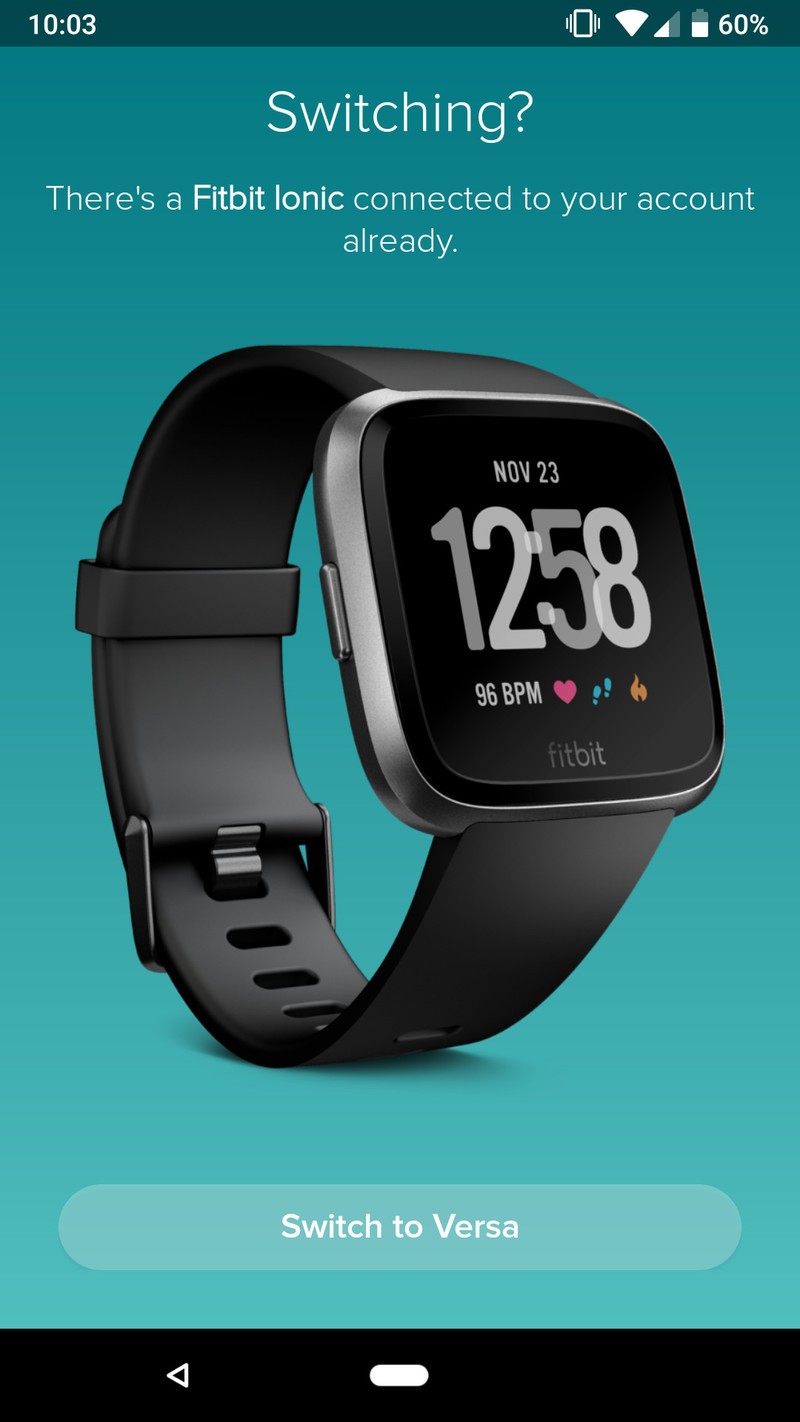


Your phone will search for the Versa via Bluetooth.
Once the Versa has been found, type the numbers shown on its screen.


Tap Next to connect your Versa to your Wi-Fi network.
Tap the Wi-Fi network you want to use.
Type in the password for your network.


Tap Next to update your Versa.
Wait for the download/installation process (this can take a few minutes).
Tap Continue once everything is done.


From here, you’ll see a pile of short video clips showing you how to use your Versa. They look like this:


Once you go through these, read through the wear & care tips and then tap Next.
Tap Done on the next page.
Tap Okay to link your Versa to the Fitbit app.


That’s it!
With all that said and done, your Fitbit Versa is now paired with your phone and ready to start tracking as much (or little) physical activity you want. Still have questions? Let us know in the comments below!
How to use Quick Replies on Fitbit Versa and Ionic
Fitbit

- Fitbit Versa vs. Fitbit Ionic: Which should you buy?
- Fitbit Versa hands-on: Fitbit’s finally getting serious about smartwatches
- Fitbit Versa and fitness: Everything you need to know
- Best Fitbit fitness tracker
Fitbit Ionic
Fitbit Versa
Fitbit Charge 2 HR
Deal: Save BIG when you buy the LG G7 from Sprint or Verizon!

If you’re in the market to pick up a shiny new LG G7, look no further than these awesome deals from Sprint and Verizon. Sprint users can snag one G7 and get another device free, while Verizon is offering $100 off and up to 50% off with a trade-in.
Sprint
When you order the LG G7 on Flex Lease, you’ll get another LG G7 FlexLease free.
- This deal requires a new line of service activation and an 18-month lease. Well-qualified customers are eligible.
- At the end of the 18-month lease, you have the option to buy your devices. You’ll pay the balance between the full price and what you’ve paid so far.
- There are taxes on any device you go with and you’ll have to pay that up front regardless.
- If you cancel your service, the remaining device balance will become due.
Sprint’s Unlimited Freedom Plan
If you’re looking to pair up your new phone with a plan, Sprint’s Unlimited Freedom is one of the cheapest on the market with 4 lines for $25/mo per line and 5th line free (until 06/30/19), with autopay. Plus Hulu is now included!
- Unlimited talk, text, and data. Once you’ve reached 23GB of data, your speeds may temporarily slow down during times of high network congestion.
- HD video, 1080p
- 10GB of 4G mobile hotspot
See at Sprint
Verizon
Purchase the LG G7 with a new monthly device payment activation and get up to $399 off (50% off) with eligible trade-in applied over 24 months.
- Purchase of new phone must be on an installment plan
- Deal credit is applied via 24 monthly bill credits and starts within two bills. To get the full value, you will need to stay on your installment payment plan for the full 24 months.
- Activation fee of $25/line applies
- Requires a new line of service to qualify
- If you cancel service, the full balance is due
- This deal excludes device’s sales taxes
See at Verizon
LG G7
- LG G7 hands-on preview: All about that bass
- LG G7 Specifications: Everything you need to know
- Join the LG G7 forums


