


Essential Phone gets new 3.5mm headphone jack module and MQA certification
Essential’s also giving its customers three free months of TIDAL.
One of the big selling points with the Essential Phone was supposed to be a magnetic accessory system that would allow for all sorts of fun modules. The only one that’s actually come to market so far is the 360-degree camera, but now Essential’s confirmed its next accessory is a 3.5mm headphone jack.

Similar to the 360-camera, this headphone jack adapter will snap onto the back of the Essential Phone using its two-pin connection system. You can already bring back the 3.5mm port using a regular USB-C adapter, but Essential says this will offer an “audiophile-grade amp” for enhanced tunes. It’ll be available this summer and pricing details are still unknown.
Essential goes on to say that:
The Audio Adapter HD can fit almost all types of 3.5mm headphones and is crafted from machined titanium for exceptional durability. Plus, with Click technology, you can charge your phone and listen to music simultaneously.
Along with the new accessory, the Essential Phone’s also receiving a software update that gives it MQA certification. MQA stands for “Master Quality Authenticated” and allows the Essential Phone to properly handle lossless music files “so you can experience the sound of the original recording” for what you’re listening to.
Lastly, Essential’s rounding these audio upgrades out by giving new and existing owners of the Essential Phone three free months of TIDAL.
Essential Phone 2 reportedly canceled, Andy Rubin considering selling the company
Essential Phone
- Essential Phone review
- Essential Phone specs
- The latest Essential Phone news
- Join our Essential Phone forums!
Amazon
Best Buy
Sprint
Telus
Apple Signs Writers Guild Contract, Setting Possible Precedent for Future Negotiations
Apple has signed the current Writers Guild of America master contract, agreeing to terms above the minimum for programming offered free online. This is significant because it could have implications for the next round of WGA talks ahead of the expiration of the current contract in May 2020, Variety reports.
In a message to WGA West members, President David A. Goodman and executive director David Young wrote:
These deal terms are significant. First, the current MBA does not contain minimums or residuals for projects on free-to-consumer services (think Crackle). Terms have to be negotiated on a writer by writer basis. Except, now, at Apple.
Second, while almost all Guild-covered Internet programming has thus far been under a subscription (consumer pay) model — like Netflix, Amazon and Hulu — Facebook has already launched shows on their free-to-consumer service. As this market develops, it will be imperative to negotiate MBA protections for writers creating content for such services. Our Apple deal moves us in that direction while the 2020 negotiations are still two years away.
In other words, the better deal (for writers, at least) that Apple agreed to with the WGA could act as a starting point for contract negotiations, rather than the lower standards in the current contract.
Apple has been active in developing shows and movies for its own platforms in recent years, including signing actress Lizzy Caplan for its new series “Are You Sleeping?” and landing the TV adaptation rights to Gregory David Roberts’ 2003 novel “Shantaram.”
Tag: Apple’s Hollywood ambitions
Discuss this article in our forums
Apple Stops Signing iOS 11.3.1 Following iOS 11.4 Release
Following the release of iOS 11.4 on May 29, Apple has stopped signing iOS 11.3.1, the previous version of iOS that was available to consumers.
iPhone, iPad, and iPod touch owners who have upgraded to iOS 11.4 will no longer be able to downgrade to earlier versions of iOS.
Apple routinely stops signing older versions of software updates after new releases come out in order to encourage customers to keep their operating systems up to date.
iOS 11.4 is now the only version of iOS 11 that can be installed on iOS devices by the general public, but developers can download iOS 12, the next-generation version of iOS that’s in beta testing ahead of a fall release.
Discuss this article in our forums
Apple Pay Promo Offers $20 Gift Code With $100+ Purchase From Nike App
A new Father’s Day-themed Apple Pay Promo is providing customers who spend at least $100 in the Nike app with a $20 gift code, according to emails Apple sent out to Apple Pay customers this afternoon.
The offer is valid from June 7 to June 11 and requires customers to make a $100 purchase using Apple Pay in Nike’s app. The $20 code is not provided at the time of purchase, but will be delivered within two weeks of purchase.
The $20 promo code must be redeemed by August 25 on a separate Nike app purchase. Apple is also promoting the Apple Store, StubHub, and Newegg as recommendations for Father’s Day.
Apple regularly sends out Apple Pay promotional emails to customers with discounts on a range of products. Recent deals have included $15 off flowers for Mother’s Day and 10 percent off furniture from Hayneedle.
Related Roundup: Apple Pay
Discuss this article in our forums
TreVolo S review: Strangest but most popular speaker in the house

Listen to the latest podcast!
If you picture “Bluetooth speaker” in your brain, you are almost certain to conjure up a very plain black or very very dark gray brick, with a perforated front and near-invisible control buttons. There are dozens, if not hundreds, of these clone-like bricks in the market. Heck, I have at least three of them in the house as I type this. But, I’ve been given the opportunity to try out a speaker from BenQ; the Trevolo S.
If you’re familiar with BenQ, you know their wheelhouse is high-quality projectors and displays. Seems that BenQ wanted to put their unique spin on a speaker….and boy did they ever! The Trevolo S is an very high-quality electrostatic speaker… easily the most unique in the market- and honestly, the most popular speaker in our house. It’s not cheap, but as you’ll find, every part of this speaker sings quality. It currently retails for $199 (link to the Amazon listing here).
Body & Design
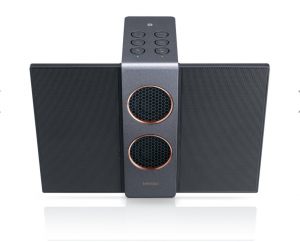
Starting with looks, the Trevolos S is unlike any speaker before it. The highs and mid-range are provided by impossibly-looking thin “wings”, which fold out from the main body for listening. These super-thin speakers are not built like traditional cone speakers but are in fact electrostatic speakers.
 Electrostatic technology makes this speaker unique.
OK, so what on earth is an electrostatic speaker??? This was my question exactly, and if you have even a little bit of nerd blood in you, it’s actually pretty cool science. Instead of the traditional magnet-driven vibrating cone, electrostatic speakers are comprised of a very thin membrane sandwiched between two plates. For audio, electrical current is passed through this membrane, causing the vibrations.
The woofer section in the main center body is comprised of two 12W woofers (each driven by a dedicated amplifier). The front woofer grilles stand out with bold large-perf faces rimmed with a very handsome copper trim. On the sides the body has more integral perforations for passive bass sound.
Controls are (thankfully) large circular buttons with the familiar icons. There is one extra button on top, titled MODE. This button is to enable what BenQ calls “3D Audio”, cranking up the spacial aura of the sound. BenQ’s goal here is to make the audio more multi-directional, and for the most part it works; more on this farther below. The backside has a microUSB charging port and 3.5mm headphone jack.
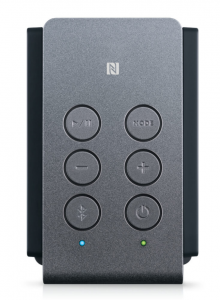 Controls are simple and easy to figure out.
The wife and kiddos just love the looks of the speaker. The kiddos argue who gets to use it, mostly because of the novel aesthetic. My wife (Hi Lisa!) thinks it’s the most handsome speaker available, and requests it front-and-center in our kitchen/entertaining area (a statement that’s never been previously made in this house). It’s replaced the aging Big Jambox as the ‘main’ house speaker. I can’t argue that point, either; it’s a conversation-starter but not in a weird “what is that?!” way.
Audio Experience
As I stated before, the Trevolo S is uber-popular at our house, and in my opinion is simply the best Bluetooth speaker experience I’ve ever had. It’s mainly a story of quality over quantity here.
 Backside of the speaker.
While most other speakers are carrying on about their volume and super-duper bass output, the Trevolo S focuses on audio quality. The electrostatic speakers make much less distortion than traditional speakers. So much so I’ve kinda fallen for the audio delivered by this speaker. It’s a bit hard to explain, but while most speakers have a boom-y sound effect, the sound profile of the Trevolo S is just so much much more clear. Actually, clear doesn’t cut it- transparent is more like it. There is almost zero hum, buzz, for fuzz coming through — just extremely clean, pure music.
Playing tunes while working around the house, I physically stopped to listen closer more than once. Familiar songs came through on another level, almost like when you hear a band live for the first time.
I know I’m gushing a bit, but let me be clear here that these are uncompensated words of mine, here. The Trevolo S is my favorite Bluetooth speaker; one truly deserving of its elevated price point.
What Could Be Better
Now, every speaker is a compromise. And the Trevolo S doesn’t escape this truism. While a lot of music types truly shine on this speaker, more bass-heavy genres (hardrock,metal, hip-hop) will suffer a bit here. There just isn’t enough output to match loud hard-hitting music.
As for volume, two 12W woofers it has, but when you crank it up, the audio quantity starts to flatten out pretty fast. This speaker is best used for normal-level listening habits.
 Treveolo S: Not exactly a party animal.
Physically, while certainly pretty, The Trevolo S is not best used as a portable sound unit. The fold-able electrostatic wings infer portability, but they are not robust enough to be used for this purpose (my opinion here). Also, the tall, skinny profile of this speaker makes for a top-heavy thing….so much so that I keep it up high in the house for fear of tipping incidents. It certainly doesn’t seem like it would take a whole lot to topple it.
While it offers multi-speaker stereo mode (dedicated left & right channel function) and party mode (multi-speaker broadcasting), and while these are great features, most of us just aren’t going to be shelling out for multiple units of this speaker, so it’s fairly moot.
Conclusion
I can’t recommend it as a portable/traveling companion, but this is perfectly okay as I don’t think BenQ is fooling anyone here. This speaker belongs front-and-center on your shelf, table, or bedroom dresser.
Other than that, and the higher-than-normal price for a Bluetooth speaker, I have nothing but positive things to say about the BenQ Trevolo S. Between its beautiful looks, solid construction, ease of use, and top-notch audio experience, it will appeal to most if not all of your household for daily use.
Nvidia’s ‘infinite resolution’ patent could change gaming forever
In a patent filing released on Thursday, June 7, Nvidia describes a technology that could fundamentally alter the way games look, feel, and perform. Nvidia calls it “infinite resolution,” and it’s effectively a clever way of using vector graphics to replace static textures in games. Let’s dive into what that means and why it could be a big deal.
Today, most games use textures that are created for a set of fairly standard resolutions, 720p, 1080p, 1440p, 4K — and some in-between. These textures cover just about every surface in modern PC games, from character models, to weapons, to environments, every 3D model is effectively “wrapped” with a 2D texture. Nvidia filed a patent to change how these textures are rendered.
Currently, developers package games with a series of these textures, one for each resolution the game runs at, and one for each detail setting at each resolution. This requires a lot of storage space, and it means that today’s games have a ceiling or a maximum resolution.
To see what we mean, try opening up Diablo 2 on a modern computer. Your resolution in that game is going to max out somewhere around 1024 x 768, way below what current monitors are capable of. As a result, it’s not going to look its best. The game is going to stretch those old under-sized textures across your whole display, like when you zoom in really far on a small picture.
Nvidia’s solution would fix these issues. Instead of packaging games with a massive set of static textures, games built using Nvidia’s technology would include only a single set of texture information, not the actual textures themselves. Effectively, each in-game texture would be drawn in real time from instructions the developers include in the game. Your computer would use its processing and graphics rendering horsepower to do the heavy lifting here.
Because your computer would be drawing each texture in real time, your games would be future-proofed to some extent. If a game like Diablo 2 was built using this technology, that would mean playing the game on a massive 8K monitor would look just as tack-sharp and detailed as it would on an old 800 x 600 CRT monitor.
This technology isn’t actually anything new, it’s just a novel application of an existing technology: Vector graphics. If you’re unfamiliar, vector graphics are used for a variety of purposes, but most notably they’re used in graphic design. When a designer creates a logo or design with vector art, that logo or design can be blown up or shrunk down to any size without losing detail. Nvidia’s patent filing here simply applies these principles to textures in PC games.
It’s unclear what potential speed bumps this technology might encounter, how it might bog down a typical gaming PC, or whether it would only be useful for certain types of games, but it’s an interesting concept and we’re excited to see where it could lead. To be clear, Nvidia has been working on this for quite a while, but this latest patent filing suggests the company could be close to bringing it to market.
Editors’ Recommendations
- AMD indirectly blasts Nvidia’s GeForce Partners Program in open letter
- Here’s how you can watch Nvidia’s GTC 2018 keynote kicking off at 9 a.m. today
- Nvidia ‘confident’ monitors using its G-Sync HDR tech will arrive in April
- Nvidia shows off the world’s largest GPU at its GTC conference
- Start your 57th character when ‘Skyrim VR’ hits Rift and Vive this April
Microsoft’s Surface Pen may never need recharging in the future
Kyle Wiggers/Digital Trends
If you’re a fan of digital inking on Microsoft’s Surface line of computing devices, you may — in the future — never need to recharge your stylus or change its batteries again. Microsoft has filed a patent with the United States Patent and Trademark Office for a solar-powered stylus. The patent was initially filed at the end of 2016, but it’s unclear if Microsoft has any intentions of commercializing this idea in a future iteration of its Surface Pen.
Rather than using light from an external source, like the sun or a nearby lamp, Microsoft’s invention calls for a light collecting mechanism to be placed near the tip of the stylus to collect light emitted from the display when the stylus is being used. This way, the light that your Surface Pro‘s screen gives off could be harvested to power and recharge your Surface Pen. The light is sent via fiber optic cables positioned inside the barrel to a solar panel array on the inside of the pen, located at the end opposite its tip.
“The stylus collects light during interaction with the touchscreen, while the stylus is in close proximity to the touchscreen,” Microsoft wrote in its patent filing. “Due to the close proximity of the stylus to the touchscreen during harvesting, the intensity of light that is collected from the electronic display is significantly higher than intensity from ambient lighting in a room or from outdoor lighting.”
To maximize recharging efficiency, Microsoft said that the solar panels — used to convert the LED light given off from the touchscreen display into energy — could be optimized for the light wavelengths emitted from LED displays, rather than other types or sources of light. Higher intensity light — for instance, with a screen set to a higher brightness level — could lead to faster charge rates. Reflective surfaces inside the barrel of the stylus could also be used to help the solar panel absorb the greatest amount of light.
In another example, Microsoft showed a dock for a Surface Pen that allows the stylus to be positioned upright with the tip inside the dock. The dock also contains a small LED light that can be used to charge the stylus when it’s not in use.
What’s unique about Microsoft’s invention is that the solar panel is located on the interior barrel of the stylus, rather than on the exterior. This would allow the Surface Pen to maintain its clean and minimal aesthetics similar to today’s battery-powered counterpart.
Editors’ Recommendations
- Google Pixelbook review
- This portable power station can keep a mini-fridge running for up to 2 days
- Move over, lithium! Researchers create world’s first rechargeable proton battery
- Incase’s ProConnected smart carry-on is a rolling power station for hungry devices
- How to clean your records to keep them looking and sounding sweet
Here are the iPads and iPhones getting Apple’s latest iOS 12 update
Justin Sullivan/Getty Images
Apple’s iOS 12 update is official and it’s filled with tweaks that should improve performance — even on older devices. The update is still in developer beta, but it’s coming to more devices than ever before.
Apple was keen to point out in its Worldwide Developer Conference keynote that iOS 11, in particular, had reached an amazing 81 percent of all active iOS devices, and all of the devices that were qualified to receive the iOS 11 update would also be receiving the iOS 12 update. Which devices does that actually mean? Five years worth of devices will be applicable for the update, and even within Apple’s tightly controlled and well-kept garden, that is a lot of devices. We rounded them all up so you can easily check.
iPhone devices that will receive iOS 12
Device
iPhone X (2017)
iPhone 8 Plus (2017)
iPhone 8 (2017)
iPhone 7 Plus (2016)
iPhone 7 (2016)
iPhone SE (2016)
iPhone 6S Plus (2015)
iPhone 6S (2015)
iPhone 6 Plus (2014)
iPhone 6 (2014)
iPhone 5S (2013)
There are some devices on this list that won’t surprise anyone. As the latest devices, it was always going to be a certainty that the iPhone X and iPhone 8 range would be getting the update to iOS 12, and given how long Apple tends to support devices for, the iPhone 7 and 6S range also seemed likely.
There are a few surprises though — chief among them is the inclusion of the iPhone 5S. The iPhone 5 and 5C was cut off from iOS updates with iOS 10.3.3, so it was likely that the 5S would be seeing an end to support with iOS 12. The same could have been said for the almost four-year-old iPhone 6 range. We’re happy we’re wrong — these devices will get iOS 12, which is a nice surprise.
Not included are any iPhones that didn’t already receive an iOS 11 update, such as the iPhone 5, 5C, as well as the iPhone 4S and earlier. You will need to upgrade your iPhone if you want a chance to play with the newest version of the operating system.
iPads that will receive iOS 12
Device
iPad (2018)
iPad Pro 10.5 (2017)
iPad Pro 12.9 (2017)
iPad (2017)
iPad Pro 9.7 (2016)
iPad Pro 12.9 (2015)
iPad Mini 4 (2015)
iPad Mini 3 (2014)
iPad Air 2 (2014)
iPad Mini 2 (Retina) (2013)
iPad Air (2013)
There are a couple of solid rules you can follow when checking up on this list — if you own any iPad Pro, then you will be getting iOS 12, and it’s the same story for both models of the iPad Air as well.
It’s a little more complicated when we turn to other models. Every iPad Mini will be getting the iOS 12 update — except for the very first iPad Mini. If you’re in ownership of an iPad simply titled “iPad,” then you best hope it was made either this year or last year, as none of the original run of the iPad — from iPad 1 all the way to the iPad 4 — will be getting iOS 12. If you’re not sure which iPad you have, the best option is to check your current version of iOS under your Settings. If it lists any version numbers other than iOS 11, then you’re not getting iOS 12.
Why isn’t my device getting iOS 12?
Unfortunately, all consumer technology has a shelf life, and while you’re free to use a device until it drops dead, manufacturers tend to set their own limits. Manufacturers will generally support devices for up to two years, supplying new updates and security patches, though it does tend to vary. Apple is considered better than most other manufacturers in this regard, and will commonly support a device for a longer period of time. The range of devices updating to iOS 12 is particularly notable in this regard since it contains the iPhone 5S — an almost five-year-old device. For comparison, the iPhone 5S came out the same year as the Samsung Galaxy S4 — which received its last major update in April 2015.
Even with Apple’s longevity, there is a limit. The devices not supported for iOS 12 are 34-bit devices and the ones that are supported at 64-bit devices. Sometimes, the hardware just isn’t capable of handling the demands of the new OS version.
Editors’ Recommendations
- How to get the iOS 12 developer beta on your iPhone, iPad, and iPod Touch
- iOS 11 is now running on 81 percent of iPhones and iPads
- Measure, Apple Books, Shortcuts: Our favorite new and updated apps in iOS 12
- iOS 12 is more evidence you should buy an iPhone, not an Android phone
- iOS 12 will make your iPhone faster and less annoying. Here’s what’s coming
Forget Roomba, your most important house robot could be the one that hugs you
Sure, so Alexa can play you the right song at the right time, and Google’s Duplex tech means you never need to phone up and book a restaurant again, but our relationship with machines still has the non-tactile frigidity of an unhappy marriage. However, that could all change thanks to work coming out of the Max Planck Institute for Intelligent Systems in Stuttgart, Germany. Researchers there have been developing a robot that is designed for giving you a hug. And, far from an amusing gimmick, they are convinced that it’s really important.
“A robot hugging a person is a good idea because people may crave the benefits that come from a hug at a time when they can’t get a hug from a person, due to factors such as distance, timing, and health,” Alexis Block, one of the lead researchers on the HuggieBot project, told Digital Trends. “We think a hugging robot could be beneficial in this case because a person can get the support they need without feeling self-conscious.”
The team’s HuggieBot is no diminutive robot beavering away, unnoticed, in the background like a Roomba vacuum cleaner. Instead, it’s a modified PR2 robot that stands as tall as an average human, which can be configured to be made extra soft using layers of foam, polyester, and other materials. Its hugs can be further modified according to the firmness of hug you desire (thanks to a pressure sensor) and even the option of having them heated.
Block and colleagues were interested to test people’s response to the robot. Thirty participants were involved in the study, each of whom received 12 different machine hugs, which they then gave their feedback on. In addition to narrowing down the robo-hugs that people enjoy (really tight, slightly squeezy, soft, and warm), the researchers found that receiving a hug makes people feel a bit more fondly toward robots. Hey, maybe that is one way to break the imminent news that a robot has stolen your job!
“We are currently building a new robotic platform that will be better suited for this specific type of social-physical human-robot interaction — [meaning that] it will be able to give even better hugs,” Block continued. “Once this new platform is complete, we plan to investigate how hugging a robot compares to hugging another person. We’d like our future robot to autonomously determine when to lift its arms and ask for a hug, rather than be prompted by the experimenter, and to match the approaching user’s arm positions. We are also interested in enabling people to send customized hugs to each other, and teaching a robot to determine how a person is feeling and try to autonomously provide the appropriate emotional support.”
How does Uber work?
junce/123RF
Uber has changed the way we move, and that’s not a hyperbole. The California-based company invented a brand-new concept that makes spending 10 minutes hailing a cab in the rain a thing of the past while letting just about anyone earn money in their spare time by moonlighting as a taxi driver.
The young company has been through more than its fair share of controversies in recent months but the free Uber application remains one of the best mobility tools on the market, especially if you find yourself without a car in a big city. Are you ready to start riding, driving, or both? Read on for everything you need to know.
For riders
The first step is to download the app on your Android or Apple device and provide basic information including your name, phone number, and credit card number. Once everything is set up, you need to enter the destination address into the box labeled “where to?” near the top of the screen. Don’t worry if you don’t know the exact address; you can find where you need to go by entering the name of a business, like “Starbucks” or “GameStop.” Uber also lets users add short stops to each trip.
Confirm your destination, confirm your exact pickup point by dropping a blue pin on the map, and the app will tell you approximately how long it will take to get there. It also provides the estimated cost of each service to ensure transparency, a feature appreciated by travelers who have gotten all too used to getting overcharged by taxi drivers claiming not to have a meter. The cost of a ride depends on which service you choose, and at what time of day. The more people request an Uber ride at the same time, the more expensive a fare gets. Uber calls this “surge pricing.”
The basic services are called UberX, UberXL, and UberSelect, respectively. The difference lies in the price, and the type of car that will pick you up. UberX drivers are normally in a standard passenger car (e.g., a Honda Accord) capable of carrying up to four riders. UberXL operators have a bigger model (such as a Chrysler Pacifica) that can carry up to six passengers. Finally, UberSelect is a more upscale service Mercedes-Benz, Audi, and BMW drivers can participate in.
Are you moving up in life? Uber has you covered with UberBlack and UberSUV services that offer even nicer vehicles. You might hitch a ride in a Cadillac Escalade, a BMW 7 Series, a Mercedes-Benz S-Class, or a top-spec Chevrolet Suburban. UberBlack and UberSUV drivers must be commercially registered. A handful of cities around the world also offer UberLux, the company’s flagship service. It’s expensive, but you’re guaranteed to arrive at your destination in an Audi A8, a Land Rover Range Rover, or a comparable high-end model. Talk about making an entrance!
Uber
Uber also offers a separate service for riders who need wheelchair-accessible vehicles, and a low-cost service named UberPool. As its name implies, UberPool is a carpooling service that lets users share the same ride. Imagine you’re traveling from downtown Washington, D.C., to Alexandria, Virginia. Your Uber could stop and pick up a passenger traveling in roughly the same direction as you; from the Lincoln Memorial to Arlington, for example. It takes longer because you’re getting from point A to point B via points C and D, but it’s also the cheapest option.
User beware: there’s no way of knowing in advance who you’ll ride with when using UberPool. You could luck out and share a car with a quiet, discreet stranger, but you could also spend 15 minutes sitting next to a queasy student who is hungover from the night before. Or parents who think their kid screaming is adorable. In our experience, using UberPool is like playing society’s Russian roulette, and the risk of a hellish ride isn’t worth saving $2.50 on your fare. Your mileage may vary, of course.
Pick a fare, and you’ll soon get a message informing you that a car is on its way. The app provides the name of the driver and his or her rating ahead of time. It also lists the car’s make, model, color, and registration number, plus approximately how many minutes until it arrives at the pickup point. You can tell your Uber is on your way by looking at the location of the car-shaped icon on the map.
Hop in, greet the driver, and you’re on your way. Regardless of which service you choose, there’s a bar at the top of the application that tracks the trip’s progress and the estimated time of arrival. There is the option of sharing trip progress via a number of communication channels, including Facebook Messenger, WhatsApp, Gmail, and an old-fashioned text message.
The great part about Uber is there’s no need to pay with cash; the app automatically pays the driver using the credit or debit card on file. Upon reaching their destination, passengers simply get out of the car and get on with their day. Users are asked to rate the driver after reach ride, and they’re given the option to leave a tip. Both are optional. Note drivers are asked to rate users on a zero-to-five scale, too. Keep in mind your rating is your reputation in the Uber community; few people have a perfect rating, but having one that’s unusually low might make finding a ride unusually complicated.
Uber aims to make every ride as smooth as possible. It recently rolled out a panic button for customers, too, providing users with extra peace of mind. If something goes wrong, simply swipe up on the safety center icon and tap “911 assistance,” before tapping again to confirm the call. The extra tap is required to minimize accidental 911 calls, according to the company.
For drivers
To drive, start by downloading a free application named Uber Driver and filling out information about yourself (including your social security number, for a simple background check) and your car. Note not everyone is eligible to drive an Uber, and not every car is accepted by the company.
Drivers must be at least 21 years old, and they must have an in-state driver’s license. You need at least three years of driving experience if you’re under 23 years old, and at least a year of experience if you’re 24 or older. You need to be insured, and you need to pass both a background check and a criminal history check. You’ll be fine if you’ve received the occasional speeding ticket, but don’t count on driving for Uber if you’ve been convicted of a DUI or if you have any kind of criminal history.
The other requirements apply to the car. To drive, you must own a car no older than a 2008 model year, with four doors, and one that’s not salvaged. It needs to be insured and registered, and it needs to get pass an Uber vehicle inspection that covers basic items like brakes, tires, lights, and seat belts. Submit everything, meet all of the requirements, and you’re ready to give your first ride.
Simply turn on the app to receive notifications from riders who need a lift. With Uber, you can decide how many hours you work per day. There’s no minimum or maximum. The amount you make will depend on how much you drive, and when you drive; the surge pricing we mentioned in the rider section is beneficial to drivers because they earn more during busy hours. Uber usually provides drivers with a list of the busiest hours in their area.
Several factors gnaw at your earnings. Drivers aren’t employed by Uber — they’re independent contractors, so gasoline, maintenance (tires, oil changes, etc), and depreciation fall on the driver’s lap. Drivers keep 75 percent of the fare, while Uber takes the remaining 25 percent, and money earned through the application must be reported to the IRS as income.
You’ll need a data connection to use the Uber Driver app, and Uber warns it typically uses about 2GB of data per month. The app also reduces battery life, so we recommend getting a quality phone charger to ensure you don’t have to ask your passengers to turn on Google Maps. A solid car mount is a must-have, too.
Editors’ Recommendations
- Uber vs. Lyft: Which ridesharing app goes the distance?
- How to password protect a PDF
- How to choose a smartphone
- How to mine Bitcoin
- How to factory reset a PS4
 AIVAnet