


Apple Seeds Second Beta of iOS 11.4.1 to Developers
Apple today seeded the second beta of an upcoming iOS 11.4.1 update to developers, two weeks after seeding the first beta and a little over two weeks after releasing iOS 11.4, an update that introduced AirPlay 2 and Messages in iCloud.
Registered developers can download the new iOS 11.4.1 beta from Apple’s Developer Center or over-the-air once the proper configuration profile has been installed from the Developer Center.
No new features were discovered in the first iOS 11.4.1 beta, suggesting it focuses on bug fixes and performance improvements to address issues discovered since the release of iOS 11.4.
We’ll update this post should we discover any new features in the second iOS 11.4.1 beta, but we’re not expecting major changes now that Apple has shifted its focus to iOS 12, which is also available to developers for beta testing purposes.
Related Roundup: iOS 11
Discuss this article in our forums
Unify your PC and accessory lighting with Razer’s expanded Chroma support
Razer has expanded its stable of supported devices and accessories for its Chroma lighting system to include third parties. That means that anyone running AMD, MSI, Thermaltake, NZXT, and other third-party accessories will be able to synchronize their lighting effects with Razer products and with one another, to make for a prettier, more uniform lighting experience.
Most of the major gaming mice, keyboard, and PC makers offer some form of lighting with their products. The problem with that though, is that unless you happen to buy all of your accessories from the same company, making them look cohesive in the way they blink and flash isn’t easy — even with control software. With Razer’s new Chroma partnership scheme though, you’ll be able to make a much more unified lighting profile for your gaming system.
Razer Chroma is a lighting platform that combines back-end software for customizing RGB LEDs across a variety of devices, with game profile support for unique looks when playing games like Overwatch, Fortnite, Thumper, and many others. Now those games and profiles can be supported across AMD, Lian Li, MSI, Vertagear, Ducky, NZXT, and Thermaltake devices. The Chroma platform already supports Philips smart lights and Nanoleaf light panels for full room ambience, as per The Verge
That broad swathe of company support means that you can have your PC case, motherboard, keyboard, mouse, headset, and other accessories, all synchronized to display the right colors at the right time, and the right frequency. It’s made possible through a new Razer API which helps connect them all to the Chroma software. This makes integration of the Chroma platform far easier for developers than Razer’s previous partnership offering, which required hardware makers to hard-program the products to work with Chroma. With the API, companies can simply add that expanded functionality to their lighting systems through software.
The only downside to this is that at present, most existing products don’t support it. Razer suggests that the first products from third parties to fully support Razer Chroma will be released toward the end of this year.
If you’d rather just get your hands on some great gaming accessories right now, these are our favorite gaming keyboards.
Editors’ Recommendations
- The best gaming keyboards
- The best laptops for programming
- AMD combats upgrade woes with ‘crates’ featuring discounted hardware bundles
- Razer claims ‘world’s smallest’ with its 2018-edition Blade 15 gaming laptop
- Logitech G560 review
LG V35 ThinQ vs Samsung Galaxy S9 Plus vs Galaxy S9: Flagship standoff
Julian Chokkattu/Digital Trends
The new LG V35 ThinQ is almost the exact same as last year’s LG V30, except it boosts more contemporary specs. LG’s pricing this modest update at $900, which puts it ahead of Samsung’s latest flagship smartphones, pricing-wise.
To see whether the V35 ThinQ is worth your hard-earned dollars, we put it up against the Galaxy S9 and S9 Plus. Let’s take a look.
Specs
LG V35 ThinQ
Samsung Galaxy S9 Plus
Samsung Galaxy S9
Size
151.7 x 75.4 x 7.3 mm (5.97 x 2.97 x 0.29 inches)
157.7 x 73.8 x 8.5 mm (6.21 x 2.91 x 0.33 inches)
147.6 x 68.7 x 8.4 mm (5.81 x 2.70 x 0.33 in)
Weight
157 grams (5.54 ounces)
189 grams (6.67 ounces)
163 grams (5.75 ounces)
Screen size
6.0-inch P-OLED display
6.2-inch AMOLED display
5.8-inch AMOLED display
Screen resolution
2,880 x 1,440 pixels (537 pixels per inch)
2,960 x 1,440 pixels (531 pixels per inch)
2,960 x 1,440 pixels (568 pixels per inch)
Operating system
Android 8.0 Oreo
Android 8.0 Oreo
Android 8.0 Oreo
Storage space
64GB, 128GB
64GB, 128GB, 256GB
64GB, 128GB, 256GB
MicroSD card slot
Yes
Yes
Yes
Tap-to-pay services
Google Pay, LG Pay (in Korea)
Google Pay, Samsung Pay
Google Pay, Samsung Pay
Processor
Qualcomm Snapdragon 845
Qualcomm Snapdragon 845
Qualcomm Snapdragon 845
RAM
4GB, 6GB
6GB
4GB
Camera
Dual 16MP (with OIS) and 16MP rear, 8MP front
Dual 12MP (with OIS) and 12MP (with OIS) rear, variable aperture, 8MP front
12MP (with OIS) rear, variable aperture, 8MP front
Video
Up to 4K at 30 frames per second, 1,080p at 60 fps, 720p at 120 fps
Up to 4K at 60 frames per second, 1,080p at 240 fps, 720p at 960 fps
Up to 4K at 60 frames per second, 1,080p at 240 fps, 720p at 960 fps
Bluetooth version
Bluetooth 5.0
Bluetooth 5.0
Bluetooth 5.0
Ports
3.5mm headphone jack, USB-C
3.5mm headphone jack, USB-C
3.5mm headphone jack, USB-C
Fingerprint sensor
Yes (rear)
Yes (rear)
Yes (rear)
Water resistance
IP68
IP68
IP68
Battery
3,300mAh
Quick Charge 3.0
Qi wireless charging
3,500mAh
Quick Charge 2.0
Qi wireless charging
3,000mAh
Quick Charge 2.0
Qi wireless charging
App marketplace
Google Play Store
Google Play Store
Google Play Store
Network support
AT&T, Project Fi
T-Mobile, AT&T, Verizon, Sprint
T-Mobile, AT&T, Verizon, Sprint
Colors
Aurora Black, Platinum Gray
Midnight Black, Coral Blue, Lilac Purple
Midnight Black, Coral Blue, Lilac Purple
Price
$900
$840
$720
Buy from
LG, AT&T, Project Fi
Samsung, Amazon
Samsung, Amazon
Review score
Hands-on
4.5 out of 5 stars
4 out of 5 stars
Performance, battery life, and charging
Julian Chokkattu/Digital Trends
All three of these phones are top-tier 2018 flagships, and as such they feature some of the same specs. For example, the devices boast the latest and greatest Qualcomm chip, the Snapdragon 845. While the Galaxy S9 offers 4GB of RAM and the Galaxy S9 Plus 6GB of RAM, the LG V35 ThinQ offers options for either 4GB or 6GB of RAM.
Storage, however, is where the Galaxy series inch ahead. While the 64GB or 128GB of storage found on the V35 ThinQ is more than enough for most people, the Galaxy S9 and Galaxy S9 Plus both come with 256GB of storage.
The Samsung Galaxy S9 Plus has the biggest battery capacity, but it also has the biggest screen. Second is the LG V35 ThinQ with its 3,300mAh battery, followed by the Galaxy S9 with a 3,000mAh battery. All three devices offer Qi wireless charging, and the V35 ThinQ boasts Quick Charge 3.0, while the Galaxy S9 devices swap it for Quick Charge 2.0.
Because of the extra RAM or options for extra RAM, the Galaxy S9 Plus and LG V35 ThinQ are the winners here.
Winner: LG V35 ThinQ / Samsung Galaxy S9 Plus
Design and durability
Julian Chokkattu/Digital Trends
All three of these phones also feature pretty modern designs. The LG V35 ThinQ offers a 6-inch display with nice, rounded corners and slim bezels. There’s still a small forehead and chin here — but they’re relatively slim and the trade-off is that there’s no notch. On the back of the phone, you’ll find a dual-sensor camera along with a fingerprint sensor around a third down from the top. The fingerprint sensor doubles as a power button.
The Galaxy S9 and Galaxy S9 Plus feature almost identical designs. They also offer rounded corners and a slim forehead and chin, along with a camera and fingerprint sensor on the back. On the Galaxy S9, you’ll find a single-lens camera, while the Galaxy S9 Plus packs a dual-lens camera. Design will come down to personal choice here, as we think all three phones look gorgeous.
The devices are all similar when it comes to durability. They all use Gorilla Glass 5, and they all have IP68 water resistance.
Winner: Tie
Display
Julian Chokkattu/Digital Trends
Phone displays are getting better and better. Thankfully, all three of this devices have ditched LCD displays in favor of OLED ones, though they offer slightly different forms of OLED displays. Samsung has opted for Super AMOLED displays in the Galaxy S9 and Galaxy S9 Plus, while LG has used a P-OLED display for the LG V35 ThinQ. They all feature 1,440 pixel resolutions too, with very similar pixel densities.
Perhaps the main difference here is how big the displays are. The Galaxy S9 has a 5.8-inch display, the LG V35 ThinQ has a 6-inch display, and the Galaxy S9 Plus has a 6.2-inch display. We think Samsung’s display is stronger here, and the bigger screen on the S9 Plus can’t be beat for media consumption.
Winner: Samsung Galaxy S9 Plus
Camera
Julian Chokkattu/Digital Trends
The LG V35 ThinQ has a dual-lens camera with one 16-megapixel sensor with optical image stabilization and an f/1.6 aperture, along with a second 16-megapixel sensor with an f/1.9 aperture. The second lens is a wide-angle lens, which lets you capture a whole lot more in a photo. There’s also Portrait Mode, quick access to Google Lens, and AI Cam. AI Cam identifies scenes and tweaks the photo to look a little better. It hasn’t worked too well for us, though.
The Galaxy S9 and Galaxy S9 Plus step things up a little. How? With a variable aperture. The aperture on the Galaxy S9 and Galaxy S9 Plus ranges from f/1.5 to f/2.4, meaning it changes based on the amount of light in the environment you’re in. That should offer you better low-light photos. The second sensor on the Galaxy S9 Plus has 12 megapixels, as well as a f/2.4 aperture. It delivers 2x optical zoom and Live Focus mode, which is similar to Apple’s Portrait Mode.
Thanks to the extra sensor and variable aperture, the Samsung Galaxy S9 Plus is the winner here.
Winner: Samsung Galaxy S9 Plus
Software and updates
Julian Chokkattu/Digital Trends
All three of the phones run Android 8.0 Oreo, and they’ll all likely get the update to Android P once it becomes available to consumers — though neither LG nor Samsung are known for quick and timely updates.
The software experience on the LG V35 ThinQ is relatively sleek. It’s not stock Android, and LG has tweaked various parts of the user interface to look different. There are also a few LG apps pre-installed.
Samsung has done the same, adding its own personal style into its Galaxy phones, along with a lot of Samsung apps. Which user interface you like will depend on personal preference.
Winner: Tie
Special features
Julian Chokkattu/Digital Trends
The Samsung Galaxy S9 and Galaxy S9 Plus boast a ton of interesting features to consider. For starters, you can use your phone like a computer with the Samsung Dex Pad or Dex Station, plus you can use it with the Samsung Gear VR too. If you’re not a fan of Google Assistant, you can instead use Samsung’s Bixby.
The LG V35 still offers some nice features though — the phone has what LG calls “Super Far-Field Voice Recognition,” which means it should allow for voice activation from up to 17 feet away, and it has a lot of audio features, such as a Quad DAC for the headphone jack.
There’s no tie-breaking feature here.
Winner: Tie
Price
All three of these phones are flagship devices, and as such they’re all a little pricey. The Galaxy S9 is the cheapest by quite a bit. It comes in at $720, while the Galaxy S9 Plus has a price tag of $840. The LG V35 ThinQ is the most expensive of the bunch, costing a hefty $900 to buy.
Overall winner: Samsung Galaxy S9 Plus
This is a very close competition, but in the end the Galaxy S9 Plus inches out the competition. How? Well, mostly thanks to a better display and camera. If you don’t mind doing away with the dual-sensor camera, then the standard Galaxy S9 is an excellent option — and you’ll save some cash along the way.
Editors’ Recommendations
- LG G7 ThinQ vs. Samsung Galaxy S9 Plus: Clash for the heavyweight title
- HTC U12 Plus vs. Galaxy S9 Plus: Clash of the plus-sized phones
- The Galaxy S9 Plus vs. Galaxy Note 8: Samsung’s heavyweights slug it out
- OnePlus 6 vs. Samsung Galaxy S9 Plus: Which big phone is better?
- Huawei P20 Pro vs. Samsung Galaxy S9 Plus: Are three better than two?
Lenovo revamps Legion brand with affordable gaming laptops and desktops
Ahead of E3, Lenovo has announced a complete relaunch of its gaming devices sold under the Legion brand. If you’re looking for the highest-powered computers you can buy, these won’t be them. In fact, Lenovo is focusing more on the hobby gamer — the person for whom gaming isn’t the primary identifier of them as a person.
In attempting to reach outside the traditional gaming audience, Lenovo has two new laptops, two new mini-PCs, and two tower desktops — all with updated components and a new design sensibility.
Laptops
Legion Y530
At the bottom of the range of prices is the Y530, which is an entry-level, 15.6-inch gaming laptop. Lenovo has trimmed down the bezels and the overall size of the laptop from previous models, now offering a much sleeker look to match what you might find on a Razer Blade laptop.
The Y530 is 5.1 pounds and 0.94 inches thick, which is significantly smaller than previous generations, though not quite as much as the 2018 Razer Blade. Across both new laptops, Lenovo has moved many of the larger ports to the rear, replacing them with extra vents on the side for improved cooling. You’ll still have two USB-A ports on either side for easy access, though theY530 doesn’t have a Thunderbolt 3 port.
While the Y530 is smaller, it’s still got some pretty impressive internal components under the hood. You have a choice between two powerful CPUs: The Intel Core i5-8300H and the Core i7-8750H. On the graphics side of things, the Y530 has either the Nvidia GeForce GTX 1050 or GTX 1050 Ti. Memory goes up to 32GB of RAM, and storage up to 512GB of PCIe NVMe, plus an optional 2TB hard drive.
Lastly, the Y530 comes with your option of either a 60Hz or 144Hz display. Thankfully, Lenovo is not offering a 4K panel and is instead focusing on Full-HD 1080p screens. The Y530 has a 52.5 watt-hour battery, and Lenovo says you can expect around five hours of battery life.
The Legion Y530 starts at $930, while the 144Hz model is priced at $1,230. It’ll be available for purchase online in June 2018 and at Best Buy in July.
Legion Y730
A lot of the same new design features from the Y530 have also been brought to the spendier model, the Y730. Some of those features include ports being moved to the back, thinned-out bezels, and a smaller overall frame. Speaking of the frame, the Legion Y730 comes with an all-aluminum body,
Overall, the Y730 is the thinner and higher-end model compared to the Y530, though it comes in both 15-inch and 17-inch variants. The 15-inch Y730 is thinner and lighter than the Y530 at 4.8 pounds and 0.78 inches thick. The 17-inch, meanwhile, weighs in at 6.4 pounds and measures up to 0.86 inches thick at the front and 0.95 inches at the rear.
As for internals, the Legion Y730 offers the same Core i5-8300H and Core i7-870H options, though the GTX 1050 Ti is your only choice for the Y730. Both the 15- and 17-inch can be configured with memory from 8GB to 32GB of RAM, and storage from 128GB to 512GB of PCIe NVMe. The primary benefits you get with the Y730 is a Thunderbolt 3 port, thinner chassis, and fancy RGB lighting in the keyboard.
The Legion Y730 even has the same IPS display options — either a 60Hz or a 144Hz screen, with both being able to turn up to 300 nits and show 72 percent of the AdobeRGB color space. The 15-inch Legion Y730 starts at $1,180 and the 17-inch starts at $1,250. Both will be available for purchase online in June 2018 and at Best Buy in July.
HTC U12+ review: Buttonless blunder
A wonky digital button setup spoils what is otherwise a decent Android flagship.
It’s rare to come across a flagship smartphone with a single fatal flaw. That, however, is where we are with the HTC U12+. The new all-digital button setup, which replaces traditional micro-switches with pressure-sensitive wizardry, just doesn’t work well. Until it’s fixed, little else about this phone matters.
HTC U12+

Price: $799
Bottom line: HTC’s new high-end offering is speedy, with impressive glass-backed designs and very capable cameras, but it’s undone by a busted digital button setup.
Pros:
- Speedy performance and minimal software bloat
- Stunning photo quality across the board
- Beautiful colored glass back panels
Cons:
- Pressure-sensitive volume/power buttons don’t work well
- Edge Sense unreliable, also prone to ghost input
- Mediocre battery life
- Dated HTC Sense UI design
See at HTC
HTC U12+ Prelude
The HTC U12+ is a fast, beautiful smartphone with relatively clean software, capable of taking fantastic photos using an impressive twin-camera setup.
When something as basic as a button doesn’t work reliably, any other critique is redundant.
But such high praise is immaterial when you can’t reliably press the power button. Or when the level of pressure to trigger each button isn’t consistent or predictable, or seems to change depending on battery charge level or ambient temperature, or when buttons randomly trigger by themselves, or when the phone spontaneously reboots itself because of ghost presses of several seconds on the power key.
It’s not like this happens every single time you pick up the device. Often, the U12+ can go for hours at a time without any pressure-sensitive hiccups. But problems occur often enough that any other critique around the usual things like battery life, display quality and photo performance is academic.
Nevertheless, we do owe you a full review of the HTC U12+, so read on to learn about a pretty great phone that you shouldn’t buy until they fix the buttons.
About this review
We’re publishing this review after two weeks with the HTC U12+. I (Alex Dobie) have been using a European U12+ in the UK on EE, and in Taipei, Taiwan on Chunghwa Telecom. Shortly after picking up my first U12+ unit, I noticed multiple issues with the phone’s new, all-digital volume and power keys, as well as the pressure-sensitive Edge Sense feature. HTC replaced the phone with a different unit, which performed better than the first, but exhibited the same problems after around 24 hours.
My review device was running software version 1.15.401.4, based on Android 8.0 Oreo, with the March 1, 2018 Android security patch. HTC tells us this is final retail-ready software, but that a firmware update will be arriving in future to refine button sensitivity and fine-tune Edge Sense based on the feedback received so far, along with other bug fixes and improvements.
Hayato Huseman, who produced our video review, has been using a U.S. unlocked variant of the U12+ running software version 1.15.617.4. He has experienced many of the same issues around the phone’s digital buttons.

HTC U12+ Full Review
If you’re familiar with the U11+, the under-appreciated extra-large cousin of the U11 that launched in late 2017, then the design of the U12+ will be very familiar.
For everyone else, this is a pretty standard 18:9 Android slab from the front, with a few pleasing design cues to set it apart. There’s no display notch, for what that’s worth. Instead, the U12+ sports a slightly asymmetrical forehead and chin. And the surface of the display is raised up from the metal frame by a near right-angle curve of the glass itself. At first, I mistook this for a plastic rim, but nope: it’s curved, angled glass going straight into metal, which is an impressive manufacturing feat.
Like HTC’s past two flagships, the rear of the U12+ is far more visually appealing. I’ve been using the standard reflective gunmetal color, which is almost identical to the same hue in last year’s U11+. There’s also a translucent blue option, which gives you a peek at the innards of the phone, as well as a fiery iridescent red, which shifts between blood red and a golden yellow.

The U12+ is a little on the chunky side, but HTC’s lustrous glass designs shine through.
| Operating System | Android 8.0, HTC Sense |
| Platform | Qualcomm Snapdragon 845 Adreno 630 GPU |
| Display | 6-inch 2880×1440, Super LCD 6DCI-P3, HDR10Gorilla Glass 5 |
| RAM | 6GB |
| Storage | 64 / 128GB UFS 2.1 |
| Main Camera | 12MP, 1.4μm pixels ƒ/1.75 lens, OIS, EISUltraPixel 4, UltraSpeed AF, HDR Boost |
| Secondary Camera | 16MP 1μm pixels ƒ2.6 lens, 2x optical zoom, portrait mode |
| Video | 4K @ 60fps 1080p @ 240fps slo-mo 360° 3D Audio with 4 microphones |
| Front Cameras | Dual 8MP sensors 1.12μm pixel size, f/2.0 84° wide-angle FOV, portrait mode |
| Water/Dust Resistance | IP68 |
| Battery | 3500 mAh Qualcomm QuickCharge 4.0 |
| Audio | HTC BoomSound Hi-Fi editionHTC USonicUSB-C + noise cancelling headphones |
| Network | 4G LTE Cat. 18 up to 1.2Gbps FDD Bands 1,2,3,4,5,7,8,12,13,17,20, 28, 32, 66 TDD: Bands 38, 39, 40, 41 |
| Voice assistants | Google Assistant, Alexa |
| Colors | Translucent Blue, Flaming Red, Ceramic Black |
| Dimensions | 156.6 x 73.9 x 8.7-9.7mm |
| Weight | 188 g |
The back panel has an oleophobic coating, which makes it less fingerprint-prone than the Galaxy S9 and LG G7, but a bit more slippery.
The overall feel is more chunky than similar-sized phones like the OnePlus 6, or even Samsung’s S9+, but the basic ergonomics of this design are sound. It’s comfortable to hold, and thanks to the addition of a decent one-handed mode in HTC’s Sense software, it’s easier to wrangle than the U11+ without bringing in a second hand.
Despite the ample heft of this phone, there’s unfortunately no headphone jack included, nor is there any USB-C-to-3.5mm dongle in the box this time. (HTC includes it as a pre-order bonus in some markets.)
There’s nothing too surprising about the spec sheet of the U12+, which combines a Snapdragon 845 processor with 6GB of RAM, and 64/128GB of storage depending on where you buy it, and dual-SIM functionality in some markets. (I’ve been using a single-SIM version of the phone.)
HTC, once again, sticks with LCD technology for the display, going against the grain of the smartphone industry. And though the U12+’s 6-inch panel doesn’t boast the same brightness as leading OLED panels from Samsung, it’s still an attractive panel with no visible ghosting, and pleasing, punchy colors.

The main thing you miss out on compared to competitors like the Galaxy S9+ and Huawei P20 Pro is daylight visibility, and the ability to use the Always-On Display mode without tanking your battery. (The U12+ includes such a mode, but it’s wise to only enable it when picking up the phone.)
HTC’s spec sheet matches the cutting edge in all but a couple of areas.
Battery life, too, has been less than amazing for me, even with a relatively large 3,500mAh cell powering the U12+. On a typical day with heavy use, I’d get around 14 hours between charges, with a little over three hours of screen-on time. On travel days in areas with poor reception, I could deplete the phone’s power pack alarmingly fast.
The saving grace is support for Quick Charge 4, though there bundled plug only supports the older Quick Charge 3.0 standard.
At least HTC’s audio credentials remain strong, outside of that sadly absent headphone jack. The U12+ boasts a meaty BoomSound Hi-Fi system, combining the single bottom-facing speaker with an earpiece tweeter, for satisfyingly loud and bassy audio reproduction.

HTC’s USonic active noise-cancelling earbuds, bundled with the phone, are great too. They haven’t changed since they first appeared alongside the U11, but they’re about the best bundled earbuds I’ve used with a phone. HTC’s Sense software can instantly and automatically tune its audio output to the structure of your ear canals, with results as impressive as we’ve witnessed from older HTC phones.
The pressure-sensitive buttons
The big new gimmick in the U12+ is its pressure-sensitive, all-digital buttons. Where normally a volume rocker and power switch would reside, HTC now includes button-like metal ridges. They feel like buttons, and (sometimes) work like buttons, but they don’t actually depress into the chassis. The clicky haptic feedback is not unlike the tap of a modern iPhone’s home key (or the trackpad of a MacBook) only it’s a little mushier, and the vibration is centered on the middle of the phone, not behind the buttons.

That’s not the biggest issue with this technology, though. Oh no. The greater problem is that in the units we’ve been using, whether as a result of hardware issues or early software kinks, it appears to be basically broken.
For brevity, here’s a quick summary of all the glitches we’ve experienced with the buttons — and, since it’s similarly busted, the Edge Sense function. These issues have persisted across three different devices, and the overwhelming majority of others reviewers we’ve spoken to have had similar gripes.
- Inconsistent sensitivity across the three keys. The power key is generally more sensitive than the volume keys, which sometimes require an unreasonably strong press to register. Normal clicky buttons don’t do this, and it’s bad.
- Inconsistent sensitivity in the same key — i.e. at different times, the sensitivity of individual buttons will vary wildly. It’s unclear why this happens: perhaps due to changing battery charge levels or external temperature. Either way, also bad.
- Ghost presses on the pressure-sensitive keys, particularly power. Sometimes they’ll trigger when you’re merely resting a finger on them. Sometimes they’ll trigger all by themselves. Both Hayato and myself have witnessed our phones hard rebooting themselves due to long ghost presses on the power key.
- The double-tap gesture on the side bezel to activate one-handed mode suffers from similar ghost input problems.
- Edge Sense squeezes failing to register when the screen is off.
- Edge Sense registering a squeeze when the phone is just being held, even lightly.
- Edge Sense registering light squeezes (showing the animation on-screen) for no particular reason.
- Multiple taps on the power or volume keys failing to register in quick succession.
You get the picture. It’s worse in every way than a regular micro switch, which works fine on every other phone. I’m also baffled by how much of a mess Edge Sense seems to be on this device, considering it worked pretty well on the U11 and U11+.
In short, right now the pressure-sensitive buttons (and Edge Sense) are a net negative.
HTC tells us that a firmware update will be arriving in future to refine button sensitivity and fine-tune Edge Sense based on the feedback received so far. We’ll revise this review if there’s any major improvement to what we’re seeing here.
If you’ve already used an HTC U11 or U11+ on Android Oreo, or read our review of the U11+ from last November, then you’ll have already seen almost everything The U12+ has to offer on the software side.
We’re still running Android 8.0 here, not the newer version 8.1. (The main impact for many of us: no Netflix support for picture-in-picture mode.) Otherwise, The user-facing side of Android 8.1 is largely identical to 8.0.
Sense remains locked in the same holding pattern it’s been stuck in for much of the past couple years.
Otherwise, it’s another year with virtually no changes in either the way HTC Sense looks or functions. On one level, that’s fine. Sense is so close to stock Android now that there’s not much need for surface-level changes.
On the other hand, Sense is still littered with the dregs of older software versions. As we’ve noted in earlier reviews, many core apps like Weather, Contacts, Messages and the Dialer haven’t changed in more than three years. In Sense Home, more subtle clues of HTC’s lack of design effort can be seen: The rows of home screen icons are aligned for a 16:9 display, not the U12+’s 18:9 panel.
The biggest changes are, in fact, two very welcome additions: The one-handed mode, which is necessary on a phone this large. It’s activated with a double-tap on the bezel (see above — this does not work well!), or a triple-tap on the home key. And the U12’s dual front cameras help to enable face unlock, which is among the fastest on any Android phone I’ve used. HTC’s software can also light up the display for better face detection in darker conditions
Beyond those few upgrades, this is a fast, relatively clean Android UI that’s in dire need of a facelift. As I said six months ago, HTC needs to either go all-in on a near-stock Android experience like OnePlus’s OxygenOS, or truly differentiate its software with a new completely new look that doesn’t look like it belongs in 2014.

For all its troubles, HTC continues to excel at smartphone photography.
The U12+’s saving grace is its camera setup, an area where HTC is truly competitive with the best phone cameras of the moment. This dual-camera array around the back can absolutely go toe-to-toe with the Galaxy S9+ and Huawei P20 Pro, and in some cases come out on top.
HTC combines a 12-megapixel main sensor with f/1.75 lens and optical stabilization with an f/2.6, 16-megapixel telephoto camera. The telephoto has smaller pixels on the sensor and no OIS — an on-paper disadvantage compared to Samsung’s zoom camera.
But HTC’s secret sauce is its HDR Boost function. First seen on the U11, the second-generation of HTC’s post-processing feature allows it to bring out awesome fine detail and high dynamic range, even in challenging situations. As I’ve said before, HDR Boost is a competitive recreation of the post-processing setup Google uses in HDR+ on its Pixel phones, though I’ve noticed that in darker conditions HTC’s will favor grainier output in order to produce a brighter-looking shot. Whether that’s good or bad is a matter of personal preference. Some may prefer the softer but less noisy output of Samsung’s Galaxy S9+.
It’s also worth noting an additional caveat: Despite its dizzying DxOMark score of 103, the U12+ can’t match the insane low-light detail provided by the Huawei P20 Pro’s industry-leading low-light mode.
HTC takes another crack at software bokeh, and the results range from competent to truly impressive.


HDR Boost also allows the U12+ telephoto camera to eke out better-looking telephoto shots than it has any right to given the optics of its secondary camera. In many darker situations, the HTC camera would stick with a shot from the secondary camera, as opposed to a digital crop of the main sensor.
HTC has also built out its own software bokeh mode, which doubles as portrait mode on the U12+, adding artificial lens blur to shots. On the whole, it’s technically proficient, and I’ve captured some impressive shots of people, food and pets using HTC’s bokeh mode. The end results are on par with what I’ve seen from the Google Pixel 2 and Huawei P20 series, and it’s also possible to edit the level of blur after the fact in Google Photos — though this option is somewhat hidden.
Meanwhile, around the front, HTC packs a twin 8-megapixel camera setup, allowing accurate bokeh shots through the front camera without the software guesswork of some rivals. As with the main camera, selfies from the U12+ are grainier than competitors like the Galaxy S9, particularly in darker conditions, but they often retain more color detail pics from the Samsung device. There’s a full array of beauty modes too, if that’s your thing.

For what it’s worth, HTC also has Animoji-style stickers in its camera app, the existence of which I’ll note here for the record. They’re there. I guess they’ll be fun if that’s your thing. Like Samsung’s AR Emoji, I’ve mostly ignored them in my time with the phone.
My only real complaint around the U12+’s camera has to do with its speed. The app is frequently slower to load than most rivals, and processing times for HDR Boost are a little on the long side. The trade-offs, with patience, are worth it, but on a couple of occasions, I’ve missed shots due to the camera taking too long to fire up.
HTC’s new flagship also has a competent video camera, building on features like 3D Audio and Acoustic Focus — amplifying volume from specific areas as you zoom — that debuted in the U11. Advances in optics and processing bring predictable improvements in video quality for HTC, however, it’s a little disappointing to see electronic stabilization limited to 1080p resolution. Some rivals, including the cheaper OnePlus 6, can manage stabilized video at 4K resolution.

HTC U12+ Bottom Line
Were it not for the busted digital buttons, the HTC U12+ would be a commendable Android flagship mostly worthy of its high price tag. Standout features include fast software, some stunning glass back panel designs, and a truly impressive camera setup.
But the slapdashedness of the Edge Sense and the digital button setup underscores how far HTC has fallen since the glory days. I wonder whether the HTC of 2013 would have shipped such a core feature in such an unfinished state.
HTC didn’t have to devote its resources to this new button system, but it did. And the result, right now at least, is this product’s Achilles heel. Problems of this kind with such a fundamental part of the hardware are unacceptable at any price point, let alone $799.
2
out of 5
As noted earlier, firmware updates are coming, and as someone who’s enjoyed many HTC phones over the years, I sincerely hope the company can fix whatever’s wrong. Until then, we simply can’t recommend this phone.
See at HTC
Best Android Phones Without a Notch
You know what is even better than an edge to edge display? Symmetry.
People want the biggest screen they can have in the smallest body they can have, and to get there as quickly as possible manufacturers have started making phones with notches in the top of the display. The people who tell you notches are the future and you should just get used to it are wrong, and they should feel bad. This design is temporary, until display makers figure out an inexpensive way to hide the front-facing camera and sensors under the display without impacting quality. It’s unlikely this trend is going to last more than a generation or two, so you might as well skip it if you can.
Not every manufacturer forces you to use a notch. These are the phones you want to look at if you’d rather avoid this situation entirely.
- Our pick
- Runner-up
- A classic pick
- A budget pick
Our Pick
Samsung Galaxy S9+

See at Amazon
A great all-around phone for everyone
For all intents and purposes, Samsung was the first major smartphone manufacturer to approach the whole “bezel-free” design with its curved Infinity Displays. These phones have been giving the appearance of a display which melted off the side of the phone for several generations now, but in exchange, you get a little forehead and chin to hold all of the necessary sensors and buttons for the front of your phone.
There’s no denying these phones look nice, are practical to use, and Samsung makes the Galaxy S9 in standard and plus sizes, so you can have your choice of how much screen you want in your hand. Most important, these are great phones. In fact, even with its unsightly forehead and chin, the Galaxy S9+ remains our top pick as the best Android phone you can buy today.
Why the Galaxy S9+ is our top pick
Outside of the work Samsung has done in making the Infinity Display a perfect answer for why we don’t need notches in our phones to make them feel bigger, the Galaxy S9+ is a beautiful, well-made phone. The camera is outstanding in every situation, the phone charges quickly through USB-C or wireless power. The headphone jack exists, but also delivers quality audio even if your headphones aren’t the best. This is a fantastic all-around phone, something that can be picked up by truly anyone and enjoyed.
But ultimately it does come down to the display. More important than the decision to keep the forehead and chin, Samsung’s displays are among the highest quality in a phone you can buy today. The panel on the Galaxy S9 gets brighter than any other phone, the colors are vibrant, and the included Blue Filter mode makes it a lot more eye-friendly when using it at night. When you put all of this together, the Galaxy S9 becomes an obvious top choice for just about everyone.
Runner-up
Google Pixel 2 XL

Living on the bleeding edge of Google’s Android
This phone comes in two different sizes, standard and XL, and they look very different from one another. The standard Pixel 2 has great big bezels on the top and bottom, looking almost like a phone from a previous generation. The Pixel 2 XL has a more modern design with a taller display and much smaller bezels, but still, a noticeable forehead and chin compared to some of its notch-laden competition.
See at Google Store
Where most manufacturers have opted to move phone speakers from the front of the phone to the bottom, Google’s Pixel phones exist as one of the few left where you can get quality audio pointed right at your face when you’re listening to music or watching a video. No need to cup your hand to point the audio at you, and no concern that you’ll be covering the speaker when playing a game. The trade-off for this design choice, obviously, is you have speakers on the front of your phone instead of that all-display experience. While it will soon be possible to hide sensors under the display, you can’t really do the same with speakers.
Not only do you get a quality speaker situation with these phones, Google’s Pixel 2 series is where you want to be for the best of Android software straight from Google with the latest features as soon as they are announced. On top of that, these phones are packing some of the best cameras in any phone ever, so you’re guaranteed to have a blast no matter which one you go with.
Classic features pick
BlackBerry KEY2

If your friends are going to mock you for having an old-school phone just because it doesn’t have a notch, you might as well go all the way back to the classic and enjoy BlackBerry’s latest creation, the KEY2. Not only does it have a decent 4.5-inch display with the sensors hidden in the bezel instead interrupting the display, the physical keyboard has made a comeback and it is incredibly fun to use. BlackBerry has done an amazing job making Android work well with some of the classic BlackBerry software tricks, including top of the line security and ridiculously good battery life.
See at BlackBerry Mobile
It’s certainly not a phone for everyone, but the BlackBerry KEY2 is a stellar phone with all of the classic features. It used to be a guarantee that a phone would have a headphone jack, expandable storage, and a quality keyboard. Now we’re leaning on something with an almost retro charm to it in order to have all of these experiences in one place.
Budget pick
Motorola Moto G6

Few companies have done as many clever things with phone displays as Motorola, and it has thankfully avoided the notch so far in all of its phones. Instead, you get the unmatched quality of Moto Display, the always-on experience with tons of information at your fingertips without ever needing to fully wake your phone. There really is nothing else quite like the experience Moto puts on its phones today, and it works without a funky display shape to seem more futuristic.
See at Amazon
What really sets Motorola apart from the rest is its G series. The Moto G6 is an amazing phone at any price, but it just so happens that its price is $250. This makes a great budget phone, or first phone, or even a backup phone. Any way you want to use it, Motorola’s software is going to be a pleasure to use.
Conclusion
There are many phones on the market today free of the scourge of notch. From the Galaxy S9+ to the Pixel 2 XL to the BlackBerry KEY2 and Moto G6, there’s a notch-free phone for everyone.
Does it matter whether your phone has a notch? Well, that’s up to you to decide. It matters to some people, and that’s all that matters to us.
Our Pick
Samsung Galaxy S9+
See at Amazon
A great all-around phone for everyone
For all intents and purposes, Samsung was the first major smartphone manufacturer to approach the whole “bezel-free” design with its curved Infinity Displays. These phones have been giving the appearance of a display which melted off the side of the phone for several generations now, but in exchange, you get a little forehead and chin to hold all of the necessary sensors and buttons for the front of your phone.
There’s no denying these phones look nice, are practical to use, and Samsung makes the Galaxy S9 in standard and plus sizes, so you can have your choice of how much screen you want in your hand. Most important, these are great phones. In fact, even with its unsightly forehead and chin, the Galaxy S9+ remains our top pick as the best Android phone you can buy today.
The Google Pixel 3 XL’s notch could be a deal-breaker
Not everyone is pleased with what we’re seeing so far.
Last week saw a heap of hands-on photos make an appearance that showcase what’s supposedly a prototype of the Google Pixel 3 XL. The photos show a phone that’s all-glass, retains a single rear camera, has two front-facing cameras, and comes equipped with the infamous notch.
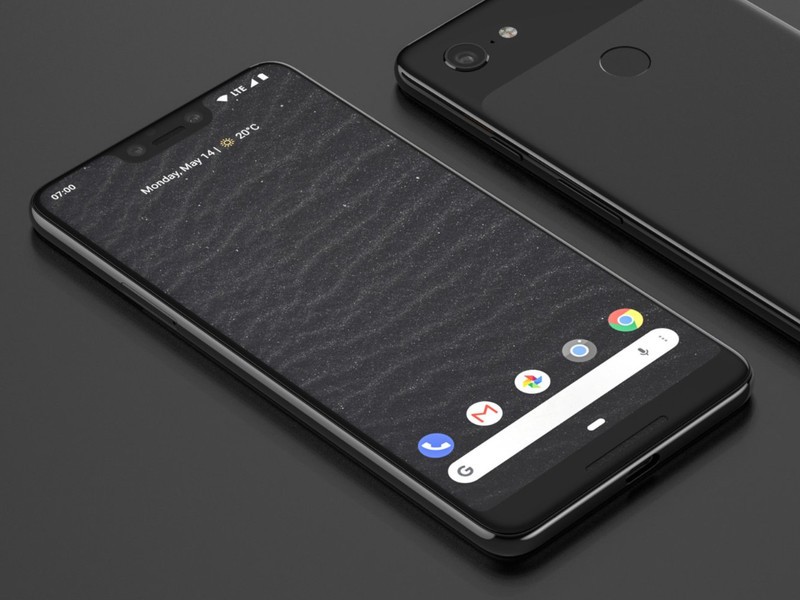
Render from @PhoneDesigner
These pictures give us a better idea of how the notch will be incorporated into the phone compared to the screen panels that leaked before them, and now that the phone is quickly coming together into a finished product, even more potential buyers are quick to share their thoughts on what we’re seeing.
The Android Central forums already has a lot of discussion regarding the Pixel 3 XL’s design, and for a lot of people, the notch isn’t looking too hot.
TraderGary
06-09-2018 11:15 PM“
Right now I still feel very negative about the notch. I had fully intended to get the Pixel 3 XL but if there’s a notch, I’ll be in full revaluation mode.
Reply
Kirstein Gourlay
06-09-2018 03:20 PM“
Am keeping my 2 XL. It is on a 2 year contract so my upgrade will be the Pixel 4 XL. Skipping the 3, especially with that awful notch
Reply
Then again, some don’t seem to mind it all that much.
DarkNeo
06-09-2018 02:33 PM“
It’s not, we just have to get used to phones having one for a while. We can “protest” all we want but it won’t change anything.
I’m hoping for a better camera if it’s even possible lol.
Reply
SactoKingsFan
06-09-2018 07:05 PM“
I don’t mind a minimal notch like on the Essential Phone. Would rather not have a much wider notch. If I stick with Pixel phones I’ll probably go with the smaller Pixel 3 which has a much more appealing design.
Reply
What do you think? Is the notch a deal-breaker on the Pixel 3 XL?
Join the conversation in the forums!
Type away for days on an unlocked BlackBerry KEYone for just $400
Amazon currently has the unlocked BlackBerry KEYone on sale for just $399.99, which is a $100 discount. When it was first released, the KEYone sold for $550, and before this discount, it had never dropped below $440.

The KEYone has an intuitive smart keyboard with flick typing, fingerprint sensor, and customizable shortcuts. It’s built with aluminum casing and Corning Gorilla glass for protection. It also has a Qualcomm Snapdragon 625 processor, a 3505mAh battery, and runs on Android’s Nougat operating system.
CrackBerry has the rundown on everything you need to know to use your new KEYone, including a Beginner’s Guide and a list of helpful how-to articles. BlackBerry Mobile also announced the KEY2 which will retail for $649, though that’s not currently available to order.
See at Amazon
LG V40: How LG’s next flagship can win me over and find success
The V30 wasn’t a bad phone, but LG can make the V40 truly spectacular.

In just the last three years since the original LG V10 was released, the V series has changed a lot. The V20 followed up on the V10’s formula of packing in every feature imaginable in addition to providing a high-quality DAC for headphone users and a removable battery.
The V30 still offered a phenomenal wired audio experience but ditched the V10 and V20’s utilitarian designs in favor of a sleek glass slab. The removable battery went away, LG adopted an OLED panel, and bezels slimmed down a lot. The V30 ended up being a really great phone, but like so many other LG products, had a tough time standing out from its competition at the time.
We’ve already seen two minor updates to the V30 in 2018 with the V30S and V35, but later in the year, we should get a proper sequel in the form of the LG V40. A lot of the phone’s minute details remain a mystery, but I’ve got a few ideas for LG on how to make sure it can stand on its own against the Note 9, Pixel 3 XL, and others.
Keep bezels slim without adding a notch

The notch-touting LG G7.
Without a doubt, one of the most controversial trends in smartphones for 2018 is the notch. Ever since Apple released the iPhone X, we’ve seen Asus, Xiaomi, OnePlus, LG, and countless others mimic this design by slapping a notch onto their own hardware.
The notch itself really isn’t a big deal, but any phone that comes out with one is ridiculed for its design and is seen (at least by the tech community) as just another iPhone clone.
LG’s shown that it’s willing to adopt the notch with the G7, but I think the right move is to not include it on the V40. As we’ve seen from companies like Vivo, it’s entirely possible to slim down bezels without adding a cutout in a phone’s screen. This requires innovation and a willingness to take risks, but that’s what the V series used to stand for.
Rather than fading into the background by just adding a notch and calling it a day, LG can make the V40 shine by finding another way to keep bezels small without obstructing the top portion of the screen. I know that’s no small feat, but it’s one LG needs to be willing to tackle.
LG needs to make a big deal about the things it gets right

Two areas LG’s been excelling at recently are audio and haptic feedback, but unless you actively follow the tech world, chances are you don’t have any idea about that.
LG gets a lot of stuff right but fails to educate people about it.
The G7 provides one of the best audio experiences around, giving users a Hi-Fi Quad DAC and “Boombox Speaker” that kicks out a surprising amount of bass for an external speaker on a phone. Furthermore, its haptic feedback, while not up to the same level found on Apple’s recent iPhones, is far superior to just about any Android phone on the market.
These are two big selling points when targeted at the right demographics, but for whatever reason, LG doesn’t seem to invest a lot of money into marketing them. Compared to the Galaxy S9, the G7 kicks its butt when it comes to providing a high-quality audio experience and premium feedback for your taps and swipes.
Assuming the V40 picks up these strengths of the G7, I’d like to see LG give them the attention they deserve. They may not sound like huge additions on their own, but when paired with everything else on this list, could make they V40 unstoppable.
Commit to fast updates and prolonged software support

Two of the worst companies when it comes to updating its phones have historically been LG and Samsung. Recently, however, LG’s been doing a much better job than Samsung in these regards.
In just the past couple weeks, Android Oreo’s arrived on the unlocked, AT&T, Sprint, and Verizon models of the G6 from 2017 with April to May security patches. On the other hand, Samsung’s latest Galaxy S9 is still rocking the February security patch it was released with.
LG opened a “Global Software Upgrade Center” in April to increase the speed at which it updates its phones, and so far the effectiveness of this seems to be paying off.
Assuming LG keeps improving the speed at which it kicks out big upgrades and regular security enhancements, it could get a big lead over just about every Android OEM (save for Google, of course).
Reconsider the pricing strategy
It’s no secret that smartphones are getting more and more expensive, but the price tags on LG’s past couple releases have been tough to swallow even considering the current market conditions.
The LG G7 costs at least $750 in the United States, the V30S is selling at a discounted price of $730, and the most recent V35 will set you back a whopping $900.
With Google and Samsung’s latest flagships going for $650 to $720, LG’s shooting itself in the foot.
If the V40 debuts with a $900+ price tag, it’s going to be DOA. However, if LG can work that down to $650 – $700, it’ll be much more appealing to folks looking for an alternative to the Galaxy Note 9 or Pixel 3 XL later in the year.
What do you want to see?
That’s what I think the V40 needs to succeed, but what about you? Sound off with your wants/wishes in the comments below!
LG V40 ThinQ: News, Rumors, Release Date, Specs, and More!
LG V30 + V30S ThinQ
- LG V30S hands-on: A 2017 phone with 2018’s buzzwords
- LG V30S specs
- LG V30 review: The no-BS flagship
- Top LG V30 camera features
- Full LG V30 specs
- Join our LG V30 forums
Amazon
Best Buy
Verizon
AT&T
Command & Conquer: Rivals now available in pre-alpha on the Play Store
Remember, pre-alpha = bugs, bugs, and more bugs.
Even though E3 hasn’t even technically begun yet, there’s already been a heap of announcements from EA, Microsoft, and Bethesda. During EA’s press conference, the company announced the first new Command & Conquer game since 2012 — Command & Conquer: Rivals. This is a mobile game that’s going to be free-to-play, and you can already sign up to check out the title in a pre-alpha state.
If you head over to the game’s listing on the Play Store, there’s a pre-register button that allows you to get notifications about the game’s release and be eligible to play it even this early in its development. I haven’t had a chance to play around with it myself, but since it’s still in pre-alpha, don’t be surprised if you come across a healthy amount of bugs, glitches, etc.
On the Play Store listing, Rivals is described as a “competitive real-time strategy game on mobile” in which you “battle to dominate your enemy with Commanders from the Global Defense Initiative and Brotherhood of Nod.” I’ve never touched a Command & Conquer game, but for fans of the series, it looks like EA’s crafting a great way to get your strategy fix while on the go.
The free-to-play nature of the game means that you’ll have to deal with loot boxes, but that shouldn’t come as any sort of a surprise in mid-2018. Also, if you pre-register before Rivals is released, you’ll get an Early Bird Bundle that includes a Titan unit, Diamonds, and Credits you can use in the game when it officially launches.
Command & Conquer: Rivals should be finished later this year.
Pre-register on the Play Store
 AIVAnet