


Bluetooth speakers, 32-inch monitors, Beats headphones, and more are all discounted today
Whether you’re looking for new tech gear or household items, we’ve got you covered.
We found plenty of great deals today that include big discounts on Sony’s portable Bluetooth speaker, Dell’s 31.5-inch monitor, the Withings smart watch and fitness tracker, and more! Time’s running out to take advantage of these prices, so hurry!
View the rest of the deals
If you want to know about the deals as soon as they are happening, you’ll want to follow Thrifter on Twitter, and sign up for the newsletter, because missing out on a great deal stinks!
Show your love of Canada this holiday weekend with our Heart Canada home screen theme

Canada is America’s chill big brother, and it deserves to be celebrated.
There’s a lot to love about Canada. You’ve got good healthcare — and with all that poutine and you’ve got all that maple syrup, you certainly need it — you’re going to have nationwide cannabis legalization this October, you’ve got Justin Trudeau, and the biggest chance of a riot in Canada seems to be a hockey match. If it weren’t for those winters and how much more expensive technological gadgetry seems to be up there, I’d be all over it!
It’s a lovely country full of lovely people and lovely locales, so doesn’t it deserve a lovely home screen theme to celebrate Canada Day? Last year we made two glorious Canada Day Themes for the occasion, but this year, we’ve used KWGT to take our Heart Canada theme to the next level!

Today’s theme has been assembled in Smart Launcher 5 to take advantage of the Icon Pack Studio integration and the gridless widget-placement system, but it can be easily applied to most customizable launchers like Nova Launcher and Action Launcher.
Applying a breathtaking Canada wallpaper
Canada Circle Icons in Icon Pack Studio
- Importing CanadaCircle Icons
- Applying CanadaCircle Icons to Smart Launcher
- Applying CanadaCircle Icons to other launchers
Heart Canada Preset in KWGT
- Importing Heart Canada Preset in KWGT
- Adjusting your Heart Canada widget
Applying a breathtaking Canada wallpaper
This theme is a bit unique in that you can use just about any Canada wallpaper behind the Heart Canada widget and stencil icons, but as I was aiming to recapture as much of the magic from last year’s Canada Heart theme, I found a breathtaking wallpaper of Moraine Lake, which is one of the most photographed and beloved Canadian sights on Reddit’s /r/EarthPorn community, but there’s plenty of other cool Canadian wallpaper options if you’re looking for something different.
Long-press an empty space on your home screen until a menu appears.
Tap Wallpaper.
Tap Other images.
Tap Photos.


Navigate to and tap your downloaded Canada wallpaper.
Adjust the wallpaper left or right if desired and tap Set Wallpaper.
Tap Home screen and lock screen.


Canada Circle Icons in Icon Pack Studio

With your wallpaper picked and applied, it’s time to get our Canada on, and that starts with custom red stencil icons made in Icon Pack Studio. If you’ve never heard of Icon Pack Studio, they’re a nifty little make-your-own icon app that will let you kiss gaps in your app drawer goodbye.
I’ve already built the pack, so all you have to do is import this CanadaCircle Icons Preset and apply it.
Importing the CanadaCircle Icons pack in Icon Pack Studio
Open Icon Pack Studio.
Tap Let’s start.
Tap Next five times to skip through the initial icon pack building process. Note: please come back later and play with Icon Pack Studio to see if it could fit another theme of yours down the road.


Tap Save to exit the initial icon pack building process.
Tap the three-dot menu in the top right corner of the screen.


Tap Import Iconpack.
Navigate to and tap the CanadaCircle Icons file you downloaded.


The pack will be added to your Icon Pack Studio library. Now we need to apply them, and that process varies slightly depending on if you’re using Smart Launcher 5 — which Icon Pack Studio was made to accompany — or another launcher with icon pack support.
Applying CanadaCircle Icons to Smart Launcher 5
Tap the three-dot menu below the CanadaCircle Icons pack.
Tap Apply.
Tap Home Screen and App Grid to apply the icons to both your home screen and app drawer.
Tap OK.


You can go back to the home screen to witness the applied pack.
Applying CanadaCircle Icons to other launchers
Tap the three-dot menu below the CanadaCircle Icons pack.
Tap Export.
Icon Pack Studio is meant for personal use, not for commercial profit. Tap I agree to acknowledge that you’re just using this pack for yourself.


Once the pack is exported in a handy app installer package and is ready to install, a notification will appear on your phone. Tap to install.
You need to allow Icon Pack Studio to install the exported icon pack as a separate app so tap Settings.
Tap Allow from this source. On older versions of Android, you will instead be tapping Allow unknown sources.


Tap the back button to return to the install screen.
Tap Install.
Once the app is installed, tap Open.


Tap Apply.
Tap your desired launcher in the popup launcher menu.
Tap OK or Apply depending on your launcher.


Your icons will now be applied to your chosen launcher.
Heart Canada Preset in KWGT

Let’s get down to the main event: the Heart Canada widget. This multi-section Kustom widget — KWGT for short — features an easily glanceable information widget in the top right corner, a Canadian-colored music widget that can work with just about any music app on Android including the YouTube Music service that recently came to Canada, and a bold central Heart Canada logo. The Heart Canada icon itself is a monochromatic vector recreation of the logo from last year’s Canada Heart wallpaper, because I loved that logo but wanted a theme that was higher resolution and usable with other wallpapers.
Get to know KWGT, an essential tool for Android themers and widget lovers
Importing Heart Canada Preset in KWGT
Before we get started, you will need to download both KWGT and KWGT Pro Key, which is required for importing presets like our Heart Canada Preset. Once you download the Heart Canada Preset, use a file manager app to copy it to Internal Memory/Kustom/widgets. If you haven’t opened Kustom before, you might have to make the Kustom folder or widgets subfolder. Once the preset file is saved in Kustom/Widgets, importing it is a snap.
Long-press an empty space on your home screen until a menu appears.
Tap the plus icon next to the lock icon.
Tap Widget.


Scroll down the widget list and tap Kustom.
Tap KWGT 4×4.
Tap the widget to configure it.
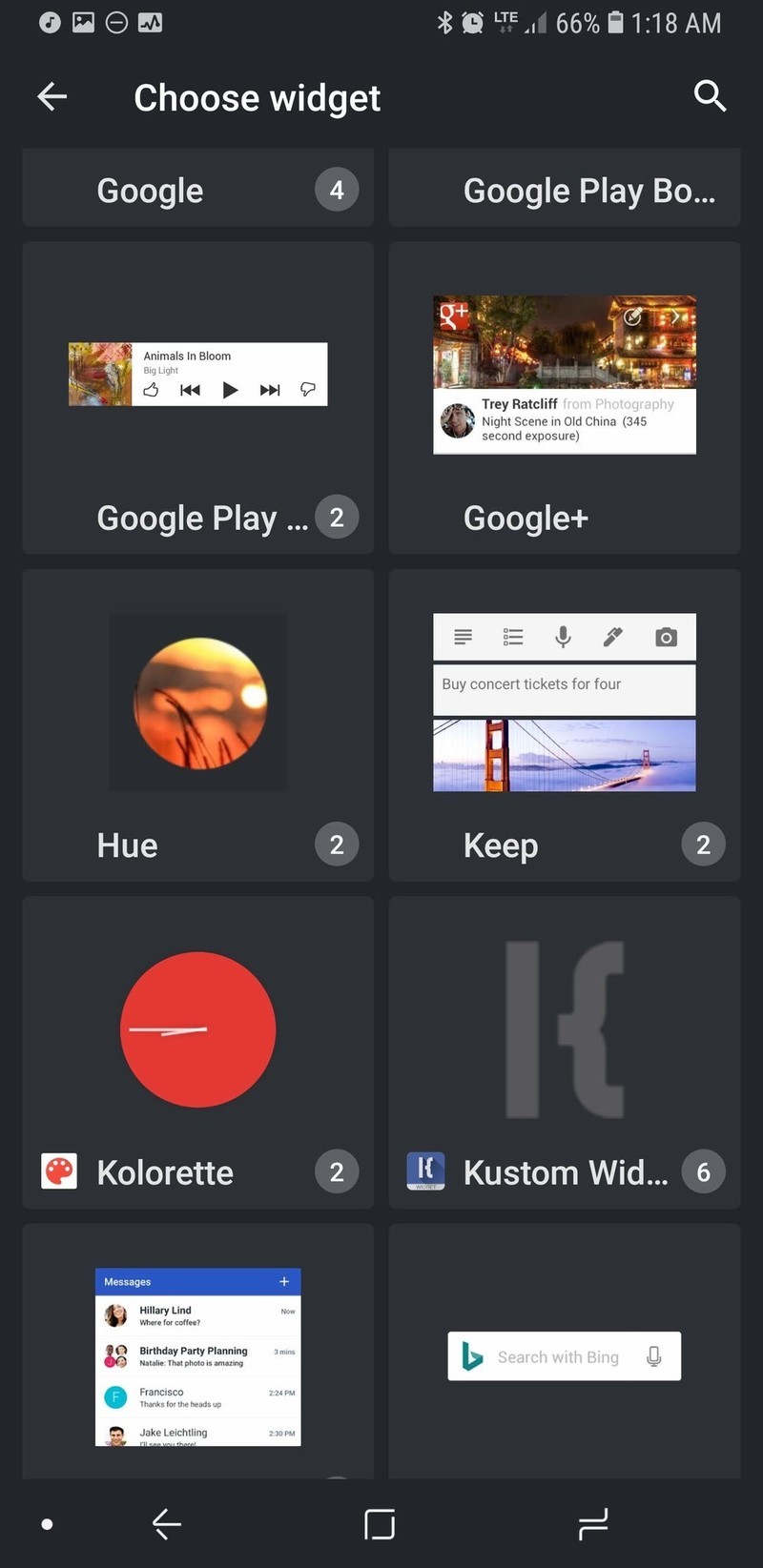


In the Exported tab, tap Heart Canada Preset.
The preset will load. Tap the floppy disc icon in the top right bar of the screen to Save the widget.
If you haven’t previously given KWGT Notification Access, Tap Fix. We need notification access for the widget to pull in music information and controls from your music app’s notification.


Tap Kustom Notifications to grant it Notification access.
Tap Allow.
Tap the back button.


Tap the floppy disc icon in the top right bar of the screen to Save the widget.
Tap the home button to see the applied widget.


Adjusting your Heart Canada widget
- Want to make the whole widget bigger or smaller in relation to your widget box? Tap Layer and adjust the Scale up to down to your liking. Depending on the widget of your screen, you may want to do this for the music widget to better fit across the bottom of your widget.
- Want to reposition the sections of the widget to better fit your home screen or particular widget size? Tap the section you wish to move (for instance the Heart Canada icon), and then tap Position. Adjust the X and Y offsets to reposition the section of the widget.
-
You can change what tapping an individual element or group triggers. For the base Canada Heart Preset, tapping the Heart Canada icon opens the Kustom editor so you can adjust the widget to your liking, but you could change it to open your favorite music app or weather app.


- Weather providers offer different descriptions of current weather conditions and some providers are more accurate in different regions than others. To change the weather provider KWGT uses, tap the three-line menu icon in the top left corner of the screen and tap Settings. Under Weather, you can tap Weather Provider and select from half a dozen sources.
-
KWGT by default will pull in the details and controls for any media notification that it sees. If you only want KWGT to pull in data from one app, you can enter KWGT Settings and set Preferred Music Player to your chosen music app.


There are a lot of ways to customize KWGTs, and I welcome you to play with this preset and find even more amazing ways to customize it. Put the information you’ll need in the top-right corner — I add in a text box that will display a current Google Assistant reminder on my home screen to help remind me of what I need to do.
Your turn

Whether your love of Canada stems from its vast natural beauty, vibrantly diverse cities, or its even more diverse people, show your love of Canada proudly on your home screen every day with this theme. And if you have any other themes you’d like for us to tackle, reach out to us in the comments! I learned my way around a vector editor to create this theme, and I’m ready and waiting to build some more themes that can use them!
These are all the Moto phones Motorola is releasing in 2018

2018 is shaping up to be a big year for Motorola.
Ever since its acquisition by Lenovo, Motorola’s turned into a company that’s not shy about releasing a lot of different phones each year. This allows for a lot of choices, but it can also make trying to pick the perfect phone a bit headache-inducing. No matter your opinion on Motorola’s release cycle, however, there’s no denying that 2018 is already shaping up to be an exciting year for the company.
We’ve seen a ton of leaks, rumors, renders and more for Motorola’s lineup of phones for 2018 ever since the beginning of the year, and this is everything we know so far.
The phones that are still on their way
Motorola One / One Power


Motorola One Power (left) and Motorola One (right)
The wildcard on this list easily goes to the Motorola One and One Power. We didn’t have any idea these phones existed until late June and May, respectively, and based on what we know so far, it looks quite they’ll be quite a bit different from the rest of Motorola’s 2018 handsets.
First off, the overall design language isn’t anything like the rest of this year’s Moto phones. There’s a giant notch at the top of the screens, vertical dual cameras on the back, and what appears to be a glass design for the Motorla One and a metal unibody for the Motorola One Power.
Android One branding suggests that these phones will be among the first Motorola handsets to get software updates and new security patches, and the full-on “Motorola” branding is unique from the short-hand “Moto” tag on the rest of the company’s products.


The Motorola One Power
Shortly after the One Power broke cover for the first time, even more press renders and a hands-on photo surfaced along with alleged specs. According to Andri Yatim on Twitter, the One Power will come equipped with the Snapdragon 636 processor, 6GB RAM, 64GB of storage, a large 3,780 mAh battery, and NFC for Google Pay support. Then, on June 21, TechInfoBit shared multiple hands-on pictures that showcase the phone from various angles.
As for the camera situation, the two sensors on the back include a primary 16MP shooter with f/1.5 aperture and a secondary 5MP f/1.9 one. As for the front-facing camera, it’s 16MP with f/1.9.
Specs for the regular Motorola One are still unknown, but it’s noted that it’ll be considerably smaller than the One Power.
Moto Z3
Next, let’s talk about Motorola’s highest-end and most premium phone for 2018 – the Moto Z3.

Just like last year, we’re expecting Motorola to release two entries in its Z-series in 2018. The regular Moto Z3 will be the most powerful of the two, and it’s expected to come with a 6-inch FHD+ display. Like we saw through a lot of 2017, bezels surrounding the screen should be cut down considerably. The Z3 is said to have the slimmest bezels of the two, but the Z3 Play still looks a lot more modern when compared to the Z2 Play.
Along with showing off the phone itself, the image of the Z3 also reveals a new Moto Mod. It may not look like anything at first glance, but the “5G” branding near the bottom suggests that this Mod will allow the Z3 to get 5G data speeds. Furthermore, the monthly data allotment page is taken right from the Project Fi app and could be a hint that more Moto phones will find their way to Google’s MVNO.
Moto X5
If you’re not about the Moto Mod life but still want a quality phone from Motorola, the X series has proven to be the way to go. Our first look at the Moto X5 shows a very similar design compared to the X4, but there are a couple key differences.

Just like the Z3/Z3 Play, we’re looking at a tall display with slim bezels on all sides. However, unlike those two phones, the X5 appears to have a notch near the top just like another phone with an X in its name. This is one trend I was really hoping wouldn’t catch on, but if it has to make its way into one Moto phone, so be it.
The screen on the X5 is said to measure in at 5.9-inches with a FHD+ resolution, there are dual cameras on the front and back, and there’s also mention of “Moto’s Smart AI.”
Unfortunately, it’s possible none of this will mean anything. A report surfaced in early March suggesting that Motorola had canceled the Moto X5, meaning it won’t be released at all. As a big fan of the X4, this would be incredibly disappointing if it turns out to be true.
The phones that have been released
Moto Z3 Play

Following up last year’s Moto Z2 Play, Motorola’s released the Moto Z3 Play. The overall design is mostly the same due to the phone supporting all existing Moto Mods, but the bezels surrounding the 6.01-inch 2160 x 1080 AMOLED screen are considerably smaller.
Inside the Z3 Play is the Snapdragon 636 processor, 4GB RAM, 32 or 64GB of storage, and a 3,000 mAh battery.
Motorola’s introducing dual cameras to the Z Play line this year, with the Z3 Play featuring a 12MP + 5MP sensors. The front-facing camera captures pictures at 8MP, a fingerprint sensor can be found on the right below the volume buttons, and Motorola’s has a new on-screen gesture system not unlike what Google’s messing with in Android P.
Despite all these improvements, the Moto Z3 Play will be faced with a lot of stiff competition — especially with a starting price of $499 in the U.S.
Moto Z3 Play hands-on preview: Three’s company
Moto G6/G6 Plus/G6 Play

Motorola’s Moto G series has been its most popular (and profitable) since the very first Moto G that came out in 2013, and this year’s entries have proven to be some of the best so far.
For 2018, Motorola released three G phones — the Moto G6, G6 Play, and G6 Plus. The Play is the most affordable of the bunch, with the G6 Plus being the flagship entry and the regular G6 finding home in between the two.
While the G6 Play is made out of a shiny plastic, the G6 and G6 Plus both have glass bodies that look and feel much nicer than their asking prices. Add that together with dual cameras, 18:9 screens, and Snapdragon processors, and there’s a lot to like here.
Moto G6, G6 Play, and G6 Plus: Everything you need to know!
Moto E5/E5 Plus/E5 Play

Similar to the G series, Motorola released three entries in its E5 series this year in the forms of the Moto E5, Moto E5 Plus, and Moto E5 Play.
The E5 Play is the cheapest phone in Motorola’s 2018 portfolio, touting a plastic body, 16:9 display, removable battery, and pretty low specs.
The E5 and E5 Plus still won’t blow your socks off, but they’re a bit more modern with glass designs, big, 18:9 screens, and respectable specs across the board. Oh, and did we mention the E5 Plus has a gigantic 5,000 mAh battery? 😳
If this year’s G6 phones are too rich for your blood, the E5 models are absolutely worth a look.
Moto E5, E5 Plus and E5 Play: Everything you need to know!
Updated June 28, 2018: Added new details about the Motorola One.
MacRumors Exclusives: Save 45% on Speck’s Cases and Save 50% on Choetech’s Wireless Charger
Today and tomorrow only MacRumors readers can save 45 percent sitewide on Speck’s website, making a great opportunity to purchase a new case for your iPhone, iPad, or MacBook at a discounted price. To take advantage of the deal, head over to Speck, find a case or accessory, add it to your cart, and enter MACRUMORS45 in the discount code box.
This will net you 45 percent off up to two Speck products per order, although the promo code excludes any existing markdowns and can’t be combined with Speck’s other offers or coupons.
Note: MacRumors is an affiliate partner with these vendors. When you click a link and make a purchase, we may receive a small payment, which helps us keep the site running.
As an idea of how much you can save, Speck’s lower-cost iPhone and iPad cases run for around $40, meaning accessories like the Presidio Grip for iPhone X (including World Cup colors), Balance Folio for iPad, and Presidio Clear for iPhone 8 are all discounted down to $21.97 in the sale. Head over to Speck’s website to browse and make your purchase before the promo code expires tomorrow, June 29.
Over on Amazon, accessory company Choetech is offering its T511 Wireless Charger (Black) for just $6.47 with MacRumors exclusive promo code MACRUM50, down from $12.95. For any of our readers who have been looking to add a few more iPhone-compatible wireless charging mats around a home or apartment, this is a solid time to expand your collection.

There are a few other Choetech deals happening on Amazon this week as well: a 3-pack of USB-C Braided Cables for $5.99 with code 3N2LZXJP, down from $14.99 and a 6-Pack of USB-C Cables for $7.99 with code 9ARQ5ZD6, down from $12.99. With the cables, you can stock up on extra chargers for your MacBook ahead of any trips you might be taking this summer.

Incipio is also marking down many of its products this Fourth of July, with promo code PWR4U taking 20 percent off all Incipio power accessories. These include smart cases, portable battery packs, cables, wireless chargers, and more. The discount code is already live ahead of next week’s national holiday, so head over to Incipio’s power accessory page to browse items available under the discount.
Finally, app developer Softorino is offering MacRumors readers an exclusive 40 percent off of its WALTR 2 software with promo code MACRUMORS. WALTR 2 is a drag-and-drop utility that allows you to quickly and easily move music, ringtones, videos, and other files onto your iOS devices. WALTR 2 works over Wi-Fi and lets you avoid using iTunes for file transfers while also automatically converting file types like FLAC and MKV that aren’t otherwise supported by iTunes.
Head over to our full Deals Roundup for more information on the latest sales happening this week.
Related Roundup: Apple Deals
Discuss this article in our forums
How to downgrade your iPhone or iPad from iOS 12 to iOS 11.4
Apple’s latest and greatest mobile operating system is iOS 12, and it brings with it a number of new features — including things like new gestures, improved performance, and more. But if you’re updating to the new operating system, you may find that it’s not really for you — in which case, it might be helpful to downgrade back to iOS 11.
That is why we put together this guide — to help you downgrade from iOS 12 back down to iOS 11. There are a few ways to do so, and they’re outlined below.
A quick note: We recommend backing up your phone before downgrading to an older version of iOS. Generally speaking, it should be pretty easy to downgrade, and it shouldn’t result in any lost data — but just in case it does, backups always help. On top of that, you’ll only be able to downgrade to iOS 11.4 for a week or so after iOS 12 is released to the public in September. After that, Apple will stop signing iOS 11.4 versions, and you won’t be able to downgrade without a jailbroken phone.
From a backup in iTunes
The best and safest way to roll back your iPhone to iOS 11 is through a backup, and it’s easy, as long as you made a backup before upgrading to iOS 12. Let’s look at how to restore your iPhone if you have a backup from when your iPhone was running iOS 11.4 stored on your computer.
Download the IPSW file for your device and iOS 11.4 here.
Disable Find My Phone or Find My iPad by heading to Settings, then tapping iCloud, and turning off the feature.
Plug your iPhone or iPad into your computer and launch iTunes. Click on the iPhone or iPad in iTunes, then select Summary.
Hold down Option (or Shift on a PC) and press Restore iPhone.
Navigate to the IPSW file you previously downloaded and press Open.
Once the file has been installed, you will have a blank iPhone — which is where your backup comes in. In iTunes, click the Restore iPhone button, and select your backup. Make sure it’s the right backup — if you’ve been running iOS 12 for more than a day or so, the latest may be a backup of iOS 12. iTunes should then restore the correct backup, though it may take some time.
Without a backup
If you didn’t back up your device before updating to iOS 12, then there are still some options for you — though you may lose your texts in the process. If you’re fine with that, follow the instructions below.
Download the IPSW file for your device and iOS 11.4 here.
Connect your iPhone or iPad to iTunes, and select your device.
Under Summary, press Check for Updates while holding down Option (or Shift on a PC). Then, navigate to the IPSW file you downloaded before.
Your iPhone or iPad should then install iOS 11.4.
Editors’ Recommendations
- How to save text messages in Android and iOS
- Here’s how to get the iOS 12 public beta on your iPhone, iPad, and iPod Touch
- iOS 12’s best new features
- Here’s how to enroll in the iOS beta program to get updates early
- Apple iOS 12 hands-on review
Show, don’t tell, with Amazon’s new Show Mode Charging Dock
Love the Echo Show, but haven’t taken the plunge on Amazon’s coolest smart speaker? Amazon is offering even more ways to access Alexa’s newest and coolest tricks with added support for Fire HD 8 and HD 10 tablets with the addition of Show Mode, and the Show Mode Charging Dock accessory. That’s not all either, as Amazon’s also offering a new kids bundle for the Amazon Fire HD 10.
Show, don’t tell
Show Mode is an extension of the Alexa capabilities added to the Fire HD 8 and HD 10 tablets, and allows Alexa to show you trending news, weather, camera feeds, and other options previously only available to the Echo Show. It’s a great idea, and it adds extra utility to two already pretty great tablets.
The Show Mode Charging Dock is an extension of that idea, and turns the Fire tablet into a mobile Echo Show. The Show Mode Charging Dock comes in two parts: An adjustable dock, and a case with charging pogo pins that clips onto the back of your tablet. Clip the case onto your tablet and insert the MicroSD plug, and the tablet will automatically change to Show Mode when dropped into the dock, and will also start charging.
While docked and in Show Mode, the tablet can be used like any regular Echo Show, and can be asked to provide recipes, start a video call, watch movies, or read out the news — but it also has the advantage that it can be picked up and carried to any other part of the house at any other time, making it the perfect smart home companion for a mobile user.
The Show Mode Charging Dock will be available for $5 off for the Amazon Fire HD 8 for $35, and the Fire HD 10 for $50, with shipping starting on July 12. If you’re interested, but don’t have a supported tablet, then you can buy a dock bundled with a tablet for a discounted price. The Fire HD 8 with dock will set you back $110, while the Fire HD 10 with dock will cost $190.
Amazon Fire HD 10 Kids Edition, Amazon FreeTime Unlimited, and world-class parental controls
Kids love technology, but it’s more than obvious that not all tech loves kids. Choosing a device that’s suitable for your children and that’s also accepted by them can be a tough call to make, especially with a vast selection of tablets and kid-friendly parental controls apps out there. Amazon is trying to make that decision a lot easier with its new Fire HD 10 Kids Edition bundle, and kid-friendly FreeTime Unlimited subscription service.
The Fire HD 10 Kids Edition comes bundled with the Amazon Fire HD 10 tablet (unsurprisingly), one of Amazon’s kid-friendly cases, a two-year worry-free guarantee, and a year’s subscription to Amazon’s FreeTime Unlimited service, for a discounted price of just $200 — Amazon claims all these items would cost $320 separately, making this an absolute steal at the price. The two-year worry-free guarantee is Amazon’s usual guarantee for kid’s tablets, and they’ll replace the tablet free of charge if any of your little tykes manage to break it.
Amazon’s FreeTime Unlimited service comes with access to over 15,000 age-appropriate apps, games, books, and videos for kids of all ages, including content from names like Disney, Nickelodeon, HarperCollins, and access to a curated list of appropriate websites too.
The Fire HD 10 Kids Edition bundle comes with a free year of FreeTime Unlimited, and after the first year, access is priced at $5 a month (or $3 a month for Amazon Prime members). The Fire HD 10 Kids Edition bundle is available with three different colors for the protective case — yellow, blue, or pink — and Amazon is also offering $100 (or 25 percent) off if you buy two bundles at the same time. The bundle can be pre-ordered now for shipping on July 11.
Editors’ Recommendations
- Amazon rolls out Alexa hands-free to Fire 7, Fire HD 8 tablets
- EA shows more ‘Anthem’ and ‘Battlefield V’ at E3 2018, debuts all-access subscription
- How to ‘Drop In’ on an Echo, Echo Show, or Echo Dot
- The best shows on Netflix right now (June 2018)
- First products from Facebook’s secret Building 8 lab could target Echo Show
Niantic wants to make its augmented reality apps more realistic
Niantic — the company behind Pokémon Go and the upcoming Harry Potter: Wizards Unite — is on a mission to make augmented reality more realistic. To truly augment reality, computer systems need to be able to understand the real world a little more, and Niantic thinks the technology isn’t quite there yet.
That’s why it’s launching the Niantic Real World Platform, a program that aims to tackle today’s issues with AR on multiple levels. The platform’s launch comes as the company also announces the acquisition of Matrix Mill, a U.K.-based AR research and development firm developing neural networks that can infer information about the world using data from your smartphone’s camera.
The Niantic Real World Platform is first going to attempt to “model reality.” Niantic wants the platform to be able to adapt and change as the real world changes. In the real world, buildings are constructed, parks are formed, roads are closed, and cities expand — if there’s a significant delay in the platform adapting to those changes, it can affect game-play. The digital model of the world that Niantic has needs to be able to adapt almost in real-time, and it requires a combination of computer vision and machine learning.
Niantic also said its platform needs to be able to “understand reality,” meaning it needs to be able to see an object, recognize exactly what it is, and what the object’s place is in a broader environment. Computer vision is key here — Niantic is training its platform to accurately recognize objects based on data from a phone’s camera, and as time goes on, more and more objects will be added to the platforms “AR vocabulary.”
Recognizing objects is only one part of the puzzle, as systems need to learn where those objects are in a 3D space. Simply knowing that an object is a car doesn’t necessarily matter in the context of a game if that car is 50 feet away. That’s why Niantic is working on developing better depth maps, which can understand exactly how far away an object is at any given time. That can help digital elements better interact with the real world.
The platform will also try to cut down latency, which is when you experience delays in multiplayer games thanks to connectivity issues. Latency in multiplayer games can also affect game-play, and Niantic showed off a demo game called “Codename: Neon,” which involved people moving around an environment, collecting balls of light, and launching them at other players to get points. The interactions were smooth and seamless between all the players, and it was a testament to the progress Niantic has made to reduce latency in its platforms.
Niantic is throwing a lot of resources into its AR tech, and it’s work that it won’t be keeping all to itself. The Real World Platform will be available to third-party developers in the future, and while more information will be available in the coming weeks, Niantic said it’s selecting a few developers to work with later this year. Hopefully, this means we’ll start seeing better-looking and better-performing AR games in the future.
Niantic’s CEO John Hanke said games like Pokémon Go “never have to end.” Hanke envisions continuously improving games that are such a huge part of people’s lives, that they pass them on to their children.
Editors’ Recommendations
- A 21-year-old is heading up Google’s new social gaming startup
- Adobe’s next big software secret? An augmented reality tool called Project Aero
- ‘Star Wars: Jedi Challenges’ review
- Low-cost Ghost AR headset promises MacOS multitasking on steroids
- The creator of Internet Explorer wants to read your mind with a bracelet
Best Battery Cases for Samsung Galaxy S9 and S9+

Double the battery life of your phone with a battery case!
The Samsung Galaxy S9 and the larger Galaxy S9+ are some of the best phones you can buy in 2018 — if you own one you know this.
With a great camera and a brilliant display, both the Galaxy S9 and S9+ make for a great digital companion when you’re traveling this summer and want to document everything with photos and videos — the only thing holding you back might be battery life. Wireless charging and other battery packs are convenient, but you may want to opt for a battery case which lets you keep using your phone normally while recharging the internal battery.
Note: Usually, we’d recommend a Mophie case because they’re such a popular brand for this style of case, but we cannot reasonably recommend its case model for the Galaxy S9 or S9+ given its paltry battery size (only 2070mAh) and high price ($100).
- Alpatronix BX440 battery case (4000mAh)
- ZeroLemon Slim Power battery case (4700mAh)
- ZeroLemon ZeroShock battery case (8000mAh)
- Powerman Slim battery case (4700mAh)
Alpatronix BX440 battery case (4000mAh)

We’ll start out with a slim (for a battery case) option from Alpatronix that’s well reviewed on Amazon and offers a good combination of bonus battery life (4000mAh) while keeping your phone protected while keeping all the functionality of your phone intact. There’s a front lip around the display to defend against screen damage when you place your phone screen down, and there’s a USB-C port at the bottom that can be used for both charging and data transfer purposes.
This case also supports wireless charging using the Alpatronix wireless charger ($25) or any other Qi wireless charging pad so you can maintain the convenience of wireless charging with or without the battery case on.
Get yours for just $50 and buy with confidence knowing it’s supported by a lifetime warranty and a 30-day money-back guarantee.
Also available for the Galaxy S9+ with a 4600mAh battery for $60.
See at Amazon
ZeroLemon Slim Power battery case (4700mAh)

ZeroLemon is another brand that’s known for making some beefy battery cases, but we’ll start off with their slim case option first.
Featuring a 4700mAh battery, this case is capable of providing a full charge to your Galaxy S9 and features all the protection you’d expect from a case, too. On the back is an LED indicator that used different colors to let you know how much bonus battery life you have remaining. This case also supports passthrough data transfer and charging via USB-C and will let you get way more out of your phone for a pretty reasonable price.
Get your own Slim ZeroLemon case for just $30.
Also available for the Galaxy S9+ with a larger 5700mAh battery for $30.
See at Amazon
ZeroLemon ZeroShock battery case (8000mAh)

Battery cases are sometimes considered to be too bulky — and it’s totally understandable if you think this case is way too bulky. The ZeroLemon ZeroShock case is a behemoth. It’s nearly an inch thick and designed to combine a massive 8000mAh battery with a rugged phone case design that’s perfect for the outdoorsy type who love to go on long hikes but also want to have your phone available for photos and videos, or for emergency situations.
With a case this big, you may be interested in the optional belt clip accessory because this case might not actually fit in your pocket.
Get this case for just $60 and know that it’s backed with a one-year warranty along with a 30-day money-back guarantee.
Also available for the Galaxy S9+ with a 8000mAh battery for $60.
See at Amazon
Powerman Slim battery case (4700mAh)

Finally, we’ll highlight this case from Powerman that’s slim at just 18 mm thick but is capable of delivering a full charge for your phone. The case supports Qualcomm Quick Charge 3.0 so you can top it up right fast, and it keeps the case bezels really slim around the edge so it’s comfortable to hold in your hand. With a 4700mAh Li-Polymer battery, you’ll be able to keep your phone charged throughout the day.
Get your’s for just $33 knowing that it’s backed by a 24-month warranty.
Also available for the Galaxy S9+ with a 5200mAh battery for $34.
See at Amazon
Do you love the functionality of a battery case?
Have you used a battery case on your phone before? Let us know what your experience was like in the comments!
Samsung Galaxy S9 and S9+
- Galaxy S9 and S9+: Everything you need to know!
- Galaxy S9 review: A great phone for the masses
- Complete Galaxy S9 and S9+ specs
- Galaxy S9 vs. Galaxy S8: Should you upgrade?
- Join our Galaxy S9 forums
Verizon
AT&T
T-Mobile
Sprint
OnePlus promises 2 years of software updates for all phones going forward
The company also confirmed plans to work with U.S. carriers and build a 5G phone.
OnePlus is finally addressing one of the biggest concerns surrounding its phones since the company’s inception — the longevity of software support. Per the OnePlus forums, we now have official details on the new OnePlus Software Maintenance Schedule.

Under this schedule, all OnePlus phones (including T variants) will receive 2 years of “regular software updates” from the date of release.
Regular software updates include the likes of Android version upgrades and new OnePlus-specific features, and along with this, all phones are also getting 3 years of Android Security patch updates that will be pushed out every two months.
OnePlus’s 5G phone will be released at some point next year.
The OnePlus Software Maintenance Schedule goes into effect right now and applies to the OnePlus 3/3T, 5/5T, 6, and all future phones.
On a similar note, OnePlus announced that the Open Beta program for the 3 and 3T will be ending this week. In early-July, users that are in the Open Beta will receive an OTA update to go back to the current stable build of OxygenOS.
In other OnePlus news, CEO Pete Lau recently took the stage at Mobile World Congress Shanghai to confirm that the company plans on releasing a 5G-compatible phone next year and that it’s still in talks to bring OnePlus phones to U.S. carriers (something we first heard about in January at CES).
With OnePlus’s new commitment to software support, are you more likely to buy a OnePlus phone for yourself and/or recommend them to people you know?
OnePlus 6 review, a second opinion: The best Android phone under $550
Samsung Chromebook Plus V2 announced, available at Best Buy for $499.99
Samsung’s latest Chromebook has an upgraded design and faster processor.
The Samsung Chromebook Plus was one of the better grown-up Chromebooks of last year, and to follow up its success, we now have the Samsung Chromebook Plus (V2).

The V2 looks mostly the same compared to the 2017 Chromebook Plus, but there are a few important changes inside and out that should make it a much better experience for everyone — one of the most notable being the silicon that powers everything.
Samsung’s ditching ARM processors and switching to the much more capable Intel Celeron 3965Y. From running Android apps, having multiple tabs open in Chrome, and more, this will allow the V2 to be considerably faster with just about every task. That Celeron processor is also paired with 4GB RAM, Intel HD Graphics 615, 32GB of expandable storage (up to 400GB via microSD), and a 39Wh battery.

As much as we love seeing the upgraded internals, the Chromebook Plus V2’s screen is actually a downgrade compared to its predecessor. The 16:10 1920 x 1080 panel should be fine, but it’s quite a bit different from the 3:2 2400 x 1600 screen on last year’s model.
In regards to ports, we’re looking at two USB-C ports, a 3.5mm headphone jack, microSD card reader, and one full-sized USB-A 3.0 port. There’s also a 1MP front-facing camera for video calls and a 13MP camera next to the keyboard that can act as a rear-camera when using the Chromebook Plus V2 in tablet mode.
If you’re interested, the Chromebook Plus V2 is available both in-store and online at Best Buy right now for $499.99.
See at Best Buy
Chromebooks
- The best Chromebooks
- Chromebooks in education: Everything you need to know
- Should you buy a Chromebook?
- Chromebook Buyers Guide
- Google Pixelbook review
- Join our Chromebook forums
Updated June 28, 2018: Updated this article now that the V2 has been released.
 AIVAnet