


Type wherever and whenever with the $20 iClever foldable Bluetooth keyboard
Small and portable for when you aren’t using it.
The iClever IC-BK03W portable folding ultra slim Bluetooth keyboard is down to $19.71 with code ICELBK03 on Amazon. This keyboard has been selling steadily around $29. We shared a couple deals on the black version of this keyboard around Black Friday last year, but this is the first code we’ve seen that worked on the white version.

This seems like the perfect keyboard for when you’re traveling and something comes up: maybe you get inspiration for a great idea or just need to fill out a form you hadn’t filled out before. You can just unfold this slim keyboard and do what you need to do. It’s compatible with iOS, Android, and Windows. The built-in Bluetooth has a range of 33 feet, and the keyboard is made with a premium aluminum alloy for durability. It automatically goes into sleep mode and powers off to save the battery, which is easily rechargeable. The keyboard has 4.4 stars based on 712 user reviews.
See on Amazon
Best Smartwatches for Fitness in 2018
- Best overall
- Best alternate
- Best without GPS
- Best with Wear OS
Best overall
Samsung Gear Sport

See at Amazon
See at Best Buy
The best smartwatch to pull double duty for daily use and activity tracking is the Samsung Gear Sport. It’s built to take a beating or a plunge with 5ATM waterproofing, and has all of the necessary sensors and radios to make sure you can track everything. Samsung Health has gotten surprisingly good for following each workout but also long-term goals, and partnerships with bigger names like Under Armour and MapMyFitness mean you can also send all of your data to a different system if you need.
One of the best features of the Gear Sport is that it doesn’t look that sporty. It can easily be worn every day with a variety of clothing and not stand out, which you can’t really say about most smartwatches that are aimed at fitness. The rotating bezel is fantastic, the screen is great and while the software is a tad clunky it’s super powerful. Battery life is surprisingly good as well, about 2-3 days depending on usage.
Bottom line: The Gear Sport gets all of the typical smartwatch stuff handled, and is also a super-capable fitness tracker.
One more thing: For the sportiest look and robust design, stick with one of the rubber bands rather than a nylon or leather one.
Best alternate
Fitbit Ionic

See at Fitbit
Fitbit comes at smartwatches from the direction of its successful fitness band lineup. This makes the Ionic a perfect smartwatch for someone who really wants to focus on activity tracking first, and the other “smartwatch” stuff secondarily. Though it may be a bit big and blocky, the Fitbit Ionic has a bright display, GPS tracking, optical heart rate sensor, SpO2 sensor, 50-meter waterproofing and all of the other cool stuff like NFC and 2.5GB of storage space. It’s also rated at four days of battery life, which goes beyond the competition.
Tons of people have trusted Fitbit with their fitness tracking of all kinds for years, and that’s really what you’re getting in the ~$300 Ionic. The smartwatch side of things isn’t as deeply integrated to your Android phone as an Wear OS or even Samsung watch is, but you can’t argue it’s just as good or better for fitness.
Bottom line: If fitness is your primary goal, and you’ve had previous Fitbits, the Ionic should be at the top of your list.
One more thing: The new Fitbit Versa offers a smaller case and better looks as a smartwatch, but doesn’t have GPS like the Ionic does.
Best (without GPS)
Fitbit Versa

See at Amazon
The Fitbit Ionic is clearly the best overall fitness device from the company, but for something a bit more balanced, the Versa is worth considering. Fitbit learned a lot from the Ionic, and the new Versa has a much smaller and better-designed case that looks more like a regular watch than a gadget.
The unfortunate downside of the smaller, better-designed case is that it doesn’t have GPS like the Ionic does. If you want to run, walk or bike and get precise tracking, the Ionic is still the pick. But anyone who does need GPS for their workouts should go with the Versa on account of its improvements over the Ionic in every other way.
Bottom line: A great all-around smartwatch, but one without GPS making it a bad choice for runners and bikers.
One more thing: Being the newest model, you can expect to pay full retail for the Versa for a while — Fitbit isn’t likely to kick on any sales for a bit.
Best with Wear OS
Huawei Watch 2 Sport

See at Amazon
The Wear OS world (formerly Android Wear) is moving almost entirely to lifestyle and fashion brands, but there are a few relatively modern choices out there for fitness-focused needs. The Huawei Watch 2 Sport is the best of the bunch, on account of its lightweight and relatively rugged exterior that can take bumps and sweat with ease. The case isn’t going to win any design awards, and as a watch feels a bit cheap and flimsy. But it’s correspondingly inexpensive, hovering around $200, which is great if you’re on the fence about spending more money on a dual-purpose wrist computer.
On the smartwatch side it’s all typical Wear OS fare, meaning it has perfect integration to your Android phone’s notifications and messaging system — plus with access to Google Play you have a good number of watch faces and app extensions to try out. It also has NFC for Google Pay. The fitness tracking isn’t nearly as good as Samsung or Fitbit offer, but that’s one of the trade-offs you’ll see by going with Wear OS to get a better daily smartwatch operating system with great integration to your phone.
Bottom line: If you need to have Wear OS, the Watch 2 Sport offers it in a rugged case at an affordable price.
One more thing: Keep an eye out for discounted, refurbished or open-box units, as the Watch 2 Sport is several months old now.
Conclusion
For a smartwatch that pulls double duty as a daily watch but also a capable fitness tracker, the Samsung Gear Sport is a fantastic decision. Fitbit’s Ionic isn’t as great of a daily smartwatch, but has great fitness tracking you expect from the Fitbit brand. The Fitbit Versa is better in the smartwatch category, but lacks GPS which is an immediate downside for runners. If you must have Wear OS for great smartphone integration, check out the inexpensive Huawei Watch 2 Sport.
Best overall
Samsung Gear Sport
See at Amazon
See at Best Buy
The best smartwatch to pull double duty for daily use and activity tracking is the Samsung Gear Sport. It’s built to take a beating or a plunge with 5ATM waterproofing, and has all of the necessary sensors and radios to make sure you can track everything. Samsung Health has gotten surprisingly good for following each workout but also long-term goals, and partnerships with bigger names like Under Armour and MapMyFitness mean you can also send all of your data to a different system if you need.
One of the best features of the Gear Sport is that it doesn’t look that sporty. It can easily be worn every day with a variety of clothing and not stand out, which you can’t really say about most smartwatches that are aimed at fitness. The rotating bezel is fantastic, the screen is great and while the software is a tad clunky it’s super powerful. Battery life is surprisingly good as well, about 2-3 days depending on usage.
Bottom line: The Gear Sport gets all of the typical smartwatch stuff handled, and is also a super-capable fitness tracker.
One more thing: For the sportiest look and robust design, stick with one of the rubber bands rather than a nylon or leather one.
Update June 2018: The Samsung Gear Sport is still our top choice, and the Fitbit Ionic continues to be a runner-up. The Fitbit Versa has been added as an alternative choice for those who want something smaller and better-designed but are willing to give up GPS to get it.
Spyro: Reignited Trilogy for PlayStation 4: Everything you need to know!

Spyro returns in beautiful, detailed glory for three of his most beloved adventures
After Activision announced the Crash Bandicoot N Sane Trilogy, fans continued to clamor for their beloved dragon, Spyro. And the demand was heard, because Toys for Bob is bringing Spyro’s first and best three adventures to modern consoles with the Spyro: Reignited Trilogy. This trilogy consists of Spyro the Dragon, Spyro 2: Ripto’s Rage, and Spyro: Year of the Dragon. This isn’t a remaster so much as a from-the-ground-up remake that remains faithful to the structure and design of the original. If you played any of these three Spyros, you’ll find the same game here, only way, way prettier.
I was able to go hands-on with three of the levels in the Spyro: Reignited Trilogy at E3 2018, all three of which were from the original Spyro the Dragon. Those levels were Sunny Flight, Toasty, and Tree Tops.
See at Amazon
Same dragon, new look

When I think back on the original Spyro games, it’s been so long since I’ve played that the image I have in my head is far more visually attractive than what the games actually were. Spyro’s gameplay has aged well, but its visuals haven’t. Yet when I burst into the Toasty level and started blasting fire on grouchy old wizards, I was happy to find that Toys for Bob had managed to recreate Spyro to feel just as good as he always has, and look even better. The titular dragon moves fluidly throughout the world, his flames scorch the grass, and enemies have adorable and detailed animations and tells as you fend them off. It’s worth it to stop and look up at the details the team has added to backgrounds that the technology did not allow them to before, though I did find the camera angles were still a pain to work with at times.
The sound design has also been redone, with the familiar tunes getting a makeover as well as the sound effects. I found myself inexplicably charmed by the sound of Spyro’s dragon feet on the stone floor of the Toasty castle. I’ve never personally heard dragon feet on a stone floor, but I’m convinced Toys for Bob has captured exactly what they would sound like.
How do you play?

Spyro can move about 3D worlds, jump, charge forward, and breathe fire. His charge is capable of destroying certain obstacles or knocking over certain types of enemies, while his fire is your primary weapon against the many, many enemies that want to hinder your progress. Spyro’s a dragon, so of course, he can also fly, though his power is a bit limited. In some worlds, certain obstacles or terrains will give you other options. For example, in Tree Tops, I was able to charge down a marked ramp and jump at the end to make a huge leap over a gap.
In most levels, you’ll want to collect gems hidden about the level around corners, down halls, from defeating enemies, or inside chests. In other levels, such as Sunny Flight, you’ll have a different challenge. Sunny Flight gives you a time limit and asks you to take down hidden barrels, planes, and fly through goal posts within the limit. Though there are ways to increase your time, it’s one heck of a tight window, so you’ll need to have some confident flying skills to make it happen!
Is there anything new?

For now, Toys for Bob just wants to focus on making Spyro as good as it can possibly be as a recreation of the original trilogy. So as far as we know now, there are no new levels or hidden, extra content that wasn’t in the original games. But given the sheer amount of levels between the three titles, you should have more than enough to do.
While the visuals are rebuilt entirely, one fascinating fact I learned from the team at E3 was that they had used tools specifically to measure the distance of Spyro’s jumps, steps, and the distances between all points on the map to ensure that those who played the heck out of the original Spyro games would find their muscle memory reliable in Reignited. All heights and distances are faithful to the originals.
For all three games in the trilogy, Tom Kenny has returned to reprise his role as the voice of Spyro. The friends Spyro meets along the way are voice acted as well, and a few of the dragons have new and improved designs to help them stand out from the rest.
When can I set the world on fire?
Spyro: Reignited Trilogy launches for PS4 and Xbox One on September 21, 2018. It will cost $39.99.
See at Amazon
Tell me more!
If you have any further questions about the Spyro: Reignited Trilogy, let me know in the comments!
PlayStation 4

- PS4 vs. PS4 Slim vs. PS4 Pro: Which should you buy?
- PlayStation VR Review
- Playing PS4 games through your phone is awesome
Amazon
Complete the new Developer Economics Survey: Voice your opinion and win a Galaxy S9!

Developers – Now is the time to share your opinions and enter to win amazing prizes like a Galaxy S9!
Is JavaScript giving you headaches? Do you wish other developers knew how important Swift and Rust will be in the coming years? It’s your chance to turn your opinions into a tool of change! The new Developer Economics survey is open NOW, calling out all software developers to take part. Start right away!
Don’t miss a chance to join over 40,000 developers from 160+ countries who take part in the Developer Economics surveys every year to tell the world where software development is going next.
Who can take the survey?
Pretty much everyone writing code and getting their hands on software development in Mobile, Desktop, IoT, AR/VR, Machine Learning & Data Science, Web, Backend and Games. It doesn’t matter if you’re a hobbyist, a startupper or an enterprise dev — the survey is open for all real developers out there!

What sort of questions are they asking?
The survey is designed to dive into real-life developer issues, from coding skills and favorite tools to satisfaction with learning resources and communities.
Expect questions like:
- Which are your favorite tools and platforms and why?
- Are you getting value from the available dev resources?
- What are your goals for coding?
Ready to take the survey?
Why should you take the survey?
It’s fun, for starters! The survey is designed to reveal your sci-fi profile, so the more you engage, the closer you get to finding out your place in the galaxy far, far away.
Then there are the PRIZES. This time, devs who complete the survey can win stuff like a Samsung S9+, an HTC Vive Pro, an iPhone X, GitHub Developer Plans, Amazon vouchers and other useful things to help you test your work or just play around. You can also take part in the referral program, which allows you to with up to $700 in cash by referring other developer friends to take the survey.

This year we’re introducing a novelty – SlashData will donate funds to a coding charity to support their mission. We want to give back to the community, and we hope this encourages developers to take our survey and be a part of something larger and truly meaningful.
And last but not least, everyone who takes the survey will get insights with key findings from the survey, as well as a free report with the highlights and up-and-coming trends.
If you have a few minutes to spare and want to have a quality time, then this survey is for perfect for you! You can start right here. Extra tip: if you need to take a break, just click to save your responses and then you can come back and continue where you left off.
Good luck!
Take the survey now!
Win a Samsung Galaxy S9+ and RhinoShield protection set from Android Central!

Rhinoshield makes some of our favorite cases, with offerings that are not only stylish and great protection for your phone, but also reasonably priced. Their latest cases for the Samsung Galaxy S9 and Galaxy S9+ meet all of that criteria, and more!
We’re teaming up with Rhinoshield to give one lucky winner a Samsung Galaxy S9+ and RhinoShield protection set, and 10 additional winners free cases! Keep reading for more info about the cases, a special discount, and to get entered into the giveaway!
Besides the signature Rhinoshield CrashGuard Bumper, they’ve also released the SolidSuit Case to provide full cover protection for the S9 / S9+, as requested by many Android users. While the CrashGuard Bumper shows off the back of the phone in its minimalist design, the SolidSuit Case provides full cover protection and add a touch of class with its premium back finish (Carbon Fiber, Classic Black). Both the CrashGuard and SolidSuit are made of our latest ShockSpread™ material which provides over 11 feet of impact protection while being thin and lightweight. You can get a closer look at these cases in action here. And for a limited time, Android Central readers can use the code ANDROIDCENTRAL to save 20% on RhinoShield cases!
Enter to win a Samsung Galaxy S9+!
THE PRIZE: One Android Central reader will receive a Samsung Galaxy S9+ and RhinoShield protection set, and 10 runners up will receive a RhinoShield case of their choice (or $30 gift card if case is not available for the winner’s phone).
THE GIVEAWAY: Use the widget at the bottom of this page. There are multiple ways to enter, each with varying point values. Complete all of the tasks for maximum entries and your best shot at winning! Keep in mind that all winning entries are verified and if the task was not completed or cannot be verified, a new winner will be chosen. Phone service is not included with the prize and we make no guarantees that the phone will work with your service provider, so be sure to check that before you enter. International winners will be responsible for any customs fees incurred during shipping.
The giveaway is open through June 12, 2018, and the winner will be announced right here shortly after the closing date. Good luck!
Win a Samsung Galaxy S9+ and RhinoShield protection set from Android Central!
By entering you agree to our Privacy Policy and Terms & Conditions.
AOC USB-C external monitor review: A Chromebook’s best companion

Two screens are better than one.
A majority of the writing I do for Mobile Nations happens at home. I have a gigantic monitor that lets me comfortably split two windows so I can have the text I’m writing on the left side of the screen and reference material on the right. Most people use dual monitors for the same thing.
AOC USB-C External Monitor

Price: $195 USD
Bottom line: If you’re on the go a lot and want some extra screen real estate for your laptop, it’s hard to go wrong with AOC’s USB-C monitor.
The Good
- Great viewing angles
- Lightweight
- Works with Chromebooks, Windows laptops and MacBooks without any hassles
- Uses USB-C for power and display from a single cable and port
The Bad
- The included stand is often more trouble than it’s worth
- No 3:2 option
See at Amazon
When I take my laptop out in the world, work slows down a lot. This is a first world problem, but if I’m writing up an article of a new phone and I’m referencing the manufacturer’s press material, I type a bit, change back to the manufacturer’s site, go back to typing a bit, and so on. It doesn’t sound like a lot, but the time switching back and forth between windows adds up. I could pin each window to the left or right side of my screen as I do on my desktop, but this is impractical on a small laptop screen.
Portable monitors have been around a few years to solve this problem, and two months ago I began using one from AOC.
This model has a 15.6-inch screen and a single USB-C port for both power and video. If you have a newer Windows laptop, Chromebook or Macbook with a USB-C port, you’re good to just plug the monitor in and go about your merry way. If you don’t, there is a driver CD (yes, a CD) included to connect the monitor to a USB-A port.

AOC USB-C External Monitor What’s great
The monitor itself is lightweight, coming in at under two pounds. It’s been living in my backpack since day one, and I’ve never had any discomfort with the extra weight. The 15.6-inch screen is more than enough for productivity, especially when combined with my laptop’s screen. The 1080p resolution may not be enough for some photo and video editors, but I imagine those folks would prefer their laptop’s screen for those tasks anyway.
If I had one minor complaint about this panel, it’s that outdoor visibility could be better.
This is an IPS panel, so viewing angles are much better than older TN panels. Colors are accurate as well, at least to my eyes. If you’re interested in gaming on this external screen, do note that its refresh rates is “only” 60hz, but the 5ms response time should help you pwn plenty of noobs. One obvious but important note is because this monitor is getting its power from your laptop, it will drastically reduce your laptop’s battery life. If you need your laptop to last through the night, consider leaving this monitor in your bag.
If I had one minor complaint about this panel, it’s that outdoor visibility could be better. There’s surprisingly little glare, but it doesn’t get bright enough for some of the sunny days I’ve had recently. I mostly write in record stores and bars, so that’s not a huge loss for me.

AOC USB-C External Monitor What’s not great
A major complaint I have about this monitor — and the external monitor marketplace as a whole — is there’s no 3:2 option. My Pixelbook has a 3:2 screen, and if I ever go back to a Windows laptop that’ll have a 3:2 screen too. 3:2 displays are simply better for productivity, while still being great for content consumption. Going back and forth between a 3:2 screen and a 16:9 one isn’t the end of the world, but it’s a little janky. I don’t blame AOC or other manufacturers for going with 16:9, since a vast majority of laptops use that aspect ratio. I just wish there was a 3:2 option available.
The external monitor comes with a soft cover that attaches with a magnet, Surface Pro style. This cover is also supposed to function as a stand, but it’s much more trouble than it’s worth. Spend a few more dollars on a tablet stand and save yourself the hassle.
Brightness, stand and aspect ratio complaints aside, actually using the monitor is a joy. It starts working as soon as you plug in the USB-C cable, and it can’t be understated how much more enjoyable this makes my mobile writing. Before getting this screen, I used to spend an hour or two working on an article. With it, and I have that down to 45 minutes maximum.
Other options
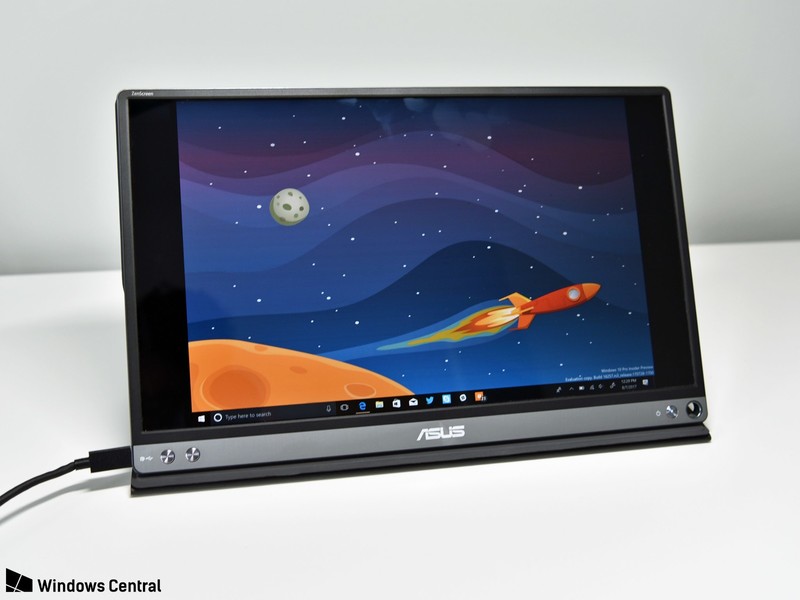
Alternatives to this include the Asus Zenscreen, which is effectively the same monitor inside a re-branded chassis. That screen has been reviewed by both Daniel Rubino and Mr. Mobile if you’re curious.
Asus has a newer model coming that has a built-in battery, so it won’t pull from your laptop all the time. This should also — in theory — connect it to older laptops with an HDMI or DisplayPort to USB-C cable, since you won’t need to worry about transmitting power.
Closing thoughts: a super useful accessory
A second laptop screen is the epitome of a first-world accessory: it’s not necessary, and for most people, it will be redundant. But, if you enjoy writing on the go and want some extra real estate, this will legitimately make you more productive in the same way a second desktop monitor would.
4.5
out of 5
This screen is $50 cheaper than the comparable Asus model, making it a win if you want to expand your mobile workstation. If you work on your laptop a lot and want an easy way to get more screen real estate, it’s hard to go wrong with this monitor.
See at Amazon
Security camera kits, Chromebooks, mechanical keyboards, and more are all discounted today
Whether you’re looking for new tech gear or household items, we’ve got you covered.
We found plenty of great deals today that include big discounts on the Blink XT home security camera system, GoPro’s 360-degree camera, an Acer Chromebook, and more! Time’s running out to take advantage of these prices, so hurry!
View the rest of the deals
If you want to know about the deals as soon as they are happening, you’ll want to follow Thrifter on Twitter, and sign up for the newsletter, because missing out on a great deal stinks!
Beyond Good and Evil 2 : Everything you need to know!
We’re all going to be Space Monkeys soon
During E3 2017 we got to see jetpacks, flying ships, hijacking, lightspeed travels, and a whole lot of explosions when Ubisoft announced they would be making a sequel to Beyond Good and Evil. Now, during E3 2018 they released another trailer for us to oogle over.
This is some pretty massive news considering we haven’t been able to play a new Beyond The Good and Evil since the release of the first game in November of 2003. What’s more exciting? It’s going to be a sequel to the original game, giving us a chance to continue the stories we stared before.
“Whatever can be common always has little value,” and Beyond Good and Evil 2 is going to be anything but common. Read on below for all the information we have on this upcoming title!
Open Universe and the Space Monkey Program

When I watched the gameplay video (shown below) I almost lost my mind when he zoomed out of the world and it just… kept going. It didn’t just stop at zooming out on the world around them, he straight up showed us the universe around that world. Even the timelapse of the game has the world actually rotating in space to change the entire dynamic of your visuals.
“System 3 has become the center of interstellar trade and colonization in the Milky Way due to the creation of “Hybrid Slaves”. While private enterprises fight over resources and power, the first colonists weave together the rich and diverse cultural heritage of “Old Earth” to give meaning to their existence. In this new era of piracy, players will rise from a lowly pirate to a legendary captain.”
These people look and feel real to the player, and that’s amazing. They each have their own style of clothes, culture, phrases, food, and accents based on the areas they were born and raised. It’s so refreshing to see so much diversity and that much more immersive to a space-futuristic based game.
Last year @Ubisoft announced that artists + fans around the world would get the chance to help make the game “Beyond Good and Evil 2” — and now, I’m so excited to announce everyone’s invited to create art + music for #BGE2 here: https://t.co/tUAsfrJOX7 #UbiE3 #E32018 pic.twitter.com/emTybaG9i5
— Joseph Gordon-Levitt (@hitRECordJoe) June 11, 2018
Right after the new E3 trailer was revealed Joseph Gordon-Levitt took the stage to explain to us that his production studio, HitRecord, was going to be teaming up with Beyond Good and Evil 2 to create an entire environment based on help from fans across the world. Environmental contributions include original content, art, music, and ideas for players to experience in the game. These live creative challenges give us all the power to shape the world we will be playing in.
I don’t know about you, but I’m absolutely stoked to see this already diverse universe have even more of an opportunity to expand. If you’re interested, check out the link below!
See more at HitRecord
Gameplay
In space, you run the risk of being hit with meteorites and the other very real dangers of space. So the cities are built in a “safe space” the other areas of the planet are under constant dangers of meteorites. It doesn’t stop there, either. While you’re out there exploring these planets you’ll see slaves collecting the precious materials from these meteorites drops. It hasn’t been disclosed of how much involvement you get to have with those, but I personally hope I have the option to wipe out some massive slave owner and free the people. It’s never been an arch I appreciated in games.
Character creation: This time around you won’t be playing as Jade. Instead, you’ll be able to customize your own character at the start of the game!
Jetpacks: From what we can see of the gameplay trailer it looks like you won’t be able to use the fast speed of your jetpack for very long. There is no “stamina” or fuel bar shown for this mechanic, but the flames from your jetpack do slowly turn red as you run out of momentum. One thing that is shown is the speed and level of speed you are flying in.
Taking pictures: An interesting mechanic they have brought to this game is the ability to take pictures. It hasn’t even been made clear if sharing these images to social media is something we could do yet, but they do serve for a purpose. After taking a picture of something in the game you can share it with other characters in the city to trigger discussions on what they are seeing.
Flying spaceships: When flying a ship you can do loops, increase speeds, quick dash out of the way of things, fly upside-down (or sideways) and even come to drifting stops. You can take these ships and go directly into space with them. So those planet rotations I mentioned earlier? You can experience them in real time. Plus, when you are in space they’ve added a mechanic of losing friction in the atmosphere – allowing you to hit even higher speeds.
Characters
Looks like we get a couple of familiar faces here. Peyj is back as the Chief Chef of the Gada and Jade is back… looking like she just got back from Hell. What happened to our photojournalist who was so full of life and fight? Other than that we see some other faces like Umma, the Chief Medic of the Gada who is apparently also pretty skilled in high-tech acupuncture. Then there’s Shani and Knox, a badass pilot who (judging from the trailer) is a skilled fighter for the Gada and a smart-mouthed monkey full of mischief and bad ideas.
Release date and pre-order options

Currently there is no information on a release date or where you can pre-order this game. Stay tuned as we’ll update this article as soon as we get any of that information for you!
What are you most excited about?
Tell me all your thoughts and opinions on the upcoming Beyond The Good and Evil 2 game below!
Review: Kingston’s Nucleum USB-C Hub Adds Much-Needed Ports to Your MacBook or MacBook Pro
With Apple’s decision to embrace USB-C on all of its modern Macs, the company has created a need for USB-C docks so that we can continue to use all of our non-USB C peripherals as we wait for the rest of the tech industry to catch up.
Kingston’s Nucleum USB Type-C Hub is designed to meet that need, offering a selection of useful ports for MacBook, MacBook Pro, and iMac owners who still need to use the USB-A, HDMI, SD, and microSD ports that are no longer available on recent machines.
The Nucleum USB-C Hub, made from a silver Aluminum to match Apple devices, is small enough that it can be tucked into a purse or a bag, or, in a pinch, a pocket. It’s narrower and shorter than an iPhone X, but a bit thicker, with a short built-in USB-C cord provided.
It’s a bit larger than palm-sized, but it’s still not going to take up much room during travel or when it’s in use on a desk. There’s a “Nucleum” logo on the top of the device, while the back features Kingston branding and necessary regulatory labels.

The left side of the dock features a USB-A port and a USB-C power delivery port so you can charge a MacBook or MacBook Pro while the hub is plugged in, and on the right side, there’s another USB-C port for USB-C accessories, a single USB-A port, a microSD card slot, and an SD card slot. At one end, there’s the aforementioned power cord, while the other end houses an HDMI port.
All in all, there are a total of seven ports available on the hub, which is not too bad for a device of this size. I don’t often need more than two USB-A ports at a time, so the two-port setup worked for me, and it’s nice to have access to both microSD and SD card slots for camera accessories.

This port arrangement is standard for many of the USB-C hubs that you’ll find on sites like Amazon, but I’ve found that many of those hubs don’t offer multiple USB-C ports. An extra USB-C port is surprisingly handy for my MacBook in particular (which has a single USB-C port) because I’ve found myself with more USB-C accessories as I transition from USB-A to USB-C.
If you have primarily USB-A accessories, you may find that the Kingston hub does not offer a sufficient number of USB-A ports. Competing (and more affordable) hubs on Amazon typically offer 3 to 4 USB-A ports, but again, Kingston has a nicer variety of ports available. Most dual USB-C hubs seem to have higher price tags.

You can use all of the hub’s ports at once if so desired, and when testing multiple accessories plugged in at once, I ran into no problems. The HDMI port supports a 4K monitor (or a 1080p monitor), while passthrough charging functionality means your attached iPhones will charge up while plugged into the hub. Kingston says the Nucleum offers 5V/1.5A, which is best suited to iPhones and similar accessories. iPads will charge, but slowly.
When using the power delivery USB-C port with your USB-C cable and power adapter for charging purposes, the hub is able to deliver up to 60W of power. That is sufficient for charging the 12-inch MacBook (29W) or the 13-inch MacBook Pro (61W) but it falls a bit short of the full capacity of the 15-inch MacBook Pro (87W).

Still, 60W is enough to keep a 15-inch MacBook Pro topped up provided you’re not doing something that’s super battery intensive like rendering video or playing a graphics-heavy game. During my workday, the 60W provided by the hub was enough to keep my 15-inch MacBook Pro at 100 percent using apps like Safari, Mail, Slack, Photoshop, Pixelmator, Chrome, Tweetbot, and more all at once.
I did notice that when I unplugged my USB-C power adapter from the Nucleum or when I plugged it in, that it would cause the hub to shut off for a second. That means that any hard drives or other accessories I have attached temporarily disconnect, so you’re going to want to be careful not to plug it into a power source or unplug it during file transfers.
As a side note, the Nucleum does not need to be plugged in to a power source other than the host computer for it to function. Using the passthrough charging feature is optional.
Transfer speeds were at what I’d expect for a USB-A device plugged into a USB-C hub. With a traditional Seagate Backup Plus hard drive, for example, it took about 20 seconds to transfer over 3GB of data. Speeds were a bit slower when I was utilizing all of the ports on the hub, but not unreasonably so. As a note, you can only connect USB-C and USB-A hard drives to the hub. If you have a Thunderbolt 3 drive, like I do, it is not compatible because the Nucleum does not support Thunderbolt 3.

Moving files from an SD card and a microSD card was also relatively speedy, with it taking about 25 seconds to copy over 1GB worth of photos from an SD card to my computer, and a little under a minute to copy them back from the MacBook Pro to the card. As someone with several cameras and a drone, having access to both microSD and SD card slots is invaluable.
Bottom Line
With Apple’s focus on USB-C and its decision to remove all legacy ports, the company has created a thriving third-party hub market, and it can be difficult to narrow down what’s good from what’s just mediocre.
Kingston’s Nucleum is in the former category, providing the ports you’re most likely to need in your day to day life in a slim, portable hub from a trusted manufacturer. Kingston’s hub is more expensive than some options you’ll find on Amazon, but reliability is often worth the extra money.
I appreciated the compact size of the Nucleum, which makes it ideal for travel, and the variety of ports that it provides was perfect for me. It offers all of the ports that I need on a daily basis (primarily USB-C, USB-A, and an SD card slot), and everything worked as expected with no surprises.
I do wish that it perhaps had one more USB-A port for people who still need to use several USB-A accessories, but I have no complaints about an extra USB-C port. I don’t need dual USB-C ports on my MacBook Pro, but for my 12-inch MacBook, dual ports is a valuable addition. While I used this with Macs, it’s also going to be compatible with Windows-based machines.
The one major thing to be aware of with the Nucleum that it disconnects when connected to or disconnected from a power source. It’s not a huge deal, but if you purchase this hub, make sure not to change its power settings during file transfers.
How to Buy
The Nucleum USB Type-C Hub can be purchased from the Kingston website or from Amazon.com for $80.
Note: Kingston provided MacRumors with a Nucleum USB-C Hub for the purpose of this review. No other compensation was received.
Tag: USB-C
Discuss this article in our forums
Microsoft Debuts Office 2019 Preview for Mac Enterprise Users
Microsoft today announced the launch of a new Office 2019 for Mac Preview, which is available starting today for its commercial customers.
Office 2019 for Mac, which includes new versions of Word, Excel, PowerPoint, Outlook, and OneNote, is the next perpetual update to Office for Mac and will ship alongside Office 2019 for Windows during the second half of 2018.
The new software is designed for customers who aren’t yet using Microsoft’s Office 365 subscription service and prefer instead to have access to perpetual non cloud based apps.
According to Microsoft, Office 2019 for Mac introduces a roaming pencil case and ribbon customizations across all Office apps, a new focus mode in Word, a focused inbox in Outlook, new charts and functions in Excel, and morph transitions, in-click sequence, and 4K video export in PowerPoint.
The update also includes features for IT designed to simplify deployment and management, such as command-line tools for centrally controlling how and when Office updates are provided to users and support for industry-standard MDM policies and preferences.
The new additions to Office 2019 for Mac are already included in the Office 365 ProPlus plan available to businesses, but are not available in Office for Mac 2016, the current perpetual Office version.
Microsoft has also prepared a website that lists all of the available features for the Office 2019 for Mac Preview.
Microsoft users interested in joining the Office 2019 for Mac Preview can do so by following the directions available on Microsoft’s support site.
Tags: Microsoft, Microsoft Office
Discuss this article in our forums
 AIVAnet