


Pokémon Go developer Niantic is opening up its AR development platform
Niantic’s technology is called the Real World Platform.
Niantic, the development team behind Pokémon Go, announced today that it’ll now allow third-party developers to use its AR technology that powers not only Pokémon Go, but Ingress and Harry Potter: Wizards Unite, too.

Niantic’s AR tech is called “Real World Platform”, and it uses a combo of computer vision, object recognition, and depth detection to create for those augmented reality experiences we’ve become so fond of.
If you’re a developer, you can now visit a new website Niantic’s created where you can apply to start using it. According to CEO John Hanke:
Because we are so excited about the opportunity in advanced AR, we want other people to be able to make use of the Niantic Real World Platform to build innovative experiences that connect the physical and the digital in ways that we haven’t yet imagined. We will be selecting a handful of third party developers to begin working with these tools later this year.
If this sounds familiar to something Google did earlier this year, that’s because it is. During this year’s Game Developer Conference, Google launched its Maps APIs for the Unity game engine to help developers create more accurate and immersive AR experiences.
In addition to the Real World Engine now open to use by other developers, Niantic also shed some light on features that’ll soon be available for it — such as shared AR multiplayer experiences, better blending of AR elements with the real world, and more.
Harry Potter: Wizards Unite for Android: Facts, rumors, and theories
Every Google Pixel 2 and Pixel 2 XL Case We Could Find

Looking for a case for your brand new Google Pixel 2 or Pixel 2 XL? We’ve got you covered!
There are so many reasons to get a case for your Google Pixel 2 or Pixel 2 XL. Whether you want the highest level of protection available to prevent damage to your new phone or the most transparent, thinnest case available to show off your new phone with pride, there are plenty of options out there.
So if you want a case for your Google Pixel 2 or Pixel 2 XL, we’ve compiled a massive list of all the cases we could find that are worth your while!
NOTE: Due to the large size of the list, we made the pictures smaller than usual; however, you can enlarge any image to full size by clicking or tapping on the image.
Thin Cases
Spigen Thin Fit

A thin polycarbonate back plate with a little cushion in the corners to help prevent damage if you drop your Pixel.
You can pick one up for about $12.
- See Thin Fit for Pixel 2 at Amazon
- See Thin Fit for Pixel 2 XL at Amazon
Maxboost mSnap series

A hard polycarbonate case that protects the back and sides of the Google Pixel 2 from scratches and scuffs.
Get the Maxboost mSnap series in black, pink, or mint for $20.
- See Maxboost mSnap for Pixel 2 at Amazon
- See Maxboost mSnap for Pixel 2 XL at Amazon
Vinve flexible case

Made from TPU, the Vinve flexible case will help prevent damage from drops. The textured back also provides extra grip.
You can pick one up in black or blue for about $8.
- See Vinve flexible case for Pixel 2 at at Amazon
- See Vinve flexible case for Pixel 2 XL at at Amazon
Peel case

The thinnest case you’ll find, it will almost look like you have no case on your phone at all.
You can pick it up in black, white, and kinda blue for $25.
- See Peel case for Pixel 2 at Peel
- See Peel case for Pixel 2 XL at Peel
MNML case

Only 0.35mm thick and made with a matte finish that won’t show fingerprints.
You can find the MNML case in gray, black, white, red, and blue for about $15.
- See the MNML case for Pixel 2 at Amazon
- See the MNML case for Pixel 2 XL at Amazon
Google Live Case

Pick from a wide selection of designs, places, and even stunning scenes from Google Earth.
You can even send Google your pictures to make a personal case for you; perfect for a gift. Starts at $40.
- See Google Live Cases for Pixel 2 at Google
- See Google Live Cases for Pixel 2 XL at Google
LK Slim Thin

For those who want a cheap clear case to keep your phone protected without obscuring the Pixel 2’s cool design.
You can pick up the LK Slim Thin case for just $8.
- See LK Slim Thin for Pixel 2 at Amazon
- See LK Slim Thin for Pixel 2 XL at Amazon
Incipio NGP Pure

A slim soft polymer case that provides a barrier between your Pixel 2 and the rest of the world.
You can pick one up in smoke, navy, plum, or clear for about $20.
- See Incipio NGP Pure for Pixel 2 at Incipio
- See Incipio NGP Pure for Pixel 2 XL at Incipio
totalle case

Plain and simple, the totalle case for your Pixel 2 and Pixel 2 XL will add a splash of color and a little grip to your phone, but absolutely no bulk. At only 0.02 inches thick, the totalle case won’t even feel like its there at all.
In fact, we liked the totallee case so much for its practically non-exsistant nature, thta we gave if a glowing review of 4.5 stars out of five.
You can pick up the totallee case for $20 in blue, black, white, grey, and more color options.
- See totallee case for Pixel 2
- See totallee case for Pixel 2 XL
Clear Cases
Spigen Liquid Crystal

This thin flexible TPU case will provide your Google Pixel 2 or 2 XL with more grip and has cushioning on the corner to help prevent damage from drops.
You can pick up the Spigen Liquid Crystal for $12.
- See Spigen Liquid Crystal for Pixel 2 at Spigen
- See Spigen Liquid Crystal for Pixel 2 XL at Amazon
Spigen Crystal Shell

Dual-layered protection consisting of both TPU and polycarbonate, the Spigen Crystal Shell offers protection while keeping the design of your Google Pixel 2 in clear sight.
You can pick up the Spigen Crystal Shell for $25.
- See Spigen Crystal Shell for Pixel 2 at Spigen
- See Spigen Crystal Shell for Pixel 2 XL at Spigen
Ringke Fusion

Ringke has their rugged clear case available for the Pixel 2. Made with a sturdy panel of polycarbonate on the back panel and an easy-grip TPU bumper, this case will keep your new device protected while also letting the Pixel 2’s design shine through.
You can pick up the Ringke Fusion for about $10.
- See Ringke Fusion for Pixel 2 at Amazon
- See Ringke Fusion for Pixel 2 XL at Amazon
Ringke Bevel

Just like the Ringke Fusion, the Bevel provides the same protection with a bevel design on the back to enhance grip and make your phone stand out. The case is still clear enough not to take away from the design of the Pixel 2.
Grab it for around $9.
- See Ringke Bevel for Pixel 2 at Amazon
- See Ringke Bevel for Pixel 2 XL at Amazon
Speck Presidio Clear

Dual-layered protection drop tested for eight feet. Thick cutouts for camera prevent scratches on the lens when lying on a flat surface.
The Speck Presidio Clear case will cost you $40 for the Pixel 2 and $45 for the larger Pixel 2 XL.
- See Speck Presidio Clear for Pixel 2 at Speck
- See Speck Presidio Clear for Pixel 2 XL at Speck
Trianium CLARIUM

Shock-absorbing TPU mixed with a hard polycarbonate back give the Trianium CLARIUM dual-layered protection to keep your phone safe.
You can pick up the Trianium CLARIUM for $8.
- See Trianium CLARIUM for Pixel 2 at Amazon
- See Trianium CLARIUM for Pixel 2 XL at Amazon
Incipio Reprieve Sport 2.0

Clear back to show off the Google Pixel 2’s style, textured sides to improve grip, and reinforced corners to prevent damage from dropping. For $40, the Incipio Reprieve Sport 2.0 has a little something for everyone.
- See Incipio Reprieve Sport 2.0 for Pixel 2 at Incipio
- See Incipio Reprieve Sport 2.0 for Pixel 2 XL at Incipio
Rugged cases
Caseology Vault Series

Made of flexible TPU, it features a sleek finish along the back and textured grip around the edges.
You can pick up the Caseology Vault Series for around $11.
Note: This case is only available for the Pixel 2 XL.
- See Caseology Vault Series for Pixel 2 XL at Amazon
Otterbox Symmetry series

Otterbox’s Symmetry series offers the classic protection you expect from the company in a slimmer profile. The one-piece design is thick enough to prevent damage from drop and scratches, and the raised edges help protect your Pixel 2 when lying on a flat surface.
- See Otterbox Symmetry series for Pixel 2 at Otterbox
- See Otterbox Symmetry series for Pixel 2 XL at Otterbox
CrashGuard Bumper Case by RhinoShield

RhinoShield’s CrashGuard Bumper Case is a great way to protect your phone without adding a ton of bulk. Protects the edges of your phone with lots of cusion on the corner, which prevents damage when your Pixel 2 takes a tumble.
You can pick up CrashGuard Bumper Case by RhinoShield for $25.
- See CrashGuard Bumper Case for Pixel 2 at RhinoShield
- See CrashGuard Bumper Case for Pixel 2 XL at RhinoShield
Spigen Rugged Armor

Single layer TPU with rasied edges to protect screen and camera while lying on a flat surface. Plus, the corner of the case are extra protected to help prevent damage from drops.
You can pick up the Spigen Ruged Armor for $13.
- See Rugged Armor for Pixel 2 at Amazon
- See Rugged Armor for Pixel 2 XL at Amazon
Spigen Neo Hybrid

A TPU sleeve and a hard polycarbonate bumper make up Spigen’s New Hybrid case offering adequate protection with a sense of style. The way the bumper is designed it sit completely flush with the rest of the case, make the Neo Hybrid feel good when you’re holding your phone.
You can pick up the Neo Hybrid for $16.
- See Neo Hybrid for Pixel 2 at Amazon
- See Neo Hybrid for Pixel 2 XL at Amazon
DGtle shockproof case

Made from a single layer of TPU, the DGtle shockproof case has lots of extra protection around the corners to help prevent damage when the phone is dropped on a corner.
Available in a wide variety of colors, such as blue, pink, and smoke black for $8.
- See DGtle shockproof case for Pixel 2 at Amazon
- See DGtle shockproof case for Pixel 2 XL at Amazon
UAG Plasma series

This translucent rugged case features a two-tone single piece design that cover the back and sides of the Google Pixel 2 and meet military drop test standards.
You can pick up the UAG Plasma series in ice or ask color option for about $40.
- See UAG Plasma series for Pixel 2 XL at UAG
- See UAG Plasma series for Pixel 2 XL at UAG
Suensan protective case

A single TPU layer that covers the back and side of the Google Pixel 2 with raised bezels to protect the camera and screen on flat surfaces.
You can pick on up in mint green, black, blue, gray, and red for $9.
- See Suensan protective case for Pixel 2 at Amazon
- See Suensan protective case for Pixel 2 XL at Amazon
Heavy Duty
ATUS Anti-Slip Slim Fit

Heavy duty protection in a slim profile, the ATUS Anti-Slip Slim Fit has dua-layered protection to keep your Pixel 2 safe and sound, while keeping the profile of your phone slimmer than most heavy-duty cases out there.
The ATUS Anti-Slip Slim Fit is only avaiable for the Pixel 2. You can pick one up in black, pink, or teal for about $9.
- See ATUS Anti-Slip Slim Fit for Pixel 2 at Amazon
Caseology Parallax series

The Caseology Parallax Series offers a slim, two-piece design to keep your Pixel 2 well-protected.
It’s available in a wide variety of colors such as black, burgundy, navy blue, and ocean gray. You can pick on up for about $15.
Note: This case is only available for the Google Pixel 2 XL.
- See Caseology Parallax series for Pixel 2 XL at Amazon
Caseology Legion Series

The Caseology Legion Series offers the same dual-layered protection as its Parallax series; however, the Legion series focuses on protecting the back of the phone a lot more.
You can grab it for $18.
Note: This case is only available for the Pixel 2 XL.
- See Caseology Legion Series for Pixel 2 XL at Amazon
Spigen Tough Armor

A personal favorite of mine, Spigen Tough Armor offers robust dual-layered protection with TPU and hard polycarbonate materials. The metal kickstand is perfect for watching videos and other media while your hands are other wise preoccupied.
You can pick up the Spigen Tough Armor in black or gunmetal for $35.
- See Spigen Tough Armor for Pixel 2 at Spigen
- See Spigen Tough Armor for Pixel 2 XL at Spigen
Spigen Slim Armor

Just like Spigen’s Tough Armor, the Slim Armor case uses TPU and hard polycarbonate materials for dual-layered protection, but comes in a slimmer package.
You can pick up the Spigen Slim Armor in black or gunmetal for $30.
- See Spigen Slim Armor for Pixel 2 at Spigen
- See Spigen Slim Armor for Pixel 2 XL at Spigen
Otterbox Defender series

The ultimate name in protection, Otterbox’s Defender series is the Mack Daddy of all protective cases. With four different layers, your Pixel 2 or Pixel 2 XL will be as safe as it possibly can be.
The Otterbox Defender series will cost you $50 or $60 for the Pixel 2 and the Pixel 2 XL respectively.
- See Otterbox Defender series for Pixel 2 at Otterbox
- See Otterbox Defender series for Pixel 2 XL at Otterbox
Leather Cases
Bellroy Leather case

Made using premium leather and featuring a soft microfiber lining this is a lightweight case that will keep your phone well protected and age beautifully over time. It’s also backed by a 3-year warranty from Bellroy.
You can pick up the Bellroy Leather case from the Google Store for $45 with free shipping!
- See Bellroy Leather case for Pixel 2 at Google
- See Bellroy Leather case for Pixel 2 XL at Google
Wallet cases
ProCase Leather Wallet

This beautiful leather case has three cards slots and closes with a magnetic clip. Plus, it even can be used as a kickstand for media viewing.
You can pick up the ProCase Leather wallet for about $30 in black, tan, or red.
- See ProCase Leather Wallet for Pixel 2 at Amazon
- See ProCase Leather Wallet for Pixel 2 XL at Amazon
Case Mate Wallet Folio

Made from real leather, the Case Mate Wallet Folio has four card slots and even a pocket to put your cash. Leaving your wallet at home has never been easier.
You can pick one up for $60.
- See Case Mate Wallet Folio for Pixel 2 at Case Mate
- See Case Mate Wallet Folio for Pixel 2 XL at Case Mate
JD wallet case

Made from a faux leather material, the JD wallet case has plenty of room for cards and cash. The case even comes with a built in RFID blocker, meaning your credit card numbers should be safe.
The JD wallet case comes in black, blue, pink, and brown for about $16.
- See JD wallet case for Pixel 2 at Amazon
- See JD wallet case for Pixel 2 XL at Amazon
Trianium wallet case

A hard protective shell with a card slot that card hold ID, credit cards, and cash, the Trianium wallet case offers protection and functionality.
You can pick up a Trianium wallet case for $10.
Note This case is only available for the Pixel 2 XL.
- See Trianium wallet case for Pixel 2 XL at Amazon
Maxboost wallet case

With three cards slots and a place to store your cash, the Maxboost wallet case has a magenetic lock to keep the wallet case firmly closed when not in use.
Grab the Maxboost wallet case for only $13.
- See Maxboost wallet case for Pixel 2 at Amazon
- See Maxboost wallet case for Pixel 2 XL at Amazon
LK wallet case

With a TPU inner skin, the LK wallet case offers mild protection against damage when your Pixel 2 takes a fall. With three card slots, and a place to put your cash, you can venture out into the world with your normal bulky wallet with ease.
The LK wallet case comes in black, brown, purple, and rose gold and will cost you about $10.
- See LK wallet case for Pixel 2 at Amazon
- See LK wallet case for Pixel 2 XL at Amazon
Other types of cases
Moment Photo case

Another personal favorite of mine, the Moment Photo case is designed to work with the wide-variety of Moment lenes. If you want a beautiful looking case that will up you photography game, check it out.
You can pick one up with a walnut finish for only $30.
- See Moment Photo case for Pixel 2 at Moment
- See Moment Photo case for Pixel 2 XL at Moment
Google Fabric case

If you prefer your phone case to have some texture for grip, you’re probably going to love the Google Fabric Case. It features the same fabric finish look found on other recent Google products such as the Google Home Mini.
These cases offer a premium microfiber liner to ensure your device stays scuff-free and your choice of four color combinations for $40.
- See Google Fabric case for Pixel 2 at Google
- See Google Fabric case for Pixel 2 XL at Google
Carved Wooden Cases

With dozens of unique designs and plenty of wood grains and colors to choose from, Carved wooden cases are absolutely gorgeous.
The Carvedwooden cases range from $24 — $40.
- See Carved wooden cases for Pixel 2 at Carved
- See Carved wooden cases for Pixel 2 XL at Carved
What case did you go with for your Pixel 2 or Pixel 2 XL?
Let us know in the comment below!
Updated June 2018: Added the fantastic totallee case for fans of really thin cases!
Google Pixel 2 and Pixel 2 XL
- Pixel 2 FAQ: Everything you need to know!
- Google Pixel 2 and 2 XL review: The new standard
- Google Pixel 2 specs
- Google Pixel 2 vs. Pixel 2 XL: What’s the difference?
- Join our Pixel 2 forums
Best Buy
Verizon
Google Store
Project Fi
How to play Beat Saber on Oculus Go

ALVR allows you to play a one-handed version of Beat Saber.
Oculus Go is a standalone wireless VR headset that natively allows you to enjoy some quality mobile Oculus experiences. Coupled with Air Light VR (ALVR), a free piece of open-source software, you can actually stream SteamVR games normally reserved for PC-based headsets to the Oculus Go.
While a lot of those SteamVR experiences won’t work properly, Beat Saber seems to now fall under the category of “partially working.” You still don’t have six degrees of freedom (6DoF) or two motion controllers, but you can certainly get a feel for the game. If you’ve been dying to try Beat Saber in any capacity whatsoever, you’re in luck. Here’s how to get Beat Saber mostly working with Oculus Go.
See Oculus Go at Amazon
How to install and set up ALVR

Before anything else, you want to ensure that you can get ALVR working on your PC. I’ve already written an extensive guide with step-by-step instructions, as well as a short list of what’s required when it comes to hardware.
Check out this guide first, and if all works properly, you can proceed with getting Beat Saber properly set up.
How to play SteamVR games on Oculus Go
How to play Beat Saber on Oculus Go

Now that ALVR is set up and ready to rock, all you have to do is launch Beat Saber through Steam. However, there are a few things that you need to know about running Beat Saber properly.
1. Opt out of the SteamVR beta
If you’re part of the SteamVR beta, be sure to opt out before continuing. In my experience, the beta didn’t allow my to use the Oculus Go motion controller.
How to enroll in the SteamVR beta
2. Ensure you’re using version 2.1.5 of ALVR
It’s uncertain whether future versions of ALVR will continue to support Beat Saber, but for now, this version is tested and true.
3. Select “No Fail” from the Beat Saber menu
If you don’t select the “No Fail” option within the game, you will quickly lose. It’s impossible to duck out of the way of obstacles, and because the controller is essentially stuck in place, you won’t be able to hit all blocks.
4. Select “One Saber” from the Beat Saber menu
Before starting a game, be sure to choose the single saber option. This one’s a no-brainer, as you only have the one Go motion controller.
What to expect from Beat Saber on Oculus Go
YouTuber RaMarcus created this video to show what we can expect from Beat Saber on Oculus Go. Props to him for discovering that this now works.
Considering this unholy union was never meant to happen, Beat Saber on Oculus Go can be a good bit of fun. As long as you don’t go into this experiment expecting an experience on par with a true PC-based system, you’ll do alright.
As we wait and hope that Beat Saber one day comes to Oculus Go in a true sense, you can right now give it a good shot with one saber. You can’t really duck obstacles, and moving side to side can even be a bit sketchy, so the “No Fail” option is still a must.
My recommendation? Definitely give this a try if you already own an Oculus Go and don’t mind a bit of PC tinkering, but I’m not sure at this point in time it’s worth buying the hardware just for this experience, no matter how awesome Beat Saber is.
More resources
- Best VR games similar to Beat Saber
- 8 Beat Saber tips and tricks to excel in Expert mode
Oculus Go

- A parent’s guide to Oculus Go
- Oculus Go vs. Lenovo Mirage Solo
- Best Gamepad for Oculus Go
- Best Battery Backup for Oculus Go
Oculus Go 32GB
Oculus Go 64GB
Motorola promises to change the way we use our phones on August 2
Maybe this is where we’ll get the Moto Z3?
Even though the Moto Z3 Play was just announced earlier this month, Motorola already has something else in store for us to check out.
The company just released a teaser video on YouTube highlighting a press event that’ll take place on August 2 at 2:00 PM at its headquarters in Chicago. For the video’s description, it reads:
Mark your calendar. On August 2, we’re making a big announcement at Motorola’s HQ in Chicago. Say “hello” to a whole new way to connect, stream, download, video chat, and more. Are you ready?
Motorola doesn’t give any indication as to what the announcement will be, but the two most likely candidates are the Moto Z3 and Motorola One Power. These two phones have leaked rather substantially, and while the Motorola One Power came up out of nowhere this year, an August 2 reveal for the Z3 lines up with the Z2 Force that was announced in late July last year.
What are you hoping to see from Motorola in a little over a month?
These are all the Moto phones Motorola is releasing in 2018
BlackBerry KEY2 vs. BlackBerry KEYone: Should you upgrade?

The price you pay for loving KEY.
The BlackBerry KEY2 didn’t have to overdeliver — it just had to deliver. Instead, BlackBerry Mobile listened to the complaints leveled against the first-generation KEYone and managed to address nearly every one of them. There’s something to be said about that.
The KEY2’s improvements are subtle but significant, and are uniformly applied — there isn’t a single area of the phone that hasn’t been affected in some way. At the same time, it’s very much the physical and spiritual successor to the KEYone, and will likely attract a similarly-sized audience; when BlackBerry Mobile says it intends to grow the keyboard phone market with the KEY2, it’s through evolution, not revolution.

KEY2 vs. KEYone What’s the same?
The KEY2 maintains the original’s 4.5-inch 1620×1080 pixel IPS display — and I’m not talking the same specs, I’m talking about the same exact display — which limits the phone to letterboxing while watching wide-angle content in landscape.
But that’s part of the value proposition of a phone like this: it does things differently. BlackBerry Mobile says that no one, including its most hardcore fan base, complained about the screen, and lengthening it to 16:9, or trying to reduce bezel size, would have been problematic for both aesthetics and usability.
Some of the things that stayed the same were good. The capacitive buttons weren’t.
What also hasn’t changed over last year is the implementation of capacitive buttons. Again, BlackBerry doubled down on a set of conventions and stuck to them, saying that virtual keys would have forced them to rethink the display or chassis size, and it wanted the phone to be evenly weighted.
The use of capacitive keys isn’t fundamentally problematic since Google isn’t going to enforce a navigation change to gestures when upgrading to Android P, but it does somewhat limit the KEY2’s upgradeability.
Both the KEYone and KEY2 share a textured back, making the phone easy to grip, and both sport headphone jacks, single downward-facing speakers, and USB-C fast charging.

| Operating System | Android 8.1 Oreo | Android 7.1 Nougat |
| Display | 4.5-inch, 1620×1080 IPS LCD434 ppi | 4.5-inch, 1620x1080IPS LCD434 ppi |
| Processor | Qualcomm Snapdragon 6604x Kryo 2.2GHz, 4x Kryo 1.8GHzAdreno 512 GPU | Qualcomm Snapdragon 625Octa-core 2GHzAdreno 506 GPU |
| RAM | 6GB | 3GB |
| Storage | 64GB / 128GB | 32GB |
| Expandable | microSD up to 2TB | microSD up to 2TB |
| Rear Camera 1 | 12MP (1.3 micron) ƒ/1.8 laser+phase autofocusdual-tone LED flash | 12MP (1.55 micron) ƒ/2phase autofocusdual-tone LED flash |
| Rear Camera 2 | 12MP (1 micron) ƒ/2.6 2x optical zoom portrait mode | n/a |
| Video | 4K @ 30fps, 1080p @ 60fps HDR | 4K @ 30fps, 1080p @ 60fpsHDR |
| Front Camera | 8MP Selfie flash1080p/30 video | 8MPSelfie flash1080p/30 video |
| Battery | 3500 mAh Non-removable | 3505 mAhNon-removable |
| Charging | Quick Charge 3.0 USB-C | Quick Charge 3.0USB-C |
| Water resistance | No | No |
| Headphone jack | Yes | Yes |
| Security | Front-facing fingerprint sensor (in keyboard) DTEK security suiteFIPS 140-2 Full Disk EncryptionAndroid For Work, Google Play for Work | Front-facing fingerprint sensor (in keyboard) DTEK security suiteFIPS 140-2 Full Disk EncryptionAndroid For Work, Google Play for Work |
| Connectivity | Wi-Fi 802.11 ac, 5GHz, Bluetooth 5 + LE, NFCGPS, GLONASS | Wi-Fi 802.11 ac, 5GHz, Bluetooth 4.2 LE, NFCGPS, GLONASS |
| Network (NA GSM) | LTE Band 1/2/3/4/5/7/8/12/13/14/17/20/28/29/30/66 TD-LTE Band 38/39/40/41 | LTE Band 1/2/3/4/5/7/8/12/13/17/19/20/28/29/30 TD-LTE Band 38/39/40/41 |
| Dimensions | 151.4 x 71.8 x 8.5 mm | 149.1 x 72.39 x 9.4 mm |
| Weight | 168 | 180g |
Both phones have roughly the same sized battery, too — 3,500mAh on the KEY2 and 3,505mAh on the KEYone — which should translate into more than a full day on both phones. We’ve already recounted the epic longevity of the original KEYone, with its battery-sipping Snapdragon 625 platform, and in our tests, the KEY2 performs just as well, if not better.
BlackBerry KEY2 specs

KEY2 vs. KEYone What’s different?
Despite sharing much of the same core design, the BlackBerry KEY2 changes up a significant amount, both internally and externally, from the size of the keys on the eponymous keyboard to the heftier components that adorn the specifications sheet.
For starters, the Snapdragon 660 that powers the phone is more than double the speed, both in single- and multi-core tests, of the KEYone’s Snapdragon 625. That phone was notorious for unwelcome slowdowns and stutters, and despite a fairly good reputation with other phones, the Snapdragon 625 is aging itself out these days.
The processor in the KEY2 is more than twice as fast as the KEYone, and it’s going to be a big deal for performance.
Conversely, the S660 is newer, faster, and better-equipped to handle the considerable multitasking allotment that KEY2 owners are going to ask of the phone. In day-to-day use, the KEY2’s performance is much more consistent than the KEYone’s, and though I experienced a bit of slowdown, it wasn’t enough to adversely affect my enjoyment of the phone.
BlackBerry KEY2 review: Just my type
Add to that the 6GB of RAM that comes standard in the KEY2 — double that of most KEYone models — and the newer phone has the potential to rival many flagships for overall peppiness. (It also does somewhat justify the $100 price bump over the original.)
The faster processor and RAM also support the new camera system. To accommodate a second camera — a 12MP sensor with an f/2.6 lens at twice the focal length of the main one — BlackBerry Mobile had to change out the primary sensor for a smaller one than was in the KEYone.
That particular camera, though not best-in-class by any means, boasted the same module as the first Google Pixel, which had the best camera of 2016. The sensor, a Sony IMX368, boasts 1.55-micron pixels, which affords better low-light photography, has been replaced by one of identical resolution Samsung ISOCELL module (the same one that was in the international Galaxy S8), with smaller 1.28-micron pixels. On paper, that’s not a huge difference, but the KEY2’s low light performance is considerably worse than the KEYone’s, and somewhat counteracts its excellent daylight performance.
Of course, having a second sensor means the KEY2 can perform tricks the KEYone couldn’t dream of, like portrait mode and, more useful, telephotography. The rear camera also boasts the ability to capture 1080p video footage at 60fps, an ability earned by the more powerful Snapdragon 660 processor.
There’s something to be said for subtle improvements, like the size of the keyboard buttons.
The KEY2’s design is considerably more modern-looking than the KEYone’s, with angular brushed aluminum sides, a front boasting more integrated sensors, and less frustrating button placement, with the power button now located on the phone’s right side nestled between the volume rocker and Convenience Key.
Looking at the two side-by-side reveals a number of small tweaks, too: the phone is ever-so-slightly taller and narrower, making it easier to paw one-handed, and it’s around 8% lighter, too.
The keyboard keys, now matte instead of glossy, are 20% taller than those in last year’s phone. The keys’ size, and improved clickiness, are among the most important upgrades to the KEY2, and they’re really good. In fact, this is the best BlackBerry keyboard I’ve ever used.
The newer phone also sports a Speed Key, which operates as a de facto shortcut key to anything the phone can do. It’s located where the right-side Shift button is on the KEYone, and I can’t say I’m going to miss the old design much.
KEY2 vs. KEYone Should you upgrade?
The KEY2 costs $649 USD and $829 CAD, and will be released in Canada on July 6 and the U.S. on July 13. It’s $100 more than the KEYone, which is a bummer, but there’s a lot of value here. Given the slow creep of phone costs in general, some price bump was expected, but $100 seems pretty sizeable. At the same time, the internal specs align much more with flagships we’re seeing from Samsung, Huawei, LG, and others, and BlackBerry Mobile understands its demographic well enough to know that those willing to spend $550 on a KEYone will easily spend $650 on its successor. I mean, the Pixel 2 costs $650, as well.
Whether that successor is worth upgrading to, though, is not my decision to make. While we still don’t know whether the KEY2 will be sold directly at U.S. carriers, the version that’s coming supports both AT&T and T-Mobile; it doesn’t seem like BlackBerry will be releasing a CDMA-compatible model at the moment. (There is a Verizon/Sprint-compatible KEYone, if you’re interested in picking one up at a discount.)
If you love BlackBerry phones and were holding off buying a KEYone, the KEY2 will sate your hunger for a keyboard phone running Android. If you have a KEYone, you should probably wait until the company rolls out Android Oreo before deciding whether the KEY2 is a worthy upgrade, since there will be some inevitable software improvements coming to the older model. If you’re in the larger camp that’s loudly scoffed at BlackBerry’s return — are you hate-reading this? — the KEY2 may not convince you to change your mind, but picking one up will offer a much better first impression either way.
See at BlackBerry Mobile
BlackBerry KEY2
- BlackBerry KEY2 review
- BlackBerry KEY2: Everything you need to know!
- BlackBerry KEY2 specs
- BlackBerry KEYone review: Coming home
- Join our BlackBerry KEY2 forums!
BlackBerry
Everything you need to know about the RAMpage security exploit

The RAMpage exploit has the potential to give a bad app complete control of your phone. Should you be worried?
The latest security exploit to affect millions of devices is called RAMpage. It’s a variation of previous attacks that use the Rowhammer hardware vulnerability to run malicious code by changing what’s stored into your device’s memory (RAM) and has the potential of data loss and to allow unauthorized access. In other words, someone using RAMpage could get into your phone and have control.
Scary headlines that say “Every Android device since 2012” are effective in getting the word out, but they leave plenty of questions. We can answer some of those in language everyone can understand.
What is Rowhammer?
You need to start here to understand how this exploit works. Rowhammer is a term used to describe a hardware issue that affects computer RAM. It’s not technically an exploit and happens because of the laws of physics.
Modern RAM chips are packed so densely that electricity can “leak” from one part and affect another.
DDR2 and newer RAM is packed so densely that you can electrically manipulate one area of RAM and it will affect another through electrical crosstalk or something like transistor leakage — where one component radiates more stray electricity that its neighbors can handle. Theoretically, this can affect any silicon-based computer hardware like video cards or CPUs.
An attack that exploits the Rowhammer effect could do what’s called “bit flipping” and turn a single bit in RAM from one state to the other — turn it on or off, depending on how it was set before the attack. If the right bit was flipped, an attacker could change permissions for their app and give it complete control of your phone.
RAMpage attacks ION on Android devices. What is ION?
There are a lot of ways to initiate a Rowhammer attack. There are even examples (now patched by most every company that needs to make patches) using network packets or Javascript, which means it could happen just by visiting a webpage. RAMpage uses the ION subsystem to initiate the attack.
ION lets apps talk to the system about how much RAM they need while they are running, then makes it happen in a safe and universal way.
ION is a universal generic memory management system that Google added to the Android kernel in Ice Cream Sandwich. You need a subsystem to manage and allocate memory because a program could need 10 bits (for example) of memory used but “standard” ways for allocating memory mean 16 bits would be used. That’s how most computers count — they go from 0 to 4 to 8 to 16 to 32 and so on. If every running process reserved more memory than it needed you would have a lot of empty memory that thinks it needs to be used.
Companies that make smartphone chips, like Qualcomm or Samsung, all had their own memory allocation tool. In order to allow Android to use the “regular” (mainline) Linux kernel source, Google added ION to the Android kernel so all manufacturers could switch to using it and the system would be more universal. And they did.
How does RAMpage work?
RAMpage attacks the ION subsystem and causes it to frantically write and refresh a row of bits in the physical memory in the hopes that it will eventually flip a bit in the adjacent row. This can potentially allow for one application to gain access to another application’s data, or even allow that application to act as the system administrator and have full control.
RAMpage breaks the most fundamental isolation between user applications and the operating system. While apps are typically not permitted to read data from other apps, a malicious program can craft a RAMpage exploit to get administrative control and get hold of secrets stored in the device.
You would need to install a malicious app that uses the RAMpage attack, and since this was made public Google Play and Amazon’s App Store won’t allow any to be uploaded. You would have to get the application through other means and sideload it.
The researchers who introduced us to RAMpage have an app to test vulnerability as well as a security app to prevent the attack. You can find both here.
Does this affect Windows or Apple products?
Maybe. The researchers themselves aren’t very clear on the issue but claim that RAMpage could affect iOS, macOS, Windows PCs, and even cloud servers.
We will have to wait for additional findings to know for sure.
Should I be worried?
Every Android device made since 2012 (every phone that shipped with Ice Cream Sandwich or later) uses the ION subsystem and has DDR2, DDR3, or DDR4 RAM and is potentially vulnerable. This means you should definitely know about RAMpage and other Rowhammer attacks.
Flipping the right bit has a 1-in-32 billion chance of happening on most Android phones — some have even higher odds.
But using a Rowhammer attack to do a specific thing isn’t possible. It’s simple enough to attack one row of bits in a RAM module until a bit in an adjacent row flips, but it’s nearly impossible to know what is written to that adjacent row. Software like Android or iOS has protections built in that ensures there is no specific place in memory any task needs to be written to, and the whole thing is random.
An attacker can’t know what bit is going to be flipped or what it will do. That means it’s like a game of roulette with a wheel that has 32 billion slots for the ball to fall in. Random luck exists, but these odds are extremely low.
You should be aware of RAMpage, but there is no need to be worried that anything will happen to you. Continue to use common sense and only install apps that come from a place you trust (sticking to Google Play is a fine idea) and carry on as normal.
Bluetooth speakers, 32-inch monitors, Beats headphones, and more are all discounted today
Whether you’re looking for new tech gear or household items, we’ve got you covered.
We found plenty of great deals today that include big discounts on Sony’s portable Bluetooth speaker, Dell’s 31.5-inch monitor, the Withings smart watch and fitness tracker, and more! Time’s running out to take advantage of these prices, so hurry!
View the rest of the deals
If you want to know about the deals as soon as they are happening, you’ll want to follow Thrifter on Twitter, and sign up for the newsletter, because missing out on a great deal stinks!
Show your love of Canada this holiday weekend with our Heart Canada home screen theme

Canada is America’s chill big brother, and it deserves to be celebrated.
There’s a lot to love about Canada. You’ve got good healthcare — and with all that poutine and you’ve got all that maple syrup, you certainly need it — you’re going to have nationwide cannabis legalization this October, you’ve got Justin Trudeau, and the biggest chance of a riot in Canada seems to be a hockey match. If it weren’t for those winters and how much more expensive technological gadgetry seems to be up there, I’d be all over it!
It’s a lovely country full of lovely people and lovely locales, so doesn’t it deserve a lovely home screen theme to celebrate Canada Day? Last year we made two glorious Canada Day Themes for the occasion, but this year, we’ve used KWGT to take our Heart Canada theme to the next level!

Today’s theme has been assembled in Smart Launcher 5 to take advantage of the Icon Pack Studio integration and the gridless widget-placement system, but it can be easily applied to most customizable launchers like Nova Launcher and Action Launcher.
Applying a breathtaking Canada wallpaper
Canada Circle Icons in Icon Pack Studio
- Importing CanadaCircle Icons
- Applying CanadaCircle Icons to Smart Launcher
- Applying CanadaCircle Icons to other launchers
Heart Canada Preset in KWGT
- Importing Heart Canada Preset in KWGT
- Adjusting your Heart Canada widget
Applying a breathtaking Canada wallpaper
This theme is a bit unique in that you can use just about any Canada wallpaper behind the Heart Canada widget and stencil icons, but as I was aiming to recapture as much of the magic from last year’s Canada Heart theme, I found a breathtaking wallpaper of Moraine Lake, which is one of the most photographed and beloved Canadian sights on Reddit’s /r/EarthPorn community, but there’s plenty of other cool Canadian wallpaper options if you’re looking for something different.
Long-press an empty space on your home screen until a menu appears.
Tap Wallpaper.
Tap Other images.
Tap Photos.


Navigate to and tap your downloaded Canada wallpaper.
Adjust the wallpaper left or right if desired and tap Set Wallpaper.
Tap Home screen and lock screen.


Canada Circle Icons in Icon Pack Studio

With your wallpaper picked and applied, it’s time to get our Canada on, and that starts with custom red stencil icons made in Icon Pack Studio. If you’ve never heard of Icon Pack Studio, they’re a nifty little make-your-own icon app that will let you kiss gaps in your app drawer goodbye.
I’ve already built the pack, so all you have to do is import this CanadaCircle Icons Preset and apply it.
Importing the CanadaCircle Icons pack in Icon Pack Studio
Open Icon Pack Studio.
Tap Let’s start.
Tap Next five times to skip through the initial icon pack building process. Note: please come back later and play with Icon Pack Studio to see if it could fit another theme of yours down the road.


Tap Save to exit the initial icon pack building process.
Tap the three-dot menu in the top right corner of the screen.


Tap Import Iconpack.
Navigate to and tap the CanadaCircle Icons file you downloaded.


The pack will be added to your Icon Pack Studio library. Now we need to apply them, and that process varies slightly depending on if you’re using Smart Launcher 5 — which Icon Pack Studio was made to accompany — or another launcher with icon pack support.
Applying CanadaCircle Icons to Smart Launcher 5
Tap the three-dot menu below the CanadaCircle Icons pack.
Tap Apply.
Tap Home Screen and App Grid to apply the icons to both your home screen and app drawer.
Tap OK.


You can go back to the home screen to witness the applied pack.
Applying CanadaCircle Icons to other launchers
Tap the three-dot menu below the CanadaCircle Icons pack.
Tap Export.
Icon Pack Studio is meant for personal use, not for commercial profit. Tap I agree to acknowledge that you’re just using this pack for yourself.


Once the pack is exported in a handy app installer package and is ready to install, a notification will appear on your phone. Tap to install.
You need to allow Icon Pack Studio to install the exported icon pack as a separate app so tap Settings.
Tap Allow from this source. On older versions of Android, you will instead be tapping Allow unknown sources.


Tap the back button to return to the install screen.
Tap Install.
Once the app is installed, tap Open.


Tap Apply.
Tap your desired launcher in the popup launcher menu.
Tap OK or Apply depending on your launcher.


Your icons will now be applied to your chosen launcher.
Heart Canada Preset in KWGT

Let’s get down to the main event: the Heart Canada widget. This multi-section Kustom widget — KWGT for short — features an easily glanceable information widget in the top right corner, a Canadian-colored music widget that can work with just about any music app on Android including the YouTube Music service that recently came to Canada, and a bold central Heart Canada logo. The Heart Canada icon itself is a monochromatic vector recreation of the logo from last year’s Canada Heart wallpaper, because I loved that logo but wanted a theme that was higher resolution and usable with other wallpapers.
Get to know KWGT, an essential tool for Android themers and widget lovers
Importing Heart Canada Preset in KWGT
Before we get started, you will need to download both KWGT and KWGT Pro Key, which is required for importing presets like our Heart Canada Preset. Once you download the Heart Canada Preset, use a file manager app to copy it to Internal Memory/Kustom/widgets. If you haven’t opened Kustom before, you might have to make the Kustom folder or widgets subfolder. Once the preset file is saved in Kustom/Widgets, importing it is a snap.
Long-press an empty space on your home screen until a menu appears.
Tap the plus icon next to the lock icon.
Tap Widget.


Scroll down the widget list and tap Kustom.
Tap KWGT 4×4.
Tap the widget to configure it.
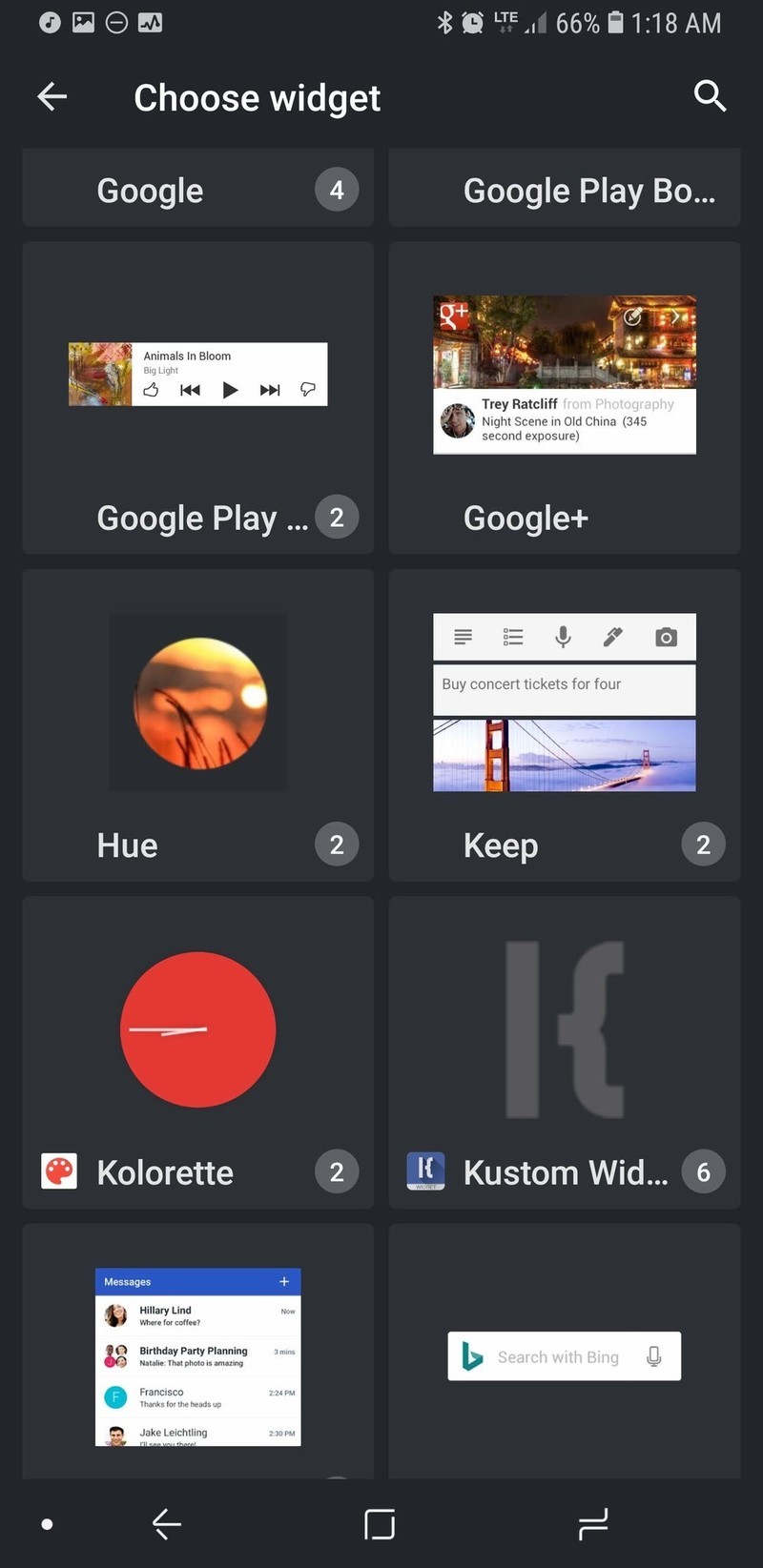


In the Exported tab, tap Heart Canada Preset.
The preset will load. Tap the floppy disc icon in the top right bar of the screen to Save the widget.
If you haven’t previously given KWGT Notification Access, Tap Fix. We need notification access for the widget to pull in music information and controls from your music app’s notification.


Tap Kustom Notifications to grant it Notification access.
Tap Allow.
Tap the back button.


Tap the floppy disc icon in the top right bar of the screen to Save the widget.
Tap the home button to see the applied widget.


Adjusting your Heart Canada widget
- Want to make the whole widget bigger or smaller in relation to your widget box? Tap Layer and adjust the Scale up to down to your liking. Depending on the widget of your screen, you may want to do this for the music widget to better fit across the bottom of your widget.
- Want to reposition the sections of the widget to better fit your home screen or particular widget size? Tap the section you wish to move (for instance the Heart Canada icon), and then tap Position. Adjust the X and Y offsets to reposition the section of the widget.
-
You can change what tapping an individual element or group triggers. For the base Canada Heart Preset, tapping the Heart Canada icon opens the Kustom editor so you can adjust the widget to your liking, but you could change it to open your favorite music app or weather app.


- Weather providers offer different descriptions of current weather conditions and some providers are more accurate in different regions than others. To change the weather provider KWGT uses, tap the three-line menu icon in the top left corner of the screen and tap Settings. Under Weather, you can tap Weather Provider and select from half a dozen sources.
-
KWGT by default will pull in the details and controls for any media notification that it sees. If you only want KWGT to pull in data from one app, you can enter KWGT Settings and set Preferred Music Player to your chosen music app.


There are a lot of ways to customize KWGTs, and I welcome you to play with this preset and find even more amazing ways to customize it. Put the information you’ll need in the top-right corner — I add in a text box that will display a current Google Assistant reminder on my home screen to help remind me of what I need to do.
Your turn

Whether your love of Canada stems from its vast natural beauty, vibrantly diverse cities, or its even more diverse people, show your love of Canada proudly on your home screen every day with this theme. And if you have any other themes you’d like for us to tackle, reach out to us in the comments! I learned my way around a vector editor to create this theme, and I’m ready and waiting to build some more themes that can use them!
These are all the Moto phones Motorola is releasing in 2018

2018 is shaping up to be a big year for Motorola.
Ever since its acquisition by Lenovo, Motorola’s turned into a company that’s not shy about releasing a lot of different phones each year. This allows for a lot of choices, but it can also make trying to pick the perfect phone a bit headache-inducing. No matter your opinion on Motorola’s release cycle, however, there’s no denying that 2018 is already shaping up to be an exciting year for the company.
We’ve seen a ton of leaks, rumors, renders and more for Motorola’s lineup of phones for 2018 ever since the beginning of the year, and this is everything we know so far.
The phones that are still on their way
Motorola One / One Power


Motorola One Power (left) and Motorola One (right)
The wildcard on this list easily goes to the Motorola One and One Power. We didn’t have any idea these phones existed until late June and May, respectively, and based on what we know so far, it looks quite they’ll be quite a bit different from the rest of Motorola’s 2018 handsets.
First off, the overall design language isn’t anything like the rest of this year’s Moto phones. There’s a giant notch at the top of the screens, vertical dual cameras on the back, and what appears to be a glass design for the Motorla One and a metal unibody for the Motorola One Power.
Android One branding suggests that these phones will be among the first Motorola handsets to get software updates and new security patches, and the full-on “Motorola” branding is unique from the short-hand “Moto” tag on the rest of the company’s products.


The Motorola One Power
Shortly after the One Power broke cover for the first time, even more press renders and a hands-on photo surfaced along with alleged specs. According to Andri Yatim on Twitter, the One Power will come equipped with the Snapdragon 636 processor, 6GB RAM, 64GB of storage, a large 3,780 mAh battery, and NFC for Google Pay support. Then, on June 21, TechInfoBit shared multiple hands-on pictures that showcase the phone from various angles.
As for the camera situation, the two sensors on the back include a primary 16MP shooter with f/1.5 aperture and a secondary 5MP f/1.9 one. As for the front-facing camera, it’s 16MP with f/1.9.
Specs for the regular Motorola One are still unknown, but it’s noted that it’ll be considerably smaller than the One Power.
Moto Z3
Next, let’s talk about Motorola’s highest-end and most premium phone for 2018 – the Moto Z3.

Just like last year, we’re expecting Motorola to release two entries in its Z-series in 2018. The regular Moto Z3 will be the most powerful of the two, and it’s expected to come with a 6-inch FHD+ display. Like we saw through a lot of 2017, bezels surrounding the screen should be cut down considerably. The Z3 is said to have the slimmest bezels of the two, but the Z3 Play still looks a lot more modern when compared to the Z2 Play.
Along with showing off the phone itself, the image of the Z3 also reveals a new Moto Mod. It may not look like anything at first glance, but the “5G” branding near the bottom suggests that this Mod will allow the Z3 to get 5G data speeds. Furthermore, the monthly data allotment page is taken right from the Project Fi app and could be a hint that more Moto phones will find their way to Google’s MVNO.
Moto X5
If you’re not about the Moto Mod life but still want a quality phone from Motorola, the X series has proven to be the way to go. Our first look at the Moto X5 shows a very similar design compared to the X4, but there are a couple key differences.

Just like the Z3/Z3 Play, we’re looking at a tall display with slim bezels on all sides. However, unlike those two phones, the X5 appears to have a notch near the top just like another phone with an X in its name. This is one trend I was really hoping wouldn’t catch on, but if it has to make its way into one Moto phone, so be it.
The screen on the X5 is said to measure in at 5.9-inches with a FHD+ resolution, there are dual cameras on the front and back, and there’s also mention of “Moto’s Smart AI.”
Unfortunately, it’s possible none of this will mean anything. A report surfaced in early March suggesting that Motorola had canceled the Moto X5, meaning it won’t be released at all. As a big fan of the X4, this would be incredibly disappointing if it turns out to be true.
The phones that have been released
Moto Z3 Play

Following up last year’s Moto Z2 Play, Motorola’s released the Moto Z3 Play. The overall design is mostly the same due to the phone supporting all existing Moto Mods, but the bezels surrounding the 6.01-inch 2160 x 1080 AMOLED screen are considerably smaller.
Inside the Z3 Play is the Snapdragon 636 processor, 4GB RAM, 32 or 64GB of storage, and a 3,000 mAh battery.
Motorola’s introducing dual cameras to the Z Play line this year, with the Z3 Play featuring a 12MP + 5MP sensors. The front-facing camera captures pictures at 8MP, a fingerprint sensor can be found on the right below the volume buttons, and Motorola’s has a new on-screen gesture system not unlike what Google’s messing with in Android P.
Despite all these improvements, the Moto Z3 Play will be faced with a lot of stiff competition — especially with a starting price of $499 in the U.S.
Moto Z3 Play hands-on preview: Three’s company
Moto G6/G6 Plus/G6 Play

Motorola’s Moto G series has been its most popular (and profitable) since the very first Moto G that came out in 2013, and this year’s entries have proven to be some of the best so far.
For 2018, Motorola released three G phones — the Moto G6, G6 Play, and G6 Plus. The Play is the most affordable of the bunch, with the G6 Plus being the flagship entry and the regular G6 finding home in between the two.
While the G6 Play is made out of a shiny plastic, the G6 and G6 Plus both have glass bodies that look and feel much nicer than their asking prices. Add that together with dual cameras, 18:9 screens, and Snapdragon processors, and there’s a lot to like here.
Moto G6, G6 Play, and G6 Plus: Everything you need to know!
Moto E5/E5 Plus/E5 Play

Similar to the G series, Motorola released three entries in its E5 series this year in the forms of the Moto E5, Moto E5 Plus, and Moto E5 Play.
The E5 Play is the cheapest phone in Motorola’s 2018 portfolio, touting a plastic body, 16:9 display, removable battery, and pretty low specs.
The E5 and E5 Plus still won’t blow your socks off, but they’re a bit more modern with glass designs, big, 18:9 screens, and respectable specs across the board. Oh, and did we mention the E5 Plus has a gigantic 5,000 mAh battery? 😳
If this year’s G6 phones are too rich for your blood, the E5 models are absolutely worth a look.
Moto E5, E5 Plus and E5 Play: Everything you need to know!
Updated June 28, 2018: Added new details about the Motorola One.
MacRumors Exclusives: Save 45% on Speck’s Cases and Save 50% on Choetech’s Wireless Charger
Today and tomorrow only MacRumors readers can save 45 percent sitewide on Speck’s website, making a great opportunity to purchase a new case for your iPhone, iPad, or MacBook at a discounted price. To take advantage of the deal, head over to Speck, find a case or accessory, add it to your cart, and enter MACRUMORS45 in the discount code box.
This will net you 45 percent off up to two Speck products per order, although the promo code excludes any existing markdowns and can’t be combined with Speck’s other offers or coupons.
Note: MacRumors is an affiliate partner with these vendors. When you click a link and make a purchase, we may receive a small payment, which helps us keep the site running.
As an idea of how much you can save, Speck’s lower-cost iPhone and iPad cases run for around $40, meaning accessories like the Presidio Grip for iPhone X (including World Cup colors), Balance Folio for iPad, and Presidio Clear for iPhone 8 are all discounted down to $21.97 in the sale. Head over to Speck’s website to browse and make your purchase before the promo code expires tomorrow, June 29.
Over on Amazon, accessory company Choetech is offering its T511 Wireless Charger (Black) for just $6.47 with MacRumors exclusive promo code MACRUM50, down from $12.95. For any of our readers who have been looking to add a few more iPhone-compatible wireless charging mats around a home or apartment, this is a solid time to expand your collection.

There are a few other Choetech deals happening on Amazon this week as well: a 3-pack of USB-C Braided Cables for $5.99 with code 3N2LZXJP, down from $14.99 and a 6-Pack of USB-C Cables for $7.99 with code 9ARQ5ZD6, down from $12.99. With the cables, you can stock up on extra chargers for your MacBook ahead of any trips you might be taking this summer.

Incipio is also marking down many of its products this Fourth of July, with promo code PWR4U taking 20 percent off all Incipio power accessories. These include smart cases, portable battery packs, cables, wireless chargers, and more. The discount code is already live ahead of next week’s national holiday, so head over to Incipio’s power accessory page to browse items available under the discount.
Finally, app developer Softorino is offering MacRumors readers an exclusive 40 percent off of its WALTR 2 software with promo code MACRUMORS. WALTR 2 is a drag-and-drop utility that allows you to quickly and easily move music, ringtones, videos, and other files onto your iOS devices. WALTR 2 works over Wi-Fi and lets you avoid using iTunes for file transfers while also automatically converting file types like FLAC and MKV that aren’t otherwise supported by iTunes.
Head over to our full Deals Roundup for more information on the latest sales happening this week.
Related Roundup: Apple Deals
Discuss this article in our forums
 AIVAnet