


Adware posing as a private network client secretly takes screenshots
Adware stuffed into software you can freely download from the internet can secretly take screenshots of your desktop among other sneaky spyware-like capabilities. Dubbed as Zacinlo by Bitdefender, the adware first surfaced in 2012 and mostly targets Windows 10 PCs in North America. The adware was in its most “active” state at the beginning of 2018 since it emerged six years ago.
Software you can download and use for free sometimes present free secondary software options during installation that you can use or decline. This secondary software is typically bundled to appease “sponsors” supposedly backing the free program you set out to download and install. Although free software can be good for your wallet, bundled software presented during installation could prove catastrophic.
In this case, the adware poses as a free anonymous virtual private network (VPN) client called s5Mark you can install alongside the original software you intended to use. This VPN client provides a simple easy-to-read interface designed for non-technical web surfers.
But that client is just a decoy. When the Windows 10 device owner runs the fake VPN client for the first time, it downloads the actual adware components along with a rootkit: Malware that resides at the root of your PC before loading Windows 10. There is also another component called an “updater” that receives instructions and makes updates to the adware and rootkit when needed.
During installation, the adware will temporarily disable Windows Defender. It can also detect and temporarily disable antivirus solutions from 13 different providers including Bitdefender, Kaspersky, Malwarebytes, Panda, Symantec, and more. The rootkit component is what scans the PC for an antivirus client in the initial installation stages and temporarily shuts them down so the remaining adware components download to the PC.
The list of what Zacinlo can do is rather lengthy outside the screen capture component. It can stop processes in Windows 10 it deems as “dangerous” to its overall functionality. It can also inject custom JavaScript into secure HTTPS webpages visited by the device owner, re-direct web pages, send information about the desktop environment back to the hackers in charge of the campaign, uninstall and delete any Windows 10 service, and more.
“We have identified at least 25 different components found in almost 2,500 distinct samples,” the security firm states. “While tracking the adware, we noticed some of the components were continuously updated with new functionalities, dropped altogether or integrated entirely in other components. This once again reinforces our initial assumption that the adware is still being developed as of the writing of this paper.”
According to Bitdefender’s whitepaper, the winscr.exe component installed by the adware is what takes screenshots of your desktop. It can also send the hackers a list of the file locations of the applications that are set to run automatically when Windows starts and delete files used by processes and services. Other components in the adware’s payload include dataup.exe, regtool.exe, homepageoptimizer.exe, and more.
The big red flag here is that despite infecting Windows-based PCs since 2012, the spyware won’t infest your PC unless you allow its installation.
Editors’ Recommendations
- The best free antivirus
- The best keyboards for Android that will help you type efficiently in 2018
- The best VPN services
- Best product key finders
- The best free antivirus for Mac
Nestlé is building a ‘digital warehouse’ using robotics, autonomous vehicles, and A.I.
An example of a type of robotic equipment that will fill Nestlé’s “digital warehouse of the future.” XPO Logistics
Got the craving for a KitKat bar, but wish you didn’t have to get up to go to a store? In the future, it could be delivered to you, straight from the the warehouse. Nestlé is building its first-ever, fully digital distribution center that’s designed to speed up the delivery of Nestlé-branded products to consumers, such as KitKat, Maggi, and Nescafé. Located in Leicestershire, in the East Midlands region of England, the project is a joint venture with XPO Logistics, which will own and manage the facility.
“We will be able to be even more responsive for our customers across our brands, which include some of the most recognizable in the world,” said David Hix, Nestlé’s director of supply chain, in a statement.
The automated, 638,000-square-foot center, scheduled for completion in 2020, will rely heavily on robotics and autonomous vehicles, as well as “predictive data and intelligent machines to deliver one of the most advanced distribution management centers in the world,” according to the two companies involved. XPO will also use the facility to test new technologies and prototypes before implementing them in other XPO-owned facilities.
The “digital warehouse of the future” will be located in a transportation hub, with proximity to highways, an airport that handles many cargo flights, and an onsite rail freight terminal that leads to major ports. With a fully automated warehouse and access to several transportation options, Nestlé, the world’s largest food and drink company, would be able to deliver products faster and efficiently to consumers in the U.K., continental Europe, and beyond.
“The new East Midlands center will operate as both a think tank and a launch pad for XPO innovations, with far-reaching impacts on the way business is done,” said Richard Cawston of XPO Logistics Europe, in a statement.
XPO, one of world’s largest service providers for transportation and logistics, will also incorporate sustainable features into the building. In addition to LED lighting, the warehouse will use “environmentally friendly ammonia refrigeration, air source heat pumps for administration areas, and rainwater harvesting,” according to XPO, and the building itself will have minimal visual impact to the surrounding area.
Warehouse and distribution centers are increasingly becoming automated, using more and more robotics, smart sorting systems, and autonomous vehicles alongside human employees. While it would be a couple years until the Nestlé/XPO high-tech facility comes online, we can already look to Amazon’s highly automated fulfillment centers as examples of what we can expect.
Editors’ Recommendations
- HyperloopTT takes another step toward completing its test track in France
- Why self-driving trucks will take over before self-driving cars
- Who pays for autonomous driving fatalities?
- Check out BMW’s new autonomous R&D center
- Royal Caribbean turns to AR, VR to help visualize its new private island project
YouTube Music: Everything you need to know
YouTube is taking the reins for Google’s music strategy — and Early Access is available now.

Google’s music strategy has been fractured and confusing and falling behind for years, with Google Play Music being treated like an orange-haired stepchild, YouTube Music being ignored by some users and unheard of by the rest, and YouTube being a place where people of all kinds come to listen to music — both legitimately uploaded and not-so-much.
Google’s been amassing a new team to take on the music industry, from streaming competitors like Spotify to the record labels that control what music can appear on what platforms and how.
We’ve been waiting months for the shoe to drop and Google to reveal its new strategy, and now we know what that new direction looks like. YouTube Red is dead, and it’s being replaced by YouTube Music and YouTube Premium.
June 18, 2018 — YouTube Music is coming to 12 new countries
The rollout for the new YouTube Music has been anything but smooth, but on June 18, Google confirmed that the updated service is now live for everyone in the United States, Australia, New Zealand, Mexico, and South Korea.
YouTube Music is also expanding to 12 new countries, including Austria, Canada, Finland, France, Germany, Ireland, Italy, Norway, Russia, Spain, Sweden, and the United Kingdom!
May 23, 2018 — Your locally owned songs from Google Play Music will transfer over to YouTube Music
Google wants all of its Play Music subscribers to migrate over to YouTube Music at some point in 2019, and to help make that process as seamless as possible, the company’s confirmed that some of Play Music’s best features will be coming to the new YouTube Music — the biggest of which is a music locker for storing copies of song you locally own.
This news was recently confirmed by Google to The Verge, with the Head of YouTube Music saying on Twitter that “Your collection, playlists and preferences from Google Play Music will be preserved at migrated to YouTube music for a soft landing.”
In addition to having a place to store music you already own, YouTube Music will eventually allow you to buy new songs that you can add to your collection.
The service starts at $9.99/month
Similar to every other streaming service, the new YouTube Music will offer a paid subscription of $9.99/month. For that price, you’ll get an ad-free experience when listening to your tunes, can have music videos play in the background, and download songs for offline listening.
The big difference with Google’s new plan, however, is that all of the non-music features included with YouTube Red will now cost extra.

For $11.99/month, you can subscribe to YouTube Premium and get all of the above features in addition to ad-free videos, the ability to play videos in the background and download them for offline viewing, and access to the growing collection of YouTube Original programming.
Existing YouTube Red subscribers are grandfathered into the old plan
Having to pay more for the same features is never an exciting proposition, but Google’s made sure to cater to those that are already subscribed to YouTube Red/Google Play Music.
If you’ve been a paying member for some time or sign up for the current service before the new YouTube Music + YouTube Premium changes take hold, you’ll be able to get all of the YouTube Premium perks for just $9.99/month instead of $11.99.
All-new apps are coming to mobile and desktop

If you’re already using YouTube Music, you’ll notice some big changes coming to the user interface. A “reimagined mobile app” is in the works, as is a brand-new desktop site. According to The Verge, both of these have been “designed specifically for music.”
Similar to what’s already offered in Play Music, Google will use AI to recommend songs and playlists based on where you’re at and what you’re doing. If YouTube Music detects you’re at the gym, it’ll suggest music to listen to that’ll help keep you moving. If it’s late at night and you’re home, you might be offered calm songs for unwinding.
There will be a bigger focus on YouTube Originals
YouTube Originals have paled in comparison to programming made by the likes of Hulu and Netflix, but this is another area Google’s hoping to improve.
It’s promised that YouTube Originals will offer “bigger original series and movies” spanning the genres of action adventure, drama, comedy, and reality shows. Along with the U.S., YouTube Originals will also feature content from the UK, Mexico, France, Germany, and others.
What’s happening to Play Music?

All of this is great, but what in the world is happening to Google Play Music? YouTube’s announcement says “if you use Google Play Music, nothing will change — you’ll still be able to access all of your purchased music, uploads and playlists in Google Play Music just like always.” However, I wouldn’t expect things to stay that way forever.
Google clearly wants YouTube Music to be the face that takes on Spotify and Apple Music, and having another service lying around that offers so many overlapping features will only create for continued confusion.
Play Music needs to be laid to rest in order for Google’s efforts with YouTube Music to truly pay off, and while that may not happen soon, I wouldn’t expect Play Music to still be kicking in a year’s time.
A mixtape full of promise

YouTube Music is built on a gold mine. YouTube is not only the most used video platform in the world, it might be the biggest catalog of professional, semi-professional, and amateur music available in the world. This isn’t the first time Google has tried to capitalize on this, but this time is different. They have gotten their act together and made us all a mixtape full of promises.
But can they follow through on them?
YouTube Music review: A mixtape full of promise
Getting started

YouTube Music is an adjustment from traditional music services — especially because it is based around video rather than audio — but thanks to the Google’s search prowess and downright uncanny predictions and recommendations, getting used to Google’s newest music service should be as painless as possible. And since it’s built around years of your YouTube history, YouTube Music already knows you better than you think.
Getting started with YouTube Music
Going offline

Networks fail. Your plane says it’s going to have Wi-Fi, but nope. You get stuck in the car with your parents in the middle of nowhere, and you’re outside cell range, and the radio stations are nothing but static and muffled AM country. Having music to listen to when you offline is important, and when the music service you’re using is based around video — which eats data like nobody’s business — how you save your music for offline playback is even more important.
How to download music for offline playback in YouTube Music
Making the most of things

YouTube Music is “Early Access” right now, which means the service is essentially a beta and it is definitely buggy. While time and updates will fix some of those bugs, there are some things you can do to make the most of its current state.
6 tips and tricks for using YouTube Music
Can it dethrone Spotify?

Spotify has spent the last decade building up a loyal user base, building algorithms that few companies can even begin to touch, and building up a reputation as the best brand in streaming music. YouTube, however, is one of the most used sites on the internet, period, a selection you can’t find anywhere else — a selection that will be absolutely unbeatable in the future — and Google is bringing its best algorithmic game with YouTube Music.
It’s still early days, but YouTube Music will be enough to dethrone Spotify soon?
YouTube Music vs Spotify
Don’t overpay for it

There’s no real sugar-coating it: using YouTube Music as a free user on Android is crap. There are ads every 3-6 songs and you can’t leave the now playing screen, so it hogs your screen and your battery. YouTube Music is worlds better when you unlock its paid features. YouTube Premium is absolutely worth paying for.
YouTube Music Premium, however, is not.
For the love of Duarte, don’t buy YouTube Music Premium
Updated June 2018: We have expanded this guide to include links to the YouTube Music guides and how-to content since Early Access launched.
What is YouTube Premium? Everything you need to know!
The service costs $11.99/month and gives you access to a ton of stuff.

Back in 2015, YouTube Red launched as a way for people to get an even better YouTube experience than what was offered in the free version. For $9.99/month, YouTube Red gave you access to ad-free videos, all-new original shows, and much more.
YouTube Red is now being replaced by YouTube Premium, and for folks that are hardcore or just moderate YouTube users, it’s definitely worth checking out.
June 18, 2018 — YouTube Premium is finally launching!
It’s been over a month since Google first announced YouTube Premium, but starting June 18, the service is finally rolling out to replace YouTube Red in 17 countries around the globe.
YouTube Premium is initially rolling out to the United States, Australia, New Zealand, and Mexico and will then expand to additional markets. If you never signed up for YouTube Red and want to give Premium a try, Google’s giving away three months of the service for a limited time.
What’s included?
As mentioned above, YouTube Premium comes with a load of goodies that make its monthly fee well worth the asking price.
All of the old features from YouTube Red are here, including:
- Ad-free videos
- Play videos in the background
- Download videos for offline use
- Access to all YouTube Originals content
In addition to these perks, a YouTube Premium subscription also gives you full access to YouTube Music. With a YouTube Premium plan, you can use YouTube Music to listen to music without ads, let your tunes play in the background, and download songs/playlists for offline listening.
How much does it cost?

That’s all fine and dandy, but how much will you be paying for all this?
YouTube Premium costs $11.99/month, and you can cancel or change your plan at any time. However, YouTube now has a second, more affordable option you can check out called YouTube Music.
What’s the deal with YouTube Music?
For a cheaper $9.99/month, you can subscribe to YouTube Music. That monthly fee will allow you to listen to music ad-free, let songs play in the background, and download them so you can keep jamming even when you’re without an internet connection, but you won’t get any of the perks in the bullet list above.
If you subscribe to YouTube Music but decide you want to upgrade to YouTube Premium later on, you can make that change at any time.
You’ll access your tunes through the recently upgraded YouTube Music app, and while new features are in the works, it’s already pretty great in its current form.
Download: YouTube Music (free)
What if I was already subscribed to YouTube Red?

YouTube Premium is a pretty great deal, but old YouTube Red subscribers might think differently. YouTube Premium has all of the same features that were previously found in Red, but it now costs $2 more each month.
Thankfully, if you were previously subscribed to YouTube Red on or before May 21, 2018, you get access to all of YouTube Premium for YouTube Red’s old pricing of $9.99/month.
YouTube Music has the potential to solve Google’s streaming conundrum
From Google to your phone: The life of an Android security update

Security patches aren’t simple updates that can go out as soon as they are written.
At the beginning of every month, Google releases the monthly Android Security Bulletin and starts to send updates to Pixel phones. It’s great that the company is transparent about what is going on and how things are being fixed even if you’re not the type of person who likes to read the source code.
There is a lot of work that goes into these patches before they are made public, and there is even more work involved before it comes to other phones — if it comes at all. Let’s take a look at how the sausage is made and try to have a better understanding of why the timeline for security patches is a little blurry.
First you fix Android

Android is a complicated beast. Over 5 million lines of code, it exists to help companies that make mobile products get up and running with a complete application platform including access to Google Play and other services. It’s not something that can be used as-is; these companies spend a lot of time trying to get Android tailored to merge into the other software they may be using to create a nice homogenized operating system.
Google has some rules about how this should be done should a company want to include its services, but manufacturers have a long leash on how the final product is built.
This code is where a security patch comes to life. Someone, be it a security researcher or just an average Joe, finds a flaw in a phone that could be used to lessen the device’s security layer. If that flaw isn’t something an OEM created, the Android team is tasked to find out what’s happening, why it’s happening, and how to fix it in the least disruptive way.
If a security flaw is found and it’s part of the base Android code, Google has to fix it then send it along to everyone else.
Often, the flaw isn’t something Google can fix. Like us, Google doesn’t have access to firmware from companies that make hardware like Qualcomm or LG. If the flaw needs to be addressed at the hardware level there is a good chance the company that supplies some of the components used will need to make changes first. If this is the case, those changes are forwarded to Google so that it can see what needs to be done to accommodate them in Android’s code.
These changes take time, especially if a hardware vendor is involved. There is patching and testing and more patching and more testing for each and every flaw addressed in a patch. Once Google is confident that they have a valid fix for a security flaw, every company who makes Android phones is given early access (at least 30 days before the patch is made public by Google) so they can get to work.
Phase two

This is where most of the work is done. Google may write and maintain Android itself, but the bulk of devices that use it are not made by Google. The ones that are — Pixel phones — are also included here. Google hardware is a customer of Android the same way Samsung or Motorola is.
The Samsungs and LGs of the mobile industry, which make a lot of changes to Android, have a lot of work involved when it’s time to merge a patch.
All of these companies get to work on a couple of things as soon as they have new code from Google. The first — and possibly most important — part is determining what part of the patch is not needed. And there are plenty of things in every patch a single company can freely ignore.
For example, if NVIDIA had to make changes that are pushed back into Android, no Samsung phones will need that part of the patch. A more extreme example would be the changes that BlackBerry or Samsung made that already address the problem in a different way. Finding out what’s needed and what isn’t can be time-consuming, especially when a company makes large changes to certain portions of the operating system. Google investigated accusations that OEMs were sending security patches that did not address some things they should have, and this is what it found.
Not every part of a patch is needed on every phone.
Once that’s done, the rest of the patch needs to be merged into a vendor’s custom Android code, then built and tested. The “built and tested” part can become a big headache if the patch can’t just be applied because it touches files that custom code is using or depends on. We see that a lot, too. Whenever Bluetooth or Wi-Fi is patched, whether it be the hardware or the software behind them, it will touch code that has been altered by a large OEM that makes a fancier operating system than “stock” Android. There are a lot of parts of Android that an OEM can touch.
Once the engineers at Samsung or another vendor get an operating system that boots up and runs, it needs to be tested. And tested some more. The testing may include getting network engineers from various carriers involved, as well as having Google and/or the manufacturer of any component back into the mix. It has to be right. A patch sent out to thousands and thousands of phones could potentially cripple a carrier’s network, eat up every user’s data cap, or even cause the phone itself to stop working. Anything of the sort is unacceptable and has to be found before it leaves the building.
The rollout

The company that made your phone, Google, and maybe your carrier work together to get a mass over-the-air update ready. If you’ve ever seen the URL that is used to download a patch, you’ll notice it has “Google” in the web address. That’s because the engine inside your phone that can fetch and process an OTA update is looking in a very specific place for a patch. It needs to know that the patch is 100% correct and signed by the right digital signature. It will check this again once the patch is fully downloaded.
If you bought your phone from a carrier, it has plenty of input during the entire life of a patch.
Your carrier may have some rules about when and who can download a patch once it’s live if their name is on the phone. Companies like Samsung or LG make custom versions of their most popular models for each carrier, which has plenty of input into how things are done. It should since its name is on the box. This can be frustrating, but it makes sense. If everyone in Pittsburgh (for example) who has a Samsung Galaxy S8 phone tries to fetch an 800MB patch at the same time, the network is going to crumble in spots. Your carrier will do anything it needs to do in order to keep the network alive.
Google also places a sort of hold on OTA rollouts. A specific number of users will receive a patch, and after a set amount of time, Google determines if those users had a good experience or a bad one. If all goes well, a larger number of users will get the patch in a second wave. This repeats several times before the floodgates are opened. Users who do not wish to wait for this final testing can manually download a patch through their device settings.
When it’s your turn and you gave your phone the green light to grab that file, it’s downloaded and then your phone takes control.
In your hands

A patch is downloaded to your phone and verified as being the right stuff. Older versions of Android have a dedicated cache, which is a section of your storage that has been divided off for things like an update file to live; things that are only temporarily on the phone. Phones that use Android’s seamless update feature (which should be most phones running Android Nougat when sold) “slip” the downloaded files into what are called slots. In either case, you need to have enough space for the OTA file to be extracted and worked on.
Phones with older versions of Android may have a dedicated cache partition that’s used during an update. It needs to be 2.5 times bigger in size than the OTA file you downloaded.
The OTA updater software in your phone is a part of Android. A script in the downloaded file tells it how to go about finding the files that need altered and it copies those files either into your device cache or into the designated slot. It then compares the original files on your phone with the files that have been downloaded. Some may be a simple swap — take file X from the phone and delete it, then replace it with file X from the OTA download. Others aren’t the full file and only contain small specific changes. The updater and installer software in your phone know what to do here.

Many files in Android, especially the applications and software libraries, are really a lot of files compressed into a special archive. You can take an APK file and change it to a .zip file and open it with Windows. Sometimes these archives need to be opened and portions of them need to be swapped with new versions downloaded for the security patch. That’s why you need that working space in your cache partition — that’s where these files are extracted.
A lot of files on your phone are really archives containing many files — including other archives of files. It’s complicated.
Once every file in the OTA update has been processed and changes made to copies of system files, it’s time to run the system with them. This happens when the phone asks you to reboot after it processes the OTA you received because there are often files that need to be patched but are in use while the phone is running. You may see a screen showing that there is work going on during the reboot or you may just see the Android logo. In either case, files are being checked, moved into place, and checked again. The old files are kept in the cache just in case there is a problem and you can’t boot with the new files.
All that’s left is for you to make sure everything is still just how you like it, and you have a newer date for the Security Patch version in the settings of your phone. Now you’re ready for the next update!
Android P
- Android P: Everything you need to know
- Android P Beta hands-on: The best and worst features
- All the big Android announcements from Google I/O 2018
- Will my phone get Android P?
- How to manually update your Pixel to Android P
- Join the Discussion
Hands-on photos show ‘Project V’ — a foldable Samsung phone that never was
It’s widely expected that 2019 will be the year Samsung finally launches the Galaxy X — its long-awaited foldable/bendable smartphone. Patents from years past have indicated Samsung’s been toying around with the idea of a foldable phone for some time, and thanks to a user on Twitter, we now have an idea of what one of those prototypes looked like.

Referred to as “Project V”, the above phone was being developed by Samsung between 2015 and 2016 as evident by the UI and clock widget on the home screen. Rather than being a phone with a bendable screen, Project V was similar to ZTE’s Axon M in the sense that it had two screens on the front and back.
Project V could be used like a regular phone, but using a hinge mechanism, the second display could be moved to the front for double the screen real-estate.


The photos show that Project V was a pretty chunky gadget, and although its construction isn’t quite as refined as the Axon M, it’s impressive Samsung had such a similar device ready to go about two years before ZTE.
Samsung’s Project V won’t ever see a proper release, but it’ll be interesting to compare this to the Galaxy X whenever it’s actually released.
Based on what we’re seeing here, are you glad Samsung canceled Project V or do you think you would have purchased it?
Samsung Galaxy X foldable phone: Rumors, Images, Details, and More!
Lock screen customization is dead

From start to finish, this kind of theming was a complete mess.
If you don’t like a launcher on Android, you get a new one. Hate your keyboard? Use a third-party keyboard. After all, Android is all about choice, and customization is an essential part of the Android experience… but lock screen customization is bad. Third-party lock screen customization is especially bad. There was a very, very brief moment in history when it was less bad, but it’s bad today.
And that’s OK, because it’s not worth your time.
Do you even see your lock screen anymore?
Lock screens used to be something we’d see dozens if not hundreds of times a day, so customizing them made a little more sense. These days, though, lock screens are more of a “blink and you’ll miss it” part of Android — quite literally on phones with Iris scanning like the Samsung Galaxy S9. With fingerprint sensors in most Android phones these days, you can go days without seeing the lock screen; you press your finger to the sensor while you’re picking the phone up, and by the time you put it up in front of your face, the phone is awake and unlocked.
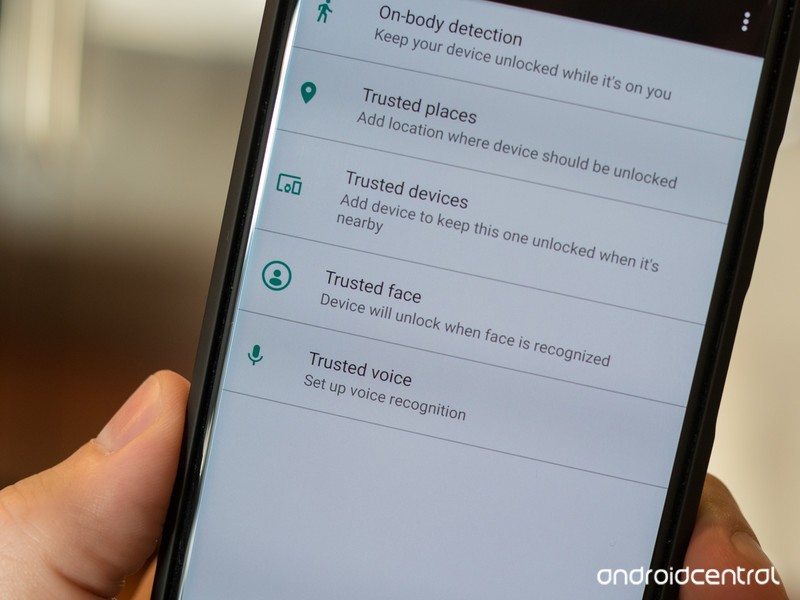
Even before biometrics and widespread fingerprint sensors, though, the lock screen was already something we were seeing less and less thanks to Smart Lock and its many forms. Smart Lock can keep your phone unlocked while connected to a Trusted Bluetooth device — like the stereo in your car or your trusted smartwatch. It can keep your phone unlocked while you’re carrying it around, and you can unlock it with your voice using Google Assistant’s Voice Match. It can even keep your phone unlocked at your house or workplace — though you’d need to be very trusting of your coworkers to enable that.
Long story short, we don’t spend enough time on lock screens to bother customizing them anymore. And thank goodness, because lock screen customization was a hot mess.
Bad theming and worse security
Lock screen customization faced a lot of hurdles, but the only one that really mattered was this: most of the time it flat-out didn’t work. Third-party lock screen widgets were only really supported in the Jelly Bean era, and the vast majority of lock screen replacement apps that sprung up after that died aren’t worth the ads they come with and certainly aren’t worth paying any money for.
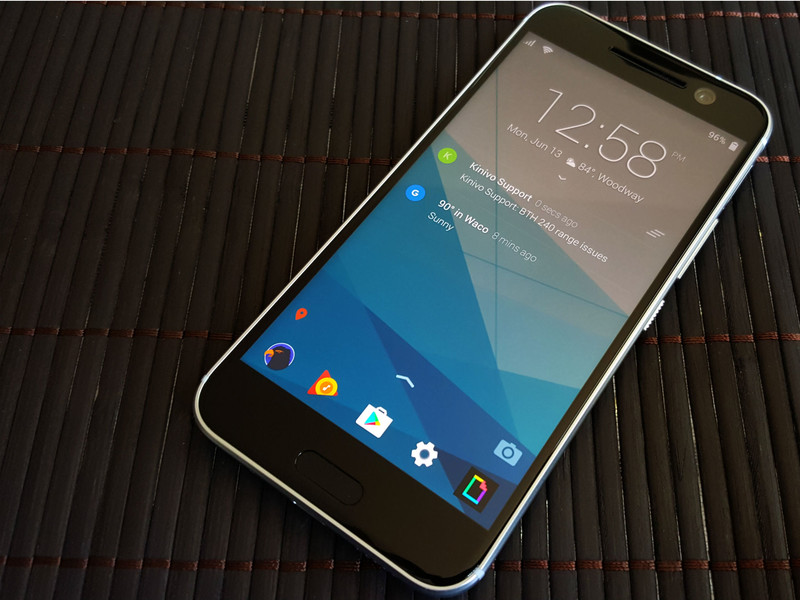
App screen replacements come with another set of security headaches since most require you to disable the system lock screen in order to use them. If you have any apps that require your phone to have a locking method — like Google Pay or corporately managed email accounts — lock screen replacements aren’t an option. Even if you don’t, they’re just a bad idea, and most of them aren’t as fast or as functional as the lock screen your phone came with. It’s not worth it.
The only lock screen theming worth your attention or time
Use Smart Lock. Use fingerprint scanners. Use iris scanners or face recognition if you want. Just don’t use a lock screen replacement, and don’t bother with any hacky lock screen widgets that haven’t been supported for years. It’s not worth your time. It’s not worth your effort. Just. Don’t.

If you really, really, really want to customize your lock screen, here are the things you can do:
- Set a custom lock screen wallpaper — most wallpaper apps and third-party launchers will let you set a wallpaper on the lock screen separately from the home screen wallpaper
- Add text to the lock screen via the Contact information option in the lock screen settings. Most people will set this to “If lost, contact X,Y, or Z”, but you could sneak a motto or quote in there instead.
- If your phone allows you to pick the style clock on your lock screen — Samsung and a few others do this — then go ahead and pick a lock screen clock that suits your wallpaper.
- Samsung also has what it calls “FaceWidgets”, a couple of simple, task-minded widgets that you can scroll through on the lock screen like Music controls and Next alarm.

But let’s face it, folks, the lock screen is something you’re going to see less and less of as Android continues to roll out quicker authentication methods and continues to expand Smart Lock. Just pick a wallpaper and clock style and get on with your life.
Android Messages for web desktop site is now live
The service isn’t working quite yet, but we’re getting somewhere.
In late-April, Google’s plans for turning Android Messages into something of an iMessage competitor were revealed. There are a lot of moving parts with this effort, but one of the big ones appears to finally be coming to light — desktop messaging.

If you head to messages.android.com, you’ll see a new website with a large bit of text saying you can “Text on your computer with Messages for web.” There’s a QR code to the right of this and instructions for scanning it through the Android Messages app on your phone.
As exciting as this is, you can’t actually do anything with the site. The “Messages for web” tab in Android Messages should be accessible after tapping on the three dots at the top right of the app, but this isn’t live at the time of publication.
Even so, we should expect all of this to go live anytime now. We first heard talk of a desktop site for Android Messages way back in February before Google made its announcement in April, and based on what we’re seeing right now, it looks like all Google needs to do is flip the imaginary switch to give us access to this new toy.
Are you excited to start using Android Messages for web?
Chrome OS to soon offer ‘integration’ with Android Messages
Google Pixel 3: News, Rumors, Release Date, Specs, and more!
Everything we know about what’ll likely be one of the year’s best phones.
Google first introduced its Pixel series in 2016, and since then, has been hard at work to establish itself as a serious player in the smartphone market. Google may be one of the most powerful and iconic companies in the world, but when it comes to hardware, is still very much a newcomer.
We saw vast improvements with the Pixel 2 compared to the original Pixel line, and we’re expecting to get that again with the Pixel 3. Google’s quickly learning what it takes to compete with the likes of Samsung and Apple, and seeing as how the Pixel 2 was one of 2017’s best phones, there’s a lot riding on this year’s entry.
Ladies and gentlemen, here’s everything we know so far about the Google Pixel 3.
The latest Pixel 3 news
June 18, 2018 — Case render confirms Pixel 3 XL design

Ice Universe on Twitter has built up a reputation for being pretty accurate about leaks/rumors in the mobile space, and on June 18, they shared a case render that further confirms the Pixel 3 XL’s design.
Like we saw with the hands-on photos on June 7 and 8, the Pixel 3 XL will have a notch in its screen, dual front-facing cameras, stereo speakers, rear-mounted fingerprint sensor, and a single rear camera.
It’s rather peculiar that Google’s choosing to use two cameras on the front while keeping just one on the back, but based on how excellent the Pixel 2’s single rear camera is, I don’t expect this will be a downside at all.
June 8, 2018 — Pixel 3 XL shown off in six more hands-on pictures
Less than a day after those first two hands-on photos of the Pixel 3 XL surfaced, six more have appeared.


These additional photos showcase the Pixel 3 XL from every possible angle, and when XDA Developers reached out to their forum member that shared them, they were able to confirm that the phone has a full glass back. In other words, it’s possible this year’s Pixel line may finally adopt wireless charging.


The front and back photos are pretty similar compared to what we saw yesterday, but the other images showcase a reflective glass frame around the phone, volume rocker and power/lock button on the right side, and a USB-C port and SIM slot on the bottom.
Also, as 9to5Google pointed out, that mysterious logo on the back of the Pixel 3 XL was used previously with old Pixel 2 prototypes.
When will the Pixel 3 be released?
In 2016 and 2017, Google held its hardware event on October 4. We don’t have a concrete date for this year’s event quite yet, but there’s no reason to believe Google will deter from this pattern.
Another October 4 event isn’t out of the question seeing as how that falls on a Thursday this year, but at the very least, we should be looking at some point in early October.
Pre-orders for the Pixel 3 will likely open shortly after it’s announced that same day with shipments going out at least a couple of weeks later.
How much will the Pixel 3 cost?
Over the past couple years, pricing for Google’s Pixel phones has remained mostly the same. The MSRP for the Pixel and Pixel 2 series is as follows:
- Pixel w/ 32GB — $649
- Pixel w/ 128GB — $749
- Pixel 2 w/ 64GB — $649
- Pixel 2 w/ 128GB — $749
- Pixel XL w/ 32GB — $769
- Pixel XL w/ 128GB — $869
- Pixel 2 XL w/ 64GB —$849
- Pixel 2 XL w/ 128GB — $949
I imagine we’ll see similar numbers with the Pixel 3, but don’t be too surprised if we get a Pixel 3 XL variant that crosses the $1000 threshold.
Google Pixel 2 and Pixel 2 XL
- Pixel 2 FAQ: Everything you need to know!
- Google Pixel 2 and 2 XL review: The new standard
- Google Pixel 2 specs
- Google Pixel 2 vs. Pixel 2 XL: What’s the difference?
- Join our Pixel 2 forums
Best Buy
Verizon
Google Store
Project Fi
 AIVAnet