


Samsung’s T5 500GB portable SSD is down to an all new low price of $128
Great price.
Update: The price has dropped again by a few bucks, bringing it down to $127.99 right now!
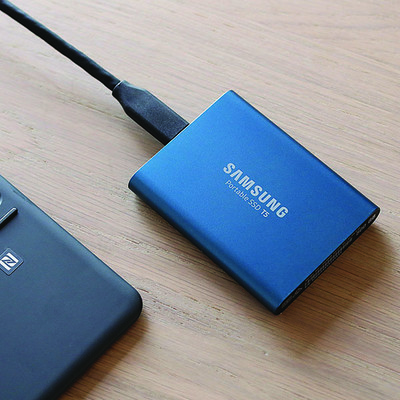
The Samsung T5 500GB portable solid state drive is down to $127.99 on Amazon for the first time. This price is an all new low for the T5 and beats the previous low by $20. This deal is even better than last year’s holiday shopping season.
The 250GB version of this SSD also dropped in price recently. It’s down to $97.99 from $120.
The Samsung T5 has gotten quite a few great critical reviews in a short amount of time, including an Editor’s Choice and 4 stars from PC Mag, 4.5 stars from Tech Radar, and a review from Forbes that said it “offers a great sweet spot in terms of size, performance and price.” Amazon users give it 4.7 stars based on 539 reviews. Samsung backs it up with a three-year warranty, as well.
See on Amazon
How to use an Amazon Cloud Cam outdoors

I’ve been using Wi-Fi security cameras in my house for years. I started with a Nexia Home system ages ago, then upgraded to Simplicam due to their price and various subscription plans. From there it was a short stint with the Logi Circle (which are still great cameras) until I finally landed on the Amazon Cloud Cam when it was released last fall. While this version was only meant to be indoors, it didn’t stop me from wanting an Amazon Cloud Cam outside.
See at Amazon
While they work amazingly well indoors — since day one I’ve longed to put one outside overlooking my driveway. I’ve been holding with hopes that Amazon will release a full-fledged Cloud Cam outdoor version (please Amazon!) and searching frantically for a short-term solution. It wasn’t until a few days ago that I came across this outdoor housing made to fit the Cloud Cam that my prayers were (somewhat) answered.
Before we go too much further — no, this isn’t a 100% weather-proof solution. Even if you want to use your Cloud Cam outdoors, you’ll still be using an indoor camera outside where it’s not intended to be used and will be susceptible to the elements (depending on your placement, of course). While this housing does a really good job of covering most of the camera, there is still a bit of the underside exposed. It’s insanely sturdy and very well made, but it’s not without its faults. Should it worry you? Again, it depends where you put your camera and what the weather is like where you live. Caveat emptor.

That being said, this thing is much more than I expected for the $13 price tag. Unlike other silicone “covers”, this bad boy is solid, sturdy plastic that I can’t say enough good things about. The entire housing comes with a variety of pieces — the main housing itself, a clear plastic protective face-plate, a sticky foam ring (for helping with night vision, more on that later), front cover, a few small screws and even a small eyeglass-size screwdriver. Also, instruction manuals, if you’re into that sort of thing.
There was one hiccup that I ran into right at the start that hopefully, you can avoid. Before you get going, know that you’ll need to have the power cable plugged into the camera before you put the housing on. This was a slight issue for me as my cable runs through a wall outside, meaning I had to assemble the housing on the camera while standing 10 feet up on a ladder. Not impossible, but still not as easy as doing it on the ground.
Putting it together is actually super easy. To attach the housing, you slide the main unit over the camera and then put the protective screen in place. The instructions here state to make sure that the holes are lined up symmetrically (showing just how awesomely thorough the whole process is) but aside from that, there’s not much to it.

After the screen is in place, you stick the little foam ring in the center around the camera lens to help prevent glare from the IR illuminators. Anyone who has ever put a camera like this in front of a window and tried to use night vision knows why this is important (thankfully you can always just turn off night vision). Then just put the front plate into place, put in the provided screws and you’re good to go.
Even though my camera is on the far end of my house, outside and away from my router, I haven’t noticed any major lag or degradation with this housing in place. Granted, everyone’s experience will be different, but my only real worries are weather-related. There’s a super slim chance that the camera could get wet during a torrential downpour, and I’m also not sure how it will fair on super hot days with no way to vent excess heat — but only time will tell. Did I mention how well-built this thing is?!
For now, I’m ecstatic that I can finally use my Amazon Cloud Cam outdoors without shelling out a ton of money in the process.
See at Amazon
YouTube Music vs. Spotify: Which is the better streaming music service?

Can the biggest name in streaming video overtake the biggest name in streaming music?
If there is a throne to be won in music streaming, Spotify won it years ago. They’ve got a great selection, they’ve somehow gotten a better reputation for algorithms than Google, and with their Student pricing, they lure in younger listeners in droves and then hook them into staying long after they graduate. Not even Apple — the name synonymous with music players for the last 20 years — could make much of a dent. But there is a new challenger coming for the king.
If you’re going to try and fight Spotify, you need more than great value, superior selection, and fancy new features — all of which the all-new YouTube Music has. No, you need two things that aren’t found in an app’s feature list or shiny, new web client.
You need brand power, and you need to have history. YouTube’s brand power and history are far more storied than Spotify’s, but how much of that will translate to YouTube Music this time around?
Plans, Pricing, and Device Limits
YouTube Music and Spotify both offer free versions and paid versions. Neither let you download music for offline listening — and both break up the music with audio ads every few songs — but at least Spotify will let you play music with the screen off. YouTube Music pauses the music when free users turn off the screen or leave the Now Playing window, which means that YouTube Music Free will monopolize your screen and thus your battery while you’re listening to it.

Spotify Premium is $9.99/month for a single user or $14.99/month for a family plan of up to 6 users at the same billing address — all Spotify accounts must be billed to the same address for a family plan. A $4.99/month Spotify Student plan bundles in a basic (ad-support) Hulu subscription, and is just about the best student subscription price in streaming media today. Spotify Premium can bundle with basic Hulu for non-students at $12.99/month. Spotify only has a device limit for downloads, which is 3 devices, each with a download limit of 3,333 songs, which is easy to remember and easy to hit for music addicts.
See at Spotify
YouTube Music Premium is $9.99/month for a single user and $14.99/month for a family plan of up to 6 users over 13 years of age — you have to be at least 13 years old to have a Google account. It removes ads and unlocks background playback and offline playback for YouTube Music. For an extra $2/month — $11.99 for a single user or $17.99 for a family plan — you can get YouTube Premium, which gets rid of ads and enables background/offline playback in YouTube, YouTube Music, YouTube Kids, YouTube Gaming, YouTube VR, as well as giving users premium features in Google Play Music and access to YouTube Originals content.
If you’re going with YouTube Music, pay a little more to get a whole lot more bang for your buck with YouTube Premium.
See at YouTube
The new YouTube Music is available right now in 17 countries — Australia, Austria, Canada, Denmark, Finland, France, Germany, Ireland, Italy, New Zealand, Norway, Mexico, Russia, South Korea, Spain, Sweden, Switzerland, the United Kingdom and the United States — whereas Spotify is available in over 60 countries.
Library and Selection

Spotify has over 30 million songs in its catalog, and while YouTube Music doesn’t give out a hard number for the songs in its catalog, it doesn’t matter what the official number is, because that would only count the official songs YouTube Music hosts through its deals with record labels.
And there is so much more to YouTube Music’s selection than that.
YouTube Music has official songs and albums from the record labels, and to that it adds official music videos, live concert videos — both official and fan-uploaded, fan covers, remixes, and mashups. Then there’s also the millions upon millions of songs that aren’t in YouTube Music’s official library, nor any official streaming library, in many cases.

Some of this fan-uploaded content is illegal. When copyright holders serve DMCA requests, YouTube pulls that content, but that’s a constant game of whack-a-mole that most labels don’t have the time or resources to play. There are also labels that have folded, songs that have partially or entirely lapsed/frozen rights, songs that labels have lost, and much of that music is only available via fan uploads, so YouTube Music will be the only legitimate streaming service that can even hope to have them unless the service has a personal music locker.
In short: Spotify has more official songs, but YouTube has far, far more music that’s actually available to listen to.


The one caveat to YouTube Music’s awesome library right now is that library management is still somewhat lacking. Everything you do in YouTube Music shows up in YouTube’s main app, from searches to added albums to every song you listen to cluttering up your watch history. YouTube has told Android Central they “are working on making it easy to separate YouTube Music & YouTube Main watch history and will also have a way to hide playlists/albums added from Music in Main.”
Stations and Mixtapes — A battle of algorithms

Spotify is known for its algorithms. From the Daily Mixes that will adjust and tweak their listening-based stations every day to the much-beloved Discover Weekly to everyday artist- and playlist-based radio stations, Spotify’s recommendations are consistently lauded by tech enthusiasts and music addicts alike. They even break out the algorithm-based Daily Mixes into several different mixes so that you can get more rock recommendations without the teeny pop you play for your daughter sneaking in.
YouTube Music’s algorithms don’t have the pedigree of Spotify’s, and they only have two main mixes for users: Your Mixtape and Offline mixtape. In the new YouTube Music, all genre radio stations have been completely hidden unless you explicitly ask for them, but a radio station button sits at the top of every artist page. And once you get a station going, Google’s stations shine like the diamonds in the rough they are.

YouTube Music’s station offerings seem inadequate, but only until you listen to one.
Your Mixtape may be a bit diverse in its genres since everything is in one mix, rather than separated by genre/type like Spotify, but Your Mixtape dials into your tastes very, very quickly. YouTube Music has years of YouTube history to feed its radio algorithms as well as the recommendations that litter the Home feed. Spotify’s algorithms may package things a little better with Daily Mixes 1-7, but those 7 mixes still haven’t learned me as well in months as YouTube Music has in a week.
Then we have Offline Mixtape, one of the features of the original YouTube Music. Offline Mixtape takes the algorithm from Your Mixtape and uses it to generate a playlist that is regenerated and re-downloaded daily. You choose how many songs the playlist includes, up to 100, and it presents you with a new mix every day to rock out to during your commute. Offline Mixtape is a downloadable Daily Mix, something that not even Spotify’s many mixes can do.
Stability and Sound Quality
YouTube Music is still its early stages and is lacking a great many features. There are serious UI bugs, especially when using the app offline, casting, and trying to manage or browse your own library, as every category in Your Library is sorted by date added rather than name.

YouTube Music’s audio quality right now is stuck at average. Spotify offers audio streaming qualities up to 320 kbps via Spotify Premium’s “Extreme” audio quality option, whereas YouTube Music’s current music quality in the app is about 128 kbps. YouTube Music has told Android Central that more robust audio quality settings are coming in an upcoming update, but they’re not here quite yet. Spotify also has Android Auto support, something every music subscription service should have in 2018, and video-based YouTube Music needs that even more than most.
For now, YouTube Music sounds fine unless you’re an audio snob, and it’s a bit buggy. We expect things to improve soon, but we have to compare what we have right now.
Why Spotify is better right now…

Spotify has almost a decade head-start over YouTube Music: a decade to build a loyal user base around the world, one of the best-known brands in music, and enough history with its users to deliver consistent and consistently awesome mixes to its users daily, weekly, and yearly. It’s also had a decade to smooth out its rough edges and refine their experience, while YouTube Music is still firmly in the growing pains stage of its development.
Spotify is still the clear winner for students, as $5/month for Spotify Premium and Hulu is pretty hard to beat, and by the time the Student discount ends, most users have too deep a library and history in Spotify to just pick up and move to a new service.
Read more: Everything you need to know about Spotify
…and why YouTube Music is going to dethrone it sooner than you think
Spotify has built itself up as one of the biggest names in music, but its brand power is still a drop in the bucket compared to YouTube, which is one of the most-visited sites on the internet. YouTube’s brand power even extends to music already — from the most viewed music videos ever to viral covers from upcoming artists, from mind-blowing remixes to that one song that you can’t remember the lyrics to.
 Just look at those views.
You already use YouTube for music. Google just needs to convince you to pay for it.
YouTube Music has a few very compelling arguments already — if you’re a free user, you have to keep the screen on the whole time, which is a battery drain and keeps you from using your phone for anything else. You also can’t download music for offline playback without Premium, which is a more common practice. However, the most compelling reasons for subscribing aren’t even in YouTube Music — at least, not today.
YouTube Premium is $2/month more than Music Premium, and is the no-brainer for anyone considering paying for a YouTube subscription. For $2 more, you get offline and background playback on all of YouTube instead of just on YouTube Music content. You get rid of YouTube ads on all of YouTube, and you get access to YouTube Originals, should you need any more freebies thrown in.

Then there’s the news that Google Play Music is going to eventually give its best feature to YouTube Music: its music locker. Google Play Music’s free, 50,000-song music locker is something that doesn’t really have a rival on the market right now. If a user can’t find a song in Google Play Music’s subscription library, they can upload it to their library themselves. That’s invaluable, and it’s coming to YouTube Music, which will combine the biggest, baddest music subscription catalog on the planet with the ability to patch any conceivable hole in it a user finds.
Read more: YouTube Music review
Updated June 2018: We’ve updated this guide to reflect YouTube Music rolling out to more countries and YouTube’s new pricing tiers. YouTube Red is dead. Long live YouTube Premium — and seriously, I mean it, do not pay for Music Premium. Spend $2 and get 200% more features!
Killing Floor Incursion review : Guns, zombies, and severed arms

Better zombies have come to a VR headset near you
This sci-fi horror, created by Tripwire Interactive, hit some VR platforms earlier this year. But this title coming to PlayStation VR (PSVR) is such a big deal because Incursion is a VR exclusive, which means the scares are new and the action is so much more intense.
Perhaps more important, we know that Incursion came to PlayStation VR as a complete game, unlike other platforms. In November of 2017, the game received a few more updates including Hard Mode for the campaign, a Holdout Mode for how long you can survive, a new Katana weapon for the Holdout mode. Options for smooth rotation and a good amount of bug fixes were also included in this update. Here I’ll go over all of these updates, as well as the overall review of the game.
So, if you’re interested in trying out Killing Floor Incursion for the PSVR, read on below and get your Zed on!
See on PlayStation Store
Controls

At the start of the game, they ask you if you are right or left handed, and I really appreciated that optional setting. Another thing that got them loads of points from me was the ability to turn on an option for playing when sitting down. This was particularly awesome because not too many horror games are accessible to someone who might not be able to stand.
Movement and control buttons
The smooth rotation turning option was just a little too slow and definitely took some getting used to, but I’ve never been a fan of click turning because it always makes me feel nausous. There’s no option to change the speed of the turning, but hopefully, one will be included in the next update.
Other than that “Free movement”, which is the ability to walk or run, really made the game feel real. When it comes to horror VR games I appreciate being able to actually run from the enemies because teleportation movement makes me feel like I’m cheating. When I’m playing a horror game being able to teleport behind my enemy just makes it too easy to play.
Gameflow from pre-set controls

I appreciated being able to set my holster to my chest or my waist. Being a short person I have it set to my chest, but it’s going to register at my waist anyway, so these types of customizations can really make an impact on gameplay. There is also an option to store things on your back, but there were more times than not where I would just end up throwing an object behind me. The best way to avoid this is to hover your hand over your back for a moment before you let go.
There was also a “Control scanning” option that worked in two different ways. You could send your little robot friend out to find something (via an option in the menu) or turn on your control scanning. This is an interesting mechanic that lights up items that are near you and illuminating objects that you can collect or interact with.
Now let’s talk about melee options. There are melee weapons for you to fight with should you run out of bullets. Then, much to my amusement, if you run out of bullets and don’t have any knives you can use the butt of your gun or the severed limb of a zombie. That’s right, you can beat zombies to death with the bloody side of their own limbs. Phenomenal.
Presentation

The overall visuals were rather dark, but not in a murky or cloudy sense. This made everything an extra level of creepy and I loved every minute of it. The background sounds also get an A+ from me. Hearing the owls, bugs and other general forest noises added a level of immersion that made it feel that much more real. Heck, you can even hear the sounds of people dying and zombies groaning even if you’re nowhere near a spawn for combat. They did an extraordinary job making me feel like I was in a real live zombie stimulation.
The last thing I want to goob about is how great their zombies looked. You can see the amount of detail that went into them all the way from movement to rotting flesh festering as they walked. While there were zombies who looked similar there were enough varieties to make it feel like a true horde. Also, spider zombies. Nope. Not even once. 10/10, terrifying every time.
Story mode

The beginning of the game gives you plenty of time to learn the mechanics and gather things before throwing you into the fire. This is pretty important for horror games, so be confident in knowing you’ll be able to get those controls down packed before you experience your first zombie. To top it all off, the controls are actually fairly easy to use. This, combined with the Move Controllers great design, made learning go smoothly. And then there was Emma.
Emma Rose is the voice in your headset. While I appreciate a character who is there to explain the mechanics and what you need to do, the way she is presented wasn’t the best. She reminded me all too much of Navi from Legend of Zelda, and not in a good way. The first time she explained how to do something, or what I needed to do, it was okay. But, if you take too long she will continue to ping you with notifications. There are already arrows in your field of vision that show you where to go, so some of the things she said were all but pointless. This got annoying very fast as I’m a player who likes to fully experience my surroundings and take my time to figure things out before moving forward. With her constantly nagging in my head I felt rushed and, ultimately, pretty annoyed.
With the new updates, they have now added a “Hard Mode” for the campaign. This gives you less ammo and health as well as more power Zed with different abilities. So, if you’re looking for a challenge or to be scared out of your pants, you should check it out!
Holdout Mode

Holdout Mode is an amazing option where you can see just how long you can survive against a horde in a set location that you get to choose. After you complete a level in the campaign mode, that level will be available to play in Hold Out mode. Here you will only start with a pistol and a knife, but don’t worry. There are better equipment and powerups you can collect on the way. This mode isn’t just killing zombies. There are also puzzles, locks and full maps for you to explore and discover.
Your scores are marked on the leaderboards so there is a very real competition to get the best score among your VR peers!
Final thoughts
The entire story mode of the game takes about seven hours to complete. Then when you add on their multiplayer options and Holdout Mode, Killing Floor Incursion could very easily be a game that you have a blast with for quite some time. For $29.00 on the PlayStation Store it’s almost a steal. From graphics to gameplay to controls I give this title a 4.5 out of 5 stars.
The only reason it’s not a 5 out of 5 is that I wholeheartedly believe the movement visuals could have been a little better. As someone who spends a lot of time in VR having to get used to movement in VR isn’t something I’ve had to do for a while.
Regardless, go check out this game and get your Zed on!
See on PlayStation Store
4
out of 5
PlayStation 4

- PS4 vs. PS4 Slim vs. PS4 Pro: Which should you buy?
- PlayStation VR Review
- Playing PS4 games through your phone is awesome
Amazon
Microsoft Edge beta for Android picks up Adblock Plus support
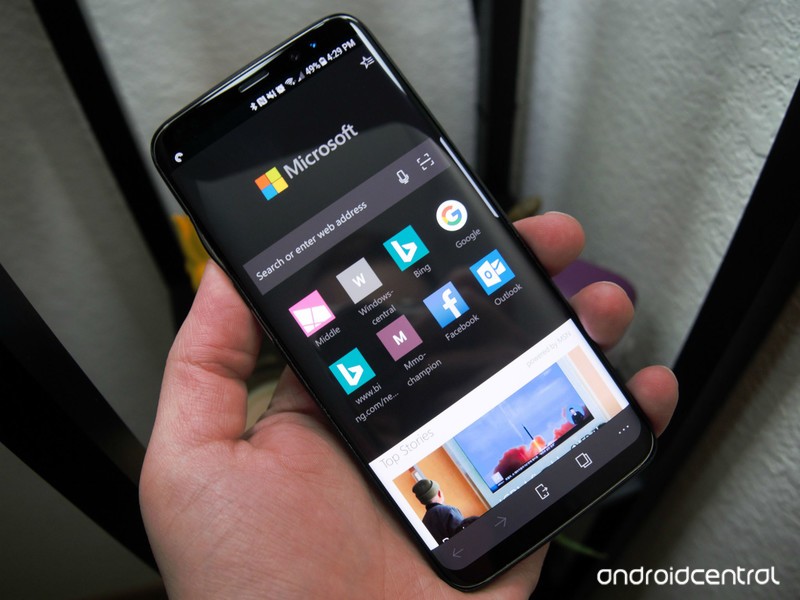
Now you can stop ads before they start.
Microsoft continues to iterate on its Edge browser for Android, with beta testers being first in line for improvements. And with the latest beta release, the company is tackling an area that’s sure to be important to everyone: ads.
The Microsoft Edge for Android beta now includes support for ad blocking via Adblock Plus. Built directly into the browser, users can now turn the feature on from within the settings menu. If you’ve used Adblock Plus on your desktop machine, then you’ll know what to expect here, with the feature keeping sites clear of potentially annoying advertisements as you browse.
Though ad blocking is the only new piece of this update, Microsoft is also continuing to test its intelligent visual search and favorites for internal Intune-managed work and school accounts. Here’s a look at all of what’s new:
- Content blocking with Adblock Plus is now available under Settings
- Intelligent visual search gives you a cool new way to find contact info, identify landmarks, or find similar images based on a photo
- See organization-managed favorites and internal web apps on Intune-managed work and school accounts A better book reading experience including ability to see/add bookmarks and to change text spacing
- Performance improvements
If you’re an Edge beta tester, the latest update is in the process of rolling out now. Do note that we haven’t seen it arrive on all of our devices yet, so this appears to be a slow rollout of sorts. Otherwise, expect ad blocking to make its way to the release version relatively soon, should testing go well.
See at Google Play
CordCutters.com answers: Do you need an ‘HD’ antenna?

Don’t laugh — it’s a perfectly fair question.

Whether you’re using an Amazon Fire TV, or Android TV, or Apple TV or even Roku, one of the first accessories you should pick up is an over-the-air antenna. It’s the best way to fill the gaps that streaming TV can occasionally leave behind. And it often does so with even less compression, which is great.
Oh — and once you’ve bought the antenna, all the content is free.
But one question folks ask all the time is whether you need an “HD” antenna. And it’s a fair question — it’s all about the HD content these days, right? And it’s an especially salient question because it’s absolutely possible to watch shows over the air in “HD.” (OK, 1080i, but that’s another thing for another time.)
So let’s answer the question, shall we?
Read at CordCutters.com: Do you need an ‘HD’ antenna?
Introducing CordCutters.com
- The hardware you need
- All about streaming services
- What channels are on which service
- FREE over-the-air TV
- How to watch sports
- Join the discussion
Get the latest deals
This iPhone Case Runs Android, Creating the Ultimate Dual OS Mashup

For those who want a bit of Oreo with their Apple.
Smartphone accessory makers love to promote the idea that their product will enhance the functionality of your device. In spite of all the hype not all accessories will live up to those lofty expectations, but we sure do love it when designers push the limits of what consider possible from our phones.
The Eye Smartcase is an iPhone case that doubles as an Android phone complete with 4G connectivity and gives you access to both mobile operating systems at once.
It’s a really bold product which you may have seen featured on Unbox Therapy or elsewhere on the internet. The Eye Smartcase purports to combine the two most popular mobile platforms into one singular device so you can swap between iOS and Android as you need throughout your day. This case has been in the works for a couple of years now and is in the home stretch towards its official release.

This case is about the size of a Mophie battery case except instead of extra battery the Eye Smartcase offers a full-featured Android smartphone experience. The Eye Smartcase will be available for the latest iPhone models going back as far as the iPhone 6 and 6 Plus and up to the iPhone X.
So what are the specs for this Android device? The phone includes a MediaTek MT6739 chipset which includes 3GB of RAM and supports 2G, 3G and 4G networks (with two SIM slots), Wi-Fi, Bluetooth, GPS. There’s 32GB of onboard storage with a microSD slot that supports up to 256GB and a 2800mAh battery that is supported by Qi wireless charging. The 5.7-inch HD 720p display is located on the back of the case and the whole thing will run Android 8.1. Oh, and it also brings back the headphone jack for those who were peeved at Apple’s decision to nix the legacy hardware with the iPhone 7.
There’s a number of reasons that make this case a compelling option. Maybe your required to use an iPhone for your job but you really prefer to use Android and don’t love the idea of carrying two phones around with you. You can also use apps and do things on Android that simply aren’t available for iOS and literally double up your phone’s functionality. We all know that the rear camera is the best camera for taking photos, and the Eye Smartcase will let you mirror your iPhone’s rear camera as a selfie camera on the Android OS, letting you take the best selfies ever (if you’re into that sort of thing).
Beyond that, there’s simply the cool factor of owning a phone case that features another freaking phone.

According to their campaign page, the Eye Smartcase is passed the designing phase and well into the prototyping phase before ramping up production by the end of summer. The team expects to start shipping cases for the Plus-sized iPhone models by September 2018, and then start shipping cases for the 6, 6s, 7, and 8 in October.
The Eye Smartcase has raised nearly $1 million and has raised six times its funding goal but there’s still time to back this project and save some money on this unique product. For $135, you can get an Eye Smartcase with no cellular connectivity (only Wi-Fi) or pledge $159 for the Smartcase with 4G cellular — saving you 30% off the expected retail price. If you’re thinking about buying one for yourself and give the second one as a gift for a friend or family member, the discounts only get better if you pledge to get two or more devices.
See at Indiegogo
Tim Cook Visits Ireland as Apple Promotes Its Support of Over 1.7 Million Jobs in Europe
Apple CEO Tim Cook has arrived in Ireland, the latest destination on his European tour, which has included stops in Italy and the Netherlands.
Apple CEO Tim Cook and Ireland’s Taoiseach Leo Varadkar
Leo Varadkar, the Taoiseach or Prime Minister of Ireland, tweeted that he had a “good meeting” with Cook in the capital of Dublin on Monday. It’s unclear what was discussed, but it appears to have been a routine meeting.
Good meeting with @tim_cook of @Apple this evening at @merrionstreet. He’s on to Cork next to open an extension to the facility there pic.twitter.com/XRBTHzNC2c
— Leo Varadkar (@campaignforleo) June 18, 2018
Cook has since headed to Cork, where Apple’s European headquarters are located. There, he will formally announce an expansion of its Hollyhill campus. Apple says a new building will provide space for an additional 1,400 employees. Since 2012, Apple says it has invested nearly €220 million to develop the facility.
 Apple’s campus in Cork
Apple, on its recently updated Job Creation page in Europe, says it is Cork’s “largest private employer” and “proud” that many of its employees in the area have worked at the company for decades.
Apple’s website notes that it “has been based in Cork for over 35 years and now directly employs 6,000 people throughout Ireland supporting all aspects of the business.” The company also says its Irish team has “doubled in size over the last five years and includes over 80 different nationalities.”
Apple says Cork is home to its “only wholly owned manufacturing facility in the world. It provides configure-to-order iMacs which are for customers across Europe, Middle East, and Africa.” AppleCare support for those regions is also based in Cork.
 Nicole, a Product Quality Engineer, at Apple’s iMac facility in Cork
While in Cork, Cook also visited The English Market, according to photos shared on Twitter. Earlier, in Dublin, he met with developers from Hostelworld. The app, featured on Apple’s website, allows travelers to search for and book thousands of hostels in more than 170 countries around the world.
Honoured & privileged to host @tim_cook at the @hostelworld Dublin office today, great honour for our iOS team, company & #hostels #ios #apple #meettheworld pic.twitter.com/rfgUvzRHbg
— breffni (@breffnih) June 19, 2018
All of this amounts to good PR for Apple in Ireland, just over a month after it abandoned its plans to build a $1 billion data center in the country due to “delays in the approval process,” primarily due to concerns from some local residents. Apple and Ireland are also in a major tax dispute with the European Commission.
Apple’s updated Job Creation page also reveals that it now supports 1.7 million jobs across Europe, including around 1.5 million jobs attributable to the App Store ecosystem, some 170,000 jobs supported by Apple’s supply chain in Europe, and some 22,000 direct Apple employees in 19 countries across the continent.
Since the App Store was created, Apple says it has now paid €20 billion to European app developers. The company says the United Kingdom leads Europe in terms of jobs linked to App Store development, at 291,000.
Tags: Tim Cook, Europe, Ireland
Discuss this article in our forums
Yahoo Mail Debuts New Mobile Web Service for iOS and Android Smartphones
Yahoo today announced the launch of a new Yahoo Mail website optimized for mobile devices, allowing users to access their inboxes without having to download an app on their iPhone or Android smartphone (via TechCrunch).
On the website for the new mobile web experience, Yahoo says that its users will have access to swipe gestures to easily mark messages as read or delete them completely, organizable folders, auto-suggest email addresses, and customizable themes.
According to senior director of product management for Yahoo Mail, Joshua Jacobson, the company built the new mobile web service for users who don’t want to download an app that takes up more storage on their device.
“We’ve heard loud and clear from users that they’re not always ready to make the big leap to downloading an app that takes up any storage space on their phone,” said Joshua Jacobson, senior director of product management for Yahoo Mail.
“People with high-capacity phones may want to save that space for photos or videos, while others with entry-level smartphones may just have limited space from the get-go. Further, some folks share devices or borrow a family member’s to access their email. This is all especially true in developing markets.”
The mobile web launch also ties into a new app for Android Go, which touts a smaller download size on the Android software that’s tailored for cheaper devices. With the new Yahoo Mail versions, Yahoo is aiming at both storage-concerned users and those in emerging markets where low-cost devices are popular.
The company hopes to boost stagnated user growth, which sits at 227.8 million active users per month, an increase from about two million from one year ago. As TechCrunch points out, Yahoo’s user base is far smaller in comparison to Google’s Gmail client, which reported 1.4 billion users in April.
As the company grows Yahoo Mail, just over a week ago it announced that it will be permanently discontinuing Yahoo Messenger on July 17, 2018. At the time, Yahoo said its reason for shutting down Messenger was to focus on “building and introducing new, exciting communications tools” that will be a “better fit” for its customers.
Tags: Yahoo, Yahoo Mail
Discuss this article in our forums
Smart Speaker Owners Aren’t Yet Widely Using Them to Control Connected Home Devices
IHS Markit conducted a new survey in March and April 2018, asking 937 smart speaker owners various questions about the usage of their devices, spreading across the United States, United Kingdom, Japan, Germany, and Brazil. According to the findings that have been shared today, just six percent of smart speaker owners used their speakers to command smart home devices like lights, switches, and thermostats.
The speakers and assistants included in the survey were HomePod/Siri, Google Home/Google Assistant, Microsoft Cortana, Bixby, and Amazon Echo/Alexa. The most popular category for smart speaker control for all speakers was asking about the weather and news, followed in descending order by: basic questions, music controls/discovery, sending a message and making a phone call, video controls/discovery, making a purchase, controlling smart home devices, and lastly a “none of these” category.
Despite the low usage rates for users interacting with smart home products through their speakers, IHS principal analyst Blake Kozak believes this will change in the near future.
“Controlling smart home devices by voice currently represents only a small fraction of total smart-speaker interactions,” said Blake Kozak, principal analyst, smart home, IHS Markit. “However, this category will continue to trend upward as more video-streaming devices come to rely on voice control, as security alarm systems adopt voice control to arm and disarm, and as more builders embed smart devices throughout new homes.”
Kozak believes that one area of potential smart home growth will come from insurance companies, who will “play a role” in educating customers about connected devices that could help them in their homes. These include products for water leak detection, flow detectors, and shutoff valves. In total, Kozak predicts more than one million home policies in North America will include at least one connected home device by the end of the year, and 450,000 smart speakers will be connected to insurance companies by that time as well.
In terms of smart assistant usage, Amazon Alexa was the most widely used voice assistant with 40 percent of respondents owning an Alexa device, and 23 percent owning a Google Home device. Siri came in third place, with the most inquiries for Apple’s assistant also pertaining to the weather, news, and asking Siri a question.

For HomePod, Apple yesterday launched the smart speaker in Canada, France, and Germany via the Apple online store, Apple Store app, and in its retail locations in each country. HomePod allows users to command Siri to activate or deactivate their personal HomeKit products in the Home app, and represents Apple’s first entry in the smart speaker market.
Related Roundup: HomePodBuyer’s Guide: HomePod (Buy Now)
Discuss this article in our forums
 AIVAnet