


See why no one would have bought Samsung’s Project Valley foldable phone
@MMDDJ_/Twitter.com
Rumors about Samsung’s foldable phone prototype, code-named Project Valley, have swirled for years. They have subsequently been overtaken by talk of a phone known as the Galaxy X — believed to be the folding phone Samsung’s working on for release — which is likely to have evolved from Project Valley. What did the prototype look like? A set of images may have revealed everything.
A series of pictures said to be of the SM-G929F, or Project V, were posted on Twitter, showing a phone with two screens hinged in the center. It’s reminiscent of ZTE’s Axon M, the only foldable phone to so far make it on sale. It’s clear the phone pictured in the leaks is an older model, as the design ignores Samsung’s most recent trends, and is more based on Galaxy phones seen several years ago.
Both the Twitter user and Slaskleaks, which also posted the pictures, call Project V canceled. However, it was never clear the phone was going to go on sale or was anything more than a prototype used for development. What can we learn from the Project V pictures? Only the Android home screens are showing, spread across the two screens, rather than having to swipe left or right to reveal them. No video or app content is displayed, so it’s not known how Samsung intended to handle the dual-screen aspect of Project V’s app use.
@MMDDJ_/Twitter.com
The body of the phone is thick, and made even more so by the folding second screen, which operates like a folio case — hinged at the side so it can be flipped open or closed. It appears Project V could be used as a single-screen device, with the screen presumably folded around the back.
It’s not an attractive phone, and even in 2016 when Samsung may have been actively working on Project V, it wouldn’t have attracted many admiring glances. It’s also considerably less Space Age-looking than the concept device (seen to the right) often shown as an example of what Project Valley may have looked like. There’s still a chance the Galaxy X may end up being closer to the concept.
Project Valley may have been canceled, or at least the prototype retired, but we’re still expecting Samsung to release a folding or bendable phone in the future. It’s known under several names, including Galaxy X, and the $2,000 device may arrive in 2019.
Editors’ Recommendations
- Samsung Galaxy X: Everything we know so far
- A foldable iPhone could be released as soon as 2020, according to analyst
- Huawei reportedly plans to launch its foldable smartphone in November
- DT Daily: Samsung Galaxy X foldable phone could debut at MWC 2019
- Dell is reportedly working on its dual-screen version of the Surface Phone
Mayday! Amazon pulls the plug on Kindle Fire’s popular support feature
It’s been five years since we were first introduced to Mayday by none other than the head of Amazon himself, Jeff Bezos. The on-screen customer support feature was hugely popular for Fire tablet users, and at one point, we reported that “the vast majority of Kindle Fire HDX customers now ask for assistance using the Mayday feature, instead of calling the Amazon customer service line.” But those days have come to an end. On a customer support page originally spotted by Geekwire, Amazon announced, “The Mayday video calling service will be discontinued in June 2018.”
So what exactly was Mayday? In short, it was a button that you could press to get quick and easy tech support via a virtual face-to-face chat.
“When we set out to invent the Mayday button, we wanted to revolutionize tech support — and we’re happy to report it’s working!” Scott Brown, Amazon’s customer service director, said back in 2014. “Even as the Mayday button has grown to become the most popular way for customers to ask questions, the team’s been able to beat the response time goal of 15 seconds or less — our average is just 9.75 seconds.”
But it wasn’t just technical support that Mayday sometimes provided assistance with. One Kindle Fire HDX user apparently used Mayday to help beat a particularly challenging level of Angry Birds, while another asked a Mayday representative to sing “Happy Birthday” when presenting the Kindle Fire as a birthday gift to a friend. Indeed, customers seemed quite jazzed about Mayday, calling it “sensational” and “terrific.”
As per the support page, while you’ll still be able to reach Amazon customer service via the phone, email, or chat, you’ll no longer be able to press the Mayday button on your Fire tablet in order to start a video chat. So why the change of heart? Amazon told Geekwire that ultimately, the Mayday video calling service was offered only on legacy devices that are no longer available on Amazon.com. The change will be implemented “through an automatic update to the device Settings. Customers can still access customer support by tapping on the Phone & Email icon, through the Quick Actions menu on their device, or via the Help App on their device home screen.”
But don’t worry, just because the button is being disabled doesn’t mean that Mayday is totally disappearing. Rather, Amazon says, “Mayday Screen Sharing will continue to be offered on supported devices via free customer support, 24×7 by tapping on the Phone & Email icon or via the Help App on their device home screen. With your permission, the Amazon customer service expert can share your screen to draw on your screen, talk you through how to do a task, or do the task for you.”
Editors’ Recommendations
- Everything you need to know about Google Assistant
- Apple HomePod vs. Amazon Echo vs. Google Home: Which is best?
- Everything you need to know about the Essential PH-1 phone
- Battle of the streaming sticks: Chromecast vs. Roku vs. Fire TV Stick
- The only guide you need to get started with Google’s Wear OS
How to enable Philips Hue scenes with Google Assistant

Take your smart lights to the next level with your voice and a dash of Google magic.
Philips Hue lights have been integrated with Google Assistant for years — though it was Google Home reliant for a time — but it was somewhat incomplete. You could turn individual bulbs or all the lights in a room on or off. You could make basic color changes and you could dim the lights, but you couldn’t turn on any of the scenes you made in the Philips Hue app.
Well, those days are over. The Philips Hue integration with Google Assistant has been updated with scene support, and we’re here to help you add it to your smart home setup.
- How to delete or rename a scene in Philips Hue
- How to unlink and relink Philips Hue from the Google Home app
- How to turn on a Philips Hue scene with Google Assistant
Before we get started

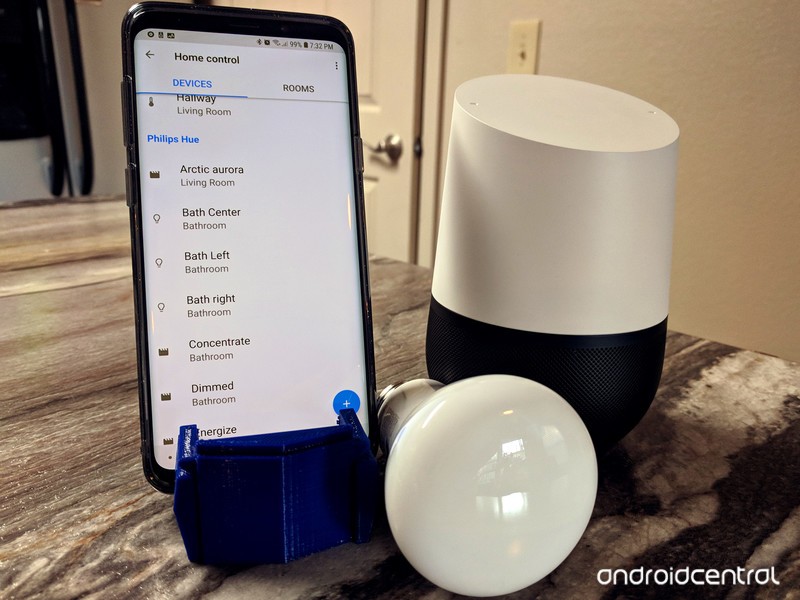
Adding scene support for Philips Hue in Google Assistant doesn’t take much, but there are a few things to be aware of before you go through with it. The first is that every scene in Philips Hue is added as an individual “device” in the Home control section of Google Assistant. This can lead to a lot of clutter very quickly since every room in Philips Hue comes with a dozen preset scenes, ballooning a 4-bulb, two-room setup from 4 devices to almost 40.
If you have preset scenes that you do not use, you should consider deleting them out of the Philips Hue app now. Even if you delete the scene from the Philips Hue app, it won’t disappear from your Google Assistant devices menu until you unlink and relink your Philips Hue account, so it’s much easier to get everything set up the way you want now.
Better to only need to unlink and relink once, right? So, lets get to cleaning.
How to delete or rename a scene in Philips Hue
Open Philips Hue.
Tap the room you wish to edit.
Tap the scene you wish to delete.


Tap the Edit pencil icon in the top right corner of the scene’s shortcut.
Tap Delete.
A confirmation window will pop up asking if you really want to delete this scene. Tap Delete.


Cleaning up your scenes will make room for new scenes you’ll actually use. While you’re here, if you have the same scene that you use in multiple rooms, consider renaming the scene so it has a name specific to each room.
Tap the room you wish to edit.
Tap the scene you wish to rename.
Tap the Edit pencil icon in the top right corner of the scene’s shortcut.
Tap Rename.
Give your scene a unique name.
Tap Save.


When picking names for scenes, try to pick unique names that aren’t related to songs/artists/films. I named one of my scenes Under the Sea, and Google Assistant turned on the Little Mermaid song instead.
How to unlink and relink Philips Hue from the Google Home app
Once you’ve gotten your scenes in order, it’s time to add them to Google Assistant. Scenes are automatically added to Google Assistant when adding a Philips Hue account now, but accounts that were already connected to Google Assistant will have to remove and re-add the account in Google Assistant’s Home control section.
Open Google Home.
Tap the three-line menu in the top left corner.
Tap Home control.
Tap the blue + button in the bottom right corner of the screen.


Tap Philips Hue.
If you’re already connected to Philips Hue, tap Unlink account.
A confirmation window will appear. Tap Unlink.


Tap Philips Hue.
A link will open a browser window. Sign in to your Philips Hue account.
Philips will ask if you trust Google Assistant enough to give it control of your Philips Hue system. Tap Yes.


Philips Hue will link with Google Assistant and add all of your devices — each bulb and each scene is added as an individual device — and if any room names in Google Assistant match up with room names in Philips Hue, it will automatically add them to the matching rooms. If not, you can go back to the Home control menu and assign devices using Assign rooms now.
How to turn on a Philips Hue scene with Google Assistant
You can activate scenes the same way you would turn on an individual light, such as OK Google, turn on Sapphire. If you have a scene with the same name in two rooms, Google will turn on that scene in every room it exists in, so be sure to either give scenes specific names or specify the room. While you can turn a scene on to turn on the lights, you can’t turn a scene off, so you’ll still have to tell Google to turn off the lights when you’re done.
You can add scenes to Google Assistant routines, allowing you to turn on a bright scene when you say “Good morning” or activate a dim scene at bedtime using the Adjust scenes option. You still have the Adjust lights, plugs, and more option for turning individual bulbs on or off.
Read more: Philips Hue 3.0 is the smart light update you’ve been waiting for
Apple CEO Tim Cook Meets iPhone Photographer in Amsterdam
Apple CEO Tim Cook has been spending the weekend in Amsterdam, where he met historian Koen Kleijn and iPhone photographer Annet de Graaf.
The Apple chief tweeted on Sunday about his appreciation for the city’s “rich history and creative energy” during the meeting, which took place an open-top boat as it cruised along the capital’s famous canals.
Spending Sunday afternoon on the canals of Amsterdam with historian Koen Kleijn and iPhone photographer Annet de Graaf, “The Eye of Amsterdam” (IG: snapthecity). Love the rich history and creative energy of this city. Fijn om terug te zijn! 🇳🇱 pic.twitter.com/ieFFVguKWw
— Tim Cook (@tim_cook) June 17, 2018
Kleijn has written or co-written several books on the history of Amsterdam and architecture in the Netherlands, while de Graaf has made a name for herself by capturing scenes of Amsterdam street life using her smartphone’s camera. As de Graaf puts it on her website:
The iPhone way of photography is pure. I can capture moments before they pass; I ‘own’ the Amsterdam streets with my iPhone for nearly 9 years now. I never use any other camera. Amsterdam is hiding stories, like a miraculous book, I simply reveal the pages with my lens.
While we don’t know what else is on Cook’s agenda for the rest of the trip, a visit to the local Apple retail store is likely to be on the cards. We’ll update this article when we know more.
Tags: Tim Cook, The Netherlands
Discuss this article in our forums
iPhones on iOS 12 Will Automatically Share Precise Location Data During 911 Calls in United States
Apple today announced that, starting later this year with iOS 12, iPhones will automatically share precise location data with first responders during 911 calls in the United States, helping to reduce emergency response times.
The new functionality will be powered by RapidSOS’s IP-based data pipeline, which will quickly and securely provide 911 call centers with Hybridized Emergency Location data, which is determined based on proximity to cell towers and Wi-Fi access points, and on-device data sources like assisted GPS.
Apple said the location data will only be used for emergency purposes, and only accessible to responding dispatch centers during 911 calls.
“Communities rely on 911 centers in an emergency, and we believe they should have the best available technology at their disposal,” said Apple CEO Tim Cook, in a prepared statement. “When every moment counts, these tools will help first responders reach our customers when they most need assistance.”
The current 911 system, developed by AT&T in the 1960s, was intended for landline phones, which have fixed addresses. Apple notes that approximately 80 percent of 911 calls today come from mobile devices, however, and most dispatching systems can only obtain their estimated location based on cell towers.
RapidSOS’s system, which will be integrated with existing software at 911 centers, should help solve this problem. The modern technology is part of a broader initiative known as Next Generation 911.
“911 telecommunicators do extraordinary work managing millions of emergencies with little more than a voice connection,” said RapidSOS CEO Michael Martin. “We are excited to work with Apple to provide first responders a new path for accurate, device-based caller location using transformative Next Generation 911 technology.”
As many as 10,000 lives could be saved each year if 911 emergency dispatchers were able to get to callers just one minute faster, according to the FCC. Whether someone is experiencing cardiac arrest, or a house is on a fire, it is obviously critical for first responders to arrive as quickly as possible.
“This new functionality is an example of how companies and first responders can use technology to dramatically improve public safety,” said former FCC Chairman Tom Wheeler. “Lives will be saved thanks to this effort by Apple and RapidSOS.”
The feature is somewhat similar to Advanced Mobile Location, implemented in iOS 11.3 in a handful of European countries.
Advanced Mobile Location recognizes when an emergency call is made and, if not already activated, activates an iPhone’s GPS or Wi-Fi to collect the caller’s precise location information. The device then sends an automatic SMS to the emergency services with the caller’s location, before turning the GPS off again.
Advanced Mobile Location must be supported by carriers. As of earlier this year, the service was fully operational in many European countries, including the United Kingdom, Estonia, Lithuania, Austria, and Iceland, as well as New Zealand.
Apple says the RapidSOS functionality will be limited to the iPhone for now, ruling out the Apple Watch and other devices at launch.
Apple’s announcement coincides with the annual NENA Conference & Expo in Nashville this week, focused on the future of the 911 system.
“It can be hard in an emergency to know exactly where you are, and if you’re not on a landline, our first responders can’t always help. This upgrade will save lives by giving our 911 dispatchers, police, firefighters and paramedics the thing they need the most: time,” said Nashville Mayor David Briley.
Related Roundup: iOS 12
Discuss this article in our forums
Everything that’s new in OxygenOS

Have a OnePlus phone? Here’s what’s new with your latest update.
OxygenOS is the software that powers OnePlus phones, and even if you’re not enrolled in the Open Beta, it’s still frequently updated with new features and bug fixes to keep an eye out for.
It can be tough to keep track of what’s new, so we’ll be updating this guide with each new OxygenOS update that’s rolled out.
June 18, 2018 — OxygenOS 5.1.7 and 5.1.8 bring bootloader fixes
OnePlus is rolling out the OxygenOS 5.1.7 build, which includes the usual bug fixes and stability improvements along with a fix for the bootloader vulnerability that was discovered a few days ago. The build also includes fixes for scheduled DND settings.
The OxygenOS 5.1.7 build won’t be making its way to Indian users, and OnePlus is instead rolling out the 5.1.8 build, which offers the same fixes as the global build. The 5.1.8 build also includes system and network stability fixes, and features optimizations to the call quality.
June 8, 2018 — OnePlus 6 gets Portrait Mode for the front-facing camera and scheduled Do Not Disturb
OxygenOS 5.1.6 is now rolling out to the OnePlus 6 around the globe and comes with a bevy of new features to play around with.
There are two big updates to the camera situation, including a Portrait Mode for the front-facing camera and a Light Bokeh effect that can now be used with the rear camera.
Also included with this update is the ability to schedule Do Not Disturb to turn on at set times and dates. Additionally, you can create your own custom rules for DND to make it work just the way you want.
Other improvements with 5.1.6 include:
- Battery percentage can be seen in the status bar
- Improvements for sound quality and volume with ringtones
- A dual 4G option now available in SIM & network settings
- Stability improvements for dual SIM cards
- Idea VoLTE now working in India
- Optimized call clarity
- Added smart answer for Bluetooth – automatically answer incoming calls when connecting to Bluetooth devices
- Optimized power consumption and Improved system stability
June 1, 2018 — May security patch comes to OnePlus 5 and 5T
OnePlus pushed out a small update to the OnePlus 5 and 5T on June 1 (OxygenOS 5.1.2), with one of the most notable changes being an upgrade to the May 2018 Android security patch.
OxygenOS 5.1.2 adds a few smaller fixes/features as well, including:
- Fixed auto-rotation stability issue
- Fixed Wi-Fi connection issue
- Fixed microphone not functioning issue for AKG earphones
- Added double-tap to lock screen
- Gallery app updated with Places (map view of where your photos were taken) and a Recently Deleted folder.
OnePlus 6
- OnePlus 6 review
- OnePlus 6 vs. OnePlus 5T: How much changes in six months?
- OnePlus 6 vs. OnePlus 5: Should you upgrade?
- These are the official OnePlus 6 cases
- The OnePlus 6 doesn’t work on Verizon or Sprint
- Join the discussion in the forums
HomePod Now Available to Order in Canada, France, and Germany
Nearly five months after the HomePod launched in the United States, United Kingdom, and Australia, Apple today expanded availability of the Siri-enabled speaker to customers in Canada, France, and Germany.
HomePod is available in white and space gray for $449 in Canada and €349 in Germany and France via Apple’s online store and the Apple Store app for iPhone and iPad. It’s also available at Apple’s retail stores in each country, and at select authorized resellers, including Best Buy in Canada.
Apple recently pushed a software update to the HomePod that enables Siri to speak in French, German, and Canadian English. Apple’s website notes that support for Canadian French is coming later this year.
The software update, paired with iOS 11.4, also introduced support for stereo sound and multi-room audio via AirPlay 2. It also enables users to check calendar appointments on the HomePod by asking Siri.
HomePods could already be used abroad in countries outside of the United States, United Kingdom, and Australia, but Siri’s language options were limited to American, Australian, and British dialects of English, and certain features like Siri’s ability to read the news or play music charts were lacking.
While the HomePod has received rave reviews about its sound quality, critics believe the speaker has exposed Siri’s shortcomings. Siri Shortcuts should help in that regard, enabling users to connect certain third-party apps to Siri to greatly streamline voice controls with app-specific actions.
In terms of what’s next for HomePod, a few rumors have suggested that Apple could release a lower priced version of the speaker later this year or next, although it could end up being a Siri-enabled Beats speaker.
Related Roundup: HomePodTags: Canada, France, GermanyBuyer’s Guide: HomePod (Buy Now)
Discuss this article in our forums
Increased LCD production hints at more affordable iPhones for 2018
When Apple announced the iPhone X, it was met with a bit of a mixed reaction. On one hand, everyone thought the phone looked amazing, but the $1,000 price tag was a bit much. Despite the phone selling very well during the holiday season, Apple appears to be poised to focus its efforts on more affordable alternatives this year. The Wall Street Journal has reported that Apple’s supply chains are producing a higher number of LCD panels which are used in Apple’s less expensive smartphones.
Apple itself has not directly commented on its plans for the future and has said that the iPhone X was its best-selling smartphone for the first three months of 2018. That being said, many analysts believe that less expensive LCD-based phones make up the majority of Apple’s sales.
This doesn’t mean that Apple is abandoning the OLED displays found in the iPhone X. In fact, it is widely believed that two of this year’s new iPhones will feature OLED panels, whereas only one will make use of an LCD display. Despite this, it has been reported that Apple’s suppliers are producing more LCD displays than OLED displays because the company expects that most consumers will prefer the more affordable option. The OLED panels were a major factor in the high price point of the iPhone X, with some analysts saying they cost about $100 compared to $40 LCD displays used in the iPhone 8.
Regardless of which option consumers choose, they will likely be getting a similar phone to last year’s iPhone X, as it is believed that Apple intends to use the X’s design as the basis for 2018’s smartphones.
If that is true, then it may be the end of the line for the design used by the iPhone 8, which has been a staple since the iPhone 6. At this point the design, while certainly iconic, does feel a bit dated. It can often be difficult to tell the iPhone 8 from the 7 or the 6, which makes this change a rather welcome one. Regardless of where you stand on the iOS v Android debate, there can be little doubt that the iPhone X is one of the best looking smartphones on the market.
Editors’ Recommendations
- Apple iPhone X Plus: News, rumors, specs, and more
- iPhone X: Here’s everything you need to know about Apple’s best phone yet
- Apple iPhone X review
- Shrinking demand forces Apple to slow down iPhone X production
- This $4,600 solar charger comes with an iPhone X attached
Foxconn is coming to America — more specifically, to its new Milwaukee HQ
Craig Ferguson/Getty Images
Foxconn is coming to the United States. The Taiwan-based tech manufacturer, known for providing the requisite parts to bring many of your favorite Apple products to life, has always maintained a larger presence in Asia than in the west. And while that will likely remain the case, Foxconn is indeed extending its reach in the U.S., and is not only establishing a display factory in Wisconsin, but also setting up a brand new North American headquarters in Milwaukee. The tech firm is reportedly purchasing a seven-story building from Northwestern Mutual, and will ultimately employ 500 people to work in the new facility. Sure, that’s a whole lot fewer than the 13,000 jobs it’ll be creating at its display facility just 30 miles south, but it does indicate that Foxconn is serious about its American presence.
As Reuters reported, this recent announcement comes about a year after Foxconn revealed that it would be investing a hefty $10 billion over the course of the next four years in order to establish its 20 million square foot LCD panel plant. It’s a big move, but at scale with what one might expect from the Taiwanese company. After all, it is the world’s most prolific contract electronics manufacturer, and has an employee roster of more than a million people.
It’s not terribly surprising that Foxconn is doubling down on Wisconsin as its home base, either. Recently, the University of Wisconsin-Milwaukee launched a co-op program that encourages engineering students to travel to Taiwan in order to pursue further education at Chung Yuan Christian University, while working at a Foxconn facility before attaining their final degrees. This program will kick off come fall with a fledgling class of five students, who will first work at Foxconn in Wisconsin, and then travel to Taiwan in February. Foxconn is offering similar work-study programs to students in other midwestern universities.
Moreover, Wisconsin has been more than generous in welcoming Foxconn. In total, the state has offered $3 billion in tax breaks to play out in the next 15 years. But if Foxconn manages to bring the number of jobs it’s currently projecting into the state and increase domestic tech manufacturing, Wisconsin could have a lot to gain as a result.
Editors’ Recommendations
- Foxconn to divert 7 million gallons per day from Lake Michigan for LCDs
- 7 of the biggest scandals in tech history
- The best TV brands of 2018
- The best shows on Netflix right now (June 2018)
- Awesome Tech You Can’t Buy Yet: Smart Rubik’s Cubes, diving drones, robot artists
Foxconn is coming to America — more specifically, to its new Milwaukee HQ
Craig Ferguson/Getty Images
Foxconn is coming to the United States. The Taiwan-based tech manufacturer, known for providing the requisite parts to bring many of your favorite Apple products to life, has always maintained a larger presence in Asia than in the west. And while that will likely remain the case, Foxconn is indeed extending its reach in the U.S., and is not only establishing a display factory in Wisconsin, but also setting up a brand new North American headquarters in Milwaukee. The tech firm is reportedly purchasing a seven-story building from Northwestern Mutual, and will ultimately employ 500 people to work in the new facility. Sure, that’s a whole lot fewer than the 13,000 jobs it’ll be creating at its display facility just 30 miles south, but it does indicate that Foxconn is serious about its American presence.
As Reuters reported, this recent announcement comes about a year after Foxconn revealed that it would be investing a hefty $10 billion over the course of the next four years in order to establish its 20 million square foot LCD panel plant. It’s a big move, but at scale with what one might expect from the Taiwanese company. After all, it is the world’s most prolific contract electronics manufacturer, and has an employee roster of more than a million people.
It’s not terribly surprising that Foxconn is doubling down on Wisconsin as its home base, either. Recently, the University of Wisconsin-Milwaukee launched a co-op program that encourages engineering students to travel to Taiwan in order to pursue further education at Chung Yuan Christian University, while working at a Foxconn facility before attaining their final degrees. This program will kick off come fall with a fledgling class of five students, who will first work at Foxconn in Wisconsin, and then travel to Taiwan in February. Foxconn is offering similar work-study programs to students in other midwestern universities.
Moreover, Wisconsin has been more than generous in welcoming Foxconn. In total, the state has offered $3 billion in tax breaks to play out in the next 15 years. But if Foxconn manages to bring the number of jobs it’s currently projecting into the state and increase domestic tech manufacturing, Wisconsin could have a lot to gain as a result.
Editors’ Recommendations
- Foxconn to divert 7 million gallons per day from Lake Michigan for LCDs
- 7 of the biggest scandals in tech history
- The best TV brands of 2018
- The best shows on Netflix right now (June 2018)
- Awesome Tech You Can’t Buy Yet: Smart Rubik’s Cubes, diving drones, robot artists
 AIVAnet