


Apple’s TV App Gains Live Sports and News in Canada as FIFA World Cup Begins
Just in time for the FIFA World Cup, which began today, live sports are now available in Apple’s TV app on iPhone, iPad, and Apple TV in Canada.
At launch, Sportsnet, TSN, RDS, CBC, and DAZN will bring sports content from a large selection of major sports leagues to the TV app on iPhones and iPads with iOS 11.2 and later, the fourth-generation Apple TV, and Apple TV 4K.
Here is a list of the Canadian providers and services available in the TV app’s new Sports tab, which debuted in the United States last November:
- Sportsnet — MLB, NHL, NBA, Premier League, WWE, Tour de France, and more
- TSN GO — FIFA World Cup, CFL, PGA TOUR, and more
- RDS GO — TSN content in French in Québec
- DAZN — NFL, MLS, MLB Network, European soccer, tennis, and more
- CBC — Calgary Stampede in July, rugby, and more
While it is already possible to simply open the apps listed above and stream sports content, the TV app provides a nice overview of live and scheduled content from each provider in one dedicated place.
If the Toronto Blue Jays are planning on Sportsnet, for example, simply open the TV app, tap on the play button, and the Sportsnet app will open and begin streaming the game. For an upcoming game, tap on the “Up Next” button to receive push notifications when it begins or when the score is close.
iPhone and iPad users can also ask Siri for real-time sports updates, including FIFA World Cup information, or ask to tune into a specific game.

Of course, users must have each provider’s app to stream, and some require a subscription or cable authentication. To stream games via the Sportsnet app, for example, users must have a $24.99 per month Sportsnet NOW subscription or authenticate with a cable provider like Bell, Rogers, Shaw, or Cogeco.
Live news in the TV app has also expanded to Canada. CBC News is available for free, or $4.99 per month without ads, while CTV News Go is offered through authentication with a cable provider like Bell or Rogers. Other networks available include CNN, BNN Bloomberg, and online news network Cheddar.
Related Roundup: Apple TVTag: CanadaBuyer’s Guide: Apple TV (Neutral)
Discuss this article in our forums
Fiio Q5 HiFi Bluetooth-Capable Portable DAC review: The value to beat

Fiio has been killing it lately when it comes to performance for the price. Earlier in the year, the company gave us the chance to test drive two ends of their audio player spectrum, from the tiny $50 Bluetooth BTR1 DAC to the top-end $650 X7 Mark II Android-powered HiFi player. We were left impressed either way.
But being that Fiio’s has beginnings in the mobile DAC market, the most promise is held in its latest flagship DAC, dubbed the Q5.
 Unboxing the Fiio Q5.
Right from a glance, it’s apparent that Fiio is carrying over design cues from its metal-clad DAP (digital audio player) series. This is fine with us; we loved the brushed metal and chiseled aesthetics of the X7 II. We’ll examine what you get with the $350 Q5 DAC, and if it’s the right Fiio player for you.
Design
We’re tempted to sum up the Q5 DAC as a X7 II without a screen (especially with a brushed-metal panel on the front that looks like where a display should be). The two devices look very related, from their block-of-Aluminum form to that slit that glows an adjustable light.
We loved the X7 II’s premium feel and attractive, angular aesthetics, so we’re glad to see the same build quality in a device half the cost. That said, there are plentiful differences around the Q5’s exterior that give it its own identity.


For instance, turn it around and you’ll a substantial deviation – a classy-looking, black leather lining taking up most of the back. We love this contrast and break from the otherwise completely silver Aluminum look. The leather also helps the DAC stay still on a tabletop – a small contention of the smooth, relatively slippery X7 II. We also no longer have to worry about scratching the pristine metal surface.
Maybe this is why Fiio did not include a case in the box, like it did with the X7 II (or maybe it’s because the Q5’s lower price). We would’ve still liked to see a case, as the rest of the chassis is vulnerable to the elements. At least there’s a quality, draw-string bag for transport.

Contents include tool for changing out the amp module, Lightning to microUSB data cable, coaxial adapter, 3.5mm analog cable, optical adapter, microUSB to USB charging cable, and two sizes of rubber straps

Mesh carrying sac is thick and should keep the Q5 safe.
Speaking of the packaging, in typical Fiio-fashion, we get an array of accessories. Though, it’s not as extensive as we’ve seen before (like the omission of a protective case); basically what would be essentials for usability, like a charging cable and a couple I/O methods.
We were disappointed to only see a Lightning-to-MicroUSB cable for passing through the digital signal. Fiio is ignoring Android users, making us get our own digital cable before being able to use the DAC with our phones. It’s not a big deal, as these cables are cheap. But for a device that’s mobile and depends on that cable, it should’ve been included.
Back to the unit itself, we catch a lot of the same ports and controls around the perimeter as seen in its X7 II brother. The 3-button playback controls are on the left side, primarily consisting of back/forward track and play/pause in the middle button. This is also how you turn Bluetooth on and pair, by holding down the middle button.


The Q5 has separate microUSB ports for charging and digital audio pass-through (Boo for no USB-C). You’ll see the charging port under the playback controls on the left side, and the digital out is on the bottom of the device, in between the two headphone output options, 3.5mm standard or 2.5mm Balanced. Yes, Fiio carries over the capability of Balanced audio as seen in the X7 II.
On the right side, we see a rotary volume dial significantly larger than the one on the X7 II. There’s a dot indicator so you can see where the volume level is set. Right under that is the power button, with an LED at the center to indicate if the device is on or not.
 Volume dial firmly and smoothly rolls.
Function
Of course, the DAC can be used for better audio out of a computer (you can use the supplied USB-to-microUSB cable for this purpose, as well as charging the device).
Fiio takes flexibility a step further by making the Q5 Bluetooth-capable, and it remembered about the aptX codec for transmitting a higher-fidelity signal. However, it’s our opinion that any “HiFi” player today shouldn’t be incorporating any less than aptX HD bandwidth (352 vs 576 kbps). Both standards are a far cry from “high res” but if you’re going to do Bluetooth in this kind of device, you should be using the best standard available.
 There’s plenty of affordable USB-C to microUSB OTG cable options on Amazon.
However, first and foremost, the Q5 is meant for wired pairing with a mobile device. Once we got a USB-C to microUSB cable, getting the digital audio signal passed through from our Galaxy S9 worked like a charm.
At the top of the unit, you’ll see a couple other I/O options. One port handles all of the other input support: optical (using the supplied adapter), coaxial, and aux line in. The other hole is simply a line out, for sending the audio signal to another system.
 The top of the Q5.
This is also where the basic signal tweaks live. If you have higher impedance headphones and the volume level isn’t quite cutting it, you can toggle the gain to High. Similarly, if the bass isn’t tickling your fancy, there’s a one-setting boost.
Speaking of which, another feature that the Q5 borrows from the X7 line is the ability to change out the amp. It uses the same design/form as on the X7, so you have access to all the modules available for that platform. Pretty neat.
 The removable amp module is located along the bottom. Fiio provides a screwdriver for the screws on both sides. The Q5 comes with the same AM3A module as the X7 II, which can power most headphones and has Balanced output.
Via the presence of the X7 line, various different amp modules exist, providing different jack configurations and higher power output for more beastly headphones.
Going back to that glowing light on the front, Fiio added some functionality this time around. It has RGB access, and uses color coding for different things. When the unit is turned on and connected (but not playing), it’ll show as White. Different signal inputs light different colors, and the color Blue is used when Bluetooth is running.
Lastly, it will flash red when the battery is low or the device is charging. Though, we wish there was a way to know the battery status above that point.
 Red glow when charging.
Speaking of battery life, the Q5 packs a 3,800mAh capacity that reaches about 10 hours of playback. This is either using the DAC in wired or wireless mode.
Audio
Judging by the rest, we were expecting audio quality and a sound signature from the Q5 like that of the X7 II. This would be a fine thing. We adored the well-rounded and lively audio from the X7 II, and we’d be getting that top-notch experience at half the price with the Q5.
However, where the X7 II uses a SABRE ES9028Pro DAC for sound processing, Fiio opts for a solution from AKM for the Q5 – the AK4490EN, to be exact. Both mobile DACs are from trusted manufacturers (for instance, AKM is found in many of Astell & Kern’s high-end audio players). The AK4490EN is actually a dual-DAC chip, so we were really interested in how it sounded in comparison.
 The Shure SE846 have a gorgeous sound paired with the Fiio Q5.
Despite hardware difference, Fiio’s excellent tuning can still be heard in the Q5. That is, an exceptionally balanced spectrum and authoritative mid-range. The Q5’s price isn’t “cheap” in the grand scheme of things, but when you hear the cleanness, articulation, separation, and detail that this DAC pumps out, the reality comes into focus. This is true audiophile-grade quality that usually costs closer to $1K.
Like with the X7 II, we can’t say enough good things about the mid-range. Its in-your-face reproduction (in a good way) and exemplary airyness really enhances the listening experience.
You get engaged with the music in a level not achieved by most. None of the ranges miss the opportunity to utilize the open soundstage. Dynamical play is free-game, and if you have a high-end headphone that can resolve depth, you’ll hear the dimensional sound it’s capable of with the Q5.
Regarding specifics, the neutral sound signature may not suit bassheads. This is more true of sub-bass than mid-bass, of which there’s plentiful punch for us. The sub-bass is subtle, but you’ll hear its nicely rounded quality and rumble when the track dictates it. The mid-bass more tamed than what you may be used to, but it’s super clean in return (complimenting the mids perfectly rather than interfering with them). You have the bass boost option via the switch we talked about, but it bloats the low-end too much for us.
The treble range shares the same cleanness and articulated kind of response that we’ve noted of the rest. With many reproductions, the treble can get pushed back when there’s a lot going on. Not so here; it’s as present as the rest. Actually, its spacious and high-reaching quality and pin-drop clarity many times captured our attention most of all. You’ll be able to pick up detail you may not have heard before in your favorite music.
Ultimately, some folks may find that the Q5 is “light” in some ranges. But it’s apparent that that’s done for cleanness, detail, and balance, all of which is important for true, high-end audio. That said, the Q5’s overall sound is far from sterile. It’s very lively and pleasing. Fiio has become very skillful at this craft, and we’re glad that it is still standing by its “value” ideal, rather than continually upping its prices like its competitors do.
Final Thoughts

Suffice to say, the Q5 is a winner. It’s not just that it’s solidly constructed with premium materials and is packed with features, but its biggest success is in what it’s ultimately meant for – stellar audio. At $330, it may not seem like a great value to those new to this field, but it really is when you look at the high-end portable DAC market. The Q5 can stand toe-to-toe with them at half the cost. We’re really glad that Fiio is continuing to show them how it’s done.
Grayshift May Already Have iPhone Unlocking Solution for iOS 12’s USB Restricted Mode
iOS 12 introduces USB restrictions that effectively put an end to law enforcement access to iPhones and iPads using devices like the GrayKey box, but Grayshift, the company that makes the box, may have already developed a workaround.
VICE’s Motherboard shared an email from a forensic expert who planned to meet with Grayshift, which said the company had “gone to great lengths” to futureproof its technology and that USB Restricted Mode had been “already defeated.”
Grayshift’s GrayKey iPhone unlocking box, via MalwareBytes
“Grayshift has gone to great lengths to future proof their technology and stated that they have already defeated this security feature in the beta build. Additionally, the GrayKey has built in future capabilities that will begin to be leveraged as time goes on,” a June email from a forensic expert who planned to meet with Grayshift, and seen by Motherboard, reads, although it is unclear from the email itself how much of this may be marketing bluff. “They seem very confident in their staying power for the future right now,” the email adds.
A second source that spoke to Motherboard said Grayshift addressed the topic of USB Restricted Mode in a webinar several weeks ago.
Coming in iOS 12, USB Restricted Mode prevents USB accessories from connecting to an iPhone or iPad if it’s been more than an hour since the device was last unlocked.
The setting is enabled by default and it will not allow USB-based accessories like the GrayKey box to connect to an iOS device until a passcode is entered, effectively disabling the current techniques law enforcement officials across the United States are using to access locked iPhones.
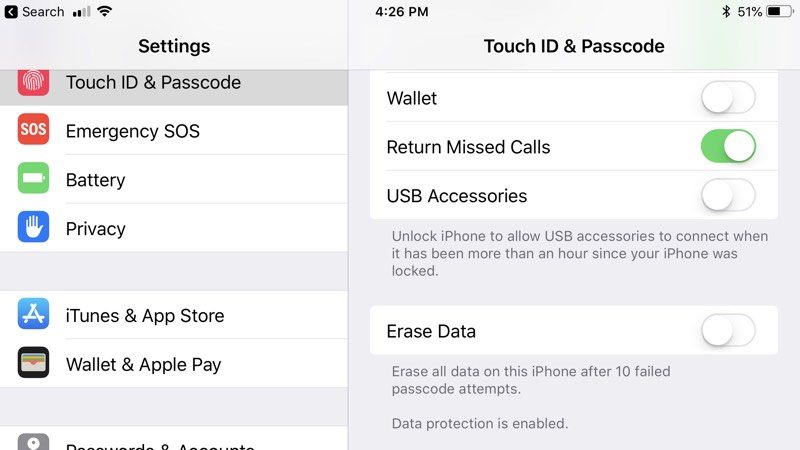
Motherboard’s sources did not share details on how Grayshift plans to avoid the new USB restrictions, so it’s not clear if the GrayKey box will continue to function or if Grayshift has another iPhone access solution in the works.
Despite Grayshift’s potential workaround, law enforcement officials are concerned about the changes Apple is implementing, and are said to be frustrated with the attention the GrayKey box has received in the media. “Some vendors are frustrated with GrayKey,” one researcher told Motherboard. “They feel the media hype brought too much attention to the attack vector.”
Apple yesterday confirmed its plans to implement new USB access restrictions in iOS 12 and clarified that it is aiming to defend customers against hackers, not frustrate law enforcement officials.
“At Apple, we put the customer at the center of everything we design. We’re constantly strengthening the security protections in every Apple product to help customers defend against hackers, identity thieves and intrusions into their personal data. We have the greatest respect for law enforcement, and we don’t design our security improvements to frustrate their efforts to do their jobs,” Apple said in a statement to MacRumors.
Note: Due to the political nature of the discussion regarding this topic, the discussion thread is located in our Politics, Religion, Social Issues forum. All forum members and site visitors are welcome to read and follow the thread, but posting is limited to forum members with at least 100 posts.
Related Roundup: iOS 12
Discuss this article in our forums
Amid U.S. hurdles, Huawei may be banned from Australia’s 5G network
It looks like it’s one kick down after another for Chinese company Huawei. After years of security-related issues in the United States, the company could now be facing some similar issues in Australia.
According to a report from Australia’s ABC, Huawei has increasingly been considered a security risk to critical infrastructure — something that will likely result in the company being blocked from taking part in building out Australia’s 5G network.
It’s not the first move against Huawei in Australia. The company was banned from participating in Australia’s National Broadband Network, and it lost a contract to build cable between Sydney and the Solomon Islands after an Australian spy chief intervened.
Blocking Huawei from participating in Australia’s 5G network would be a pretty big move, especially considering the fact Australian carriers Optus and Vodafone both have partnerships with Huawei to develop their networks.
“On matters like the electronic spine of Australia, the new 5G network which will control the internet of things — automatically driven cars, lifts, medical technology — I don’t think it’s appropriate to sell or allow a company like Huawei to participate,” said Australian politician Michael Danby in an interview with the ABC.
There are plenty of parallels between this and Huawei’s relationship with the United States. For example, like in the U.S., there are some concerns that blocking Huawei would stoke tensions between Australia and China, which is Australia’s biggest trade partner.
The main fear here is that Huawei is working with the Chinese government to spy on citizens in countries like the U.S. and Australia. While Huawei as a company is independent from the Chinese government, the two have a long history of collaboration. In the U.S. Huawei isn’t the only Chinese company facing hurdles — the U.S. government also recently banned U.S. officials from using ZTE smartphones.
Despite hurdles in countries like Australia and the U.S., Huawei has grown to become the world’s third-largest smartphone manufacturer. Still, it’s hard to imagine the company growing much more than it already has given the challenges it faces in new regions. Recently, reports surfaced that Huawei would step back from its push into countries like the U.S., refocusing its efforts on other markets.
Editors’ Recommendations
- ZTE could see ban lifted soon, but it’s still on thin ice
- Trump deal (and $1.7 billion fine) will let ZTE resume operations
- Facebook in hot water again over data deals with Huawei, Lenovo and others
- Verizon doesn’t care about Sprint and T-Mobile merger
- Is there horse in your hamburger? How blockchain could fight food fraud
Folding ‘Andromeda’ device could be Microsoft’s iPhone moment
Leaks might suggest that Microsoft’s long-rumored Andromeda device could be announced later this year, but we still don’t know very much about it. We’ve seen patents in the past that suggest it will be a hinged dual-screen device, but a patent filing made public today illustrates not only how it could look, but also how it could work — and how it could fit into your life.
Most of the time, patent filings include tons of diagrams and drawings that tend to obfuscate more than they illustrate, but in this case, Microsoft has given us a clear look at how the device functions and how big it will be. As you can see here, the Andromeda device is clearly not a full-size laptop or even tablet-sized device, but rather something you can slip into your pocket.
With two displays, it’s something of a spiritual successor to the canceled Microsoft Courier device. But it has more in common with modern smartphones than Courier-era tablets. This way, Microsoft is positioning itself to compete with the Apple iPhone and Google Pixel more than the iPad or PixelBook.
When the device is folded open flat, it appears to be about the size of a small tablet, slightly larger than the most recent Samsung Galaxy Note, but still smaller than the 10.5-inch iPad. That could mean it would be a great device for reading books, comics, and full-size webpages, but also give you more keyboard real estate than you would get on a normal smartphone.
In this image, we can see that it appears to have some laptop 2-in-1 DNA in its design. Not only would you use this device in handheld mode, or laid flat, but also folded in a sort of ‘display mode’ for something like an alarm clock — or maybe even some Windows and Xbox exclusive games? If the device has Bluetooth, which it most certainly would, it could connect wirelessly to Xbox One controllers and might end up providing a bit of competition to the Nintendo Switch as a handheld gaming device.
More than anything else, this patent filing illustrates that we don’t really have a category that comfortably applies to the Andromeda device — and that is likely part of Microsoft’s plan. When this device hits the market, there won’t be anything else like it, and that gives Microsoft a significant advantage over its competitors. Just like the iPhone did for Apple when it first came out.
Editors’ Recommendations
- Google patent could replace your contacts’ profile pictures with animations
- The iPhone’s viewfinder might soon let you see both cameras simultaneously
- Lamborghini’s electric supercar won’t contain batteries; it will be one
- You’ll soon be able to send texts on your Chromebook
- Here’s everything we know about the Microsoft Surface Phone
Folding ‘Andromeda’ device could be Microsoft’s iPhone moment
Leaks might suggest that Microsoft’s long-rumored Andromeda device could be announced later this year, but we still don’t know very much about it. We’ve seen patents in the past that suggest it will be a hinged dual-screen device, but a patent filing made public today illustrates not only how it could look, but also how it could work — and how it could fit into your life.
Most of the time, patent filings include tons of diagrams and drawings that tend to obfuscate more than they illustrate, but in this case, Microsoft has given us a clear look at how the device functions and how big it will be. As you can see here, the Andromeda device is clearly not a full-size laptop or even tablet-sized device, but rather something you can slip into your pocket.
With two displays, it’s something of a spiritual successor to the canceled Microsoft Courier device. But it has more in common with modern smartphones than Courier-era tablets. This way, Microsoft is positioning itself to compete with the Apple iPhone and Google Pixel more than the iPad or PixelBook.
When the device is folded open flat, it appears to be about the size of a small tablet, slightly larger than the most recent Samsung Galaxy Note, but still smaller than the 10.5-inch iPad. That could mean it would be a great device for reading books, comics, and full-size webpages, but also give you more keyboard real estate than you would get on a normal smartphone.
In this image, we can see that it appears to have some laptop 2-in-1 DNA in its design. Not only would you use this device in handheld mode, or laid flat, but also folded in a sort of ‘display mode’ for something like an alarm clock — or maybe even some Windows and Xbox exclusive games? If the device has Bluetooth, which it most certainly would, it could connect wirelessly to Xbox One controllers and might end up providing a bit of competition to the Nintendo Switch as a handheld gaming device.
More than anything else, this patent filing illustrates that we don’t really have a category that comfortably applies to the Andromeda device — and that is likely part of Microsoft’s plan. When this device hits the market, there won’t be anything else like it, and that gives Microsoft a significant advantage over its competitors. Just like the iPhone did for Apple when it first came out.
Editors’ Recommendations
- Google patent could replace your contacts’ profile pictures with animations
- The iPhone’s viewfinder might soon let you see both cameras simultaneously
- Lamborghini’s electric supercar won’t contain batteries; it will be one
- You’ll soon be able to send texts on your Chromebook
- Here’s everything we know about the Microsoft Surface Phone
SwiftKey integration on latest Insider build makes it easier to type on glass
Microsoft just made it easier for Windows 10 tablet owners to type on glass by delivering a more intelligent software keyboard. The SwiftKey integration is one of the bigger improvements on Windows Insider Preview build 17692, which not only brings swiping gestures to the software keyboard on Windows 10, but it also adds autocorrection and word prediction support. This should make the on-screen software keyboard on Windows tablets, convertibles, and detachables more competitive against Apple’s iPad and tablets running Google’s Android operating system.
“SwiftKey gives you more accurate autocorrections and predictions by learning your writing style — including the words, phrases and emoji that matter to you,” Microsoft said. The company noted that English, French, German, Italian, Spanish, Portuguese, and Russian are supported on Windows 10’s SwiftKey integration. SwiftKey support may help improve the usability of rumored dual-screen Windows devices, including Microsoft’s Andromeda project.
After initially launching its keyboard for Android in 2010 and later for iOS, SwiftKey was eventually acquired by Microsoft in 2016. With SwiftKey making its way to Windows 10, Microsoft’s vision for a Cloud Clipboard to easily share data copied between different devices is one step closer to reality. During its 2017 Build keynote, Microsoft announced that users logged in through their SwiftKey keyboard will be able to copy content — including text, images, and media — from one device and paste it on another device, including iOS and Android. The Cloud Clipboard feature appears to be an extension of Microsoft’s earlier OneClip experiment.
If you’re an Insider ready to upgrade to this build, Microsoft cautions that the screen will crash in a loop if you use a Picture Password to sign in. “We recommend removing your Picture Password before upgrading to this build,” Windows Insider Program head Dona Sarkar said. This latest build is available for Insiders in the Fast and Skip Ahead rings.
In addition to a swipeable keyboard, Microsoft is also bringing improvements to entertainment and gaming on build 17692. A new advanced setting in the Microsoft Edge browser will offer users control on which sites can autoplay videos, while gamers will see more features headed to the RS5 Game Bar. You will have more control over audio output, be able to view performance visualizations, and experience improvements to gameplay with a new “Dedicate resources” toggle in Game Mode.
Other notable improvements include the ability to make text bigger across the system, in Win32 apps, and in Universal Windows Platform (UWP) apps, narrator improvements, and the ability to stream audio to both the headset and PC speakers when using Windows Mixed Reality. You can read the full changes on Microsoft’s blog. If you’re looking for a new Windows 10 device to use or test any of Microsoft’s new Insider Preview features — like the SwiftKey integration — be sure to check out our laptop guide.
Editors’ Recommendations
- A Snipping tool looks to be the star of Windows 10’s next release
- Windows 10 ‘Lean’ shows up in a preview build for Windows Insiders
- Code in latest Windows 10 preview hints at a Surface Phone
- Microsoft’s latest Windows 10 Insider Preview release all about fighting malware
- New Windows 10 Skip Ahead build forces Mail app users to open links in Edge
Half taxidermy, half robot: Why UC Davis built this crazy realistic robo-bird
Intrepid researchers in the Department of Evolution and Ecology at the University of California, Davis are building fembots — and, no, we are not talking about the seductive killing machines from the Austin Powers movies. Instead, ecology professor Gail Patricelli’s “fembots” are taxidermy bird robots on wheels, designed to discover more about the mating habits of the survival-challenged sage grouse.
“The main goal is to understand how the process of sexual selection — which typically favors elaborate traits like the peacock’s train for impressing possible mates, or weapons like antlers to fight for access to mates — can also favor social skills,” Patricelli told Digital Trends. “We can use the robot to take part in the conversation between males and females during courtship to see whether males who are more responsive to the robot are also more successful with real females. We can also use the robot to elicit courtship behaviors in a consistent way, so that we see how differences in diet quality and levels of human disturbance affect reproductive behaviors.”
The fembots are part of a long-running research project dating back all the way to 2003, although Patricelli has been building bird robots since she was a graduate student at the University of Maryland in the 1990s. The fembots comprise a wheeled robot skeleton, augmented with real bird skin and feathers. “It’s a little bit biology, a little bit engineering, a little bit arts and crafts, and a little bit taxidermy,” Patricelli said.
Perhaps unsurprisingly, given the one-off nature of each robot, there are no plans to commercialize this. “It’s a pretty specialized tool, so the market is small, and it takes me weeks to build each one,” she said. However, she noted that this is certainly a valuable tool for people doing work similar to that being carried out by her lab.
“One of my colleagues, Jackie Augustine from the University of Ohio, used the plans we developed to build a robot prairie chicken to study hybridization between prairie chickens and their relatives,” she continued. “Once we’ve published our work, we’ll make the plans available to anyone who wants to make one.”
Editors’ Recommendations
- DT Daily: Facebook deletes over a half-billion fake accounts
- Kia recalls half a million vehicles in the U.S. due to airbag problem
- Verizon offers Pixel 2, iPhone X for up to half the price with a trade-in
- Xbox One sales figures are shockingly low, less than half of the PS4
- Office Depot just slashed the price of a Surface Pro Core i5 model in half
VR experience re-creates the Anne Frank House as it looked during WWII
Anne Frank House
VR can be used to transport us to amazing new worlds, which could never exist outside of virtual reality. Now it’s also being used to help take us closer to a world which tragically did exist, so that we can better understand what it was like. The world in question is the Nazi-occupied Netherlands of World War II — and specifically the plight of one of the many Jewish families who went into hiding there, prior to their extermination as victims of the Holocaust.
Announced this month, the Anne Frank Museum in Amsterdam is launching a virtual tour of the Anne Frank House, where the famous diarist and her family hid from the Nazis. The launch of the VR tour was timed to coincide with what would have been Anne’s 89th birthday. It was created as a collaboration between the Anne Frank House, Force Field VR, and Oculus Studios — and offers viewers the chance to tour the rooms in the Secret Annex, re-created to look as they would have during WWII.
“The real Secret Annex is empty,” Annemarie Bekker, who handles communications for the Anne Frank House, told Digital Trends. “The furniture was removed by order of the Nazis after the arrest of the eight people in hiding. It was the wish of Otto Frank, Anne’s father, to leave the rooms of the Secret Annex empty. Otto Frank was the only one of the eight people in hiding to survive the war. The VR tour gives people all around the world the opportunity to explore Anne Frank’s hiding place as it was in July 1942 to August 1944, the period when Anne Frank was forced into hiding and wrote her diary.”
Anne Frank House
We have no doubt that some will find the idea of re-creating the experience in virtual reality controversial. When the VR project was announced a couple of years back, it was the subject of criticism in some places. This is the same (understandable) criticism that often accompanies attempts to grapple with horrific world events in mediums more commonly associated with frivolity rather than academic solemnity. It’s certainly not for us to judge people’s reaction — either positive or negative to this idea. Nonetheless, if it’s able to introduce Anne Frank (and, by association, her wider experience) to an audience who might not otherwise be exposed to her, surely that’s a good thing, right?
Initially, the VR experience is being installed at the Anne Frank House in Amsterdam for visitors with limited mobility. Later, it will be rolled out to other sites including the Anne Frank Zentrum in Berlin and Anne Frank Center for Mutual Respect in New York.
Editors’ Recommendations
- Here’s everything we know about ‘The Punisher’ season 2 so far
- Netflix orders a series based on Frank Miller’s upcoming ‘Cursed’
- The best movies on Netflix right now (June 2018)
- Gaming is just the beginning. Here are 8 innovative ways VR is being used today
- The best shows on Netflix right now (June 2018)
Huawei’s Windows 10 streaming service for Android likely not happening in U.S.
Huawei introduced a new cloud service during CES Asia 2018 that streams Windows 10 to specific Android smartphones. Called Huawei Cloud PC, this service requires a special Cloud PC app served up through the Huawei App Store for Android. The app enables you to view the Windows 10 desktop on the smartphone’s screen, or on a connected external display.
According to a hands-on report from the show, the service is based on Huawei’s FusionCloud Desktop platform originally developed for the enterprise. Huawei’s service is meant to be used on “thin clients,” another word for PCs with extremely low-end hardware. These thin clients access a virtual PC running in the cloud that provides the operating system, processing power, and large storage spaces not possible on the thin client machine.
Of course, that means Windows 10 is running in the cloud and not locally on your device. Streaming requires a stable network and/or internet connection, thus the responsiveness of the virtual machine depends on your connection. A bad connection makes your Windows 10 experience frustratingly slow to respond to any manual input, possibly resulting in data loss.
The setup demonstrated during CES Asia 2018 relied on a docked smartphone connected to a big display via an HDMI cable. Given the dock used the phone’s single USB-C port, mouse and keyboard input was made possible through a Bluetooth connection. What’s interesting is that the Huawei Desktop Protocol used in the service enables Windows 10 running in the cloud to access your phone’s stored photos and other files.
Another hands-on demonstration showed how an owner of the Mate 10 smartphone could take a photo and then edit the image in Photoshop installed on Windows 10 in the cloud. You can install programs and apps on the virtual machine, and even open large CAD drawings, which you can’t do on a smartphone.
Due to latency issues, the service will only be available in China for now given the location of Huawei’s servers. If Huawei Cloud PC proves to be popular, the company may purchase additional servers throughout Europe to expand the service to other countries. But given Huawei’s current status with the American government, launching the service in the United States may not be an option.
At one time Microsoft pushed a mobile version of Windows 10 for smartphones. Although phones sporting the platform slowly rode off into the sunset, Microsoft kept the dream alive in its Windows Insider program. But its demise seemed inevitable and the platform finally came it its conclusion in January when Microsoft stopped providing preview builds.
Android currently dominates the smartphone market outside of Apple’s iPhone family, and Microsoft even serves up its best services on both platforms. Streaming Windows 10 from the cloud appears to be the next-best thing to actually having Windows 10 Mobile installed on your device. But streaming Windows 10 won’t be free, as Microsoft typically charges a per-seat licensing fee.
Huawei’s current list of compatible devices for its new service includes the P20 and P20 Pro, Mate 10 and the Mate R5 smartphones along with the MediaPad M5 tablet.
Editors’ Recommendations
- What is OneDrive?
- Huawei P20 Pro review
- Huawei P20 Pro vs. Samsung Galaxy S9 Plus: Are three better than two?
- Master your Huawei P20 and P20 Pro with these helpful tips and tricks
- You can soon stream your Steam PC games to Android, iPhone, Apple TV
 AIVAnet