


How to enable dark mode in MacOS Mojave
If you like dark themes, Apple is making your dreams come true with an all-new dark mode that’s coming with MacOS Mojave. Previous versions of MacOS allowed you to switch to a dark menu bar and dock, but this left many people unsatisfied. This new feature will provide an OS-wide dark theme that affects pretty much all the native MacOS features with a classy black/gray look.
If this is exactly what you’ve always wanted for your Mac, we can show you how to access and enable this mode with just a few steps.
Step 1: Get MacOS Mojave
This dark mode is only available to the average user through MacOS Mojave. At this time, Mojave is not yet available as a free download to everyone, the way the other MacOS updates are. Apple will make it available for all in fall 2018.
If that feels too long for you to wait, Apple will be releasing a public beta in June 2018 that you can download to check out the Mac dark mode. Sign up for Apple’s beta software program here, and you will be able to get the beta and test it out. Of course, betas aren’t always stable, so there is some risk in getting involved in the public beta. Make sure you back up all your valuable data before you begin the process – or download the beta on a Mac machine you don’t use for important purposes to test it out.
When MacOS Mojave comes out later this year, it’s certain to be free like the other recent MacOS versions, which means you will be able to download it and access the new dark mode at no additional cost.
Step 2: Head to System Preferences
Okay, so you have a version of MacOS Mojave and you’re ready to go. What next? Don’t worry, switching to the dark mode is very easy! Start by heading to “System Preferences,” which you can find as the gear icon in your dock, or in the drop-down menu if you click the apple icon in the upper left corner of your Mac screen.
Step 3: Go to General
Once System Preferences is open, look at the top row of icons. All the way to the left, you should see the icon for General, which is a little File drop-down menu icon.
General is where all the basic settings connected to your Mac’s look and color are located. Select it.
Step 4: Switch your Appearance
The very first option in “General” should be “Appearance.” In Mojave, Appearance is divided into two icons, a “light” and a “dark” option. Simply select the “dark” icon to switch MacOS over.
That’s it! If you decide you don’t like the dark mode very much, simply switch back to the normal icon in “Appearance.” You may also want to spend a little more time in General to check out other options for adjusting icon size, highlight color, and so on, so that everything matches your new dark color scheme perfectly.
Editors’ Recommendations
- MacOS Mojave brings Dark Mode, stacking, and a redesigned App Store to Macs
- How to stream on Twitch
- Here’s how to take a screenshot on any generation of iPhone
- How to print from an iPhone and iPad
- How to convert FLAC to MP3
Nomad’s new cable kicks up battery capacity for the same price
Nomad is stepping back into the limelight. After a few months without any new products from the company, it looks like it’s gearing up to launch a slew of new products — starting with a refreshed version of the Nomad Battery Cable.
The new battery cable offers many of the same perks as the previous iteration, but steps things up to a 2,800mAh battery instead of the 2,350mAh battery found on the previous model. Unfortunately, there’s still only an iPhone model of the cable.
If you’re unfamiliar with the battery cable, it’s essentially a charging cable that also has a battery module, so you can connect your iPhone to the cable without plugging the other end into a computer or USB port to charge. There are a few reasons you might want this. For starters, it means you have one less thing to worry about bringing on the road with you, but it also means you can charge your phone and external battery at the same time without having to worry about charging them separately. So, if you’re someone who forgets to charge things like external batteries, this should help eliminate that issue. The cable also charges the phone before it charges the battery — so if you plug your low-battery phone in when the cable’s battery is low, it’ll charge up your phone first.
There are a few other upgrades too. For example, Nomad has done away with the plastic battery housing in favor of an aluminum one, which should help ensure that the device is able to withstand some abuse. The cable itself is also protected with a braided nylon. Nomad isn’t raising the price of the device, thankfully — it’ll stay at $50.
As mentioned, Nomad is promising to update many of its other products too, and it says they’ll land in the second half of this year. We’re hoping to see updated versions of products like the Nomad Wireless Hub, which acts as a USB hub while simultaneously acting as a wireless charger for devices like the iPhone X, which support wireless charging. It would also be nice to see the company upgrade its battery packs, like the Nomad PowerPack.
Here’s everything we know about the 2019 iPhone
Julian Chokkattu / Digital Trends
While it’s still early, rumors for the 2019 iPhone are already surfacing. While the information has yet to be confirmed, it seems Apple’s 2019 flagship could include a variety of upgrades ranging from a new design to enhanced features. Here’s everything we know about the device so far.
Design
Past reports have been claiming that the 2018 iPhone will ship with a Lightning-to-USB-C cable — which means iPhone users will be able to join in on Type-C fast charging without having to spend money on extra accessories, 9to5Mac notes. According to the latest rumor, this could also mean the 2019 iPhone will include a USB-C port as well. Apple is reportedly redesigning chargers for its next-generation iPhones and iPad devices, Digitimes reports. By incorporating the interface into its iPhones, Apple would completely ditch its Lightning connector.
Similar to how the Apple’s MacBook series encouraged other notebook vendors to adopt the USB Type-C port, sources close the matter claim the company hopes to do the same with the iPhone. Incorporating it into the iPhone will apparently help to increase the popularity of the Type-C interface within other smartphones on the market.
While the notch has been a trend for the smartphones of 2018, that trend may be dying down. Earlier in June, Apple filed for a patent that specifically connected to displays that have openings in between pixels for sensors — which suggests the 2019 iPhone will ditch the notch. According to the patent application notes, it seems to hint the notch was placed there to begin with in order to accommodate the sensors needed in the front of the phone. Other reports indicate these openings would be embedded into the display itself, and too small to see.
Another patent from Apple relates to manufacturing ceramic iPhone bodies in a variety of colors — which could alter the way future iPhones look. The patent shows a device with colored bars on the back of the device — specifically on the top and bottom. It’s also possible the Apple logo could be a different color than the rest of the iPhone.
Display
As of right now, the only iPhone model to feature an OLED display is the iPhone X. But according to rumors that have extended across the past few months, all iPhone models in the future will feature the same display.
A report by South Korean news source ETNews, anonymous Apple officials close to the matter stated the company has started planning its 2019 iPhone models and have chosen OLED screens for “all three models.” This means that in addition to the traditional iPhone and iPhone Plus versions, there could also be a third iPhone thrown into the lineup.
Camera
Back in May, it was reported that the flagship 2019 iPhone is set to include three camera lenses. Taiwanese publication Economic News Daily claimed each of the three cameras could boast 12 megapixels — which could mean additional camera features such as increased detail or greater zoom mode.
The latest rumors come from Deutsche Securities analyst Lu Jialin, who believes Apple will incorporate two stereo vision lenses and a telephoto lens into its three-lens camera. That way, the cameras will be able to understand 3D space in a manner similar to the iPhone X’s TrueDepth front camera — which in turn means there could also be new augmented reality features at well.
It’s clear Apple is continuing to work on its ARKit, having introduced ARKit 2.0 as part of iOS 12 at this year’s Worldwide Developer Conference. The new version delivers improved face tracking, support for 3D object detection, and realistic rendering. Users can also play AR games against other users in the same virtual environment with multi-user augmented reality. With a three-lens camera, it will be interesting to see what features Apple will release for future versions of ARKit.
Editors’ Recommendations
- DT Daily: Samsung Galaxy X foldable phone could debut at MWC 2019
- The most expensive iPhone may lose one of its unique features in 2019
- The 3 cameras on the 2019 iPhone may bring awesome AR tech
- Apple iPhone X Plus: News, rumors, specs, and more
- Redesigned 2019 Acura RDX SUV’s starting price holds steady at $38,295
Updates to Google Assistant could make it the most natural digital helper yet
Google is making Google Assistant a whole lot better. At Google I/O 2018, the company announced a few new changes to Assistant that should help make conversation a lot more natural and conversational.
Most recently, on Monday, June 11, the Made by Google Twitter page posted a tweet (that was later deleted) noting that Google Home “can perform up to three queries at a time, so you can get more done.” For the time being, Multiple Actions are only available for Home users who have set their language preferences to U.S. English, but support for other languages is also planned.
Google previously announced that Assistant will be getting six new voices later in 2018 — and one of those is none other than musician John Legend. In other words, if you’re not a fan of the current Google Assistant voice, you will soon be able to change it to make it a little more personal.
New voices aren’t the only update to Assistant. Users have long wanted to be able to have a more natural conversation with Assistant, and Google is making that happen. For starters, the company is adding a feature called “Continued Conversation,” which allows you to chat with Google without having to say “Hey Google” every time you make a request. You’ll say it the first time, but after that, you’ll be able to continue talking to Google the same way you would any other conversation.
Google also recently rolled out a feature called Multiple Actions. As the name suggests, you will soon be able to ask Google to perform multiple actions in one sentence. No longer will you need to make different requests to change the thermostat and turn on the TV — now, simply say, “Hey Google, set the thermostat to 68 degrees and turn on the TV,” and it should be able to recognize the two separate actions it needs to perform. But it’s no longer just two actions that you can string together — rather, Assistant will now obey up to three commands at a time.
Ethics in technology was also a big theme at Google I/O, and along those lines, Google Assistant will now reward polite interactions with positive reinforcement. This is particularly important for kids, who are still learning how to be polite in their interactions. Now, if someone says “please” in their request, Assistant will say something like “thank you for asking so politely.” The feature is called “Pretty Please,” and is rolling out later this year.
On your phone, Google Assistant is also getting a few visual tweaks that should help make it more helpful. For starters, when you make a request, you won’t only get audio responses — you’ll also get rich visual responses in Assistant on your phone. Swipe up from a response, and you’ll also get a rundown of your day — including things like flight schedules, weather, and so on. Along with those visual changes, Google is making Assistant a little more helpful when you’re navigating in Maps. Assistant is now featured in Maps, so if you’re driving and ask for music, it won’t switch to a different screen while you’re navigating. It should be a helpful feature, and will make using Assistant in the car a little safer.
Google Assistant will also soon be able to order food for both pickup and delivery. Not only will you be able to order food using the chat-style interface like before, but you’ll also now be able to ask Assistant to simply order your usual from Starbucks, for example.
As a digital assistant, Google Assistant can do things like book tables at restaurants and book haircuts — and soon it’ll get a whole lot better at doing so. The new feature is called “Google Duplex,” and basically involves Assistant actually calling businesses to get things done. In other words, if you ask Assistant to book you a haircut, it may actually call the hair salon, and book the haircut by talking to whoever picks up. It actually sounds very natural and represents a pretty big step forward for digital assistants in general. Google has put a lot of work into ensuring that Assistant can understand the nuances of language — and based on the examples Google gave, it seems to be able to do this pretty well.
Updated on June 12: Google Home can respond to three queries at once.
Editors’ Recommendations
- Here’s everything we saw at the action-packed Google I/O 2018 keynote
- Google Assistant vs. Amazon Alexa: How do they compare?
- Everything you need to know about Google Assistant
- Google Duplex sounds human when it calls to book appointments
- Here’s how to change Google Assistant’s voice on your Google Home device
Type wherever and whenever with the $20 iClever foldable Bluetooth keyboard
Small and portable for when you aren’t using it.
The iClever IC-BK03W portable folding ultra slim Bluetooth keyboard is down to $19.71 with code ICELBK03 on Amazon. This keyboard has been selling steadily around $29. We shared a couple deals on the black version of this keyboard around Black Friday last year, but this is the first code we’ve seen that worked on the white version.

This seems like the perfect keyboard for when you’re traveling and something comes up: maybe you get inspiration for a great idea or just need to fill out a form you hadn’t filled out before. You can just unfold this slim keyboard and do what you need to do. It’s compatible with iOS, Android, and Windows. The built-in Bluetooth has a range of 33 feet, and the keyboard is made with a premium aluminum alloy for durability. It automatically goes into sleep mode and powers off to save the battery, which is easily rechargeable. The keyboard has 4.4 stars based on 712 user reviews.
See on Amazon
Best Smartwatches for Fitness in 2018
- Best overall
- Best alternate
- Best without GPS
- Best with Wear OS
Best overall
Samsung Gear Sport

See at Amazon
See at Best Buy
The best smartwatch to pull double duty for daily use and activity tracking is the Samsung Gear Sport. It’s built to take a beating or a plunge with 5ATM waterproofing, and has all of the necessary sensors and radios to make sure you can track everything. Samsung Health has gotten surprisingly good for following each workout but also long-term goals, and partnerships with bigger names like Under Armour and MapMyFitness mean you can also send all of your data to a different system if you need.
One of the best features of the Gear Sport is that it doesn’t look that sporty. It can easily be worn every day with a variety of clothing and not stand out, which you can’t really say about most smartwatches that are aimed at fitness. The rotating bezel is fantastic, the screen is great and while the software is a tad clunky it’s super powerful. Battery life is surprisingly good as well, about 2-3 days depending on usage.
Bottom line: The Gear Sport gets all of the typical smartwatch stuff handled, and is also a super-capable fitness tracker.
One more thing: For the sportiest look and robust design, stick with one of the rubber bands rather than a nylon or leather one.
Best alternate
Fitbit Ionic

See at Fitbit
Fitbit comes at smartwatches from the direction of its successful fitness band lineup. This makes the Ionic a perfect smartwatch for someone who really wants to focus on activity tracking first, and the other “smartwatch” stuff secondarily. Though it may be a bit big and blocky, the Fitbit Ionic has a bright display, GPS tracking, optical heart rate sensor, SpO2 sensor, 50-meter waterproofing and all of the other cool stuff like NFC and 2.5GB of storage space. It’s also rated at four days of battery life, which goes beyond the competition.
Tons of people have trusted Fitbit with their fitness tracking of all kinds for years, and that’s really what you’re getting in the ~$300 Ionic. The smartwatch side of things isn’t as deeply integrated to your Android phone as an Wear OS or even Samsung watch is, but you can’t argue it’s just as good or better for fitness.
Bottom line: If fitness is your primary goal, and you’ve had previous Fitbits, the Ionic should be at the top of your list.
One more thing: The new Fitbit Versa offers a smaller case and better looks as a smartwatch, but doesn’t have GPS like the Ionic does.
Best (without GPS)
Fitbit Versa

See at Amazon
The Fitbit Ionic is clearly the best overall fitness device from the company, but for something a bit more balanced, the Versa is worth considering. Fitbit learned a lot from the Ionic, and the new Versa has a much smaller and better-designed case that looks more like a regular watch than a gadget.
The unfortunate downside of the smaller, better-designed case is that it doesn’t have GPS like the Ionic does. If you want to run, walk or bike and get precise tracking, the Ionic is still the pick. But anyone who does need GPS for their workouts should go with the Versa on account of its improvements over the Ionic in every other way.
Bottom line: A great all-around smartwatch, but one without GPS making it a bad choice for runners and bikers.
One more thing: Being the newest model, you can expect to pay full retail for the Versa for a while — Fitbit isn’t likely to kick on any sales for a bit.
Best with Wear OS
Huawei Watch 2 Sport

See at Amazon
The Wear OS world (formerly Android Wear) is moving almost entirely to lifestyle and fashion brands, but there are a few relatively modern choices out there for fitness-focused needs. The Huawei Watch 2 Sport is the best of the bunch, on account of its lightweight and relatively rugged exterior that can take bumps and sweat with ease. The case isn’t going to win any design awards, and as a watch feels a bit cheap and flimsy. But it’s correspondingly inexpensive, hovering around $200, which is great if you’re on the fence about spending more money on a dual-purpose wrist computer.
On the smartwatch side it’s all typical Wear OS fare, meaning it has perfect integration to your Android phone’s notifications and messaging system — plus with access to Google Play you have a good number of watch faces and app extensions to try out. It also has NFC for Google Pay. The fitness tracking isn’t nearly as good as Samsung or Fitbit offer, but that’s one of the trade-offs you’ll see by going with Wear OS to get a better daily smartwatch operating system with great integration to your phone.
Bottom line: If you need to have Wear OS, the Watch 2 Sport offers it in a rugged case at an affordable price.
One more thing: Keep an eye out for discounted, refurbished or open-box units, as the Watch 2 Sport is several months old now.
Conclusion
For a smartwatch that pulls double duty as a daily watch but also a capable fitness tracker, the Samsung Gear Sport is a fantastic decision. Fitbit’s Ionic isn’t as great of a daily smartwatch, but has great fitness tracking you expect from the Fitbit brand. The Fitbit Versa is better in the smartwatch category, but lacks GPS which is an immediate downside for runners. If you must have Wear OS for great smartphone integration, check out the inexpensive Huawei Watch 2 Sport.
Best overall
Samsung Gear Sport
See at Amazon
See at Best Buy
The best smartwatch to pull double duty for daily use and activity tracking is the Samsung Gear Sport. It’s built to take a beating or a plunge with 5ATM waterproofing, and has all of the necessary sensors and radios to make sure you can track everything. Samsung Health has gotten surprisingly good for following each workout but also long-term goals, and partnerships with bigger names like Under Armour and MapMyFitness mean you can also send all of your data to a different system if you need.
One of the best features of the Gear Sport is that it doesn’t look that sporty. It can easily be worn every day with a variety of clothing and not stand out, which you can’t really say about most smartwatches that are aimed at fitness. The rotating bezel is fantastic, the screen is great and while the software is a tad clunky it’s super powerful. Battery life is surprisingly good as well, about 2-3 days depending on usage.
Bottom line: The Gear Sport gets all of the typical smartwatch stuff handled, and is also a super-capable fitness tracker.
One more thing: For the sportiest look and robust design, stick with one of the rubber bands rather than a nylon or leather one.
Update June 2018: The Samsung Gear Sport is still our top choice, and the Fitbit Ionic continues to be a runner-up. The Fitbit Versa has been added as an alternative choice for those who want something smaller and better-designed but are willing to give up GPS to get it.
Spyro: Reignited Trilogy for PlayStation 4: Everything you need to know!

Spyro returns in beautiful, detailed glory for three of his most beloved adventures
After Activision announced the Crash Bandicoot N Sane Trilogy, fans continued to clamor for their beloved dragon, Spyro. And the demand was heard, because Toys for Bob is bringing Spyro’s first and best three adventures to modern consoles with the Spyro: Reignited Trilogy. This trilogy consists of Spyro the Dragon, Spyro 2: Ripto’s Rage, and Spyro: Year of the Dragon. This isn’t a remaster so much as a from-the-ground-up remake that remains faithful to the structure and design of the original. If you played any of these three Spyros, you’ll find the same game here, only way, way prettier.
I was able to go hands-on with three of the levels in the Spyro: Reignited Trilogy at E3 2018, all three of which were from the original Spyro the Dragon. Those levels were Sunny Flight, Toasty, and Tree Tops.
See at Amazon
Same dragon, new look

When I think back on the original Spyro games, it’s been so long since I’ve played that the image I have in my head is far more visually attractive than what the games actually were. Spyro’s gameplay has aged well, but its visuals haven’t. Yet when I burst into the Toasty level and started blasting fire on grouchy old wizards, I was happy to find that Toys for Bob had managed to recreate Spyro to feel just as good as he always has, and look even better. The titular dragon moves fluidly throughout the world, his flames scorch the grass, and enemies have adorable and detailed animations and tells as you fend them off. It’s worth it to stop and look up at the details the team has added to backgrounds that the technology did not allow them to before, though I did find the camera angles were still a pain to work with at times.
The sound design has also been redone, with the familiar tunes getting a makeover as well as the sound effects. I found myself inexplicably charmed by the sound of Spyro’s dragon feet on the stone floor of the Toasty castle. I’ve never personally heard dragon feet on a stone floor, but I’m convinced Toys for Bob has captured exactly what they would sound like.
How do you play?

Spyro can move about 3D worlds, jump, charge forward, and breathe fire. His charge is capable of destroying certain obstacles or knocking over certain types of enemies, while his fire is your primary weapon against the many, many enemies that want to hinder your progress. Spyro’s a dragon, so of course, he can also fly, though his power is a bit limited. In some worlds, certain obstacles or terrains will give you other options. For example, in Tree Tops, I was able to charge down a marked ramp and jump at the end to make a huge leap over a gap.
In most levels, you’ll want to collect gems hidden about the level around corners, down halls, from defeating enemies, or inside chests. In other levels, such as Sunny Flight, you’ll have a different challenge. Sunny Flight gives you a time limit and asks you to take down hidden barrels, planes, and fly through goal posts within the limit. Though there are ways to increase your time, it’s one heck of a tight window, so you’ll need to have some confident flying skills to make it happen!
Is there anything new?

For now, Toys for Bob just wants to focus on making Spyro as good as it can possibly be as a recreation of the original trilogy. So as far as we know now, there are no new levels or hidden, extra content that wasn’t in the original games. But given the sheer amount of levels between the three titles, you should have more than enough to do.
While the visuals are rebuilt entirely, one fascinating fact I learned from the team at E3 was that they had used tools specifically to measure the distance of Spyro’s jumps, steps, and the distances between all points on the map to ensure that those who played the heck out of the original Spyro games would find their muscle memory reliable in Reignited. All heights and distances are faithful to the originals.
For all three games in the trilogy, Tom Kenny has returned to reprise his role as the voice of Spyro. The friends Spyro meets along the way are voice acted as well, and a few of the dragons have new and improved designs to help them stand out from the rest.
When can I set the world on fire?
Spyro: Reignited Trilogy launches for PS4 and Xbox One on September 21, 2018. It will cost $39.99.
See at Amazon
Tell me more!
If you have any further questions about the Spyro: Reignited Trilogy, let me know in the comments!
PlayStation 4

- PS4 vs. PS4 Slim vs. PS4 Pro: Which should you buy?
- PlayStation VR Review
- Playing PS4 games through your phone is awesome
Amazon
Complete the new Developer Economics Survey: Voice your opinion and win a Galaxy S9!

Developers – Now is the time to share your opinions and enter to win amazing prizes like a Galaxy S9!
Is JavaScript giving you headaches? Do you wish other developers knew how important Swift and Rust will be in the coming years? It’s your chance to turn your opinions into a tool of change! The new Developer Economics survey is open NOW, calling out all software developers to take part. Start right away!
Don’t miss a chance to join over 40,000 developers from 160+ countries who take part in the Developer Economics surveys every year to tell the world where software development is going next.
Who can take the survey?
Pretty much everyone writing code and getting their hands on software development in Mobile, Desktop, IoT, AR/VR, Machine Learning & Data Science, Web, Backend and Games. It doesn’t matter if you’re a hobbyist, a startupper or an enterprise dev — the survey is open for all real developers out there!

What sort of questions are they asking?
The survey is designed to dive into real-life developer issues, from coding skills and favorite tools to satisfaction with learning resources and communities.
Expect questions like:
- Which are your favorite tools and platforms and why?
- Are you getting value from the available dev resources?
- What are your goals for coding?
Ready to take the survey?
Why should you take the survey?
It’s fun, for starters! The survey is designed to reveal your sci-fi profile, so the more you engage, the closer you get to finding out your place in the galaxy far, far away.
Then there are the PRIZES. This time, devs who complete the survey can win stuff like a Samsung S9+, an HTC Vive Pro, an iPhone X, GitHub Developer Plans, Amazon vouchers and other useful things to help you test your work or just play around. You can also take part in the referral program, which allows you to with up to $700 in cash by referring other developer friends to take the survey.

This year we’re introducing a novelty – SlashData will donate funds to a coding charity to support their mission. We want to give back to the community, and we hope this encourages developers to take our survey and be a part of something larger and truly meaningful.
And last but not least, everyone who takes the survey will get insights with key findings from the survey, as well as a free report with the highlights and up-and-coming trends.
If you have a few minutes to spare and want to have a quality time, then this survey is for perfect for you! You can start right here. Extra tip: if you need to take a break, just click to save your responses and then you can come back and continue where you left off.
Good luck!
Take the survey now!
Win a Samsung Galaxy S9+ and RhinoShield protection set from Android Central!

Rhinoshield makes some of our favorite cases, with offerings that are not only stylish and great protection for your phone, but also reasonably priced. Their latest cases for the Samsung Galaxy S9 and Galaxy S9+ meet all of that criteria, and more!
We’re teaming up with Rhinoshield to give one lucky winner a Samsung Galaxy S9+ and RhinoShield protection set, and 10 additional winners free cases! Keep reading for more info about the cases, a special discount, and to get entered into the giveaway!
Besides the signature Rhinoshield CrashGuard Bumper, they’ve also released the SolidSuit Case to provide full cover protection for the S9 / S9+, as requested by many Android users. While the CrashGuard Bumper shows off the back of the phone in its minimalist design, the SolidSuit Case provides full cover protection and add a touch of class with its premium back finish (Carbon Fiber, Classic Black). Both the CrashGuard and SolidSuit are made of our latest ShockSpread™ material which provides over 11 feet of impact protection while being thin and lightweight. You can get a closer look at these cases in action here. And for a limited time, Android Central readers can use the code ANDROIDCENTRAL to save 20% on RhinoShield cases!
Enter to win a Samsung Galaxy S9+!
THE PRIZE: One Android Central reader will receive a Samsung Galaxy S9+ and RhinoShield protection set, and 10 runners up will receive a RhinoShield case of their choice (or $30 gift card if case is not available for the winner’s phone).
THE GIVEAWAY: Use the widget at the bottom of this page. There are multiple ways to enter, each with varying point values. Complete all of the tasks for maximum entries and your best shot at winning! Keep in mind that all winning entries are verified and if the task was not completed or cannot be verified, a new winner will be chosen. Phone service is not included with the prize and we make no guarantees that the phone will work with your service provider, so be sure to check that before you enter. International winners will be responsible for any customs fees incurred during shipping.
The giveaway is open through June 12, 2018, and the winner will be announced right here shortly after the closing date. Good luck!
Win a Samsung Galaxy S9+ and RhinoShield protection set from Android Central!
By entering you agree to our Privacy Policy and Terms & Conditions.
AOC USB-C external monitor review: A Chromebook’s best companion

Two screens are better than one.
A majority of the writing I do for Mobile Nations happens at home. I have a gigantic monitor that lets me comfortably split two windows so I can have the text I’m writing on the left side of the screen and reference material on the right. Most people use dual monitors for the same thing.
AOC USB-C External Monitor

Price: $195 USD
Bottom line: If you’re on the go a lot and want some extra screen real estate for your laptop, it’s hard to go wrong with AOC’s USB-C monitor.
The Good
- Great viewing angles
- Lightweight
- Works with Chromebooks, Windows laptops and MacBooks without any hassles
- Uses USB-C for power and display from a single cable and port
The Bad
- The included stand is often more trouble than it’s worth
- No 3:2 option
See at Amazon
When I take my laptop out in the world, work slows down a lot. This is a first world problem, but if I’m writing up an article of a new phone and I’m referencing the manufacturer’s press material, I type a bit, change back to the manufacturer’s site, go back to typing a bit, and so on. It doesn’t sound like a lot, but the time switching back and forth between windows adds up. I could pin each window to the left or right side of my screen as I do on my desktop, but this is impractical on a small laptop screen.
Portable monitors have been around a few years to solve this problem, and two months ago I began using one from AOC.
This model has a 15.6-inch screen and a single USB-C port for both power and video. If you have a newer Windows laptop, Chromebook or Macbook with a USB-C port, you’re good to just plug the monitor in and go about your merry way. If you don’t, there is a driver CD (yes, a CD) included to connect the monitor to a USB-A port.

AOC USB-C External Monitor What’s great
The monitor itself is lightweight, coming in at under two pounds. It’s been living in my backpack since day one, and I’ve never had any discomfort with the extra weight. The 15.6-inch screen is more than enough for productivity, especially when combined with my laptop’s screen. The 1080p resolution may not be enough for some photo and video editors, but I imagine those folks would prefer their laptop’s screen for those tasks anyway.
If I had one minor complaint about this panel, it’s that outdoor visibility could be better.
This is an IPS panel, so viewing angles are much better than older TN panels. Colors are accurate as well, at least to my eyes. If you’re interested in gaming on this external screen, do note that its refresh rates is “only” 60hz, but the 5ms response time should help you pwn plenty of noobs. One obvious but important note is because this monitor is getting its power from your laptop, it will drastically reduce your laptop’s battery life. If you need your laptop to last through the night, consider leaving this monitor in your bag.
If I had one minor complaint about this panel, it’s that outdoor visibility could be better. There’s surprisingly little glare, but it doesn’t get bright enough for some of the sunny days I’ve had recently. I mostly write in record stores and bars, so that’s not a huge loss for me.

AOC USB-C External Monitor What’s not great
A major complaint I have about this monitor — and the external monitor marketplace as a whole — is there’s no 3:2 option. My Pixelbook has a 3:2 screen, and if I ever go back to a Windows laptop that’ll have a 3:2 screen too. 3:2 displays are simply better for productivity, while still being great for content consumption. Going back and forth between a 3:2 screen and a 16:9 one isn’t the end of the world, but it’s a little janky. I don’t blame AOC or other manufacturers for going with 16:9, since a vast majority of laptops use that aspect ratio. I just wish there was a 3:2 option available.
The external monitor comes with a soft cover that attaches with a magnet, Surface Pro style. This cover is also supposed to function as a stand, but it’s much more trouble than it’s worth. Spend a few more dollars on a tablet stand and save yourself the hassle.
Brightness, stand and aspect ratio complaints aside, actually using the monitor is a joy. It starts working as soon as you plug in the USB-C cable, and it can’t be understated how much more enjoyable this makes my mobile writing. Before getting this screen, I used to spend an hour or two working on an article. With it, and I have that down to 45 minutes maximum.
Other options
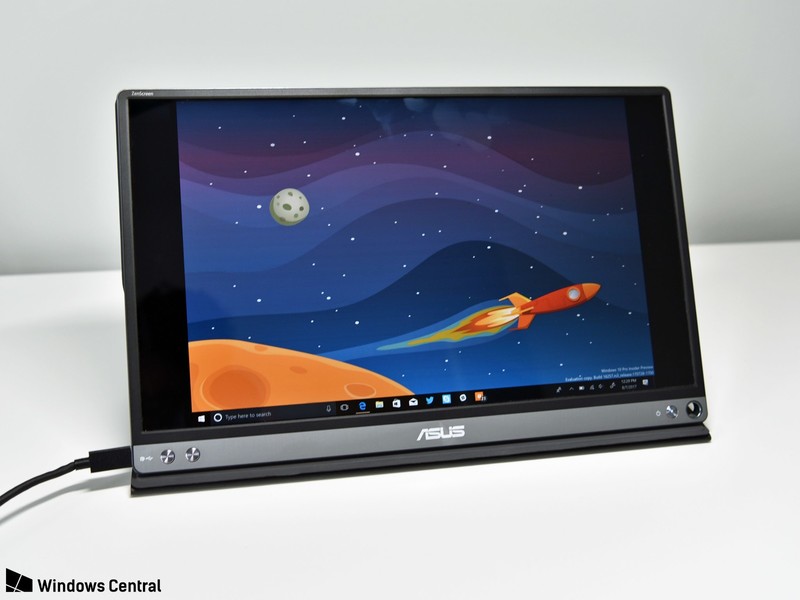
Alternatives to this include the Asus Zenscreen, which is effectively the same monitor inside a re-branded chassis. That screen has been reviewed by both Daniel Rubino and Mr. Mobile if you’re curious.
Asus has a newer model coming that has a built-in battery, so it won’t pull from your laptop all the time. This should also — in theory — connect it to older laptops with an HDMI or DisplayPort to USB-C cable, since you won’t need to worry about transmitting power.
Closing thoughts: a super useful accessory
A second laptop screen is the epitome of a first-world accessory: it’s not necessary, and for most people, it will be redundant. But, if you enjoy writing on the go and want some extra real estate, this will legitimately make you more productive in the same way a second desktop monitor would.
4.5
out of 5
This screen is $50 cheaper than the comparable Asus model, making it a win if you want to expand your mobile workstation. If you work on your laptop a lot and want an easy way to get more screen real estate, it’s hard to go wrong with this monitor.
See at Amazon
 AIVAnet