


The best apps for the 2018 World Cup
Simon Hofmann – FIFA/Getty Images
The 2018 World Cup kicks off June 14, and for soccer fans around the world there is no bigger event. A total of 32 teams, each representing a different country, will gather in Russia to kick, slide, and flop their way to what is arguably the highest honor in the world of soccer. The tournament consists of many games taking place over the course of a month, so if you want to keep up with everything, there are a few apps you might find convenient. If you’re looking for a great soccer game to keep you busy, we’ve also reviewed EA Sports’ FIFA 18.
Onefootball Live Soccer Scores
The World Cup is a massive tournament, and it can be hard to keep up with every game. Onefootball, despite its goofy name, is an excellent app for staying up-to-date on the latest happenings in the world of soccer, whether you’re looking for recaps, scores, or the news. The UI is clean and easy to navigate, and you can choose which teams you want to follow to get information about them first and foremost.
Download now for:
Android iOS
Goal Fantasy Football
What’s better than watching soccer? What about managing your own team? Most people won’t have the opportunity to manage a pro team in their lifetimes, but that’s why fantasy leagues exist. Goal Fantasy Football gives you a budget with which to construct a team. Forming a team is an easy process, and you can quickly join or create a “mini-league.” Goal even offers “achievements” for those who want goals to work toward.
Download now for:
Android iOS
2018 FIFA World Cup Russia
For constant World Cup coverage, it’s a good idea to go to the source. FIFA’s official app for the 2018 World Cup offers comprehensive news updates, scores, and information on players and teams. You can read in-depth profiles of players, check the current standings, and learn the start times for upcoming matches.
Download now for:
Android iOS
BBC Sport
Soccer is popular in Britain, so it’s no surprise that the BBC (British Broadcasting Corporation) supplies a wealth of soccer coverage. In addition to scores and news updates, BBC Sport provides in-depth analysis, including previews for various teams and features. There are even podcasts.
Download now for:
Android iOS
ESPN
ESPN is probably the biggest name in American sports media, and the network has made its mark on the digital space with an app that offers constant coverage of every major sport, including soccer. The ESPN app has a dedicated section for the World Cup, so you can view the schedule of upcoming games, keep track of scores and standings, and read articles from ESPN writers. The app is free, but does include some ads.
Download now for:
Android iOS
Editors’ Recommendations
- The best iPhone apps available right now (May 2018)
- Six of the best Festival-approved movies and TV shows to stream this year
- The best Apple Watch apps
- Get smart: The best educational apps for iPhone and Android
- The best drone apps
Even in the desert, an innovative device pulls fresh water out of thin air
On any given day, you’re surrounded by of water suspended in the air as imperceptible vapor. The idea of harvesting this water has deep roots in the sci-fi culture — when we first met Luke Skywalker on his desert home planet, Tatooine, he was toiling away on his uncle’s vapor farm — but similar devices have also taken shape in the real world.
One of the biggest challenges engineers face when designing water harvesters is how to keep the device cool. To form water vapor, the device has to be cooler than the air around it. That might mean using a cooling fan, which would prove feasible in areas with easy access to electricity but not in undeveloped regions, where water scarcity is at its worst. Finding another solution is key.
In a study published last week in the journal Science Advances, University of California, Berkeley researchers demonstrated a unique approach to water harvesting that let them extract drinkable water from desert air without the need for external energy. The proof-of-concept device could pave the way for cheaply supplying clean water to arid regions.
“For the first time, we are demonstrating that you can harvest drinkable amount of pure water from the dry desert air every day, using essentially just a simple cheap box, with no additional energy and electricity required other than the natural sunlight,” Omar Yaghi, a professor of chemistry at UC Berkeley who invented some of the underlying technology, told Digital Trends. “All of these are possible because of a revolutionary porous novel material inside the box called metal-organic framework.”
A metal-organic framework (or MOF) is a highly porous material with internal cavities and channels that give it immense surface area. An MOF the size of a sugar cube has the internal surface area of a full football field, Yaghi said. “This high surface area ensures high capacity for the captured water.”
The device developed by Yaghi and his team is, strictly speaking, a box within a box. The internal box is filled with MOFs made up, in this case, of organic material and the expensive metal zirconium. The lid of the outer box is left open at night (when cool, humid air rushes in and is absorbed by the MOF), and closed during the day (when sunlight heats the box, the water molecules escape the MOF, and condense as droplets on the inside of the outer box). From there, Yaghi and his team manually collected the droplets with a pipette.
In a trial in Scottsdale, Arizona, the harvester yielded just about seven ounces of water — not enough to quench someone’s thirst but enough to show feasibility.
“This [device] is especially important for regions where access to clean water is limited,” Yaghi said. “My vision is to achieve ‘personalized water,’ where people in water-stressed regions have a device at home running on ambient solar, delivering the water that satisfy the basic needs of the individuals.”
He acknowledged the many steps ahead before such a device could come to market — including scaling up the device to capture more vapor and experimenting with newer, cheaper MOFs — but Yaghi is optimistic that such technology could someday provide potable water to people in need.
Intel “forgot” to mention its 28-core CPU demo was bogus
Intel CEO, Brian Krzanich Intel
Remember that 28-core high-end-desktop CPU that Intel wowed everyone with at Computex? It was supposed to be capable of running at 5GHz and offer performance that was leaps and bounds ahead of its previous top-tier offerings in the Core i9 series. It turns out that chip was based on server hardware and was heavily overclocked to hit that kind of frequency.
That might be excusable if it hadn’t required a phase change cooler with a power rating that could be measured in horsepower to keep it running at manageable temperatures. But here’s the real kicker: According to Tom’s Hardware’s report on the matter, Intel claims it “forgot” to tell the crowds about the kind of cooling and aftermarket enhancement that such a chip would require to hit the levels of performance it displayed on stage.
Because of that cooler and the server-grade CPU that this “new” design is said to be based on, it may have required as much as 2,300 watts of power just to turn the system on, making it laughably unfeasible for anything but that very specific show debut. Considering the reveal of this supposedly groundbreaking design appeared to be cobbled together and tacked on the end of Intel’s stage show, its timing just before AMD’s own Threadripper 2 reveal is incredibly suspect.
Whether it was an attempt to take the wind out of AMD’s Ryzen 2 sails though doesn’t matter, because if anything Intel’s announcement made AMD’s even more exciting. Theadripper 2 has up to 32 cores and though we don’t know the clock speeds, they should be higher than the first-generation as all Ryzen 2 chips have been. It may not be 5GHz on all cores, but 4.5GHz on some is certainly feasible.
Most importantly though, those chips are real and definitely coming this year. Dell told us in a recent media briefing that it already planned to use Threadripper 2 chips in Alienware desktops in 2018. First generation Threadripper CPUs are competitive with Intel’s offerings that cost more than twice as much; Threadripper 2 could break new boundaries of consumer performance.
With Intel’s best efforts at combatting that seeming to be an effectively fictional CPU that certainly will not be released this year, AMD could well be poised to take the ultimate CPU performance crown in the next few months. In comparison, Intel, by showing us that 28-core, super-chilled, heavily overclocked CPU as the only working hardware that could even hope to steal some of AMD’s thunder — which it didn’t — has effectively ceded the floor to AMD to become the more affordable and exciting CPU manufacturer in the next few months.
Intel will certainly offer stiff competition and likely better gaming hardware in the mid to high end of the consumer space, but AMD Threadripper 2 is currently poised to steal the top spot for high-end desktops and power users.
Editors’ Recommendations
- Intel throws down a gauntlet with its 28-core extreme CPU
- The best processors for gaming
- AMD Threadripper 2 with 32-cores and 64-threads one ups Intel
- AMD leaks Ryzen 2000-series expansion with mobile and Threadripper CPUs
- AMD’s second-generation Ryzen desktop CPUs hit the market starting at $199
Best Screen Protectors for Moto G6

Keep your display protected with a tempered glass screen protector!
The Moto G6 is one of the best budget phones around. But just because the price is cheaper doesn’t mean it’s not worth protecting. For under 10 bucks, you can get a set of tempered glass screen protectors to protect that Moto G6 display from anything that life throws at it.
- Supershieldz Tempered Glass [2-pack]
- IQ Shield Tempered Glass [3-pack]
- Mr. Shield Tempered Glass [3-pack]
- TopACE Tempered Glass
Supershieldz Tempered Glass Screen Protectors [2-pack]

Supershieldz is a popular maker of screen protecting accessories and they offer a two-pack of tempered glass screen protectors for the Moto G6. The edges are rounded for comfort around the earpiece and home button cutouts.
It’s a good value from a trusted brand that’s backed by a lifetime replacement warranty. Available for just $7 on Amazon.
See at Amazon
IQ Shield Tempered Glass Screen Protectors [3-pack]

IQ Shield offers screen protectors for a wide variety of smartphone brands, and typically offers both tempered glass and film options. For the Moto G6, they offer a Full Bodyskin Protector ($16) and a Matte finish screen protector ($8). But the best value by far is the three-pack of tempered glass.
Tempered glass offers the best protection for your phone, and IQ Shield offers an impossibly thin screen protector. Best of all is you’ll have two backups as needed. Get your kit for just $8.
See at IQ Shield
Mr. Shield Tempered Glass Screen Protector [3-pack]]

The installation is the most important part of using a screen protector — you don’t properly clean that screen and you’re going to have dust and weird streaks appear.
That’s why Mr. Shield includes a complete installation kit that includes a cleaning cloth, dust collecting stickers, and an alcohol prep pad. The glass is laser cut to provide as much coverage as possible for the Moto G6.
These will be in stock and shipping from Amazon by June 16. Get yours for just $8.
See at Amazon
TopACE Tempered Glass Screen Protector

TopACE makes the list for offering a slightly more curved set of “horns” around the earpiece cutout. Otherwise, it’s another solid tempered glass screen protector for the Moto G6 that offers everything you’d expect in a screen protector.
Designed to be case friendly, this pack includes cleaning wipes and dust re for installation. Get yours for $10, or consider the two-pack of film screen protectors included on this Amazon listing for just $7.
See at Amazon
Are you getting a Moto G6?
Let us know if you’re buying the G6 and whether you plan to buy a screen protector for it.
Updated June 2018: Updated our list with the freshest links and updated pricing information.
How to change exercise shortcuts on Fitbit Versa and Ionic
Exercise shortcuts on the Versa and Ionic are great, but changing them is a little tricky.

Your Fitbit Versa or Ionic can be used for a ton of different things, but at the end of the day, they work best when helping you stay active and healthy. It’s really easy to start tracking a workout on either watch, but did you know you can actually add and remove these shortcuts as you see fit?
Fitbit doesn’t really make this super apparent, so we’re here to walk you through the process step-by-step.
How to change your workouts
Tap on your Versa/Ionic icon near the top right.
Scroll down and tap Exercise Shortcuts (it’s the third-to-last option).


From here, you’ll see a list of the workouts currently on your watch. You can move the position of how they appear on your watch by dragging the four bars next to each one, and if you want to remove one, swipe it to the left.
You can have up to seven workouts on your Versa/Ionic at a time, and if you have room to add more, you’ll see a + icon near the top right.
To add more workouts to your watch:
Tap the + icon.
Select the workouts you want to add.
Tap Add to Versa / Add to Ionic.


How to sync your watch
After you’ve updated your workouts, you’ll want to manually sync your Versa/Ionic to ensure your changes are added to it.
Tap on your Versa/Ionic icon near the top right.
Tap Sync Now.

Need more help?
Need more help with anything we covered here? Just want to say hi? Leave a comment down below!
Best watch faces for Fitbit Versa and Ionic
Fitbit

- Fitbit Versa vs. Fitbit Ionic: Which should you buy?
- Fitbit Versa hands-on: Fitbit’s finally getting serious about smartwatches
- Fitbit Versa and fitness: Everything you need to know
- Best Fitbit fitness tracker
Fitbit Ionic
Fitbit Versa
Fitbit Charge 2 HR
Asus ZenFone 5Q now available for $299 in the U.S.
You can buy it at Amazon, Best Buy, B&H, and Newegg.
During MWC 2018, Asus announced the ZenFone 5, 5Z, and 5 Lite. The 5 and 5Z picked up a lot of attention for being shameless iPhone X clones, but the 5 Lite ditched the notch in favor of a basic, functional budget offering. Today, it’s been confirmed that the phone is now available in the U.S.

Launching in the States as the ZenFone 5Q, the phone is available for purchase right now at Amazon, Best Buy, B&H, and Newegg for $299.
For just shy of 300 bucks, the 5Q offers a 6-inch 18:9 LCD display with a resolution of 2160 x 1080. There are also dual cameras on both the front and back, with the 16MP rear shooter and 20MP selfie cam each paired with a secondary wide-angle lens.
Inside the ZenFone 5Q is the Snapdragon 630 processor paired with 4GB RAM, 64GB of storage, and a decently-sized 3,300 mAh battery.
Other goodies include a rear-mounted fingerprint sensor, 3.5mm headphone jack, microSD card expansion up to 1TB, NFC, and Android Oreo.
Amazon, B&H, and Newegg are selling the ZenFone 5Q in its Midnight Black and Midnight White colors, but Best Buy only has the Midnight Black option.
See at Amazon
Updated June 11, 2018: Tweaked this article to reflect the ZenFone 5Q now being available for purchase at multiple retailers across the U.S.
Best Samsung Galaxy S9 Cases

Find a sleek and stylish case to keep your S9 protected.
Whether you bought your Samsung Galaxy S9 at launch or have decided to upgrade to the S9 after reading the reviews, you’re going to want to buy a case to keep it safe. here, which means it’s time to ruminate over which accessories to buy!
Here are the best cases we’ve found for the Galaxy S9. We’ll be updating this article as more awesome options become available.
- Samsung S-View Cover
- Samsung Hyperknit Cover
- Samsung Alcantara Cover
- Otterbox Commuter Series
- RhinoShield CrashGuard bumper
- Lifeproof SLAM case
- Maxboost mSnap Perfect Fit case
- Speck Presidio case
- BodyGuardz Ace Fly clear case
- Spigen Rugged Armor case
- VRS Design Clear Slim case
- Ringke Fusion Clear Case
- SUPCASE Unicorn Beetle Series case
- dbrand skins
Samsung S-View Cover

We’ll start out with some of Samsung’s own cases, although they’re not yet available for purchase.
The first one is the perennially awesome S-View case. This folio-style flip case features a clear cover for the screen that keeps it protected from scratches while also letting you see notifications and accept calls with a swipe. It can also be folded up as a hands-free stand.
You’ll drop big money on this one — Samsung lists the S-View case at $60.
See at Samsung
Samsung Hyperknit Cover

Google seemed to start the fabric case trend, but we’re happy to see Samsung also embracing it.
Made of woven nylon, this case looks brilliant in red with a nice, soft finish. Everyone’s going to want to see your brand new phone, so why not add a bit of extra flash while keeping it safe? With extra protection in the corner and clean cutouts around the camera and fingerprint sensor on the back you’ll love the functional and stylish design on display here. You can get yours for just $35.
The Galaxy S9 and its Hyperknit case are a match made in heaven
See at Samsung
Samsung Alcantara Cover

First-party accessories are always on the more expensive side, so they really need to offer customers something unique. Samsung’s Alcantara covers have been recent standouts, offering a combination of sound protection and a cozy finish for your Galaxy devices.
The Alcantara case won us over with the Note 8, so we’re pretty happy to see it offered by Samsung for the S9. Made of Alcantara, a lightweight material that’s rugged and durable while keeping a slim form factor, you’ll get a stylish and grippy case that won’t add much bulk to the phone. It’s not yet available to buy but would be worth keeping an eye out for.
You can get this stylish case for $50 direct from Samsung or for $42 on Amazon.
Samsung’s Alcantara case is the most luxurious way to protect your Galaxy S9 or S9+
See at Amazon
RhinoShield CrashGuard bumper

If you would really prefer not to put a bulky case on your phone but still want some added peace of mind for those rare times where your phone slips out of your hand, consider the CrashGuard bumper from RhinoShield.
This is a really well-designed bumper that’s rugged and shock absorbing in the corners and along phone’s edges — exactly where you need it most. It’s quick and easy to install and lets you still fully show off the design of your phone.
You can get this minimalist case solution for just $25.
See at Amazon
OtterBox Commuter Series

Few names are as symonymous with phone cases as OtterBox. They’re built a reputation as a trusted brand by designing really rugged cases and backing their products with superior customer service.
We’d recommend the Commuter series case which is a pocket-friendly case that still delivers the rugged protection you’ve come to expect from an OtterBox case. It’s got one big cutout on the back for the camera and fingerprint sensor and includes port covers to keep dirt out. You can get yours for just $30 from Amazon.
We’ve highlighted the Commuter Series here, but OtterBox has over 10 different case styles available for the Galaxy S9 which you can check out on their site.
See at Amazon
Lifeproof SLAM case

When you’re dropping over $700 on a brand new phone, you want to protect it from everything life might throw at it, especially if you plan on spending a ton of time outside this summer.
Lifeproof cases typically offer protection from dirt and snow, but the SLAM case focuses exclusively on drop protection. Lifeproof says this case can survive drops from up to two meters (6.5 ft) thanks to the reinforced bumpers. It’s also got a rugged backplate that’s clear to show off the phone’s design and also compatible with wireless charging. While it’s not quite as Lifeproof as you’d expect, it’s also not as expensive as other Lifeproof cases at only $50. Plus, it looks pretty cool with the black and neon green, don’t you think?
Looking for the classic FRE Lifeproof case? You can get the supreme Lifeproof case for a whopping $89. It’s real pricy, and probably more than we could justifiably recommend to the average user, but if you want one you can buy it straight from the source.
See at Lifeproof
Maxboost mSnap Perfect Fit

The Galaxy S9 deserves protection, but we don’t always want to give up the thin and sleek Galaxy S9 design to get it. That’s why the Maxboost mSnap case is so great. It has an extremely hard and tough plastic exterior that doesn’t flex or bend, and that means it can take all of the bumps and scrapes of daily life. But at the same time, those properties also let it be incredibly thin.
The mSnap case has cutouts on the corners just to be able to slide over the phone — and even that takes some force to get it on and off. It just shows you how strong this case is. Once you do get it on, your phone’s protected — there’s even a good little lip around the front so you can put the GS9 face-down on a table without scratching it. The case has a soft-touch coating that gives it just enough grip to hold comfortably but not so much that it snags on pockets.
The mSnap comes in four colors, and starts at just $8.
See at Amazon
Speck Presidio

Speck has a full line of cases available for the Galaxy S9, but we’ll focus on the Presidio case here because it’s a great place to start. It’s got a simple design with smart features where it counts like double protection in the corners and a slim profile that’s compatible with wireless charging. It’s been drop tested up to 10 feet and the matte finish is scratch resistant so it shouldn’t show wear. Get this classic looking case for just $40.
This is just one of the many case styles Speck offers, so check them all out if you want something with a bit more flair.
See at Amazon
BodyGuardz Ace Fly clear case

Looking to show off your Galaxy S9 without leaving it prone to drop damage? BodyGuardz offers a clear case they say is built using the same impact gel used in padding and helmet technology for athletes.
Whether or not that marketing talk sways you, the Ace Fly clear case looks like a reliable clear case. BodyGuardz backs their products with a lifetime warranty and you have a 30-day money back guarantee so if you don’t love it you can simply return it.
Available for $35, these cases are also compatible with the Pure Arc Tempered Glass screen protector, so if you’ve used BodyGuardz screen protectors before and trust the brand this would be a good combo to keep your Galaxy S9 fully protected right out of the box.
See at Amazon
Spigen Rugged Armor case

The Spigen Rugged Armor case is my go-to phone case. It’s a sleek, one-piece case that adds good protection to your phone without much bulk. Thin enough to not impede wireless charging, this is a great minimalist case that still offers rugged protection.
More importantly, it always comes in at a great price. At just $12, it’s one of the cheapest options currently available from a brand we trust.
See at Amazon
Spigen Liquid Crystal clear case

Looking for a clear case option under $20? Spigen’s got you covered there, too. Just like the Rugged Armor case, the Liquid Crystal is slim and pocket-friendly. Made of flexible TPU, it’s easy to slip on and will provide quality protection while still letting you show off your phone’s design.
You can get the Liquid Crystal for $11.99 or add a funky print or some sparkles for just $12.99.
See at Amazon
VRS Design Clear Slim case

These clear cases from VRS Design basically offer it all. It’s a clear case that shows off the body of the Galaxy S9 with a shockproof bumper available in the exact color to match your device.
Better still, these cases are thin enough to be fully compatible with wireless charging. Make sure you get the right color for your phone to complete the look.
You can get this case for just $14 on Amazon.
See at Amazon
Ringke Fusion Clear Case
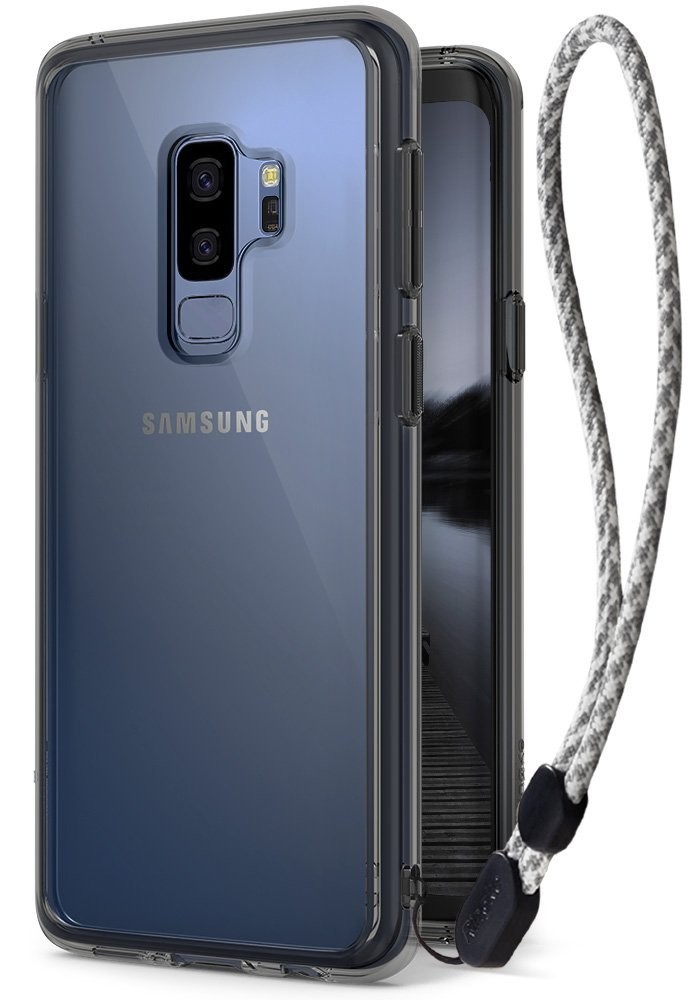
The best way to protect your phone from drop damage is to not drop your phone. The latest Fusion clear case from Ringke includes a handy wrist strap built into the case.
Whether or not you want to use the wrist strap is up to you, but it’s a thoughtful addition to a consistently stellar case style. Available as a clear case or with a Orchid Purple or Smoky Black bumper accent, you can get this case for just $11 on Amazon.
See at Amazon
SUPCASE Unicorn Beetle Series case

The Unicorn Beetle case is one of those phone cases that people buy with every new device. It’s got that classic rugged design with ridges to help with grip and it includes a built-in screen protector to keep your S9 in pristine condition.
Port plugs keep dust and pocket lint out of your charging port and headphone jack, and it also comes with an optional belt-clip holster. Rugged enough to keep your phone protected and yet thin enough to work with wireless charging, get your Unicorn Beetle Series case starting at just $15.
See at Amazon
dbrand Skins

Dbrand Skins are a consistently popular option for phone enthusiasts who want to customize the look of their phone without adding any bulk. They of course offer an awesome level of customization for creating a skin for your Galaxy S9.
You can pick between nine different texture styles for the back, the minimal bezels on the top and bottom of the display, and even around the camera sensor! You can mix and match and create your dream skin. Didn’t get the phone color you wanted? Make it your own with dbrand!
See at dbrand
Updated June 2018: We’ve added the Maxboost mSnap case to the roundup. Enjoy your Galaxy S9!
Samsung Galaxy S9 and S9+
- Galaxy S9 and S9+: Everything you need to know!
- Galaxy S9 review: A great phone for the masses
- Complete Galaxy S9 and S9+ specs
- Galaxy S9 vs. Galaxy S8: Should you upgrade?
- Join our Galaxy S9 forums
Verizon
AT&T
T-Mobile
Sprint
E3 video games, the BlackBerry KEYone, smart toothbrushes, and more are all discounted today
Whether you’re looking for new tech gear or household items, we’ve got you covered.
We found plenty of great deals today that include big discounts on the BlackBerry KEYone, Oral-B Bluetooth toothbrushes, E3 video games, and more! Time’s running out to take advantage of these prices, so hurry!
View the rest of the deals
If you want to know about the deals as soon as they are happening, you’ll want to follow Thrifter on Twitter, and sign up for the newsletter, because missing out on a great deal stinks!
These are all the Android games announced at E3 2018
Gaming on Android is about to get really exciting.

E3 is the biggest gaming event of the year, and while the focus is primarily on console and PC titles, mobile games are steadily becoming more and more prevalent.
This year’s E3 is no different, and as the conference progresses and more announcements are made, we’ll be updating this list with all of the biggest Android games that are unveiled.
Without further ado, here’s what’s been announced!
Elder Scrolls Blades
Although there’s no denying that Fallout 76 was the highlight of Bethesda’s E3 conference, one of the most surprising announcements came in the form of Elder Scrolls Blades.
Elder Scrolls Blades is a first-person RPG adventure in which you play as a member of the Blades, “the empire’s top agents”. According to Bethesda’s Todd Howard, the game will see you coming back from a mission only to find your home completely destroyed. In your quest to find out who’s responsible for this destruction, you’ll be sent off into exile and go through dungeons that are both procedurally generated and pre-created by Bethesda.
Blades will eventually launch on consoles, PC, and VR headsets, too.
Despite being a mobile game, Elder Scrolls Blades will have “console-quality graphics” and offer players a variety of ways to interact with everything. You can move your character by tapping on the screen or use virtual joysticks, combat is “all-new” and “follows your specific movements and timings”, and a “town-building” mode in Blades will allow you to create/manage your own village.
You can play Blades by holding your phone horizontally like most games of its nature, but Bethesda is also letting you go through the whole thing with your phone in portrait mode.
Elder Scrolls Blades will later make its way to PCs, consoles, and VR headsets, but it’ll first launch as a mobile title for Android and iOS in the fall.
Sign up for early access
Command & Conquer: Rivals
Command & Conquer is one of the most popular strategy games around, and 12 years after the last new entry in the series was released, it’s making a return in the form of Command & Conquer: Rivals.
Rivals pits two players against each other, each with their own base. The end goal is to destroy your opponent’s base, and while you can do this by sending countless troops to it, the ultimate task is to capture the large missile in the middle of the map. If you successfully capture the missile by the time it’s ready to launch, it’ll go hurtling toward’s your enemy’s base. After two successful hits with this, you win.
You can use a variety of troops and vehicles to help you win matches, and since Rivals is a free-to-play title, expect loot boxes to enhance your experience (and drain your wallet).
Learn more about Rivals here!
Gears Pop!
Alongside Gears of War 5, Microsoft also used its E3 conference to announce a new mobile spin-off game in the series — Gears Pop!
Microsoft partnered with Funko to create Gears Pop!, and as the title suggests, you’ll play the game as Funko Pop! versions of popular Gears of War characters. I’m not a Gears fan myself, but it’s awesome seeing Funko’s Pop! figures coming to life in the short teaser trailer we got.
There’s still a lot we don’t know about Gears Pop!, but Microsoft has confirmed it’ll be available for Android and iOS at some point in 2019.
We’ll be updating this list throughout E3 as more games are announced, so be sure to check back often!
Android Gaming

- Best Android games
- Best free Android games
- Best games with no in-app purchases
- Best action games for Android
- Best RPGs for Android
- All the Android gaming news!
Sony says it’s stopping development of its Xperia Home launcher
Only bug fixes will be added from here on out.
Most Android OEMs outfit their phones with their own skin on top of Android, and with that, a custom launcher. Sony’s phones have long come with the Xperia Home launcher, and following the latest update that landed on June 11, development for it will be ending.

As noted by moderator Erika Prymus for the Xperia Home Open Beta on Google+:
A business decision has been taken that our current launcher, Xperia Home should enter maintenance phase.
In this “maintenance phase”, Xperia Home will no longer receive new features. There will still be updates down the road, but they’ll strictly be focused on removing bugs “for as long as deemed necessary.”
Additionally, this transition also means that the Xperia Home Open Beta program will be ending.
The latest update to Xperia Home (11.3.A.0.17) prior to this switch was mostly focused on bug fixes anyways. As noted by Sony, some of the highlights include fixes for widgets not updating, crashes when trying to open a photo from search, and more.
What does this mean for the future of launchers on Sony phones? Although Xperia Home will probably keep on chugging for a while to come, it’s likely that Sony’s either looking to create an all-new experience or just go the Nokia route and mimic the Pixel Launcher. I’d prefer to see the latter of those two things, but only time will tell.
Are you a Sony fan? What do you think about the end of Xperia Home?
Best Android Launchers in 2018
 AIVAnet