


Finally, an ‘umbrella drone’ that hovers above your head
If holding a parasol or umbrella has always felt like too much trouble, then this contraption from Japan looks to be just the ticket.
At first glance, it looks like a drone with a parasol/umbrella attached. Actually, it looks like that with subsequent glances too, because that’s exactly what it is.
Put to one side, if you can, any negative thoughts about the ear-splitting racket it’ll make above your head as you go about your day, and marvel instead at all of the incredible things you’ll be able to do with two free hands instead of the usual one.
Like applauding amazing happenings, fiddling with your massive smartphone display, performing fascinating TED Talks (outdoors in sunny or rainy conditions, obviously) using both hands to emphasize interesting points, or counting the number of dollars you wasted on this daft device (you’ll definitely need more than five fingers for that).
If you’re thinking that having fast-spinning rotors just inches from your head may put you at risk of an impromptu haircut (or worse), then rest assured, the final design will include caged blades.
Speaking of final designs, the company that came up with the drone — Asahi Power Service — has released another video (above) showing the motor and rotors in a more elevated position, a little further away from the brave person standing beneath it. It also looks more like a traditional umbrella, with a handle, suggesting it would only be activated in short bursts when you need both hands to perform a particular task, such as taking a golf shot.
Indeed, with strict regulations still preventing widespread use of drones in urban areas, Asahi Power Service says it wants to begin by aiming its marketing efforts toward golf players who can use it while they take their shots.
According to SoraNews, the company plans to start selling its umbrella/drone combo for the princely sum of 30,000 yen (about $275), starting next year.
Drones are turning out to be amazing for a lot of things. This isn’t one of them. For those who want to keep both hands free as they shield themselves from extreme weather, we suggest a far more sensible option: The umbrella hat.
Editors’ Recommendations
- The best drones of 2018
- The 10 best windproof umbrellas to help you weather the storm
- Do more with your drone: 5 things you can do with a UAV (aside from taking pics)
- Make your phone awesome with these Samsung Galaxy S9 tips and tricks
- How to download YouTube videos
Duck, cover, and reboot your router? Why the FBI’s new warning is no joke
(in)Secure is a weekly column that dives into the rapidly escalating topic of cybersecurity.
Last week, the FBI released a statement that shocked many — reset your home or office router immediately upon threat of cyberattack. To throw some additional urgency to the matter, the threat was traced back directly to a group connected to the Russian government.
It sounds like an easy fix for a major threat, but is resetting your router really going to prevent a major cyberattack?
Does rebooting really help?
Vulnerabilities in routers can be a huge problem, but rebooting the router flushes the short-term memory, and most attacks with it. However, there’s reason to think the recent scare won’t be so easy to solve.
Bitdefender Senior E-threat Analyst, Liviu Arsene. Bitdefender
According to the FBI, a specific kind of malware called VPNFilter was used, which infected the firmware of routers across the world. The FBI’s statement didn’t much detail as to whether this multi-stage malware might survive the suggested reboot, and that raised the alert of the cybersecurity expert we spoke to.
“Until now, we haven’t seen malware on IoT that could survive the reboot,” said Liviu Arsene, senior analyst at BitDefender. “If this malware survives the reboot, it’s a pretty big deal.”
The malware exists in three stages, the second and third of which aren’t persistent — meaning a reboot will mitigate the problem. The problem is the initial stage.
“They do say that the main purpose of stage one is to gain a persistent foothold in enabling the deployment of malware,” Arsene said. “The FBI did say that you need to reboot your devices to flush out any connection. But they did not say if the firmware is effective or if after rebooting, you’re vulnerable or not. They didn’t say if the malware survives and attempts to dial back home.”
The piece of hostile code allows the hackers to automate and control physical systems.
A follow-up statement from the Justice Department provided some clarity, saying that a reboot would eliminate second-stage malware and cause first-stage “to call out for instructions.” The statement continued, saying that while devices will remain vulnerable to reinfection, “these efforts maximize opportunities to identify and remediate the infection worldwide.”
Because it’s unknown how the routers were even infected to begin with, it’s also unknown whether a reboot or factory reset would do the trick. If VPNFilter turns out to exist beyond a reboot, this is a breed of malware that we haven’t seen before — and one that will be much more difficult to stamp out.
Why is VPNFilter so serious?
There’s another reason why VPNFilter is serious enough to merit an FBI warning.
“The big deal is that for the code these analysts found in VPNFilter have overlapped with some other threats that was used a couple of years ago in Ukraine with the cyberattack that took down their power grid,” said Arsene. “Once you see that, it’s usually a pretty good sign that that botnet is going to be used. When you compare that with the code that was previously used to attack Ukraine, the most obvious conclusion is that they’re gonna use this botnet to attack some other critical infrastructure.”
The cyberattack on the Ukraine in December of 2016 wasn’t a great disaster. The power went out for around an hour at midnight in the capital city of Kiev. By morning, most people hadn’t noticed it occurred.
“Router companies need to pay more attention to the security aspects of their firmware.”
Upon digging into the incident, however, researchers discovered a more frightening potential under the surface. Security firms ESET and Dragos Inc. concluded the hackers were only testing their possibly world-shaking malware. The piece of hostile code used allows hackers to automate and control physical systems (such as the power grid). That’s not good.
The same code was also famously used in Stuxnet, a worm which is believed to have damaged Iranian nuclear systems around 2010. The prospect of that code appearing in an attack on 500,000 routers is troubling to anyone worried about cybersecurity. That’s likely why the FBI went public with its findings.
How can you secure your router?
“Router companies need to pay more attention to the security aspects of their firmware,” said Arsene. “This is not the first time we’ve seen routers with backdoors, with vulnerabilities, or open Telnets ports that are accessible from anywhere you are on the internet.”
Router companies don’t have the best reputation for cybersecurity. Many leave firmware updates up to the individual user, and router security isn’t easy to understand. “Whenever someone buys a router or any other IoT device they simply plug it into their network,” Arsene said. “They don’t usually take time to change default extensions. Whenever you have a router with default credentials connecting to the internet, you’re kind of asking for it. Security should start with your router.”
BitDefender has a new product called Box that gives you a clear view of all of the smart devices in your network — and where the vulnerabilities are. While it’s a good solution for the tech-savvy among us, the average person doesn’t care enough about personal cybersecurity to invest in such a product. Arsene insisted that the largest vulnerability is the lack of awareness among the average person.
“People usually enable remote management so that they can dial in from work or from wherever you are. It is a big issue, especially if the router has hard-coded credentials or default passwords. You should disable remote access if you don’t use it. You should disable telnet if you don’t use it. You should disable SSH if you don’t use it. You should update the firmware as often possible and change default credentials. But how many people do that? Outside of tech savvy people, it doesn’t happen. My parents don’t do it.”
Now you know. Router security isn’t fun – but if it’s serious enough for the FBI to issue warnings, it’s serious enough to be worth your time.
Editors’ Recommendations
- FBI: Reboot, reset your router immediately to prevent cyberattacks
- Tech companies pledge to not help governments pull off cyberattacks
- Slingshot malware that attacks routers may be state-sponsored espionage tool
- What is WPA3?
- Cryptojacking is the new ransomware. Is that a good thing?
Amazon transitions its Prime Pantry service to a monthly membership
Never leave the house again.
Amazon is giving Prime Pantry a facelift, and if you’re already a Prime member you’ll want to pay close attention to the changes. Starting June 1, Prime Pantry is changing to a subscription service. Just an extra $4.99 a month on your Prime membership will give you unlimited free shipping on any orders over $40 from the Prime Pantry service. Before this, Prime Pantry required a per-order flat fee of $5.99 even for Prime members. And everyone knows we’re all Prime members because we don’t want to pay shipping.
The downside for people who don’t want to subscribe is Prime Pantry’s flat-fee is increasing to $7.99. That applies to any orders that don’t reach the $40 minimum or any customers, Prime members included, who aren’t subscribed specifically to Prime Pantry.
Never tried Prime Pantry before? Curious about it now? Amazon offers a 30-day free trial, and if you use the code PANTRY5 when checking out, you’ll save $5 on your first order. With the free trial, you will get all the benefits of the subscription service for 30 days without paying. After that, you’ll start getting charged the $4.99 a month fee unless you cancel.

Prime Pantry is Amazon’s way for you to order everyday grocery products, like laundry detergent, toilet paper, or snacks, without ordering in bulk or driving to the store. A lot of the items available in Pantry aren’t available on the regular Amazon store because it includes individual products. Of course, Pantry still has Amazon’s aggressive pricing and price-matching, too, so you’ll save money that way as well. Admittedly, it takes some guts for Amazon to ask for more of your money after increasing Prime by $20 a year, but regular grocery shoppers will save in the long run and avoid unnecessary trips to the grocery store.
Keep in mind that just because you’ll get free delivery doesn’t mean it’s the same as Prime Shipping. Prime Pantry works differently than regular Amazon orders, so it could take as much as four days to get to you. Be sure to plan ahead when ordering toilet paper.
You can’t be just a member of Prime Pantry, either. You’ll need a Prime account first. If you don’t already have one, you can sign up here. There are a ton of great reasons to be a Prime member besides Pantry, but if groceries are your focus remember Amazon’s recent purchase of Whole Foods Market has led to some great potential savings there as well.
Don’t forget to use code PANTRY5 to save $5 on your first order and avoid that flat fee by getting it over $40!
Sign up for a 30-day free trial of Prime Pantry
How to pair a Fitbit Versa with your phone
Have a Fitbit Versa and want to pair it with your phone? Let’s get started!

Fitbit’s latest smartwatch is the Versa, and it’s quickly proven itself to be one of the company’s best products in years. It’s affordable, stylish, and packed to the gills with both fitness and other smartwatchy features.
Whether you’re setting up the Versa for the very first time or just want to remove it from your old phone and pair it with a new one, the process for doing so isn’t too bad as long as you know what you’re doing.
We’ve got a bit of work ahead of us, so let’s stop talking and get right to it.
Open the Fitbit app and tap your Account icon (it’s at the very top right and looks like the silhouette of a business card).
Tap Set up a Device.
Tap Versa from the list of available trackers.


Tap Switch to Versa or Set up Your Versa (depends on if you have another watch linked to your account).
Scroll through the terms & policies and tap I Agree.
Tap Next once you’ve read the “Before we get started” tips.
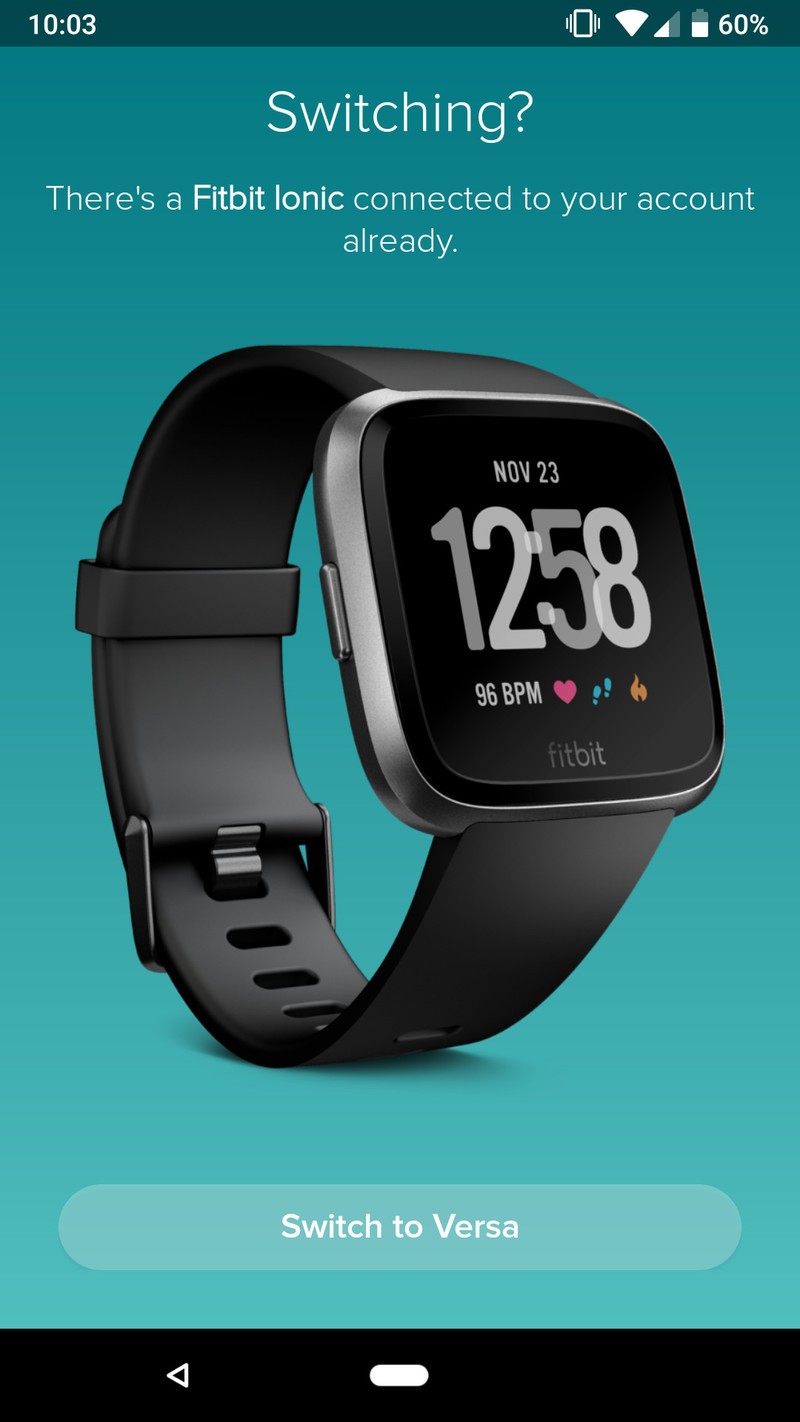


Your phone will search for the Versa via Bluetooth.
Once the Versa has been found, type the numbers shown on its screen.


Tap Next to connect your Versa to your Wi-Fi network.
Tap the Wi-Fi network you want to use.
Type in the password for your network.


Tap Next to update your Versa.
Wait for the download/installation process (this can take a few minutes).
Tap Continue once everything is done.


From here, you’ll see a pile of short video clips showing you how to use your Versa. They look like this:


Once you go through these, read through the wear & care tips and then tap Next.
Tap Done on the next page.
Tap Okay to link your Versa to the Fitbit app.


That’s it!
With all that said and done, your Fitbit Versa is now paired with your phone and ready to start tracking as much (or little) physical activity you want. Still have questions? Let us know in the comments below!
How to use Quick Replies on Fitbit Versa and Ionic
Fitbit

- Fitbit Versa vs. Fitbit Ionic: Which should you buy?
- Fitbit Versa hands-on: Fitbit’s finally getting serious about smartwatches
- Fitbit Versa and fitness: Everything you need to know
- Best Fitbit fitness tracker
Fitbit Ionic
Fitbit Versa
Fitbit Charge 2 HR
Deal: Save BIG when you buy the LG G7 from Sprint or Verizon!

If you’re in the market to pick up a shiny new LG G7, look no further than these awesome deals from Sprint and Verizon. Sprint users can snag one G7 and get another device free, while Verizon is offering $100 off and up to 50% off with a trade-in.
Sprint
When you order the LG G7 on Flex Lease, you’ll get another LG G7 FlexLease free.
- This deal requires a new line of service activation and an 18-month lease. Well-qualified customers are eligible.
- At the end of the 18-month lease, you have the option to buy your devices. You’ll pay the balance between the full price and what you’ve paid so far.
- There are taxes on any device you go with and you’ll have to pay that up front regardless.
- If you cancel your service, the remaining device balance will become due.
Sprint’s Unlimited Freedom Plan
If you’re looking to pair up your new phone with a plan, Sprint’s Unlimited Freedom is one of the cheapest on the market with 4 lines for $25/mo per line and 5th line free (until 06/30/19), with autopay. Plus Hulu is now included!
- Unlimited talk, text, and data. Once you’ve reached 23GB of data, your speeds may temporarily slow down during times of high network congestion.
- HD video, 1080p
- 10GB of 4G mobile hotspot
See at Sprint
Verizon
Purchase the LG G7 with a new monthly device payment activation and get up to $399 off (50% off) with eligible trade-in applied over 24 months.
- Purchase of new phone must be on an installment plan
- Deal credit is applied via 24 monthly bill credits and starts within two bills. To get the full value, you will need to stay on your installment payment plan for the full 24 months.
- Activation fee of $25/line applies
- Requires a new line of service to qualify
- If you cancel service, the full balance is due
- This deal excludes device’s sales taxes
See at Verizon
LG G7
- LG G7 hands-on preview: All about that bass
- LG G7 Specifications: Everything you need to know
- Join the LG G7 forums

Should you buy a phone case or a skin?

Both add varying levels of protection and personalization to your phone. So which one is right for you?
Manufacturers put a ton of work into designing their phones to be equal parts functional tools to make our lives easier, and beautiful works of art that make us want to pick them off of store shelves to begin with. But beauty comes at a price, and with more all-glass phones than ever these days, there’s no getting around it anymore: phones are fragile.
With this in mind, you might not want to carry your phone without some kind of protection … but exactly what kind should you use? There are plenty of options available, but now that sleeves and belt holsters are out of fashion, the two most common ways of keeping your phone safe are cases and skins.

You’re probably most familiar with cases; every carrier store and mall kiosk has dozens of cases for all of the most popular phones, and they’re a great way of quickly personalizing your phone that may otherwise look just like everyone else’s. Sure, they add a bit of bulk to your phone, but in return you get the peace of mind that your phone should be okay if you accidentally drop it a time or two.
Cases come in all different sizes, form factors, and materials. If you’re particularly clumsy, you may want to get an Otterbox for your phone, which makes it considerably thicker but offers the best drop protection, and usually even comes with a built-in screen protector. I don’t drop my phone too often though (that doesn’t mean it never happens), so I tend to prefer thinner cases that keep the body from getting scratched but don’t take away from the thin design.
In particular, I’ve grown attached to “premium material” cases, like the Alcantara cover for the Galaxy S9 or Apple’s leather case for the iPhone X. They don’t offer much in the ways of shock absorption — they don’t even cover the bottom of the phone — but they look and feel fantastic, and when I’m carrying an expensive phone, I want it to feel like one. Superficial, I know, but that’s just what I like, and these cases still at the very least keep the majority of my phone fairly well protected.
See at Amazon
Cases aren’t for everyone though, and there are plenty of reasons why you might prefer a skin. Maybe you’re unwilling to give up the thinness that your phone was designed to have. Or maybe you just wish your phone were a different color. The glass back on your phone might be too slippery for your liking, or maybe it already slipped out of your hand or off of the table and now the back is irreparably shattered. Whatever the case — err, situation, a skin could be the answer to your problems.

Whether you’re buying from Slickwraps, dbrand, Colorware, or somewhere else, most skins are precision-cut to perfectly match the design of your phone — right down to the curved edges, buttons, and ports. They add next to zero thickness to your phone and cover up any scratches, cracks, or imperfections that might’ve preceded the installation.
It goes without saying that skins aren’t as protective as cases; if you drop your phone onto a hard surface, a skin probably won’t do much to absorb the damage. But they at least keep scratches away, and if your phone cracks underneath the skin … well, just leave the skin on! Okay, yeah, that’s probably not a great longterm solution. If you want that extra level of protection, you can even use a skin and a case at the same time — though unless you’re using a clear case, this might defeat the purpose of getting a skin in the first place.
See at dbrand
Which do you use? Are you more of a case person or a skin person, and is there a particular brand you tend to gravitate towards? Have you ever stepped into the other side’s territory? Let us know in the comments!
Image Shows Supposed ‘iPhone SE 2’ Screen Protector With Smaller iPhone X-Style Notch
Sketchy claims that Apple’s “iPhone SE 2” could boast an iPhone X-esque display apparently refuse to go away, with the latest addition to the rumor pile coming courtesy of Sonny Dickson.
Earlier today the parts leaker posted an image on Twitter of a supposed iPhone SE 2 screen protector that appears to share a similar notch-design to the one Apple uses to house the iPhone X’s facial recognition sensors in lieu of Touch ID fingerprint recognition.
iPhone SE 2 (left) iPhone X (right) screen protectors. SE appears to share the design, however smaller notch. pic.twitter.com/PCJaPkgAOR
— Sonny Dickson (@SonnyDickson) June 1, 2018
The comparison shot also shows an actual iPhone X screen protector (right) beside the allegedly leaked one in order to highlight the smaller notch that would presumably be destined for the smaller form factor phone.
Unconfirmed renders and dimensions of the next iPhone SE obtained by MacRumors from casemaker Olixar claim the device will have a length of 4.7 inches and a width of 2.1 inches, making it slightly smaller than the current model but with a larger display thanks to the fuller-screen design. They also suggest the device’s notch will be around half as wide as the one on the iPhone X, but the idea that it might house facial recognition sensors still seems far-fetched.
Apart from the technological hurdles that Apple would have to overcome to achieve the unlikely feat, it’s hard to imagine that Apple would include Face ID on the iPhone SE at all without hiking up the price significantly. Including the feature on an iPhone that starts at just $349 would reduce Apple’s gross margins and risk cannibalizing sales of the iPhone X, which starts at $999.
Those issues put the whole notch-design in doubt, given that the lack of a home button would require some other method of user authentication. Some rival smartphones have recently featured integrated screen fingerprint sensors, but Apple has suggested it won’t be following that approach ever since it developed its TrueDepth camera recognition system.
Apple hasn’t properly refreshed the iPhone SE since it launched back in March 2016, but it did double the available storage capacities in March 2017. Rumors about an updated model have been contradictory in recent months, but they can be distilled into two camps: one hoping for a iPhone X-like design, and another expecting a minor refresh.
Related Roundups: iPhone SE, 2018 iPhonesBuyer’s Guide: iPhone SE (Don’t Buy)
Discuss this article in our forums
Drones are helping efforts to free whales from dangerous marine debris
Quadcopters and other remotely controlled flying machines are finding all kinds of amazing uses, well beyond just capturing stunning photos or helping filmmakers to secure some awesome aerial shots.
Take this recent ocean-based collaboration as an example. The National Oceanic and Atmospheric Administration’s (NOAA) Hawaiian Islands Humpback Whale National Marine Sanctuary teamed up with Oceans Unmanned, whose goal is to protect oceans and coastal marine environments through the use of drones.
The focus of this particular partnership, highlighted in a video posted on YouTube this week, is to help disentangle whales around Hawaii from discarded fishing kit and other ocean debris that can injure or drown the mammal, or prevent it from feeding.
It’s dangerous work and the team has to approach the creatures, which may be in a great deal of distress, with extreme care.
The NOAA’s Ed Lyman, who’s been helping whales for more than 25 years, has warmly welcomed drone technology into his work. He says the camera-equipped machines, which relay real-time footage to the rescue team, help his boats to “minimize approaches, give us a different view — an aerial view — of the gear and the animal’s condition … it reduces our risk, having that drone in the toolbox makes the whole procedure a much safer one.”
Lyman can thank Matt Pickett, a trained pilot and president of Oceans Unmanned, for the extra assistance offered by the eye in the sky. Picket launched the nonprofit company five years ago with the aim of bringing unmanned technology to ocean protection, using small drones launched from response boats or smaller support vessels.
“You can get a better look at the whales [and] figure out what’s going on, with less risk to both the responders and the whales,” Pickett said, adding that “using tech for environmental good is a really fantastic feeling,”
The video was produced by drone maker DJI as part of its Stories collection highlighting the various ways in which its machines are being used for positive purposes.
Drone rescue
Besides assisting whales in distress, drone technology is also being utilized right now — again in Hawaii — to help emergency response teams rescue residents from the lava flows from Kilauea volcano on the Big Island.
A number of drone experts also assisted with relief efforts in the wake of Hurricane Harvey, which caused widespread damage in Houston, Texas, in 2017.
Editors’ Recommendations
- Drone to the rescue: Hawaii resident saved from Kilauea’s lava flows
- Drone to the Rescue: Hawaii Resident Saved From Kilauea’s Lava Flows
- Underwater swarms and sonar-bombing drones: Meet the deep-sea Xprize finalists
- Amazon-style drone deliveries come a step closer for U.K. shoppers
- Wonder what the bottom of the ocean sounds like? Check out this livestream
How to Add a Passcode to Your Apple Watch and What to Do if You Forget it
There are several reasons why you should consider using a passcode on your Apple Watch. Without one, you won’t be able to use Apple Pay to make contactless transactions using the device, nor will you be able to use it to automatically unlock your Mac.
But apart from losing out on functionality, not using a passcode on your watch means that anyone who got hold of it could potentially gain access to your Health and other app data, and possibly more besides.
Using a passcode on your Apple Watch isn’t like having one on your iPhone or iPad, because you don’t have to enter it every time you use your watch. You’ll only be prompted for it if you remove your Apple Watch from your wrist or if the watch is restarted. Also unlike iOS devices, if you ever forget your Apple Watch passcode, there are steps you can take to regain access.
With those benefits in mind, here’s how to set up your Apple Watch passcode.
How to Add a Passcode to Your Apple Watch
Launch the Settings app on your Apple Watch.
Scroll down the list and tap Passcode.
Tap Turn Passcode On.
Enter the four-digit passcode you want to use to lock and unlock the watch.
You can also add a passcode to your Apple Watch through the Watch app on your iPhone. You can find the relevant setting in the My Watch tab under Passcode -> Turn Passcode On.
For an added layer of security, consider using a six-digit passcode on your Apple Watch. Six-digit passcodes offer 1 million possible combinations instead of 10,000, making the passcode harder to crack. To enable a six-digit code from within the iOS Watch app, tap My Watch -> Passcode, and toggle off Simple Passcode. You’ll then be prompted to enter the new six-digit code on your Apple Watch.
Lastly, if you tend to take your watch off during the day, there’s a setting in the Watch app’s Passcode menu that will unlock your Apple Watch whenever you unlock your iPhone, which should make things somewhat more convenient. Toggle on the switch next to Unlock with iPhone to enable it.
What to Do if You Forget Your Passcode
If you forget your Apple Watch passcode, you’ll need to erase the device and then restore from a backup. You can perform this action by launching the Watch app on your paired iPhone: tap the My Watch tab if it’s not already selected, tap General -> Reset, then select Erase Apple Watch Content and Settings.

Alternatively, you can start the erase and restore process on your Apple Watch by connecting the device to its charger and following these steps.Press and hold the side button until you see the Power Off screen.
Hard press the Power Off slider and then let go.
Tap Erase all content and settings.
You’ll be asked to set up your Apple Watch again when the process ends. When you do, be sure to restore from a backup.
Related Roundups: Apple Watch, watchOS 4Buyer’s Guide: Apple Watch (Neutral)
Discuss this article in our forums
Creative Ways to Fund Your Digital Startup
A BBC report from 2012 says that startups now need very little cash to get underway. But for digital entrepreneurs who do not have access to cash in any form, getting creative is the order of the day, whether this involves holding a yard sale, talking to angel investors, crowdfunding, applying for government loans or getting a personal loan. With nearly 660,000 businesses established in the UK in 2016, it is safe to say that starting any type of business has now become easier, but for entrepreneurs who have tried getting funding in the idea stage and failed, it can still be easier said than done. There is hope, though, because the ideas above can open doors to digital businesses.
Government Loans and Personal Loans
A report by the Financial Times in 2017 attributes the establishment of new businesses to government-sponsored initiatives such as Brighton Fuse, a programme that creates entrepreneurial opportunities for graduates. However, entrepreneurs who already have a concrete business idea or those who have started building a business from the ground up are encouraged to take a look at applicable government loans.
The UK government offers loans to businesses who have been operating for less than 2 years. A personal loan is another funding opportunity worth exploring. To get a personal loan, entrepreneurs should determine the capital they need. If the loan is unsecured, entrepreneurs will, of course, need to take their credit score into consideration before applying for a loan. Personal loans are available in traditional financing institutions such as banks, but those who have low credit scores can always take a look at reputable lenders online.
The Benefits of Crowdfunding
Entrepreneurs who have a bright idea can always go to crowdfunding sites and start their own crowdfunding campaign. While it is tricky to get funding for free, it is still possible for new digital businesses to raise a bit of cash from the activity, even if they know that they are not likely going to get all the funding they need.
Crowdfunding can be competitive, but this can help business owners get their message out there and the campaign itself can also inspire them to put together a business profile that they can use later on. Crowdfunding is one of the fastest ways to raise funds that also doubles as a marketing campaign. It is also an avenue where entrepreneurs can test the market and a good alternative for those who struggle to get traditional financing.
Talking to Angel Investors
When businesses want to talk to angel investors, the first hurdle is to find them. Thankfully, sites like Lusha and Angelist exist. If the pitch is ready and all pertinent information have been supplied in one succinct email, entrepreneurs are encouraged to contact angel investors directly. However, John Sechrest, a founder of the Seattle Angel Conference notes that businesses need to build their business first before asking for funding. After all, angel investors are not only there to help, they also want to invest in startups that will make their money grow.
Holding a Yard Sale
If a business does not need a lot of cash, holding a yard sale is a good idea. In fact, it is one of the easiest ways to raise funds for just about anything. Entrepreneurs who have accumulated a lot of stuff they no longer use can sell these items to raise a bit of money. According to Forbes, business owners who do not owe any money to investors have more freedom than those who do. This means that raising money from old items that have been sitting in storage for a while is a wonderful idea businesswise. To raise more money, friends and relatives can donate items to the yard sale as well.
Raising money can be difficult but founders of businesses shouldn’t lose hope. In fact, entrepreneurs who are willing to put in some work to raise funds for their digital startup can get the funding they need in no time.
 AIVAnet