


Panasonic’s new image sensor could help cars see in the dark
Panasonic’s new image sensor tech is designed for taking shots in the dark. Literally. The company has made an advancement that provides “electrical control of the near infrared (NIR) light sensitivity of the same pixel in an organic CMOS image sensor.” In English, that means it can take photos in near pitch-black without losing detail or resolution — and it does so without the need for a mechanical IR cut filter.
It works by applying different voltages, independently, to different layers of organic films that are stacked on top of the sensor. From the sounds of it, though, this might not be a consumer-focused advance. The press release specifically calls out the sensor’s potential use in machine vision and smart car systems.
If you hurry, Panasonic will be presenting its findings at the International Solid State Circuit Conference in San Francisco today. You know, in case you wanted more info on how it all works.


Source: BusinessWire
Cortana scans your emails to remind you about commitments
If you’ve ever said you’d do something in an email then whiffed on adding it to your calendar, Cortana can now help. As it previewed last year, Microsoft’s assistant will check your emails and, using machine learning tech, pick out things you say you’ll do. It’ll then remind you later with no effort on your part. For instance, if you tell you’re boss “I’ll send this report,” it’ll save that as a suggested reminder. If you specified a date and time, it’ll automatically ping you and add it to Microsoft’s Action Center.
It’s now available on Windows 10 and coming to Android and iOS “in the coming weeks.” To use it, you’ll need enable an Outlook or Office 365 email account to give Cortana consent. The feature is proactive and will automatically pop up reminders on your PC, assuming you’ve set a time and date. If not, it’ll collect them in the Cortana Home view, and let you create your own timed notification that will appear on any devices with the app.
Cortana already has location- and contact-triggered notifications, so as shown in the video below, if could remind you to get milk if you happen to be near the market, for example. Google has done something similar for quite awhile now with its own assistant — it’ll scan your emails for plane reservations, for instance, and post a notice in the Google app telling you when you need to leave. However, Microsoft’s application seems a bit more proactive, and it’ll eventually work with other email services, including Gmail, soon.
Via: The Verge
Source: Microsoft
This tiny drone can pollinate flowers like a bee
As a species, bumblebees aren’t doing well, so sadly, we may have to consider a future with fewer of the endangered insects. Humanity would be in trouble without these active pollinators, so Japanese scientists have created drones that mimic them by spreading pollen from plant to plant.
Researchers at the National Institute of Advanced Industrial Science and Technology bought $100 drones and affixed patches of horsehair to the bottoms. They then applied liquid ion gels, which MIT Technology Review says are as sticky and moist as Post-It notes, to the horsehair. In tests, the drones were able to fly into the plants, grabbing and releasing pollen from the male and female parts of pink and white Japanese lilies.
Project leader Eijiro Miyako claims this was the first time a drone pollinated a flower, although he noted this isn’t a practical solution to the bee problem. He believes it might only be feasible if high-resolution cameras, GPS and artificial intelligence technology were added to the drones, which would be challenging considering their small frames. Miyako also said it was difficult for them to successfully use drones to pollinate the lily, whose sex organs are among the largest found in plants.
Elsewhere, scientists are working on genetically modified cyborg dragonflies that can be controlled by humans, and they say the technology could potentially be used on bees as well.
Source: MIT Technology Review
Keybase’s encrypted chat works with accounts you already have
With their first release, Keybase simplified encrypted file sharing, allowing anyone to securely send data without the need for additional third-party software. Now the company wants to bring that same security and simplicity to encrypted messaging with Keybase Chat. Unlike other encrypted messaging services such as WhatsApp or Signal, Keybase Chat works with public accounts and usernames you already have, so there’s no need to exchange phone numbers, email addresses or encryption keys.
“Our goal is end-to-end encryption with minimal friction,” Keybase co-founder Chris Coyne wrote in a blog post, and anyone can send a Keybase Chat message to anyone else on the internet — even if they haven’t signed up for Keybase yet. If you wanted to message Coyne, for example, you could simply enter his Twitter (or Reddit, or Hacker News) handle @malgorithms into Keybase Chat and leave a message in his secure inbox. If someone joins after you’ve already left them a Keybase message, the app checks for proof again and the server never sees a decryption key. If you have a couple handles from various services for one contact, Keybase consolidates them into one profile and each active device has its own private key.
Keybase also offers Forward Secrecy, public broadcast messages, command line access and an API for building bots and scriptable services. For now, the Keybase Chat allows for 4,000-character messages and attachments, and includes some basic blocking and muting features which will be necessary now that everyone on the internet essentially has an encrypted inbox waiting for them. Coyne and company promise that “more advanced blocking / reporting / nuking features” are coming in a future release.
Keybase is currently available for macOS, Windows and Linux platforms, with a mobile version launching “soon.”
Source: Keybase
Google’s Street View head moves to Lyft to work on mapping
Lyft is refocusing its mapping efforts with a major new hire: Luc Vincent, who previously founded and led Google’s Street View team. As a vice president of engineering at Lyft, Vincent will be in charge of the company’s mapping and marketplace divisions, Recode reports. As you’d expect, he’ll initially be focused on making the company’s real-time map and navigation capabilities better, but he’s also planning to improve how Lyft connects drivers and riders. Looking forward, Vincent also hopes to help out Lyft’s self-driving initiatives (obviously, maps are a pretty big deal there).
A single hire won’t do much to compete against Uber’s recent $500 million mapping investment, but it’s a start. As the smaller company, Lyft has to play it smart, so it makes sense to bring on a veteran mapping expert. Lyft is also in an interesting position as it stands to benefit from the wave of people abandoning its rival as part of the #DeleteUber protest. That conflict began with Uber dropping its surge pricing during a recent taxi strike in New York City, but CEO Travis Kalanick’s position on Trump’s advisor council didn’t help. The New York Times claims over 200,000 Uber users ended up deleting their accounts, and Kalanick has since abandoned his plans to work with Trump.
Source: Recode
Volvo melds technology and luxury in the XC90 T8 hybrid
The name Volvo conjures up the incredibly safe but visually bland 240 Wagon sold during the ’70s, ’80s and ’90s. You’d buy a Volvo because you were practical and possibly a bit paranoid about other drivers slamming into you. But the Swedish automaker has been working hard to make its cars not only safe but also stylish and high-tech. That work has culminated in the hybrid CX90 T8 luxury SUV.
Other than its safety pedigree, the $74,400 CX90 T8 Inscription shares little with the automaker’s older wagons. It’s a visually striking SUV both inside and out, with clean lines, subtle accents and a few hints of chrome on the outside. The interior is reminiscent of a stylish mid-century modern office.
But more than its looks make the T8 worth considering when you’re looking for a luxury SUV. Volvo has been working hard to packs its cars with high-end technology, including semi-autonomous driving. While some automakers have spent the past five years attempting to catch up with the future of driving, Volvo has been quietly developing a top-notch SUV that’s not only smart but also stylish.
At the heart of the XC90’s technological prowess is the latest version of Pilot Assist (this tech was first introduced on the 2016 XC90). The feature combines the car’s adaptive cruise control and lane assist to create a semi-autonomous driving experience similar to Tesla’s Autopilot. During my tests on freeways, city streets and the notoriously narrow lanes of the Golden Gate Bridge, it worked as advertised most of the time. What seemed to trip up the system were sharp curves. Anything that required the wheel to turn beyond a few degrees usually required driver assistance.

Meanwhile the adaptive cruise control was spot-on, if a bit overzealous when it came to putting space between the XC90 and the car in front of it (there’s that safety pedigree rearing its head). The system was also extremely aggressive about my keeping my hands on the wheel while Pilot Assist was in use, more so than other vehicles I’ve tested with similar technology. I’m not complaining, though: Until we have fully autonomous vehicles, it’s important for drivers to continue to pay attention while using these semi-autonomous features.
With all that in mind, Pilot Assist is great for highway gridlock and cruising on the freeway. It brings the SUV to a complete stop in stop-and-go congestion, and once traffic starts moving again, a quick tap of the accelerator gets the SUV moving.
That focus on safety continues throughout the vehicle, with both low- and high-speed collision avoidance. In addition to knowing when cars are in its path, the XC90 can detect pedestrians, bicyclists and large animals (like moose!) both day and night and will apply the brakes when necessary. Unfortunately, it’s tough to test this type of feature without putting people in danger, and I sadly couldn’t find any moose or caribou in the San Francisco area up to the challenge.

The rest of the vehicle’s tech features were easier to try out. Inside the car, the Sensus infotainment is presented on a 12.3-inch portrait-mode touchscreen display. Volvo is aiming for an easy-to-use and uncluttered experience, and while it does indeed deliver that, there are a few oddities. One confounding thing was the grouping of car features. For example, instead of all the parking buttons being lumped together, they’re scattered across two groups with other systems sprinkled in.
While that’s a strange design decision, the rest of the Sensus layout gives drivers quick access to apps and features without forcing them to tap on the screen seven times to turn on Parking Assist or launch the in-car weather app. For finer control of the vehicle, Volvo placed deeper level controls in the Settings area.
As for physical buttons, the XC90’s interior is a perfect example of the “less is more” school of thought. None of the buttons feel incongruous or extraneous. It’s a clean, well-thought-out layout that understands how people interact with their vehicle while driving. It’s the first car I’ve driven in a long time where I was able to master every feature within a few minutes and didn’t have to hunt for buttons to make something happen. Everything was where I expected it to be.

It also helps that the interior is beautiful. The leather and wood complement each other, making for a warm, inviting environment. It’s not without its extravagances either. The shift knob is a hand-crafted glass crystal. Yes, it’s ridiculous, but it glows a bit at night, which is cool.
The over-the-topness doesn’t stop there. Volvo added “Thor’s hammer” running lights/blinkers to the front of the car. I’ll admit they look remarkable, but they resemble a chisel or pick axe more than a hammer. Still, it’s fun to say, “Yeah, my car has Thor’s hammer lights.”
The XC90 T8 has room for seven, so that boasting might indeed take place on a road trip. But as with most SUVs, that third row can be tight. At six-foot-three, I didn’t bother sitting in that back row for fear I’d never be able to squeeze my way out. With those rear seats folded down, five passengers (and their glamping gear) should be comfortable during a long drive.

Which brings us to the actual driving experience. The hybrid has a four-cylinder turbo and supercharged engine up front and electric motor in the back. Together they produce 400 horsepower and 472 pounds of torque. In sport mode, you’ll get an impressive jolt off the line, but drivers will likely stick to the default hybrid mode, which has a rating of 54 miles per gallon equivalent.
You can run it in pure electric mode, but during my tests I was only able to eek out 11 miles before depleting the battery. So it’s fine for short jaunts around town but not much else.
I found that while behind the wheel, the XC90 T8 is an incredible cruiser — perfect for long drives. It has a smooth ride without sacrificing cornering on the freeway. I started to forget how large the SUV actually was while on the highway, but once I hit twisty back roads, its heft immediately became apparent. While it has a sporty mode, it’s tough to slap that moniker on a vehicle that weighs over 5,000 pounds. That’s not a slight as much as a reminder of how physics works.
In fact, the only real issue I had while driving the car was with the brakes. They took a few days to master, because as you come to a stop the car will slowly decelerate and then suddenly stop quickly. I adjusted my braking style so that I start a bit sooner than usual; after that I didn’t have any more jarring episodes. Again, as a matter of safety, having a heavy car that can brake quickly is wonderful, so it’s tough to fault it for keeping me safer; I just wish it could ease into that stop.

But overall, the XC90 T8 hybrid is a feature-rich SUV that combines style, technology and safety into a package that you would have never expected from the Swedish automaker a few decades ago. The company has evolved beyond the boxy wagon to something that should be on the radar of all car buyers.
Source: Volvo
Tap Titans 2: How can tapping the screen be so fun? (Review)
Even though there are a lot of games that rely on very simple controls (especially the enormous amount of “endless” games), more and more games are also implementing complex controls with complicated (but fun) gameplay. However, Tap Titans 2, by Game Hive Corporation, does the exact opposite: it gives you only one control through the whole game. However, the result is much more entertaining than you might think.
Developer: Game Hive Corporation
Price: Free
Setup
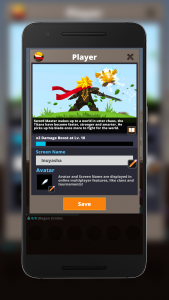 Setup lets you choose a name and an avatar for your character.
When you launch the game, it shows you a blonde guy with a black suit and a red scarf. This small guy is the character you will control for the rest of the game. Immediately after, you are allowed to change the name of him. Henceforth, he shall be known as Inuyasha (since that is how I named my character, because Inuyasha is a true sword master). You can also change your avatar, albeit the choices are limited to three and they aren’t that appealing.
Overview
You are thrown at the game immediately, with no tutorial or even a simple explanation of what to do. Since the name is “Tap Titans 2,” I figured that I should tap in order to do something. And I was right. The whole game has only one control, and it involves tapping anywhere on the screen. This will make Inuyasha slash his opponent once. Repeated tapping will kill your opponent, and a new one will show up.
In order to complete a stage, you need to kill nine monsters and one boss. Bossess are obviously more difficult and a timer will be associated with them. If you fail to kill the boss before this time, you will have to fight other monsters and then try again.
After clearing several stages, you will change the location where you are fighting, and naturally, monsters will get stronger. But, Inuyasha can also get stronger! This is because, when you kill a monster, it will yield coins that you can collect. These coins can be used to increase Inuyasha’s level, which will make him do more damage per slash.
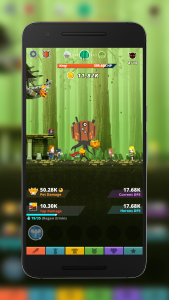 Tapping the screen repeatedly is all you have to do to progress.
Just as the anime character that inspired my hero’s name, Tap Titan 2’s main character can also have companions with him. You can hire their services using coins too, and they can also be leveled. Each level increase gets more expensive, but you also get more coins so it evens out.
There’s also pets that can accompany you in your trip, as well as equipment, artifacts, and special skills (all of which are unlocked after a certain level). Everything has some kind of upgrade associated with it, so the replay value is huge.
To add to the enjoyment, the game plays for you automatically when it is closed (but it doesn’t clear the bosses, so you actually don’t progress that much), so there’s a decent pile of coins awaiting for your arrival everytime you open the game.
A clan system has been added as well. You join a clan and you team up with its members in order to kill a huge monster with an insane amount of HP. It is important for every member to participate, because killing this massive monster is almost impossible without teamwork.
If you remember a game we reviewed some months ago called Groove Planet, then you might think that it is familiar. That is because it is. Tap Titans 2 replace buildings with heroes and notes with coins, but the concept is almost identical.
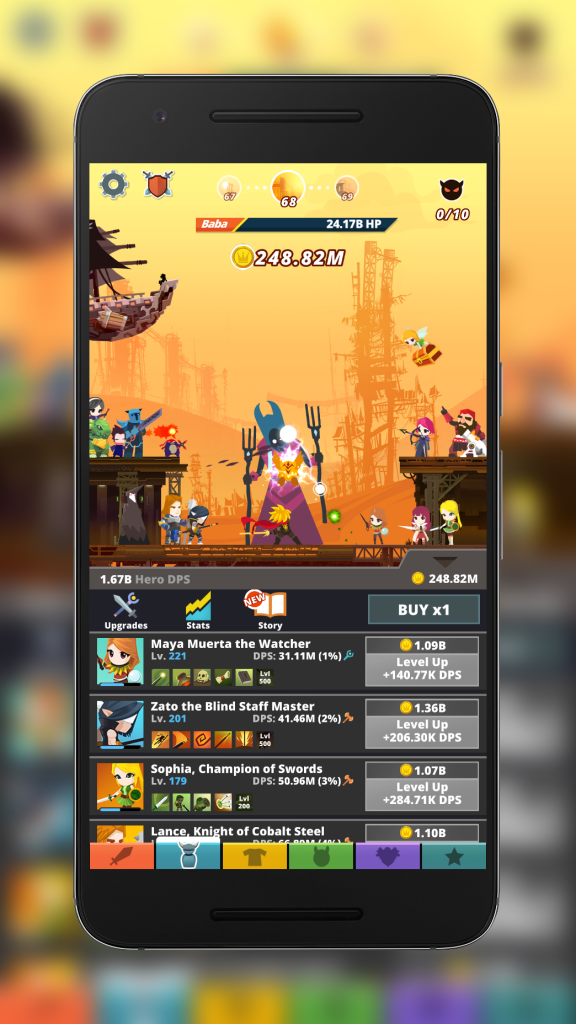 There’s a lot of stuff you can upgrade.
For some reason, I’ve found that this game has become very addictive. Even though the only thing you have to do is tap the screen, the amount of things available for upgrading and improving is astounding, and seeing how you progress little by little is rewarding. I’ve played for several days and I’m currently in stage 68 and it seems like I’m not even close to finishing the game because the amount of upgrades I have left is enormous.
Sure, it would be awesome if at least another way of controlling the characters was implemented (something that is partially mitigated by special skills), but at least the core gameplay is rock solid.
Graphics
 Clans are a great way to add replay value to the game.
Finally a game that acknowledges design patterns other than voxel! Tap Titans 2 looks very nice. It is not the most detailed game around, but the sprites are colorful and good-looking. I mean, some monsters are extremely ugly but their ugliness is represented in a wonderful and elaborate way, if that makes sense. The scenary changes are nice, since it keeps you from looking at the same background every day. Some of them are more detailed than others but they’re a joy to look at.
The buttons in the lower part of the screen are used to change from upgrades to your main character, to heroes, to artifacts, etc. Sometimes, they seem a bit too small, so tapping them doesn’t register, which is a bit frustrating. Other than that, elements are normally very clear and look nice.
Sound
Music for the game stays the same always, so you might get a bit tired of it after some time. However, it is entertaining and goes in line with the game’s theme. Sound effects are nice, although some attacks have no SFX at all.
I can understand the decision behind this: since you will have several heroes in the screen all attacking at the same time, it could get really annoying very fast. However, it stills looks weird to have these nice-looking attacks being done by heroes and there’s absolutely no auditive feedback associated with them.
Options
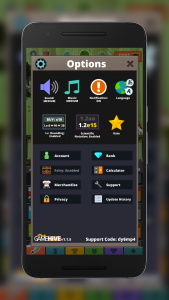 There are a handful of options available.
There are a few options you can play around with. The game is translated into 16 different languages, so you are probably covered in that aspect. You can also toggle sounds, music and notifications (they sometimes get a bit annoying, so I would recommend you deactivate them).
Other less useful stuff available includes creating an account (because syncing between devices doesn’t use Google Play Games), a link to a merchandise webpage, a calculator and a link to the Privacy Policy.
This is also the place where you can go to buy gems, through the “Bank” option. You can also rate the game here and contact support if you find some nasty bug that needs fixing.
Finally, an important element here is enabling rounding for leveling in bulk. That means that if you are on level 6, and you select to buy levels on increments of 10, you will first level to 10, then to 20, and onwards. If you disable rounding and are on level 6, you will increase your level to 16, then 26, and so on.
Conclusion
Even though it incorporates dead-simple controls that don’t seem entertaining, Tap Titans 2 manages to provide a lot of fun, thanks to a very well-thought upgrade system that brings huge replay value to the game. Nevertheless, it would be nice to see a bit of variation in the game, since there will be a moment in which tapping the screen the whole time will not cut it anymore. However, the game right now can provide a lot of fun and is ideal for playing in short bursts. If you are looking for a not too demanding game that provides lots of fun, then Tap Titans 2 is for you.
Download and install Tap Titans 2 from the Google Play Store.
Windows 10 Project Neon confirmed by developer day live-stream
Why it matters to you
Project Neon will change and modernize the look of Windows 10 in a way that makes sense of multiple devices, including HoloLens.
Microsoft has inadvertently confirmed the existence and shown us a little more of its upcoming Project Neon design overhaul for Windows 10, which makes it possible to create much more visually appealing applications for the operating system. Although its release date is still unknown, it should mean we start seeing much more attractive apps in the future.
To date, all we have seen of Project Neon is a few application previews from certain developers, which seemed to feature much fancier transparency options for the UI, as well as new animations to make everything feel more fluid. Microsoft has yet to officially announced Neon’s existence, but it might as well have, as during a recent developer day it showed an image of Project Neon in the flesh.
Spotted during the Windows Developer Day live-stream (by WindowsCentral) the image shows The Neon design language in action, as well as Microsoft’s own statement on its commitment to helping developers make “beautiful, engaging experiences” using it.
More: Latest Windows 10 Insider Build will let your smartphone lock and unlock your PC
The added translucency found in the Project Neon update is being termed Acrylics, and will look to ape some of the visual feel that Windows 7’s Aero Glass update added.
When it does debut at some point in the future, Project Neon is expected to impact the aesthetics of everything related to Windows 10, from the PC-based OS itself, to the Xbox One, Windows 10 Mobile and Hololens. It’s not clear if Microsoft will debut it across all platforms straight away, but considering Microsoft’s drive for much more unified platforms, it wouldn’t be surprising.
We’ll likely hear more about the new design update at Microsoft’s BUILD 2017 conference, to be held in May. We also expect to hear more about Windows 10 Cloud, a rumored low-cost, lightweight version of Windows 10, at that time.
Tinder for moms? Peanut app helps get gang together for friendship, playdates
Why it matters to you
Making friends isn’t easy when you’re a busy mom, but Peanut aims to help you find fellow moms to befriend.
It’s hard to name a social network geared toward women with kids. Sure, websites like Cafe Mom and ParentsConnect cater to moms, but they don’t exactly offer the polished experienced that social behemoths like Facebook, Twitter, and Snapchat deliver. While moms can correspond in Facebook Groups and Forums, it’s not the same as using an app designed with their needs and interests in mind.
That’s why Michelle Kennedy, a former lawyer, started Peanut. Kennedy began working on Peanut after spending a lot of time trying to find mothers who shared common interests. She comes armed with knowledge from Badoo, a dating startup where she spent six years as General Council and later deputy CEO, and Bumble, a location-based ephemeral dating app she helped to found with ex-Tinder team member Whitney Wolfe.
Meeting fellow moms the digital way
Penaut’s tagline explains the goal of the app perfectly: “Meet as mamas, connect as women.” The idea is to connect women with fellow moms who share their interests to create lasting friendships.
“Peanut is designed to give women a network, [and] view motherhood as an adventure in the life of a woman,” the Peanut team said in a press release. “Every step of Peanut is geared toward making it simple to reach out and connect in a friendly and accessible way.”


More: Fishbrain is a social network for Fishermen
That’s apparent at signup. New users, which Peanut cutely calls “mamas,” log in with an existing Facebook account and create a profile by answering questions like, “How far along in your pregnancy are you?,” and “How old are your children?” Then, they select three colorful labels — “packs,” in Peanut’s vocabulary — from categories like “Spiritual Gangster,” “Fashion Killa,” “City Gal,” “Single Mama,” and “Mama of Multiples.” And that’s all it takes.
From there, Peanut works its magic. Using machine learning, a form of artificial intelligence that allows the app to make insights independently, the network recommends matches based on proximity and common interests. It’ll show other women nearby, highlighting commonalities such as hobbies, languages, the age and gender of children, educational background, and other criteria. Users express interest in potential matches with an upward swipe on their profile picture, which Peanut playfully calls a “wave.”
In-app messaging makes meeting up easier
The goal is to make connecting with other women less daunting, Kennedy said. When a user responds to another’s wave, a popup highlighting the two users’ shared interests serves as a discussion prompter. Users can chat before they “wave” at one another, providing a built-in means of screening prospective matches. Peanut offers a myriad ways to shuttle messages back and forth. Users can send notes from profile screens, from the expanded view of their profiles, and from the network’s dedicated messages folder.
More: Twitter claims users trust social media influencers as much as their own friends
“Waves” aren’t the only way Peanut users interact with one another. There’s a chat feature that can host up to 20 others, and a built-in polling tool that helps you decide on dates for meetups and events. Once the poll is complete, it turns into an event invite that participants can add to their respective calendars.
Peanut’s challenge lies in rallying a critical mass of users. Women use Facebook at somewhat higher rates than men (83 percent of female internet users versus 75 percent of male internet users), according to the Pew Research Center. Women also tend to have more Facebook friends than men (166 compared to 145).
More: The history of social networking
There’s something to be said for Peanut’s goal to “make connections in a meaningful way that works for the mobile-first generation,” but social networks need users by nature. It won’t be easy to drag women away from the competition, but if Peanut mounts a well-targeted recruitment effort, it might just have a fighting chance and become the ultimate social network for moms.
Peanut is launching in the U.S. and the U.K., with a focus on New York and London initially. You can download it on the iOS App Store now.
AMD isn’t afraid of Intel anymore, and its $490 Ryzen CPU proves it
Although we are mere weeks away from AMD’s Ryzen CPUs hitting the shelves, it doesn’t mean we aren’t keen to hear pre-release information. In the latest leak, it may be that we have our first look at the kind of prices we can expect AMD’s new flagship chips to have and if they are anything to go by, AMD is confident about their performance.
AMD has, for the past decade or more, been a budget focused CPU maker. That’s not to say that all of its chips were at the entry level — but it hasn’t competed directly with Intel in top-tier performance since the AMD64 chips trounced the Pentium 4. That’s meant that its processors are priced competitively and at the lower end of the scale. But Ryzen looks different.

Although not confirmed in any official capacity, ShopBLT (via VideoCardz) seems to have posted U.S. prices for a trio of AMD Ryzen CPUs. The DT Ryzen 7 1700, 1700X and 1800X all have prices and wattage ratings.
More: Leaked roadmap shows AMD may release three classes of Ryzen desktop processors
The price tags are $317, $382 and $490 respectively, which even at the low end is a lot more expensive than AMD’s currently available processors. They’re not as expensive as some of Intel’s extreme processor options, but they’re certainly comparable to certain i7 chips.
Note, the $317 chip shouldn’t be taken as the entry level. Earlier leaks show three tiers of Ryzen, and the chips with leaked prices are all in the highest tier.
Although these prices should be taken with a pinch of salt since AMD hasn’t made anything official, Hexus also grabbed a screenshot from British retailer, Kikatek.com, which showed comparable pricing for the same Ryzen chips. That suggests that even if the prices on ShopBLT aren’t exact, they should be around the ballpark we can expect Ryzen hardware to debut at.
The big take home from this reveal isn’t necessarily the prices themselves, but what they reflect. Ryzen is a big step up in price for AMD. Current AMD chips top out around $200, which is where Intel sells its mid-range hardware.
If AMD had been overselling its new CPUs with its talk of clock for clock performance with Intel, the ability to be comparable to or even beat it in some cases, its pricing probably would not be this high. High pricing suggests AMD is confident, and doesn’t think it’ll have to rely on pricing alone to beat Intel.
 AIVAnet