


Someone made a giant Rubik’s Cube in ‘Fallout 4’

It seems there are two types of Fallout 4 gamers: those who want to do nothing but take out bad guys, and a very patient few who painstakingly create some incredible stuff. Case in point, this giant floating Rubik’s Cube. User “Theowest” spent a whopping 25 hours gathering and assembling 128 generators, 36 terminals and thousands of wires to create this neon behemoth, but we’re not entirely sure whether or not it’s a cube that can be “solved.” It seems to be missing a top and bottom panel and each square is able to change color. So if you’re not a gamer who would make anything like this, then take a second to appreciate its complexity — right before you get back to kicking bad guy butt.
Via: Push Square
Source: Steam
‘Gravity Rush Remastered’ launch date shifts up a week in Europe

Sony is doing the fine people of Europe a solid and pushing up the release date of Gravity Rush Remastered from February 10th to February 2nd. This is the new-and-improved, PlayStation 4 version of Gravity Rush, originally a (truly incredible) Vita game. Gravity Rush Remastered includes updated graphics, motion-sensing controls, and extra missions, costumes and challenges. The game is due to hit PS4 on February 9th in the US, in both digital and physical forms. A sequel, cleverly called Gravity Rush 2, is also on its way to PS4 — and PS4 only, with no Vita version in sight.
Source: Sony
Google account no longer required to join a Google Hangout
Google has just announced a new feature, which has been a major request from users, for Hangouts that allows meeting organizers to invite any user, including those without a Google account. This new feature is especially useful for businesses who hold meetings over video chats using Hangouts. With this added ability, it should eliminate the need for special meeting accounts like Gotomeeting, and is especially great for small businesses who have to stick to budgets because Google for Work is only five dollars per month.

Key changes:
– Simpler: Joining a video call now is as simple as one click
– Easier: No filling in forms, no creating accounts, just easy access to
meetings
– Secure: Presenters maintain full control over adding, muting and
ejecting participants
Instructions for inviting users without a Google account:
1. Invite your external guests with Google Calendar
2. They click a link in the event description and fill in their name
3. In order to help give you control and security over your meetings,
you’ll get a prompt to accept / deny their entry whether you’re using web,
mobile or Chromebox for meetings.
Check out the new features at Google Hangouts.
Source – Google for Work blog
The post Google account no longer required to join a Google Hangout appeared first on AndroidGuys.
Google Fit updated to recognize all of your activies
Tired of your pedometer simply counting your steps? With Google’s latest update to Google Fit, it will now recognize all of your activities: from cardio to strength training, what you eat plus how you rest, and coaches you every step of the way. I can actually confirm this, as my own Google Fit app knew I had been more active recently and asked me to increase my daily goal, which I begrudgingly did. But after one day with the new goal, I already achieved an additional 25 minutes of activity which will make me healthier.


Google Fit will now pull information from your favorite nutrition and sleep apps giving you the whole picture of your health. Diet apps such as MyFitnessPal, Fatsecret, Lifesum, or LoseIt are all compatible with Google Fit. And the compatible sleep apps: Sleep as Android, Xiaomi Mi Band and Mi Band 1S, Sony Smartband 2, or the Basis Peak.
Google Fit is bringing a whole new level of health monitoring just in time for those New Year’s Resolutions.
Here are the new features(Google):
Instant insights. See real-time stats for your runs, walks and rides on your phone. Google Fit will record your speed, pace, route, elevation, and more so you can stay motivated and on track.
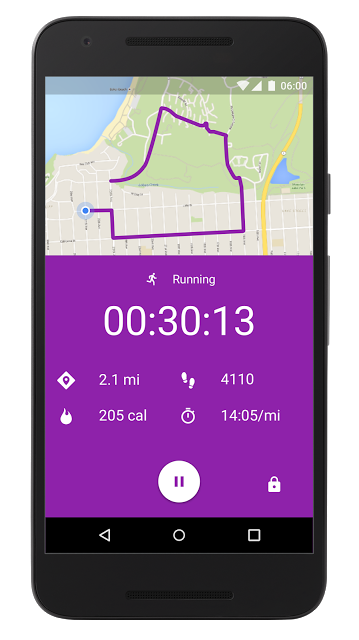
Strength training. Want to add push-ups to your routine? If you have an Android Wear watch, you can start a daily challenge and your watch will automatically detect and count each sit-up, push-up, and squat. They’ll be added to your daily activity, so you get credit for each one.
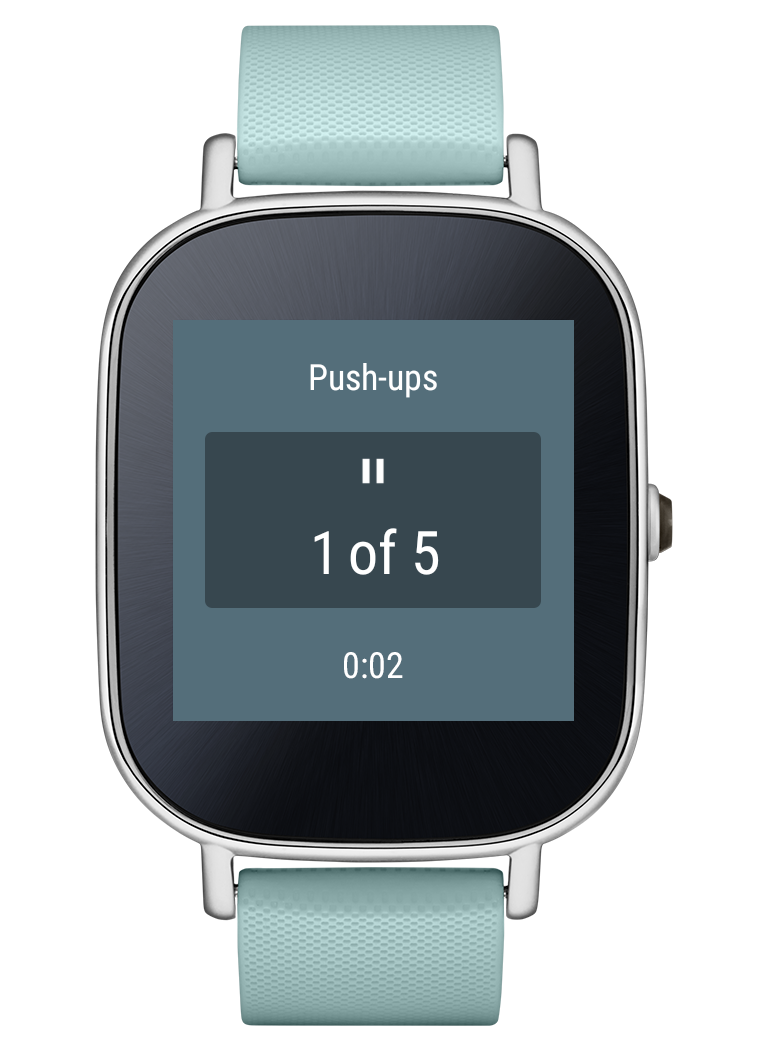
Just five push-ups?
Source – Google Blog
The post Google Fit updated to recognize all of your activies appeared first on AndroidGuys.
Apple ‘Investigating’ iPad Pros Unresponsive After Charging, Recommends Restart as Interim Fix
Shortly after the launch of the iPad Pro, buyers began complaining about an issue that caused the iPad Pro to become unresponsive after charging, requiring a hard restart to restore functionality.
Apple has now responded to those complaints with a support document letting customers know it’s looking into the problem and recommending the aforementioned hard restart as an interim fix.

To get back to using your iPad Pro, force restart it by pressing and holding both the Sleep/Wake and Home buttons for at least ten seconds, until you see the Apple logo.
Apple is aware of this issue and is investigating.
After being charged, affected iPad Pros appear to be completely frozen, unresponsive to touch and other interactions. The screen remains dark until a reset is performed. The issue appears to be quite widespread, with complaints on the Apple Support Communities, the MacRumors forums, and reddit.
Both 32 and 128GB (Wi-Fi and LTE) iPad Pro models on iOS 9.1 have been affected, and it is not clear if the problem is related to hardware or software. Software is a strong possibility, as iPhone 6s and 6s Plus users started seeing a similar issue with their smartphones randomly powering off and becoming unresponsive last month.
Discuss this article in our forums
Adele’s New Album Won’t Be Available on Apple Music
Following in the footsteps of Taylor Swift, Adele is opting to restrict her upcoming album from streaming music services. “25,” Adele’s highly anticipated album set to release tomorrow, will not be available on Apple Music, Spotify, or other Internet-based streaming music services, reports The New York Times.
Citing three sources with knowledge of the album release plans, The New York Times says Adele was involved in the decision not to share her album on streaming music services. “25” is Adele’s first album in nearly five years and has been preceded by “Hello,” a single that’s already extremely popular, so the decision to restrict the album from streaming services may make fans unhappy.

Taylor Swift was one of the first major artists to take a stand against streaming music, opting to pull her songs from services like Spotify that offered a free listening tier. According to Swift, she did so because “music should not be free” and artists should value their work. It’s likely Adele has similar motives, as restricting Swift’s latest album “1989” from music sites did not significantly impact its popularity. “1989” sold upwards of 1.2 million copies during its first week of availability, and its believed Adele’s new album could sell 2.5 million copies.
Swift initially refused to share her songs on Apple Music because Apple executives did not intend to pay artists during the Apple Music free trial period, but after the company reversed course, she too changed her mind and allowed Apple Music to stream “1989” and her other albums.
While Adele’s new music will not be available on Apple Music, customers interested in obtaining the album will be able to purchase it through iTunes.
Adele had also asked Apple to stock her new album in its retail stores, but Apple declined the offer. It’s not likely the refusal impacted Adele’s decision not to offer her music on streaming sites, and Adele and Apple have also reportedly discussed a possible $30 million tour sponsorship. The status of that potential deal is not known.
Discuss this article in our forums
[TA Deals] Save 71% on the 3-in-1 Smartphone Photography Lens Set

Everyone is snap happy these days, we take pictures of family, friends, pets, landscapes, historical buildings, the list is never-ending. It results in millions of images getting posted on social media outlets every single day. Many of the photos are taken with smartphones, with varying degrees of success depending on the model used. If you’ve been taking pictures that just don’t seem up to scratch quality-wise, perhaps this 3-in-1 Smartphone Photography Lens Set will be of use. The set consists of a fish-eye, macro, and wide-angle lens that simply snap on and off your smartphone’s camera lens. Best of all, the 3-in-1 set has been discounted to just $19.99 from Talk Android Deals.
The 3-in-1 Smartphone Photography Lens set lets you capture images close-up (macro) or from a distance, with the fish-eye lens allowing you to take 180-degree images. The lens kit works by magnetically snapping on to the sticky magnetic ring that you place around your smartphone camera’s lens, and is easy to ‘snap off’ when not in use. In case you are wondering, a selection of magnetic rings is included with the set. The lens kit works with most Android devices as well as iPods and iPhones.
The 3-in-1 Smartphone Photography Lens Set has been discounted by 71% to just $19.99 and is available to order from Talk Android Deals for the next 2 days. So there’s no time to waste if you’d like to start taking better quality photos that will have your friends and family wondering if you’ve bought a DSLR.
Come comment on this article: [TA Deals] Save 71% on the 3-in-1 Smartphone Photography Lens Set
Day One Apps: The first apps we install on every new Android (Volume 3)
As someone who has gone through his fair share of Android phones and tablets over the years, I’ve also installed and reviewed countless apps and games. As such, there some titles out there that I simply must have on my Android – and as soon as possible. We like to term these as “Day One Apps” because, well, we install them on day one.
What follows are the day one apps that I look for almost as soon as I get connected to Wi-Fi. Be sure to check out Volume 1 and Volume 2 to see what my fellow writers are loading on their respective devices.
Google Keyboard
The first thing I do on any smartphone or tablet is install Google Keyboard. In some cases this comes preloaded with the phone, however many manufacturers choose to go their own route with a third party keyboard. To me, there is nothing easier to learn or set up. It’s easy, intuitive, and I like some of the customization settings. Yes, I know that there are more feature-rich keyboards out there, and some will save me more keystrokes over time, however I love the universal feel that this Google client provides. I don’t even want to mess with email, text, or installing other apps until I’ve had this one in place.
Internet Movie Database (IMdb)
 I am a big movie fan so I am always quick to install the IMDB application. It is one of the more polished looking Android apps you’ll find and is always among the first to adopt Google’s latest design principles. I love looking at trivia, movie trailers, and just tripping down the rabbit hole. I like the app so much that I prefer this experience over the web version now and I’m often found skimming this app when watching older films. It’s also the first one I break out when I leave the theater so I can check out trivia.
Movies by Flixster
Staying with the theme of films, I install Flixster right away so that I can see what is showing at the local box office. Whether you’re traveling or staying close to home, the app does a great job of showing what is available at what time. Of course this one provides phone numbers, addresses of theaters, but it also hands off to turn-by-turn navigation. Although the color scheme is getting a little dated in my opinion, it is a simple to use application and ties into your Facebook or Google profiles for quick login.
Nova Launcher Prime
 Nova Launcher Prime ensures that my smartphone looks exactly the way I wanted to. It is not necessarily that I have a problem with stock Android or some of the custom UIs out there, it’s more that I love to hand select every little facet. The experience has gotten incrementally better over time and new features are introduced on a semi-regular basis. If you are looking to set up your phone with gestures, custom icons, or want to have your new phone mirror the exact user interface as your last device, this is the first one you should consider. Yes, there’s a free version, but do yourself a favor and spring for the Prime version as it unlocks all sorts of wonderful things for the money.
BaconReader for Reddit
I am a reddit junkie so I install Baconreader right away; Reddit is the way that I pick up most of my headlines and participate in discussion. Moreover, it’s also a great way for me to unwind and waste time with various subreddits and irreverent, fun stuff. Baconreader recently picked up a new design that implements Google’s latest guidelines and looks fantastic. I would like to see more themes, however, I am content with the experience. I’ve dabbled another reddit applications, but always come home to this one.
ESPN
ESPN is a must-have application for me because I follow a variety of sports and have loyalties to teams in multiple leagues. I love being able to pop in and check at-a-glance as to how my teams are doing. I appreciate that I can toggle notifications for alerts and I am sure to get scores as they happen. This one has gotten more refined overtime and really uses some of Googles Material Design cues. In addition to scores, you can pull up news as it happens in just about any league; the “Now” column brings up a steady stream of tweets and updates from a whole host of sources. Plus, it’s always nice to hop in and watch a quick replay of your team ripping off a 75 yard touchdown run. Things get even better with the counterpart app, WatchESPN.
Snapseed
Although I do have quite a few photo editing tools, Snapseed is the one that I currently love the most. I’ve installed this on day one for the last year or two and simply love the editing tools. As cameras get better with time, the pictures look even cooler when you run them through quick clean up, filters, minor and major tweaks, or add a border. I also love that this one is easy to work with and it doesn’t hurt that it is owned by Google.

HootSuite
Managing social media for myself personally as well as the AndroidGuys brand, I need a tool that gives me flexibility and a robust set of options. To me, HootSuite, is one that does the best job of this. Not only can you add multiple streams, for social media accounts, but it looks great on a tablet. If you stay active on social media, then you will want to consider this one.
Audible
I don’t get to spend as much time reading books as I would like to, so I take every advantage of listening to audiobooks. Audible is the first name in audiobooks, and, conveniently, it’s tied directly to Amazon. I love that I can log in on any device and resume where I left off. Depending on the book, I will also adjust the playback speed so that I can get through it quicker. This varies, of course, from book to book and reader to reader, but it’s a great way to take him books while riding a bike, mowing the grass, or on longer car rides. Speaking of which, Try Audible and Get Two Free Audiobooks
 Timely
I love Timely particularly because of the cloud sync. I have a number of alarms that go off throughout the day and week to keep me on task, and the cloud synchronization here makes sure that I don’t miss a beat. Indeed, you can set alarms on any of your devices and make it so that the alarms you set on your first phone carry over to your latest phone. You can toggle this stuff on and off at a per-device level and it super easy easy to manage. I don’t spend much time inside of the application, but it is among the prettiest clocks, stopwatch, timer, countdown apps you’ll find.
I count myself among the 400 million active Instagram users so of course I will use their mobile app. Although the app was a little stale for a while, I have come to appreciate the new filters that have been at it over time. And, thanks to the video feature, it easy to share longer moments, too. The mobile application, to me, works better than the desktop version. While we’re on the topic, be sure to follow AndroidGuys on Instagram.
PayPal
Sending and receiving money is something I deal with on a weekly, if not daily, basis. The first name in this space, for most people, is PayPal. The mobile app has gotten exponentially better in the last year or so and I love the ability to add to balances at various locations. The mobile client is a no frills experience, but when dealing with mobile payments, it doesn’t have to be gorgeous or feature-rich. I find the app to be intuitive and pleasing to the eye.

Sonos
We have a Sonos music set up in our house so I am always quick to install this app. Whether I am listening to music in one room, or grouping music across the household, I I’m a big fan of this app. Content providers and developers are always adding new features and services to the client. I will admit that a few years ago this was an ugly app and not something I enjoyed dealing with. But, the stuff we have today not only looks great, but it is easy to use.
WeatherBug
Whereas most devices come pre-installed with a weather client or ties to a weather service, I love WeatherBug so much that I install it on day one. I don’t spend too much time interfacing directly with the app itself, however when I do, this one is sharp, customizable, and as accurate as anything else. I know that there are other apps out there that provide more detailed weather or forecasts, but I think WeatherBug does a great job of putting together a hassle free and easy to use weather app.
Dunkin’ Donuts
I install a number of restaurant and food-related applications on my Android phone on day one. Among the first loaded up is the Dunkin Donuts application. I live dangerously close to a Dunkin’ Donuts location so I am often found at the drive thru.
 Not only can you use the app to pay for your food, but you can also keep an eye on your rewards, and manage your gift cards. If you are the type of person who likes to be alerted to new promotions, then you may enjoy this one as well. Just about once a day or so I will get an alert on my phone for some limited-time deal or savings that can be had.
Starbucks
Although it may be viewed as someone of a competitor to the aforementioned title, I love the Starbucks app. Again, managing my account and adding to my balance is easy and can be done directly from the application. A recent update also makes it possible for me to order my drink or food ahead of time and pay for it. The app, of course also provides location based help and can direct you to the nearest store. As someone known to rush out the door without his wallet, it’s nice to know my phone will pay for my drink.
Taco Bell
If you ask my wife, she’ll tell you that I eat Taco Bell way more than I should. OK, maybe I do. I love the Taco Bell application as it is one of the most gorgeous food apps you’ll find, especially for a fast food chain. You can view the menu, place orders, and even pre pay for your food to be picked up. I like that I can customize my order with little add-ons or make adjustments and not feel awkward standing at the cash register with these changes. This one looks way better than it needs to for the money.

Slack
Our team uses Slack for internal communication and collaboration. We’ve been employing its services for roughly a year now and I really enjoy the mobile counterpart. If you’ve seen the desktop version, you’ll find this looks exactly the way you would expect it would. Do you have a group or are you part of a team that needs to work together on a regular basis? This is one you will definitely want to check out. You can share directly to this app from your Android phone in just about any scenario. Want to upload an image? Easy. Want to share a web link with a specific set of users? Presto. I don’t know how these guys monetize, and I won’t question it, but we really love Slack and the way it helps our organization.
Todoist
I have toyed with a number of task applications and to-do list clients, however I am really in love with Todoist. It looks very modern, is full of features, and delivers what you would want from a big name developer. The fact that it synchronizes across clients and has real-time updates and notifications is vital to me and my team. It doesn’t take long to learn how to use this one and tap into its potential. Indeed, it is quite the robust app. It is a breeze to add a task, set a date and/or reminder, assign it to somebody and, and leave comments. We use it internally here, however I’ve come to love having it for personal uses too.
Doggcatcher
A mainstay on my phone for the past few years, Doggcatcher is my favorite podcast client. For an app designed for listening you could be forgiven if your app wasn’t quite as polished or refined. Having said that, I like the way this one looks today, and it feels very fresh and modern. It wasn’t the most beautiful podcast app a few iterations back but it’s got Material Design all over it today. I don’t know what will happen Google Play Music begins curating podcasts, however I am not ready to give up on this one yet. Adding, discovering, and sharing podcast is very easy with this client.
The post Day One Apps: The first apps we install on every new Android (Volume 3) appeared first on AndroidGuys.
Engadget giveaway: Win an Apple Watch Sport and Aim fitness tracker courtesy of Skulpt!

If you’re serious about fitness (or want to be), stepping up your game beyond basic activity trackers couldn’t hurt. Products like the Skulp Aim let you quantify your workout beyond steps by directly measuring body fat and muscle quality. Used in tandem with a wearable like the Apple Watch Sport, you can ascertain detailed correlations between exercise regimens and physical results. To do this, the Aim uses Electrical Impedance Mypgraphy (EIM) to measure the resistive and capacitive properties of the tissue via electrodes. With the holiday season upon us, the struggle to stay fit in the face of seasonal snacks is challenging. Skulp has provided us with a Skulpt Aim and Apple Watch Sport this week to help one lucky Engadget reader get over that hump and start the new year healthier. It’s also adding two Exhibitor Plus passes to the Consumer Electronic Show (CES) in January. So, if you win and you’re able to swing by Las Vegas, you’ll be able to check out all the new upcoming gadgets. Just head down to the Rafflecopter widget below for up to three chances at winning this fitness and technology combo.
iPad Pro review: Big and powerful, but it won’t replace your laptop

Here we are. Apple, the same company that once swore off styluses, and dismissed hybrid PCs as experiments gone wrong, is now selling a laptop/tablet mashup of its own. One that accepts pen input, at that. The new 12.9-inch iPad Pro went on sale last week, and though it is, in a sense, just an oversized iPad, it’s also the closest thing we’ve seen yet to a hybrid device from Apple. With the screen real estate of a laptop, and the speed of a laptop, and various keyboard accessories allowing you to type on it like a laptop, the Pro seems like it might indeed be able to replace your notebook. In fact, Tim Cook himself has suggested as much in interviews. But with a starting price of $799, it isn’t for everybody. And even then, it won’t replace your laptop so much as complement it.Slideshow-341779
 AIVAnet