


Get the 3 Nest Cam bundle for a discount starting this weekend
The Nest Cam security camera is designed to keep an eye on your home and family even when you are away. It offers 24/7 live streaming with night vision, and is connected via WiFi and can be accessed through the Nest Cam app. Multiple cameras can be set-up around your house offering you full home monitoring. Nest Cams stream in full 1080p HD, using an all glass wide angle lens so you can see a clear and crisp feed.

The Nest Cam retails for $199 but starting this weekend, you will be able to buy a 3-pack for $497 for a total savings of $100. The bundle will be availble for purchase at nest.com, Amazon.com and apple.com. You can get the bundle in-store at Best Buy and Home Depot.
Nest cameras do not offer recording abilities straight out of the box, but require a subscription service. You can read more about pricing here.

Source – Nest
The post Get the 3 Nest Cam bundle for a discount starting this weekend appeared first on AndroidGuys.
TravelPass from Verizon lessens the cost of using your phone abroad

Traveling aboard is nice because you can see, taste, and smell the world. What’s not so nice is having your phone be restricted overseas. AT&T, T-Mobile, and Sprint are all among the carriers that promote special services to allow their customers the luxury of using their phones seemingly from country-to-country. Verizon, until now, has been pretty quiet to jump on the international hype. Today’s announcement of TravelPass changes things as Verizon customers can travel to select countries and use their phones for a decent price.

For just $2 per line daily, Verizon customers can travel to Canada and Mexico on their existing talk, text, and data plan. The carrier is also supporting travel to an additional sixty-five countries for a bit more money. Big Red isn’t issuing data roaming charges nor are they requiring the use of a mobile hotspot. Everything operates as it would in the United States.
These are the other areas supported by Verizon’s $10 per line daily fee:
- Caribbean and Central and South America: Anguilla, Antigua & Barbuda, Aruba, Barbados, Bonaire, British Virgin Islands, Cayman Islands, Curacao, Dominica, French Guiana, Grenada, Guadeloupe, Haiti, Jamaica, Martinique, Montserrat, Netherlands Antilles, Saint Barthelemy, Saint Eustatius & Saba, Saint Kitts & Nevis, Saint Lucia, Saint Maartin/Saint Martin, Saint Vincent & the Grenadines, Trinidad & Tobago, Turks & Caicos.
- Europe and Middle East: Austria, Belgium, Croatia, Cyprus, Czech Republic, Denmark, Estonia, Finland, France, Germany, Greece, Guernsey, Hungary, Iceland, Ireland, Isle of Mann, Israel, Italy, Jersey, Latvia, Liechtenstein, Lithuania, Luxembourg, Madeira and Azores, Netherlands, Norway, Palestinian Territories, Poland, Portugal, Romania, Slovakia, Spain, Sweden, Switzerland, Turkey, United Kingdom of Great Britain and Northern Ireland, Vatican City.
- Asia Pacific: Australia, Singapore, Taiwan.
Verizon customers have to go to the MyVerizon online or on the app and select “manage international services” to activate TravelPass.
Source: Verizon
Come comment on this article: TravelPass from Verizon lessens the cost of using your phone abroad
Motorola is starting initial deployment of Android 6.0 Marshmallow upgrade for some of its devices

David Schuster, vice president of Product Sales and Operations at Motorola announced today that the company is starting the initial deployment of the Android 6.0 Marshmallow upgrade to the 2015 Moto x Style (3rd Gen) in both Brazil and India, as well as the 2014 Moto X (2nd Gen) in Brazil. The update will also roll out in the coming weeks to the 2015 Moto X Pure Edition.
Motorola’s David Schuster mentioned that the update will be automatically pushed and a notification will be sent to your phone when you are able to install the update.
He also gave a list of all the new features that come with the update. These include Doze mode, App standby, improved control of app permissions, App links, a new expandable storage option that lets you set your SD card as internal storage, Do not disturb mode, improved volume controls, Now on tap, Direct share, Moto display and Ambient display, Moto Assist, Motorola migrate, and attentive display.
Below is a more detailed list of the new features
A new Memory Manager that lets you check memory usage of all your installed apps
– Volume controls have been greatly improved
– Do not disturb button has been added to the quick settings panel for easy access.
– System UI Tuner will appear in the settings menu at the very bottom once enabled. It provides a few simple UI tweaks.
– Google Now on Tap allows contextual information to be delivered based on content on your screen with a long press of the home key.
– Doze is a battery management feature that detects when your device is not in use and it will automatically go into a deep sleep state which saves your battery.
– App Standby reduces battery drain by putting seldom-used apps into a reduced activity state.
– Expandable Storage support allows for microSD cards to be used either in a portable storage or an internal storage mode. Portable storage allows your pictures, videos, audio and other media files to be stored. Internal storage allows both media storage along with apps and games but can not be used by other devices.
– RAM manager in settings which allows a consumer to view memory used by the system or an individual app over different time frames
– Automatic App backup not only backs up your apps but their associated data so when restored they will be the same as they were before
– Text selection has been improved
Source: David Schuster (Google+)
Come comment on this article: Motorola is starting initial deployment of Android 6.0 Marshmallow upgrade for some of its devices
We pushed the in-flight WiFi of the future to its limit

It shouldn’t have worked, but I streamed an episode of Last Week Tonight, a Twitch broadcast of Fallout 4, the premiere episode of Aziz Ansari’s Master of None and Meow the Jewels all at once, all on airplane WiFi. In-flight WiFi giant Gogo demoed its next-gen version of mile-high connectivity, 2Ku, above the overcast November skies of Gary, Indiana, bragging 98 percent coverage around the world (the poles don’t play nicely with airborne internet) at peak speeds of 70 Mbps. The reality is transfers much slower than that on a plane with roughly 25 journalists, business folks and Gogo staff all doing the same as me: trying to break the internet for about an hour.
A closer look at NVIDIA’s vision for AI ubiquity

Building new hardware has become increasingly easier thanks to the rise of 3D printing and the quick prototyping that’s now possible thanks to devices like the Arduino, Raspberry Pi and LittleBits. With Nvidia dropping the Jetson TX1’s machine-learning firepower into the mix, small companies and makers will be able to quickly put together smarter devices that have some of the same abilities that are creeping into our cars.
‘We take your security seriously’

Anyone who has even the slightest amount of contact with the internet is familiar with the scenario: An email or actual piece of mail arrives from a company who apparently handles some part of your connected life. The letter calmly identifies its author as a company you do business with, either by choice or by default. It blandly informs you that there has been a security incident in as little detail as possible. You have already heard about it on the news. It was probably a month ago and in more detail than in the letter currently staring back at you. Then the company’s mass-missive assures you, “We take your security seriously.”
Hulu reportedly wants to sell part of itself to Time Warner

Time Warner might soon be joining NBCUniversal (Comcast), Fox and Disney as a co-owner of Hulu, the Wall Street Journal reports. The streaming site is said to be in discussions to sell Time Warner a stake of itself, a deal that would value it upwards of $5 billion. While talks aren’t final yet, sources say the deal would likely involve Hulu’s existing co-owners reducing their stakes in the site for an equal 25 percent split, down from 33 percent each. Having another media parent could give Hulu the muscle to better compete with Netflix. If it goes through, Time Warner will invest cash and give Hulu access to more of its content library. The news isn’t too surprising — we’ve been hearing since 2013 that Time Warner was interested in Hulu. And it simply makes sense, given that it has the backing of America’s other cable giants.
Source: Wall Street Journal
How to Use Live Photos on iPhone 6s and 6s Plus
Apple’s latest flagship handsets, the iPhone 6s and 6s Plus, are the first to include the ability to take Live Photos. A Live Photo is a combination of up to a three-second .mov file and a still .jpg file that is taken automatically when you press the shutter button in your iPhone 6s or 6s Plus camera app. It grabs up to 1.5 seconds of 960×720 video before and 1.5 seconds of video after you tap the shutter button.
The camera app on the iPhone 6s and 6s Plus automatically starts recording the moment you open the app. Then, after you tap the shutter button, it saves only that 1.5 seconds beforehand and discards the rest.
That means, if you open your camera app and leave it open for a few minutes, your iPhone will be recording video the whole time. However, once you tap that shutter button, everything recorded prior to 1.5 seconds beforehand will be deleted.
To help you get the most of Live Photos, we’ve put together this guide for how to get the best Live Photos, and what to do with them afterward.
How to Take a Live Photo
Most iPhone 6s and 6s Plus devices have Live Photos on by default. However, there have been cases where the feature is off.
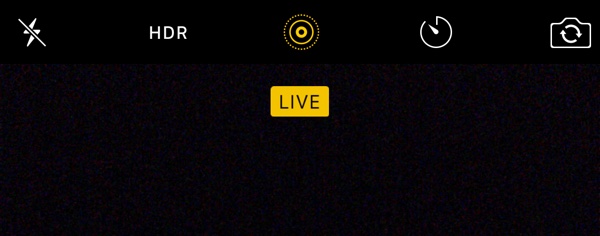
- Open the Camera app on your iPhone.
- Tap the Live Photos icon in the center-top of the screen between HDR and the timer. It looks like a set of concentric circles.
- You will know when Live Photos is on when the icon is highlighted in yellow.
- The word “Live” will also appear at the top of the screen. This label will remain on until 1.5 seconds after you tap the shutter button. It signifies that the video recording is complete.
Your Live Photo is automatically stored in your Photos app, just like traditional photos are for non-iPhone 6s or 6s Plus users. However, when you use 3D Touch on the screen, they come to life.

YouTube Music is here everybody! [+Download]
If you’ve previously used YouTube as a music streaming app on your phone, you would’ve probably recognized that it was not really suitable to do so. Namely, due to blocked content and the inability to close the app and use your phone for other things.
Google has likely noticed that mobile streaming is becoming ever more popular in the competitive market. With this, they credited the music industry and community for the massive support and growth on YouTube, and announced a YouTube app that creates a specialized music environment engineered specifically for non-stop listening.
“ But we want to do even more to support artists and all the fans who turn to YouTube to discover music, so we’re making the experience even better with a brand new YouTube Music app. With YouTube Music, you’ll get a completely new type of experience, designed to make discovering music on YouTube easier than ever.“
Teasing the user interface, they mentioned how it will function like a normal music player. You’ll have the standard tabs with different playlists and titles, while incorporating the online streaming into it.
“The app also gives you complete access to one of the richest music catalogs on earth. You’ll be able to quickly find music videos, tracks, artists and albums, but you’ll also see all the remixes, covers, lyric videos and concert footage that YouTube has to offer“
And finally, after announcing YouTube Red, they’ll also be incorporating this premium membership into the new Music App. No adverts, offline listening and the ability to switch between audio only or video and audio are just some of the perks available.
Starting today, it is available in the US Android Play Store and Apple App Store. You get the full version for free as a 14-day bonus.
What are your thoughts on Google’s recent activities?
Source: Official YouTube Blog
The post YouTube Music is here everybody! [+Download] appeared first on AndroidGuys.
YouTube Music launches in the United States

Millions of songs are stored on YouTube and listened to by more than one billion people worldwide. Through YouTube, Google has paid north of $3 billion to the music industry. Now, Google wants to do even more to support the music industry by providing users with a dedicated place for discovering music.
Welcome to YouTube Music.
Click here to view the embedded video.
YouTube Music is a single place for tracks, music videos, artists, albums, remixes, covers, lyric videos, and concert footage to be displayed. This is all within an ad-free environment.

The official app features a simple design, focusing on three areas to benefit users. The Home and Trending tabs show recommended and custom stations in addition to what other users are enjoying. People normally associate YouTube with video, but YouTube Music allows music streaming to be done in the background or without ever loading a video. Music can be streamed offline, too.

YouTube Music costs $9.99 per month, but Google is currently offering a 14-day trial with no credit card required. Subscribers are also able to use Play Music and YouTube Red at no extra charge. Google is basically giving access to all three premium services for $9.99 per month. Confused about anything? Don’t worry, you’re not alone. Google is launching streaming services that are so similar, making it difficult to understand which is the right one for you. But at least now a single monthly fee encompasses all three of these services. And, of course, you can pay nothing and continue using the existing free YouTube app.
For now, only people in the United States with Android and iOS devices can use YouTube Music.
Source: YouTube


Come comment on this article: YouTube Music launches in the United States
 AIVAnet