


Sony Xperia Z5 and Z5 Compact spotted in leaked image
Whilst the Sony Xperia Z4 wasn’t the upgrade many wanted from the Xperia Z3, the Z5 may be a different story all together. Perhaps Sony knew the Z4 was’t the upgrade everyone wanted since it never made it out of their home country, but new leaks could show what the Xperia Z5 has in store.
Coming courtesy of @vizileaks, the leaks show three devices – an iPhone 5S wedged between what are referred to as the “Sony Xperia Z(TBC) and Compact” to give an indication of the size. Sure, the number preceding the ‘Z’ isn’t guaranteed, but it’s more than likely going to be 5.

Other than the picture, the leak didn’t reveal too much else in the way of specifications but as far as exterior design goes, the Xperia Z5 seems to follow the same design that we’ve become accustom to with the Xperia range. The power button does appear to have been elongated and this could be to facilitate the fingerprint reader the graphic on the display clearly suggests the device is capable of.
Sony’s IFA press conference is scheduled to take place on September 2, 2015, so it could be a perfect opportunity for the devices to launch.
The post Sony Xperia Z5 and Z5 Compact spotted in leaked image appeared first on AndroidGuys.
Galaxy S6 Edge review follow-up: three months later

One of the breakout devices this year is the Galaxy S6 Edge, which bought the world’s first dual-curved smartphone screen in a package that appealed to millions of people. Announced alongside the Galaxy S6, Samsung’s “true flagship” bought a new era in design for the Korean manufacturer and while it was thought that the Galaxy S6 would be the most popular, customers turned to the unique and more expensive Galaxy S6 Edge instead.
The handset was released in April this year and in our review, we rated the handset 9.0 (out of 10), with Lanh saying that “the Galaxy S6 Edge is the beautiful result of Samsung’s newfound identity”.
 Samsung Galaxy S6 Edge review: the edge is here to stay
Our initial impressions were certainly very positive, but having spent three months with the handset, does it continue to live up to its lofty review score? One of the biggest problems with all smartphones is the eventual slowdown in performance as usage increases, but how has the Galaxy S6 Edge fared in three and a half months of use? Let’s find out.
Hardware

Curved displays on smartphones are certainly not unique but the Galaxy S6 Edge is, simply because it has the dual-curved display that rights one of the biggest issues with the Galaxy Note Edge: the curved display could only be seen when held in the left hand.
Samsung’s new design strategy certainly delivered a compelling flagship smartphone and like many users, I was sold on buying one as soon as they announced the handset. For me, the appeal of the dual curved display was two-fold: first, the handset stands out and second, I was hoping for some useful functionality in the edge screen.
Three months on, the curved edge still retains its appeal, but aside from the aesthetic appeal, I don’t actually use the Edge Screen features. The few times the Edge Screen has been activated – aside from the night clock which activated every night automatically – it has been by accidentally swiping the edged screen.
Aside from the curved display, there’s very little that sets the S6 Edge apart from its non-curved namesake. Some of Samsung’s hardware decisions still remain peculiar (as they can’t be fixed), but on the whole, the hardware is premium and definitely worthy of a flagship device.
The display itself remains one of the best on a smartphone display and although I’ve used most flagships released this year – including the LG G4 which has a Quantum Display – the oversaturated colours on the S6 Edge display provide a more emphatic experience.
The curved edge on the display of the S6 Edge can be a little jarring – especially when recording a video while panning or watching a film as the image wraps over the edge of the display – and the regular S6 is much better in this regard.
The back of the Galaxy S6 Edge is made from glass, which is both a blessing and a curse: the glass finish makes the handset more premium than past Galaxy flagships but also means the handset is susceptible to overheating. I’ve found the handset overheats quite often and while it’s not usually too hot to touch, it can be unbearable when charging and using simultaneously.

One surprising thing about the glass finish is that despite appearing to be fragile, my S6 Edge has survived several drops. When I used the original Galaxy S6, a few choice unintentional drops to concrete or stone floors resulted in significant damage in the body work, but the Galaxy S6 Edge seems to hold up remarkably well. Corning Gorilla Glass 4 provides significant protection and aside from a few scratches and a small chip in the bezel, the Galaxy S6 is mostly free of harm.
#gallery-2
margin: auto;
#gallery-2 .gallery-item
float: left;
margin-top: 10px;
text-align: center;
width: 33%;
#gallery-2 img
border: 2px solid #cfcfcf;
#gallery-2 .gallery-caption
margin-left: 0;
/* see gallery_shortcode() in wp-includes/media.php */


Cameras are definitely an important feature on modern flagships and the Galaxy S6 Edge is no different with the 16MP camera proving to be one of the best all rounders on the market. Having used most flagships over the past year, I have a fair reference point and for me, the S6 Edge still has the best smartphone camera, although the LG G4 comes very close. For the past few days I was visiting Vienna, Austria and the Galaxy S6 Edge took all my photos; apart from a few noisy low light shots, the results were very impressive.
Three months on and the Galaxy S6 Edge hardware has mostly lived up to its initial appeal but emotion towards hardware doesn’t change too often during the first few months with a handset. The real changes are seen in the handset’s software and performance, as usage of the features changes and software updates tweak parts of the experience.
Software

Aside from the design changes, the other big philosophy change in both the Galaxy S6 and the Galaxy S6 Edge is Samsung’s TouchWiz UX. Looking back to last year, the Galaxy S5 had one of the worst software experiences on a Samsung smartphone for many years thanks to loads of bloatware that couldn’t be uninstalled, but this year’s flagships changed that.
With the latest TouchWiz UX, we saw Samsung adopt the motto that “less is more” and as a result, there are just a handful of preloaded apps and all of these (including the entire Google suite of apps) can be disabled to prevent them from running in the background.
 See also: Samsung Galaxy S6 Edge Tips and Tricks
When it announced the S6 Edge, Samsung made a pronounced effort to introduce the favourite contacts as a key reason to buy the Galaxy S6 Edge and on paper, it certainly has an appeal; the premise is that you set up to five favourite contacts and when your phone is upside down, the screen will light up with the colour of that contact when they call or message you. On paper, it’s a very useful feature but in actual practice, it’s rare that I leave my phone upside down, mainly because doing so increases the chances of scratching that lovely display (which I’ve done a couple of times).
The Edge screen also has different available panels and if you’re someone who relies on your news or stock feeds, you’ll find the panels are really useful. As a social junkie, the Twitter panel definitely appealed to me but when I have activated it, I’ve found it only displays a few trending items and doesn’t scroll across the list as you might hope. For many months, I’ve been hoping for new additional panels but it seems that – at least for now – 3rd party developers have very little interest in the Edge Screen. With the rumoured Galaxy S6 Edge Plus set to launch in a few weeks and presumably additional curved display devices planned for the future however, there’s still plenty of time for this to change.
The Galaxy S6 Edge launched running Android 5.0.2 Lollipop and this bought its own inherent Android issues, primarily around RAM management. Promising fixes for a host of issues, the Korean manufacturer then delivered the Android 5.1.1 Lollipop and while this did fix a couple of things, it also impacted heavily on performance (more on that below) but a couple of software tweaks were a little strange.
 Read: Features of Android 5.1.1 for Galaxy S6
As an example, the update delivered the ability to sort the App drawer in alphabetical order, but by doing so, it removes any customisation to the app drawer and there’s no way to revert the change (other than redoing all the customisation).
Furthermore, when an app updates and you’ve added it to a folder in the app drawer, it removes it from that folder and adds it to the last screen while also deleting any shortcut you’ve saved on your home screen. Not unbearable but frustrating indeed.
Yes, the Galaxy S6 Edge software experience is positive on a whole – and unbelievable if you’ve used past Galaxy handsets that are full of bloatware – but on the flip side, there remain a few things that don’t quite make sense. In a bid to streamline the entire UX, Samsung went too far towards a simplified UI and its updates have done very little to fix the quirks that remain in the software.
Performance
The Galaxy S6 Edge is powered by some of the latest specs including an octa-core 64-bit Exynos 7420 processor with a Mali-T760MP8 GPU and 3GB RAM. On paper, the specs are fantastic and performance should match. For a while it did, but the Android 5.1.1 update changed this. Sadly, it changed for the worse.
As mentioned above, the latest update delivered a few fixes but also introduced a lot of issues, primarily in the performance and stability of the handset along with the battery life. The biggest difference between the Galaxy S6 Edge before and after the update is the stability and reliability of the handset; prior to the update, the handset was generally stable and rarely forced closed apps or rebooted. After the update, the list of performance issues is almost endless and some of these do make the experience very frustrating.
Clearly, the Android 5.1.1 Update did more bad than good
As an example of why Samsung should be concerned, a week ago I took a picture and went to show it to a couple of journalists I was with. Instead of just loading the picture, the handset became unresponsive, overheated and finally restarted once I gave up and put it in my pocket. After taking a couple of minutes to finish powering up, a trip to the gallery revealed that the handset never saved the image I’d just captured and this is a common issue I’ve found since the update.
Earlier I touched on the handset overheating and the Android 5.1.1 update made this worse, with the handset regularly overheating even when performing the most mundane tasks. Furthermore, the update also results in the handset becoming slow, sluggish and very unresponsive. Before the update, I could open an app or switch app within a second but since the update, there is often a large and very noticeable delay, even when trying to go back to the home screen.
The handset also randomly vibrates as if something has delivered a notification (even though nothing shows) and on the subject of notifications, I’ve found that a lot of notifications are delayed since the update. Even when using Google’s own apps, I’ve waited over 20-30 minutes for an email to come through even though it has come through on other Android devices (and before you ask, it’s not related to my internet connection).
The last key issue with the 5.1.1 update is the fingerprint sensor performance; before the update, it worked pretty much flawlessly for me but since the update, it’s hit and miss whether it recognises my fingerprint and the no match error message is becoming ever more frequent. When adding a new fingerprint, I’ve found that occasionally it doesn’t recognise that a finger has been placed on the reader and even wiping the home button (as the handset suggests) doesn’t improve this.
That being said, the Android 5.1.1 Update has delivered an interesting fix – since the update, the network antenna appears to be a lot stronger. As we covered in our Best for 4G testing, the Galaxy S6 Edge had issues with holding onto a connection and delivering fast speeds but the latest update improves the antenna strength, with coverage and reliability appearing to be a lot better.
Sadly, this is one positive in a swarm of negatives regarding the Android 5.1.1 update and given it took a while for the handset to gain 5.1.1, it’s possible we’ll be waiting a while for fixes.
Battery Life
While the unreliability and instability of the handset since the Android 5.1.1 update is partially manageable, the knock on effect on the battery life is certainly not. As we’ve covered, the handset regularly delivered 14 to 18 hours’ battery life with around 4 hours’ screen on time at launch but sadly, this is a thing of the past.
 Recommended: Galaxy S6 Edge battery life review – 28 days later
Believed to be delivering fixes and improvements in the battery life, the Android 5.1.1 update has introduced considerable battery drain; before the update the handset could usually handle around 10 to 12 hours of heavy usage including considerable usage of the camera but as I write this, I’ve now had to charge my phone twice since taking it off charge this morning. In just under 17 hours, it has drained to below 10 percent twice and when using it for a lot of camera shooting in Vienna, 70 percent of the battery was drained in just 2 hours and 57 minutes.
The lack of removable battery means this is actually a major problem for Samsung and looking at feedback on the update on social media, it’s clear that the issue is not local. In fact, I have seen many users report considerable battery drain since the update (including some rather prominent members of our own industry), which should definitely be a concern for Samsung.
Rather than rely on the battery holding out for a normal working day, I’ve had to resort to carrying a portable Quick Charge 2.0 battery pack to ensure I’ve got enough juice for a day, which is unlikely with the handset in its current state. The marked reduction in battery life is definitely a shame as anyone buying the handset with Android 5.1.1 Lollipop pre-installed will believe this to be an accurate reflection of the handset, which is definitely not the case.
Specifications
As a reminder, here’s a list of the key Galaxy S6 Edge specs:
| Display | 5.1-inch Super AMOLED 2560 x 1440 resolution, 577 ppi |
| Processor | Exynos 7420 |
| RAM | 3 GB |
| Storage | 32/64/128 GB |
| Camera | 16 MP rear camera with OIS 5 MP front-facing camera with 90 degree wide angle lens |
| Connectivity | WiFi a/b/g/n/ac Bluetooth 4.1, NFC, GPS + GLONASS |
| Networks | LTE cat 6 300/50 |
| Battery | 2,600 mAh Fast charging WPC and PMA-compatible wireless charging |
| Software | Android 5.0 Lollipop |
| Dimensions | 142.1 x 70.1 x 7.0 mm 132 grams |
| Colors | Black, white, gold, green |
Wrap up
Wrapping up, I was certainly very impressed with the Galaxy S6 Edge during my first month with the handset but a couple of months later, the handset has certainly lost some of its appeal. Yes, the handset looks fantastic and still stands out, but the software experience has definitely impacted my opinion of this handset. This should be a big concern for Samsung.
Samsung Galaxy S6/Edge vs
.rvs_wrapper
width: 350px;
.rvs_wrapper.align_left
float: left;
.rvs_wrapper.align_right
float: right;
.rvs_wrapper.align_center,
.rvs_wrapper.align_none
width: 100%;
.rvs_wrapper.align_center
text-align: center;
.rvs_wrapper.align_center.cbc-latest-videos ul li
float: none;
display: inline-block;
vertical-align: top;
.rvs_wrapper.cbc-latest-videos:not(.align_none) ul li:nth-child(2n+1)
clear: both;
.rvs_title
font-weight: 600 !important;
margin: 0 !important;
font-size: 24px !important;
.rvs_wrapper.align_right .rvs_title
padding-left: 20px;
.rvs_title a
font-family: ‘Roboto Condensed’;
color: #3a3a3a;
.rvs_wrapper.cbc-latest-videos ul
padding-top: 10px;
.rvs_wrapper.align_left.cbc-latest-videos ul li,
.rvs_wrapper.align_none.cbc-latest-videos ul li
padding: 0 15px 0 0;
.rvs_wrapper.align_right.cbc-latest-videos ul li
padding: 0 0 0 15px;
float: right;
.rvs_wrapper.align_center.cbc-latest-videos ul li
padding: 0 7px;
.rvs_wrapper.cbc-latest-videos ul li > a
font-weight: 400;
.rvs_wrapper.cbc-latest-videos ul li > a .yt-thumbnail
margin-bottom: 0;
@media only screen and (min-width : 480px)
body #page .rvs_wrapper.cbc-latest-videos ul
width: 100% !important;
@media only screen and (max-width : 480px)
body #page .rvs_wrapper.cbc-latest-videos
width: 100%;
float: none !important;
overflow-x: auto;
overflow-y: hidden;
body #page .rvs_wrapper.cbc-latest-videos ul
overflow: auto;
max-height: none;
body .rvs_wrapper.cbc-latest-videos ul li
float: left !important;
clear: none !important;

For Samsung, it’s certainly worrying especially as the Galaxy Note 5 and Galaxy S6 Edge Plus are both likely to launch next month running Android 5.1.1 Lollipop, and some of these issue may remain (although hopefully not). As part of the handset’s Q&A process, we’d hope that Samsung uncovers any software issues and resolve them before releasing new handsets on Android 5.1.1 Lollipop.
In order to ensure that a software issue does not impact on perception of what is otherwise a very good smartphone, Samsung needs to deliver a fix and promptly. At the moment, millions of customers use the Galaxy S6 Edge, but if it doesn’t fix the issues in the latest update, many of these customers may not use Samsung devices in the future.
As for me personally, my next step is to perform (another) hard reset of my Galaxy S6 Edge in the hope it fixes the issues. If it does, great. If it doesn’t, I’ll need to take a long look at what my next smartphone is. The Galaxy Note 5 will definitely appeal – the lack of S Pen means I probably won’t go for the S6 Edge Plus – but I may opt for another brand. I guess we’ll see!
The Galaxy Tab S2 “touch cover” stresses Samsung’s new direction for Android tablets
Along with the official announcement of the Galaxy Tab S2 for South Korea, yesterday’s news also brought with it a mysterious “keyboard bundle” for the larger, 9.7-inch tablet variant. With the OEM’s domestic website now having an official page for the product, the keyboard cover can be seen in all its glory, along with the presence of a very interesting development: a track pad.

Early last year, Samsung unveiled the Galaxy Tab PRO line of products, consisting of the Tab PRO 8.4, 10.1, and 12.2. In addition, a Galaxy Note PRO 12.2 was released. These devices were heavily promoted by Samsung as being designed for productivity given the presence of pre-installed applications such as WebEx and Remote PC, as well as a full-fledged productivity mobile suite called Hancom Office. Praised by many reviewers, Hancom Office was often described as being the first “true” Microsoft Office rival on Android, if only for the fact that so many features and so much of the functionality was retained. Still, the keyboard cover for the Tab/Note PRO 12.2 was a very standard affair:
#gallery-1
margin: auto;
#gallery-1 .gallery-item
float: left;
margin-top: 10px;
text-align: center;
width: 50%;
#gallery-1 img
border: 2px solid #cfcfcf;
#gallery-1 .gallery-caption
margin-left: 0;
/* see gallery_shortcode() in wp-includes/media.php */
-

- The Galaxy Note PRO 12.2 keyboard cover
-

- No track pad to be found
In the year since the release of the PRO series of tablets, Samsung and Microsoft came to an agreement to bundle Microsoft Office apps onto Samsung products in exchange for resolving a problem that had surfaced in the Korean manufacturer’s failure to pay royalties. This, in and of itself, has furthered the idea that Samsung is interested in focusing on business productivity, a sentiment further bolstered by partnerships with IBM and Blackberry.
The inclusion of a track pad on the Galaxy Tab S2 9.7-inch’s official keyboard cover will not only help customers better use make use of the product in terms of their business-doings, but it could very well be seen as a way to both preempt the expected business-friendly Apple iPad Pro that is rumored to be launching this Fall, and have some basic rivalry with Microsoft’s very own Surface line of tablet PCs, especially given the diagram seen below, which suggests multi-angle positioning is possible:

Given the relatively high specs of the Galaxy Tab S2, as well as the clear absence of the Galaxy Tab PRO from this year’s product line refreshes, it looks like Samsung is intent on adding extra functionality to the Tab S2 for those who need it. Beyond that, the presence of a touch pad itself will likely reappear in future products, and may be a clear indication of the Korean company’s strategy in trying to solve the rather concerning condition that tablets now find themselves in.
The Galaxy Tab S2 comes in an 8-inch, and 9.7-inch variant, both of which employ a 4:3 aspect ratio 2048×1536 SAMOLED display, and will be available in LTE and Wi-Fi-only configurations. It features an Exynos 5433 Octa-core SoC, 3GB of RAM, 32 or 64GB of on-board storage, and an 8-megapixel rear, 2.1-megapixel front camera set-up (no flash, sorry). It will ship with Android 5.0.2 and features the same “touch-based” fingerprint sensor used in the Galaxy S6 and has support for microSD. The 9.7-inch variant will include a 5,870mAh battery, and the 8-inch variant a 4,000mAh power-cell.

While no pricing has yet been announced for the keyboard case combo, even as a stand alone product it would not be unsurprising to see an amount hovering around $150+.
Despite the presumed high price point, is anyone interested in the potential productivity this new product accessory might offer? Leave us a comment below!
YouTube makes new desktop player available to everyone

YouTube just got a facelift — it’s not a complete reconstruction, but it’s definitely more than just fillers to smooth out wrinkles. The Google-owned video sharing service has rolled out its new HTML5 desktop player to everyone after a few months of testing. When you play a YouTube vid on your computer, you’ll notice that the control bar at the bottom is replaced by a transparent version that disappears a few seconds after you stop moving the mouse pointer. Its icons are larger and bolder, the loading bar is thinner and the transition animation to load the Quality and Subtitle drop-down menu is a lot smoother. The player looks generally better throughout, but feel free to check and judge for yourself.
Ooh la la! Our new player design is slicker than a squirrel on waterskis! pic.twitter.com/9tS1pm3NiG
— YouTube (@YouTube) August 3, 2015
Via:
Google System
Source:
YouTube (Twitter)
Tags: google, html5, youtube
ICANN reveals plan for ending America’s control of the internet

Though it’s called the “world wide web,” the US Commerce Department has held the keys to the internet since its inception in the ’90s. Last year, it agreed to hand them over to worldwide bodies and asked ICANN, the group that manages internet addresses, to come up with a plan. ICANN unveiled the much anticipated report yesterday, and has given the public until September 8th to comment on it. The gist of the 100-page document? Internet control functions will be given to ICANN and an oversight body made up of “interested parties” that has no connection to any world governments.
Many American political heavyweights were opposed to ceding US control, fearing internet censorship in certain nations. Ex-President Bill Clinton, for instance, said it could lead to states “protect(ing) their backsides instead of empowering people.” Republicans also signaled early on that they were opposed to any change in the status quo. However, ICANN’s proposed rules would keep nations from meddling in any internet decisions. Instead, oversight will be handled by a “Customer Standing Committee” (CSC) made up of numerous stakeholders in industry, academia, government agencies like NASA and protocol management groups like the Internet Systems Consortium.
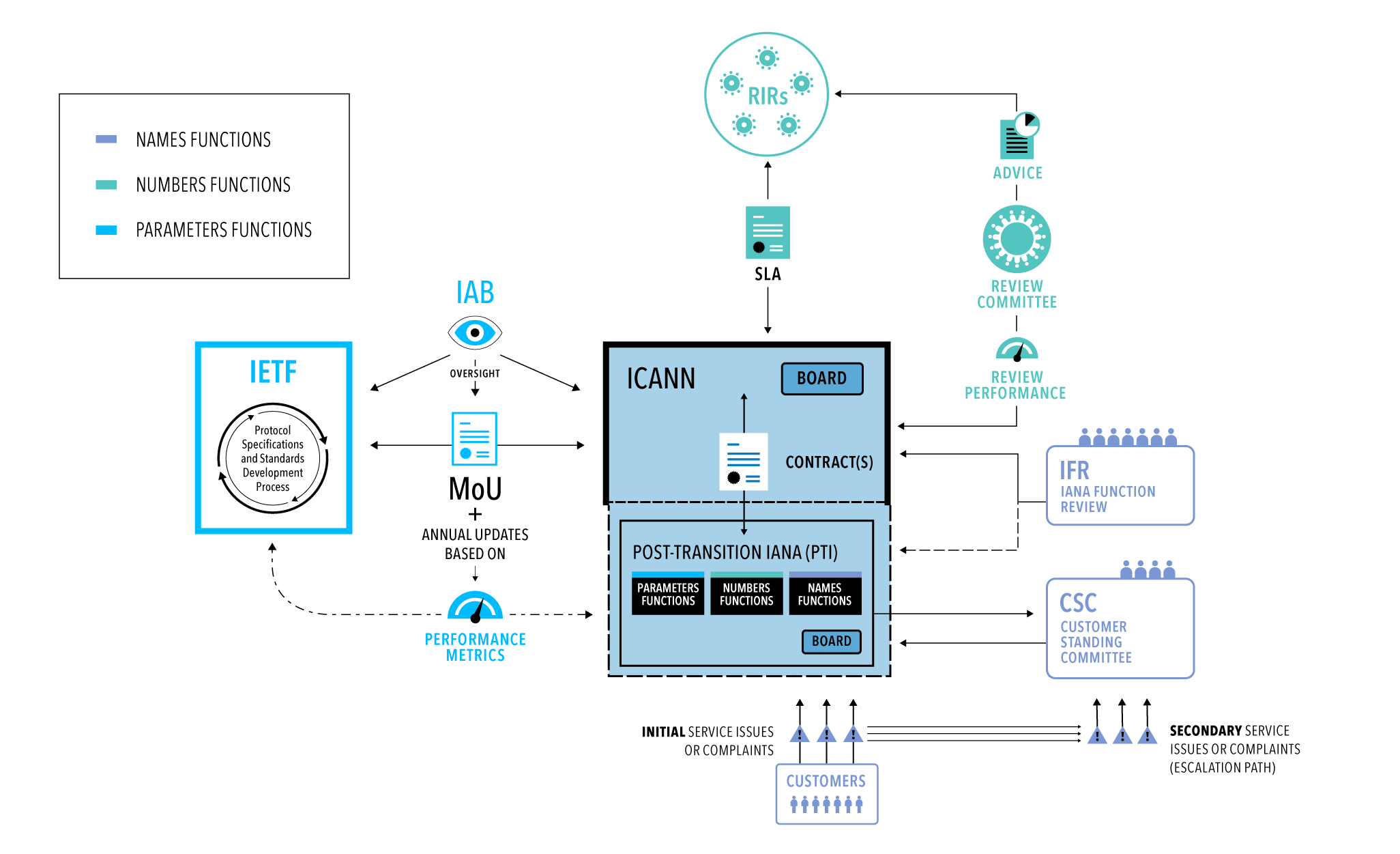
The technical aspects of the internet’s address and naming system would be handled by a new legal entity under contract to ICANN. If a community feels that entity is not performing its duties appropriately, it could raise an alarm with ICANN, which could then consult the CSC. The idea is to create a “defense against (internet) capture by any single constituency,” as one network engineer told Reuters.
In fact, the new proposal is similar to how internet control works now, and is roughly what the US government wanted. ICANN ignored China and Russia’s demands to get the United Nations involved and made sure it integrated European concerns about privacy. After the comment period for the report ends next month (you can add your input here), President Obama will present the proposal to the US Congress. If Congress passes it — which is definitely not a given — the transition is scheduled to be completed in July, 2016.
[Image credit: Associated Press
Filed under:
Internet
Via:
PhysOrg
Source:
ICANN
Tags: Department of Commerce, IANA, ICANN, United States, US
Sphero targets the education market with a redesigned robot

Sphero’s road to becoming more than a toy began last year with SPRK, an educational program that lets kids build up their coding skills. Fast forward to today and the company, formerly known as Orbotix, is introducing a new edition of its robot to keep growing that initiative. This model offers basically the same features as Sphero 2.0, including Bluetooth and up to 4.5mph speeds, but the freshly minted clear shell gives it an updated look and allows us to see its glowing innards. What’s more, Sphero has released a companion SPRK app on iOS and Android that makes it easy for students, parents and teachers to set up commands for the robot to follow. This process is simplified by OVAL, Sphero’s own low-level coding language, which uses simple visual blocks to represent different elements of the robot — such as color, speed and spin. The Sphero SPRK Edition is available now in the US for $130, and the firm says its charming device will launch across more countries “soon.”Slideshow-308876
So, Sphero, how about that Star Wars BB-8 toy we’re waiting for?
Filed under:
Misc, Peripherals, Robots
Source:
Sphero
Tags: education, educational, hands-on, robot, Sphero, Sphero SPRK, SpheroSPRK, SPRK
Video: Xperia Z4 Tablet sports Qualcomm tech for a more responsive wet display

Water resistant smartphones are pretty neat, especially if you are a little accident prone like myself. However, it is still rather frustrating when a little splash brings your phone’s touchscreen to its knees. Sony is pretty keen on waterproofing its devices and its latest Xperia Z4 Tablet makes use of Qualcomm’s improveTouch technology for a more responsive screen when wet.
Qualcomm is a little shy about telling us exactly how it works, but improveTouch is apparently an algorithm based solution that uses the tablet’s processor to establish a difference between actual finger touches and traces of water on the display.
Qualcomm calls this “advanced water rejection”, which aims to eliminate false touches from water, thereby improving the accuracy of your actual gestures on a wet display. It works with multi-touch too, so pinch and swipe gestures continue to register pretty well. The video below shows us the tech in action.
In typical Qualcomm fashion, the company has integrated this technology into its Snapdragon line-up of processors, meaning that a smartphone or tablet manufacturer doesn’t have to purchase and implement an additional microcontroller to oversee this type of touch control.
The Xperia Z4 Tablet makes use of Qualcomm’s Snapdragon 810 SoC, which suggests that other devices could also implement this improveTouch technology, presumably providing that the display hardware is also compatible.
Pretty cool right? Is water resistance still high on your list of priority smartphone features?
How one user ‘hacked’ the OnePlus 2 invite system

Part of the strategy that keeps OnePlus different to its rivals is in the supply of its handsets; while other companies let you buy one as easily as possible, OnePlus claims to keep its inventory in check by using an invite system.
OnePlus in video:
.rvs_wrapper
width: 350px;
.rvs_wrapper.align_left
float: left;
.rvs_wrapper.align_right
float: right;
.rvs_wrapper.align_center,
.rvs_wrapper.align_none
width: 100%;
.rvs_wrapper.align_center
text-align: center;
.rvs_wrapper.align_center.cbc-latest-videos ul li
float: none;
display: inline-block;
vertical-align: top;
.rvs_wrapper.cbc-latest-videos:not(.align_none) ul li:nth-child(2n+1)
clear: both;
.rvs_title
font-weight: 600 !important;
margin: 0 !important;
font-size: 24px !important;
.rvs_wrapper.align_right .rvs_title
padding-left: 20px;
.rvs_title a
font-family: ‘Roboto Condensed’;
color: #3a3a3a;
.rvs_wrapper.cbc-latest-videos ul
padding-top: 10px;
.rvs_wrapper.align_left.cbc-latest-videos ul li,
.rvs_wrapper.align_none.cbc-latest-videos ul li
padding: 0 15px 0 0;
.rvs_wrapper.align_right.cbc-latest-videos ul li
padding: 0 0 0 15px;
float: right;
.rvs_wrapper.align_center.cbc-latest-videos ul li
padding: 0 7px;
.rvs_wrapper.cbc-latest-videos ul li > a
font-weight: 400;
.rvs_wrapper.cbc-latest-videos ul li > a .yt-thumbnail
margin-bottom: 0;
@media only screen and (min-width : 480px)
body #page .rvs_wrapper.cbc-latest-videos ul
width: 100% !important;
@media only screen and (max-width : 480px)
body #page .rvs_wrapper.cbc-latest-videos
width: 100%;
float: none !important;
overflow-x: auto;
overflow-y: hidden;
body #page .rvs_wrapper.cbc-latest-videos ul
overflow: auto;
max-height: none;
body .rvs_wrapper.cbc-latest-videos ul li
float: left !important;
clear: none !important;
Its first handset, the OnePlus One, debuted the invite system and a fair amount of issues including poorly conceived marketing campaigns and a lack of supply resulted in several tweaks to invites for the OnePlus 2. The company said they had 30 to 50 times the amount of inventory at the launch of OnePlus One available for its successor but despite this, there’s still some confusion over the invite system as there’s several ways to get an invite to buy the handset.
While some users can gain invites having been one of the early backers of the OnePlus One, many have had to sign up to OnePlus’ registration list, which currently sits at over 1.5 million registrations. A user found that despite signing up and being number 9,000 on the list, he was pushed back down to 70,000 after other users climbed above him by through referrals.
What did he do? As Jake Cooper says, he took it to OnePlus:
You wanna dance OnePlus? Let’s dance.


To simplify what appears to be a long process, Cooper used Python to run a series of scripts that fooled the invite system into thinking he was referring users. As a result, he jumped from position 334,633 (out of 1,639,895) to 1,694 (out of 1,590,221). Jake hasn’t shared the exact script and has told OnePlus about the vulnerability but if you’re handy with scripts and want to know more, you can read Cooper’s in-depth explanation at the source link below.
Xiaomi to launch MIUI 7 alongside a new product on August 13th

A post up on the MIUI forum has declared that the next iteration of Xiaomi’s popular MIUI software will be arriving in less than two weeks’ time, along with a new product. Perhaps looking to steal some of Samsung’s thunder, Xiaomi will also be holding its launch event on August 13th.
Last time Xiaomi announced a new version of its OS was alongside its Mi 4 smartphone, so there is a strong possibility that the company may unveil its new flagship Mi5 smartphone at the event as well. Alleged specifications for a Xiaomi Mi 5 and Mi 5 Plus leaked online early last month.
 Rumored specifications include a QHD display, Snapdragon 810 SoC, a 16 megapixel rear camera, 13 megapixel front camera and a 3,000mAh battery, at a price point of just CNY 2,399 (~$386).
If true, the Mi 5 would join the likes of the OnePlus 2 and Moto X Style as a very attractive alternative to the major flagship smartphones from Samsung, Sony and HTC. The larger Mi 5 Plus is rumored to sport a Snapdragon 820 processor, so this device would likely launch at a later date.
Xiaomi is also expected to launch a successor to its Mi Band fitness tracker at some point this year, which may also show up at the launch event.
 See also: Alleged Xiaomi Mi 5 and Mi 5 Plus specs leak
Xiaomi’s existing MIUI 6 OS is based on Android 5.0, so MIUI 7 will quite possibly be built from the latest Android 5.1.1 Lollipop. Other than that, we’re not really sure what to expect from Xiaomi’s new software.
What are you hoping for from Xiaomi on August 13th?
Samsung reminds us to “Note the Date” ahead of the Samsung Galaxy Note 5 announcement
(adsbygoogle = window.adsbygoogle || []).push();
It’s no secret that Samsung is holding an Unpacked event on August 13th, and we’re pretty sure of the line-up that they’ll be announcing at that event: the Samsung Galaxy Note 5, the Galaxy S6 Edge+ and the Gear A smartwatch. As part of their marketing campaign, however, Samsung has reiterated that the August 13th event will serve as the Samsung Galaxy Note 5 announcement event with a post on their Samsung Tomorrow blog, telling us to “Note the Date” – 5 generations on and still milking that line.
 As our previous leaks would suggest, the curved silhoutte depicted in the teaser is actually the back of the Galaxy Note 5, and we can clearly see the indent at the bottom of the device, signifying the location of the S-Pen. Samsung also confirms that the event will start at 11:00am EDT on August 13th, and that they will be streaming the event on their Samsung Mobile YouTube account.
Are you excited for the Samsung Galaxy Note 5 announcement? Let us know your thoughts in the comments below.
Source: Samsung Tomorrow via Phone Arena
The post Samsung reminds us to “Note the Date” ahead of the Samsung Galaxy Note 5 announcement appeared first on AndroidSPIN.
 AIVAnet