The Samsung Galaxy Note 5 and Galaxy S6 Edge+ come with about $300 worth of content
(adsbygoogle = window.adsbygoogle || []).push();
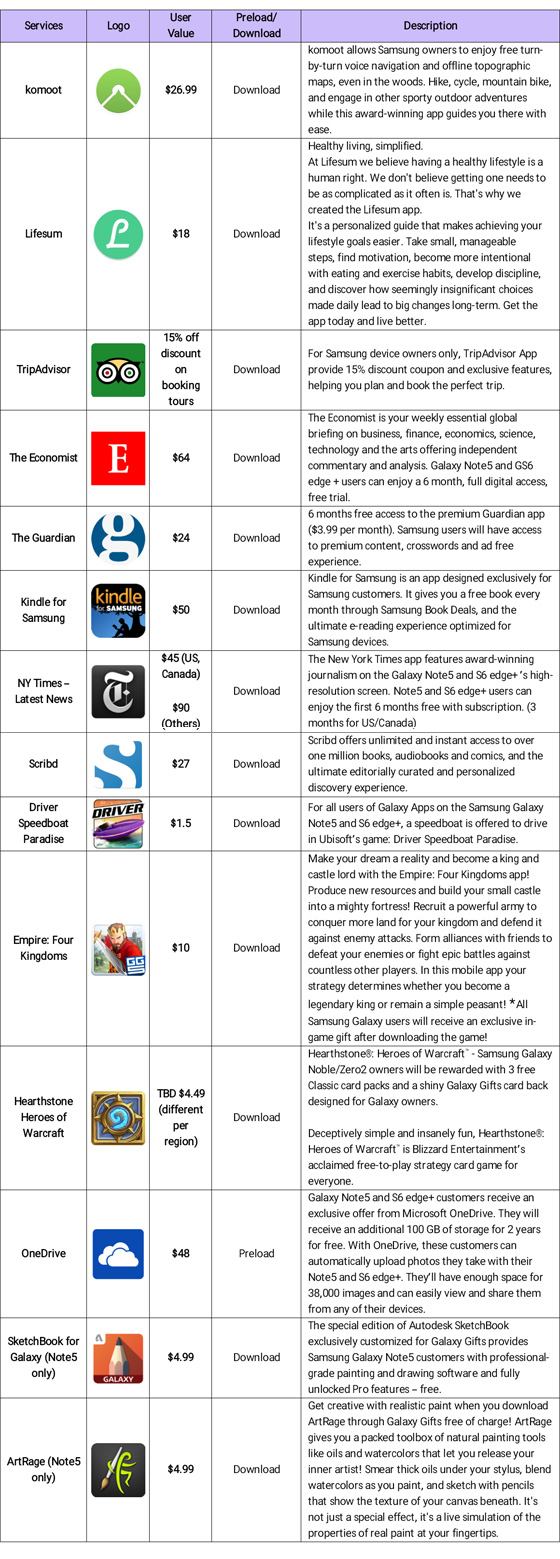
In case you weren’t already aware, Samsung announced the Samsung Galaxy Note 5 and Galaxy S6 Edge+ just the other day and as Samsung is wont to do with its flagship devices, has stuffed it full of bonus content for its users to take advantage of. This usually includes limited-time subscriptions and apps from companies that Samsung has partnered with – this year’s list includes the likes of Lifesum, The Economist, The Guardian, but also a surprising number of games are included. Check out the whole list below:

The whole list of apps adds up to around $300 worth of content, which is quite a lot if you think about it, but it’s unlikely that everybody that buys one of Samsung’s new phablets will be able to use everything on that list – then again, there are worse perks to have and let’s be honest, who doesn’t love free stuff.
What do you think about the $300 worth of content that Samsung has included with the Samsung Galaxy Note 5 and Galaxy S6 Edge+? Let us know your thoughts in the comments below.
Source: Mobile-Review via TalkAndroid
The post The Samsung Galaxy Note 5 and Galaxy S6 Edge+ come with about $300 worth of content appeared first on AndroidSPIN.
Recommended Reading: Watching football without cable

Recommended Reading highlights the best long-form writing on technology and more in print and on the web. Some weeks, you’ll also find short reviews of books that we think are worth your time. We hope you enjoy the read.
Unbundling: Beginner’s Guide to Football without Cable
by Joe Ovies
WRAL Sports Fan
As football season approaches, live sports remains a stumbling block for fans who are eager to cut the cord. If you’re looking to examine your options ahead of kickoff, this piece takes a look at the current state of streaming in regards to both college and NFL action.
|
Uber is Serving New York’s Outer Boroughs More than Taxis Are The rift between NYC and Uber rages on, but now there’s some real data about the rides Uber is providing the city’s boroughs. |
How an Analog Photo Company Can Thrive in an Instagram Age Most photos snapped today are captured with a mobile device. However, Lomography is working hard to offer retro-styled film gear. |
|
What Went Wrong with ‘True Detective’ Season 2? Reactions to the recently completed season of True Detective were mostly negative. Rolling Stone tries to make sense of where the show went off course. |
It’s Not Easy Making Green: Why the ‘Sesame Street’ Deal Hurts Parents More Than Kids Did this week’s HBO/Sesame Street news throw you for a loop? You’re not the only one. And now, parents will likely suffer most. |
[Image credit: Harry How/Getty Images]
Filed under:
Misc
Tags: cordcutting, football, hbo, lomography, ncaa, nfl, sesamestreet, truedetective, tv, uber
Samsung takes to YouTube to share its first commercial for the Galaxy Note 5

Samsung just shared its first commercial for the Galaxy Note 5 on its official YouTube channel. The 30-second video solely focuses on the endless uses of the redesigned S Pen, which is arguably the most recognisable feature of the Note lineup. Some of these uses include navigating the operations system, cropping images, sending a text message, creating sketches and split-screening a video.
Check it out after the break.
Click here to view the embedded video.
Come comment on this article: Samsung takes to YouTube to share its first commercial for the Galaxy Note 5
ASUS ZenFone 2 gets Stagefright fixes in new update

ASUS has released a new update for the ZenFone 2, patching up the Stagefright exploit and bringing with it a handful of new features, bug fixes, and performance enhancements.
The newest feature to come to the ZenFone 2 is the Mobile Manager, and similar to most Android phones, it helps monitor your data usage. ASUS has also added some additional functionality to the flip cover.
Here’s some of the changes made straight from ASUS:
- Fix WIFI info sync-up issue
- Improve System UI and lock screen stability
- Improve Launcher App stability
- Fix Alarm function issue after set up in Snap View mode
- Improve Task Manager
- Optimize Multi user and Do not disturb mode function stability
- Fix camera sphere panorama issue
- Improve Auto Start Manager stability
- Fixed when AC removed, UI still shows in charge mode.
You can find the full list of changes and enhancements from ASUS at the source link below.
If you haven’t gotten the update just yet, be sure to head into Settings to manually check for the update. Let us know in the comments below if you’ve noticed any serious changes or any bugs that arise from this new firmware upgrade!
source: ASUS
via: Android Central
Come comment on this article: ASUS ZenFone 2 gets Stagefright fixes in new update
ICYMI: Google’s face-policing API, Rage Rooms and more

Today on In Case You Missed It: Google’s new API for Android applications comes with face detection that can tell if you’re smiling or not. Then there’s the trend in Rage Rooms that looks like too much fun to keep to ourselves. And a hoax of an amazing prototype: A supposed adoption of Volkswagen technology birthed a stroller to follow you around, using collision sensors to avoid people or objects. This thing should really exist in some form, yes?
Next up, a lot happened in news this week, which we cover in rapid-fire fashion in TL;DR, yet we’re still most interested in Google’s decision to restructure into Alphabet.
If you come across any interesting videos, we’d love to see them. Just tweet us with the #ICYMI hashtag @engadget or @mskerryd.
Filed under:
Cellphones, Misc, Handhelds, Peripherals, Transportation, Science, Internet, Software, Google
Tags: Android, AndroidS, API, babystroller, engadgetdailyshow, engadgetvideo, golf, google, GoogleAPI, GooglefaceAPI, GoogleMobileVision, icymi, InCaseYouMissedIt, Japaneserageroom, MobileVision, RageRoom, Reddit, robots, stroller, video, Volkswagen, Volkswagenstroller
Samsung bundles $300 worth of content with the Galaxy Note 5 and S6 Edge+

One of the things Samsung is noted for is bundling a heap of free and paid for apps and services with its devices, and the Galaxy Note 5 and S6 Edge+ are no different. Join us after the break for the full list of apps and services that add up to around $300 worth of content.
It’s fair to say that not all Note 5 and S6 Edge+ owners will use all the included apps and services, but seeing as the bundle is worth up to $300, surely there’s something for everybody?

Source: Mobile-Review
Come comment on this article: Samsung bundles $300 worth of content with the Galaxy Note 5 and S6 Edge+
3 categories of apps that can make you healthy at work

By Spencer Blackman, Entrepreneur Contributor and Primary Care Physician at One Medical Group
Anyone who’s ever worked long hours in an office knows that it can be a challenge to stay healthy. And all that time spent sitting doesn’t help matters. From eye strain to poor posture, office workers are at risk for a variety of aches, pains and other health challenges.
Related: Protect Your Eyes From the Harm of Digital Devices With These 4 Tips
Although we often blame technology for the pitfalls of a desk-bound lifestyle, tech can also help alleviate some of the same health hazards from sitting in front of a computer all day. To keep your team healthy and productive, I like these three categories of apps, programs and devices to remedy the most common ailments workers face at the office:
1. To combat eye strain

- Orange-tinted glasses are an affordable option for reducing eye fatigue by filtering blue light.
- F.lux is a free software program that adjusts the tint and brightness of your device’s display depending on the time of day — full-spectrum during the day and warmer, red-spectrum at night.
- Awareness is a free app for Mac and Windows that reminds you to take breaks by playing the steady tone of a Tibetan singing bowl. It won’t lock you out of your computer, but it does monitor continuous usage to ensure you actually take a break.
- EVO beeps when it’s time for a break and temporarily blacks out the screen for an allotted amount of time. It also offers suggestions for eye exercises to do during the break. The app is customizable, but the default “20-20-20″ plan (every 20 minutes, take a break for at least 20 seconds and look at objects that are 20 feet away) is most commonly used.
- Eyelo reminds you to rest your eyes by occasionally dimming your screen and leading you through eye exercises. It also disables the screen for specified periods of time for longer eye breaks.
2. To improve posture

- Lumo Lift is a small sensor you put on your shoulder that tracks your posture and activity, coaching you to sit and stand tall by gently vibrating whenever you’ve been sitting with bad posture for too long.
- UpRight sticks to your lower back and delivers a gentle vibration when your posture slips.
- MacBreakZ is a posture-building app that offers two programs: prevention and recovery mode. Prevention mode demonstrates and prompts stretches to reduce muscle tension and promote good posture, then prompts you to take a short break. Recovery mode is for users already experiencing neck and back pain, worsening vision or poor circulation. It prompts users to take 10-minute breaks after a specified period of time.
- Posture Man Pat uses the Y-axis of your webcam to monitor head height. If you start slouching, the app will alert you by dimming the screen, sounding a bell or both.
Related: 4 Ways to Eliminate Back and Neck Pain at Work
3. To get you moving

- Big Stretch Reminder allows you to configure breaks. You decide how long they should be, what they’re for and how intrusive you want reminders to be.
- Move is an app that reminds you to stretch and stay active throughout the day. It allows users to select from more than 300 specific exercises. It describes them as “80+ coworker-friendly exercises you won’t be embarrassed to do at work. In fact, no one will even know you’re doing them.”
- Workrave reminds users to take micro breaks, long breaks and breaks that limit daily computer usage. It shows you how long it is until your next break and also offers a selection of exercises to do during breaks.
- Break Time is a simple app that allows you to set alerts at chosen intervals to remind you to take a break from sitting. It lets you customize break times and lengths, and reschedule breaks and disable reminders with one swipe.
Related: Why Exercising Is a Higher Priority Than My Business
Related:
- Why Food, Sleep and Exercise Are Critical to Success
- 3 Categories of Apps That Can Make You Healthy at Work
- 10 Healthy Snacks to Curb Your Appetite
Image credits: Shutterstock]
Tags: awareness, BigStretchReminder, BreakTime, entrepreneur, EVO, eyelo, lumolift, MacBreakZ, mobilepostcross, Move, partner, PostureManPat, syndicated, upright, Workrave
Samsung launches the Galaxy Note 5 in Taiwan

It was only 48 hours ago that Samsung unveiled its latest addition to the Galaxy Note lineup, and now the handset is officially up for grabs in Taiwan. Reports suggest that the South Korean company’s decision to launch the device there first is based solely on the fact that the Note series has been a roaring success in the region and, therefore, would be up for making the most sales.
In terms of pricing, the 32GB variant comes with a price tag of around $740, whilst the 64GB model will set you back $820. However, the latter won’t be available to purchase until the end of August due to a production issue which has left Samsung low on stock of the high-capacity handset.
Just in case you missed the announcement, the Note 5 is a powerhouse, packing a 5.8-inch Super AMOLEd display, a 1.5GHz quad-core Cortex-A53 and 2.1GHz quad-core Cortex-A57 CPU, an Exynos 7420 chipset, 4GB of RAM, a Mali-T760MP8 GPU, a 16-megapixel rear-facing camera equipped with OIS and a 3,000mAh battery.
So there it is, folks. The Note 5 has started its worldwide journey. Next stop the United States on Friday, August 21.
Source: ePrice
Come comment on this article: Samsung launches the Galaxy Note 5 in Taiwan
Huawei Mate S shows up in benchmarks with HiSilicon Kirin 935 processor, 3GB of RAM

An AnTuTu report has surfaced online for Huawei’s upcoming upscaled smartphone of 2015, the Mate S. The leaked benchmark reveals that the handset will have the model number SUR-TL00 attached, feature a HiSilicon Kirin 935 octa-core processor and have 3GB of RAM on board.
Other notable specifications include a whopping 5.7-inch Full HD display, 32GB of internal storage (expandable up to 128GB via microSD), a Mali-T628 GPU, a 20-megapixel rear-facing camera together with an 8-megapixel selfie shooter.
Check out the full list of results in the image below:

Source: AnTuTu
Come comment on this article: Huawei Mate S shows up in benchmarks with HiSilicon Kirin 935 processor, 3GB of RAM
Unannounced ASUS ZenFone passes through TENAA

Earlier today, an unannounced ASUS-branded smartphone passed through China’s official certification database — TENAA. The high-end handset carries the model number Z00TDA and due to its lack of dual-SIM support is believed to be targeted at the American market.
Surprisingly, the documentation included sheds some light on the units specifications. It shows it will be powered by a 1.5GHz octa-core CPU, have 2GB of RAM, 16GB of expandable internal memory and pack a 5.5-inch Full HD display.
As for the camera, the Z00TDA will sport a 13-megapixel rear-facing shooter and a 5-megapixel selfie snapper. Whilst connectivity options include Wi-Fi, Bluetooth 4.0 LE, microUSB, 4G LTE, 3G and GPS.
If you’d like to view the full certification filing over on TENAA’s website, hit the source link below.
Source: TENAA
Come comment on this article: Unannounced ASUS ZenFone passes through TENAA
 AIVAnet