Pac-Man 256 is a blocky and nostalgic endless runner that’s now available on Android
Popular game developer Bandai Namco has teamed up with Hipster Whale, the creators of the hit game Crossy Road, to bring a new Pac-Man-themed endless runner to Android. The new game is called Pac-Man 256 and it’s now available in the Google Play Store for free.
Featuring blocky 3D graphics, Pac-Man 256 offers up an interesting twist on the original Pac-Man arcade game. You play as Pac-Man running through a maze, and the goal is to survive as long as possible without getting overtaken by “the glitch” or running into ghosts. You’ll need to collect as many pellets and power ups as you can along the way, while still making progress through the maze. As you’d imagine, this can get pretty hectic after awhile.
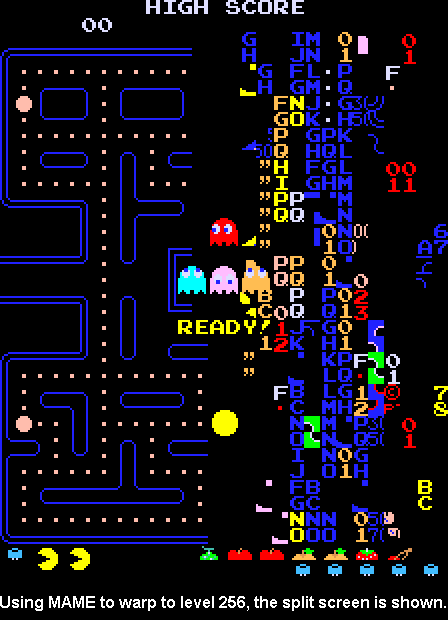
As for the name, the original Pac-Man arcade game came with a glitch that you’d experience when you reach level 256. A wave of letters and numbers would overtake the maze, making it extremely difficult to see where you need to move next. Take a look at this image to see what I’m talking about.
#gallery-1
margin: auto;
#gallery-1 .gallery-item
float: left;
margin-top: 10px;
text-align: center;
width: 33%;
#gallery-1 img
border: 2px solid #cfcfcf;
#gallery-1 .gallery-caption
margin-left: 0;
/* see gallery_shortcode() in wp-includes/media.php */


This is a free-to-play title, meaning it features quite a few in-app purchases – none of which are overly intrusive, though. You start the game out with a handful of credits and more can be earned by watching advertisements, similar to what you’d see in Crossy Road. It costs one credit to play a round with power ups or to continue the first time you die, but these aren’t necessary at all. The developers have done a good job at making in-app purchases not horrible.
Head to the Play Store link below to try out Pac-Man 256 for yourself!
Moto app gains customized Assist activities and places with 3.0 update
Motorola has been breaking ground with its phones the last few years, and one of the biggest ways its done this is by only adding useful features to the phone, and not messing with stock Android otherwise. With the introduction of the Moto X (2014), it placed all of these features into one app called “Moto”. That app is getting updated to version 3.0, and with it the ability to add customized Assist activities and places.
Moto Assist allows you to set automatic functions to your phone based on the time of day and your location. This includes:
Home, where you can set the phone to only bug you with important notifications, and even speak notifications out loud, Driving, which detects when your driving (based on the speed at which you’re traveling), and then do the same functions as “Home”, along with automatically playing music when a Bluetooth connection or auxiliary cord is detected, Meeting, which can automatically set your phone to quiet and auto reply to people when it detects an event in your calendar, and Sleeping, which will set your phone to quiet and keep your screen off (Moto Display included) during pre-set hours of the day/night.
Before, those options above were the only ones you could adjust or turn on. With today’s update, you can now make your own activity, or set another place to perform an action.
“Moto 3.0 adjusts to both your places and activities. It learns your home and work locations, and you can save any place and it will act appropriately there. Tell your phone to keep quiet, vibrate or talk to you depending on where you are or what you’re doing. e.g. you can save your local movie theater and choose it to automatically remain silent or vibrate while you are there.“


With the Floating Action Button (shown to the right), you can “Add Activity” or “Add your place”. Adding a new place brings up the screen to the left. Adding an activity really only sets either Meeting, Driving, or Sleeping functions, so that if you have those set already, you’ll just adjust those options.
The update is rolling out today, so be on the lookout for it in the Play Store if you have any of these devices (based on the Play Store description):
Moto X (2nd Gen.), DROID Turbo, Moto Maxx/Turbo, Moto X Pro and Moto E (2nd Gen.), Moto X (1st Gen.) and DROID Ultra.
SOURCE: Play Store
The post Moto app gains customized Assist activities and places with 3.0 update appeared first on AndroidGuys.
Engadget Live takes over the Exchange in Los Angeles this Friday!

We’re gearing up to take over Exchange LA this Friday, August 21st at 7PM for our next Engadget Live event, where we’ll bring together gadget lovers and awesome tech brands. Sound good? First, grab your free tickets and then read on to find out what you can expect at our free event in downtown Los Angeles!
If you’ve never been to an Engadget Live event before, check out the fun we had just last month in Boston, where in addition to meeting our readers and watching them go hands-on with the latest in tech, we made sure to try out drunk skateboarding.
Slideshow-306766
Thanks to our sponsor Ford, you’ll have the chance to sit inside a 2016 Ford Escape, complete with that new car smell. You can also experience the new voice-activated SYNC 3 system in the car or through standalone screens set up around the venue.

There’s a lot more to experience and get hands-on with in downtown Los Angeles during Engadget Live. Our friend Mark Setrakian (who joined us at Engadget Expand last November) made these mesmerizing Axis Robots, which will be on site for you to check out.
What else can you expect at Engadget Live Los Angeles? Here’s a handful of companies (local and national) that will be on-hand:
- Ario will demonstrate the “World’s first Healthy Lamp,” which adjusts light color and direction to support your body’s circadian rhythm.
- Braven will show off its latest Bluetooth high fidelity audio speakers (and its parent company, Incipio, will let you get hands-on with its mobile device accessories.
- Drizly will offer a free alcoholic beverage to the first 250 people in the door (21 and older, of course!)
- RYOT is a news organization that links every story to an action and empower you to become the news. Their most recent project, ‘Welcome to Aleppo,’ allows viewers to enter a war zone through virtual reality.
- Speaking of VR, we’ll have folks from UploadVR, White Elk Studios and Otherworld on hand to show off what they’ve been up to.
If this sounds like the ideal way to spend this Friday night in downtown Los Angeles, grab your free tickets here and we’ll see you on the 21st. Then, we’ll wrap up our Engadget Live series in Austin, TX on October 16th.
Filed under:
Announcements
Tags: aleppo, ario, axle, boston, braven, drizly, DTLA, engadget live, engadgetlive, escape 2016, events, ford, fordsync3, incipio, lax, los angeles, losangeles, ryot, sync 3, uploadvr, virtual reality, vr
‘Final Fantasy VII’ lands on iOS with built-in cheat codes

If you can’t find your old PSOne discs, don’t want the PC version and don’t have a PS4, there’s now one more way to play Final Fantasy VII: on your iPhone. Today Square Enix launched the classic jRPG for devices running iOS 8.0 and up. At its core, this release is a simple port of the PC version of the game, but developers have made a few minor tweaks to the title palatable on the small screen.
Leveling up won’t be an issue on the mobile version of the game, for instance: the iOS version has a “max stats” command that instantly raises your character’s levels. Your all-powerful party won’t have to deal with time-sucking random battles, either — they can be turned off. Finally, Square Enix has decided not to give the game a customized touch-friendly menu as it has with some of its other mobile Final Fantasy ports, opting to overlay the screen with a virtual joypad instead.
Final Fantasy VII for iOS launches today, but it’s on a slow rollout: at the time of this writing, it only seems to be available in New Zealand, for $19.99 NZD (which converts to about $13 in greenbacks). Check out the New Zealand product page here or hit up Square Enix’s official YouTube channel to watch the trailer.
Source:
YouTube, iTunes (1), (2)
Tags: finalfantasy, finalfantasyvii, gaming, ios, iPhone, mobilepostcross, Square-Enix, squareenix, videogames
Deal: Aukey Quick Charge 2.0 USB Car Charger for just $9.49 on Amazon after coupon code

Car chargers are a pretty decent accessory to own but depending on how long you spend in your car each day, you might not get much benefit from using one. However, if you happen to own a Quick Charge 2.0-compatible smartphone, this deal may be worth your while. Right now, you can pick up an Aukey Quick Charge 2.0 2-Port USB Car Charger for only $9.49 from Amazon.
The list price currently reads $16.99, so you’ll need to enter in coupon code ZSBP8QMP at checkout for the car charger to drop down to $9.49 the promotional price.
This car charger features two USB ports so you can charge multiple devices at once. The top Quick Charge-compatible port can charge devices up to 9V at 2A or 12V at 1.5A. The other port is meant for non-fast charging devices. This deal also includes a 3.3-foot Micro USB cable that should be plenty long enough if you’re just keeping this in the car.
We’re not sure how long this deal will last, so you might want to pick one up sooner rather than later if you’re interested. Head to the link below for more information.
Apple Seeds 7th OS X 10.11 El Capitan Beta to Developers, Re-Seeds 5th Beta to Public Testers
Apple today released the seventh beta of OS X 10.11 El Capitan to developers for testing purposes, two weeks after releasing the sixth El Capitan beta and two months after unveiling the new operating system at its 2015 Worldwide Developers Conference. Apple has also re-seeded the fifth public beta of OS X El Capitan to public beta testers.
The update is available through the software update mechanism in the Mac App Store and through the Apple Developer Center.

In recent weeks, Apple has been pushing rapid updates for OS X El Capitan, all of which have focused on under-the-hood performance improvements and bug fixes to optimize the operating system ahead of its public debut. Few design changes have been made in the most recent betas.
OS X El Capitan is designed to improve features introduced with OS X Yosemite, focusing on performance and user experience. A number of apps and processes on the Mac are much faster with El Capitan, and the introduction of Metal for Mac brings system-level graphics rendering that’s 40 percent more efficient.
As for user experience, El Capitan includes a new systemwide San Francisco font, a revamped Mission Control feature, a new Split View feature for using two full-screen apps at once, deeper functionality for Spotlight, and several new features for Safari, including Pinned Sites for housing frequently visited websites and a universal mute button that quiets all tabs.
OS X 10.11 El Capitan is available to both registered developers and public beta testers. Apple plans to release El Capitan to the public in the fall.

 AIVAnet