


Makerbase knows who built your favorite website

Makerbase, a new site from Lifehacker founder Gina Trapani and former blogger Anil Dash that’s being billed as the IMDb of web design, has just launched. Just as IMDb maintains archives of the people that help produce television shows and movies, Makerbase focuses on those that create the sites and tools that make the web what it is. You won’t find listings of corporate stuffed shirts and legions of VPs here. Instead you can get information on the likes of Tracy Chou of Pinterest or Buster Benson from Locavore.
The service currently is likely to be of more use to journalists and aspiring web developers than it is for people who can’t remember what company Sergey Brin founded. Still, it could prove to be a useful networking tool for the web development community. You know, like LinkedIn but not terrible. Plus, the web itself and the technology used to build it (not just the cat videos that it contains) is becoming more deeply ingrained in pop culture. So we can expect to see more and more of these people becoming household names — looking at you Shingy — and this site wants to be where you turn to research who the rest of the office is talking about over the water cooler.

“At a surface level, it’s fun to see who makes the apps and sites we use every day, and fun for hackers and creators to be able to list all their work,” Dash told TechCrunch. “But at a bigger level, this is a powerful tool for opening up opportunity in the industry, because it shows the network and connections between people, and maybe even offers those who aren’t in the industry a glimpse into who’s making things and a chance to gain access.”
[Image Credit: Getty Images/iStockphoto]
Filed under:
Internet
Source:
TechCrunch
Tags: anildash, database, GinaTrapani, imdb, Lifehacker, locavore, makerbase, pinterest, TechCrunch, webdevelopment
Pushbullet adds end to end encryption for Notification and SMS mirroring and Universal Copy and Paste
Pushbullet, the app that, amongst other things, lets you reply to your text messages from your computer and push files back and forth from your phone, has added end to end encryption. Users will now be able to safely push files and copied text back and forth from their PCs without fear of Pushbullet taking a peek.
In Pushbullet’s brief existence, the heroes behind the app have consistently added features suggested by the community. There was an initial pushback from the developers in adding end to end encryption but the company added it after realized that enabling people to take charge of their security wasn’t a bad thing.
“We know how important keeping this information private is, which is why we’ve alway used secure connections (https) like Gmail and Amazon. Secure connections do have a shortcoming for us though, the data is still visible to Pushbullet. To help you protect your privacy and ensure that nobody but you can read your data, we’ve added support for end-to-end encryption.
End-to-end encryption means your data is encrypted before it leaves your device, and isn’t decrypted until it is received by another of your devices. This means we at Pushbullet only forward encrypted data. By setting up end-to-end encryption, you can be confident that your data is only readable when it’s shown to you.“
Pushbullet is an extremely powerful app that will generally make your life much easier if you switch back and forth between your computer and cell phone a lot. My favorite feature is being able to text from my computer and have it go through my phone. A recent update brought full threaded SMS conversations with message history. It’s very easy to just reply on my computer screen instead of taking my phone out.
The other features that Pushbullet offers are just as convenient. Baked into the app is the ability to see all notifications that show up on your phone, universal copy and paste from your phone to your computer and back, and as well as sending yourself files.
Pushbullet is available for Android and iOS along with browser extensions for Chrome, Firefox, Opera and Safari across Windows and OSX. The app is so popular that fan-made versions have popped up to take advantage of the features offered by Pushbullet. You can find unofficial versions for Windows Phone, Ubuntu, and Blackberry.
Source: Pushbullet blog
The post Pushbullet adds end to end encryption for Notification and SMS mirroring and Universal Copy and Paste appeared first on AndroidGuys.
Intel’s Skylake Processor Lineup for MacBook Air Unveiled
Details on Intel’s upcoming 15-watt 6200U – 6600U Skylake processor lineup were shared today by Fanless Tech, giving us a look at what we can expect from the processors that will likely be used in Apple’s next MacBook Air update.
 Click to view larger version
The 2.3GHz i5-6200U and the 2.4GHz i5-6300U chips are appropriate for the lower-end MacBook Air models, while the 2.5GHz i7-6500U and the 2.6GHz i7-6600U would be used in the higher-end MacBook Air models. All four chips include Intel HD 520 graphics. With Skylake, Intel has opted to simplify its graphics naming scheme, adopting 3-digit numbers instead of 4-digit numbers.
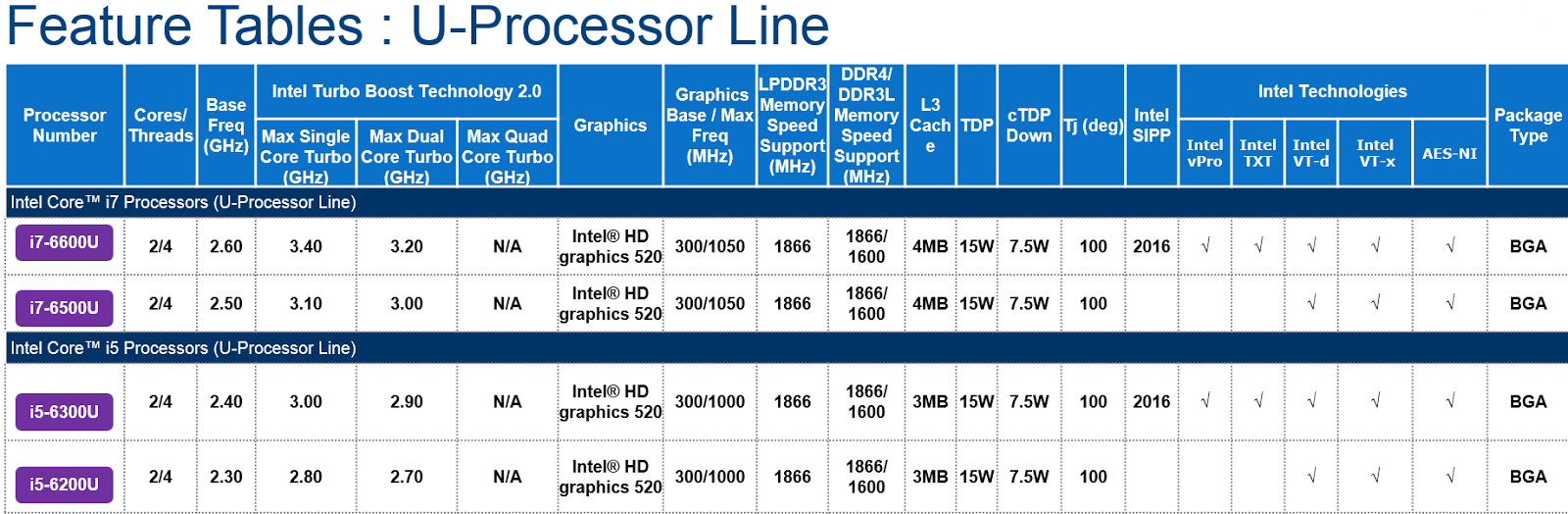 Click to view larger version
It is not clear when Intel plans to release the Skylake chips appropriate for the MacBook Air, but with full specs now available, it seems launch is imminent, perhaps planned for next week’s Intel Developer Forum.
According to the information available, 28-watt chips appropriate for the 13-inch Retina MacBook Pro will not be launching until 2016. Launch dates are equally unclear for the rest of the Skylake lineup, as today’s leak only covers chips that would be used in the MacBook Air.
 Click to view larger version
Intel’s Skylake processors are expected to offer a 10 to 20 percent boost in CPU performance over Broadwell, plus lower power consumption and improved Intel HD integrated graphics performance. Better energy efficiency will also lead to up to 30 percent longer battery life.

Two New iPhones Spotted in Analytics Data Cast Doubt on Possible iPhone 6c Launch
Ahead of the launch of the iPhone 6s and iPhone 6s Plus, mobile app marketing platform Fiksu saw just two new iPhones in its data logs in July, casting doubt on this morning’s rumors suggesting an iPhone 6c launch is still a possibility.
Last month, Fisku began seeing two unknown iPhone models in its logs, with the identifiers “iphone8,1″ and “iphone8,2,” which likely correspond to the next-generation 4.7-inch iPhone and the next-generation larger-screened 5.5-inch iPhone, expected to be called the “iPhone 6s” and the “iPhone 6s Plus,” respectively. The current iPhone 6 Plus is “iphone7,1,” while the iPhone 6 “iphone 7,2.”
Fiksu’s data includes 87 unique “iphone 8,1″ devices and 67 unique “iPhone 8,2″ devices, with no hints of a third unidentified model that might represent the rumored smaller-screened iPhone 6c, suggesting such a device is not being tested. While the absence of a third iPhone model in Fiksu’s data does not entirely rule out the possibility of an iPhone 6c launch, when combined with previous rumors, the release of such a device alongside the iPhone 6s and the 6s Plus seems unlikely.

Rumors indicate that while Apple did initially consider launching a 4-inch iPhone 6c in 2015, those plans were scrapped due to concerns the device could cannibalize sales of the iPhone 6 and 6 Plus, which Apple wants to offer as a lower-cost solution when the next-generation iPhones are released. Other rumors have suggested the iPhone 6c was never intended for 2015, with Apple perhaps planning to launch a smaller-screened phone in 2016.
Despite rumors that have seemingly ruled out an iPhone 6c launch, well-known mobile phone leaker Evan Blass or @evleaks sent out a tweet last night hinting that Apple might still release an iPhone 6c. “Sounds like iPhone 6s, 6s Plus, and 6c will all arrive concurrently,” he wrote, without providing additional information.
According to Fiksu’s data, the “iphone8,1″ and “iphone8,2″ in its logs are using a wide range of apps, including travel, games, and lifestyle apps. While the majority of usage is coming from the US, the site has also seen hits from Germany and Brazil.
Apple is expected to launch its next-generation iPhones in September, likely on September 9. The iPhone event may also see the debut of new iPads and it is said to include the new Apple TV.

Get exclusive access to the new eBay v4.0 Beta app
If you’re a big user of the Android eBay app then you’ll probably be interested in their latest version 4.0. The catch is that it’s currently in a closed Beta.
Not the normal Beta that allows testers via the Play Store; nope, this one requires you to fill out a form and have your account specifically activated to access the eBay Beta app. Not even sideloading the APK works as it asks you to login and will kick you out without an authorised account. Not sure what the deal with the secrecy is here, but clearly eBay are taking a different direction with their Beta program.
Want to get in on the closed Beta for version 4.0 of eBay? Fill out the form here.
What’s new in version 4.0? Guess you’ll have to sign up and find out!
The post Get exclusive access to the new eBay v4.0 Beta app appeared first on AndroidGuys.
EA Sports FIFA will make its way to the Google Play Store on September 22nd

EA Sports first announced its new soccer game called EA Sports FIFA a few months ago, and we got the chance to go hands-on with it back at E3 2015. According to the video game developer’s official website, the new title is slated to launch in the Google Play Store on Tuesday, September 22nd.
EA is marketing the new title as providing a real console-like experience, and for the most part, we’d have to agree. In our short time with FIFA, we found that animations were great and graphics were as solid as they could get on mobile devices. It’s optimized and built from the ground up to be played on a smaller screen, and that makes a difference when comparing it to other soccer titles. You control your team with large, easy-to-find joysticks, and swipes can be used to pass and shoot the ball.
 Don’t miss: E3 2015 demo: EA Sports’ FIFA takes the console experience to your phone
You can either play in a single player campaign mode, but the fun really begins when you start customizing your own team. You can maintain your roster through trades and transfers. After you build your dream team, you can participate in live events such as tournaments and dynamic accomplishments. EA says more unique content will be added to the game on a regular basis.
According to EA’s website, EA Sports FIFA will be available on September 22nd for Android and iOS devices, though the game has already soft launched on iOS. It will be free to download and will contain some in-app purchases, just like other EA titles. We’ll be sure to let you know when the game becomes available. Oh, and be sure to check out our hands-on video attached above!
MIT team gets us one step closer to robot bartenders

Sure, we’ve seen machines that can mix drinks with the help of an app and robot bartenders that can create cocktails out of Keurig-esque pods, but they all require you to actually push the control buttons and carry your own beverages. The horror! Fortunately for lazy drinkers everywhere, members of the CSAIL (Computer Science and Artificial Intelligence Laboratory) team at MIT recently presented a system of robots working together in a “bar” scenario that consisted of a PR2 robot “bartender” and two four-wheeled open-source “Turtlebot” kits acting as waiters. That… must have been a mighty tough day at work.
Seriously, it must have taken a lot of work to accomplish: One of the biggest challenges in getting robots to work together is dealing with the uncertainties presented by the human world. For example, a Turtlebot heading to the PR2 bartender bot might be thwarted by the bartender serving another Turtlebot or by the PR2 being unobservable by the other bots’ sensors. Robots are often unable to communicate with each other unless in close proximity, another issue that the team is working on so that the system can be tested in more complex scenarios such as search-and-rescue.
The CSAIL team was able to develop planning algorithms that coordinated groups of bots to perform tasks with only a description of the problem by programming them to see tasks as a series of macro-actions that involved multiple steps. Which means the robots approach tasks like “Fetch me another martini!” more like a human would. Now if they could only get it to make scones and call everybody Wesley….
[Image credit: Tom Buehler/CSAIL]
Source:
MIT
Tags: bartender, Massachusetts Institute of Technology, MIT Computer Science and Artificial Intelligence Laboratory, Robots, Switzerland
Surviving the Def Con hacker conference

The phrase I saw and heard over and over again while talking to other journalists and security researchers about the Def Con hacker convention was “hostile environment.” Not physically hostile; the attendees and staff were extremely nice. The hostility was digital. The hackers and security researchers are there to present vulnerabilities within the systems we rely on. But there’s a tinge of mischief that permeates the event. Because of that, everyone that attends is fair game for hacking. That meant taking certain precautions that I wouldn’t regularly take while covering an event. And, since it would be my first time covering Def Con (or any hacker conference for that matter), I felt especially vulnerable. Everyone loves to haze the n00bs; that’s just human nature. So here is how I prepared for, attended and (I’m pretty sure) survived Def Con 23. Slideshow-311621
Saturday, August 1st:
It’s the Saturday before Def Con and after chatting with security researchers and getting a very helpful email from Violet Blue, I’ve learned that no matter what, I should get a burner phone. I feel like I’m in The Wire, but without all the killing and awesome dialogue. The phone shouldn’t have my personal information or any of my usual accounts. Also, all wireless communications (WiFi, Bluetooth, NFC) should be shut off.

The recent Android vulnerability disclosures don’t leave me with much confidence in those devices. So I decide to go the route of security through obscurity with the BlackBerry Q10. I also figure that I need to take notes and grab a cheap (and old) Samsung Chromebook I have lying around the house.
Sunday, August 2nd:
I secure wipe both devices. I think. The BlackBerry’s Sure Wipe takes forever so I assume it’s doing a pretty good job at deleting all my personal information and main BlackBerry account. The Chromebook’s Powerwash feature finishes pretty quickly and I’m fairly positive it’s not overwriting my data with zeros. I’m already getting lazy about security.

Then I find out I can’t do an OTA update of the Blackberry. It’s important to keep all your devices up-to-date because vulnerability patches reside in those fancy updates you get that also drop new features. I finally figure out that I need to download a BlackBerry app onto my Mac and update the phone via USB. This ruins my plan to keep these burner devices from connecting to my work machines and adding an extra layer of security to my personal and work accounts. But it’s late Sunday night and I uncheck the box that syncs data between the phone and the computer and go for it.
When both devices are ready, I create burner Gmail and Twitter accounts. The Q10 also gets a burner BlackBerry account. I think I’m ready.
Tuesday, August 4th:

In addition to securing my devices, I also need to protect my credit cards and work gear while it’s back in the room. Wickr is nice enough to give me two Faraday sleeves to keep my cards and iPhone in while back in my room. But I still need to buy stuff while on the show floor. I’ve already been warned to bring cash to Vegas and that I should treat all the ATMs near Def Con as compromised. Still, not having my ID or credit cards with me while walking around Vegas seems like a bad idea. So I stop by a travel store and pick up an RFID-blocking wallet. I’m feeling pretty good about my wallet choice. Later on, not so much.
Thursday, August 6th:
Before I leave the house to catch my flight, I turn off WiFi on all my devices. While Vegas is definitely a hostile environment, it’s good to remember that hackers will also be flying to Def Con and hanging out in the airport. I’ve decided that everyone is a hacker. Even the really nice old couple that talked to me on the plane. Especially them, with their awesome stories socially engineering me to tell them what I do. I know your game!

After landing in Vegas, I immediately go to my room and shut down my iPhone and MacBook Air. The iPhone goes in a Faraday sleeve — the MacBook I just shove in my suitcase under my clothes. Even though I’m staying two miles from Bally’s, where Def Con is being held, I know attendees are staying in the same hotel so no free hotel WiFi for me.
Friday, August 7th:
When I wake up, I tether my MacBook to my MiFi and check in with Engadget home base. I assure them all via Slack that I have not been hacked (they don’t believe me) while I get ready to head to the convention for the day. Then I get the following iMessage from my wife’s account:

My wife has never sent me a message like this and I start to panic. Has my iCloud account been hacked? Has her account been hacked? She’s gonna be super pissed if her account gets hacked. I log in to iCloud and check her phone’s location. Okay, it’s where it’s supposed to be. I unplug my computer from the MiFi and shut it down. I call her and ask, “Did you send me a message that just said ‘Hi Robbie’?” She starts to giggle and says yes.
Very funny.
I feel like I’m being overly paranoid — then I find out later that there are folks spoofing cell towers. So maybe I’m just the right amount of paranoid. I also learn from an attendee whose job it is to build enclosures that keep items safe from wireless intrusion that my fancy RFID-blocking wallet isn’t very good. The words “shit design” are actually uttered. I also noticed during a presentation that a less-than-scrupulous attendee was peeping my keyboard whenever I typed my password. Yeah, I’m adequately paranoid and I change my password.
Saturday, August 8th:
I’ve been unable to get a strong mobile connection with my Verizon MiFi since Friday night. I have no idea why. I do know that tethering my BlackBerry Q10 with T-Mobile works fine. Later in the day, I wander into a talk about spoofing GSM towers, which amplifies my concern about the cell-tower spoofing I heard about the night before.
(Disclaimer: Verizon has acquired AOL, Engadget’s parent company. However, Engadget maintains full editorial control, and Verizon will have to pry it from our cold, dead hands.)
Still, I’ve started tethering my Chromebook to my BlackBerry during sessions. Both devices are burners and I’m connecting directly to the towers (I hope), so I’m feeling pretty safe. Okay not really, but this is why I have these burner accounts. If they get hacked, it’s not that big of a deal.
Sunday, August 9th:
My hotel has free breakfast. I don’t feel like lugging my gear just to grab some complimentary scrambled eggs and lukewarm home-style potatoes. I also don’t feel comfortable leaving all my gear in my room. I’ve declined all housekeeping attempts because I don’t want anyone in my room. An open door is an invitation. So I attach a piece of tape to the door and doorjamb as I leave for food. When I return, the tape is still in place and hasn’t been broken. I’m currently at paranoia level: Howard Hughes.

Today I learn the word “juicejacked.” It’s when someone uses free device charging as a ruse to capture data off a phone. Wall of Sheep has placed a charging station for iOS and Android in its space and people actually used it. Most attendees know not to plug random thumb drives they find lying around into their computers. Apparently, a couple of them forgot that the charging port on their phone is also a data port. I’ll never plug my phone into one of those charging stations at the airport ever again.

Tomorrow, I’ll wipe the Chromebook and BlackBerry before they get access to any home or work wireless network and change all the passwords of accounts I accessed while at the conference. It’s like a shower after a marathon. It was a great experience, but now you just want to get some of the ickiness off of yourself and rest.
As I get ready to board my delayed flight back home, a woman calls her bank and reads off her date of birth and the last four digits of her social security number. A family sits down and they immediately plug their iPad into one of the charging stations. They are having difficulty signing into the airport’s free WiFi. I’m using my computer, but still tethering to the MiFi (Verizon seems to be working at the airport) and while I’ve placed my SIM back in my iPhone, Bluetooth and WiFi are still turned off.
This isn’t my new normal. I’ve taken extreme precautions because of the environment. But, back in the regular world where we’re not surrounded by hackers, there’s very little stopping nefarious folks from exploiting the vulnerabilities found in our everyday technology. The exploits disclosed at the event are shared with the offending companies before being made public. While the hostile digital environment of the event can be taxing, the people I met were incredibly nice and, like most of us, want a more secure world. The reality is that everyone is a target during Def Con so fewer of us will be a target the rest of the time.
Filed under:
Misc, Networking, Internet, Software
Tags: DEFCON, Diary, hacking, Security
Facebook may soon be sending you breaking news alerts
 Many people get their news from their Facebook feed, but Facebook themselves don’t actually tell you what is going on. That may change as Facebook is said to be making a new app that will send you breaking news directly to your mobile device.
The new app is still in the early stages of development, but the way it will work is by asking users what news topics they want to receive. Whenever some big news story is currently breaking in one of your selected topics an alert will be sent out. The alert will be similar to a Twitter message as it is only up to 100 characters. Anything that interest you, you can click the link to read more. Currently there are only a select few news publications that are available.
The app is very new and still in alpha testing. There is no word on when it will be released.
Source: Business Insider
Via: The Verge
Come comment on this article: Facebook may soon be sending you breaking news alerts
Why I am sticking with my Note 4. The Note 5 is a failure.
Many phone enthusiasts love the Samsung Galaxy Note line. We(specifically fans of the Note line) have learned to love the Note line for what is different about it, and because it can do so much more than any other device. Note fans don’t buy phones for sexy looks, even though we don’t mind a good looking phone, we buy the Galaxy Note because it has the best display, quickest processor, removeable battery, more standard memory than most devices with the option to add expandable memory, maximum RAM, great camera, and that super useful tool called the stylus. Quite simply, Note fans look to buy the best device they can get their hands on, and we are even willing to pay up to almost a thousand dollars. I am sure all of these reasons don’t apply to each and every Galaxy Note fanatic, but they apply to most.
Samsung Note fans are well educated phone users. Please don’t take this as an insult if you are not a Note fan, because I am sure you are educated too. But typically, Note users have tried many other devices. If Note fans have $800-1000 to spend on one device, they want to make sure they get their money’s worth by making sure the other devices are inferior.
Personally I found stock Android to be boring on the Nexus 6, and even though the Note 4/Note Edge is a large device, the Nexus 6 is just unwieldy. The Moto X, Xperia Z3, HTC One M9 are all great phones in their own right, but they are too small and their displays do not match up to the Note. The G line from LG is great, until about two months pass and then you’re stuck tons of software and hardware issues. All around, the Note is just the best phone you can get.
Samsung made a bold move with the Galaxy S line by focusing on build design rather than functionality. Samsung Galaxy devices have always had great build-quality, but they were never the best looking phones. I argue that real Samsung fans don’t care as much about the looks as much as we care about functionality. Proof is in the sales. The S6 is already discounted because people who want “good looking” phones own iPhones or HTC Ones.
There are a lot of first time Samsung buyers, like Josh Noriega, who finally bought a Samsung, because of the S6 Edge just being “sexy”. Of course, he knew the S6 was loaded up with the latest hardware, so the “sexy” factor is what put him over the hump to buy a Galaxy device. And I do agree with Josh, the S6 is damn sexy, especially in blue, as well as that green which is not sold in the US.
Samsung decided to abandon its most loyal fans on the S6 and take on Apple head to head. When Galaxy Note users first saw the S6, we had a feeling of, “Samsung won’t do the same thing to the Note line” because we always considered the Note line to be sacred. The Galaxy Note line carved its own path, so to divert it down the “sexy” path would never be in Samsung’s best interest, or so we thought…
Knowing the things we know through leaks, images, renders and benchmarks, we can make an assessment if we should buy the next iteration of the Samsung Galaxy Note. Please keep in mind, Samsung may surprise us all and give us exactly what we are looking for on August 13. Let’s get into the comparisons on what we know so far.
Design
Note 5
All leaks point to the Samsung Galaxy Note 5 arriving in the same fashion as the Galaxy S6 with “premium” materials. From images, expect the frame to be metal with a glass front and back panel. Everyone appreciates a good looking phone. But not if it means the back panel is not removable, thus eliminating the ability to swap batteries. For many people, this isn’t a big deal, but for me it is a buzzkill. One of my favorite features, as basic as it seems, it having the ability to swap batteries. It takes 20 seconds to go from 0% power to 100%, and extra batteries are cheap these days. Plus, Note users use their phones much more than the average user which means our battery cycle life is reached faster, and we like to have efficient batteries that maintain a full charge.

Note 5
Note 4
The Note 4, in my humble opinion, had the perfect build. The metal frame was a huge upgrade over the Note 3’s plastic frame. The plastic frame on the Note 3 wasn’t a big deal, but the fake chrome chipped off relatively easy and looked ugly. The Note 4 on the other hand, had a painted metal frame, which felt incredibly strong and it also had a removable back plate for my favorite feature of the swappable battery. Even though the plastic cover felt cheap when it was removed, it felt solid once locked back onto the phone. In addition, if a Note 4 user wanted to put on an official Samsung case, you could remove the back cover to replace it with the new case, effectively helping to keep the phone slim. Or you could throw on a wireless charging cover in place of the back panel.

Note 4 back panel
Result – Note 4 design wins.
Processor/RAM
Note 5 – Exynos 7422 Octa-core processor with 64-bit processing and 4GB of RAM
One of my favorite features of the Note is that it is always released at the end of the calendar year. The Note is the phone that gets the latest processor which is typically used in flagships the following year. With the Note line you always know you will have a powerhouse processor and the Exynos 7422, an upgrade over the Galaxy S6’s 7420, should set the standard for all processors going into 2016. The Note 5 has also been rumored to arrive with 4GB of RAM, presumably to help handling added functionality with things like the S-Pen and dual window features. In summary, the Note 5 should be a beast when it comes to processing.

Note 4 – Qualcomm Snapdragon 805 with 32-bit processing and 3GB of RAM
The Qualcomm Snapdragon 805 is still a powerhouse. I never ran into lag issues until Google released the most unstable version of software, called Lollipop. Remove the Lollipop bugs and the Snapdragon 805 is one of the best processors I have ever used in a device. 3GB of RAM handles multi-window, S Pen functionality, and multitasking with ease.
I live in San Diego and Qualcomm employs thousands here helping our local economy. Even though the Snapdragon 810 was a blunder and was their own fault, I hate to see Qualcomm laying people off. The jobs that were lost locally are now in Korea/China. Kudos to Samsung for creating a better processor, but I’m more than happy with my Snapdragon 805 if that means keeping jobs in the US.
Result – Note 5 wins even though I want to keep jobs in the US. Having more RAM and more speed is always a bonus, especially for Note fanatics.
Display
All rumors are pointing to the Note 5 maintaining the same display. It should still be the same gorgeous Super AMOLED display with 16m colors in 2k resolution. All fans of Samsung know without a doubt that this is the best display you can get your hands on. The colors and contrast ratio are simply jaw dropping. Don’t you love showing off that display to people who think they have the best? You may or may not show it off, but I love showing iPhone fans the Note 4 display. All they can say is “wow”.
There were some rumors pointing to 4k, but until virtual reality explodes, I doubt we will see a phone with a 4k display. Although, I won’t complain if it does arrive with a 4k display unless it drains the battery too quickly.

LG G3 on the left vs. the Superior Note 4 on the right.
Result – Tie
Battery
Note 5 – 3000mAh battery with wireless charging, but without removability
According to the leaked packaging images posted at AndroidCentral, the Note 5 should come with a 3000mAh battery. Battery life should be known to manufacturers as one of the most important things we care about. No one likes a dead battery. We saw the reduction in battery size from 2800mAh in the S5 to 2550mAh in the S6. Now we were told this would be okay because the new Exynos processor would be more efficient thus giving us better battery life. This simply was not true in real life.
The S6 has subpar battery life compared to the S5, and that just is not acceptable. Given that the Note 5 is expected to come with a battery marginally bigger than the S5, I am expected battery life to be subpar. Also with the inability to swap batteries, Samsung truly abandoned its fanbase here. I have one word for Samsung: FAIL.
Note 4 – 3220mAh battery with swappability
The 3220mAh battery wasn’t the best battery, but it also was not the worst. On Kit Kat I could make it through a full day without issue. And for the days I knew I wouldn’t be able to make it to a charger, I would just bring an extra battery with me. It’s nice knowing I can push my phone as hard as I want, knowing I can get a full charge with a spare battery or two. It’s much better than trying to fit a battery pack on my phone, as a spare battery is quite small and is not an issue to throw in my pocket. Also, after six months of hard usage, I know that my battery efficiency won’t be the same from the first month’s usage. Knowing I can replace my less efficient battery without tearing my phone apart is comforting. It’s also much cheaper than paying Samsung to swap a battery.
Winner – Note 4 by a longshot.
Storage and Expandable Memory
Note 5 – 32GB, 64GB, 128GB variants. Expected to arrive with a glass back and like the S6 will do away with expandable memory.
Samsung did away with expandable memory in the S series, and their reasoning was expandable memory was too slow. They supposedly have a new type of internal storage where the read/write speeds are incredibly fast. I don’t buy it. Samsung went to the Apple model of charging $100 for memory upgrades. If you wanted 64GB over 32GB you had to pay 100 dollars! Samsung’s profits have been hurting, and extracting cash out of your customers through memory upgrades is simply stupid.
Note 4 – 32GB and 64GB models with the ability to add up to 128GB of expandable memory.
Most people who don’t understand us Note fans think we are crazy for wanting so much storage. The reason why we need that storage is because we actually use it! The Note line is the closest Android phone to a computer replacement. In fact, many of us view our Notes as an extension of our primary computers. We need the space. We need it for pictures, movies, documents, and whatever else our heart desires. Yes we use it and yes we need it. If you aren’t a Note fan then don’t judge us for needing so much space.
Winner – Note 4 by another longshot.
Camera
Samsung Galaxy Note 5: 16 megapixel sensor, optical image stabilization, 8-megapixel front-facing camera, 4K video recording
Samsung Galaxy Note 4: 16-megapixel sensor, optical image stabilization, 3.7-megapixel front-facing camera, 4K video recording
As you can see, the differences are minimal here. The Note 4 was one of Samsung’s biggest improvements over previous iterations. Simply put, the Note 4 camera was a great camera. Here you can see the Note 5 has a much improved 8MP front facing camera. As much as I don’t care about front facing cameras, I know selfies are a big thing so having an 8MP selfie camera is nothing to balk at. Cameras aren’t simply measured in megapixels though, as different cameras may pick up low-light situations and colors differently. We don’t know much about how the Note 5 camera performs, but I will assume the 16MP shooter on the Note 5 will be better.
Winner – Note 5, but the Note 4 still has a great camera that I am happy with
Summary – Winner Note 4
As much as I can appreciate a better camera, better processor, and sexy design, I cannot sacrifice expandable memory and the ability to swap batteries. The Note 4 is still one of the best performers in benchmark tests, and the camera takes great pictures. When I first started thinking about the Note 5, I was hoping it would come with water resistance and dust protection like the S5 had. That would have been a design/build upgrade I would have loved. The Note 5 is marginally better than the Note 4 when it comes down to specs.
Design wise, they are two different phones like Dr. Jekyll and Mr. Hyde. I don’t know what Samsung was thinking when they took away our favorite features on the Note line, but I do know that Samsung won’t be getting my money this year(it also kills me to see Qualcomm people getting laid off). That saddens me because I love the Note and buying the next iteration as it is always the greatest.
Keep in mind, nothing has been official up to this point, but with the amount of leaks I am guessing most are correct. If Samsung does happen to surprise us all, and they maintain the features that we love, I am sure I will get the next Note.
The other question I have is, what happened to the Note Edge? I love my Edge and actually find the edge display to be very useful on my phone.
Either way, I am hoping for the best on Aug. 13th.
Let us know what you think of the next Note in the comments section. We would love to hear what you have to say.
The post Why I am sticking with my Note 4. The Note 5 is a failure. appeared first on AndroidGuys.
 AIVAnet