


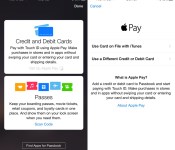
Rite Aid Disables Apple Pay Support After Initially Accepting Payments
A growing number of Apple Pay users are angry with retailer Rite Aid following the reported disabling of the mobile payment service within the past 24 hours. Apple Pay should technically be compatible with any point-of-sale systems supporting NFC technology, but customers who made successful Apple Pay payments earlier this week have found their payments were being denied yesterday and today.

Among the disgruntled users was Josh Hundall, who shared his experiences and his conclusions that Rite Aid is deliberately crippling its payment systems to prevent Apple Pay transactions.
Today, Allison asked me to pick up a few things on my way home from the office, and I’m a major nerd, so naturally I was all too happy to oblige. I was equally disappointed, then, when my transaction was declined with a message on the terminal informing me that Apple Pay was not supported. The terminal mentioned Apple Pay by name. So the system is smart enough to know about Apple Pay and to decide not to take it.
Hundall spoke to an associate who claims Rite Aid recently sent an email informing stores that the retailer is not accepting Apple Pay payments, and Hundall speculates it is because Rite Aid is a supporter of the upcoming CurrentC payments system from Merchant Customer Exchange. Competitor Walgreens is also one of Apple’s biggest launch partners for Apple Pay.
According to Twitter reports, the retailer also unexpectedly turned off support for Google Wallet at the same time. Rite Aid has not confirmed the shut down of these services, nor commented publicly on these reports.
@Futment @riteaid system IS compatible. @riteaid blocked it and Google Wallet today. Both worked yesterday. Bad business decision.
— Yoshi (@YoshiTheShiba) October 22, 2014
Apple Pay launched earlier this week in a debut that was relatively smooth for most customers. As demoed in a McDonald’s transaction, payments are processed almost instantly at supported terminals with the press of the Touch ID sensor on the phone.
The most publicized hiccup occurred with Bank of America customers, who were accidentally charged twice for their purchases. Bank of America confirmed that the issue only affected a small number of users who will receive refunds.
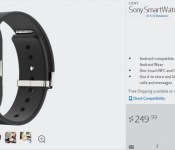
Sony SmartWatch 3 pre-orders begin on Verizon
Yes, another Sony announcement tied in with Verizon. Today the carrier has officially launched the Sony Xperia Z3v. Along with that release Verizon has also begun taking pre-orders for the Sony SmartWatch 3. The device is priced at $250 and is expected to ship October 30th.

The Sony SmartWatch 3 is a bit different from the other current Android Wear offerings. Sony took more of a fitness / sporty approach to their offering. The display is removable and you can purchase various colored bands. It is water resistant to a degree, so are some of the others. The battery is the largest at 420 mAh and is rated for 2 days of continuous usage. It charges via a Micro USB port that is found on the backside. There are two aspects to the device that I personally find useful. It offers its own GPS chip allowing you to take a run and have it track your activity without needing a phone with you. Others have pedometers, 9 Axis and heart rate monitors.
In addition to the GPS chip, the recent release of an Android Wear update that can take advantage of it, you will also find offline music support too. This will allow you to not only leave your phone at home, but also your music player too.
Head over to VerizonWireless.com to pre-order this new Android Wear device today. The Sony SmartWatch 3 will also be available on the Play Store. However, it is still listed as “coming soon”. I would image it will become available soon.
//<![CDATA[
ord = window.ord || Math.floor(Math.random()*1E16);
document.write('‘);
//]]>
The post Sony SmartWatch 3 pre-orders begin on Verizon appeared first on AndroidSPIN.
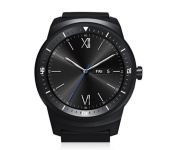
LG G Watch R gets global roll out announcement from LG
The LG G Watch R, the other round watch, is finally coming to the world. Well, at least its roll out globally is starting. The first set of locales to have access to LG’s second Android Wear device will be France, Italy, Spain and the UK. You guys in those countries should start to see the device popping up at retailers in the first part of November. Shortly after the release LG has plans to push it to Asia North America. They say “soon after”, so that could mean later in November or December. Hopefully they push it out in time for Christmas in the states. It is also set for release on the Play Store in the weeks ahead.

The LG G Watch R brings in many of the same hardware specs we have all heard of before. Th carries a Qualcomm Snapdragon 400 processor clocked at 1.2GHz, 512MBs of RAM, 4GB internal storage, 410 mAh battery, and a round 1.3-inch P-OLED display at 320 x 320. It also carries a heart rate monitor, barometer and 9-Axis sensor.
“While the original G Watch was designed to be a no-nonsense, pure Android Wear device, the G Watch R was developed with a more aesthetic eye,” said Dr. Jong-seok Park, president and CEO of the LG Electronics Mobile Communications Company. “The G Watch R represents LG’s commitment to meld form and functionality together in perfect harmony and to create a device that not only looks great but more importantly, offers technology that makes life more convenient.”
A nice benefit to the LG G Watch R compared to a few of the other guys on the market today is the watch band. It is compatible with any 22mm watch strap. Which leaves your strap options nearly limitless. LG cleverly left any price tags off the press release, but we have heard talk that it should be around $300. That would put it on par with the Moto 360, and be slightly higher than their current G Watch.
Have you been holding off on splurging for the Moto 360 to get your hands on the LG G Watch R? The wait is almost over.
Source: LG | G Watch R Global
//<![CDATA[
ord = window.ord || Math.floor(Math.random()*1E16);
document.write('‘);
//]]>
The post LG G Watch R gets global roll out announcement from LG appeared first on AndroidSPIN.

Uber brings on-demand flu shots to Boston, NYC and DC for a day

If there’s one thing on-demand car startup Uber likes more than ferrying people around, it’s trying to grab people’s attention with kooky promo stunts. Uber for barbecue? Uber wedding packages? Pairing riders with attractive lady drivers? Been there, done that (for better or worse). Every once in a while though, Uber cooks up something genuinely useful and today is one of those days: if you live in Boston, Washington DC or New York City, you can order an on-demand flu shot for you and up to nine of your friends until 3PM Eastern.
No, really. You’ll have to punch the promo code “HEALTH” into the app, but once that’s done you can flag down a roaming nurse to either drop off a flu prevention kit or administer those shots. Uber refers to the day’s events as a pilot program flying under the UberHealth banner that could wind up marrying Uber’s logistical might with even more valuable health services, like bringing doctors straight to doorsteps. If that sounds a little familiar, you may be thinking of a New York startup called Pager (which is actually helping power today’s flu shot promo) that does something similar, and it’s not hard to imagine a frenzied MD responding to an in-app house call by jumping into a Uber some day down the road.
Anyway. Uber warns that high demand means you’ll probably have to be very patient, but hey — free flu shots! Why the hell not. Seeing as how we’re a bunch of cynical jerks, we feel compelled to remind you that Uber’s operations definitely aren’t all sunshine and roses. After all, Uber’s got a precarious little balancing act going on: it’s positioning itself to the people an valuable alternative to the traditional cab experience, and pissing off the drivers powering its success at the same time.
Filed under: Mobile
Source: UberHealth
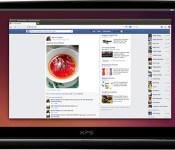
Ubuntu turns 10 with its latest release

Don’t look now, but one of the staples of the open source world just marked a big birthday. Canonical has released Ubuntu 14.10, officially making this friendlier Linux distribution 10 years old. The company is clearly happy with a low-key celebration; 14.10’s biggest addition is a developer tool center that makes it easier to write Android apps, while you’ll also find support for zero-setup printers and 64-bit ARM chips. Not exactly riveting stuff, is it? Still, the release shows how far Ubuntu has come — while there have been some rough patches in the last decade, the Canonical team can now focus most of its energy on refining a successful formula.
Filed under: Software
Source: Ubuntu Insights

Travelocity apparently saves the best deals for iOS shoppers

Like with most everything, online shopping has its pros and cons. One of the best elements of going the digital route, though, is that you usually end up saving more money than at a brick-and-mortar store. Having said that, according to a recent study by Northeastern University, a number of websites are charging some users more than others. The findings point out that travel-booking companies such as Cheaptickers and Orbits were bumping hotel prices for people who weren’t logged in to their site, with prices going up by as much as $12 extra per night to every user without an account. Even more interesting is the fact Travelocity, which is among the most popular places to book travel on the web, was found to be charging iOS users an average of $15 less on hotels compared to those browsing from another mobile platform. Which is to say, you should probably use an iPhone or iPad during your next Travelocity order — and with the holidays coming up, the timing couldn’t be any better.
[Image credit: Kasaa/Flickr]
Filed under: Cellphones, Tablets, Internet, Software, Mobile, Apple
Source: The Wall Street Journal
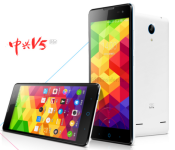
ZTE officially launches the budget-minded ZTE V5 Max

ZTE has officially launched the ZTE V5 Max which is part of its line of V5 series, budget-oriented smartphones. Although not a top-tier phone, we can see how the whole market is rising by taking a look at some of the specs for this new device. The ZTE V5 Max comes with a 5.5-inch display running at 1280 x 720 pixels being run by a Snapdragon 410 64-bit quad-core processor. Currently the device comes with Android 4.4 KitKat loaded, with ZTE’s Nubia UI running on top of it. With the 64-bit processor included, ZTE should be able to take advantage of Android Lollipop if they decide to go down that path.
Other specs include 2GB of RAM and 16GB of internal storage. The device does come with a microSD slot that can handle a 32GB card for additional space. For cameras, the ZTE V5 Max gets a 13 MP rear-facing shooter and a 5 MP front-facing shooter. The smartphone will come with a 3,100mAh battery that is removable.
The ZTE V5 Max will be priced at RMB$999 ($163 USD) when it starts selling in China.
source: GSM Insider
Come comment on this article: ZTE officially launches the budget-minded ZTE V5 Max

NHL 2K15 hits the Play Store

Following its official announcement last month, NHL 2K15 is now available to download for $7.99 through the Play Store. This latest title in the extremely popular series of hockey games brings an ‘all new’ multiplayer experience, in addition to a ‘visually remastered career’ mode which enables you to create a custom player to take through the seasons.
There’s tons of one-off challenges hidden within the app, like Winter Classics and turn-based shootouts, as well as the introduction of a fantastic new free skate mode that encourages users to show off their skills on the rink, earn points and work their way to the top of the leaderboard.
The developers have promised that they will issue regular updates for the game throughout the year bringing any new team signings to the application as soon as they occur.
The full gallery together with a link of where you can grab NHL 2K can be seen below:


Come comment on this article: NHL 2K15 hits the Play Store

TOCCs Feather Buds: Noise cancelling Bluetooth headphones for under $25 [Deal of the Day]

I can’t think of anything more trivially infuriating than my ear buds being ripped from my ears after getting snagged on a doorknob or crowded subway passenger’s arm. The Feather Buds from TOCCs are a perfect fit for folks looking to cut the cord from their wired earbuds without dropping beaucoup bucks for the Bluetooth upgrade.
These headphones are lightweight and tangle-free so you won’t be encumbered by heavy tech on your head nor will you have to worry about unwinding a tangled heap of cord. The Bluetooth transmission is rated for 30ft and we’ve heard feedback of roughly 5 hours active-use, 50 hour standby, battery life. Three sizes of comfort-gel earbuds are included to ensure a perfect fit. There’s also a built-in mic and remote to make calls and control your phone’s audio playback.
AndroidGuys readers can snag these awesome earbuds today for just $24.99 (free shipping) over at our deals page. I’ve had a good experience with the Plantronics BackBeat GO 2 but am certainly going to snag these TOCCs. At this price, grabbing a few pairs for holiday gifts might not be a bad idea.
Check this deal out, and many others at deals.androidguys.com!
 |
The post TOCCs Feather Buds: Noise cancelling Bluetooth headphones for under $25 [Deal of the Day] appeared first on AndroidGuys.

5 tips on preventing mobile phone loss and theft

There are a great many articles out there that offer advice on how to recover a lost or stolen device. Unfortunately, many of them focus on what you can do after you’ve lost your device. Generally at that point, it’s too late, because you didn’t have the right apps or tracking systems set up, didn’t copy down important information, or just weren’t aware of the options in advance. As the old saying goes, an ounce of prevention is worth a pound of cure.
This is doubly true of mobile phones, as their loss is more than just financial. It’s all of your personal data, images, and even email and SMS chats. Worse, those who keep banking information or other account passwords on their devices in plain text, like a note editor, can find their bank accounts compromised. This can create a domino effect that could take months to solve – especially if the credit reporting agencies get involved.
The credit reporting agencies will want to see a police report to freeze your credit file, so contact the police as soon as you know your phone has been stolen, file a report, and get copies of it (you’ll need them). Keep in mind that when you report your phone as stolen, the police will do their best to get it back, but there are some steps you should follow to recover your lost phone first. This should be done before you involve the police. Then, once you’re sure it’s actually been stolen, file your report. Finding out that you just left your mobile tucked down the couch, and then forgetting to notify the police, well… that can be messy.
So, how can you protect your phone from theft?
1) Use the phone operating system’s tracking application. Every OS has one, and while some are better than others, you should at least start with what your phone has out of the box.
Android: Visit the Android Device Manager. Sign in with your Google Account login, and set up your phone so you can later track or remotely wipe it if needed. A better option is Cerberus, discussed in Step Five of this guide, but you can have both, which offers added protection.
BlackBerry: Visit the BlackBerry Protect Site. Make sure your device is registered, and set up so you can wipe or track it if you need to. There are other third party apps you can use too.
iOS: Visit Apple’s Find My iPhone site. Read about the function, and then set it up so you can locate, or remotely wipe your device. Also, make sure it’s registered to iCloud. Any thieves won’t be able to access iCloud services with a stolen device – even if they wipe it.
Windows: Visit the Windows Find My Phone link. Read about how it works, and then set your phone up so it’s secure. If you feel this is not enough, there are other apps you can download to further secure your Windows Phone device.
2) Write down your phone’s model number, serial number, and the IMEI number (*60# from the dial pad for your IMEI). Then store them in a safe place. We recommend putting them in the box your phone came in, but you can put them anywhere safe. Just remember to keep them somewhere you can find them, should you ever need to.
3) Put your contact details in a location that’s easy to find. We recommend creating a contact that always displays first in your phone, which is your details, and one or two other obvious ones. Examples include things like ‘Lost Phone’ and ‘Reward if Found’. If you have a custom system that lets you set a passcode reminder, you can put in your details there, so that any good Samaritan who finds it will return the device to you. Novice phone thieves will also usually go for a guaranteed £100 reward from you rather than try to sell the phone. In cases like that, you might be able to get your device back more easily. Just don’t assume they’re a thief. Sometimes a decent person will find and return your device. While a hundred quid might hurt a little, it hurts a lot less than losing your device.
4) You can get a proximity alarm. There is a neat little product called the Hip Key, which is basically a key ring that causes your iPhone to make an alarm if you get too far away from the keyring. However, the device works both ways, because the key also beeps. It works by having you select an alarm range from 2-5 meters, all the way up to 30-35 meters, which will trigger if your phone moves out of that radius. As the alarm is 90bd, if you’re in a bar or out somewhere, and your phone is set to the 2-5 meter range, you’ll get an audible alarm the moment your phone is more than a few steps away from you. That way you can catch a phone thief before your phone is gone. As an added plus, you can use the device to find your phone at home or in the office too if you misplace it. Since the system works both ways, if you forget where your keys are, you can trigger the alarm from your phone and find them. There are other programs that do this too. Shop around, and you can find some interesting ways to protect your phone from loss.
5) Last, and quite possibly best – use Cerberus. This is the best application in the world for tracking and recovering a lost phone. You can flash it to the system memory, or ROM. What that means is that even if a thief performs a factory reset or wipes the device, you’ll still have access to Cerberus. In fact, once a phone is wiped, Cerberus remains there, but is invisible. That’s because you it resides in the phone’s boot memory, rather than having it stored in regular memory. You can then control it over the Internet, or through SMS commands if the phone thief disables your Internet connectivity. Because these command messages remain invisible, the thief won’t even know that you’re tracking them. You can take photos, video, or get GPS updates too, all of which are secretly uploaded by the app. In truth, there’s no better app to protect yourself from would be thieves than this one, and nothing more helpful to the police in recovering your stolen device.
Often, losing your phone is worse than losing a purse or wallet. Credit cards are easily blocked, and few of us carry around as much cash as a new phone would cost. Add in the lost time for police reports, headaches of setting up a new phone (and getting a SIM replaced), and you can lose out on a day or more of your free time in addition to the out of pocket costs. Protect yourself and your phone. You’ll be glad you did.
|
The post 5 tips on preventing mobile phone loss and theft appeared first on AndroidGuys.
 AIVAnet