


Android Wear update adds local music playback, standalone GPS
Google on Thursday announced an update to the Android Wear platform which adds in two noteworthy features. Smartwatches powered by Android Wear will now be able work more independently of smartphones thanks to internal GPS reporting capabilities. Apps such as MyTracks can now track runs and activities without requiring a connected device. Whether you’re training for… Read more »
The post Android Wear update adds local music playback, standalone GPS appeared first on SmarterWatching.
 |
Read the rest at SmarterWatching.com!
The post Android Wear update adds local music playback, standalone GPS appeared first on AndroidGuys.

NYPD is getting equipped with over 40,000 mobile devices

Thanks to a massive $160 million investment, the New York City Police Department is on its way to receive a combination of up to 41,000 smartphones and tablets. Known as the NYPD Mobility Initiative, which will be mostly financed by criminal asset funds provided by the Manhattan DA’s Office, the goal is to provide the the city’s law enforcement with tools that can improve and streamline their overall workflow. NYC Mayor Bill de Blasio said there are a few key elements to this plan, such as offering better case support for detectives, providing features including real-time 911 data, enhanced database access for patrol staff, quick entry points to info like Amber Alerts and email accounts for every officer.
The new Mobility Initiative is set to be funded over the next three years, with the NYPD expected to get a total of 35,000 handsets for officers and 6,000 cars equipped with ruggedized tablets. “In an emergency, every minute counts, and this initiative will allow our officers in the field to get up-to-date, accurate information and process critical information anywhere in the city. I am thankful for the Manhattan District Attorney for being such a great partner to the City, and for his efforts to secure this much-needed investment that will benefit all New Yorkers for years to come,” stated de Blasio.
This new update to NYPD technology will make our police more efficient and our city safer. http://t.co/55krbFiuAo pic.twitter.com/QH6Ek4quUa
– Bill de Blasio (@BilldeBlasio) October 23, 2014
[Image credit: Gustavo Stumpf/Flickr]
Filed under: Cellphones, Tablets, Transportation, Mobile
Source: NYC

Hailo’s app now lets you pay for cabs you’ve flagged on the street

Hailo reported just last week it was pulling out of North America, where it could no longer effectively compete against its rivals. On this side of the pond, however, Hailo’s kicking off its third birthday celebrations with the announcement of more positive news. Firstly, the app-fueled cab-hailing service has just launched in Leeds and Liverpool, meaning it’s now available in four UK cities — Hailo started out in London several years ago, before taking a road trip to Manchester earlier this year. Hailo’s Android and iOS app has been updated, too, or rather, completely rebuilt. It doesn’t look all that different, but has a slightly cleaner, flatter interface. Debuted in Ireland last month, a new feature called “Pay with Hailo” is now live in London as well. While you’ve always been able to pay for Hailo-flagged cabs through the app, this new feature lets you do the same with a taxi you’ve hailed on the street (for a 50p surcharge), assuming that driver is registered with Hailo themselves. Under certain circumstances, iPhone users will also be notified when they can use this method of payment as they jump in a cab.
For businesses, Hailo’s launched a new web portal called “Hailo Hub,” which allows restaurants and similar establishments to book multiple jobs for their customers with different pick-up and drop-off points. Passengers will be kept up to date on the status of their cab via text messages, but there’s no way to pay fares centrally, so it’s not really ideal for the corporate market. Instead, these passengers will need to have some cash handy. Or they could, of course, use Pay with Hailo if they’re taking a trip across London.
Filed under: Transportation, Mobile
Source: Hailo

Facebook’s anonymous Rooms is a chat app that feels like the old days

Facebook’s new Rooms app is weird, and it isn’t long after installation that you figure out why. You don’t log in with your Facebook credentials. Your profile picture appears nowhere. It doesn’t tap into your contacts. If Rooms’ App Store listing didn’t proudly proclaim it was a Facebook product, you’d almost certainly never know it was brewed within the social giant’s cavernous confines. Seems a little off-kilter for a chat app, especially one with this pedigree. Instead, it just lets you create those eponymous Rooms — they’re like those AOL chatrooms of yore, dedicated to any topic (or no topic at all) and augmented with the the ability to moderate posts like a power-tripping VIP on a forum. When it’s spelled out like that, doesn’t it all sound just delightfully anachronistic?
Facebook’s Josh Miller (who previously work on Branch before FB bought it) cops to a certain level of historical inspiration — he says the company’s Creative Labs team wanted to meld the “ethos of these early web communities and the capabilities of modern smartphones”. Naturally though, those Rooms don’t look like the places we hung out online in 1998 — they’re bright, colorful, near-endlessly customizable. Users can pin especially good content for all to see, or tweak member permissions to control who gets access to what. And, most importantly of all, your real name doesn’t come anywhere near Rooms… unless you want it to, anyway. Every time you enter or create a room, you’re prompted to come up with a nom de plume — when your Rooms are small and insular enough, chances are most people will be able to suss out who the others are. But when a Room gets big (by way of a neat image-based invite system)? Like, say, Noms From Above, which sports 479 people sharing pictures of food? You just might be glad for that anonymity. After years of insisting that people should stick to using their real names, Facebook has finally conceded that yes, there’s value in getting to choose who you want to be in a given situation.
Via: Re/code
Source: Rooms.me

Apple to Continue Evaluating GT’s Sapphire Production Progress, Looking for New Uses for Arizona Plant
 Earlier today, GT Advanced Technologies officially announced its settlement with Apple, which will see the two companies dissolving their partnership, ending their production agreement, and eliminating contractual ties that kept GT from selling its sapphire to other parties.
Under the agreement, GT Advanced will be selling off its remaining sapphire, along with 2,000 sapphire furnaces, with much of the proceeds going to Apple to repay the $439 million loan it provided to get the operation underway.
Apple has now commented on the settlement with GT Advanced, telling Re/code that GT’s sapphire manufacturing process simply wasn’t ready for production, and that a relationship in the future remains a possibility as the company’s sapphire production techniques improve. GT will continue research work focused on creating sapphire boules over 165 kilograms.
Apple also says that it is going to look for other ways to use the Mesa, Arizona facility that it purchased for GT Advanced, which will be unused after GT fully shuts down operations at the end of December
“Apple put a lot of effort into an ambitious new sapphire manufacturing process with GTAT which is not ready for production. We’re going to continue evaluating GTAT’s progress on larger sapphire boule development, as well as consider other options for the facility. We remain committed to the city and we’re going to work with Mesa and Maricopa County to help the GT Advanced employees who will be impacted by this find new jobs.”
GT Advanced first filed for bankruptcy at the beginning of October, but the company was reportedly missing technical milestones as early as February, hinting at the trouble to come. While Apple was widely expected to use sapphire from GT Advanced for the iPhone 6 and 6 Plus displays, the company opted to stick with Corning’s Gorilla Glass after it became apparent GT would not be able to produce sapphire of the quality that Apple required.
Approximately 650 employees at the Mesa, Arizona sapphire plant have already been laid off, and a limited number of employees will remain employed until the end of the year in order to help GT Advanced wind down production at the factory, finishing the sapphire boules that are currently growing and shutting down and cleaning furnaces for storage and sale.

‘Continuity Activation Tool’ Enables Handoff on Older Macs
With iOS 8 and OS X Yosemite, Apple introduced “Continuity,” a set of features designed to allow for deeper integration between Macs and iOS devices. Unfortunately, some Continuity features are limited to Macs with Bluetooth 4.0, which leaves many older Macs unable to access the new features.
Additionally, even though the 2011 MacBook Air and 2011 Mac mini include Bluetooth 4.0, Apple has opted not to allow them to access Continuity features. Luckily, many resourceful members of the MacRumors forums have come up with solutions to allow them to enable Continuity on their older Macs, and discussion on our forums has led to the creation of a set of instructions and a Continuity Activation Tool that should get Continuity working on Macs unable to explicitly support the feature.

Created by Dokterdok (based on instructions compiled by UncleSchnitty) and available on Github, the Continuity Activation Tool is designed to activate Continuity by doing a compatibility check, creating backups of original System drivers, and disabling a Mac-model blacklist in the Bluetooth code that prevents Continuity from working on ineligible Macs. From there, it also whitelists Mac board-ids within the Wi-Fi code to get the feature working.
The tool can be downloaded as a zip file from Github and is installed by double clicking the app and following the instructions provided on the screen.
The Continuity Activation Tool will enable Continuity on the mid-2011 MacBook Air and the mid-2011 Mac mini with no additional hardware required, as both of those devices include Bluetooth 4.0. That means installing the tool should get Continuity up and running on those machines in just a few minutes.

On older Macs that do not come equipped with Bluetooth 4.0, new wireless cards will need to be installed, which makes it more difficult for casual users to get access to Continuity. USB dongles that provide Bluetooth 4.0 will not work with the Continuity Activation Tool, and a list of wireless cards that will provide Bluetooth 4.0 for each older Mac can be found on the MacRumors forums.
Both MacRumors forum members and Redditors have confirmed that this method is able to successfully enable Continuity on a variety of Macs, including the mid-2011 MacBook Air, the early 2011 MacBook Pro, and the mid-2011 Mac mini.
The Continuity Activation Tool appears to enable all Continuity features when used successfully, allowing older Macs to access Handoff, Instant Hotspot, SMS forwarding, and Mac phone calls without an issue. Some of these Continuity features may work already on older Macs as they use a variety of different connection methods ranging from Bluetooth to Wi-Fi, but the tool is confirmed to get Handoff and AirDrop, both of which require Bluetooth, to work.
Users should exercise caution when using the Continuity Activation Tool, as it moves around low level files and there’s a possibility it could cause problems. A backup is recommended before attempting to install the tool.

Apple’s TestFlight Beta Testing Service Now Available for Developers [iOS Blog]
 Apple today began notifying developers that its TestFlight Beta Testing platform is now live and available for immediate use. TestFlight Beta Testing is designed to make it easier for developers to invite users to test pre-release versions of apps.
You can now invite up to 1,000 testers to beta test your iOS apps by simply sending them an email invitation through iTunes Connect. Once they accept your invitation, testers can install your beta app on their iOS devices, get updated builds, and provide feedback, all within the TestFlight app.
TestFlight has long been used as an app beta testing platform by developers, but Apple acquired the service earlier this year with its purchase of Burstly, the company that initially developed the testing platform. After the acquisition, Apple redesigned TestFlight and relaunched it as an integrated iOS 8 service for both developers and testers.
While there are several beta testing services including HockeyApp, TestFlight aims to make the beta testing process simpler by removing the need for UDIDs and provisioning profiles. Developers can invite users to test an app with just an email address, and there are built-in tools for both internal and external testing.
End users who are invited to beta test an app will be instructed to download the TestFlight app for iOS, which became available in the App Store last month. The app is designed to deliver apps for testing, notify testers each time a new build is available, and provide tools for feedback.

Android Wear now has GPS and offline music support

Google has today published details of a major update it’s currently pushing out to all International variants of the LG G Watch, Samsung Gear Live and Moto 360 located in the US.
The upgrade primarily focuses on implementing some new fitness functionality into Android Wear by taking full advantage of the smart watches integrated GPS sensors. Users will now be able to track their distance and speed during a run, walk and bike ride, without actually having to have a smartphone connected.
This latest firmware also lets users upload and store music on the physical memory of their device, enabling them to listen to music on a run, walk or ride via a pair of Bluetooth headphones with no active connection required between their smartwatch and phone.
Hit the source link below to hear exactly what Google has to say about the update.
Source: Google
Come comment on this article: Android Wear now has GPS and offline music support
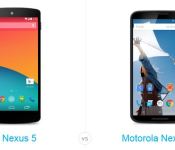
Nexus 6 vs Nexus 5: A civil war within Google

Ever since the announcement of the Nexus 6, we’ve been dying to know how it will stack up against other devices. While we won’t know for sure until we have our hands on one, we can at least look at the various specs. Lets take a look at the Nexus 6 vs the Nexus 5!
Motorola Nexus 6 vs LG Nexus 5
Display
Let’s start with the Display. The Nexus 6 has a gorgeous display with a pixel density of 493 ppi, while the Nexus 5 isn’t bad either with a 445 ppi. However, considering the Nexus 6 is a full inch bigger than the Nexus 5, the Nexus 6 is a clear winner in the display quality. Motorola’s device has an AMOLED screen while LG’s offering has an IPS screen, so that’s a matter of preference. Is also worth noting that the Nexus 5 is still a regular phone with its size, whereas the Nexus 6 places itself well into the “phablet” category.
Battery
With the battery, the Nexus 6 has another clear advantage with a 3,220 mAh battery, while the Nexus 5 has a 2,300 mAh battery. While the Nexus 6 has much more pixels to push, the Nexus 6 site still claims you can get 24 hours of talk time, with the Nexus 5 getting 17.
Processing
When it comes to the processors, they come pretty close. The Nexus 5 has a Qualcomm Snapdragon 800 clocked at 2.26 GHz, while Motorola’s offering has a Snapdragon 805 clocked at 2.7 GHz. While the Nexus 5 technically has a year old processor, it is no slouch. Technically, the Nexus 6 wins, but when it comes down to it they are pretty close. However, the Nexus 6 has 3 GB of RAM while the Nexus 5 has 2 GB. This should give the Nexus 6 more multi-tasking power.
Camera
The Nexus 6 has a better camera, with a 13 MP rear shooter and a 2 MP front shooter, while the Nexus 5 has a 8MP and 1.3 MP. The Nexus 6 also has the ability to shoot video in 4K, while the Nexus 5 is behind at 1080p.
Storage
The Nexus 5 starts at 16 GB of memory, while the Nexus 6 starts at 32 GB. Neither have expandable memory.
All in all, both devices have great specs. Google truly has done well in designing both of these Even the Nexus 5 which came out last year holds its ground well, but the Nexus 6 has been updated immensely, so in terms of specs the Nexus 6 is the clear winner.
However there are two things to consider: the Nexus 6 is quite large with its 5.96″ screen. One will have to get used to the size of the Nexus 6. Otherwise, some people are simply not going to want a phone that large and will want to get the Nexus 5. The other thing to consider is the price. What makes the Nexus 5 so great is all the great specs you get for the price: $349 off contract. The Nexus 6, however, will be $649 off contract. While the Nexus 6 will be available through carriers for cheaper, you’ll likely need to lock into a 2-year contract to get that price, which to many is not preferable.
So, when it comes to specs, the Nexus 6 is a winner. When it comes to size preference and price, the Nexus 5 is the winner. Which do you think is the better device? If you’re planning on getting a Nexus this year, which will you get?
|
The post Nexus 6 vs Nexus 5: A civil war within Google appeared first on AndroidGuys.

Amazon offering up to 80% off select apps and games

Looking to pick up some new games or apps for your Android? Be sure to check out Amazon’s current promotion which sees the retailer shaving up to 80% off of select titles. Be it in the form of up-front discounts or in-app purchases, there are 47 apps listed under the Appstore Halloween Deals.
Key among the apps and games are titles such as FarmVille 2, The Sims, Despicable Me: Minion Rush. Family Guy: The Quest for Stuff, Grand Theft Auto III, and Adventure Time!

|
The post Amazon offering up to 80% off select apps and games appeared first on AndroidGuys.
 AIVAnet