


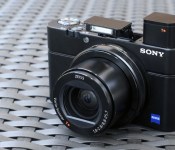
Sony RX100 III review: a fantastic point-and-shoot, but it’ll cost you

There are good cameras that look cute, take passable pictures and don’t cost an arm and a leg. And then there are incredible cameras that can really do it all, but come along with comparatively astronomical price tags. The Sony RX100 is the latter — the original model, which cost $650 and first appeared in 2012, was already wildly popular with camera enthusiasts, and 2014′s version cashes in on two additional years of R&D. The result is a more capable point-and-shoot that’s even pricier, at $800, but still worth every penny: It’s the RX100 III.
There are a few major changes in the third iteration. For some photographers, the most significant is the new pop-up OLED viewfinder that’s available when you need it, but retracts completely into the housing when you don’t. Sony removed the full-size hot shoe to accommodate the new EVF, but that’s a trade-off few will mind. Another big swap is the new 24-70mm lens, which sports an f/1.8-2.8 maximum aperture range, giving you more bokeh and better low-light performance when zoomed all the way in. Finally, there’s a new video codec on board, called XAVC S. On paper, it’s not tremendously exciting, but it does result in some pretty spectacular video footage, rivaling what you’d get with a higher-end (and much larger) rig, assuming you add on the mandatory Class 10-plus SDXC card.
Hardware

You’ll still get better performance from a top-of-the-line mirrorless camera or DSLR, but those aren’t nearly as portable, and they’re certainly not small enough to carry in your pocket. The RX100 is plenty capable, but its greatest strength is its size. While heavier than many other point-and-shoots, it’s not much larger. Its powerful 24-70mm f/1.8-2.8 Vario-Sonnar T* zoom lens does make it quite a bit thicker than your run-of-the-mill compact, but assuming you can deal with a moderate bulge, it can fit in a pants pocket.
You’ll more likely be dangling the RX100 III from your wrist, using the included band, or from a third-party neck strap (the requisite adapters are in the box). Despite its small size, however, the camera offers all of the necessary buttons and dials, including a dedicated mode dial, a video record button, a scroll wheel (for adjusting aperture and/or shutter speed) and a button for accessing the integrated WiFi mode, which lets you transmit images from the camera directly to a smartphone or a tablet.

This time around, the greatest engineering feat is the pop-up electronic viewfinder. It’s located at the far-left corner, and extends up about one inch when in use. The clever design includes a slide-out magnifier, complete with a diopter adjustment dial. The camera powers on as soon as you extend the EVF using the release switch on the left side of the housing, though it also turns off when you push it back down. Like most other EVFs, there’s a proximity sensor that activates the finder and disables the LCD when you raise it to your eye. Of course, grazing the viewfinder with a finger or other appendage has the same effect, but you can simply push it back into the housing to eliminate the issue.
Because the EVF takes up quite a bit of space within the housing, Sony had to move the pop-up flash a bit to the right. It’s now centered just above the lens, though it extends far enough to reach beyond the zoom, even at the widest focal length. Given that the flash has now taken over the real estate previously allocated to the full-size hot shoe, that component is a casualty of the RX100′s redesign, though (as mentioned earlier) with the exception of perhaps a few hardcore shooters, it likely won’t be missed.
User interface

For a spell, Sony began including touchscreens with its mirrorless cameras, such as the NEX-5N, but newer models, including the Alpha 6000 and flagship A7s don’t offer that feature. All three RX100 models also lack touch functionality, including this year’s iteration, which may be a disappointment to some. On the other hand, no touchscreen means Sony needed to include a range of dedicated controls and dials, which ultimately work to improve the experience. The trade-off, of course, is that you can’t tap to focus, which many shooters have come to count on when capturing video.
The user interface hasn’t changed much since the original RX100. The menu layout is more or less identical, though there have been some slight cosmetic tweaks. The quick-access menu has been refined — it’s a bit more straightforward to use now — but indicators and the camera’s general workflow are consistent with past models. Like with the RX100 II, you can transfer images over WiFi using Sony’s PlayMemories Mobile app for smartphones and tablets, but unlike competing products, you can’t control the camera remotely.
Performance and battery life

The first model in this series was lauded for its incredibly fast focusing, and the RX100 III performs just as you’d expect. It focuses very quickly, and it’s accurate nearly all of the time. Focus hunting is perceptible, particularly with dim subjects when you’re not using the AF-assist light, but if you miss a shot due to speed, the camera probably won’t be to blame. Granted, it’s not the fastest gun in the West, but it’s definitely one of the best in its class. As with any compact camera with a power zoom lens, it takes a second or two to get the camera powered on and ready to capture its first shot. If you’re anticipating an upcoming capture, it’s best to leave the RX100 powered on — once the camera’s standing by, shutter lag is barely noticeable.
As for battery life, I took the RX100 on vacation and managed to get through three days of exploring without charging up. On average, I probably used the camera for a few hours each day, so if you tend to capture hundreds of shots and dozens of video clips during each day of touring, you’ll need to charge up overnight. During that period, I was able to snap more than 500 stills and 13 minutes of 1080p/60 video, which was captured with the high-bit rate (and processor-intensive) XAVC S codec.
Image quality
Since we’re already on the topic of video, I’ll start with some analysis there. The XAVC S codec available with Sony’s latest cameras is a significant step up from AVCHD. Video looks great on the camera, of course, but when evaluating footage on a laptop, it’s hard to believe this level of quality came from a camera you can slip in your pocket. The new f/1.8-2.8 lens also deserves some of the credit, I’m sure, but the improvement is clear. The one con is that you’ll need to use a file converter to edit and output your footage using a computer. I used Pavtube ($35), which worked very well.
Unfortunately, once you convert footage and upload it to the web (with further compression), you lose a lot of that captured detail. The resulting clips, as you’ll see in the footage reel above, look better than what you’d shoot with some other compact cameras, but unless you’re maintaining that high 50 Mbps bit rate, you’ll notice some degradation for sure. In the reel above, exposure was spot-on, and the RX100′s integrated optical image stabilization helped keep things steady, even as I moved around.

Moving on to still images, the RX100 exposed this late afternoon, backlit shot beautifully, with an aperture of f/4 and a shutter speed of 1/640 second at ISO 125. Details are very sharp and colors are accurate.

This plate of cacio e pepe, a typical Roman dish, is slightly underexposed, at f/4 and 1/320 second, with a sensitivity of ISO 125. The camera may have been thrown off by the metal fork, but it’s nothing a slight levels tweak in Photoshop won’t fix.

I saw dozens of tourists shooting tablet photos each day during my short trip to Rome. Moments like these come and go in only a few seconds, so this was a great test for the RX100. I was able to turn the camera on and snap a few shots as I walked by on the sidewalk. Details are sharp and colors are accurate in this 1/200-second, f/5 exposure at ISO 125.

This is where gelato cups go to die. The camera opted for an exposure of 1/100 second at f/4 here, with a sensitivity of ISO 125. Details are sharp; colors are accurate; and the exposure is spot-on.

Like the iPad shot above, this is another opportunity that came and went in only a few seconds. Fortunately, the RX100′s speed enabled me to grab this sharp shot, at 1/50 second and f/2.8, with a sensitivity of ISO 125.

The Pantheon is remarkably dim, yet the RX100 did a fine job of capturing this stranger with sharp details, assuming you’re uploading for the web. In-camera processing counteracts the high sensitivity of ISO 6400, but results in softer details, as you can see in the inset of this 1/60-second, f/2.8 exposure.

The RX100 really excels at night, capturing consistently exposed images with limited noise. The camera’s optical image stabilization helped keep details sharp in this 1/20-second, f/2.8 exposure at ISO 800.

I returned from Italy just in time to capture this shot of New Yorkers making their way home after the July 4th fireworks. With plenty of vapor light, colors are accurate, believe it or not, though details are soft due to in-camera processing in this ISO 6400, 1/50-second, f/2.8 exposure.
The competition

Given all of the features that Sony’s managed to pack into the RX100 III, including a 1-inch sensor, an f/1.8-2.8 lens, an LCD that flips forward 180 degrees and that one-of-a-kind pop-up viewfinder, this is currently the only camera you can buy that includes that identical feature set. There are a few similar options on the market, though, with Canon’s PowerShot G1 X Mark II offering the most comparable specifications while still maintaining a point-and-shoot form factor. That camera, also priced at $800, includes a larger 1.5-inch sensor and a longer 24-120mm f/2-3.9 zoom lens. And while there’s no pop-up EVF, you can attach one to the hot shoe.
If you’re looking for even more power, you’re not going to find it in a pocketable form factor. Instead, consider stepping up to a mirrorless camera or a DSLR. Our mid-range pick in the mirrorless category, the Sony Alpha 6000, which also retails for $800, offers many of the same features as the RX100, such as an integrated EVF and plenty of hardware controls, with the added benefit of a larger APS-C sensor and interchangeable lenses. You should also consider purchasing last year’s RX100 II ($650) or the original RX100 ($500) at a discount. Both are excellent cameras, and they’re considerably less expensive than this year’s model.
Wrap-up

When Sony launched its first RX100 back in 2012, we were very impressed. The camera offered tremendous functionality in a pocketable package. Then, when the RX100 II came around last year, Sony added WiFi along with a full-size hot shoe (which can accommodate high-end audio gear, among other accessories), besting the original model. This year’s iteration is by far the most capable yet, with a superior lens, XAVC S encoding and a unique pop-up EVF. At $800, it’s a significant investment, particularly within the point-and-shoot category, but if you need a ton of power in your pocket and you don’t mind paying for it, you can’t do any better than this.

Apple Joins White House ‘SupplierPay’ Program to Speed Payments for Small Businesses [Mac Blog]
Apple, Coca-Cola and other high-profile companies across various sectors have agreed to participate in SupplierPay, a new White House initiative designed to accelerate payments for smaller firms in the company’s supply chain. President Barack Obama is expected to announce the program and early adopters later today, reports the Wall Street Journal.
The program will “strengthen small businesses by increasing their working capital, so they can grow their businesses and hire more workers,” the White House said in a statement.
SupplierPay is the private sector counterpart of the government’s existing QuickPay program that pays small business contractors before larger ones. Under QuickPay, businesses typically receive payment within two weeks of a completed project or service.

Apple in recent years has focused on supply chain issues, working to curb excessive overtime, underage workers and harsh working conditions in its supplier factories. The Cupertino company requires its suppliers to meet a code of conduct, routinely monitors its contract manufacturers for compliance with these fair labor practices and issues an annual Supplier Responsibility report to document its progress.

Icon packs that you must have on your Android device…Round Three

I’m an icon addict to the point of where I really need some serious intervention. But don’t call anyone quite yet, because you might just enjoy what I’m fixing to show you. Once you see what I have to show off, then you can decide if a phone call is warranted or not.
That’s right, I’m going to show you some of the newest, hottest, most amazing icon packs in the Google Play Store today that you need to have installed on your mobile device. These icons packs will make your phone scream with pleasure and will get everyone asking; “What awesome icon pack is that you’re using?”
You can check out some of our older posts on this same subject here: Android Icons You Must Have as well as my other two editions of this post here: Icon Packs You Must Have(Round One) and here: Icon Packs You Must Have(Round Two)
The good thing about the icon packs that I’m going to show you today is that they are so very simple to install and easy to set on your device. And when you do get them set on your device, they will theme your homescreen icons as well as all of your icons in your app drawer. That way everything looks nice, neat and uniform. Now, without further adieu, let’s get to all the jaw dropping awesomeness that you’ve come here to see.
NOTE: THIS ARTICLE IS SPREAD ACROSS FIVE PAGES
Aloha by Will Windham(StealthyChief)

Aloha by StealthyChief is an exceptionally well put together icon pack of over 1,650 custom made icons with a retro and tropical style that were influenced by the beautiful scenery of Hawaii. Will Windham has done an exceptional job of custom making so many of the icons majority of us use on a daily basis, and with the unique colors, icon images and everything else, Aloha is just another example of who much he pays attention to detail.
Priced at $1.99, Aloha gives you the icon masking feature as well as 10 HD wallpapers, Muzei Wallpaper support, support for most of the known launchers and it even gets weekly updates every Friday.

Astero by Ekky Pramana(PinkNoze Studio)

PinkNoze Studio has been around for a bit, but Astero is the first icon pack of theirs that I’ve used. What might appear as your standard every day round icon with a shadow, Astero, by Ekky Pramana isn’t exactly that. Yes, it’s round and it has a shadow, but the shadow isn’t a long shadow going from the middle of the icon to the bottom corner so to speak. The shadow stays at the bottom, which you don’t see a lot of right now. Something slightly different which is nice.
For only $1 in the Play Store, you’ll get 650+ custom HD icons made at 144 x 144px, 9 HD wallpapers, a theme dashboard, icon request tool and frequent updates.

The post Icon packs that you must have on your Android device…Round Three appeared first on AndroidGuys.

Microsoft looking for beta testers for Android version of OneNote

Microsoft have announced a new feedback program that will allow Beta testers to try out upcoming versions of its note-taking app OneNote on Android.
To get involved, you just need to join the Google+ Community Page for OneNote and click ‘Become a tester’.
Allowing the community to feedback to Microsoft about new features in versions of OneNote will be a great way to ensure any bugs or half-baked features are polished before release.
Did you sign up for Microsoft’s OneNote Beta program?
The post Microsoft looking for beta testers for Android version of OneNote appeared first on AndroidGuys.

OnePlus aren’t working on ‘Lettuce’ device just yet

We saw a leak surface yesterday that suggested OnePlus were already working on the successor to the OnePlus One, dubbed ‘Lettuce’. With such shorty supply of the OnePlus One and so soon after its release date, this understandly took a few people by surprise.
However, the community need not panic, since OnePlus have clarified the leak stating that there are “just working on the OnePlus One for 2014. Thanks!”.
Clearly they are working on ‘Lettuce’ behind the scenes – they’d be a pretty short-sighted company if they weren’t – but at least it gives satisfaction to early adopters of the OnePlus One that their devices won’t be rendered out of date after only a few weeks after all.
The post OnePlus aren’t working on ‘Lettuce’ device just yet appeared first on AndroidGuys.

Motorola talks Android 4.4.4 updates; plans a Google+ AMA

Motorola has provided a bit of insight into the Android 4.4.4 KitKat software update and how it pertains to its line of smartphones.
This latest update includes all of the goodies of 4.4.3—such a new dialer, the ability to pause during video recording, and enhanced camera image quality—and includes enhanced security for OpenSSL.
A blog post on the hardware maker’s website tells us that the update has commenced for the Moto G in Brazil and India while the Moto E is getting the same treatment in Brazil, France, Canada, and Asia Pacific. As for the United States, the Droid Ultra is the only one thus far to see 4.4.4.
Looking ahead, Motorola will be holding a Google+ Ask Me Anything event on July 17 where product manager Mark Rose will field your questions over 30 minutes.
The post Motorola talks Android 4.4.4 updates; plans a Google+ AMA appeared first on AndroidGuys.

Smappee’s £169 energy monitor can keep tabs on every device in your home

Sure, our homes are getting smarter and allowing us to be greener than before, but the cost of energy has continued to climb. Energy companies have encouraged us keep tabs on our consumption, but it’s hard to identify which appliances are responsible for driving up your fuel bill every month. That’s where Smappee’s smart energy monitor comes in, having just launched in the UK: Instead of just telling you how much current your home is consuming, this little box can identify individual devices and appliances in your home, letting you shut the offending devices down.
Similar to other energy monitoring products, Smappee requires you to clamp its sensor onto the main power cable of a household meter. If you’re not comfortable with fuse boxes or working by torchlight, you might need a professional to install it for you. Once fixed in place, Smappee’s bespoke technology monitors the electrical oscillations (or interference) in your home on a millisecond basis to recognize the individual signatures generated by each of your devices. It’ll attempt to learn about everything you use over time, meaning you won’t need to traverse your home turning things on and off again to manually add them.
While the monitor does the hard work, Smappee’s companion app displays your energy usage and costs in detailed charts and tables. It’ll also let you choose names for each device and group items depending on its type or location (if you wanted to group everything in your spare room for example). If you’ve invested in solar panels, Smappee will measure them too, letting you see at-a-glance how much of your total consumption is sourced from the sun.

It’s claimed that the energy monitor will “pay for itself in just over a year” and will reduce the electrical bill in a four-person UK household by an average of 12 percent. I reckon its “Comfort Plugs” might play a small part in helping the company arrive at that figure. Sitting between your device and the power point, these wireless adapters will let you switch a device on and off remotely, handy if you’ve popped out and you remember you’ve left the TV on.
The Smappee energy monitor goes on sale today for £169 direct from the company’s website and from Apple Stores across Europe (we’re told Apple will also list on its website soon). For that you’ll get the box itself, access to its free iOS or Android apps and one Comfort Plug (packs of three and six additional plugs are available for £34.99 and £59.99 respectively).
Filed under: Household
Source: Smappee

Samsung’s first Tizen phone slips further into the future

Samsung’s Tizen mobile OS already powers a pair of smartwatches, but what about those smartphones we’ve been promised for so long? Well the company’s first consumer-ready Tizen phone — the Samsung Z — was supposed to make its official debut at a developer event in Moscow yesterday. Of course, the key words there are “supposed to”. To hear the folks at the Wall Street Journal tell the tale, there was a Tizen event for enthusiasts, but Samsung quietly pulled the plug on the Z’s launch days earlier.
Don’t worry, the phone’s not dead yet. Samsung eventually confirmed to The Verge that it plans to keep fleshing out the OS and the ecosystem that sustains it, but phone no longer has an official launch date. Why? No one’s quite sure yet, though at least a few who attended that Russian shindig thought Samsung might’ve pushed back the launch because of a dearth of decent apps. That may well be the case, but if it is, it isn’t for lack of effort on Samsung’s part. The Korean mobile giant has a list of notable software partners and has tried to inspire developers with Tizen app contests. Maybe, just maybe that’s not enough.
This isn’t the first time a Tizen device launch has gone awry, either. Samsung originally planned to release one in Japan earlier this year before carrier NTT DoCoMo put the kibosh on it, citing an already-crowded field of competitors. That’s not going to change. If anything, those entrenched players are going to hunker down ever more as time marches on. If Samsung decides to wait for the golden moment to release its side project unto the world, we may be waiting for our Tizen phones for a long while.
Filed under: Mobile
Via: The Verge
Source: Wall Street Journal

Apple’s Next-Generation A8 Chip Said to Top 2 GHz, Remain Dual-Core
Besides a larger display, Apple’s upcoming iPhone 6 also may feature a faster A8 processor that pushes the system-on-a-chip beyond the 2.0 GHz threshold, claims GforGames citing Chinese media source cnBeta [Google Translate].
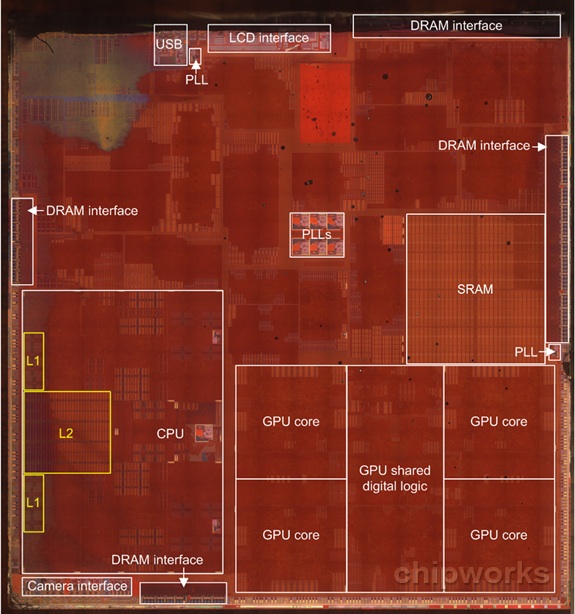
According to the latest information, Apple will reportedly increase the CPU frequency of its next-generation SoC to 2.0 GHz or higher per core, up from the 1.3 GHz (iPhone 5s and Retina iPad mini) or 1.4 GHz (iPad Air) of the A7 processor. The chip will keep the 64-bit, dual-core architecture of the current generation A7 CPU, but will be manufactured with a 20-nm process instead of the A7′s 28-nm. TSMC and Samsung are thought be the primary manufacturers that are producing the A8 chip for Apple’s upcoming iOS devices.
Though competing phones ship with quad-core processors, Apple’s possible decision to stay with a dual-core design may be the result of the company using a custom-designed chip optimized for iOS and not an off-the-shelf solution. This optimization already has been shown in the current dual-core A7, which offers “desktop class” performance that outperforms other players in the mobile phone marketplace. In its detailed analysis of the A7 after launch, AnandTech found that even though the A7′s performance is top-notch, there was still room for improvement as almost no iOS app took full advantage of A7′s available processing power.

China thinks the iPhone’s tracking features are a risk to national security

If there’s one thing that China has enjoyed doing this year, it’s taking pot-shots at the US as a result of the Snowden revelations. After banning Windows 8, allegedly pushing banks to ditch IBM hardware and calling for severe punishments on Apple and Google, the government is now gunning for the iPhone. Buried deep in iOS 7 is a Google Now-esque location tracking feature that can offer recommendations and improve the mapping experience. China, via its state television mouthpiece, believes that the system’s logs could be used by nefarious researchers to extract state secrets. Of course, as the company points out, the data is only uploaded to Apple’s servers with your explicit consent, and can be turned off — but then again, perhaps this latest bout of saber rattling is destined to direct attention away from China’s own espionage record.
Filed under: Cellphones, Mobile, Apple
Source: WSJ
 AIVAnet