
Verizon’s prepaid plans now let you use LTE smartphones

Verizon got a little more serious about tackling prepaid cellphone service when it unveiled new Allset plans a few months ago, but it was hobbled by the lack of LTE. Why not just go to rival carriers who’ve had fast data for considerably longer? That won’t be a problem after today. Big Red now lets you either bring your own 4G-capable Verizon phone to Allset or buy a fresh device with Allset in mind. You won’t have a wide selection of hardware to choose from, but Verizon isn’t saving all the good phones for its subscription customers. You can get the HTC One, Samsung Galaxy S5 or Moto X if you want something relatively fresh; the Galaxy S 4 and two LG devices, the Lucid 3 and G2, are on tap if you’d rather save money and get something slightly behind the times. The data buckets are still modest at 500MB (included with the $45 base plan), 1GB ($10) and 3GB ($20), but you at least won’t have to pair them with outmoded gear.
Filed under: Cellphones, Wireless, Mobile, Verizon
Source: Verizon

High-tech cat feeder uses facial recognition to save all nine lives

Our four-legged friends have a habit of not eating when something ails them. However, if you’re at work all day, you may not pick up on the lack of appetite until it’s too late. Well, there’s a smart cat feeder with built-in facial recognition that’s looking to lend a hand. Bistro is a high-tech feline food and water hub with sensors that monitor consumption. There’s the requisite camera to distinguish between members of your in-home pack and the furry creatures stand on a scale that measures their weight while eating. All of the collected data is beamed to a smartphone app to keep you abreast of the activity while you’re away for your “quantified cat.” Heck, you can even watch your pets feast, should you choose to do so. If you’re looking to snag one, act quickly to nab a Bistro for $149 instead of the full $249 price it’ll carry when it launches in March.

Filed under: Household

Bing and Cortana will make it easier to research your school papers

Microsoft might just give you a little help finishing your next term paper. The company is integrating academic data into Bing and services that use it, like Cortana in Windows Phone 8.1. When the upgrade hits in the fall, you should have an easier time tracking down articles on given subjects, finding an author’s other works or following news from a conference. Importantly, you won’t have to visit a separate page to see academic info front and center, as you do with Google Scholar. If all goes well, you’ll have the luxury of starting research on a big report from your Windows Phone; just don’t expect Cortana to bail you out hours before the due date.
Filed under: Cellphones, Internet, Mobile, Microsoft
Source: Inside Microsoft Research

Tesla’s next new car will be called the Model III

Tesla hasn’t quite delivered its followup to the Model S yet, but at least we have a name for its first electric vehicle pointed at the mainstream. In an interview with AutoExpress, CEO Elon Musk revealed it will be called the Model III, after Ford put the kibosh on calling it the Model E.
[Thanks, WeaponZero]
Confirmed: Our Gen III car, due out after Model X, will be named Model 3. http://t.co/PLhUzycSlp pic.twitter.com/noZf17LXre
– Tesla Motors (@TeslaMotors) July 16, 2014
Filed under: Cellphones, Transportation
Source: AutoExpress
Google Play Store 4.8.22 has arrived, download and install it [APK]

New version of Google Play Store is here and with it we get some changes, as usual. Here’s what’s new:
- New headers
– Kirill Grouchnikov from Google posted a preview of the changes made here, header images and action bar area has seen some changes in the video and book sections of the Play Store. We can see more transparency here as well as a nice fading effect when you slide down the action bar. The search button is always at the far right now.
- New additional information section
– Below the app listing itself you can now find an “Additional Information” section. Here you can find the latest version of the app, installed size, content rating and a link for permissions.
- Simplified permissions list
– Permission are now set into categories like location, camera/microphone, photos/media/files… you get a drop down-menu when you click one of them. The descriptions are also more clear now.
- Bigger buttons
– We did get bigger buttons in the 4.8.20 version of the Play Store, but they seem even bigger now, which is great if you keep on missing those for some reason.


- PayPal support
– This option isn’t available to everyone using this version just yet it seems, although we guess it will be soon.
You can get all these changes right away if you want. The size of the download is 6.7MB and you can download it from this link.
Via: Android Police
Download: Google Play Store 4.8.22
The post Google Play Store 4.8.22 has arrived, download and install it [APK] appeared first on AndroidGuys.

Google search now tells you when websites won’t work on your phone

Many websites are built for mobile devices these days, but you’ll still run into the occasional page that refuses to run. Wouldn’t it be nice if you got a heads-up before you wasted a click? As of today, you will: Google search now warns you when a site isn’t likely to work on your hardware of choice due to incompatible content, such as Flash. You can still visit if you’re convinced everything will be A-OK, or if you just have a masochistic streak. However, the new search policy may leave some site designers scrambling — now that Google is discouraging mobile users from visiting pages that insist on proprietary plugins, companies may have to switch to web standards like HTML5 if they want to get your business.
Filed under: Cellphones, Internet, Mobile, Google
Via: TechCrunch
Source: Google Webmaster Central Blog
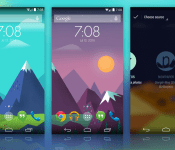
Get This Look: nowPaper

We’re huge fans of changing the home screen around a bit and creating a new user experience for our Android. So much so that we present our ongoing series of Get This Look posts. In a nutshell we show you a new layout, app, widget, or icon set for your Android handset and tell you which apps you’ll need to mimic the feel.
Some of these are a little easier to create than others and many of them can be tweaked to no end. The following details are but the ingredients to which you can create your own delicious Android dish; your results will vary. Which is awesome! If nothing else, this is a great way to discover new apps, widgets, icons, and more!
nowPaper by Alex Pasgquarella and Jaxon Wright
Why we love this look:
Who doesn’t love the Google Now designs and artwork that come with your mobile searches? And, really, who doesn’t love Muzei Live Wallpaper? Combining the two in a Reese’s Peanut Butter Cup-esque mashup we get a constant rotating wallpaper that employs the flat and colorful design language. This is one of those set it and forget apps that brings a new look at regular intervals.
For those who prefer to download a static image and set it as a wallpaper, Alex is offering those on his website.
What you’ll need:
The post Get This Look: nowPaper appeared first on AndroidGuys.
Hacking the friendly skies: creating apps for wearables at 36,000 feet

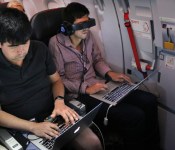
Few activities are as taxing, time-consuming and mentally draining as air travel, and there are hundreds of thousands of travel-related apps to help us get from point A to point B with as little hassle as possible. But there’s always room for improvement, especially now that wearables like Android Wear, the Pebble smartwatch and embedded sensors are growing in popularity. While it’s already possible to scan boarding passes or receive flight notifications on smartwatches, there are surely other use cases that would ease the burden of flying. Wearable World, which teaches wearable-related startups the ins and outs of the business, partnered with American Airlines to create what it’s billing as “the first in-air wearables hackathon.” Teams were asked to come up with the best travel app for wearables, and the finalists got to jump on one of the airline’s newest planes to polish their app and show it off to real-life passengers.

Calling it an “in-flight hackathon” is debatable, since the biggest chunk of the event actually took place on the ground in San Francisco. In traditional hackathon style, 200 developers had 24 hours to create a travel-related wearables app from scratch. Finalists were chosen and given 30 days to work on their app before it was time to get on an Airbus A321T from San Francisco to JFK Airport. Here, the four teams tested their creations in a real-life setting, which included going through security, boarding the plane, using in-flight WiFi (Gogo was a sponsor) and limited workspace in Economy Class. This was their last chance to make any tweaks based on their in-flight experience. The next day, each finalist boarded another A321T bound for San Francisco and pitched several people on the flight who acted as judges.

The winning app came from UsTwo (the creators of Monument Valley), and is handy for family or close friends that like to monitor where you are in your travels. As you arrive at the airport, make it through security, board the plane, take off and land, the app pushes notifications to both you and another person of your choice. Even though two devices are involved, each one shows different information based on who’s using it; your device (and smartwatch, if applicable) shows flight information, boarding passes and other details that may help you get to the plane, while your loved one will get updated on what stage of the experience you’re in. When you’re in-flight, they’ll also be able to follow your plane’s location.
Since GPS isn’t available indoors, the app relies on a network of common-use iBeacons placed at various points within the airport (known as the SITA registry, it’s currently undergoing a trial run at Dallas/Fort Worth Airport). The beacons communicate with your phone as you pass by, and the app will send notifications as it detects each one along the way. The primary issue is that the app relies on these beacons in order to work in every airport. As a result, it may be limited to use in specific locations at first.

Next up was InFlight Social, an app that wants to connect you with other people on the plane. When you get on the flight and connect to WiFi, InFlight Social can detect if anyone else on the plane is using the app; then, by looking at your Facebook and LinkedIn accounts, it will determine if anyone has mutual friends or associates. Once a connection is established, the app will check Concur to see where the two of you are going — perhaps both of you are going to the same conference or staying at the same hotel, so why not split a cab or car rental? Or, if that’s not really your thing, you can send your new pal a welcome gift online via MasterCard. The problem is that many travelers prefer to keep to themselves and will balk at the idea that other people can see their travel itinerary, even if both of you know the same people. Fortunately, your information can only be picked up by others if you download the app, opt-in to the service and are connected to Gogo.
Proximity Signage was put together by NewAer, a company that licenses proximity-advertising software to other businesses. As you step off the plane, digital signs will be there to greet you with personalized suggestions on where to go based on your connecting-flight info, along with travel and shopping preferences. If you’re getting to another flight, the signs provide you with gate information as well as a map and a place to get your favorite coffee along the way; if you’re at your final destination, it could tell you how to get to baggage claim or ground transportation. To address privacy concerns, as soon as you walk by the sign, the personal messages are deleted and replaced with a generic screen. (The company said that wearables easily fit into this situation, but no demonstrations took place.)

The company refers to the tech, which is already available to developers, as “reverse iBeacons”; whereas iBeacons ping your phone incessantly whenever you pass by, in this case your phone actually pings the signs and relays profile information. The software can easily be extended to other uses, such as personalized advertising at mall kiosks, file exchanges between mobile devices, automatic check-ins to locations and even unlocking your car.
Finally, if you have pets in the cargo area of the plane, Furry Flyers will be helpful. Embed a sensor into your pet’s collar that tracks their location, heart rate, temperature and other conditions. It also includes a handy checklist of your pet’s lengthy onboarding process, so you can make sure they’ll get on. If the team finds success with the app, it wants to eventually make it possible for you to talk to (and perhaps even see) your dog or cat during the trip. This may put an anxious pet owner at ease during the flight — as long as everything is going well for Fluffy. If things take a turn for the worse, well… your travels just became much more stressful.

None of these apps are available yet, and some of them may never make it into an app store. But the hackathon served its purpose: It gave developers an opportunity to come up with creative travel-related uses for wearables, Bluetooth beacons and smartphones. As the tech continues to grow in popularity, the more impact these types of events can have. And when it comes to travel, any app that makes life easier is a welcome one.
Filed under: Cellphones, Wearables, Software, Mobile

Google adds former Ford CEO Alan Mulally to its Board of Directors

Just a few months ago Alan Mulally was being mentioned as the possible next CEO of Microsoft, but after leaving his position as CEO of Ford he’s now aligned with a different tech company: Google. Google announced today that he’s joined its Board of Directors, effective July 9th. While his connections to the auto industry could obviously be valuable for projects like Android Auto and the development of self-driving cars, Google’s announcement also mentions his aviation experience as a former executive at Boeing. Mulally was president of Boeing’s space and defense business, and between Project Loon, drones and satellite launches we figure there’s plenty of input to provide there as well.
[Image credit: Bloomberg via Getty Images]
Filed under: Transportation, Internet, Google
Source: Google Blog

How to watch football (soccer) now that the World Cup is over

Many are referring to the 2014 World Cup as the best of the modern era — think: since Korea/Japan in 2002. Was it due to the fact it set an incredible amount of viewing records? Or, perhaps, it has to do with how much social networks made the entire experience that much more enjoyable. After all, who could forget all the great memes and Tumblr accounts? The level of play wasn’t bad either, with this year’s tournament leaving behind formidable memories of great individual (Guillermo Ochoa against Brazil, Tim Howard against Belgium) and team (Germany’s 7-1 thrashing of Brazil) performances. There’s a reason why the sport is nicknamed “The World’s Beautiful Game.” Thankfully, football doesn’t stop here. While we wait for the next World Cup, which Russia will host in 2018, here’s how you, the new (or old) fan, can keep up with some of the professional leagues from across the globe.
It’s worth nothing that most 2014-2015 seasons in Europe are set to begin next month, while others like Mexico’s Liga MX will kick off later this week. Major League Soccer, meanwhile, is already midway through its season — the US league was about the only one still active during the World Cup. In general, most league matches take place over the weekend, although some do happen during the work/school week, especially once the Champions League and Europa League start.
Do keep in mind this is for people who want to watch here in the States, live or on-demand, as broadcasting rights do vary by country. Furthermore, if the cable/satellite providers or networks we mention carry any of these leagues, be sure to use one of their TV-everywhere offerings, such as the WatchESPN or Univision Deportes apps, this way you can enjoy games across different devices.
So, without further ado.
Liga BBVA, Spain

Network: (English) beIN Sports, (Spanish) beIN Sports en Español.
Available on most TV service providers; offers apps on the web, iOS and Android.
Premier League, United Kingdom

Network: (English) NBC, NBC Sports; (Spanish) Telemundo, Mun2.
These channels are also carried by most TV service carriers. On mobile and the web, there’s NBC Sports Live Extra. Similarly, Telemundo has an app for iOS and Android, which you can use to watch some games while on the go.
Bundesliga, Germany

Network: (English and Spanish) GolTV.
This one is far from perfect. Comcast, the largest cable provider in the US, dropped the channel not long ago, so that’s already a huge chunk of people left out. That said, GolTV is still available on Time Warner Cable and DirecTV, but maybe not for long — the latter currently downgraded the channel to SD-only. To make matters worse, GolTV doesn’t have any apps. Which is to say, keeping up with Bayern Munich, home to more than half of world champion Germany’s starting players, may be a little tough.
The good news is Fox recently acquired the Bundesliga rights, starting with the 2015-2016 season.
Ligue 1, France

Network: (English) beIN Sports, (Spanish) beIN Sports en Español.
Same broadcasting deal as Spain’s La Liga.
Here, however, you’ll find different talent, including star players like Zlatan Ibrahimović and World Cup sensation James Rodríguez. (FYI: His first name is pronounced “hahm-ez.”)
Serie A, Italy

Network: (English) beIN Sports, (Spanish) beIN Sports en Español.
Similar to France’s Ligue 1 and Spain’s La Liga, Italy’s Serie A belongs to beIN Sports Stateside. It is one of the world’s best leagues, featuring teams like A.C. Milan, Inter Milan and Juventus. Most importantly, Andrea Pirlo, the man you see above, plays his trade there — and you should try to watch him in action any chance you get.
Liga MX, Mexico

South of the border, the federation in charge operates slightly differently than the rest of the pack. As such, finding Liga MX matches to watch will be a rather easy task.
Networks: (English) ESPN, (Spanish) ESPN Deportes; Univision, Univision Deportes Network and UniMas; Telemundo; Fox Deportes; and Azteca America, all available en Español.
Better yet, the majority of these channels are widely adopted by service providers. Still, things are more complicated here, since each team can play on a different network depending on whether they play at home or away. For example, Club America’s home games will always be on one of Univision’s properties, since it licensed the rights to that particular team.
Regardless, it’s a league you should be keeping an eye on.
Major League Soccer, United States and Canada

Networks: (English) ESPN and NBC Sports; (Spanish) Univision, Univision Deportes Network and UniMas.
Along with those channels, which you should have no trouble finding within your TV package, there’s also MLS Live, which offers access to live (out-of-market) and on-demand matches. Since the season is already well underway, a mere $32 gets you in for the remainder — Major League Soccer says demand for subscriptions has skyrocketed since the World Cup.
If you fell in love with the national team’s performance at the World Cup, then you should definitely be paying attention to MLS. Clint Dempsey, DeAndre Yedlin, Graham Zusi are a few players you can expect to watch as the season progresses. More importantly, supporting Major League Soccer is key for the development and growth of US soccer, and the sport as a whole in this country.
Beyond 2014, MLS will have a larger presence everywhere, thanks to new deals with ESPN, Fox and Univision.
Other Club Competitions

Networks: (English) Fox, Fox Sports 1 and Fox Sports Go; (Spanish) Fox Deportes.
Networks: (English) Fox Sports and (Spanish) ESPN Deportes.
[Image credits: Getty, Associated Press]
Filed under: Home Entertainment, Internet, HD, Mobile
 AIVAnet