


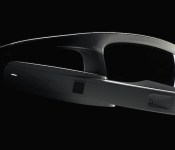
Recon’s ‘Google Glass’ for sports gets a finalized design ahead of September launch

No, the Recon Jet still isn’t out yet, but its manufacturer has a few bits of news to share. For starters, the sports-minded heads up display’s brain box is now angled slightly upward, which supposedly improves the display’s viewing angle and camera orientation. This tweak apparently boosts the HUD’s ergonomics and makes it fit a bit better, too. The Jet is also now rated to IP65 standard, which means it’ll be able to withstand dust and torrential rainstorms. Don’t think that it’ll work on your next swim, though, because submerging the unit is apparently out of the question. The outfit (thankfully) doesn’t mention any changes to its September 25th release date, either, but it is spending the next month working on testing the Jet. Oh, and there’s a protective case in the works too — all the better to keep your $700 investment safe and sound. How protected to the Jet remains while it’s on your face, however, well, that’s up to you.
Filed under: Wearables
Source: Recon Instruments

Starbucks wants you to use its app for payments in other stores

Starbucks’ mobile apps could soon let you buy much more than your next grande latte. The coffee shop’s digital lead, Adam Brotman, tells Recode that the coffee shop giant is talking to companies about using its app for payments and loyalty programs in other stores. He’s not naming any would-be allies, but the strategy would turn a fairly ordinary restaurant app into more of a universal digital wallet that just happens to focus on drinks. And even if that doesn’t pan out, Starbucks is still committed to expanding the role of its software — it’s determined to offer coffee pre-orders across the US, regardless how long it takes to make the feature work.
Filed under: Cellphones, Internet, Mobile
Source: Recode

At loggerheads: Google and Samsung are having a spat over Wearables
 Over the last few months, we’ve heard plenty of reports that Samsung has started to comply with Google guidelines more at Google’s request. Things like TouchWiz customization and Samsung Apps have been tuned down a lot since then, so you might have been forgiven for thinking Samsung and Google have been coexisting happily ever since. There could be some trouble in paradise though, as reports are saying Google and Samsung are having a spat over wearables, specifically the new Tizen-based smartwatches that Samsung pushed out earlier this year.
Earlier this month, there was reportedly a “tense private meeting” between Google CEO, Larry Page, and Samsung Vice Chairman, Jay Y. Lee, in which Page made clear that he was not impressed with Samsung putting in so much more effort into their Tizen smartwatches than their Android Wear devices. You can definitely see why Page has voiced this concern; the recently released Gear Live is basically the Gear 2 with cheaper parts, though it’s not unheard of for Samsung to re-use slightly tweaked designs for new devices.
What do you think about Samsung and Google arguing over wearables? Think Google has grounds to be worried? Let us know what you think.
Source: The Information via The Verge
//<![CDATA[
ord = window.ord || Math.floor(Math.random()*1E16);
document.write('’);
//]]>
The post At loggerheads: Google and Samsung are having a spat over Wearables appeared first on AndroidSPIN.

Feedback Loop: Crowdfunding perils, dying passwords, cameras and more!

It’s time for the latest edition of Feedback Loop! We discuss the dark and sometimes disappointing side of crowdfunding, ponder whether passwords are dying, look for point-and-shoot camera suggestions, share the cheapest ways to get HBO and talk about overly hyped gadgets. Head past the break to talk about all this and more with your fellow Engadget readers.
The perils of crowdfunding
For every great product that comes out of crowdfunding sites like Indiegogo or Kickstarter, it seems there’s an conversely horrible story about something that never shipped or lived up to expectations. Our own John Colucci discusses the darker side of this phenomenon and readers chimed in to share their own experiences. Do you have any crazy Kickstarter stories to tell?
Is the password really dying?
After enabling two-factor authentication on his personal Twitter account, a Wall Street Journal reporter shared his password with the public. He argues that “the password is finally dying.” Is he crazy? We discuss whether this is actually the case. Are passwords really dying? And what happens to two-factor authentication when you share one of your factors? Head over to the forums and sound off!
Point-and-shoot camera suggestions
Engadget forums user Baileylo recently welcomed a new member to his family. Congrats, Logan! He’s looking for a new camera to properly capture those special moments. What’s a good point-and-shoot under $500 that can work in a variety of lighting situations? Let him know!
What’s the cheapest way to get HBO?
HBO is basically the Holy grail of premium cable TV. Everyone wants it, but not everyone wants to pay for all the packages needed to get it. Is it possible to get access to HBO without subscribing to a ton of unnecessary channels? Or are we stuck sharing our parents’ HBO Go access? Share your tips and tricks right here.
Over-hyped gadget sightings
There have been a number of gadgets that have received tons of hype and press, only to end up forgotten and unloved. Things like the Microsoft Kin One, the Kin Two, the Nexus Q and even more recent examples like the Lytro and Samsung Galaxy Gear. Frank talks about seeing some of these “gadget unicorns” out in the wild. What are some surprising and unloved gadgets you’ve seen when you’ve been out and about?
Other discussions you may also like:
- What do you want to know about the Destiny beta?
- With new power restrictions on portable devices, how will TSA handle battery packs?
- Halt and Catch Fire S1E7: There’s a sucker born every minute
- Today is the 4th Anniversary of the 1st Instagram
That’s all this week! Want to talk about your favorite gadget or have a burning question about technology? Register for an Engadget account today, visit the Engadget forums and start a new discussion!
How I Android (mid-2014)

The beauty of Android is in the ability to customize it, do whatever you like and use it as such. In other words you’re not nearly as limited as you are in other mobile platforms. Of course there are some limitations on Android as well, but even those disappear once you root the device. I haven’t rooted the devices I use for a long time now, I just don’t feel the need to although I can get numerous advantages by doing that. EIther way, we’re not here to talk about rooting or anything of the sort.
I am however going to talk about the way I use my device(s) and what my current setup looks like, who knows, maybe I give you an idea or two and you do the same in return via comments down below.
In general
I’ve used tons of launchers, widgets, icons, wallpapers and general customization-oriented apps for tweaking every certain part of my device(s). I used to have 5+ home screens full of widgets out of which every one of them served a specific purpose. As time passed by I got bored by all that and have used all sorts of launchers which don’t support widgets (or didn’t at the time), at least not regular ones, like Smart Launcher and WIndows Phone-like Launcher 7 and 8. Those lacked productivity, at least for my taste, so I got back to Nova Launcher Prime along with some others, I just can’t seem to stick with one. Considering I didn’t want to go back to using a bunch of home screens I found a way to use just one and keep the productivity in place. Which brings me to my current setup(s)…
Home screen
I currently use Action Launcher Pro on my smartphone even though I always go back to Nova Launcher Prime (my setup is rather similar though and I constantly switch between the two), I just wanted to change things up a bit. Anyhow, as I said, my setup looks rather simple, even though there’s lots of productivity hiding behind this screen. Starting from the bottom you can see I use a dock similar to basically every other Android layout, this is where some of Action Launcher’s features come in handy. You might notice that three icons (1st, 3rd and 5th) have a little transparent square in the bottom right corner, Chomp SMS, Chrome and Phone. This is symbolizing one of Action Launcher’s features called “Covers”. These are basically folders which offer more functionality, instead of sticking a bunch of icons inside and taping on the folder to open them, you swipe the icon up to open it and if you tap it the 1st icon inside a folder will launch. So you can basically place whatever you want inside a folder first and not only will that open if you tap on the folder but the folder icon will look like the 1st icon inside of it. So let us take Chrome for example, you can see Chrome folder (or “Cover” if you will) opened in the image below. First place in that folder is Chrome app icon and everything else are bookmarks. I’ve done that very same thing with my SMS contacts (hiding in the Chomp SMS folder/Cover) and my Phone contacts (Phone folder/Cover). So all I have to do in order to send a direct SMS to someone for example is swipe up Chomp SMS folder/Cover and tap who I want to send it to, same goes for a direct call. The widget containing Wi-Fi, data connection, bluetooth, flashlight, screen rotation lock, sound toggle and sound settings comes from an app called Power Toggles which lets you add lots of things here and make it suit your needs, it’s also easy to use. One more thing to note is that I also use gestures, swipe up for recent apps and double tap in order to turn off the screen.

Side-screens, Action Launcher style
Now that we’ve covered the home screen looks and functionality we can jump in the rest of it. As I already mentioned, I like to have only 1 Android home screen when using my device, that doesn’t mean I can’t have side-screens though. Those of you who haven’t used Action Launcher might be a bit confused, let me explain.
In Action Launcher, when you’re on your home screen and swipe from left to right you get a list of your apps (you can of course hide the ones you don’t want there) and widgets, what is called a “Quickdrawer”. When you do the opposite, swipe from right to left you get what the developer calls a “Quickpage”. This is basically additional space or an additional screen in which you can place your icons/widgets in. The functionality is basically the same as if you have an extra screen on the side. Now you probably wonder why don’t I just add an extra screen instead of this, well… it looks better and I like it this way. Kind of a stupid reason, I know, but hey, to each its own. You can however get some extra use out of this if you enable a feature which lets you call upon this screen from wherever you are on your phone, but I opted not to use this.
As you can see in the right image below, I use four widgets on my “Quickpage”. From top to bottom: Google Keep, Play Music, Cal (calendar) and Pocketcasts widgets. I can live without the “Quickpage” screen though, I actually do that rather often when I switch to Nova Launcher Prime.

Notification tray and icons
I use a few apps on top of my vanilla 4.4.4 KitKat notification tray (first image below). From top to bottom: Lux, Weather and a persistent Facebook Messenger widget which makes it possible to call on Messenger chats in a pop-up window (Chat Heads) overlaying whatever I’m currently on. You may also notice my Google Now cards pop-up there from time to time, so I have 2 weather notifications there at times. I used only Google Now for weather for a long time but it was inaccurate a few times on my location recently so I decided to search for an alternative. Weather is working just fine for now and I really like the design of the app. Lux is probably one of the most useful apps I’ve purchased, that one thin line in the notification tray helps a lot when it comes to tweaking your screen’s brightness and what not. I’m not going to go in too much detail here, though I might do a “What’s on my Android” or something like that in order to show you all the apps I’m currently using.
As far as icons go I used to switch between different icon packs a lot. Lately however, I’m using only two, Stark and Aloha icons. Both of these icons are flat in design and I really dig both of them. You can check out Aloha icons on the second image below this paragraph, and Stark in all the images above. Regarding wallpapers, I choose the one I like and I tend to stick with it for a long time. Like the one I’m using now for example, blurred rain drops, fits me perfectly. It’s pretty and easy on the eyes, I generally tend to pick blurred wallpapers or blur them myself.

Conclusion
In short, this is how I use my device. I could of course go step-by-step and tell you about my usual day and usage scenarios, but we’ll leave that for some other time. I just wanted to show you how my smartphone looks and functions for me on a daily basis. Other than my Nexus 4, I also use a Nexus 7 (2012) tablet. My launcher of choice over there is Nova Launcher Prime and the setup is pretty much the same as it is here, except there are no Action Launcher features over there. I did however set up the folders to act the same way as they do here and I take advantage of Nova Launcher’s gestures while still using one home screen.
There you have it, that’s basically it. From heavy customizations and root to simple but productive ones. How about you? What does your phone/tablet looks like? How do you use it?
The post How I Android (mid-2014) appeared first on AndroidGuys.
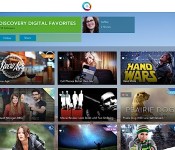
The curated video service from TiVo’s founders, Qplay, is shutting down

TiVo’s co-founders launched their Qplay service in hopes of becoming the central hub for all your online video viewing. Unfortunately, it looks like that media utopia wasn’t meant to be. Just three months after its official debut, Qplay has revealed that it’s shutting down; it’s “not possible” to run the service any longer, the team says. You’ll have until July 25th to get your fill of content, and you can get a refund for the TV adapter if you make a request before that cut-off date. The company isn’t commenting on the exact reasons behind the closure, but this is certainly going to catch some internet video aficionados off-guard. If you’re one of them, you’ll have to turn to discovery services like Showyou to get a similar fix.
Filed under: Home Entertainment, Internet, HD
Source: Qplay

Google reportedly confronted Samsung over its approach to smartwatches

The strained relationship between Google and Samsung over Android customization has been apparent for a while, and it now looks like this discontent has spread to the wearable world. The Information claims that Google CEO Larry Page confronted Samsung last week over its decision to invest more in its Tizen-based Gear 2 and Gear Fit smartwatches than the Android Wear-packing Gear Live. While the details of Page’s discussions aren’t available, it’s clear that Google wants its biggest hardware partner to devote more attention to its Android-based platform. Reportedly, Google had even wanted Samsung to avoid dipping into wrist-worn technology until Android Wear was ready. As we know now, the Korean company didn’t exactly honor that request — instead, it released the Galaxy Gear (initially using a heavily customized Android) and quickly threw most of its energy into Tizen peripherals.
Neither firm has commented on the disagreement. However, a scrap over wearables isn’t completely shocking. Google is trying to rein manufacturers in by requiring that they use its stock interface on Android Wear equipment; that’s not going to please Samsung, which has spent a lot of time customizing Android in an attempt to stand out. The Gear Live’s very existence suggests that Samsung is being somewhat accommodating. If the leak is accurate, though, Google may not be truly happy unless that device takes center stage in Samsung’s lineup.
Filed under: Cellphones, Wearables, Mobile, Samsung, Google
Via: 9to5Google
Source: The Information

McMoon’s and the Lunar Orbiter Image Recovery Project

If you’ve ever used Street View on Google Maps to preview an unfamiliar travel destination, then you’ll understand the reasoning behind NASA’s Lunar Orbiter missions during the late ’60s. The space probes were doing reconnaissance and beamed back 160 pairs of images covering a total of 12,000 square miles of lunar landscape. Unfortunately, the technology at the time resulted in less-than-ideal photographic quality. In 2008, however, a group called the Lunar Orbiter Image Recovery Project (LOIRP) was able to track down the original tapes and restore them to their full resolution. The LOIRP set up shop in an abandoned McDonald’s — which they dubbed McMoon’s — near the NASA Ames Research Park in California and began wrangling archived tape reels and defunct machinery to help them achieve their goal. The story was documented for the Carnegie Museum of Art (CMOA) and released this week as Extraterrestrial: The Lunar Orbiter Image Recovery Project. It’s the third installment of CMOA’s The Invisible Photograph series, which deals with imagery that’s been lost, degraded or almost destroyed.
In preparation for the Apollo 11 moon landing, NASA launched five successive probes between 1966 and 1967 to explore the Moon’s surface scouting for viable landing sites and scientific research locations. The probes were able to snap photographs of the moon’s surface using traditional film cameras from an orbit as low as 28 miles. The film was developed on board the craft, scanned and then beamed to Earth where the data was recorded onto 70mm magnetic tapes. NASA converted that information to photographs using 35mm film at a 250:1 dynamic range (essentially 8-bit quality). Data on the original tapes, however, had been captured at 1000:1, four times the resolution of what NASA had been able to output at the time. The Lunar Orbiter Image Recovery Project tracked down the originals and managed to acquire vintage machines like Ampex FR-900 tape drives to reclaim the images at their full resolution. The project was a success, and this is their story:
Filed under: Science
Source: CMOA
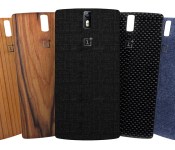
Get a new look on the cheap with these customizable phones

Deep-pocketed power users may buy new smartphones once a year or even every few months to take advantage of improved displays, better cameras and faster processors, but the majority of owners are more likely to tire of their device’s appearance long before its outdated specs. A few manufacturers have taken a new approach when designing their handsets, opting to include not only replaceable batteries, but also swappable backs, that let you change the look of your phone for only a few bucks. Samsung’s Galaxy S5 and LG’s G3 are two recent flagships that you can change up after purchase, but there are a few other options to consider, too. If you’re feeling extra ambitious, you could even replace the backplate on, say, an iPhone 5s, but such an undertaking requires precise work, pricier parts and a voided warranty. Click through for our customizable picks that keep things simple (and cheap).
Filed under: Cellphones, Mobile, Samsung, Microsoft, Nokia, ASUS, LG

Recommended Reading: Gauging the smartwatch craze and skin listening
Recommended Reading highlights the best long-form writing on technology and more in print and on the web. Some weeks, you’ll also find short reviews of books that we think are worth your time. We hope you enjoy the read.

Does Anyone Outside Silicon Valley Even Want a Smartwatch?
by Kevin Roose,
New York MagazinePocket!function(d,i)if(!d.getElementById(i))var j=d.createElement(“script”);j.id=i;j.src=”https://widgets.getpocket.com/v1/j/btn.js?v=1″;var w=d.getElementById(i);d.body.appendChild(j);(document,”pocket-btn-js”);
The first wave of smartwatches has its popular entries (ahem, Pebble), but widespread adoption has yet to take hold. With Google’s Android Wear initiative, new options bring closer ties with the operating system and improved aesthetics. But is that enough to attract the masses? Do people really want an extension of their phone as a wrist-worn device?
|
Music for your Skin The current gadget landscape features a number of devices that provide tactile feedback through vibrations. Devices from smartphones to game controllers serve up said alerts for new activity or enhanced experiences. But what if that sort of dermal interaction could be used to hear music? Well, researchers are working on ways to experience music and sound with our epidermis, and not our ears. Pocket!function(d,i)if(!d.getElementById(i))var j=d.createElement(“script”);j.id=i;j.src=”https://widgets.getpocket.com/v1/j/btn.js?v=1″;var w=d.getElementById(i);d.body.appendChild(j);(document,”pocket-btn-js”);
|
Meet ‘Project Zero,’ Google’s Secret Team of Bug-Hunting Hackers This week, Google revealed a group of hackers it’s calling Project Zero, tasked with sniffing out security flaws in software. It sounds very covert ops, and the team is looking to nix the so-called zero-day issues before they’re exploited by those seeking to do harm. Wired has a detailed look at the cleanup initiative. Pocket!function(d,i)if(!d.getElementById(i))var j=d.createElement(“script”);j.id=i;j.src=”https://widgets.getpocket.com/v1/j/btn.js?v=1″;var w=d.getElementById(i);d.body.appendChild(j);(document,”pocket-btn-js”); |
|
The Rise of the Wedding Drone It’s no secret that drones have become a popular choice for filmmakers to capture amazing footage without chartering a chopper. That said, shooting a wedding with the remote-controlled vehicles has become an increasingly popular, albeit expensive, option. Of course, given the FAA’s stance on commercial drones, this could lead to further issues if you’re looking for a bird’s-eye view of your nuptials. Pocket!function(d,i)if(!d.getElementById(i))var j=d.createElement(“script”);j.id=i;j.src=”https://widgets.getpocket.com/v1/j/btn.js?v=1″;var w=d.getElementById(i);d.body.appendChild(j);(document,”pocket-btn-js”); |
How Google’s New Font Tries to Anticipate the Future Google first outed its Android-mined font Roboto alongside Android 4.0 (Ice Cream Sandwich) a couple years back. The folks in Mountain View have spent over a year redesigning the typeface for use not only on mobile devices, but also on the screens of wearables and smart TVs. Android’s head of design Mathias Duarte tells Wired that “the idea of having a typeface that’s thought out as a UI typeface — that’s not been done before.” Pocket!function(d,i)if(!d.getElementById(i))var j=d.createElement(“script”);j.id=i;j.src=”https://widgets.getpocket.com/v1/j/btn.js?v=1″;var w=d.getElementById(i);d.body.appendChild(j);(document,”pocket-btn-js”); |
Filed under: Misc
 AIVAnet