



DU Battery Saver Means More Power and More Fun! (Sponsored Review)

When it comes to our precious devices, battery life is crucial to getting through our busy day. It’s hard to believe we didn’t have these devices before, and now if the battery starts running low, we panic to find a power outlet. DU Battery Saver wants to help your battery’s health, and will use different tools to get your device through your day on one charge. DU Battery Saver is rated pretty high in the Google Play Store, so if you haven’t tried it out yet, I suggest doing so if you are suffering through battery woes. Check out my video review below to see DU Battery Saver in action.
//<![CDATA[
ord = window.ord || Math.floor(Math.random()*1E16);
document.write('’);
//]]>
The post DU Battery Saver Means More Power and More Fun! (Sponsored Review) appeared first on AndroidSPIN.

Twitch for Android now puts the biggest game streams front and center

If you regularly catch up on eSports or “let’s play” sessions while on the move, today’s your lucky day. Twitch has revamped its Android app with a fresh interface that lets you get to the biggest game streams as quickly as possible, with impossible-to-miss links to the hottest titles. It’s also much better suited to tablets, and you can now check out both user profiles and offline channels; that’s handy if you missed a big event or want to follow someone with similar tastes. It’s much easier to sift through search results, too. The remake isn’t well-timed — it’s arriving right as Valve’s The International tournament is winding to a close — but it’s still a big deal if you like to spectate games as often as you play them.
Filed under: Cellphones, Gaming, Tablets, Mobile
Source: Google Play, Twitch

HTC smartwatch makes cameo in a behind-the-scenes design Video
 HTC has allegedly been working on a smartwatch for some time now, and with the release of Android Wear, the rumour mill is inevitably turning again. A supposed render of the HTC smartwatch was leaked out last week by @evleaks, though we remained cautious of it, however it appears a leak of the wearable might have happened even before that, and in HTC’s own behind-the-scenes video.
At around the 35 second mark, a watch-like device is quite visible on the designer’s desk, though it’s hard to get a good look at its features. It looks like a square-faced device, not unlike the LG G Watch, and does seem to vaguely resemble the leaked image we saw last week. It’s not a good enough look to say that it absolutely is the same device as that leak, but it can’t dispel it either. Whatever the watch really looks like, if this was intentional, it seems HTC looks like it is ready to drop us subtle hints about its brand-new wearable.
What do you think about the cameo of the HTC smartwatch in the above video? Do you think this was intentional or unintentional? Let us know your thoughts in the comments.
Source: HTCSource via Phandroid
//<![CDATA[
ord = window.ord || Math.floor(Math.random()*1E16);
document.write('’);
//]]>
The post HTC smartwatch makes cameo in a behind-the-scenes design Video appeared first on AndroidSPIN.

DU Speed Booster Means More Speed and More Fun! (Sponsored Review)

Need a little bit of speed added to your device? DU Speed Booster is here to help. This unique speed booster app makes it quick and easy to free some of your device’s memory, as well help the battery life. There is also a sort of game element added to this app, which makes for some great animations, and little Easter Egg’s of fun. Check out my video review of DU Speed Booster below to see it in action.
//<![CDATA[
ord = window.ord || Math.floor(Math.random()*1E16);
document.write('’);
//]]>
The post DU Speed Booster Means More Speed and More Fun! (Sponsored Review) appeared first on AndroidSPIN.

Baidu Browser Brings a Different Kind of Browser Experience (Sponsored Review)

Baidu Browser brings you an all new browser experience that is quite different from the rest. Not only is a super-quick browser experience, it also has a news feed and a homescreen to get your favorite kind of information once you open it up. It is really quite interesting, and anyone who is looking for a different kind of browser experience should take a stab at this one. Check out my video run-through below to see Baidu Browser in action.
//<![CDATA[
ord = window.ord || Math.floor(Math.random()*1E16);
document.write('’);
//]]>
The post Baidu Browser Brings a Different Kind of Browser Experience (Sponsored Review) appeared first on AndroidSPIN.
Hands-On With Apple’s New Tips App in iOS 8 Beta 4 [iOS Blog]
iOS 8 beta 4, released earlier today, included a new app called Tips, which is designed to offer iOS 8 users information about all of the new features in the operating system.
Tips was first hinted at during Apple’s Worldwide Developers Conference, shown briefly on a display that rounded up dozens of unmentioned iOS 8 features, but it was missing from the iOS 8 betas until today.
It was unclear what would be included in the Tips app, but it turns out Tips is a simple tutorial-style app that gives users a look at some of the various features in iOS 8, using text, images, and brief animations.
As detailed in the above video, the Tips app has the following sections: Quickly respond to a notification, Notify me when there’s a reply (in Mail), Hey Siri (on hands-free Siri operation), Send a spoken message (in Messages), Quickly manage your mail (using gestures), and Be in the shot (camera timer mode).
Tips has a simple interface that opens directly into the first tip, using swipe gestures to navigate through available content. There’s a menu button on the bottom of the screen that gives a list of all the available tips, and each tip can be shared via Message, Mail, Facebook, or Twitter using the app’s share sheet. There’s also a “Like” feature, which most likely gives Apple information on which tips are most popular.
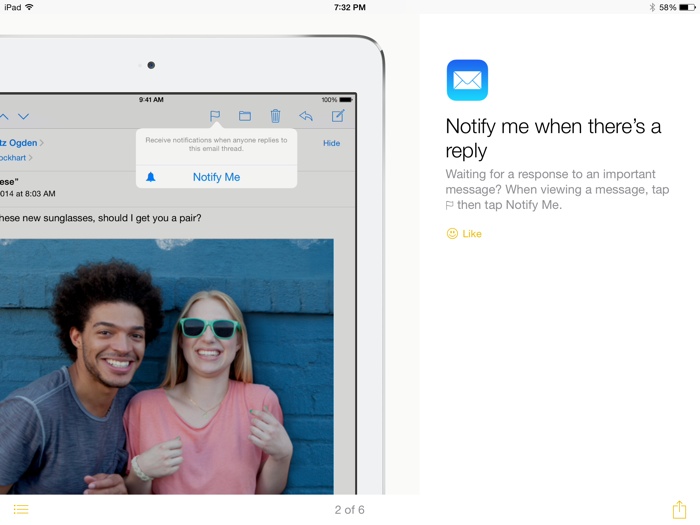
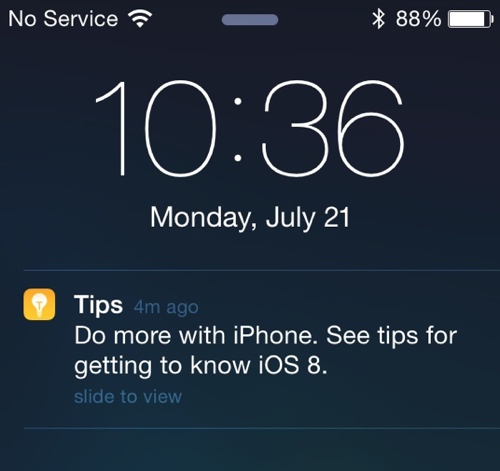
While there are only six different tips available in the app right now, an ending page suggests that users “Check back for new tips every week,” indicating the app will be updated on a weekly basis. There’s also a link to Apple’s iOS 8 website, and the app will send notifications to users when new tips are available.
Tips probably won’t be a feature that’s useful for seasoned iOS users, but for users who aren’t familiar with the ins and outs of the operating system, the app will provide valuable information on accessing new features.
Tips is only available to registered developers who have iOS 8 beta 4 installed on their devices, but it will become available to all users this fall, when iOS 8 is released to the public.

Chrome OS adds pinch-to-zoom for regular users, Pixel owners rejoice

When Google launched the Chromebook Pixel, we weren’t really sure what to make of the premium device’s touchscreen. Sure, finger-friendly displays were trendy, but Chrome OS just wasn’t asking for the technologies: it didn’t feature many touch apps, the laptop didn’t launch with a gesture update and user’s couldn’t even pinch-zoom web pages. Now, that’s changing — to go along with more touch-enabled Chromebooks now on sale, the latest update to Chrome OS’ stable channel adds a touch-enabled window manager and pinch/zoom webpage scaling.
[Image credit: François Beaufort]
The updated touch features have been around for a while, but Chrome OS users had to be on the “Canary” release channel to play around with the system’s unfinished features until recently. Google’s also been experimenting with a on-screen keyboard for some time. Put together, these features could make Chrome OS a viable options for tablets (and in the near future, convertibles like Lenovo’s Yoga), though Google hasn’t announced anything of that nature. Check out the company’s official update notes at the source link below.
Source: Chrome Releases Blog

Wii U update lets you shop without the gamepad, enables system transfer

Thinking of upgrading from that basic Wii U system to the deluxe 32GB package? Now you can — the latest system update for Nintendo’s tablet-toting console allows users to transfer data between systems… but it does so in a rather odd way. Rather than allowing users to sign out of their Nintendo Network ID account on their old console and simply log on to a new one, Nintendo’s system transfer process requires both Wii U systems to be simultaneously running in the same place at the same time. On the 3DS, this was an easy proposition, but for a home console like the Wii U, well, the solution seems a bit inelegant.
The update also updates the Nintendo eShop to allow navigation with the Wii Remote, Wii U Pro Controller or Classic Controller. This seems minor, but it’s actually a very convenient fix: until now, the Wii U digital store could only be navigated using the Wii U GamePad controller, despite having full button controls that would have translated well to the optional Wii U Pro Controller. It’s a good change — now if only Nintendo could bring the same controller compatibly to the console’s virtual Wii menu. In Japan, the update also adds support for NFC payments via Suica card, which is commonly used in convenience stores and train stations.
Source: Nintendo
Anti-surveillance advocates want you to run an open, secure WiFi router

Plenty of WiFi routers have guest modes for visitors; some companies base their entire business models around them. Many of these devices are full of security holes, however, and the Electronic Frontier Foundation doesn’t see that as acceptable in an era where widespread government surveillance is a fact of life. To fix this, it has posted a very early version of custom-built open router firmware that promises both easy access and security. While there is a guest mode, the new firmware (based on the existing CenoWRT) should patch common exploits that leave your home network vulnerable. It will even fetch signatures for updates through the anonymizing Tor network to prevent rogue code from posing as a necessary upgrade.
It’s not all about locking down your access point — there are some conveniences, too. You can limit the bandwidth guests use so that they don’t kill your own connection, and there’s “state-of-the-art” network queuing to make sure that video chats and other lag-sensitive services work as expected. The EFF is also promising ease of use, although you’ll have deep control if you’re handy with a command prompt.
Just watch out before you leap in. The new firmware only works on Netgear’s WNDR3800 so far, and it’s characterized as a “hacker alpha release” that will almost certainly be laden with bugs. Really, this is for developers who want to help the EFF fulfill its dreams of creating a best-of-all-worlds WiFi hotspot. If you’re one of those tinkerer types, you can check out the project at the source link.
Filed under: Networking
Via: Hack A Day
Source: Electronic Frontier Foundation

‘Destiny’ on PS3 is like the PS4 version but blurrier

While a bunch of the hype surrounding the Destiny beta is how great developer Bungie’s latest shooter looks running on the PlayStation 4, gamers on last-gen hardware have been playing through the weekend too. Based on the video that Digital Foundry put together (embedded below), the PlayStation 3 version expectedly doesn’t stack up next to its current-gen counterpart, but it doesn’t look terrible, either. If I were to describe it in one word, it’d be “softer.” The tech-centric outlet notes that while the levels themselves remain the same the overall shape and size, set dressing like foliage and rocks are less dense (and in some cases, completely missing), and lighting is less complex as well. Most impactful, possibly, is the PS3 game’s native resolution. While the PS4 version runs at a native 1920×1080, or 1080p, Destiny on Sony’s previous console is running at 1024×624 (sub-720p) — roughly 30 percent the total pixel count of its current-gen cousin.
The biggest victim? Shadow detail, as evidenced in this thread on NeoGAF. The amount of enemies onscreen, however, apparently doesn’t drop so there should be parity between the two versions in terms of how the game actually plays.
Considering that the PS3 is almost eight years old at this point, however, it’s kind of a miracle that it’s even capable of playing something like Destiny to begin with. And given that there are likely well over 80 million PS3s in the wild at this point and, as of April, only seven million PS4s, it makes sense for developers to continue supporting previous hardware. Take this April’s Watch Dogs and next year’s Mortal Kombat X, for example.
What about you: is Destiny the game you’re upgrading to a new console for (maybe even a white PS4), or hasn’t anything on Sony’s latest or the Xbox One caught your eye yet? The beta is down for maintenance now anyway, so you should have plenty of time to leave us a note!
Filed under: Gaming, Home Entertainment, HD
Via: Eurogamer
Source: YouTube
 AIVAnet