



A newer kind of web tracking is almost impossible to stop

You may think you’re thwarting advertisers and other nosy web citizens by blocking cookies and invoking Do Not Track whenever possible, but that apparently isn’t good enough. Researchers have just documented a newer web tracking technique, canvas fingerprinting, that’s nearly impossible to stop. As it’s simply drawing a unique, hidden image using standard web code, you can’t just filter it out using higher privacy settings or ad blocking tools. You can sometimes opt out of personalization and targeted ads by installing a cookie, but you’re otherwise out of luck unless software can start identifying and blocking these fingerprints.
One of the earliest proponents of the technology has been the social sharing service AddThis, which started public fingerprint testing earlier this year. While you may not have heard of the company, there’s a good chance that you’ve been to one of the sites that uses its tracking; California’s government, Perez Hilton and some porn sites (sorry, folks) are among the notable examples. If there’s any comfort, it’s that the test isn’t all-encompassing and won’t last forever. AddThis isn’t targeting you based on government visits, and the fingerprinting is just inaccurate enough that the company may wind things down soon.
[Image credit: Soe Than Win/AFP/Getty Images]
Filed under: Internet
Via: Pro Publica
Source: The Web Never Forgets (1), (2)
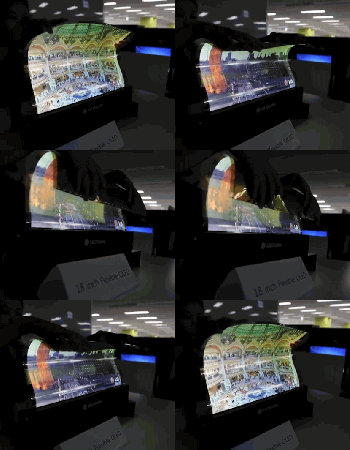
LG’s rollable TVs are (predictably) very flexible

Remember when LG announced that it had managed to create a rollable 18-inch display? Well, here’s the proof: a very much flexible OLED display. The resolution might not be there yet (1,200 x 810, alas) but the hopes and dreams of a picnic-blanket TV set — they’re getting more real every day.
Via: OLED Display
iBolt xProDock Connect Universal Phone Mounting System Review

The iBolt xProDock Connect is the latest universal docking station with NFC support from iBolt to securely position your phone in an easy to view position while driving. The differentiator the iBolt xProDock Connect has over its competition is the application they have developed to make your experience safer and easier to use.
The overall design of the iBolt xProDock mounting system is well thought out and offers a lot of features. The bottom two arms holding your phone are adjustable in every direction and slightly hooked to ensure your phone is never going to fall out. Even with the largest of cases on your phone this dock is still going to adjust to accommodate the size. I’m still using my Samsung Galaxy Note 2 and it fit easily into the dock. Even with my largest case, I had no issues at all.
If you want to find out more about the iBolt xProDock, head over to TheSavvyTechs to read the full review.

//<![CDATA[
ord = window.ord || Math.floor(Math.random()*1E16);
document.write('’);
//]]>
The post iBolt xProDock Connect Universal Phone Mounting System Review appeared first on AndroidSPIN.
Christmas in July: This power user’s Android wishlist

Do you wish stock Android would do a little bit more? Tired of relying on third party developers or manufacturers to add the features you feel should be standard in Android? I could not agree more. As great as Android is, there are some shortcomings in the system. Do not take me the wrong way, I feel it is the greatest mobile operating system in the world, but I think Google should add some of these “no-brainer” features that many manufacturers or developers have added in some way or form into their Android ecosystem.
My first experience with Android was a Samsung Moment, migrating off of a HTC Touch Pro and Windows Mobile. Android 1.5 was rough, but still refreshing and new all at the same time compared to what I was used to. Since that moment four years ago Android has changed enormously. The 2.1/2.2/2.3 updates were the game changing upgrad needed in order to set the device up for world domination under the the 4.x versions of Ice Cream Sandwich, Jelly Bean, and Kit Kat, which now make up an astonishing of 84% of all Android devices. So much for the fragmentation fears everybody was talking about in the early days of Android.
So here we are with the pending release of Android “L” and a slew of new looks and features coming out. As are most avid Android users, I am foaming at the mouth waiting for this new release. While appreciative of the new version coming out, I still hold a resentment with Google over holding out some key features that have not been baked into the Android stock operating system as of yet.
This list is a list of the top five items as compiled by myself and contributors here at AndroidGuys. I would like to think that having these items built into stock Android would give users of all levels a better Android experience.
- Active Listening (Moto X style): It would be pretty nice to not have to turn the screen on to do a Google Search but to just skip right ahead and do it from the standby screen (meaning the screen is off). Is it that hard to turn the phone screen on? No it is not, but again, if we don’t have to do that extra step, why do it? Simplify the process and allow “Ok Google” at any point, even in standby.
- Visual Voicemail: Can you believe that Android does not have it’s own Visual Voicemail app? If you own a Nexus device you know what i am talking about. Instead of having the messages download automatically to your phone so you can listen to whenever you want, you are stuck with that annoying voicemail logo in the notification bar. Yes, I’m pretty sure that Voicemail has to be done by every carrier and is unique for each user, but there has to be someway that it can be worked out. Optimally having this built into the Google Hangouts would be pretty nice. That way you can check your voicemail across systems, kind of how voicemail access works in Google Voice.
- “Knock On” (as used by LG): This is a newer feature, but still it is pretty neat and a very useful feature. Simply by knocking on your cell phone you can shortcut right to your desktop screen. This again is one of those features that just make getting where you want easier instead of going through a couple of steps.
- Extensions: Chrome and Gmail on the desktop have the awesome ability to add extensions to make the browser or your email more functional without having to open up another separate program. Here is a perfect example, I am an avid Yesware user with Gmail. I cannot send an email from my mobile device because it isn’t tracked, rendering my cell and tablet both useless at points and therefore making me run back to my desktop to send the email. This is just one example out of many. Here is another example: Instead of using a Google Analytics App, would it not be easier to just click on the extension in the Chrome Browser? Now yes, Chrome and Gmail are not Android operating system per se, but they are part of the core apps for the Android ecosystem. By allowing extensions Google would only be promoting productivity and making lives easier while using their devices. There would be much less switching apps and much more getting instant information saving users time, energy, and frustration.
- True Multitasking (Samsung Multi Window; Phandroid like multitasking): The king of all features missing is multitasking. Yes, you can have multiple apps open at the same time, but typically, unless you have a rooted device or have a device by a manufacturer like Samsung, you are not going to be able to display two items on the screen at once. Not having this feature built in Android is mind-boggling to me. Yes, it may not make a lot of sense on smaller devices, but the Android game has changed over the past two years as devices are getting larger. 99 percent of all devices now have over four inch screen sizes to where even limited multitasking would be useful (like a calendar view and an email). Once you get into the phablet and tablet world, this feature is a must if you are going to use the tablet for either school or business. I find myself needing sometimes three or four screens to do my job and being locked with one single view on Android does not cut it for me. That is one of the reasons I purchased the Galaxy Note 12.2 because of the size of the screen and the Multi Window support. I can now almost fully replace my desktop computer, unless I need to send a tracked email.
All in all, as I stated, Android is the greatest operating system out there for mobile devices. This post is not set up as a rant against Google, but more to point out some shortcomings in areas that I think most of us will agree would make our mobile experience better.
So now that you have seen my top five wishlist, tell me, what’s yours?
The post Christmas in July: This power user’s Android wishlist appeared first on AndroidGuys.
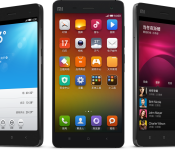
Xiaomi debuts flagship Mi4

Xiaomi on Tuesday introduced the Mi4, a high-end device with a wallet friendly price point. Details include a 5-inch 1080p HD display, 13-megapixel rear camera with an aperture of f/1.8 and 4K video recording, and 16GB/64GB internal storage. And, not only is the smartphone powerful, it’s also gorgeous; stainless steel is found throughout the body.
Powered by Android with the MUIU skin, the Mi4 boasts a 2.5GHz quad-core Snapdragon 801 processor, 3GB RAM, and a 3080mAh battery. Rounding things out we have an 8-megapixel front-facing camera, LTE support, and an IR blaster. Pricing breaks down to roughly $320 for the 16GB model; the 64GB version retails to approximately $418 US.
The post Xiaomi debuts flagship Mi4 appeared first on AndroidGuys.
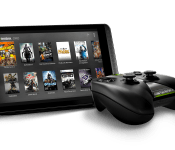
NVIDIA announces Tegra K1-powered Shield Tablet for July 29

NVIDIA on Tuesday announced the Shield Tablet, a monster of a device aimed at gaming enthusiasts everywhere. Powered by a 2.2 GHz Quad Core NVIDIA Tegra K1 processor, the tablet offers users an 8-inch 1920×1200 multi-touch IPS display, a pair of 5-megapixel cameras, and 2GB RAM. Gamers can choose between a 16GB version and 32GB model with 4G LTE (microSIM) support; both allow for microSD expansion up to 128GB. Other hardware details include stereo front-facing speakers, Bluetooth 4.0 LE, GPS and GLONASS, a DirectStylus 2, and 802.11a/b/g/n 2×2 Mimo 2.4 GHz and 5 GHz Wi-Fi technologies.
Like the Shield gaming controller/console, the Shield Tablet is versatile and allows for a wonderful multi-player experience. Toss in ShadowPlay gameplay recording, Twitch streaming, GRID Gaming App Beta, Console Mode, Gamepad Mapper, 4-player multiplayer, and 4K Ultra-HD Ready HDMI-out and you can see just how well-rounded the Shield Tablet can be.
NVIDIA is also introducing a new Shield controller which pairs via Wi-Fi Direct and provides for true-to-console capabilities. Much like the standalone Shield, you’ll find the host of buttons, triggers, and analog sticks. Also present are a microphone, and support for 3-pin and 4-pin headsets. Fully charged in five hours, users can get up to 40 hours of game play.
The NVIDIA Shield tablet will be available in the U.S. starting from July 29; eager customers can pre-order the 16GB model for $299 or the 32GB LTE model for $399. A European launch follows a few weeks later on August 14th. The wireless controller will be $59.99 while the tablet cover retails for $39.99. Additionally, NVIDIA will sell a separate stylus or AC adapters.
The post NVIDIA announces Tegra K1-powered Shield Tablet for July 29 appeared first on AndroidGuys.

Google is adding free WiFi to Uber cars in Philadelphia, but only for the summer

We have no scientific data to back this up, but we suspect most of you are not tough enough, not resilient enough, to work on a laptop in a moving vehicle without hurling. If you’re that special sort, though — or if you just like to have your phone on WiFi whenever possible — then you might appreciate what we’re about to tell you. Google just announced that it will provide free WiFi in Uber cabs — ostensibly so that people can keep working between meetings (preferably using Google Apps, says Google, winkwinknudgenudge). The move is just the latest in what seems to be a budding romance between the two companies — Uber is already built into Google Maps. In any case, as cool as this latest development may seem, it’s also quite limited: The service is restricted to Philadelphia, and it will only last through Labor Day. If you happen to live in the City of Brotherly Love, though, you can take advantage of this starting today. Just make sure you select a WiFi-enabled vehicle when booking the car.
Image source: Flickr/Adam Fagan
Filed under: Transportation, Google
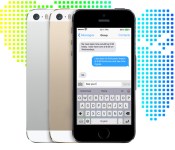
KeyPoint wants you to try its multilingual smart keyboard for iOS 8

There’s soon going to be a glut of custom keyboards for iOS 8, many of which will have word suggestions in multiple languages. However, they might not be as well-versed as KeyPoint Technologies’ upcoming Adaptxt for iOS. Besides supporting over 100 languages, the keyboard touts 30 dictionaries targeted at specific industries; it shouldn’t be flummoxed when you’re chatting with your accountant or lawyer. It will also be aware of both your location and the apps you’re running, so word predictions should change when you go on vacation or check out a favorite social network. KeyPoint is only taking sign-ups for a beta test at this stage — not surprising, since iOS 8 isn’t out yet — but it’s already promising that Adaptxt will be free on iPads and iPhones alike.
Filed under: Cellphones, Mobile
Source: Adaptxt

First look: ‘Heos by Denon’ wireless speakers take Sonos head on

Denon is no stranger to the home audio market. In fact it was making HiFi kit long before home streaming was even a thing. Times change, and new markets get new dominant players. For streaming, that means Sonos — company Denon is tackling head-on with its Heos range of internet-connected wireless speakers. With three products in the range (numbered 3, 5 and 7 — rather than 1, 3, and 5) there’s little doubt that Denon is gunning for a share of the Play series‘ market space. In this first look, we put both systems side by side to see how they stack up. We’ll give them a deeper dive at a later date, but for now head to the gallery to see how they compare.
Filed under: Home Entertainment
Source: Denon

Amazon has a new service for managing payments, named Amazon Wallet

Tried Apple’s Passbook and Google’s Wallet and not feeling satisfied? Perhaps Amazon’s flavor of mobile payment app will strike your fancy. It’s also named Wallet, and it arrived in beta form on the Google Play store recently. Like Apple and Google’s versions, Amazon Wallet collects your gift cards, loyalty programs, and membership cards in one place — on your phone — and pushes them to the cloud. Should you switch from, say, Apple’s iPhone to Amazon’s Fire phone, all that information would move over with you, tied to your Amazon account.
There’s another added benefit with Amazon’s service in that your other, far more important financial info is likely already part of Amazon’s system and connected to your profile. As a result, when you browse Amazon Wallet through the web, all that extra payment info is all in the same place.
It’s not clear when Amazon Wallet is coming out of beta (if ever), but for now, consider yourself a guinea pig if you’re jumping in.
Filed under: Cellphones, Handhelds, Software, Mobile, Amazon
Source: Google Play, Amazon
 AIVAnet