


Amazon refuses to bend to the FTC’s demands over in-app purchases

The Federal Trade Commission (FTC) wants Amazon to update some of its policies regarding in-app purchases, but the retail giant is having none of it. According to documents obtained by the Wall Street Journal the company is facing a lawsuit that would require it to pay hefty fines and dramatically alter its record keeping and disclosure practices. In particular the government is concerned about purchases being made by children, but Amazon thinks its approach is sound. In fact, not only is the company refusing to change its rules, it said in a letter (PDF) that it’s prepared to go to court.
The FTC wants Amazon to require passwords for all in-app purchases, make notices of additional charges more obvious and simplify the refund process. Those are rules similar to what Apple was forced to agree to last year. After receiving thousands of complaints from parents whose children racked up unauthorized charges via in-app purchases its no surprise that the agency decided to target Amazon. The company claims it has handed out prompt refunds to customers who have complained, but it seems that it wasn’t until June that all in-app purchases required any form of authentication.
Amazon may be ready to take its battle to court, but the FTC has already made Apple bend to its will.
Source: Wall Street Journal, Amazon
Radical.FM debuts on Android; Another ad free streaming radio service to try Out
Yesterday you might have seen the news that Google bought up Songza. Good for Songza and good for Google Music All Access. While Songza is still up and running as normal, there will be a time when it will be absorbed by Google and the current apps will cease to exist. There are more streaming services out there than one can possibly count and now there is one more that is looking to give you your streaming music fix, Radical.FM.
“Tremendous effort has gone into making these powerful new apps faster and more intuitive,” said CEO Tom McAlevey. “But unlike Beats, which offers nothing Spotify hasn’t offered for years, or Amazon Prime Music, which is missing half the music iTunes has offered for a decade, Radical.FM offers a truly unique concept built on one of the world’s most comprehensive music libraries.”
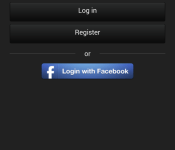
The app seems pretty simple to use. You set up your account for free and cruise through the set up process and add the genres and styles you want to hear. You can adjust and fine tune what is delivered on a separate settings screen or search for specific songs and artists. The service has been out on iOS for quite sometime and one can tell that is where it got its roots when you look at the screenshots below.


 Very iOS like isn’t it? While it could use a major UI overhaul for Android, it does stream music to your device and is commercial free for free. Random.FM claims access to over 25 million searchable tracks too. So how does a free app, without ads, without commercials be available legally? Well, Radical.FM compensates artists, composers, and labels for all the music streamed and runs solely on a “Pay What You Can” model. In a nutshell, you drop a few bucks here and there so they can pay the guys for the tunes you are listening too. If you don’t pay anything, you can still listen.
“It’s a radical revenue model, and people wonder how we can pay music streaming’s high royalties on a free app without commercials,” continues McAlevey. “When I drove my dune-buggy across Africa, I was confronted by Arabic police, spear-wielding natives, and AK-47-toting militia. More often than not, they helped rather than hindered me, reminding me that if treated with respect, people tend to do the right thing. As users discover Radical’s outstanding service, many of them will be proud to support it.”
It has some potential if they can get someone with some Android skills at the helm for a redesign. Feel free to give it a download and try via the nifty box below. Oh, and it is US only for now. Sorry everyone else in the world.
//<![CDATA[
ord = window.ord || Math.floor(Math.random()*1E16);
document.write('’);
//]]>
The post Radical.FM debuts on Android; Another ad free streaming radio service to try Out appeared first on AndroidSPIN.
IFTTT adds Android Wear support

If you’re a fan of Android Wear and the popular automation service IFTTT, you’re in luck. IFTTT for Android has just updated with Android Wear support!
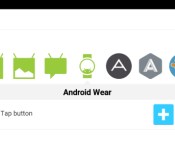
For those who aren’t familiar with the service, IFTTT is a utility app that allows an action to automatically happen when something else takes place. In this case, the trigger for Android Wear is to tap a button, and the action is to send a notification. So, if you tap a button on IFTTT using Android Wear, you could potentially, say, send a text to your spouse. Or if an event is beginning soon, you can have the notification sent straight to your wrist.
If you think a little more about what IFTTT offers, the possibilities are basically endless when it comes to smartwatches and other wearables. These are exciting times for Android Wear and IFTTT lovers. If you haven’t yet, grab the update today!
The post IFTTT adds Android Wear support appeared first on AndroidGuys.
This is Samsung’s last year making plasma TVs

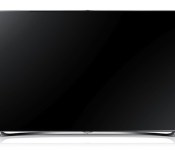
If you’ve been flirting with buying a new plasma TV, now’s the time: Samsung SDI has announced that it’s stopping production of PDP (plasma display panels) later this year. The Korean firm’s reasons for abandoning the technology echos Panasonic’s PDP shut-down — low demand and declining profits. Of course, the real culprit is likely an increasing focus on 4K, and an inability to manufacture higher-res plasma sets for the mass market. It isn’t clear how long the company’s remaining plasma sets will remain on the market, but Samsung plans to have the last of its PDP facilities closed by November 30th. Plasma production resources will be repurposed or sold to support Samsung’s battery and materials business. This leaves LG as the last major player making PDP-based HDTVs, but if you’re a die-hard plasma fan, it might better to hedge your bets and upgrade sooner rather than later.
Filed under: Home Entertainment, HD, Samsung
Nova Launcher Beta updates with Android L interface

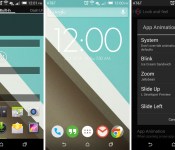
There’s been a lot of Android L love going around the past few days since being announced at Google I/O, and we’ve had our fair share of ports from the newest version of Android, including keyboards, wallpapers, and even the updated apps. But, if that’s not enough or you don’t fancy installing them, then Nova Launcher just updated their Beta version to include Android L visuals.
New options for Android L within the Nova Launcher Beta update include new folder previews, app animations, and much more, which will have you thinking you’re running the actual preview build.
Here’s a full list of what’s new in the Nova Launcher Beta update:
- “L” Folder Preview (Nova Settings – Folder – Folder Preview – Line)
- “L” App Drawer Icon (Long-press app drawer – Edit – Tap Icon – All white icon under “Built-in”)
- “L” App Animation (Nova Settings – Look and Feel – App Animation – Slide Up)
- Minor tuning for running on Android L Dev Preview
- Optimizations and bug fixes
To get the Beta, you’ll need to be part of the Google+ community page for Nova launcher here, and then it’ll appear in the Google Play Store using this link.
VIA: Droid-Life
The post Nova Launcher Beta updates with Android L interface appeared first on AndroidGuys.
Todoist announces new location notifications, coming soon to Android

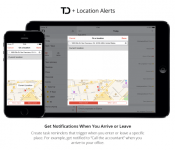
Today Todoist announced that its task manager app on the Web and iOS now offers users location-aware notifications and the feature will be coming to Android sometime in the next couple days.
The Android functionality was going to be released along with the other versions, but a spokesperson said that the company’s Android team stayed up all night and weren’t able to finish it in time, but it shouldn’t be too long before it releases.
If you’re not familiar with Todoist, there is both a free and paid version to help you manage your tasks. In the free version, you can sync your tasks across all your devices, save your todo list to the cloud, add and manage unlimited tasks and sub-tasks and more, then with a premium account you get all those features plus the ability to set up and receive reminders through SMS, email, or push notifications, you can get more organized with task notes, colorable labels and powerful filters, and track and improve your productivity on Todoist.com.
Todoist says that it’s the first task manager app on the market to offer location alerts on both mobile platforms.
The way the location-aware notifications work is that if you’re setting a reminder, such as “call the accountant” or “pick up dry cleaning,” you can set it to alert you went you arrive at or leave a specific location.This is accomplished thanks to integration with Google Maps and Apple Maps.
“… a list of your favorite places will automatically appear with options ready to select. Additionally, you can always search Google Maps or Apple Maps to pin-point and add new locations to your list. Todoist will save your last 10 identified locations so that you can easily select those recently and frequently used.”
While the location reminders can be managed from any platform, even Gmail or Outlook, they will only be available to iOS or Android device users. Once available for Android, everything will setup automatically, but on iOS, you’ll need to go to Settings > Privacy > Location Services and turn on Location Services and Reminders.
The new location-aware notifications are a premium feature part of the paid Todoist Premium, which costs $29 a year, but Todoist is offering a free 30-day trial and all users have until until 9 p.m. EST Sunday to sign-up.
If this is just what you’ve been needing in your life, check out the source link below.
VIA Todoist
The post Todoist announces new location notifications, coming soon to Android appeared first on AndroidGuys.
Get This Look: ‘Smart Clock’ Zooper Widget

We’re huge fans of changing the home screen around a bit and creating a new user experience for our Android. So much so that we present our ongoing series of Get This Look posts. In a nutshell we show you a new layout, app, widget, or icon set for your Android handset and tell you which apps you’ll need to mimic the feel.
Some of these are a little easier to create than others and many of them can be tweaked to no end. The following details are but the ingredients to which you can create your own delicious Android dish; your results will vary. Which is awesome! If nothing else, this is a great way to discover new apps, widgets, icons, and more!
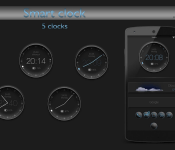
Smart Clock by KingRollo
Why we love this look:
Other than the developer’s great name, this Zooper Widget stands out as one of the best looking clock packages I’ve seen. With multiple different designs to chose from, the clocks look simple, minimalistic, and just stunning when coupled with the right wallpaper. There are 5 clock skins included, which show the time, date, and battery life. So if you like analogue clocks then check out Smart Clock Zooper widget for only £0.83.
What you’ll need:
The post Get This Look: ‘Smart Clock’ Zooper Widget appeared first on AndroidGuys.
OnePlus tablet hits rumor mill, probably won’t be available anytime soon

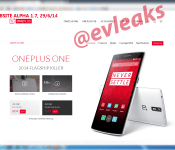
You may still be trying to get your hands on a OnePlus One, but that doesn’t mean the startup isn’t starting to think ahead to its next product. A recent leak from @evleaks suggests that OnePlus is working on a device called the OnePlus Tab.
The leak comes in the form of a screenshot dated June 29 of an alpha version of the site with a link or placeholder that reads “ONEPLUS TAB.” Besides this information, we know nothing else about the supposed device. Who knows it’s real or not, but it wouldn’t be surprising if the company was working on a tablet as well and if this was the first tablet to run CyanogenMod.
Would you be interested in a OnePlus tablet or are have you had enough with the company and its invite system?
VIA @evleaks
The post OnePlus tablet hits rumor mill, probably won’t be available anytime soon appeared first on AndroidGuys.

T-Mobile EIP coming to accessories on July 20th
Accessories for your device are a natural and normal need. We all love cases, headphones, speakers, screen protectors, chargers and anything else that works with our devices. When we first heard the Uncarrier 5.0 was coming, we immediately thought EIP (equipment installment plan) for accessories. Afterall, it made sense. Sadly, Uncarrier 5 and the sub-sequential Uncarrier 6 announcement didn’t bring that news. However, a new internal memo that TmoNews acquired shows us that EIP for accessories is very real and it is coming soon.

According to the image, on July 20th you will be able to head into your T-Mobile store, and online we assume, and grab something you might not have the cash for now and charge it to your account. The memo doesn’t give us all the details on the program though. On the smartphone side of things you pay equal amounts over 24 months. We assume this will be the same. For instance, if you want to grab a Logitech UE BOOM speaker that runs $199.99 one could expect to pay approximately 8.33 a month on their statement to pay it off. This will work particularly well on bundles like a car charger, case and screen protector all wrapped up into one package.
Without official and detailed plans on how this will all play out, I can only guess how T-Mobile will get you on the hook. I am sure that only certain, newer, qualifying plans will be eligible since you see them mention the Music Freedom offerings and JUMP!. I would also imagine that they will have a limit set per phone number on accounts to keep you from walking off with thousands of dollars in accessories. I don’t think T-Mobile would limit the option to new device purchases, but they could. I think it would be quite a bit more beneficial if anyone on the right plan could wank in, or hop online, and get something new they want.
Source: TmoNews
//<![CDATA[
ord = window.ord || Math.floor(Math.random()*1E16);
document.write('’);
//]]>
The post T-Mobile EIP coming to accessories on July 20th appeared first on AndroidSPIN.

Rolocule’s Motion Tennis will use Chromecast mirroring to recreate Wii Sports

Not sure how you’ll use Chromecast’s mirroring feature? Well, you could play tennis. About a year ago, Rolocule brought Wii-like gameplay to Apple users with Motion Tennis — an app that leveraged Apple TV and iPhone AirPlay Mirroring to turn the user’s handset into a virtual racket. Now the company is doing the same thing with Google’s Chromecast. Using the mirroring feature announced at Google I/O, Rolocule has cooked up an early demo (available after the break) of Motion Tennis on a Nexus 5. The prototype has a noticeable input delay, but it’s an excellent proof of concept for gameplay possibilities available to devices with screen mirroring. Don’t have a Chromecast dongle? No worries, Rolocule says it’s working on Miracast support too, and told Engadget that a public beta will be launching soon. Read on to see the Chromecast version of the game in action.
Filed under: Cellphones, Gaming, HD, Mobile
 AIVAnet