



Sony Xperia C3 gets announced as “The World’s Best Selfie Smartphone”
Sony did a little teasing for an upcoming smartphone that had a good amount of focus on taking selfies. Let’s face it, that is a pretty big ‘thing’ apparently. Today Sony has officially announced the new device with its name simply being the Xperia C3.

The Xperia C3 offers plenty of the traditional specs that we have grown accustomed too in today’s mid-ranged smartphones. It packs in a Qualcomm MSM8926 1.2GHz quad-core snapdragon processor, 1GB of RAM, 8GB internal storage and a 8MP rear facing camera. The screen is a 5.5 inch IPS LCD display with a resolution of 1280 x 720. Power wise the Sony Xperia C3 offers up a 2500 mAh battery with supposed 11 hours talk time. None of that is the real focus of the device though. The Xperia C3′s wide-angle front facing 5MP camera and flash is the key component to the selfie phone. Along with the real-time editing view and various hats/masks and other goofy things for your face.
I can’t say that I am all that surprised that a device like this has been created. While I am not much of a selfie taker, I do know that you don’t always get the best shots with the usual 2MP or so front facing cameras on most devices and any thought of a low light or night shots is pretty pointless. I bet we start to see other manufacturers start to up their front facing camera game pretty soon, even if they only start out with mid-ranged devices to test the market. It is a bit more useful than a Facebook phone.
Sony didn’t offer up any pricing details just yet though. They do mention that the selfie phone will be going global starting in China. They will have three color options at launch, the traditional black and white versions as well as a mint offering.
Source: Sony Xperia Twitter | GSMArena | 9to5Google
//<![CDATA[
ord = window.ord || Math.floor(Math.random()*1E16);
document.write('’);
//]]>
The post Sony Xperia C3 gets announced as “The World’s Best Selfie Smartphone” appeared first on AndroidSPIN.

Third-Party Mac Icons Reimagined in OS X Yosemite Style
With the introduction of OS X Yosemite, Apple introduced a significant visual change with an iOS 7-like “flat” look and completely redesigned icons. While Apple’s icons will see a refresh once Yosemite is released, users will have to wait until third-party companies have updated their icons to match Apple’s new design language for OS X icons.
In the meantime, users in this long running MacRumors’ forums thread have been designing their own “flat” versions of both Apple and third-party applications, allowing some users to switch out their icons until the real thing is available. Additionally, some users are redesigning Apple’s own icons for users who are using Mavericks rather than the Yosemite beta.

iWork, Twitter, Skype and 1Password icons by Arn0
While the icons may not be fully representative of the official icons, they do provide a look into Apple’s new icon philosophy enacted upon an icon not designed for it, allowing for a glimpse into various companies’ processes.
Forum member Arn0 had been taking requests from other forum members, recreating various icons to fit more along more nicely with Yosemite’s design aesthetics.
Alongside stand-alone apps like 1Password, Twitter and Skype, Arn0 also redesigned icons for entire suites of software, like Adobe’s Creative Suite.

Adobe icons by Arn0
Other designers include thread starter Humex, who hewed closer to Apple’s style than Arn0:

“dots” icon set by Humex
Alternatively, designers like drflash have taken a different approach to flat design. Rather than mimic Apple’s philosophy and match OS X Yosemite, they created their own design language with Flat OS, which provides a completely different experience for OS X users. The design seems to marry “flat” design alongside some skeumorphic principles, giving icons a more tangible feel.

Flat OS X by drflash
In a blog post on Gizmodo, MartianCraft’s Nick Keppol explains that Yosemite’s new look centers around four basic ideas: visual rhythm in the dock, three basic icon shapes and their design grid, shape hierarchy and lighting effects and materials.
Visual rhythm allows the new dock to look more consistent, although that is helped by the fact that OS X icons are now broken up into three types: circles, squares and titled rectangles. While Apple itself isn’t totally consistent with these three types, Keppol found that – for the most part – circles are used for more consumer-oriented apps, squares are used for System-related utilizes and titled rectangles are used for applications that are most often used for work.
Finally, Apple uses Hollywood-style yellow and orange highlights and blue and teal shadows to give the metal-like materials that the icons are made out of feel warm and tangible. This helps create the illusion that the icons are more physical than previous icons while also looking flatter than before.
If you’d like to switch out your icons until they’re fully upgraded with OS X Yosemite, the icon sets shown are linked above, while all of Arn0′s redesigned icons are available to download via Dropbox. Icon sets from arn0 and other designers are also available to download via the forum thread. Here are easy instructions on how to change app icons on OS X.

Google lawsuit highlights the danger of not managing your online presence

Hey small-business owner, you’re pretty savvy. I know you’re pretty savvy because you’re reading this website on the internet, like the savvy small-business owner above. But some of your colleagues aren’t quite as connected as you are. And sometimes that disconnected crowd faces serious real-world implications as a result: Take former restaurant owner Rene Bertagna for instance. His long-standing Virginia restaurant, Serbian Crown, closed last year “after nearly 40 years” due to, he believes, an error in Serbian Crown’s Google Maps listing. The error was grievous, he tells Wired, and he’s now suing Google in a Virginia court.
The restaurant’s listing on Google Maps, Bertagna says, indicated that it wasn’t open on weekends. Given the restaurant’s location (nowhere near foot traffic), Bertagna and his lawyer posit, “Unless you know that the place is going to be open, you’re probably not going to drag yourself out.” And given the way Google Maps listings work, anyone can submit information for any place, which Google moderates before publishing. Bertagna’s lawyer believes another restaurant in the area “sabotaged” Serbian Crown’s listing. For its part, Google says in a legal filing, “The Serbian Crown should not be permitted to vex Google or this court with such meritless claims.”
Of course, what’s unclear is how much accountability here rests on the false listing; Bertagna says that neither he nor his employees maintained the Serbian Crown’s online presence, which left it susceptible to tampering and misinformation.
Wired‘s piece highlights several other examples where small-business owners were, like you, savvy enough to maintain their online presence and cut off any issues before they affected the bottom line.
[Image: Shutterstock]
Source: Wired

Yahoo researchers teach GPS to take the scenic route

Often the shortest route between two places involves some grey, eight-lane expanse of Interstate that’s about as thrilling to drive as it was to pave. Resourceful road-trippers have learned to make use of the avoid highways feature, but that’s always a crapshoot. Sometimes you get a scenic country road, sometimes you get trapped in strip mall hell. But researchers at Yahoo Labs have figured out how to measure the “beauty” of a route using an algorithm. “The goal of this work is to automatically suggest routes that are not only short but also emotionally pleasant,” which might be especially important to pedestrians looking to avoid grim over passes and busy intersections. The work started by crowdsourcing opinions about images harvested from Street View and Geograph for locations throughout London. The locations that were deemed to be more beautiful by users were then plotted on a map and used as waypoints to provide directions. The resulting routes were on average only 12 percent longer than the shortest path to a destination, but 30 test subject all agreed the results were more pleasing, aesthetically.
Obviously the this method won’t work for every location around the globe, so the researchers are now working on an automated method that relies on Flickr. The group started by looking at 5 million photos of the same locations that were deemed most beautiful in their initial experiment. They found out that the number of photos of a location and the amount of positive comments generally correlated with its rated beauty. So the team put its method to the test in Boston. Most of the 54 test subjects agreed that the automatically generated “scenic route” was more beautiful than the shorter alternative.
You can check out sample maps in the research paper at the source link if you happen to be in Boston or London. But the next step for Daniele Quercia who headed the project is to build a mobile app that can get a beta test in the wild. Who know, maybe soon enough you’ll be able to ask your phone to take you on the scenic route and avoid the soulless expanses of I95.
Source: Cornell University Library

Microwaves of the future count calories so you don’t have to

If you’re into the whole quantified self movement, or you just fancy watching what you eat, GE is working on new microwave tech that could make manual calorie counting obsolete. The company’s R&D department developed a prototype that directly measures the caloric amounts for the foods that it heats. For now, the device only works with blended foods, and requires a uniform mixture to provide accurate values; however, a new gadget is in the works that that will tally stats for a full plate. This means that the essential info for a chicken breast and two vegetables can be sent to a smartphone app while you wait. The folks at GE are using fat and water content to calculate calories as low-energy microwaves pass through weighed portions. It’s too early to tell when (or if) the system will make it to consumers, but you may want to ditch those Hungry-Man dinners before your microwave has achance to provide its own guilt trip.
[Photo credit: Getty Images]
Filed under: Household
Source: MIT Technology Review

Engadget giveaway: win a OnePlus One and custom skins courtesy of dbrand!

We had a chance to test the OnePlus One a couple of months ago and it was one sweet piece of tech. The only downside, really, has been the incredibly limited supply. That’s what makes this week’s giveaway a bit of a standout. The folks at dbrand happened to have one on hand and they’ve passed it along so that one lucky Engadget reader can break away from the everyday smartphone crowd. The company has also included 16 of its custom OnePlus One skins to make it even more unique. You can even use the company’s interactive preview tools to help personalize a variety of smartphones, tablets and game consoles with dbrand’s selection of custom skins. As for the phone, the One boasts a 13-megapixel camera, 64GB of storage and runs CyanogenMod, letting users customize the OS almost as much as the exterior. This is an unlocked global version (supporting LTE, GSM and WCMDA) so users on T-Mobile, AT&T and various other carriers should be good to go. Just head on down to the Rafflecopter widget below for up to three chances at winning this OnePlus One and dbrand skins.
- Entries are handled through the Rafflecopter widget above. Comments are no longer accepted as valid methods of entry. You may enter without any obligation to social media accounts, though we may offer them as opportunities for extra entries. Your email address is required so we can get in touch with you if you win, but it will not be given to third parties.
- Contest is open to all residents of the 50 States, the District of Columbia, and Canada (excluding Quebec), 18 or older! Sorry, we don’t make this rule (we hate excluding anyone), so direct your anger at our lawyers and contest laws if you have to be mad.
- Winners will be chosen randomly. One (1) winner will receive one (1) OnePlus One smartphone (A0001, Sandstone Black, LTE/GSM/WCDMA) and sixteen (16) dbrand skins.
- If you are chosen, you will be notified by email. Winners must respond within three days of being contacted. If you do not respond within that period, another winner will be chosen. Make sure that the account you use to enter the contest includes your real name and a contact email or Facebook login. We do not track any of this information for marketing or third-party purposes.
- This unit is purely for promotional giveaway. OnePlus, dbrand and Engadget / AOL are not held liable to honor warranties, exchanges or customer service.
- The full list of rules, in all its legalese glory, can be found here.
- Entries can be submitted until July 9th at 11:59PM ET. Good luck!
Filed under: Announcements, HD, Mobile, Alt
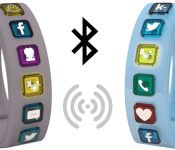
Hicon Social Bangle is a wearable fashion bungle

If you waste too much time checking notifications on your phone, don’t sweat it — yet another wearable promises to help you save those countless minutes throughout the day. But if you’re already leery of wrist-worn devices, the Hicon Social Bangle, which is undergoing an Indiegogo campaign, won’t do anything to change your mind. On the contrary: The Hicon is a awkwardly large bracelet that’s lined with enough square charms to remind you of fourth grade. Each charm is interchangeable and represents a different service (SMS, calls) or social network (Facebook, WhatsApp, etc), and they vibrate and light up whenever you get a notification from that particular service.

The Bluetooth 4.0 device has some other uses, too. You can exchange contact information through a simple handshake or fistbump gesture. The leash bracelet also comes with a companion app that notes your location and matches you with other people in the vicinity who have similar social profiles. (If you don’t think that’s creepy enough, watch the commercial below.)
Hicon promises compatibility with iOS, Android and future Windows Phones. It also comes with an accelerometer, waterproof build, 14-day estimated battery life and a variety of colors, but one thing it can’t do is display the time. This means you’d have to wear it along with a watch or pull your phone out of your pocket to check the time — further negating its primary reason for existing. But if it still sounds like the dream wearable for you, a $49 contribution is all you need to secure one later this fall, pending a successful campaign.
Filed under: Cellphones, Wearables, Mobile
Source: Indiegogo

See what makes Android Wear tick in these teardowns

You’ll be able to nab your own Android Wear watch any day now (or today, if you’re lucky), but isn’t it about time you saw what really makes them tick? Well, the iFixit community has gone and done what it does best: it’s dissected Samsung and LG’s takes on the Android Wear formula and splayed their guts out for all to see. None of the components are particularly surprising here, especially since neither of the rival companies have been shy about talking them up. No, it’s the precision, the industrial origami that’s really a sight to behold here — both watches manage to cram plenty of stuff into those tiny, stainless steel, wrist-worn frames. Samsung’s had more experience putting these things together and the way the Gear Live has been put together will seem awfully similar if you’ve peeked at any other Gear teardown. The G Watch? That’s a different story. In typical LG fashion, it’s apparently a breeze to disassemble and reconstruct — if you’re a tinkerer looking to splurge on a smartwatch, you may have just found your perfect match.
Source: iFixit
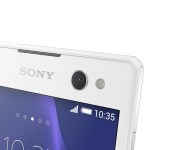
Sony introduces Xperia C3, the “selfie” phone

Selfie. I’m gonna let that sink in for a bit… OK, now we can kick this off. Sony is apparently trying to get market share any way they can so they came up with an idea to create a selfie-centered smartphone. Yeah, you might see even more people smiling at their smartphone in the most ridiculous locations. Let us be honest though, every one of us has taken at least one selfie, but most of us more than that. If you honestly haven’t, hats off to you Sir.
Anyhow, let us get down to it. This phone is called Sony Xperia C3, that very same device that was teased yesterday. We’ll start from the probably the most important part for people who’ll buy this thing. The device has a 5MP camera on the front, which makes it one of the few out on the market today sporting such a big sensor on the front. This camera has an 80-degree field of view, which is impressive for a front-facing shooter, although this is to be expected considering this phone is meant to be used to take selfies. Next to the camera you’ll find a soft LED flash, so you can shoot away in low light areas as well.
On the back, C3 sports an 8MP Exmor RS sensor shooter with a pulsed LED flash next to it. Sony included a few extra features in this phone. For example, other than pressing on hardware or software button in order to take a selfie, you can double tap on the back of the phone and it will activate the “Smile Shutter” feature and take a shot.
As far as specifications go, this is a mid-range offering. Let us check it out:
- 5.5″ 720p Trilumionus display (267ppi)
- Snapdragon 400 1.2GHz chip
- 1GB of RAM
- Dual-SIM
- 2500mAh battery
- Android 4.4.2 KitKat OS
- 8GB of internal storage (expandable via microSD card up to 32GB)
- Colors: black, white and mint
Sony says the device will launch in China this August. They mention that will be the first launch market, which means they’ll launch it elsewhere as well. So if you (or someone you know) really wants a device like this they’ll probably be able to get it.


Source: Sony
Via: PhoneArena
The post Sony introduces Xperia C3, the “selfie” phone appeared first on AndroidGuys.

Accessory of the Day: Anker MP141 Portable Bluetooth Speaker

Now that we’re in the warmest part of the year we often find ourselves sitting on the back deck or patio enjoying a sunset. Maybe we’re out there on a Friday night with some friends and having a rousing game of Connect Four or whatever. Or, perhaps you’re the forever alone type who sits alone and spends their night on Reddit. Whatever the occasion or situation, we’re betting it goes better with music.
The Anker MP141 Bluetooth Speaker can see you through an entire evening or two, maybe longer. Thanks to an internal battery that lasts up to 20 hours, you’ll be able to set some epic music for that all-nighter on the porch.
Pair your smartphone over Bluetooth or go the traditional route and use the 3.5mm auxiliary input. And, should mom call to check in on you, the device doubles as a speaker phone so you can talk hands free.
Features:
- Experience your tunes in high definition and surprising fullness realized through a 4W / 2in driver and bass port – outclassing other similar-sized portable speakers.
- Unrivalled 15 to 20-hour playtime powered by a built-in rechargeable 2100mAh Li-ion battery.
- Automatically connect to the last-connected device when turned on enables one-step music streaming. Compatible with all Bluetooth-enabled devices (2.1 and over). 3.5mm audio port for non-Bluetooth devices.
- Outstanding connection range of up to 33 feet. Built-in microphone with a 2-feet pickup range allows the speaker to double as a speaker phone.
- Package contents: Anker® MP141 Portable Bluetooth Speaker, micro USB cable, 3.5mm audio cable, travel pouch, instruction manual. 18-month warranty and free lifetime technical support.
The post Accessory of the Day: Anker MP141 Portable Bluetooth Speaker appeared first on AndroidGuys.
 AIVAnet