


Capo, an App to Help Guitar Players Learn Songs, Lands on iPhone and iPad [iOS Blog]
 The Apple Design Award-winning Capo, a Mac app praised by professional musicians that automatically generates guitar tablature from music in iTunes, has made the jump to iOS.
Developer SuperMegaUltraGroovy today released iPhone and iPad versions of Capo, allowing users to learn how to play songs on the go with chord and beat detection as well as a number of other features to help guitar players learn songs quickly and easily. The Mac version of Capo has been updated as well, with iCloud sync between all devices and improved chord detection accuracy.
Capo touch offers musicians the same power and versatility they have on the Mac with Capo 3 in an even more portable design. The app features the essential tools of instantly importing a song from your iTunes library, automatically detecting its chords, and showing how to play them using helpful guitar chord boxes. It can slow down the tempo without changing pitch while you learn, and transpose the song to any key with a simple pitch slider. Optional metronome, looping, EQ and “karaoke-style” voice reduction make Capo 3 and now Capo touch valuable tools for musicians whether in the studio, rehearsal or on tour.

Capo touch is available for $4.99 for the iPhone and iPad from the App Store. [Direct Link]
Capo 3 for Mac is available from the Mac App Store for $29.99. [Direct Link]

MLB Rolling Out Second iBeacon Phase At All-Star Game, At Bat Updated With Live Streams
 Earlier this year, Major League Baseball began installing thousands of iBeacons in ballparks around the country, putting dozens of the beacons in stadiums in Boston, Milwaukee, San Diego, and San Francisco, and more.
Considered to be one of the largest iBeacon rollouts in the world, the initial plan saw the beacons used in conjunction with the At the Ballpark app. Thus far, the iBeacons have been used in some cases to check fans in to stadiums and to send notifications and offers, but beacon usage is still in the early stages.
Major League Baseball is now entering its second phase of development with iBeacons, according to TechCrunch, and is planning to debut a special project at the 2014 All-Star Game at Target Field. Target Field will use iBeacons to provide content and interactive features to in-park exhibits.
With the introduction of interactive ballpark attractions at Target Field for the All-Star Game, MLBAM will debut its second phase of iBeacon technology at MLB ballparks. Fans attending All-Star events at Target Field with At the Ballpark on their iPhone (iOS 7 required) will be able to use iBeacon when visiting these attractions, offering a unique mobile perspective through original content automatically delivered to their iPhone. The locations in Target Field are: The Golden Glove; Twins Digital Clubhouse; 2 Gingers Pub; Target Field Ballpark Model; 573 and Herb Carneal Pressbox; Kirby Puckett Atrium; Rod Carew Atrium; The Townball Tavern; and Target Plaza.
MLB has expressed a desire to expand iBeacons to be able to provide point of interest information, concessions, in-stadium directions, loyalty and rewards programs, shopping, and more, with individual teams having significant input and control over what fans will see. It appears that Target Field will be the first major experiment with interactive iBeacon features.
MLB has also introduced new updates to its At Bat and At the Ballpark apps, with At Bat gaining live streams of the All-Star Game, the All-Star Futures Game, and the Home Run Derby for MLB.TV Premium subscribers.
MLB At Bat is a free download from the App Store for iPhone and iPad, but requires a subscription of $2.99/month or $9.99/year. [Direct Link]
MLB At the Ballpark is also a free download from the App Store for the iPhone and iPad. [Direct Link]
Two years to Tango: the race to finish Google’s 3D-mapping tablet

Speck Design’s clientele has ranged from Apple to Samsonite to Fisher-Price in its history, and now it can add Google to the list of high-profile companies. But Google — or its Advanced Technologies and Projects (ATAP) division, to be more specific — is no ordinary client. The group is modeled after DARPA, which divides its agency into teams, with each one given a limited time to solve a pressing issue. Nearly a year and half ago, ATAP reached out to Speck, led by industrial designers Jason Stone and Vincent Pascual, with one such task: Build a tablet like no other.
The project is known as Tango. Its goal is to create technology that lets you use mobile devices to piece together three-dimensional maps, thanks to a clever array of cameras, depth sensors and fancy algorithms. As if that isn’t enough of a challenge, Tango’s team only has two full years to make this tech a reality. Those two years will be up in less than five months.

Several early models designed by Speck to get an idea of how the tablet would look and feel.
ATAP focuses on cutting-edge projects that push technology forward at a rapid pace, and Tango is a prime example of this. Through a combination of hardware and software, the project aims to give mobile devices a sense of scale and an understanding of space and motion. You could potentially create a three-dimensional mockup of your office building or home just by walking through every room with a Tango-equipped smartphone or tablet. If the project is successful, it means you may someday use an app to hunt down hard-to-find products at the grocery store, the same way you’d locate a house using GPS. You could play Plants vs. Zombies or Portal with your living room as the backdrop, or envision how that IKEA couch would fit in front of your entertainment center. It opens up a lot of new options that, until now, haven’t been technically feasible.
Two years isn’t much time to develop bleeding-edge tech from the ground up, let alone two pieces of hardware (a smartphone and tablet) and an entire software platform; heck, even the original iPhone took over three years to blossom from a sparkle in Steve Jobs’ eye to a final product release. But what’s more impressive is the fact that Speck cranked out a tablet in 16 months. That’s similar to a standard development cycle for a regular device. But the Tango slate is nowhere near normal, and it’s not just different in its curvaceous appearance. For starters, it’s a high-end Android tablet with 4GB of RAM, 128GB of internal storage and an NVIDIA K1 chip (the first in the US and second in the world) that features desktop GPU architecture. It also has a unique design that consists of an array of cameras and sensors near the top and a couple of subtle grips on the sides. It packs 3D-mapping features previously reserved for professional equipment worth thousands of dollars, and it even looks good enough to pass as a consumer device.
Two years isn’t much time when you’re working on a first-of-its-kind product.
In case it sounds like an easy process, Stone insists it’s the complete opposite. Tango and its partners worked at a breakneck pace. The project vision was evolved daily, and the team worked with several different companies simultaneously on various aspects of the product’s development. Working on multiple things at the same time isn’t uncommon, but the vast number of parties that were involved is; Tango recruited engineers, researchers, universities and manufacturers to help mold what would eventually become the hardware and software we see today.
“It’s like they were starting to form a vision on how this thing should actually work while we were doing the industrial design in parallel,” Stone says.
Speck was hired in March 2013 to come up with a “shotgun blast” of ideas and conceptual designs, but Stone and Pascual soon realized they were in for a far bigger challenge than they’d expected. Oftentimes clients will have specific design languages or standards for their brands, but because ATAP operates as a separate entity from the rest of Google, there were no established guidelines or rules to help Speck narrow down design options.
“They didn’t tell us a lot about what they were doing [with Tango] at first,” Stone says. “They didn’t really explain about the applications or tech at that point.”
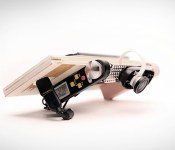
Equipped with little more than a high-level understanding of the project, Stone and Pascual crafted dozens of rough, handmade prototypes. “We’d cut out a block and lay some dimensional paper down to make sure it’s the right screen and body size,” Stone says. “We’d make around three before picking one to take to Google.” Some of the more interesting models included a flagpole-shaped option and a tablet with a transparent frame around the edge.

One of Speck’s first handmade design prototypes.
While Speck’s clients are typically armed with a strict budget, Google had no cost restraints. Price simply didn’t factor into Tango early on; to Google’s Johnny Lee and Ryan Hickman, it was essential to use the best components, such as cameras, sensors, chipsets and speakers. That became a huge challenge for the designers because blank checks mean even more options.
“Sometimes those restraints around cost can help you make decisions easier and faster,” Stone says. “You’re like, ‘Well, we can’t do this so we’ll have to do that.’”
Speck wasn’t the only company working with Tango on potential designs at first. ATAP, eager to leverage its connection with Motorola and somehow utilize its supply chain and other resources, asked Moto’s User Experience Design (UXD) group to experiment with some conceptual designs. Tango even reached out to Google’s Nexus team, which wanted to focus on making affordable devices like the Nexus 5 instead.

Speck designed several mockups detailing how Tango could be used.
Soon, Speck received more responsibility. The company was asked to put its Photoshop skills to work by drawing up visualization mockups — screenshots depicting various use cases for Tango. These mockups helped ATAP sell its vision of Tango to potential hardware partners and Google. Thanks to the project’s time constraints, immediate partner buy-in was crucial to its success. Thus, this job was given the same priority as the designer’s other tasks; it had to be done as soon as possible.
Pascual said the team came up with hundreds of use cases. For instance, virtually trying a new carpet in your house; seeing how a new pair of glasses would look before a visit to the optometrist; rendering a 3D map of what’s under your car’s hood; or calculating a route through a crowded museum.
While overwhelming, the exercise gave Speck a greater understanding of Tango’s grand vision for the user experience. Thanks to the designers’ newfound knowledge, they concluded that the slate would be more effective in landscape; users wouldn’t hold the device in portrait mode while mapping out their house or office building.

Determining the tablet’s orientation helped narrow down the design options, but Speck still had to figure out how the baseline — the term for the array of Kinect-like cameras and sensors that measures all three dimensions — would factor in. Should the user hold the device directly in front of their face? Or does it make more sense to hold the screen parallel to the ground, with the cameras pointing forward? Stone and Pascual needed to find the optimal angle, so they began working on user tests.
There was just one major problem with testing a device like this: Neither company had performed these kinds of tests before.
There was just one major problem with testing a device like this: This was new territory and there wasn’t an existing model to replicate. The designers had to formulate the tests themselves, so they worked with ATAP to determine what needed to be tested and how. Since the tablet’s industrial design wasn’t finished at the time, Speck fashioned a special prototype using plywood, a built-in digital protractor (to quickly adjust camera angles between tests) and a sample camera array.
The process of building and conducting the tests, as well as quantifying the results, began in August and lasted roughly a month. Testers numbered fewer than 100 and came from within Motorola and Google. They were given a series of five tasks, each performed at two different camera angles, chosen at random. Tests consisted of simple activities like taking photos of a few objects, snapping an image over a short wall and navigating the office by following arrows that appeared in the viewfinder. After each run, testers would rate their experience on a scale of one to five.
Stone and Pascual discovered the camera angle mattered — a lot. Testers had difficulty holding the device directly in front of their faces while avoiding obstacles. As Pascual points out, “It’s tough to navigate around the house without knocking stuff off the table or couch.” Holding it close to the user’s waist didn’t work either, because testers constantly moved their heads (and eyeballs) up and down. So it had to be somewhere in between. The solution that testers liked best: Tilt the camera so users could hold the tablet at a slight angle while walking.

Speck designers putting the final computerized touches on the Tango tablet.
After some tweaking for economics, Stone and Pascual’s next adventure was a trip to visit Tango’s supplier in Asia to iron out some finite details. They had to make a lot of trade-offs at this stage: making sure the antennas were positioned correctly, getting buttons and components locked down to precise locations, color studies to determine the best shades to use for the final product and a few other details involving fit and finish. Now, Speck’s primary task is to help support ATAP anytime the group needs them to resolve issues.
“It always feels like it’s going to be a clean handoff,” Stone says, “but it’s never as clean as you’d expect.”
With five months remaining before the project ends, Tango is now making the final preparations before shipping the tablet out to a large (though unspecified) number of developers. And although ATAP will move on to other projects, Tango will live on through the technology it created, along with a set of standards that manufacturers can use to offer a consistent experience to users. LG, for instance, has already committed to releasing one such device next year.
If Project Tango was an audition, Speck Design did well enough to make the cut. ATAP has several other unannounced projects in the works, and Stone quietly mentions that his company’s involved in at least one or two of them. “We’re working with Google on another project that’s too early to be discussed publicly,” he says, but given ATAP’s time constraints, we’ll likely hear about it sooner than we expect.
[Image credits: ATAP]

Misfit offers insight on your insomnia with the Beddit sleep monitor

Misfit tackled activity tracking with its Shine offering that looks more like a fashion accessory than a sensor. Now, the data gathering outfit is looking to wrangle sleep cycles with the Beddit sleep monitor. Claiming to be the “world’s thinnest sleep sensor,” the unit resides on your mattress as opposed to being tucked in between the sheets. From there, the gadget keeps an eye on heart rate, movement, snoring and ambient sound in order to gauge the quality of your slumber. Collected info is then beamed to your smartphone of choice for analysis within the Misfit app. If you’re looking to quantify those Zs you catch, Beddit is available now for $150 — half the price of Withings’ Aura bedside system, but without the added sound and light show.
Filed under: Household
Source: Misfit
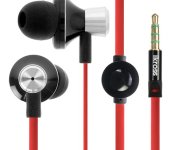
Accessory of the Day: iKross 3.5mm Stereo Earbuds with Microphone

Face it, you’ve misplaced those headphones that came with your smartphone. Or, maybe you got your device second-hand and never got a pair to begin with. Why not pick up a spare set of headphones? This way you can toss them in your bag and have them ready to go on the next trip. Or, keep them with your bug out bag and have a pair with you in the event of an apocalypse or zombie pandemic.
The iKross Stereo Earbuds work with any handset you’ll find, including those from HTC, Samsung, Motorola, and Apple. Features include tangle-free flat cables, extra ear gels, on/off control, and noise reduction for the microphone.
The post Accessory of the Day: iKross 3.5mm Stereo Earbuds with Microphone appeared first on AndroidGuys.

Ruined vinyl under a microscope makes for a beautiful music video

For Nick Zammuto, vinyl scratching isn’t something to be done during a DJ set, but with a craft knife. That’s because the musician likes to cut grooves into LPs and use the resulting jumps as the rhythm for his unique brand of electronica. In order to make the video for single Great Equator, Zammuto combined music with his love of microscopy, using a scanning electron microscope to examine the scratched records up close. The resulting video also looks at scratched CDs, rubber stamps and the odd extreme close up of an insect, which is natural when you’ve got access to an electron microscope. If you’re curious to see the odd mix of high-power imaging and whispering vocals, head on past the break.
Filed under: Misc
Source: Motherboard

Revived NASA space probe might not go back to work after all

Remember the once-dormant ISEE-3 probe that was roused from its 27 year slumber earlier this week? Errm, turns out it’s not doing so great. Despite a crowdfunding campaign that raised over $150,000 to bring it back to active duty and a recent successful spin using its aging thrusters, further attempts to move the craft have ended in disappointment.
The cause? It’s not exactly clear just yet, but Reboot project team suspects the probe’s pipes aren’t the problem — ISEE-3 may have instead run out of the Nitrogen needed to help operate the propulsion system. To hear project leader Keith Cowing tell the tale, there was likely just left in the pipes for that first spin, making the maneuver nothing more than an incredibly promising tease. Cowing and the rest of the crew ultimately hoped to nudge the ISEE-3 back into position and resume its original mission: measuring how the solar wind interacts with the Earth’s own magnetic field. That’s starting to look impossible, though, and after the probe flies by the moon in August it might be time to bid it one final farewell. While certainly a bummer, the situation isn’t completely without its upsides. Our species will have one more wandering spacefarer to commemorate us after we’ve gone, another metallic paean to a people who could never quench its thirst for understanding.
Source: Space College

Verizon offering LG G3 for $99 with contract

Verizon will offer the LG G3 smartphone for $99 with a two year service agreement starting from July 17. Those who opt to buy the phone outright can do so for $599.99; EDGE customers can purchase for $29.99 per month over two years. Available in black and white options, the LG G3 includes 32GB internal storage and 3GB RAM. Additionally, the phone boasts a 5.5-inch Quad HD IPS display and quad-core Qualcomm Snapdragon 801 processor. Oh, and don’t forget that 13-megapixel rear camera with laser focus.
Verizon will also carry the LG G Watch on July 17, pricing the smartwatch at $229. Compatible with any Android smartphone running 4.3 or later, the Android Wear device comes in Black Titan and White Gold.
The post Verizon offering LG G3 for $99 with contract appeared first on AndroidGuys.

Essential apps for every Android user

As someone who works for one of the big carriers in the US, I run into the same question on an almost daily basis. What apps should I try out and download? This is something that is asked by even those tech-savvy users when they switch from iOS or Windows Phone to Android. This got me thinking, “Why not try to compile a list of some of the best apps for Android users?” So, whether you are a beginner or if you’re Steve Kondik, we’ve got some apps to put you up on.
We’ve collected some of our favorite and must-have apps that go on every single device we one. You know, those titles that we simply can’t live without and which go immediately onto our smartphones and tablets. Without further ado, here’s our Essential Apps for Every Android User.
AirDroid

When it comes to sharing basically anything between my computer and my smartphone/tablet AirDroid is here. But that’s only a top of the iceberg when it comes to this app, it could take a while to list everything it can do. Let us just put it this way, when you connect AirDroid to you computer you can turn of your phone’s screen and control it via web browser from your computer.

I save a lot of links during my day and that’s where Pocket comes in. It’s sort of a cloud bookmarking, you just click that share icon and tap “Add to Pocket” in order to save something. You can save some articles, videos or whatever you want from a certain website in order to check it out offline or just be able to access it from wherever you want.
Nova Launcher Prime

Nova Launcher is simply an amazing Android launcher. It’s fast, fluid extremely customizable and it offers soooo much functionality. This is basically the first app I install on my devices. There is a free version, but you will end up purchasing the Prime license for even more functionality than the free version.
ChompSMS

chomp SMS is a highly customizable third-party SMS app. I like my SMS conversations and app in general to look like a want it to look and chomp SMS comes in handy when it comes to that. You can customize pretty much anything and that’s why I love this app. Plus it offers extra functionality.
Pixlr Express

Pixlr is a great app for editing photos. It’s easy to flip through filters, borders, and other options to make your pictures look just how you want them. It’s got a nice layout, and beautiful design. It’s one of the most useful apps I’ve used!
The post Essential apps for every Android user appeared first on AndroidGuys.
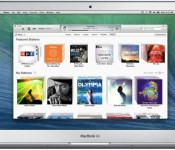
iTunes 11.3 Expands iTunes Extras as Apple TV Finally Adds Support and Apple Plans for iOS 8
Apple today released iTunes 11.3, including several improvements to iTunes Extras, including new features for HD movies. This new content will be added automatically to previously purchased iTunes movies for free.
Alongside the launch of iTunes 11.3, Apple has also announced that the Apple TV is finally supporting iTunes Extras with the 6.2 software update released late last month. The first-generation Apple TV supported iTunes Extras, but the feature was lost when Apple revamped the Apple TV back in 2010.
Finally, Apple has also announced that iTunes Extras will be coming to iOS with the public release of iOS 8, which is slated for this fall.

iTunes 11.3 includes all-new iTunes Extras for HD movies. iTunes Extras can include behind-the-scenes videos, short films, high-resolution image galleries, director’s commentary, scenes, and more. These immersive iTunes Extras can also be enjoyed on Apple TV with Software Update 6.2 now, and will be available on iOS 8 this fall.
New iTunes Extras will be automatically added to your previously purchased HD movies as they become available – at no additional charge.
iTunes 11.3 can be downloaded from the software update tool in the Mac App Store or Apple’s iTunes web page.
 AIVAnet