


Learning the hard way: The downsides of Google Cardboard
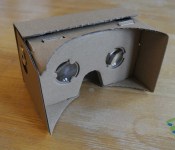
 If you followed what was going on at Google I/O 2014 last month, you would have heard about a really nifty contraption that Google announced called Google Cardboard. The easily assembled, cardboard accessory would essentially turn anyone’s phone into a virtual reality device and initially use Google’s own apps to virtually explore the internet and the world. The beauty of such a design is that it’s quite cheap and really doesn’t need any expertise to get going: just assemble the cardboard frame, launch the Google Cardboard app, profit (???).
 With that in mind, I very excitedly got my hands on a Google Cardboard kit from www.googlecardboard.com. The kit I purchased cost $24.99 and included an NFC tag for easy linking. As it ships from Hong Kong, I eagerly waited for about two weeks before it arrived, and today I assembled the virtual reality glasses today.
 For anyone who’s hoping to purchase a kit, they are extremely easy to assemble, though it took me a few minutes of stressing to realize that some bits of cardboard need to be torn off. It was a bit unusual that instructions weren’t included with this kit, but if you ever get lost, just boot up the Google Cardboard app which has a launch animation which should give you a good idea of how it’s supposed to go together. Once assembled, though, is when it all went downhill for me.
 The first big issue I encountered had a lot to do with the size of my device. I had assumed that because there were gaps at the ends of the frame that my Samsung Galaxy Note 2 would fit inside perfectly. Turns out, when lying in landscape position, the Note 2 is actually too tall as well, meaning I couldn’t close the flap that holds the phone in place. No matter, as this was just a trial run, I just held the phone in place and left the flap open. Easy, right?
 Wrong. I actually wear glasses, and had again assumed there would be enough space for my glasses to jam into the virtual reality headset. Again, my hypothesis was wildly wrong and I had to take my glasses off to even fit my head in. Naturally, this meant that I could barely see what was going on after I launched the Google Cardboard app, making the experience moot.
While I’m a bit frustrated, I’m not particularly surprised as it would have been difficult to cater for devices of all sizes and heads of all sizes too. That said, I did want to caution anybody out there that if you are looking at getting a Google Cardboard kit to carefully think about it first, particularly if you have a phablet or glasses. There is light at the end of the tunnel, though, as Google did provide us with the design files for Google Cardboard meaning it would be theoretically possible to scale up the design and make the whole thing a little bigger.
Are you planning to get Google Cardboard? Let us know your thoughts on it.
Gallery of Construction Photos


//<![CDATA[
ord = window.ord || Math.floor(Math.random()*1E16);
document.write('’);
//]]>
The post Learning the hard way: The downsides of Google Cardboard appeared first on AndroidSPIN.
 AIVAnet