


Engadget Daily: NVIDIA’s Shield Tablet, Atari’s ‘Pridefest’ and more!

Today, we take a look at NVIDIA’s new Shield Tablet, investigate Atari’s future with the LGBT community, ponder an Apple smartwatch patent and learn about a potential HIV breakthrough. Read on for Engadget’s news highlights from the last 24 hours.

Apple ‘iTime’ patent details a modular smartwatch with sensors in the band
Yep, it’s time for more Apple smartwatch speculation. This latest patent application details an ‘iTime’ device with interchangeable, sensor-equipped bands.

Atari’s betting its future on gays and gamblers
Atari, once a giant of the gaming industry, stands on the precipice of irrelevance. But now, the company’s betting its future on on the LGBT community with its upcoming game called Pridefest.

NVIDIA’s new Shield is a tablet built for gaming
NIVIDIA’s second generation Shield claims to be the “ultimate tablet for gamers.” But is this 8-inch, Android-powered slate all it’s cracked up to be?

Researchers fully ‘delete’ HIV from human cells for the first time
Thanks to the bright minds at Temple University, a cure for HIV is that much closer to a reality. By injecting patients with a man-made strand of RNA, the virus can be excised from infected cells, leaving them intact and HIV free.
You also might like:
Filed under: Misc

Edward Snowden’s preferred OS has a major security flaw

Think you’re safe from spies because you’re using Tails, the same Linux distribution that Edward Snowden uses to remain anonymous? Unfortunately, you’ll still have to be on your guard. Security firm Exodus Intelligence has revealed that the latest version of the OS, 1.1, is vulnerable to attacks that could be used to unmask your identity. The researchers say they won’t publish details of the exploit until there’s a patch, but the Tails team will have to wait up to a week before it gets a report it can use to whip up an emergency fix. In the meantime, the discovery is an all too blunt reminder that no software offers a complete guarantee of privacy — even if it’s built with anonymity in mind.
We’re happy to see that TAILS 1.1 is being released tomorrow. Our multiple RCE/de-anonymization zero-days are still effective. #tails #tor
– Exodus Intelligence (@ExodusIntel) July 21, 2014
Filed under: Internet, Software
Source: Tails (1), (2), Exodus Intelligence (Twitter)
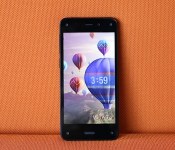
Amazon Fire phone review: a unique device, but you’re better off waiting for the sequel

After producing a long line of e-book readers and tablets (not to mention a set-top box), Amazon has its sights set on the smartphone market. But finding success here won’t be easy, even for an established tech giant like Amazon. With the Fire phone, the online retailer is coming in as an unproven underdog, hoping to bring iPhone and Android users into its fold. CEO Jeff Bezos says the only way to do that is to differentiate; to wow potential buyers with new features they didn’t even realize they needed. These unique offerings include 3D head-tracking, product scanning and fast help from customer service agents.
Regardless of the bells and whistles on offer here, Amazon is walking down a difficult path: The Fire is only available on AT&T, and at $200 on-contract ($650 full retail), it’s going up against high-end devices from companies that have been making phones for years. In order to win over customers, Amazon has to convince them that the Fire is worth dropping loyalties, switching carriers, resigning contracts and handing over a lot of money. Unfortunately, the company has a few lessons to learn before that’s going to happen.
Hardware
Amazon appears to have put so much effort on the Fire phone’s unique features that it didn’t focus on making the device attractive. It looks more like a prototype than a phone that’s supposed to compete against well-designed beauts like the iPhone 5s, LG G3 and HTC One M8. The use of glass on the front and back is a throwback to the Nexus 4 and iPhone 4/4s, which means it’s a fingerprint magnet and more susceptible to breaks than polycarbonate. The sides are protected with a rubberized polyurethane material, however, which should improve the phone’s chances of survival if dropped.
The Fire is thicker than the iPhone 5s and Galaxy S5, just as thick as the LG G3 and thinner than the One M8 and Moto X. Yet Amazon’s inaugural phone feels thicker than all of them due to its blocky design: The sides are mostly blunt, but they taper toward the back, which lies completely flat. And at 5.64 ounces (160g), it’s heavier than the competition. The only exception is the One M8, which weighs exactly the same as the Fire and has a more premium-feeling aluminum body.

Amazon’s goal was to make the Fire ideal for one-handed use, and indeed, it succeeded: The screen measures a manageable 4.7 inches and the sides are easy to grip. It’s comfortable to hold and my thumb could reach nearly every part of the display, so I rarely felt like I had to use two hands unless I was typing a message.
The back isn’t as busy as I expected. Despite being an AT&T exclusive, the carrier’s logo is nowhere to be seen on the device (front or back). All you’ll see here is Amazon’s logo near the top and the obligatory federal certification details near the bottom; aside from that, the camera, LED flash and mic are neatly tucked away in the top-right corner.
Sadly, the front is a massive contrast to the minimal back, with the five lenses being the primary culprits. There’s a Kinect-like sensor on each corner and a selfie cam just to the right of the earpiece on the top. (If you’re already wary of Big Brother, the idea that five eyes are looking back at you won’t help your anxiety.) The only button is a Samsung-esque home key that protrudes out of the glass underneath the display.

Finally, the bottom of the phone houses a stereo speaker, mic and micro-USB 2.0 charging port, while the left side features a volume rocker, camera/Firefly quick-access button and nano-SIM slot. The other stereo speaker is on the top, between the 3.5mm headphone jack and power key; the latter is placed on the left side, which is perfect if you hold the phone in your right hand. Since I prefer using my left hand, however, this was a big pain point.
Though it’s not horrible by any means, the Fire’s display quality is not on par with other flagships. It has a 4.7-inch 720p LCD panel, which offers a relatively unimpressive pixel density of 315 ppi. This is far lower than the GS5, One M8 and G3, and only a few ticks below the iPhone 5s. On a positive note, the viewing angles are good and text is still crisper than I would’ve expected. Its colors are accurate and the 590-nit display is incredibly bright, which makes a difference when you’re trying to read the screen in direct sunlight. The video quality isn’t quite as good as other flagships, but otherwise there’s very little to complain about aside from the difference in resolution.
The $200 model comes with 32GB of internal storage, which beats out the 16GB that the iPhone 5s and GS5 offer at the same price. It doesn’t feature a microSD card slot, however, so you’ll need to shell out another $100 if you want the 64GB model.

One of the biggest disappointments about the Fire phone is its agreement with AT&T. It’s also not launching with any international availability. Even worse, the phone is locked to only function with AT&T SIM cards, so if you plan to travel internationally, you’ll need to be lucky enough to get an unlock code, either through the carrier or unofficial means. All of these factors will severely limit the number of phones Amazon can sell; very few people will want the Fire desperately enough to switch carriers or go through the hassle of unlocking it. If Amazon wants to make the Fire phone successful, it’s not going to do so by making it available to just one network in the world. (On a related note, the phone is locked even when you buy it at full retail price directly on Amazon.)
It seems pretty clear, then, that Amazon is trolling us. The Fire’s loaded with cellular connectivity: The phone is compatible with nine LTE frequencies for use in most parts of the world, in addition to penta-band HSPA+ and quad-band GSM/EDGE. But the only way you can use it is by paying an arm and a leg for international roaming plans or finding a place willing to provide you with the proper unlock code.
Amazon also made a misstep with the Fire’s primitive Bluetooth connectivity. Most, if not all, competing devices support version 4.0+LE, which makes it possible for phones and wearables to communicate with each other. I’ve confirmed that the Fire’s hardware technically supports this version, but its firmware doesn’t — at least, not yet. This means that if you use a smartwatch or a fitness band, you’ll want to hold off on buying the Fire until it’s updated with official support. Out of curiosity, I sideloaded the Pebble app (it’s not available in the Amazon Appstore) and tried to pair my Steel with the Fire; it connected successfully, but the Pebble consistently dropped its connection within a couple minutes.
| Fire Phone | Samsung Galaxy S5 (AT&T) | |
|---|---|---|
| Pricing | $199 on contract; $650 retail | $199 on contract; $650 retail |
| Dimensions | 139.2 x 66.5 x 8.9 mm (5.48 x 2.62 x 0.35 in.) | 142 x 72.5 x 8.1 mm (5.59 x 2.85 x 0.32 in.) |
| Weight | 160 g (5.64 oz) | 145 g (5.11 oz) |
| Screen size | 4.7 inches | 5.1 inches |
| Screen resolution | 1,280 x 720 pixels (315 ppi) | 1,920 x 1,080 pixels (432 ppi) |
| Screen type | IPS LCD | Super AMOLED |
| Battery | 2,400mAh | 2,800mAh |
| Internal storage | 32 or 64GB | 16GB (AT&T version) |
| External storage | None | Up to 128GB, microSD |
| Rear camera | 13MP, OIS | 16MP |
| Front-facing cam | 2.1MP | 2MP |
| NFC | Yes | Yes |
| Radios |
LTE: (700/800/850/900/1700/1800/1900/2100/2600) HSPA: (850/900/AWS/1900/2100) GSM/EDGE: (850/900/1800/1900) |
LTE: (700/850/1700/1800/1900/2100/2600) (AT&T) HSPA: (850/1900/2100) (AT&T) GSM/EDGE: (850/900/1800/1900) (AT&T) |
| Bluetooth | v3.0 | v4.0+LE |
| SoC | 2.2GHz quad-core Snapdragon 800, Adreno 330 GPU | 2.5GHz quad-core Snapdragon 801, Adreno 330 GPU |
| RAM | 2GB | 2GB |
| WiFi | dual-band a/b/g/n/ac | dual-band a/b/g/n/ac, WiFi Direct, |
| Operating system | Fire OS 3.5 (Android-based) | Android 4.4.2 (TouchWiz) |
Unique features
Dynamic Perspective

The 3D fad didn’t die — it just went on vacation for a while. After taking a hiatus from smartphones for a couple years, it first made its big comeback on Google’s Project Tango phone and then on the Fire phone. But there’s a twist. It uses Kinect-like cameras “invisible infrared illumination sensors” that can detect where your head is positioned and how far away it is from your phone. (Only two work at a time, but Amazon added four total lenses just in case a couple are obscured.) The device takes the details of your position and adjusts the field of view on your display to mimic the way you’d actually see things in real life.
Think of it like a window or doorway: When you move your head to the right side, you can peer through and view more stuff to the left that you couldn’t see when looking at it straight on. You can also look at objects from different angles — in a Rubik’s Cube game, you can see “around” the sides of the cube just by moving your head — and if that object is in the foreground, you can actually take a look at what’s behind it, simply by shifting to the left or right of the screen.

Dynamic Perspective is primarily used in games, lock screens and maps (iconic landmarks seem to poke out of the screen if you look at them from the right angle), but Amazon subtly applied it to app icons as well; as you tilt the phone or lean your head to one side, you can see the icons move too. The company opened up the software to developers last month, and the Appstore already boasts over 60 titles with the 3D effects added in. It works well in some games, such as the Rubik’s Cube one, and an adventure game called Lili, which lets you steer by moving your head. But many apps only use the tech as an afterthought. In Sonic Dash, for instance, you can only use it to look around the main menu, so there’s no in-game functionality; Mint.com’s app uses Dynamic Perspective in its home screen so that each box looks like it’s moving. Unless Amazon can drum up stronger developer interest, you’re likely to see lots of apps like this with half-baked implementation.

I wish only third-party apps were half-baked, but unfortunately the performance issues are more far-reaching than that. Dynamic Perspective works well most of the time, but I still noticed plenty of flaws. Choppiness was the most frequent issue, and it usually occurred because I was moving my head around too much and the sensors simply couldn’t keep up. In these cases, the effects would pause for a couple seconds before catching up with my movements. On a few occasions, the feature stopped working entirely after I sideloaded and ran apps that aren’t available in the Amazon Appstore (more on that later); it immediately began working again after I stopped running those apps. As long as you stick to official Amazon titles and services, you likely won’t run into the same issue.
Is there a reason to be concerned about having five cameras staring back at you? Not according to Amazon. Executives emphasized that the Dynamic Perspective cameras act as sensors, and any images or data they collect are never stored anywhere on the phone; everything is deleted almost immediately, and none of it can be accessed through another part of the device.

Concerned about how Dynamic Perspective may affect those with motion sickness, I asked Amazon reps if they’ve received any negative feedback so far. They told me that they hadn’t; it’s less likely to make you sick, they said, because the user is in control of how far and how fast the effect goes (the same way many people experience less motion sickness when driving than they do in the passenger seat). So they challenged my wife — who’s susceptible to getting sick from viewing moving backgrounds — to try it out. We accepted the challenge… and it didn’t work; she had to put the phone down after just two minutes. Its effects were just as strong as the parallax feature introduced on iOS 7. If that bothered you as well, you’ll want to turn off Dynamic Perspective in the settings right away.
Even if Dynamic Perspective performed better, and even if it doesn’t make you sick, it’s still a tough sell. It’s a neat feature and developers may come up with some cool uses for it, but it isn’t enough to persuade millions of iPhone and Android users to leave their preferred platforms, and possibly carriers, to try it out — even if they are loyal Amazon shoppers. It simply doesn’t benefit the user enough.
Firefly

Another new feature on the Fire is called Firefly. Long-press the camera button on the side of the phone, and you’re presented with a viewfinder with white bubbles moving all over the screen. Point the camera at a phone number, email address, website, product, book or bar code, and the bubbles will congregate over the relevant information. From there, the camera snaps a picture. The phone then scans each detail and places it into a clipboard that you access by swiping up from the bottom of the screen. Now you can perform an action related to the item: Call a phone number; visit a website; or purchase something through Amazon. It’ll also catch TV shows, movies and songs so you can buy or rent flicks at your leisure, find them on streaming services and locate a band on StubHub.
If you’ve heard of this before, that’s because it’s been done before, to an extent, by Microsoft, Google, Apple and app makers like Shazam. The difference is that Amazon’s implementation is more extensive than the rest (it comes with more features and boasts a catalog of 70 million products to draw from) and it’s open to developers, so other services can take advantage of the feature. It could be the ultimate guilty pleasure for the impulse buyer: Scan a friend’s Blu-ray disc; immediately compare several online prices; and order the cheapest option right away.
Much like Dynamic Perspective, my experience with Firefly was hit-or-miss. It scanned music and shows with near-perfect accuracy. It could easily pick up a large number of products within a couple seconds — even something as basic as an office telephone popped up immediately as I waved the phone in front of it — but this happened roughly 75 percent of the time. The other 25 percent was an exercise in frustration: Either it’d take too long to find anything, or it wouldn’t pick anything up at all. It had a hard time looking through sun glare and shrink wrap, and Firefly couldn’t grab information from an angle or at a distance (read: more than 10 feet away). Even when phone numbers and websites were nearby, it’d sometimes take two or three tries before giving me an accurate read. On one occasion, I scanned an “888″ number and Firefly thought it started with “408.”

At times, it’d scan an object and present me with a similar item, but not the actual product itself. When I scanned a Super Mario game’s instruction book, for instance, it showed me a Mario backpack. Doing the same for a bottle of Coke, I was prompted to buy a soundtrack of every Coke commercial from 1962 to 1989. (A $22 value — what a steal!) This might make sense if the products I scanned weren’t available in Amazon’s store, but they were.
Firefly’s missing out on a few golden opportunities. It isn’t able to scan street addresses, which you could then pull up on a map; it can’t read information on a whiteboard or notepad; and it can’t see signs for restaurants or other businesses. Firefly has a lot of potential, but it’s only scratching the surface when it comes to convenience and usefulness. I don’t expect it to get everything right within a couple seconds, but it needs to be able to recognize more types of stuff for it to become a part of my regular app selection.
Another miss is the fact that Amazon isn’t planning to port Firefly over to iOS or Android. The company claims that’s because Firefly is optimized for the Fire, and while that may be true, availability on other platforms would translate into more sales on Amazon’s site — the company’s bread and butter.
Mayday

One of Amazon’s most brilliant features is Mayday. The service, which debuted on the Kindle Fire HDX tablet, promises to connect users with knowledgeable tech advisors in 15 seconds or less. (If you’re a tech enthusiast and you have relatives who aren’t as savvy as you are, you understand why Mayday is such a smart idea.) The Fire phone also comes with the feature built in; head to the quick settings to find a dedicated Mayday button.
If any good can come out of Amazon’s partnership with AT&T, it’s this: If you ring up Mayday with a bill concern or carrier-related technical problem, the Amazon rep will “warm transfer” you to AT&T’s tech support department. This means the rep will stay on the line with you and answer other questions while you wait.
My calls into Mayday connected between 10 and 20 seconds, with my average wait time coming out to the promised 15 seconds. With my permission, each rep was able to view and remotely control my device to answer my questions; one rep even drew on my screen to show me how to get to a desired feature.
Gestures

Thanks to its relatively petite size, the Fire functions well as a one-handed device. But if you’re making the move from a smaller smartphone — an iPhone, perhaps — it’s going to take some time to get used to a larger handset. Amazon has added one-handed gestures to help you navigate through different parts of the operating system without needing to use a second hand. Flick the phone right or left to open up side panels with menus, settings and other features; a swivel motion opens the quick settings and notifications panel; and moving your head up or down tells the phone to begin scrolling through text (yep, just like Smart Scroll on Samsung phones). Finally, you can tilt the device slightly to “peek” at your status bar if it’s normally hidden. Although the gestures effectively allow you to get to different places in the phone with only one hand, it becomes less effective when you have to actually use a finger to select something.
Software

Existing Fire tablet owners may be the most willing group of people to buy Amazon’s first phone because they’re already tied into the company’s ecosystem. The device comes with Fire OS 3.5, a proprietary operating system based on the Android 4.2 open-source platform (AOSP). It’s similar to the approach used on the Nokia X and other devices sold in China because this gives manufacturers the flexibility to build whatever they want without being forced to use Google Play Services like the Play Store, Gmail, Games and Google+, to name a few.
This means Fire OS is all about Amazon. Instant Video, Kindle books, Newsstand, Music, Audible audiobooks and Games are all included here. If you want to download apps, you’ll need to do so through the Amazon Appstore, which features 240,000 titles. That may sound like a lot, but this is only a fraction of the Play Store and iOS App Store size; it’s even smaller than Windows Phone’s selection! Quality certainly trumps quantity, of course, and I’ll give Amazon some credit for having a lot of popular apps, but I recommend you check out the store before you buy the phone to see if your favorite apps are in there. Also keep in mind that if you paid for an app in the Play Store, you’re going to have to pay for it again.
Of course, since Fire OS is based on Android, it’s easy to sideload apps (known as APKs) as long as you know how to get them. Programs based on Google Play Services, such as Gmail, immediately crash. Other apps may not work properly either, and as I mentioned earlier, some of them may even adversely affect the defining features on the Fire.
User interface

The Fire OS experience is much different than what you’ll find on any other phone in that it has both vertical and horizontal components. Vertically, it has a carousel on top and a standard app grid below; horizontally, there’s a slide-out menu for Amazon apps and services on the left and a tray for weather and upcoming appointments on the right. These menus change based on which app you’re in.
Arguably the most intriguing part of the OS is the Carousel. As you spin it, you’ll find many of your recent apps with timely notifications. Each app has a list of relevant details underneath it, and the content often depends on what you look at the most. You’ll see your most recent emails — complete with the first two lines of each one — as well as missed texts, settings you’ve opened lately, your most frequented websites, suggested apps in the Appstore and even third-party stuff like a Zillow app that displays a list of the last few houses you’ve looked at. You can pin specific apps to the front of the carousel and remove unwanted ones altogether, but you can’t reorder them.
I discussed gestures earlier, but there are a few other tricks worth noting. First, the Fire has no official back button, as you’re supposed to swipe up from the bottom bezel instead. You can do the same from every side: The top pulls down quick settings and notifications; the left brings up the Amazon tray; and the right accesses your miscellaneous drawer. Be careful, though: On several occasions, I found myself looking at an unwanted drawer when I was actually swiping through my photo albums. Just don’t get too close to the edge and you’ll be fine.
You can also double-click the home button to bring up a list of recent apps, whereas a long-press will prompt the Fire virtual assistant. It’s not as feature-rich as Siri, Cortana or Google Now, but it’s better than nothing: You can tell it to make calls, do web searches and send texts or emails.
Whether you use security or not (and you should), a swipe to the left on the lock screen pulls up Amazon’s “photo locker,” a quick-access picture album that you can customize as you see fit. You can have as many as you’d like. This is most useful for bragging rights; all you have to do is whip out your phone and in two seconds you can show your friends how much those kids of yours have grown.
One of the nicer, but more low-key touches on the Fire is a setting that allows you to change your sound profile to silent for three hours, after which time it’ll revert back to normal mode. This is perfect anytime you need a nap or have a work project you want to focus on. Most phones have some sort of quiet hours feature, but this option comes in handy if you need to do it quickly or simply don’t feel like messing with your Do Not Disturb settings. If I may be picky, I’d like to customize this setting to fit whatever length of time I want; otherwise, it’s a feature I’d like to see on more phones.
Camera

Amazon didn’t skimp on imaging performance: The camera here has a 13-megapixel sensor with a five-element lens, f/2.0 aperture and optical image stabilization (OIS). These specs sound great on paper, and we were hopeful when Bezos showed photos where the Fire’s shooter clearly beat out the iPhone 5s and Galaxy S5. And though the camera takes perfectly acceptable shots with the appropriate amount of detail, my own image comparisons with the same three phones didn’t always come out in the Fire’s favor.
I’ll break down the Fire’s low-light performance first, since this was one of the camera’s top selling points. The Fire outperformed the Galaxy S5, and it wasn’t even a close call; the images on the Fire picked up more light and were far less noisy. Of course, this is one of the Galaxy’s major weaknesses, so that wasn’t much of a surprise. The real test came against the iPhone, which holds its own in dimly lit conditions. The comparison was much closer this time, but the iPhone ultimately came out on top because it was able to grab more errant light and with less noise. Also, I found the Fire was less consistent about keeping shots in focus in these conditions. In most cases, I had to remain completely still in order to get a clear picture, and had to discard several shots that came out blurry. Also, the LED flash on the Fire is noticeably less bright than on the iPhone and GS5.
The Fire’s camera did a good job capturing detail in daylight, but it had a warmer white balance compared to competing phones. HDR was subtler and less cartoonish on the Fire than on the Galaxy and about the same as on the iPhone. I prefer it this way. White balance aside, the camera is decent enough for both night and day, even though it’s not the best in either situation. Click here to see my sample shots in their full-res glory. I’ve also uploaded test shots I took with the iPhone and Galaxy S5, which you can find here and here.
Many lackluster cameras can at least earn a few brownie points by adding manual controls to let you take matters into your own hands, but the Fire has a minimal interface that features a toggle for HDR and flash, as well as the option to take pictures in lenticular mode (aka, GIF-making mode) and panoramic mode.
It’s also capable of taking 1080p video at 30fps, recording at a bit rate of 20 Mbps. Again, it sounds great on paper, but I wasn’t impressed. On a positive note, it didn’t have a problem keeping motion smooth; however, it did so at the expense of detail — and it re-focused more than it should have in broad daylight.
Performance and battery life

Deep inside the Fire phone, a 2.2GHz quad-core Snapdragon 800 chipset is running the show. Despite the fact that it’s now two generations behind the current flagship processor, it’s still a solid enough chipset that it should take care of business handily. As I mentioned earlier, Dynamic Perspective struggled from time to time, but unfortunately it also seemed to have an effect on other areas of the OS. I monitored CPU usage with the 3D effects turned on and off, and indeed, there was a considerable difference; all four cores worked harder and more consistently when the feature was turned on. And since Dynamic Perspective is used in tasks both small and large, it seemed to have an impact on the performance of the entire phone.
Turn the extra features off, and you’ll have a grand time using the phone. You’ll encounter fewer frame skips and stutters. Meanwhile, apps load reasonably fast and I didn’t experience any crashes. Gaming was exactly as fast and smooth as I’ve come to expect from a Snapdragon 800. In general, the phone’s performance is solid.
| Fire phone | Samsung Galaxy S5 (AT&T) | LG G3 | |
|---|---|---|---|
| Quadrant 2.0 | 20,195 | 22,236 | 25,548 |
| Vellamo 3.0 | 1,784 | 1,676 | 1,761 |
| 3DMark IS Unlimited | 14,145 | 10,757 | 16,662 |
| SunSpider 1.0.2 (ms) | 752 | 791 | 918 |
| GFXBench 2.7 T-Rex 1080p Offscreen (fps) | 22.8 | 27.4 | 27.9 |
| CF-Bench | 29,321 | 35,352 | 30,414 |
| SunSpider: Lower scores are better. GFXBench 3.0 not supported on Fire phone, so 2.7 was used. | |||
I prefer real-world experience over numbers, but for our readers who prefer the opposite, check out the benchmark-comparison table above. In most areas, the Fire can contend in the big leagues despite the fact that it’s on a previous-generation chipset running at a lower clock speed. It topped the other two devices in a couple benchmarks and held its own on most of the others. That said, the Fire’s lower-res screen likely had an impact on at least one or two scores.
Gestures were inconsistent, however, and I noticed quite a few hiccups. Many times, a flick of the wrist or hand swivel wouldn’t do anything, so I’d have to exaggerate the gesture once or twice before it did what I wanted. But there were other times in which barely tilting the phone at all triggered a gesture. On several other occasions, wrist flicks would bring up the exact opposite menu of what I intended.

The Fire only packs a 2,400mAh battery, which is small compared with the competition. Battery life is average and will last a full day… as long as you don’t activate Dynamic Perspective and Firefly. (You know, the phone’s two most unique features.) These two things are such a huge drain on the device’s battery that I had to charge it up twice in the same day — once in the early afternoon and again later that night. It wasn’t uncommon to lose 10 percent of my charge in a half-hour. So if you plan on using Firefly for comparison shopping, make sure you shop for an external charger first.
In my endless-video loop test, meanwhile, the phone lasted nearly nine hours before dying. This is about average for a battery of this size, but then again, Amazon’s fancy features weren’t running at the time.
The audio quality is better than most. Calls were clear; in-call volume was more than adequate; and the stereo speakers were loud, if a little tinny. The phone’s GPS also performed admirably, helping me navigate multiple routes without any lost connections.
The competition

As I mentioned earlier, the Fire’s exclusive deal with AT&T severely limits its potential. It simply can’t reach as many customers when it’s only available on one carrier in the entire world. This strategy worked out fine for the original iPhone in 2007, but times are different now, and Amazon doesn’t hold enough sway to get its members to switch platforms or carriers (or both) on top of paying $200 on-contract.
At least the Fire comes with a free year of Prime membership (a $99 value) to sweeten the deal, but the same price can also get the Samsung Galaxy S5, HTC One M8, iPhone 5s and LG G3, all of which have better displays, faster performance, stronger ecosystems and, in most cases, longer battery life. Although the Fire doesn’t lag too far behind its flagship competitors, Amazon put so much effort into what makes it unique that it didn’t focus enough on everything else.
Wrap-up

The Fire’s defining features are fun, but I can’t help but feel as though they’re merely gimmicks designed by Amazon to demonstrate the company’s brilliance — and at the expense of battery life, to boot. Dynamic Perspective might be useful in a few cases (games, mainly), but it won’t provide the user with functionality they’d sorely miss if they went with an iPhone or flagship Android device.
Not only is the Fire lacking in useful new features, but its high price and exclusivity to AT&T guarantee its irrelevance. The company owes its success to millions of loyal online shoppers and bookworms who use Amazon for its convenience and aggressive pricing, so why come out with a smartphone that isn’t particularly convenient, and isn’t particularly cheap? By no means is the Fire a horrible phone, but it’s a forgettable one. You might want the eventual Fire Phone 2, perhaps, but for now, you’re better off sticking with what you know.
Filed under: Cellphones, Mobile, Amazon, AT&T
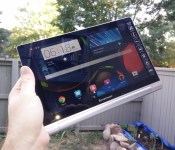
Lenovo Yoga Tablet 10 HD+ Review

Lenovo is back again with another addition to the Yoga tablet line. It’s safe to say that Lenovo’s top-of-the-line Android tablet is better than ever. As we mentioned with our review of the Yoga Tablet 10, Lenovo is pushing the envelope of design, which could be good or bad depending on which way you look at it. The new Yoga Tablet 10 HD+ has some nice upgrades from the previous model, but still falls short in some of the same places.
Hardware
As with the previous 10-inch Yoga tablet, the build quality in the HD+ is excellent. The device features a 10-inch 1920×1080 display, a 1.6 GHz quad-core Qualcomm Snapdragon 400 processor, 2 GB of RAM, 8 MP rear-facing camera and 1.6 MP front-facing camera.  The display is pretty sharp and bright, but one thing that could be annoying to some is its glossiness. I didn’t find it a problem when using it inside or in shaded area. It also has some decent viewing angles, which is always a plus. One of the best features, which also could be considered its worst, is the tablet’s design and like the previous model, it’s extremely thin at its thinnest point and up to about 3/4-inches at its thickest. The thickest part of the device is sort of a cylinder with the power button on one end and the 3.5 mm headphone jack at the other, which it’s also a handle for the device. This is a good idea theoretically in my opinion and great comes in handy when holding the device or transporting it, but it’s a slightly awkward feeling if you’re holding the device and using it in portrait mode. The thick side also houses the built in kickstand that is still a bit hard to engage, as with the previous model. If you are using the device on a table or to have it sit up on your lap, it’s perfect, but if you wanted to have it in a position that you could type on it, it’s a bit too tall in my opinion with the kickstand out. If you were using it the same way but without the kickstand engaged, it’s seems to be too small of an angle. To give you an idea of how these angles differ, think of an iPad with its Smart Cover as a happy medium just about in-between both of these angles which seem either slightly too large or small for completely comfortable typing.
  The tablet comes with 32 GB of built-in storage that is more than enough, plus hidden behind the stand is a compartment where you can add additional storage with up to a 64 GB MicroSD card. I mentioned above that the HD+ has a Snapdragon 400 processor and 2 GB RAM, which is more than enough to satisfy the standard user. Just about any app I used on the device ran with no issues, including games like The Dark Knight Rises. Comparing TDKR running on this with it running on my OnePlus One with a Snapdragon 801 processor, it’s clear which is the winner, so as you can imagine, the graphics on high-end games are reduced and it’s just slightly choppy. Games that aren’t as graphics intense like Leo’s Fortune and even Horn ran beautifully. The cameras on the device are fairly decent for a tablet cameras. I didn’t test them extensively, but the photos I took turned out pretty clear and were decent in lower light. You should have no problems video chatting with the front-facing camera either.
  Two of the last things I want to mention about the device is that the 9,000 mAh battery is fantastic as well as the fact that it has front-facing speakers. In use, the tablet gets about 18 hours of battery life, but I’ve seen the tablet display that it had about 38 hours of battery life when I didn’t use it a lot. There were times when I didn’t use it for a week or more and barely any power was lost, so it works great in standby mode. The speakers on the device are loud and were great for tablet speakers, especially when I tested it out watching Transformers: Dark Side of the Moon.
Software
On the software side of things, the device is running Android 4.4.2. For most of the review, it was running Android 4.3 Jelly Bean then right when I was finishing writing this up, it got updated to Android 4.4.2 KitKat. Lenovo had mentioned that the device would be receiving the KitKat update at the end July, which was about an 866 MB update One nice thing about the software on the tablet, although not the absolute latest version of Android KitKat, is that it’s pretty close to a stock experience, Before the update, it had tablet style menus in Settings but the upgrade brought a Nexus experience to the Settings, only with a slightly different color scheme .The desktop and even on-screen navigation buttons are also Nexus-style as well, so you’ll be right at home. The only downfall with the launcher is that it’s not great if you have a ton of apps or aren’t very good at organizing them since there is no app drawer, much like on the iPad or MIUI. Don’t forget, you can always install a third-party launcher so it’s not the end of the world. The notification drawer and Quick Settings are stock as well, with slightly different icons. Some nice additions that Lenovo added to the software is the Smart Side Bar that can be accessed by swiping from the bezel onto the screen on either side as well as the Dolby app that allows you to adjust sound settings for numerous modes such as for movies, music, games and voice, plus you can make custom configurations as well. The Smart Side Bar gives quick access to your videos, photos and books, recently used apps and sound and visual modes. The KitKat update appears to have made the sidebar work much better than previously as there were times when I couldn’t get it to come out when it was running Jelly Bean. Also, before the update you could double tap while on your homescreen and recent apps would appear, but that appears to have been taken out of the software, unless there is a setting somewhere that I couldn’t find to turn it back on.  Another thing that Lenovo added to the software is the ability to run multiple apps at once by having one open then opening the recent apps and sliding it to the window.pane. I had no trouble watching a movie and surfing a webpage a the same time.
Accessories
Along with the tablet for review, I also received a green and grey sleeve. While it won’t really protect the tablet from huge falls, it will protect it from scratches. The HD+ fits in the sleeve nicely, even with its “unique” design. It also closes magnetically so you don’t have to worry about the flap opening. 
Overall
Looking at both the hardware and software together, it’s not a bad tablet for $369. The Lenovo Yoga Tablet 10 HD+ is a worthy upgrade from the previous model, but still has some of the same shortcomings with the stand and software. As we said with the Yoga Tablet review, if you favor battery life over raw power, then this is worth considering. There also aren’t many tablets with an included stand, front-facing speakers and Android 4.4 KitKat.
The post Lenovo Yoga Tablet 10 HD+ Review appeared first on AndroidGuys.

Google Play Store 4.9.13 brings that Material Design feel to your Device [APK Download]
 Ever since Google announced its new Material Design UI overhaul at Google I/O last month, we’ve been eagerly awaiting updates to each of Google’s core apps. We’ve had sneak peeks at what the change might mean for the Google Play Store, but Google UI engineer, Kirill Grouchnikov, today announced on his Google+ that the new Play Store would be launching today with all of these changes. Sure enough, Google Play Store 4.9.13 has been captured today, and boy is it different.
 Much like the changes we saw in Google Play Games earlier this month, the Google Play Store UI overhaul replaces the simple interface with big pictures and smooth, sweeping transition animations. Other changes include the way embedded videos are displayed, recommendations from friends, and hiding long app descriptions.
If you can’t wait to try that Material Design-look Play Store, have no fear as we have the APK available for download below:
Google Play Store 4.9.13 APK Download
What do you think about the new Google Play Store with Material Design? Is it everything you dreamed it would be? Let us know your thoughts.
//<![CDATA[
ord = window.ord || Math.floor(Math.random()*1E16);
document.write('’);
//]]>
The post Google Play Store 4.9.13 brings that Material Design feel to your Device [APK Download] appeared first on AndroidSPIN.

AT&T, Apple Begin Paying $40 to U.S. iPad 3G Purchasers After Unlimited Data Lawsuit [iOS Blog]
AT&T and Apple have begun sending out payments to consumers in the United States who purchased an original iPad 3G, following the culmination of a long-running class action lawsuit over unlimited data.
Originally settled in September of 2013, the lawsuit covered a $29.99 no-contract unlimited data plan that Apple and AT&T offered with the original iPad — a deal that Steve Jobs advertised on stage when the tablet was revealed in January of 2010.
In June of 2010, AT&T stopped offering the plan and replaced it with a 2GB for $25/month plan. AT&T did grandfather in users who had an unlimited plan prior to June 2010, but the company also began throttling unlimited users in October of 2011.
The class action lawsuit accused Apple and AT&T of using bait-and-switch tactics, selling iPads that advertised unlimited data without actually providing unlimited data. The lawsuits also suggested that without the prospect of an unlimited data plan, consumers had overpaid for their tablets. Apple and AT&T’s settlement, which called for the companies to send out $40 checks to all affected customers, was finalized in February. As noted by 9to5Mac, checks are now arriving to customers.
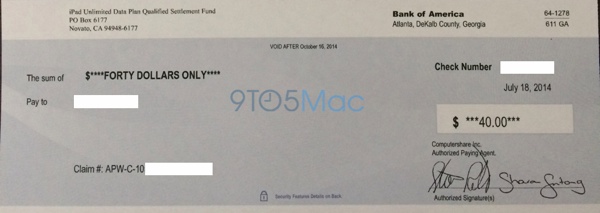
Enclosed is a check in the amount of $40.00 representing your settlement in the award of Apple & AT&T iPad Unlimited Data Plan Litigation. The amount of your settlement award has been calculated pursuant to the terms of the Settlement that was approved by the court. Pursuant to the terms of the settlement, the enclosed check must be cashed by October 16, 2014; after that date, the check will be void and will not be reissued. If you have any questions, you can contact the Settlement Administrator at 1–800–248–1504.
Under the terms of the settlement, AT&T is also required to offer customers a $20 discount on the $50/month 5GB data plan, but the deal is only available to customers who do not have another data plan with AT&T due to no-class action provisions in their contracts. 

Apple Facing Class Action Lawsuit From 20,000 Employees Over Alleged Labor Code Violations
Apple is facing a class action lawsuit in California over a number of alleged Labor Code violations, with the company being accused of not providing timely meal breaks, timely rest breaks, and timely final paychecks, reports TechCrunch.
Plaintiffs bring this Class Action against Defendants to recover for, among other things, failure to provide meal and rest periods, failure to furnish accurate itemized wage statements, and failure to pay timely wages on the end of employment, interest, attorneys’ fees, penalties, costs, and expenses on behalf of themselves, the Plaintiff Class, and the Plaintiff Subclasses.
Originally filed in December of 2011 by four former Apple retail and corporate employees in San Diego, the lawsuit was certified as class action yesterday and could affect up to 20,000 current and former Apple employees in the state of California.

According to the filing, which demands a jury trial, employee complaints cover a wide range of possible labor code violations. One complaint, for example, cites employees having to work for five hours straight without a meal break, while another complaint suggests that Apple took several weeks to send out a final check to multiple employees.
The lawsuit asks for compensatory damages and restitution of all monies due to affected employees from unlawful business practices, along with interest, but it does not specify a damages amount.
Along with this new class action lawsuit, Apple is embroiled in a class action lawsuit with Apple retail employees who allege that Apple’s bag checking policies have resulted in lost wages, a suit that also accuses Apple of violating state labor laws.


Digital Tattoos to unlock your Moto X? Yeah, it is Real

At Google I/O they announced the upcoming Android L update. Inside L there were some cool new unlock abilities that would let your device bypass any pins or patterns, they called it Personal Unlocking. The device will use locations that you designate, Bluetooth devices that you connect that are authorized and even your unique voice print. There is another way to unlock your device that will by-pass those pesky pins and patterns, at least if you have a Moto X, and it is called a Digital Tattoo.
A partnership between Motorola and VivaLnk has produced a small, round RF module that can be adhered to your skin and is synced to your device. In turn, when your screen is on, you can tap it with the back of your phone and unlock the device. The little stick on is easy to stick to yourself and lasts for 5 days. It is also water-proof so you don’t have to worry about covering it up for showers, working out or swimming. The Digital Tattoos are available for purchase in a 10 pack for $9.99. Makes them just about a buck a piece.

While interesting, unique and innovative, I can’t say that I find it all that practical. Not when each one lasts about 5 days before it needs to be replaced. I certainly won’t be spending $10 every 45 days or so I can unlock my device from a sticker on my skin. I am sure there are some people out there though that might find it useful in the right situations in life, maybe while traveling or attending conferences or something where keeping your device secured is extremely important.
What are your thoughts on this little oddball piece of gadgetry?
Via Droid-Life
VIVALINK website for more details and purchase.
//<![CDATA[
ord = window.ord || Math.floor(Math.random()*1E16);
document.write('’);
//]]>
The post Digital Tattoos to unlock your Moto X? Yeah, it is Real appeared first on AndroidSPIN.

You can now unlock your Motorola phone with a ‘digital tattoo’

Hate unlocking your Android smartphone so much that even Face Unlock or Skip feels like too much of a hassle? Motorola just came to your rescue. The company has partnered with VivaLnk to launch the previously teased Digital Tattoo, an NFC-based skin tag that unlocks your phone (currently limited to the Moto X) with a quick tap. The tattoo can stay on your body for up to five days, and it should survive abuses like showers and sweat-laden runs. It’s a clever approach that might be appealing if you’re fed up with PIN codes and patterns, although the back-of-a-napkin math suggests that you’re paying a lot just to save a couple of seconds when checking your email. VivaLnk is asking $10 for packs of 10 tattoos, or enough to last 50 days — you’ll have to spend $80 to get through a whole year. It could be useful for those busy days when you’re constantly waking up your handset, but you might be better off rolling that money into a Moto 360 or your next big phone upgrade.
Filed under: Cellphones, Wearables, Mobile, Google, Lenovo
Source: Official Motorola Blog

Artist uses over-sized pixels to keep an eye on London’s pedestrians

Folks strolling past the Welcome Collection’s venue in London may have an eery feeling that they’re being watched. Well, that’s because they are. And not just by a government’s prying eyes, but with 650 over-sized pixels that render their own set of gazing peepers. Peter Hudson’s Eye Contact is on display in the buildings front windows, observing the passers-by all day long with ocular footage from nearly 70 volunteers. At night the eyes close for rest — unless a set of sensors detect the occasional nocturnal pedestrian. The installation is meant question our reliance on digital screens and the manner in which they influence interaction. “Eyes are both a symbol of perception and an instantly recognizable human feature, so by presenting them through a heavily pixellated video display, I’m challenging the usually fluid process of recognition,” Hudson explained. Londoners can expect for the screens to keep watch on them for the next year.
[Photo credit: Peter Hudson]
Filed under: Misc
Via: Vice, New Scientist
Source: Peter Hudson, Welcome Trust
 AIVAnet