


Apple’s public beta for OS X Yosemite begins tomorrow

The Apple we know is run by a bunch of perfectionists. The company only shows off final devices at its launch events, and developers are strictly forbidden from sharing screenshots of upcoming iOS releases. This is a company that doesn’t usually bother with sneak peeks. Or do they? Apple announced a few months ago that it would carry out a public beta-testing program for OS X Yosemite, its next-gen Mac operating system, allowing regular people to give feedback before it eventually gets a wide release. Now, the testing period is finally about to begin: Apple says that beta users will be able to download an early version of the OS starting tomorrow at around 1PM Eastern. If you’ve already signed up to join the beta program, you don’t need to do anything; you’ll get a notification tomorrow when the OS is ready to download. If you haven’t gotten around to it yet, though, we suggest you get on that ASAP: Only one million people are allowed to participate in this early-stage testing, which means slowpokes might not get a chance.
Update: Our preview of OS X Yosemite is already up, even before the public beta period begins. Read it here!
Source: Apple

OS X Yosemite preview: the Mac gets a major makeover

The last time Apple released a new version of OS X, we came away feeling a little… underwhelmed. Don’t get us wrong: We’ll never say no to a free software upgrade. But despite a handful of new apps and features, last year’s Mavericks release still felt like the same old OS X. You can’t say that about Yosemite, though. The company’s next-gen operating system ushers in the Mac’s biggest makeover in years, with a flat, streamlined look inspired by iOS 7. Yosemite works more like iOS too, particularly the part where you can route phone calls to your desktop. You’ll also enjoy improved Spotlight search, with results that include news, local restaurant listings, Wikipedia pages, movie times and quick unit conversions. Safari works much the same way, and includes some enhanced privacy settings, too. Right now, Yosemite isn’t quite finished — it won’t arrive until sometime this fall — but you can sign up for the public beta, which will open tomorrow for the first million people who enlist. In the meantime, I’ve been using an early build for a week now. Here’s a quick preview for those of you who can’t wait till tomorrow.
Look and feel

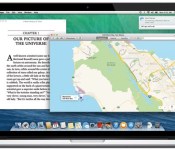
You’ll notice it as soon as you restart your machine: OS X Yosemite takes many, many cues from iOS. There’s the dock, for starters, which features redesigned, flatter-looking icons for all of Apple’s built-in apps. The menu bar now sits flat with the rest of the desktop — not that it ever really got in the way. Throughout, too, Apple has moved to a new, less condensed font, and it’s also adopted some of the same icons used in iOS (check out the “share” button in Finder, for example). Even the “stoplights” for closing, minimizing and maximizing windows are flat — no 3D shading here. Oh, speaking of the stoplights, the green button now allows you to bring windows to full-screen. You should get used to it pretty quickly.

Open up Finder — or any app, really — and you’ll see the left-hand pane is translucent, and will turn to the color of your wallpaper or whatever files you happen to have open in the background (see above for an example). The menu bar inside apps is translucent too, and it’s also significantly narrower, allowing content to stand front and center. If I’m honest, all those translucent panels are just a visual flourish. A cool flourish, but a flourish nonetheless. Yes, the slightly see-through bits up top remind you there’s more to see if you keep scrolling, but you could have figured that out anyway.
Not that I’m complaining about a fresh coat of paint. This new release feels modern — so much so that it makes my old Mavericks system feel shamefully dated. What’s nice is that even as you start installing third-party apps, the OS continues to look clean. Programs like Firefox have those flattened stoplights, for instance, though they don’t currently show the translucent panes. At the same time, as current as the OS feels, it’s still easy to find your way around; no one, and I mean no one, will feel lost inside OS X. Mail looks like Mail, and Safari looks like Safari. They just look better.
Spotlight

OK, I spoke too soon: There is one thing that works differently, and that’s Spotlight search. Whereas before, your search results appeared in drop-down form in the upper-right corner of the screen, clicking the search button now brings up a big ol’ search bar in the middle of the desktop. But it’s not just the placement of the search results that have changed; they’ve gotten quite a bit smarter, too. From here, you can convert units and measurements, preview Wikipedia entries and news stories, and pull up friends’ contact information, complete with phone numbers, email addresses and websites you can click on from the search bar.
Apps are included in search results too, as are things you may have purchased from iTunes. You can also pull up more personalized information, such as local restaurant listings and movie times, but you’ll need to have “Spotlight Suggestions” checked off under location settings in order for that to work. In cases where the keyword is a little ambiguous — “numbers,” for example — you’ll see any Numbers spreadsheets you have saved, as well as a prompt to open the Numbers app itself. Ditto for “apes” — I’ll get movie times for Dawn of the Planet of the Apes, as well as any emails where someone was talking about apes (and yes, I do have some).
All told, it feels a little like Smart Search in Windows 8.1, though there are things Apple can do that Microsoft can’t, and vice versa (Windows, for instance, lets you go to specific settings from the search results). To be clear, iOS 8 will show the same kind of Spotlight search results as the Mac, but what I particularly like about the desktop version is how self-contained it is — you can pull up search results without having to open a new window. Of course, if you click on a news story, Safari will open a new tab, but that makes sense — you can’t do everything in the search interface, after all.
Safari

It’s more of the same in Safari: The newest version of Apple’s built-in web browser shows previews of search results, with snippets of things like Wikipedia pages. The favorites bar, too, reminds me of the new Spotlight search — just click on the URL and you’ll see a pop-up window beneath showing your bookmarked sites. It’s nice because on the one hand, your favorites no longer take up unnecessary space in the browser, but they’re there when you need them, and you don’t have to navigate away from your current page to see the list.
In addition, Apple redesigned its “tabs view,” where you’ll see a mixture of tabs from both your Mac and any iDevices you own (obviously, you need to be signed into iCloud on every device for this to work). From there, you can close tabs remotely, so long as the remote device is running either Yosemite or iOS 8 (if all you want to do is open remote tabs, you just need iOS 6 or higher, or Mavericks on the desktops side). The tabs window also stacks pages from the same site, which helps keep things tidy. Meanwhile, Safari’s “share” button now shows recent shares. It’s also “extensible,” which is to say you can add extensions to share via more apps, even if they aren’t part of the default sharing menu.

The latest build of Safari also includes a couple important nods to privacy. DuckDuckGo, the do-not-track search engine, is now one of four default search options, with Google, Yahoo and Bing being the other three. Additionally, you can now open private browsing in a new window, even if you already started a regular browsing session in a different window. (In Mavericks, once you turn on private browsing, you’re turning it on for every subsequent window and tab you open.) As you open new tabs in that private window, they’ll be private by default. The private browsing window is also easy to tell apart, with a “private browsing enabled” banner and a lock symbol in the address bar (check out the screenshot above to see what I mean).
Messages

More than any other app mentioned here, Messages is the one that now feels most like iOS. With this new release, you can mute or leave conversations, or add someone to an existing group chat — all features you’ll find on iOS 8 when it comes out. Additionally, if your texting partner is using iOS 8 and has elected to share their location, you can view a map inside the Messages app that shows where your friend is — a handy feature if you’re trying to meet up in real life. Also, you’ll now see a Camera Roll-type stream on the right side, showing all the photos and videos you and your friends may have exchanged over the course of the thread. Naturally, that includes shots from both Macs and iOS devices.
If you ask me, the ability to mute or leave a conversation both seem like no-brainer features, and I’m glad Apple’s adding them to both OS X and iOS. The “add participant” feature is particularly convenient — until now, if you wanted to bring somebody to the conversation, you had to start a whole new thread from scratch. The only catch here is that you need at least three people in the conversation to add another. That means if you and Joe are planning a Sunday brunch and decide Jane is invited too, you won’t have the option to just loop her in. Needless to say, I hope Apple rethinks the “three-person” requirement between now and the fall.
Finally, Apple added a “Soundbites” feature that lets you send short, pre-recorded audio messages in a normal texting thread. (This feature is also coming to iOS 8, though you don’t need an iOS 8 or Yosemite device to receive these audio clips.) It’s all very self-explanatory, really: Just click the microphone button and start talking. And take your time. The limit for Yosemite devices is 100MB, which amounts to a lot of talking — several hours, according to Apple. Thankfully, you’ll have a chance to review your message before sending — in that sense, it’s more akin to a voice mailbox greeting than an actual voicemail. Even after you send it, you can either hit “keep” or let it expire after two minutes, à la Snapchat. Meanwhile, the sender can also choose to keep the message, or allow it to self-destruct two minutes after viewing it.

The built-in Mail app has seen a couple changes too, even though the inbox itself looks the same as ever. The first of these features is Mail Drop, which uploads large attachments to iCloud instead of Gmail, or whatever your mail service is. If your recipient is using OS X Yosemite too, they’ll just download the attachment in Mail, as they normally would. If they’re not on Yosemite, they’ll instead get a download link that will work for up to 30 days. Aside from the ability to skirt attachment-size limits, the nice thing about Mail Drop is that attachments don’t count against your iCloud storage cap.

The second new feature is called Markup, which gives you an easy way to — wait for it — mark up attachments from inside the Mail app. Just hover over a PDF or image after you insert it into your draft email, and click on the “Markup” option that’ll appear over on the right side. From there, you can add shapes and text, complete with formatting options like text colors and different fonts. You can also sign documents if you like by either signing with your finger, or using your Mac’s iSight camera to photograph your signature on a piece of paper.
Lastly, you can draw on the document, at which point Markup will attempt to smooth out your scribblings if you happen to make a shape it recognizes. If you dash out a crooked arrow sign, for instance, Apple will give you the option of swapping in a straight, more professional-looking one instead (you can also keep the crooked one, if you wish).
Calendar and Notification Center

It’s been about two years since Apple added the Notification Center to OS X. Fundamentally, it works the same way it always did, with pop-ups appearing in the upper-right-hand corner of the screen when you receive a new email, have an upcoming calendar appointment, et cetera. The difference here is that in addition to the usual “Notifications” column, there’s now a “Today” view that combines any and all information that might be relevant to you throughout your day: reminders, the local weather, stock prices, a world clock and a summary of your calendar appointments. Stocks and weather, in particular, can sync with iOS 8, so your stock list, say, will be consistent across your Mac and iPhone. Unfortunately, none of my devices are currently running iOS 8 (it’s not out yet), so I wasn’t able to test that feature. Soon, hopefully.
In short, the new “Today” view feels like an updated version of the ol’ Mac dashboard, with some of the classic widgets in one place. Of course, the dashboard is still there if you want it — old habits do die hard, after all. Personally, though, I don’t see why you’d use the dashboard if you didn’t have to; it’s much easier to just open the Notification Center and take in lots of information at once.

Meanwhile, the Calendar app also has a redesigned day view, with an inline, full-height inspection pane sitting alongside a list of all your appointments for the day. From there, you can see lots of details pertaining to a given event, such as location, the weather forecast, a map, a list of attendees and a miniature month calendar. What can I say? It looks nice. The only thing I would add is the ability to zoom in on the map without having to open the standalone Maps application.
Integration with iOS
I saved this section for last because iOS 8 isn’t out yet, which means I can’t actually test any of the features that tie into OS X Yosemite. That’s a shame, because iOS integration really is the big story here, even more than those flat new icons. I’ll of course revisit this when I eventually write my full Yosemite review, but for now, all I can really do is explain what these iOS features are and how they work.
And explain I shall. Perhaps the flashiest of these features, as I said earlier, is the ability to field calls from your desktop. As on an iPhone, you can accept or reject the call, or set a reminder for five minutes, 15 minutes or an hour. To make this happen, just sign into iCloud on both devices, and make sure both your Mac and iPhone are connected to the same WiFi network. Meanwhile, your Mac can automatically tether with your iPhone, so long as they’re within a close enough distance. Also, when you do tether, you’ll see your phone’s battery life and signal strength in the menu bar. Finally, the Messages app will now show both iMessages as well as SMS texts from non-iOS users. What’s more, you can send SMS messages through your Mac, with the texts ultimately routing through your phone (again you need to be signed into iCloud on both devices, and be on the same WiFi network).
So far, I’ve mostly enumerated features that let you control your phone from your Mac — texting, receiving calls, et cetera. But Apple has also added some features to OS X that make it easier to transfer files between devices. Perhaps the biggest development of all is iCloud Drive, which allows you to store your files on iCloud and then access them on any device. Meanwhile, a new “handoff” feature means that whatever you’re doing on one device, it will show up on the other — open tabs, documents in progress, et cetera. Finally, you can AirDrop with iOS friends, with your contacts able to share even when you don’t have Finder open.
Wrap-up

For anyone who thought OS X was getting stale, that it was evolving a little too gradually, you’ll definitely want to check out Yosemite: It ushers in a new, iOS-inspired design, along with some new, iOS-like features. In my week of testing, I’ve found the updated look to be more visually pleasing than the previous version, yet still easy to navigate. The new features are generally welcome too, though some admittedly feel more granular than others. Of course, the most important updates to the OS generally have to do with iOS integration — never have Macs and iPhones worked in lockstep the way they will here.
The thing is, those are precisely the features I didn’t get to test out: With iOS 8 reserved just for developers right now, it’s impossible to say how well these features work in real-world use. We’ll be back in the fall with a full review, but for now, this latest OS update looks promising, especially for people who also own iPhones or iPads (and that’s a lot of you, I’m guessing). Don’t take my word for it, though: Join the public beta program so you can get hands-on yourself.
iBOLT car dock – a complete NFC driving experience [Review]

I had the opportunity of reviewing the iBOLT car windshield/dash dock kit and it couldn’t have come at a better time, since the unusually hot weather we’re having in the UK had resulted in my previous dock losing it’s ability to actually support the weight of my device.
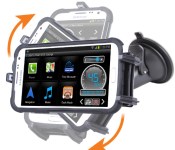
First impressions of the iBOLT are very positive, with the dock itself feeling extremely well made in hand. The kit comes with either an arm to stick to the windshield or a pad for attaching it to the dash. I opted for the windshield and had it attached within minutes. The iBolt is extremely easy to assemble out of the box and is secured to the windscreen using a very secure suction cup.

There are three toothed supports which are adjustable on the iBOLT; two on the bottom and one on the top. The arm on the top slides up and down with a springback in order to insert your phone into the holder. This is then secured using a little switch on the rear of the holder to provide the downforce needed on the device to keep it secure. It’s this switch which can be often hard to access, especially with the holder attached to the windscreen as you can’t see it and can’t look behind it without banging your head.

When it comes to the way it holds the device, the iBOLT is second to none, keeping my phone absolutely still when driving; often docks can hold your phone but it’ll vibrate up and down as you drive along.

The iBOLT also takes advantage of NFC enabled devices by including a dongle that can be swiped against the device to launch a dedicated driving app. The iBOLT Dock’n Drive app turns your Android device into a driving assistant, providing a variety of utilities including a speedometer and compass. In addition, the app uses something called ‘ItCanWait’ functionality to suppress your incoming SMS alerts to avoid distraction.
Not only is the iBOLT a fantastic dock to securely hold your device, but it also comes with a great companion app that finishes off the package, offering the perfect tools for your device that can improve your driving experience.
The post iBOLT car dock – a complete NFC driving experience [Review] appeared first on AndroidGuys.

William Shatner reviews Facebook’s new VIP-only Mentions app

Whether you’re a fan of Captain Kirk or Picard (we’re Team Picard here), you have to admit it’s apt that William Shatner is reviewing the celebrity-exclusive Facebook app — he definitely loves some VIP prestige. The Priceline huckster gives a surprisingly in-depth feature-by-feature comparison between The Social Network’s Mentions app and Pages, which everyone has access to, but not before throwing some shade toward the starship Enterprise‘s yellow-shirted helmsman and all-around social-media-guy George Takei. Apparently, when you first sign into Mentions you can’t proceed any further until you follow one of Facebook’s suggested celebrity accounts.
“The first person on the list I was given was George Takei (rolling my eyes.) I ended up choosing Robert Downey Jr. to follow and then I hid his posts (sorry Robert!).”
That, he thinks, is a flaw because celebrities shouldn’t have to follow other accounts unless they actually want to. Overall, Shatner is left unimpressed, but says he’ll still keep using Mentions anyway, in tandem with Pages and the main Facebook app. Surprisingly, his review isn’t half bad. Mr. Shatner, if you’re reading this and would like to do this sort of thing on a regular basis, you can apply right here.
[Base image credit: Ethan Miller/Getty Images]
Filed under: Internet, Mobile, Facebook
Source: Shatner Speaks

Oculus Rift tuns ‘X-Men’ into a VR head trip

If you’ve every wanted to try X-Men-style telepathic brainwave amplification, Cerebro isn’t real (yet) — but the Oculus Rift is a damn good surrogate. 20th Century Fox will let you step into Charles Xavier’s mind and don the futuristic headgear (the Rift, that is) at Comic-Con in San Diego, starting tonight. Each participant will be immersed in a three minute, panoramic VR presentation on a quest to find nudest of all mutants, Mystique, with the best reactions recorded on a GoPro for Facebook posterity. On top of the VR experience, Fox is offering a limited-edition, thousand-run of X-Men: The Cerebro Collection in a replica Cerebro helmet on pre-order for $80, or $90 with X-Men: Days of Future Past. The latter will also be up for pre-order at $23 alone and both will arrive October 14th, with the Digital HD version set to come on September 23rd.
Filed under: Home Entertainment, Wearables, HD

The Walking Dead: No Man’s Land will be a mobile exclusive game based on the TV Show
 Games set in the world of The Walking Dead have been few and far between, and more often than not settle in the category of award winning, a la The Walking Dead by Telltale Games, or downright awful *cough* The Walking Dead: Survival Instinct *cough*. The Walking Dead: No Man’s Land, is a new title based on that post-apocalyptic world which just been announced by AMC and developer, Next Games, who will work closely with the TV Show itself to create its world. Check out their announcement teaser below:
It’s a very cinematic trailer, and its doubtful that the end product will look like that, but we know the game is a mobile-exclusive title and that its release will be timed alongside the start of The Walking Dead Season 5. Next Games and AMC say that there will be choices to be made, not unlike those made in the TV show, and that “choosing the right survival strategy and making the most human choices possible is at the heart of the first-of-its-kind game”.

It’s hard not to be quietly excited about this game from what’s been shown so far, but but we’ll keep tabs on this one till it comes out.
What do you think about AMC and Next Games teaming up to make The Walking Dead: No Man’s Land? Let us know your thoughts in the comments.
Press Release
Next Games and AMC Debut Trailer for The Walking Dead Mobile Game, The Walking Dead: No Man’s Land
Trailer to Also Be Shown at Comic Con International: San Diego 2014
Mobile Game Launch to Coincide With The Walking Dead Season 5
New York, NY and Helsinki, Finland – July 22, 2014 – Next Games and AMC released today the first trailer for the new The Walking Dead mobile game, based on the incredibly popular AMC series. The never-before-seen trailer will also be shown at AMC’s The Walking Dead booth #4237 at Comic Con International in San Diego from July 24 – 27.
The game, titled The Walking Dead: No Man’s Land, will allow players to experience the world of the iconic show through gameplay exclusively developed for smartphones and tablet devices. Developed by Next Games in close collaboration with AMC, the game will feature themes familiar to the TV series, where characters fight for survival in a post-apocalyptic, walker-infested world. A recurring theme of choosing the right survival strategy and making the most human choices possible is at the heart of the first-of-its-kind game.
The game launch will coincide with the mid-season premiere of The Walking Dead Season 5 early next year.
The trailer can be seen at: http://youtu.be/_aiRboM4fok
“Our approach is to stay true to the main themes of the TV show: survival strategy, finding safety for your people, balancing between right and wrong and, of course, action when it comes to fighting against the hordes of walkers. We respect the creators of The Walking Dead immensely and want this game to portray the world they have created as closely as possible,” said Teemu Huuhtanen, CEO, Next Games.
Founded by design veterans from Rovio, Supercell and Disney, Next Games has assembled a team with a profound love for games and a burning desire to develop lasting global entertainment. In addition to the game based on The Walking Dead TV show, the studio is working on another title based on its own IP.
The Walking Dead returns for its fifth season this October. The series is the first cable drama in television history to beat all the fall broadcast shows in adults 18-49. The Walking Dead is based on the comic book series written by Robert Kirkman and published by Image Comics. The series tells the story of the months and years after a zombie apocalypse and follows a group of survivors, led by sheriff Rick Grimes, who travel in search of a safe and secure home. The Walking Dead stars Andrew Lincoln, Norman Reedus, Steven Yeun, Lauren Cohan, Chandler Riggs, Melissa McBride, Emily Kinney, Danai Gurira, Chad L. Coleman and Sonequa Martin-Green. The series is executive produced by Scott M. Gimple, Robert Kirkman, Gale Anne Hurd, Greg Nicotero, David Alpert and Tom Luse.
Comic Con International in San Diego will take place July 24 – 27.
Trailer link: http://youtu.be/_aiRboM4fok
Website: www.thewalkingdeadnomansland.com
About Next GamesNext Games, founded in 2013 by design veterans from Rovio, Supercell and Disney, focuses on crafting visually impressive, engaging games. Next Games has assembled a team with a profound love for games and a burning desire to develop lasting global entertainment. The company is headquartered in Helsinki, Finland, at the heart of mobile games development and funded by an elite list of private investors. www.nextgames.com.
About AMC
Whether commemorating favorite films from every genre and decade, or creating acclaimed original programming, AMC brings to its audience something deeper, something richer, Something More. The network reigns as the only cable network in history ever to win the Emmy® Award for Outstanding Drama Series four years in a row, and boasts the most-watched drama series in basic cable history with The Walking Dead. AMC’s original drama series include Mad Men, Breaking Bad, The Walking Dead, Hell on Wheels, Turn, Halt and Catch Fire and the forthcoming Breaking Bad spinoff, Better Call Saul. AMC also explores authentic worlds with bold characters through its slate of unscripted original series like Comic Book Men, Small Town Security, Talking Dead, Game of Arms and Freakshow. AMC is owned and operated by AMC Networks Inc. and its sister networks include IFC, Sundance Channel, and WE tv. AMC is available across all platforms, including on-air, online, on demand and mobile. AMC: Something More.
//<![CDATA[
ord = window.ord || Math.floor(Math.random()*1E16);
document.write('’);
//]]>
The post The Walking Dead: No Man’s Land will be a mobile exclusive game based on the TV Show appeared first on AndroidSPIN.

Twitch for Android gets updated with a brand new interface

The popular live streaming service Twitch has just updated its Android app, and with it brings a beautiful new interface as well as some other notable changes to the functionality of the app itself.
The Android app allows users on phones and tablets to watch live streams of people playing games, and if you’ve never tried out Twitch before I’d definitely recommend it – it’s strangely addictive.
The new features for Twitch version 3.0 are as follows:
- A beautiful new interface.
- Follow your favorite channels.
- Brand new broadcaster profiles.
- Chat on a channel, even when the broadcaster is offline.
- Expanded search that is by channels, people and games.
And here’s a video demoing the new version.
The post Twitch for Android gets updated with a brand new interface appeared first on AndroidGuys.

YouTube star sued for copyright to the tune of $150,000 per song

Most YouTubers just get a takedown notice if someone reports them using copyrighted tunes with their videos. But when that user is a huge star on the video portal like make-up guru Michelle Phan, who has almost 7 million subscribers and was even featured on YouTube’s TV ad campaign, then things get a bit more intense. Electronic dance record label Ultra Music (home to Deadmau5 and other popular artists of the genre) just slapped Phan with a copyright infringement lawsuit, which accuses her of using 50 tracks released under the company without permission. Ultra wants Phan to pay $150,000 for each instance, claiming she profited from its artists’ music, most likely because 1.) she’s a YouTube partner, and 2.) the fame she gained on the website eventually led to lucrative deals with cosmetics companies Lancôme and L’Oreal.
Phan’s adamant that she didn’t do anything wrong, though, and her spokesperson told the BBC that Ultra gave her permission to use the company’s tracks as background music for her make-up tutorials. While we’ve yet to find out which side is telling the truth, one of the label’s own artists, American DJ Kaskade, defended her and lambasted existing copyright laws on Twitter at the same time:
Summary: I’m not suing @MichellePhan + @ultrarecords isn’t my lapdog. I can’t do much about the lawsuit except voice support for her.
– Kaskade (@kaskade) July 19, 2014
I wrote that all of one month ago. Copyright law is a dinosaur, ill-suited for the landscape of today’s media.
– Kaskade (@kaskade) July 19, 2014
If you’re wondering what Phan typically uses music for, you can watch the video below which features Kaskade’s track called 4AM.
Via: Ars Technica
Source: BBC
Microsoft’s first post-Nokia phone is the budget Lumia 530

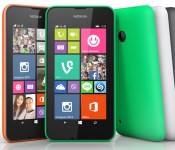
With Nokia’s range of Android-powered smartphones all but dead, Microsoft is pushing its newly-acquired Lumia line harder than ever. Today, it’s introduced the lowest-priced Windows Phone to date, the Lumia 530, delivering middle-of-the-road specs for €85 ($114). For that, you’ll get a 4-inch FWVGA (854 x 480) display, quad-core 1.2GHz Qualcomm Snapdragon 200 processor, 512MB of RAM and 4GB of internal memory (with support for 128GB microSD storage). There’s also a 5-megapixel camera on the rear (no selfie camera here folks), which is controlled by Microsoft’s latest Windows Phone 8.1 software. That, of course, offers access to Cortana (if you’re in the US), the new WordFlow swipe keyboard and a multitude of other custom Microsoft- and Nokia-crafted apps. Like its older siblings, the Lumia 530 will also come in both single and dual SIM (3G) variants and offer interchangeable back covers, which will be available in the traditional orange, green, white and dark grey colors. Microsoft’s latest Lumia will go on a global tour in the near future, starting with an initial rollout in “select markets” from next month.
Filed under: Cellphones, Mobile, Nokia
Via: Conversations Blog
Source: Nokia

Relive your NES glory days with a gamepad that feels like the real thing

We’ve ripped apart knock-off gadgets more than a few times, but there are moments where a company’s urge to mimic others will pay dividends. Take 8Bitdo’s recently released NES30, for example: the Bluetooth gamepad recreates as much of the NES controller’s design as possible while still keeping its feet planted in the modern era. The four extra buttons aren’t exactly true to the 1985 original, but the overall look and button presses are reportedly faithful to what you remember. Even if it’s not quite true to life, you might not mind given the very broad device support. The NES30 can talk to Android, iOS, OS X and Windows, and it can even double as a (fairly awkward-looking) Wii remote in a pinch.
Indulging your nostalgic side will cost you $40, and you’ll face the inherent risks that come from importing a gadget from overseas. However, it might be worth the effort — GBATemp.net forum member Ryukouki says that the NES30 is much-improved over its ancestor, the Famicom-inspired FC30. Nintendo may never make the mobile games you’d need to complete the experience, but this may be the closest you get to reliving those many, many hours spent playing Mario Bros. games in the family den.
Filed under: Cellphones, Gaming, Peripherals, Mobile, Nintendo
Via: GBATemp.net (1), (2)
 AIVAnet
