



Wacom’s sketching app finally arrives on Android, Kindle Fire and Windows 8

Wacom loves doodlers almost as much as serious artists, but its Paper-esque sketching app was limited to iOS devices only. That changes from today, now that the company has launched Windows, Android and Kindle Fire versions of Bamboo Paper. Thanks to Wacom’s Ink Layer Language, your notes will seamlessly be shared between your devices — enabling you to sketch out a plan on your leisure tablet before passing it to your work one. The free app is available to download at the links below, and you’ll also be able to try out the various premium brushes for a limited time before you’re asked to open your wallet to keep them.
Filed under: Tablets, Software, Microsoft, Google, Amazon
Source: MarketWatch, Google Play, Windows Store, Amazon Store

Apple TV now auto-plays the next episode of whatever you’re watching on Netflix

When you start chugging a series, it’s hard to stop, even for trips to the bathroom, or going to work, or catching up on sleep. It’s a problem that Netflix loves to exploit, only giving you a few seconds before offering up the next episode of whatever series you’re currently immersed in. For some reason, however, this post-play feature didn’t work on the Apple TV, until it suddenly did a few days ago, without warning. The Roku-rival has even popped up on Netflix’s list of supported devices, so never again will you have the option of stopping House of Cards after a single episode. Well, unless you disable it, of course.
Via: Cult of Mac
Source: Netflix

Hearthstone Expansion ‘Curse of Naxxramas’ Now Available on iOS and Mac [iOS Blog]
Curse of Naxxramas, the first expansion for Blizzard’s popular Hearthstone: Heroes of Warcraft collectible card game, is now available for download on PCs, Macs, and iPads.
Like Naxxramas in World of Warcraft, Curse of Naxxramas in Hearthstone is a floating necropolis organized into five different wings, including the Arachnid Quarter, Plague Quarter, Military Quarter, Construct Quarter, and Frostwyrm Lair.

Blizzard’s Curse of Naxxramas launch event will see one new wing opening each week for approximately a month, beginning with the Arachnid Quarter. Every wing contains enemies and bosses that must be eliminated, and successfully defeating bosses will add new cards to a user’s collection. Naxxramas introduces 30 new cards to Hearthstone.
The ancient necropolis Naxxramas, a base of operations for the powerful archlich Kel’Thuzad and his plague-bearing undead host, comes to Hearthstone in a single-player Adventure that anyone can undertake.
Progress through each of the five unique wings of the dungeon and gain new cards for your Hearthstone collection by defeating the iconic bosses you’ll face along the way: the oversized arachnid Maexxna, the fungal horror Loatheb, and the shambling abomination Patchwerk are just a few of the horrors awaiting you. Each boss has its own unique cards and hero powers at its disposal to challenge even the most seasoned of card-slinging adventurers.
Curse of Naxxramas includes a unique game board with interactive corners and there are also nine different class challenges to complete.
 New cards in Curse of Naxxramas
Players can permanently unlock the Arachnid Quarter for free on all platforms by downloading Naxxramas on any platform, completing the tutorial, and completing a game in the Naxxramas area.
While the Arachnid Quarter is free, subsequent expansions will cost in-game gold or real money to unlock. Each wing is priced at 700 gold or $6.99, but users who participate in the launch event can unlock the full expansion for $19.99. Pricing goes up after the event and there are also various packages available for users who want to purchase content using a combination of in-game gold and money.
Hearthstone: Heroes of Warcraft for the iPad can be downloaded from the App Store for free. [Direct Link]
Hearthstone: Heroes of Warcraft for Mac can be downloaded from Blizzard’s website for free.

Apple ‘iTime’ patent details a modular smartwatch with sensors in the band

A new Apple patent for smartwatch designs and features is bound to fuel more speculation about an incoming “iWatch,” even though such claims often amount to nothing. Still, the patent is interesting on its own merits. One version shows a receptacle band that could accept an external “iTime” module as shown above — not unlike the iPod Nano watch craze from 2010. However, Apple’s band has built-in electronics like Bluetooth transceivers, along with accelerometers and GPS modules — sensors rumored to be built-in to Apple’s upcoming wearable. According to the document, that would enable smartphone or computer notifications that you could see, hear or feel. You’d also be able to dismiss notifications or perform other actions by shaking your wrist once or several times, according to another claim.

While all of this is interesting, it could be largely unrelated to any products planned by Apple, since it was filed in 2011 — and similar Apple patents have amount to nothing thus far. However, the issue date of today (July 22nd) is intriguing, since rumors are gathering steam over a smartwatch launch at Apple’s next event, possibly in September. Either way, we hope that wearables don’t become the next patent battlefield — only lawyers get excited by a prospect like that.
Via: Apple Insider
Source: USPTO

A newer kind of web tracking is almost impossible to stop

You may think you’re thwarting advertisers and other nosy web citizens by blocking cookies and invoking Do Not Track whenever possible, but that apparently isn’t good enough. Researchers have just documented a newer web tracking technique, canvas fingerprinting, that’s nearly impossible to stop. As it’s simply drawing a unique, hidden image using standard web code, you can’t just filter it out using higher privacy settings or ad blocking tools. You can sometimes opt out of personalization and targeted ads by installing a cookie, but you’re otherwise out of luck unless software can start identifying and blocking these fingerprints.
One of the earliest proponents of the technology has been the social sharing service AddThis, which started public fingerprint testing earlier this year. While you may not have heard of the company, there’s a good chance that you’ve been to one of the sites that uses its tracking; California’s government, Perez Hilton and some porn sites (sorry, folks) are among the notable examples. If there’s any comfort, it’s that the test isn’t all-encompassing and won’t last forever. AddThis isn’t targeting you based on government visits, and the fingerprinting is just inaccurate enough that the company may wind things down soon.
[Image credit: Soe Than Win/AFP/Getty Images]
Filed under: Internet
Via: Pro Publica
Source: The Web Never Forgets (1), (2)

LG’s rollable TVs are (predictably) very flexible

Remember when LG announced that it had managed to create a rollable 18-inch display? Well, here’s the proof: a very much flexible OLED display. The resolution might not be there yet (1,200 x 810, alas) but the hopes and dreams of a picnic-blanket TV set — they’re getting more real every day.
Via: OLED Display
iBolt xProDock Connect Universal Phone Mounting System Review

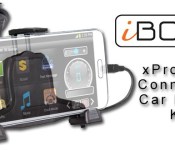
The iBolt xProDock Connect is the latest universal docking station with NFC support from iBolt to securely position your phone in an easy to view position while driving. The differentiator the iBolt xProDock Connect has over its competition is the application they have developed to make your experience safer and easier to use.
The overall design of the iBolt xProDock mounting system is well thought out and offers a lot of features. The bottom two arms holding your phone are adjustable in every direction and slightly hooked to ensure your phone is never going to fall out. Even with the largest of cases on your phone this dock is still going to adjust to accommodate the size. I’m still using my Samsung Galaxy Note 2 and it fit easily into the dock. Even with my largest case, I had no issues at all.
If you want to find out more about the iBolt xProDock, head over to TheSavvyTechs to read the full review.

//<![CDATA[
ord = window.ord || Math.floor(Math.random()*1E16);
document.write('’);
//]]>
The post iBolt xProDock Connect Universal Phone Mounting System Review appeared first on AndroidSPIN.
Christmas in July: This power user’s Android wishlist

Do you wish stock Android would do a little bit more? Tired of relying on third party developers or manufacturers to add the features you feel should be standard in Android? I could not agree more. As great as Android is, there are some shortcomings in the system. Do not take me the wrong way, I feel it is the greatest mobile operating system in the world, but I think Google should add some of these “no-brainer” features that many manufacturers or developers have added in some way or form into their Android ecosystem.
My first experience with Android was a Samsung Moment, migrating off of a HTC Touch Pro and Windows Mobile. Android 1.5 was rough, but still refreshing and new all at the same time compared to what I was used to. Since that moment four years ago Android has changed enormously. The 2.1/2.2/2.3 updates were the game changing upgrad needed in order to set the device up for world domination under the the 4.x versions of Ice Cream Sandwich, Jelly Bean, and Kit Kat, which now make up an astonishing of 84% of all Android devices. So much for the fragmentation fears everybody was talking about in the early days of Android.
So here we are with the pending release of Android “L” and a slew of new looks and features coming out. As are most avid Android users, I am foaming at the mouth waiting for this new release. While appreciative of the new version coming out, I still hold a resentment with Google over holding out some key features that have not been baked into the Android stock operating system as of yet.
This list is a list of the top five items as compiled by myself and contributors here at AndroidGuys. I would like to think that having these items built into stock Android would give users of all levels a better Android experience.
- Active Listening (Moto X style): It would be pretty nice to not have to turn the screen on to do a Google Search but to just skip right ahead and do it from the standby screen (meaning the screen is off). Is it that hard to turn the phone screen on? No it is not, but again, if we don’t have to do that extra step, why do it? Simplify the process and allow “Ok Google” at any point, even in standby.
- Visual Voicemail: Can you believe that Android does not have it’s own Visual Voicemail app? If you own a Nexus device you know what i am talking about. Instead of having the messages download automatically to your phone so you can listen to whenever you want, you are stuck with that annoying voicemail logo in the notification bar. Yes, I’m pretty sure that Voicemail has to be done by every carrier and is unique for each user, but there has to be someway that it can be worked out. Optimally having this built into the Google Hangouts would be pretty nice. That way you can check your voicemail across systems, kind of how voicemail access works in Google Voice.
- “Knock On” (as used by LG): This is a newer feature, but still it is pretty neat and a very useful feature. Simply by knocking on your cell phone you can shortcut right to your desktop screen. This again is one of those features that just make getting where you want easier instead of going through a couple of steps.
- Extensions: Chrome and Gmail on the desktop have the awesome ability to add extensions to make the browser or your email more functional without having to open up another separate program. Here is a perfect example, I am an avid Yesware user with Gmail. I cannot send an email from my mobile device because it isn’t tracked, rendering my cell and tablet both useless at points and therefore making me run back to my desktop to send the email. This is just one example out of many. Here is another example: Instead of using a Google Analytics App, would it not be easier to just click on the extension in the Chrome Browser? Now yes, Chrome and Gmail are not Android operating system per se, but they are part of the core apps for the Android ecosystem. By allowing extensions Google would only be promoting productivity and making lives easier while using their devices. There would be much less switching apps and much more getting instant information saving users time, energy, and frustration.
- True Multitasking (Samsung Multi Window; Phandroid like multitasking): The king of all features missing is multitasking. Yes, you can have multiple apps open at the same time, but typically, unless you have a rooted device or have a device by a manufacturer like Samsung, you are not going to be able to display two items on the screen at once. Not having this feature built in Android is mind-boggling to me. Yes, it may not make a lot of sense on smaller devices, but the Android game has changed over the past two years as devices are getting larger. 99 percent of all devices now have over four inch screen sizes to where even limited multitasking would be useful (like a calendar view and an email). Once you get into the phablet and tablet world, this feature is a must if you are going to use the tablet for either school or business. I find myself needing sometimes three or four screens to do my job and being locked with one single view on Android does not cut it for me. That is one of the reasons I purchased the Galaxy Note 12.2 because of the size of the screen and the Multi Window support. I can now almost fully replace my desktop computer, unless I need to send a tracked email.
All in all, as I stated, Android is the greatest operating system out there for mobile devices. This post is not set up as a rant against Google, but more to point out some shortcomings in areas that I think most of us will agree would make our mobile experience better.
So now that you have seen my top five wishlist, tell me, what’s yours?
The post Christmas in July: This power user’s Android wishlist appeared first on AndroidGuys.
Xiaomi debuts flagship Mi4

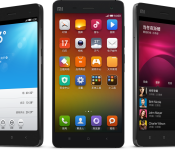
Xiaomi on Tuesday introduced the Mi4, a high-end device with a wallet friendly price point. Details include a 5-inch 1080p HD display, 13-megapixel rear camera with an aperture of f/1.8 and 4K video recording, and 16GB/64GB internal storage. And, not only is the smartphone powerful, it’s also gorgeous; stainless steel is found throughout the body.
Powered by Android with the MUIU skin, the Mi4 boasts a 2.5GHz quad-core Snapdragon 801 processor, 3GB RAM, and a 3080mAh battery. Rounding things out we have an 8-megapixel front-facing camera, LTE support, and an IR blaster. Pricing breaks down to roughly $320 for the 16GB model; the 64GB version retails to approximately $418 US.
The post Xiaomi debuts flagship Mi4 appeared first on AndroidGuys.
NVIDIA announces Tegra K1-powered Shield Tablet for July 29

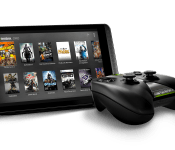
NVIDIA on Tuesday announced the Shield Tablet, a monster of a device aimed at gaming enthusiasts everywhere. Powered by a 2.2 GHz Quad Core NVIDIA Tegra K1 processor, the tablet offers users an 8-inch 1920×1200 multi-touch IPS display, a pair of 5-megapixel cameras, and 2GB RAM. Gamers can choose between a 16GB version and 32GB model with 4G LTE (microSIM) support; both allow for microSD expansion up to 128GB. Other hardware details include stereo front-facing speakers, Bluetooth 4.0 LE, GPS and GLONASS, a DirectStylus 2, and 802.11a/b/g/n 2×2 Mimo 2.4 GHz and 5 GHz Wi-Fi technologies.
Like the Shield gaming controller/console, the Shield Tablet is versatile and allows for a wonderful multi-player experience. Toss in ShadowPlay gameplay recording, Twitch streaming, GRID Gaming App Beta, Console Mode, Gamepad Mapper, 4-player multiplayer, and 4K Ultra-HD Ready HDMI-out and you can see just how well-rounded the Shield Tablet can be.
NVIDIA is also introducing a new Shield controller which pairs via Wi-Fi Direct and provides for true-to-console capabilities. Much like the standalone Shield, you’ll find the host of buttons, triggers, and analog sticks. Also present are a microphone, and support for 3-pin and 4-pin headsets. Fully charged in five hours, users can get up to 40 hours of game play.
The NVIDIA Shield tablet will be available in the U.S. starting from July 29; eager customers can pre-order the 16GB model for $299 or the 32GB LTE model for $399. A European launch follows a few weeks later on August 14th. The wireless controller will be $59.99 while the tablet cover retails for $39.99. Additionally, NVIDIA will sell a separate stylus or AC adapters.
The post NVIDIA announces Tegra K1-powered Shield Tablet for July 29 appeared first on AndroidGuys.
 AIVAnet