



Photoshop Express blemish removal and RAW support boosts mobile editing

Adobe has been making quite the heavy-handed push with its mobile apps as of late, and one of its older no-cost options just received a significant update. Photoshop Express for both Android and iOS tacked on blemish removal and defogging tools to further enhance edits on the go. There’s also a new intensity control that allows you to tweak how much of those built-in presets are applied — a feature similar to Instagram’s recent add-on. Last but not least, the software can also import RAW files for editing purposes; however, it’s unclear whether you’re tweaking a smaller “thumbnail” version that remains tied to a desktop, as is the case in Lightroom mobile. At any rate, those files are uploaded through the free tier (unless you’ve committed funds) of Adobe Revel before syncing with the app. If those trusty mobile devices have yet to alert you to the update, both versions are available for download via their respective repositories.
Filed under: Tablets, Software
Via: 9to5Mac
Source: iTunes, Google Play

One for the future: playing with the new Adidas miCoach Smart Ball

I still remember my old, favorite football like it was yesterday. It wasn’t made by Nike, Adidas or even Diadora, but it lasted me for about seven years, from when I was 7 until about 14 or so. And even though, toward the end of its life, it started to look as if it had been living in a waste dumpster, never, ever did it let me down. Despite the battle scars collected over the years, like the faux-leather gradually falling off or needing to get pumped up every time before a game, that cheap, low-tech ball always did what it was supposed to: Be, well, a ball you could have fun with. In recent years, however, things have changed quite drastically. As technology evolves, sports balls continue to get smarter and smarter, with a great amount of research and development money being spent by manufacturers. Here’s where Adidas’ recently announced miCoach Smart Ball comes in.
“The miCoach ecosystem is rooted in making athletes better.”
With its new intelligent sphere, priced at $299, the sporting goods giant aims to give players not only something to use as a playing ball, but also a tool to improve their skills. A key part of the ball, naturally, is integrating the Smart Ball into Adidas’ miCoach environment, one that focuses on keeping track of your data during workouts or training sessions. “The miCoach ecosystem is rooted in making athletes better,” said Christian DiBenedetto, senior innovation director at Adidas. In this case, the Smart Ball’s miCoach app, which is only available for iOS at the moment, pairs with the ball over Bluetooth and lets you view how fast you’re kicking the ball and its trajectory, as well as set challenges for yourself and save records so that you can compare them at a later point.

“Today, if players want to improve their kicking, they may take some balls to the local field and just kick over and over again trying to produce the kick intended and if they do, they have to try and figure out what they did differently to make it happen. The Smart Ball already understands how to do the kick that the player wants to learn, so after every kick, it coaches the player on what exactly they need to do to achieve the kick,” explained DiBenedetto. “This makes the learning process much more efficient. In the game, the player only gets one chance to make that free kick; with the Smart Ball, we are turning good luck into good technique.”
In my experience, the general feeling while playing with the Smart Ball was a great one. Adidas’ miCoach app works really well; it shows where exactly you struck the ball and your most recent shots, all while sending the info to an iOS device almost instantly after taking a shot. The wait between measured shots, though, is something I found to be cumbersome — for example, after taking a kick, you have to wait for the application to collect that data before moving on, otherwise it disrupts the process and fails to record your stats. Still, since this is meant to be for training, after all, it is a requirement to get the most out of the ball — and seeing those neat numbers makes it worthwhile. Given its features, it’s worth noting that the Smart Ball does need to be charged every now and then, but this process is made easier with the included wireless charging station.
We’re talking about a company that has designed every official World Cup ball since 1970.
For now, Adidas is taking a shot at the everyday consumer with its Smart Ball, but it does intend to bring the technology to professional pitches all over the world. Theoretically, it shouldn’t be a problem to do that, especially since we’re talking about a company that has designed every official World Cup ball since 1970. “The Smart Ball is the first step to a ball that understands the game,” DiBenedetto told me. “Imagine World Cup 2018 and on the pitch is the Smart Ball able to tell which player passed it or shot it; who intercepted it or received it; where on the pitch it is; and, of course, how fast it’s traveling, in what direction, [with] how much spin and trajectory. Every play broken down by the ball and shared with the fans in the stadium and anyone connected to the internet that wants to understand the game.”
“A Smart Ball on the pitch would be able to enlighten the fans to the true art and skill required to play on this global stage. How did [Lionel] Messi make that free kick against Nigeria? The Smart Ball would break it down and coach any player that wanted to learn how to do that shot for themselves,” he added.
[Images: Daniel Orren for Engadget]
Filed under: Misc, Peripherals
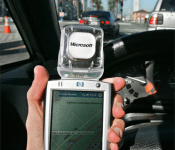
Microsoft kills off ‘Streets & Trips,’ hopes you’ll use Bing Maps instead

Microsoft MapPoint has been around a long time. How long? So long that a stock-image search pulled up this gem from 2005 — a photo of “Streets & Trips” running on a Pocket PC. In fact, the mapping platform is even older than that: It was first created by a company called NextBase in 1988, which MIcrosoft later acquired in 1994. Incredibly, it’s lived on, even long after people stopped storing maps on CD-ROMs. Finally, though, the software is going the way of the floppy disk: The company has discontinued MapPoint, Streets & Trips, and AutoRoute, with users encouraged to use Bing Maps instead. And, ya know, that kind of makes sense, considering CEO Satya Nadella only yesterday posted an open letter describing Microsoft as a mobile- and cloud first company. Somehow, knowing Engadget readers, we suspect this won’t affect you much, but in the event that you do still use Streets & Trips, you’ll continue to have support through at least July 2015. After that, you may need to get with the times.
Image credit: Associated Press
Filed under: Internet, Software, Microsoft
Via: Re/code
Source: Microsoft
 AIVAnet