



Ruined vinyl under a microscope makes for a beautiful music video

For Nick Zammuto, vinyl scratching isn’t something to be done during a DJ set, but with a craft knife. That’s because the musician likes to cut grooves into LPs and use the resulting jumps as the rhythm for his unique brand of electronica. In order to make the video for single Great Equator, Zammuto combined music with his love of microscopy, using a scanning electron microscope to examine the scratched records up close. The resulting video also looks at scratched CDs, rubber stamps and the odd extreme close up of an insect, which is natural when you’ve got access to an electron microscope. If you’re curious to see the odd mix of high-power imaging and whispering vocals, head on past the break.
Filed under: Misc
Source: Motherboard

Revived NASA space probe might not go back to work after all

Remember the once-dormant ISEE-3 probe that was roused from its 27 year slumber earlier this week? Errm, turns out it’s not doing so great. Despite a crowdfunding campaign that raised over $150,000 to bring it back to active duty and a recent successful spin using its aging thrusters, further attempts to move the craft have ended in disappointment.
The cause? It’s not exactly clear just yet, but Reboot project team suspects the probe’s pipes aren’t the problem — ISEE-3 may have instead run out of the Nitrogen needed to help operate the propulsion system. To hear project leader Keith Cowing tell the tale, there was likely just left in the pipes for that first spin, making the maneuver nothing more than an incredibly promising tease. Cowing and the rest of the crew ultimately hoped to nudge the ISEE-3 back into position and resume its original mission: measuring how the solar wind interacts with the Earth’s own magnetic field. That’s starting to look impossible, though, and after the probe flies by the moon in August it might be time to bid it one final farewell. While certainly a bummer, the situation isn’t completely without its upsides. Our species will have one more wandering spacefarer to commemorate us after we’ve gone, another metallic paean to a people who could never quench its thirst for understanding.
Source: Space College
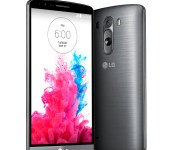
Verizon offering LG G3 for $99 with contract

Verizon will offer the LG G3 smartphone for $99 with a two year service agreement starting from July 17. Those who opt to buy the phone outright can do so for $599.99; EDGE customers can purchase for $29.99 per month over two years. Available in black and white options, the LG G3 includes 32GB internal storage and 3GB RAM. Additionally, the phone boasts a 5.5-inch Quad HD IPS display and quad-core Qualcomm Snapdragon 801 processor. Oh, and don’t forget that 13-megapixel rear camera with laser focus.
Verizon will also carry the LG G Watch on July 17, pricing the smartwatch at $229. Compatible with any Android smartphone running 4.3 or later, the Android Wear device comes in Black Titan and White Gold.
The post Verizon offering LG G3 for $99 with contract appeared first on AndroidGuys.

Essential apps for every Android user

As someone who works for one of the big carriers in the US, I run into the same question on an almost daily basis. What apps should I try out and download? This is something that is asked by even those tech-savvy users when they switch from iOS or Windows Phone to Android. This got me thinking, “Why not try to compile a list of some of the best apps for Android users?” So, whether you are a beginner or if you’re Steve Kondik, we’ve got some apps to put you up on.
We’ve collected some of our favorite and must-have apps that go on every single device we one. You know, those titles that we simply can’t live without and which go immediately onto our smartphones and tablets. Without further ado, here’s our Essential Apps for Every Android User.
AirDroid

When it comes to sharing basically anything between my computer and my smartphone/tablet AirDroid is here. But that’s only a top of the iceberg when it comes to this app, it could take a while to list everything it can do. Let us just put it this way, when you connect AirDroid to you computer you can turn of your phone’s screen and control it via web browser from your computer.

I save a lot of links during my day and that’s where Pocket comes in. It’s sort of a cloud bookmarking, you just click that share icon and tap “Add to Pocket” in order to save something. You can save some articles, videos or whatever you want from a certain website in order to check it out offline or just be able to access it from wherever you want.
Nova Launcher Prime

Nova Launcher is simply an amazing Android launcher. It’s fast, fluid extremely customizable and it offers soooo much functionality. This is basically the first app I install on my devices. There is a free version, but you will end up purchasing the Prime license for even more functionality than the free version.
ChompSMS

chomp SMS is a highly customizable third-party SMS app. I like my SMS conversations and app in general to look like a want it to look and chomp SMS comes in handy when it comes to that. You can customize pretty much anything and that’s why I love this app. Plus it offers extra functionality.
Pixlr Express

Pixlr is a great app for editing photos. It’s easy to flip through filters, borders, and other options to make your pictures look just how you want them. It’s got a nice layout, and beautiful design. It’s one of the most useful apps I’ve used!
The post Essential apps for every Android user appeared first on AndroidGuys.
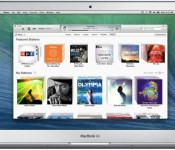
iTunes 11.3 Expands iTunes Extras as Apple TV Finally Adds Support and Apple Plans for iOS 8
Apple today released iTunes 11.3, including several improvements to iTunes Extras, including new features for HD movies. This new content will be added automatically to previously purchased iTunes movies for free.
Alongside the launch of iTunes 11.3, Apple has also announced that the Apple TV is finally supporting iTunes Extras with the 6.2 software update released late last month. The first-generation Apple TV supported iTunes Extras, but the feature was lost when Apple revamped the Apple TV back in 2010.
Finally, Apple has also announced that iTunes Extras will be coming to iOS with the public release of iOS 8, which is slated for this fall.

iTunes 11.3 includes all-new iTunes Extras for HD movies. iTunes Extras can include behind-the-scenes videos, short films, high-resolution image galleries, director’s commentary, scenes, and more. These immersive iTunes Extras can also be enjoyed on Apple TV with Software Update 6.2 now, and will be available on iOS 8 this fall.
New iTunes Extras will be automatically added to your previously purchased HD movies as they become available – at no additional charge.
iTunes 11.3 can be downloaded from the software update tool in the Mac App Store or Apple’s iTunes web page.

Tour Mythbuster Adam Savage’s collection of collections with Street View

When Adam Savage isn’t busy blowing stuff up while filming Mythbusters, he’s often found tinkering about in his San Francisco workshop. It’s in this “cave” that Savage films his popular YouTube series for Tested, but it’s also home to an incredible number of gadgets and sci-fi memorabilia that his Mythbuster cash has funded over the years. Fortunately, this treasure-filled studio is now open for virtual tours, courtesy of Google’s indoor Street View cameras, letting you go behind-the-scenes and see for yourself where all the magic happens. If you prefer something more personal, Savage has also conducted a video tour of his man-cave, which we’ve included below.
Filed under: Google
Source: Google Maps

Researchers get record broadband speeds out of old-school copper wire

While telecoms companies around the world are investing millions into the development of fiber-optic networks, the aging copper telephone line may still have some life in it yet. Experts at Alcatel Lucent’s Bell Labs research division are claiming a new world record by achieving super-fast speeds through the aging technology. Researchers were able to achieve 10Gbps speeds with the same cables you’d find under many residential streets.
The goal here isn’t just to push boundaries, but to give telecoms companies the chance to use their existing infrastructure to deliver internet speeds capable of rivalling fiber networks. While the speed is certainly impactful, Alcatel’s prototype technology is currently limited by its transmission range. Bell Labs achieved 10Gbps speeds over a distance of 30 meters and simultaneous upload and download speeds of 1 Gbps over 70 meters, meaning companies would have to work a lot harder to make this work from the exchange to your home. Those providers are only now trialing the standard on which Bell Labs’ new technology expands upon, meaning you’ll likely have to wait a couple of years to see those ridiculous internet speeds. That’s if they don’t decide fiber is the better option.
Filed under: Household, Internet
Source: Alcatel Lucent

Recreate Marcel Duchamp’s lost chess set with your 3D printer

Conceptual artist Marcel Duchamp was known for his “readymades,” which declared everyday objects to be works of art — most notably “Fountain,” a public urinal on a pedestal. Duchamp was also something of a chess obsessive and created both an ornate tabletop set and a travel version, the latter of which he wanted to mass-produce. The first of the pair, however, was thought to have been lost to a private collector, so no-one would ever again be able to play with it at least, until now.
Scott Kildall and Bryan Cera teamed up to recreate Duchamp’s tabletop chess set from stills the artist took when he sculpted it in 1918. The pair went so far as to use algorithms to extrapolate the necessary geometry from the stills, which helped get an accurate representation of the ornate knight. Even better, is that the pair have now offered up the designs to Thingverse, enabling anyone with a Makerbot to 3D-print their very own version of the set. It may not have been the set that Duchamp wanted to mass-produce, but 96 years after it was sculpted, now everyone can have a chess set made by one of the 20th century’s most prominent artists.
[Image credit: Marcel Duchamp, 2008, ADAGP/París, AUTVIS/San Pablo]
Filed under: Misc
Via: Fast Company
Source: Greg.org, Thingverse

Fleksy Keyboard introduces 15 new languages in beta

If you don’t know about Fleksy keyboard yet, you probably should. It’s one of the most rapidly growing keyboards for Android, and for good reason. They recently set a world record for fast typing, and launched a new keyboard on the Samsung Gear 2 smartwatch. They’re about to expand again with the introduction of 15 new supported languages in beta!
The company is launching Norwegian, Catalan, Hebrew, Croatian and Romanian, amongst other widely requested languages. What’s more, is that they’re also adding languages variants like English (UK), Brazilian Portuguese, French Canadian and Latin American Spanish. Not all keyboards have support for language variants, especially this many. And for a relatively young keyboard, they’re making huge strides in advancing their technology.
Kosta Eleftheriou, founder and CEO of Fleksy, explains the company’s future plans to expand.
“Today’s update represents a major, cross-platform engineering milestone for us. We are excited to confirm that are on schedule to support a total of over 40 languages, for both Android and iOS, out of beta by this fall.”
It’s certainly not easy building support for 15 new languages, so kudos to Fleksy for working hard on this. If you haven’t yet tried this keyboard, head to the Play Store to try it out today!
The post Fleksy Keyboard introduces 15 new languages in beta appeared first on AndroidGuys.

Get This Look: Boot up your Android device with your favorite comic book heroes and villains

You don’t see it often unless you reboot your device all the time, but the boot animation is another place that you can make your Android device your own, especially if your smartphone or tablet is rooted.
This boot animation features all your favorite superheroes and villains, including Batman, Spiderman, Captain America, Ironman, War Machine, Flash, Gambit, Magneto, Red Skull, Dr. Doom and many more. It comes from theme maker +BrianRoberts, who made it into a boot animation and it was made into a flashable zip thanks to +RonaldValdes. The original artist of the different images in the original GIF is UK-based motion graphic designer Christian Tailor.
 If you have a rooted device, either download the marvelboot.zip file and flash it your recovery such as CWM or TWRP or use a file manager, like Root Explorer, to copy and paste the bootanimation.zip into system/media folder, replacing the original bootanimation.zip file. To get the bootanimation.zip file, extract marvelboot.zip and the .zip you’re looking for is located at marvelboot >> system >> media.
Download the flashable zip from Mega here or from Dropbox here.
VIA +BrianRoberts, +RonaldValdes
The post Get This Look: Boot up your Android device with your favorite comic book heroes and villains appeared first on AndroidGuys.
 AIVAnet