


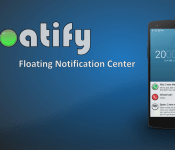
‘Floatify’ Brings Android L-like Stacked Notifications to Your Lockscreen for Android 4.3+ Users

Android L has been the talk of the community for the past two weeks, but we still got a little bit of waiting to do before we get the official release. One of the foremost features in Android L is the enhanced notifications. Not only has the notification drop-down drawer been rehashed, but we will now be able to access our notifications on our lockscreen without the need to download a third party app. But for those that don’t quite have the luxury of playing Android L, a new app called Floatify brings that Android L style to any device running Android 4.3 and above.
- When you receive notifications Floatify will show you a popup window with stacked notifications.
You can interact with the popup, expand a notification to full size, open or cancel the notification, setup a reminder or open the app in xHalo. - Even if the phone is locked you can directly open or cancel the notification! Floatify will also wake your phone if you like.
- The notify on unlock feature will automatically show you all pending notifications as soon as you unlock your phone.
Simple, fast and efficient! - Use the smart blacklist to prevent notification popups when gaming or browsing.
As soon as you leave the app Floatify will show the missed notification. - Floatify actions can be added to your homescreen or directly started from other apps.
This way you can cancel all notifications, open the notif. popup or similar with a simple touch. - Customize popup window style as you like with smooth animations, backgrounds and colors.

If you want give Floatify a try, click the XDA thread link below to grab the download. Let us know how it runs.
//<![CDATA[
ord = window.ord || Math.floor(Math.random()*1E16);
document.write('’);
//]]>
The post ‘Floatify’ Brings Android L-like Stacked Notifications to Your Lockscreen for Android 4.3+ Users appeared first on AndroidSPIN.

When WiFi imitates art

For most of us, the only way we can see the strength of a WiFi network is by the familiar signal icon on any given device. Newcastle University School of Architecture doctorate student Luis Hernan, however, has a different method: spirit photography. He’s using the new age-y method of capturing someone’s aura via electric coronal discharges — a Kirlian Device — with a few geeky augmentations (an Arduino Uno board and WiFi Shield, for example) to illustrate how strong a wireless broadcast is with colors. As Wired notes, these components take account of the nearby signal and convert it into color information that’s then beamed onto an LED strip; red being the strongest and blue being weaker sections of the network. To create the pictures like what you see above and at the source, Hernan swung the home-made device around after setting up long-exposure shots with a camera. While we can’t know for sure, we’d imagine that something with no signal would look a lot like this.
Filed under: Wireless, Science, Alt
Via: Wired
Source: DigitalEthereal (1), (2)
Google voice search learns new tricks, media controls and corrections in tow

Google is actively working on a Google Search app, This service keeps on growing in terms of functionality. Recently Google added a bunch of new languages to the service, so that you could call upon the service even if English (UK/US) isn’t set as you language of choice. This time around we get two new tricks, let’s see what they’re all about.
First feature that is added (for some) are media controls. So, Google Now is a great service, but when you call upon it you’re not able to do basic tasks with it, such as turning Wi-Fi or your data connections on/off for example. Controlling media on your smartphone also belongs in that “we should be able to do it” category. Luckily Google released such feature for some users, you’ll have to check if it’s available on your account by yourself. We guess they’re still testing it or are taking their time with the rollout. In any case, you’ll be able to activate the service by using that sweet “OK Google” phrase and then say something like “next song” for example in order to… you guessed it, switch to the next song in your app’s queue. We don’t see much use here though, unless you’re using Moto X and can activate this without having your screen on at the moment.
The other feature Google introduced has something to do with contextual awareness. Google is trying to make the service more contextually aware, and they’re doing just that, slowly though. What’s new you wonder? Well, let’s say for example you’re asking Google how tall is Jim Carrey and the app misinterprets what you meant and hears Mariah Carey instead (awesome example, I know, I know) you can simply tap on the microphone icon and say “No, I said Jim Carrey” and the app should get it thanks to contextual awareness.
These are some welcomed addition to the service, the more the merrier. Do you agree?
The post Google voice search learns new tricks, media controls and corrections in tow appeared first on AndroidGuys.
Samsung Gear VR is coming and this is what it looks Like
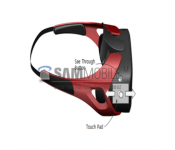
 A few months ago, we heard the rumour that Samsung was ambitiously working on a virtual reality headset that would eventually be used with their own smartphones and tablets. Today, another piece of the puzzle falls into place with the name of the device, the Samsung Gear VR, being leaked and renders and a logo for the device showing up, courtesy of SamMobile. This information was also accompanied by a release date; the Samsung Gear VR will launch alongside the Samsung Galaxy Note 4 at IFA 2014 in September.
 While we’re sure Samsung is perfectly capable of developing their own virtual reality technology, the Samsung Gear VR will actually be developed in collaboration with the best in the business: Oculus Rift. It’s reported that the Gear VR will adopt a similar approach to Google’s recently released Cardboard VR, using your own device docked within the headset to create your environment. That should ideally make the Gear VR quite affordable, much like Google Cardboard, however we don’t know how that lines up with Samsung’s idea of pricing. Probably the only thing that would make the Gear VR more attractive than Google’s offering is better apps at launch, but we’ll have to wait till September to see if it has what it takes.
What do you think about the Samsung Gear VR? Would you consider getting one? Let us know your opinion.
Source: SamMobile via Droid-life
//<![CDATA[
ord = window.ord || Math.floor(Math.random()*1E16);
document.write('’);
//]]>
The post Samsung Gear VR is coming and this is what it looks Like appeared first on AndroidSPIN.

Lyft launching in New York with a focus on serving outer boroughs

Lyft, the Uber alternative with a penchant for pink mustaches, will launch service in New York City at the end of the week. Initially, the ride-on-demand app will focus on boroughs beyond Manhattan, explaining that “Brooklyn and Queens are vastly underserved by public transit options compared to the rest of New York City.” This is good news for many city residents — not to mention Android Wear users eager to summon a car with their smartwatch — the downside is that Lyft will only pick up customers in Brooklyn or Queens, at least for the time being. In other words, if you’re trying to get back home from Manhattan, the app won’t help you out. That said, the service will come in handy for those looking to get around in Brooklyn or Queens, or travel from one borough to the other.
As Lyft sets up shop in the Big Apple, it will face stiff competition from ultra-successful Uber. The latter recently cut fares for its UberX service by 20 percent, and that’s just the latest example of the company waging war on competing services and local taxis. For its part, Lyft will lure new customers in New York City by offering two weeks of free rides. Beyond contending with rivals such as Uber and SideCar, Lyft, though, Lyft will also have to jump through the city’s regulatory hurdles — and the local taxi lobby didn’t exactly welcome Uber with open arms initially. In any case, Lyft hopes its strict vehicle safety policies — its insurance coverage is three times more than that of NYC taxis, for example — will give it a leg up in this new market.
Via: TechCrunch, The New York Times
Source: Lyft Blog

New blood test is an early warning system for Alzheimer’s disease

Of all the tragic things that come with Alzheimer’s disease, its tendency to sneak up on people is one of the toughest to deal with. That’s because by the time the condition is even detectable, there’s a good chance it’s already too late to turn back the tide. Earlier diagnoses could mean the difference between years of mental decline and a life of relative normalcy — that’s why a test developed by researchers at King’s College London and Oxford University could be such a game changer. According to The Telegraph, the scientists can predict whether or not Alzheimer’s will strike someone with existing memory loss problems by looking for 10 telltale proteins in their blood.
Their success rate is nothing to scoff at either: They’re right about 87 percent of the time. That’s right, a blood test may be able to unlock the (possibly disconcerting) secrets of your cognitive future. Here’s the rub, though: You won’t see this in your local GP’s office very soon. The first tests — which are expected to become available within about five years — will be used to ferret out those who are likely to be stricken with Alzheimer’s for inclusion in clinical trials. With any luck, some of the drugs that haven’t helped people in later stages of the disease will be able to do some real good when it’s caught early enough. Researchers hope that the right combination of testing and treatment could turn the degenerative disease into something that can be ultimately fended off. That’s not much consolation for the roughly 35 million people who already suffer from it, but for the rest of us? That’s hope where there was none before.
Source: The Telegraph
PulseOn early look: Making heart rate monitoring easier than ever

While smartwatches and fitness trackers are taking the tech world by storm, PulseOn aims to put a dent in the competition’s numbers.
Smartwatches and wearable fitness trackers are relatively new to us, though the idea has been around for quite some time. Something you can wear on your wrist that tracks your data while exercising is a great idea, especially if the price is right. We’ve seen watches that gravitate more towards notifications, telling time, being readily available in all weather conditions, or fitness and heart rate tracking.
The entire goal of PulseOn is to focus on heart rate monitoring, while offering fitness tracking functionality and the occasional telling of time. PulseOn was born out of Nokia back in 2012 with one main goal: to offer an easy way to check your heart rate. We got our hands on one a few weeks ago, and we have a pretty good idea as to whether or not you should buy one.
Overview
Before we give it a final score, we have some stuff to talk about. First and foremost, this isn’t a final copy. It’s a beta release, and it has a good amount of bugs in the hardware and software (most of which are being addressed before the final models are for sale). We’ll let you know which will be fixed later in the review.
PulseOn isn’t like other fitness trackers. Sure, you can track your run through the PulseOn app and check how many calories you’ve burned, but it aims to be the best at one thing: monitoring your heart rate. This isn’t a new idea, though. We’ve seen other fitness trackers monitor heart rate, but much of the time it’s inconvenient or inaccurate. We’ll take a look at a the performance and accuracy of PulseOn a bit later.
Hardware

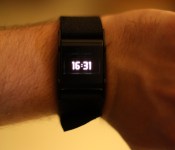
The look and feel of the device is simple, no-frills, and light. It offers a small square display with metal hinges that attach to the strap. The left side houses a start/stop button, while the right side holds a scrolling button. Around back, you’ll see the heart rate monitor and two charging pins on the right.
To charge the device, you’ll need to plug in the charging clip that’s included in the box. It’s a bit difficult to find the connectors, but once it’s secured, it’s pretty sturdy.
The strap is made from a stretchy cloth material that allows for easy removal. It’s comfortable, doesn’t irritate the skin, and is a whole lot better than a runner band. The one main downside to the strap, however, is that we’ve had to re-tighten the strap multiple times while exercising. The band comes a bit loose, pretty often – something we’d never see with a more conventional fitness tracker band.
Other than the quick look at the hardware features, we’d say the overall design could use a bit of work. It’s certainly not the most attractive device, but it’s far from the worst. It works well, and I suppose that’s all that matters.
Software

Let’s begin the software section by talking about the application. It looks really great from a design standpoint. The functionality, not so much. At least not yet. This is one of those problems that PulseOn is working on to be improved by launch date. It’s extremely slow, jittery, and just not that fun to use.
When you boot up the app, you’re whisked into a tutorial on how to use PulseOn and the app together. Once you complete the tutorial, you’ll see three main screens: one to show your latest event, the next to show your recovery time and fitness level, and the last to show your complete history. If the app ran smoothly, I wouldn’t have any complaints, whatsoever. And I’m pretty certain this will be completely ready for everyday use on launch date, especially because I’ve already gotten an update about once a week. But the app is where you’ll spend the least amount of time.
Once strapped on, the PulseOn has two main modes: standard and sport. Hit the right button to scroll through time, current heart rate, and a few statistics that have been previously recorded. There’s no shake to wake the device, so if you’re wearing it as a watch, be prepared to press a button every time you’d like to see the time.
Sport mode is activated by pressing the left button to begin recording your workout. This is where you can check out the timer, heart rate, distance, time, and training effect. These are all pretty useful while you’re exercising, given that you’re in a low-light situation. More on that later.
Overall, PulseOn works the way you’d want it to. It’s extremely easy to begin a workout, though a little annoying to do something as simple as check the time.
Performance

Most importantly, we need to talk about the screen. It’s small, and offers all of its useful information in a light-orange color. It’s great to look at while indoors, but if you try to look at anything while outdoors (where you’ll be using it most), it’s barely there. Text is faded to the point where I needed to put the watch up directly to my face to read anything. Especially while working out, I couldn’t check the correct time I was at during my run. This is mostly due to the poor screen and the small seconds counter in the timer. Unfortunately, there’s no way around that. You’ll need to squint to read anything outdoors, which isn’t really ideal at all.
The heart rate works absolutely great. It doesn’t stutter or give any false information. We tested it against a traditional chest heart rate monitor, and the results were spot-on.
Let’s move on to battery life. PulseOn is quoting up to ten hours of sport mode use before the battery goes completely dead. In my experience, I couldn’t make it an entire day without needing to throw it on the charger while in standard mode. Since this is a pre-production model, though, I’m withholding my reservations for now. We’ll have to see when the final units ship.
One great thing about PulseOn is the ability to record data without a phone. If you go for a run, just enter sport mode and go. Once you pair your device after the run, the info will sync straight to your PulseOn app. This is especially handy when you don’t feel like taking your phone with you for a super long run. Of course, it won’t track any distance information without a paired device, but it can give you the other vital information you’re looking for.
Overall, PulseOn works great for fitness tracking, and the ability to store data temporarily without a paired device is a huge plus. However, the screen and strap could use a bit of work.
Should I buy?
This is a difficult question. Since this isn’t a finished model, I can’t really say. But what I can say is that PulseOn is headed in the right direction. They’re working hard to get some hardware and software features ironed out before launch date, which is quite respectable.
It’s available as an IndieGoGo campaign, though the product is completely funded. This is essentially a way to manage preorders, something that many startup companies struggle with. If you’d like your own PulseOn, you can preorder one for $169, while waiting for launch date will cost you $200.
Though this isn’t completely finished software/hardware, what do you think? It’s certainly difficult to pick this over something like Samsung’s Gear 2, which also offers a heart rate monitor. PulseOn is most likely more accurate, so that’s also something to take into consideration.
If you’d like one of your own, head to the IndieGoGo page to pledge!
The post PulseOn early look: Making heart rate monitoring easier than ever appeared first on AndroidGuys.

Prince of Persia Shadow & Flame on Sale for a Buck
Ubisoft has put out a summer sale on the Prince of Persia Shadow & Flame. The side scrolling recreation of a classic generally would set you back $2.99. For a limited time, Ubisoft dropped that price to just $0.99.

The game offers up 14 levels in 5 different environments. You can utilize gesture based gaming or a more classic on-screen joystick style of play. If you happen to have a Moga controller at your disposal, it also supports that as well. If you have been eyeballing this one you might as well snag it today. Maybe they will toss out a sale on Assassin’s Creed Pirates next.
//<![CDATA[
ord = window.ord || Math.floor(Math.random()*1E16);
document.write('’);
//]]>
The post Prince of Persia Shadow & Flame on Sale for a Buck appeared first on AndroidSPIN.

Battlefield 4 Commander app updates to support Dragon’s Teeth DLC and Xbox One VOIP
Late last night a patch update started rolling out for the PC, Xbox One, Xbox 360, Playstation 3 and Playstation 4 for Battlefield 4. Much of that update included a ton of various bug fixes that were needed. It is also the pre-curser patch update for the upcoming Dragon’s Teeth DLC that will launch for Premium members July 15th. While none of that really has anything to do with Android, the accompanying Battlefield 4 Commander companion app certainly does.

EA has also pushed an update to the Commander app to prep it for the Dragon’S Teeth DLC. This is important if you ever play Battlefield 4 as a commander. Without the update you can’t play the 4 new maps and help your team. Besides prepping it for the new DLC, the update also brings in VOIP communication between Commander app tablet players and Xbox One players. That is pretty awesome really. This feature was previously only available for PC players and the Commander app.
If you are still playing Battlefield 4 and are gearing up for the new Dragon’s Teeth expansion, you should probably be sure to update your Android tablets as well.
//<![CDATA[
ord = window.ord || Math.floor(Math.random()*1E16);
document.write('’);
//]]>
The post Battlefield 4 Commander app updates to support Dragon’s Teeth DLC and Xbox One VOIP appeared first on AndroidSPIN.
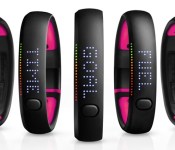
Apple Hires Two Former Nike FuelBand Engineers, Possibly for iWatch Team
Earlier this year, Nike significantly downsized its FuelBand team, firing several members of the 80-person team that worked to create its well-known fitness tracker as part of a shift from hardware to software.
Apple snapped up two of the former FuelBand team members in June, Ryan Bailey and Jon Gale. As noted by 9to5Mac, Bailey, who served as a Senior Test and Validation Engineer at Nike is now listed as a Mechanical Design Engineer at Apple, while Gale, who was a Senior Firmware Engineer at Nike is now employed as a Sensing Systems Engineer at Apple.

According to his LinkedIn profile, Bailey specialized in wearable device and consumer electronic product development, focused on providing engineering recommendations to major engineering leads. Gale, meanwhile, developed hardware and firmware architectures for Nike Digital Sport products.
Primary responsibility is to define both the hardware and firmware architectures for Nike Digital Sport products. Additionally, I managed the development of product firmware through partner companies. Responsible for delivering firmware to validate the design in a manufacturing environment, define and implementation of custom protocols to interact with other components of the Nike ecosystem, and translate high-level product requirements into actionable, testable definitions. I personally owned the delivery of firmware for the Nike FuelBand product line.
It is unclear if Gale and Bailey have joined Apple’s wearables team to work on the iWatch, but it is a distinct possibility given their expertise on wearable devices. Apple offers many positions under the job titles of Mechanical Design Engineer and Sensing Systems Engineer, however, so it is unknown exactly what the two are working on.
Over the course of the past year, Apple has hired several experts in the health and fitness fields to join its iWatch team, including fitness guru Jay Blahnik, sleep expert Roy Raymann, pulse oximetry expert and former Chief Medical Officer Michael O’Reilly, and several other scientists and executives from notable sensor companies like AccuVein, C8 MediSensors, and Senseonics. Most recently, the company took on the former sales director of luxury watch brand TAG Heuer, Patrick Pruniaux, possibly to help market the iWatch.
According to a recent report from The Wall Street Journal, Apple’s upcoming wearable device will feature 10 different sensors to track various health and fitness metrics. It’s said to integrate heavily with the Health app in iOS 8, and it may come in both multiple sizes and multiple designs to satisfy a wide range of tastes. Apple is expected to introduce the iWatch at an October event.
 AIVAnet