


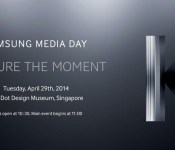
Samsung’s Kapture the Moment event may bring the “Galaxy K Zoom”

Last night, Samsung announced their Kapture the Moment event at Samsung Media day. It will be held on April 29th at the Red Dot Design Museum in Singapore, and could possibly be the announcement of the Galaxy S5 Zoom we’ve all some of us have been waiting for.
The rumors can’t stop there, though. On the event image sits a giant ‘K’ on the right side, and of course, the word ‘capture’ is spelled with a ‘K’. Could it possibly be the Galaxy K Zoom? Or are they going to get a bit more original with the name? We’ll have to wait to find out!
In case you missed it, the S5 Zoom is expected to bring a 20MP camera with 10x optical zoom, Xenon flash, OIS, with 2GB RAM, and a 4.8-inch 720p display.
Via: CNET, Source: Samsung Mobile (Twitter)
The post Samsung’s Kapture the Moment event may bring the “Galaxy K Zoom” appeared first on AndroidGuys.

Windows Phone 8.1 finally makes the OS feel whole

Android, iOS, Windows Phone. Each of these mobile platforms had to start somewhere, and it’s never anywhere close to perfect on the first try. Tenaciously, each OS gets better with each new iteration until, at some point, it just all clicks together. Sure, they’re all still works in progress, but there comes a time in which all of the gaping holes in features and functionality get plugged and concerns about the product’s future are alleviated. Arguably, Windows Phone may finally have approached its coming-of-age with an update to version 8.1.
Windows Phone only had a few big pain points remaining, and 8.1 certainly appears ready to fill the holes. The platform now has a fancy notification center to complement the information displayed on Live Tiles; the keyboard has improved with new swipe gestures; the OS can now support even more hardware options; and last but not least, it now comes with a smart virtual assistant to take on Siri, Google Now and S-Voice. The 8.1 update cooked up a lot of great things, and I got the opportunity to take it for a spin for a few days ahead of the official developer preview’s launch. It may not be perfect yet, but Windows Phone just grew up significantly. Here are some of the firmware’s highlights.
Cortana

Windows Phone included a search option from the beginning, and it was useful at the time, but smart competitors like Siri, S Voice and Google Now have quickly turned the tide, rendering Microsoft’s “voice assistant” completely obsolete. Thankfully, the 8.1 update introduces a personal assistant named Cortana which brings Windows Phone into the modern era.
Named after Master Chief’s trusty AI sidekick in Halo, Cortana is designed to help you do essentially whatever you need to do on a phone. She does the usual things: schedule appointments, alerts you to upcoming flights, tells you the weather, gets you directions to your next meeting, dictates messages, toggle settings and opens apps. And yes, she even tells jokes and responds in humorous ways to (most) silly questions. Those are givens these days, so I’ll tackle the more unusual things she can do.
First, Cortana has her own notebook, which she uses to gather more information about you and your preferences. She learns about your dining preferences, travel needs, regular routine and news stories you’re keeping track of (I’m hooked on the hunt for MH370 right now, so Cortana keeps that front and center). Often, these things will even pop up on Cortana’s Live Tile.
Another interesting part of Cortana is that she has the ability to give me reminders about specific people. For instance, I don’t want to forget that I need to ask my mom about her latest road trip, so I tell Cortana and she ensures that the reminder flashes on the screen the next time she calls.
If there’s a time in which you want to activate Cortana in a public (or quiet) place and you don’t want to disturb anyone else around you, you can just type your request in the bar at the bottom and Cortana will take care of the rest.

Cortana can also set up Quiet Hours for you. This is Windows Phone’s version of Do Not Disturb mode, which restricts calls and texts during specific hours, as well as times the calendar lists you as busy. If there are certain people who you want to allow in during those times, ask Cortana to add them to your Inner Circle (or just add them manually if you prefer).
Windows Phone 8.1 also supports geofencing, and Cortana takes full advantage of this opportunity. If you know that you’re going to be passing by the local pizzeria and you want to grab a pie on your way home from work, tell Cortana to remind you when you pass by, and she’ll make sure you remember.
My biggest frustration about Cortana is the fact that it takes me two clicks to get in and start talking: the first click to get into the program, and the second to tell her to begin listening. I’d like to see Cortana gain a true hands-free feature. An always-listening mode, for example, would allow me to simply use a hotword to activate her, and if that’s not an option yet, I would at least like the program to start listening once I press the search key to enter it. This kind of automatic option is technically possible in Windows Phone, since Cortana automatically listens for responses whenever she asks me questions (when I ask to send a text to someone, Cortana asks me for the message and then listens for my answer).
Microsoft boasts that Cortana can understand context — she can see something like “Thursday for coffee” in an incoming text and she’ll help you set it up in the calendar — but this is one area in which she needs a little work. Case in point: I used Cortana to turn on two alarms (one for five minutes from now, the other fifteen minutes from now), but she couldn’t understand when I asked her to turn off both of my alarms. She also couldn’t understand when I requested that she turn off my next alarm, and mistook 1:39PM for AM (I didn’t specify one or the other, but Cortana just assumed that I meant AM — despite the fact that she could’ve easily looked at my alarms and seen for herself). Curiously, the input box, which doubles as a suggestion box, told me to ask Cortana very specifically to turn off the 1:39PM alarm. This means the phone itself was smart enough to figure out which was which, but Cortana didn’t share the same knowledge for some reason. There were also plenty of times in which I’d ask a question in conversational style and I’d end up getting Bing search results.
It’s the little things like this that indicate why Cortana’s still in beta for now. There’s a lot more for her to learn over time, but at least she’s got a solid base to start from. Not only will Cortana get a better idea of your likes and dislikes as you interact with her more often, she’s also powered by Bing servers and will be constantly updated by Microsoft engineers, which means she’ll continue to get smarter as more people use her as well — and you won’t have to wait for formal updates to benefit from those changes.
I was impressed by how well the phone dictates my requests, aside from the occasional time when she couldn’t get exactly what I was telling her. I can’t be sure yet how well she’ll work on budget devices with lower-powered processors, but the Lumia Icon test unit I played with was able to process my requests in a very short period of time. Now it’s just a matter of refining how Cortana interacts with the users, by making her even more personal and understanding context a little better. However, this is just my first few days of using the service on a regular basis; over the next few days I’ll do more testing to see how Cortana compares with competing virtual assistants.
Action Center

Ever since Windows Phone was first introduced, I’ve liked the ability to use Live Tiles to look at glanceable information whenever the Start screen is displayed. Unfortunately, it wasn’t a full solution to a much greater problem: how does a user look at notifications without having to exit an app or unlock the screen? It’s hard to believe that it took Microsoft over three and a half years to figure it out, but Windows Phone 8.1 addresses that glaring oversight with a notification menu called Action Center. But forget the fact that it’s taken so long for it to arrive — it’s actually well done for a first go. In fact, after a few days of use I already prefer using it over the iOS notification center (although it’s still not quite as good as Android’s option).
The Action Center consists of four spaces on top for customizable shortcuts or toggles, depending on which action you choose. Here is where you can toggle your brightness, airplane mode, bluetooth, internet sharing, quiet hours, location and rotation lock; you may also get a shortcut for your camera (extremely helpful your phone doesn’t have a hardware button to do this for you) and settings like WiFi and VPN. For most activities listed, this is much faster and easier than pinning a specific Live Tile to Start or digging through settings menus to do it.
The original status bar still hangs out on the top of the screen, but it now comes with a battery meter and date, both of which I’ve found handy. The option to clear all notifications and go straight into settings are also near the top, though they’re located just underneath the shortcuts.

As for the notifications themselves, they’re easy enough to click to get more info or swipe to clear them out for any given app. You can also click to access a specific notification (say, one particular email) or choose to simply open up the entire app itself. Oddly, should you choose to open up a specific email, there’s no way to move backward or forward through your inbox, so you have to re-open the Action Center and click on a different email to read it.
The Action Center offers a few advantages over its iOS counterpart. For one, iOS doesn’t have shortcuts or toggles of any kind; additionally, you can swipe away your notifications, sync them up with your apps and Live Tiles in real-time, clear all of them at once (arguably one of the biggest pain points on the iOS version) and the status bar indicates that you have new notifications awaiting you. That said, iOS at least offers multiple tabs for more types of content, such as a “today” tab that shows calendar appointments, today’s weather and stock information.

It doesn’t fare as well against Android options, however. While a handful of versions of the notification menu exist thanks to manufacturers wishing to differentiate, the guidelines are the same. Not only can you swipe away notifications, you can also use two fingers to expand individual ones — and you can even act upon most of them (for instance, you can choose to delete or reply to emails directly from that menu). On Android, you can also access plenty of shortcuts, settings and toggles by pulling down the tray with two fingers; there are more on the screen, but they’re not as customizable as it is on Windows Phone.
For now, don’t pay too much mind to how it compares with Android — in its very first implementation, Microsoft managed to make the Action Center not only usable but enjoyable as well. This is a huge win for the company, which needed to do well in this area if it wanted to progress upward and onward.
Word Flow Keyboard
Another pain point in the Windows Phone experience has been its Word Flow keyboard, which was among the best in the mobile space when it first emerged on Windows Phone 7 but hasn’t improved much since; it got stale while Android flourished with a wide number of great keyboards boasting a lot of neat features. With 8.1, the keyboard just got upgraded to support swipe gestures, which is something I’ve grown used to using on Android phones and tablets. (Fun trivia: we first saw keyboard swiping on a Windows Mobile device, so it’s nice to see it finally come back to Microsoft’s mobile OS.)
With the swipe gestures, Word Flow works precisely as you’d expect it to — use your finger to draw to each letter in a word, and the phone figures out what you’re trying to say. It’s not completely perfect, as it doesn’t always get every word that I try to type, but that’s nothing new with these types of keyboards. It’s still a huge improvement over the previous version of Word Flow, and I noticed that my experience got better with practice in just a few days of use.
Hardware support

Last fall’s firmware update (known simply as Update 3) added support for larger and higher-resolution displays, as well as top-of-the-line processors. This upgrade was crucial for Microsoft, because until then the company struggled to convince manufacturers and consumers that a flagship Windows Phone could be just as good as an Android or iOS device at the same price. Microsoft had some strict hardware requirements to ensure WP8 devices were optimized to its liking. Fortunately Nokia found a way to differentiate its Lumia 1020 by featuring a 41MP PureView camera, but otherwise there wasn’t much reason to choose it over, say, an HTC One or Samsung Galaxy S4.
Good news: this wasn’t a one-off scenario for Microsoft, because version 8.1 comes with some fantastic improvements in this arena. Arguably, the most important addition is support for dual-SIM devices. The company wants to hit emerging markets hard, and by offering that extra SIM underneath the hood, Microsoft effectively throws in a new selling point to help it compete against Android in those markets.
There’s also support for virtual soft keys (until now, only capacitive keys were allowed) and even more Qualcomm chipsets than before, and the hardware camera button is no longer required. As much as I like using that button, it simply doesn’t make much sense on budget devices; eliminating the shutter key may shave off a bit of a phone’s production costs, which hopefully will make inexpensive handsets similar to the Lumia 520 even less expensive.
Finally, WP8.1 will also let you save your apps to SD, which makes a huge difference if you’re low on extra storage. Interestingly enough, Microsoft says that the apps are still encrypted to ensure that random users can’t snag your SD card and try to copy your games over to their device.
Other key improvements

The change log is too lengthy to list all of the new improvements to Windows Phone, but I want to highlight a few other features which enjoyed some much-needed attention from Microsoft.
Personalization. The new update makes Windows Phone feel a touch more personal. Not only can you choose your own wallpaper for the Start screen, the picture you choose also moves behind the Live Tiles (or through them, in the case of transparent tiles). I’d love to see something similar for the application list as well, since not much seems to happen visually on that screen. Microsoft will also have a new app out in the coming weeks that will let you choose from a bunch of new lock screens.
Battery saver. In the past, Battery Saver has worked exactly the way you’d think it should: when your battery starts getting low, this feature begins shutting off the non-essential apps and services in order to keep your phone alive as long as possible. It still does all that, but it improves upon it by adding the ability to see which apps are causing the most drain to your battery. If any of your apps are hogging all the power for itself, you can tell it to shut off in the background.
Calendar. Arguably, one of the weakest links in the OS has been the calendar. This also saw some significant improvements across the board in 8.1: most importantly, Microsoft’s added weekly and monthly views. The month view shows colored lines for each day that you have appointments, the different colors representing the specific calendar it’s assigned to. The weekly view is a grid of eight boxes (one for each day of the week and another that shows the week in relation to the rest of the month), but you can press on any day and it will expand to show more details.
Store. The Store has a slightly different look, but the most interesting part of it is that apps can now update automatically, if you desire. On top of that, apps that you’ve purchased in the past now show up as “owned” when you conduct a search for them. Finally, the act of installing an app doesn’t kick you out to the application list — it just keeps you on the same page you were already on.
Wrap-up

Finally. For the past three years, I’ve admired Windows Phone for many reasons, but the update to 8.1 marks the first time that the platform actually feels… complete. In other words, there are no more gaping holes in its features or functionality — essentially, I can now use Windows Phone without feeling like I’m giving up something that I’d otherwise enjoy on an Android device or an iPhone. With the update to version 8.1, you can now enjoy a functional personal assistant, a robust notification center, solid hardware support and a great keyboard, all of which were huge pain points that needed to be addressed a long time ago.
Of course, Microsoft still has plenty of challenges ahead. After all, it’s still quite uncertain what kind of changes will happen to Windows Phone after the Nokia acquisition is finalized, and we still haven’t seen a ton of manufacturers announce new hardware yet, despite Microsoft’s claim that there’s a ton of renewed interest in the platform. The OS has struggled to grow since its conception and is just now starting to hit double digits in market share (in certain regions, anyway). My hope is that this update signifies a change in momentum for the company. With new leadership, new significant functionality and the company’s “One Microsoft” vision, Windows Phone 8.1 could easily be the boost the company needs to foster continued growth.
Filed under: Cellphones, Wireless, Software, Mobile, Microsoft

UN: fixing climate change is affordable

One of the biggest arguments against fixing climate change is that it would cost too much. Not so, says the UN’s climate change panel, which has found that abandoning fossil fuels would only knock around 0.06 percent off the world’s GDP. According to the report, if low-carbon energy quadruples by 2050, then the planet may only warm by two degrees — the upper limit before The Day After Tomorrow-style catastrophes are commonplace. The panel recommends switching to renewables like solar, wind and hydropower, with nuclear the next best option and biofuels in third, since the latter uses the same land and resources needed for growing crops. Maybe it’s time that we all started cycling to work.
Via: The Guardian
Source: IPCC (PDF)

The ‘world’s smallest’ laptop adapter debuts on Kickstarter for $79

Back at CES in January, MIT spin-off FINsix unveiled the “world’s smallest” 65W laptop adapter, and it even managed to nab a nomination for our Best Startup award. Fast forward to today, the company is launching this nifty device — now dubbed the Dart — on Kickstarter for as low as $79 per unit. Here’s a quick reminder: this charger is four times smaller and six times lighter than its regular counterparts, and it also comes with a 2.1A USB port. The enabling technology here is a highly efficient VHF (very high frequency) power conversion, as refined and patented by MIT. As you’d expect, the Dart is compatible with most laptops, and there’s even a special version for MacBooks that don’t need more than 65W of power.
The first 1,000 backers will be able to grab a standard Dart for just $79 a pop, and latecomers will only have to fork out an extra $10 per piece. Both lots are cheaper than the $119 retail price, but rather than arriving in the summer as expected, these won’t be shipped until November — following product certification and field tests in the earlier months, of course.
As for the limited MacBook version due December, the first 500 units will cost a staggering $148 each, followed by $168 each for the remaining 1,500 units. FINsix explained that this huge price bump is because it has to buy the original MacBook adapters (also $79 each), in order to repurpose the MagSafe and MagSafe 2 connectors for its Darts. The good news is that FINsix is also hoping to work out a long-term agreement with Apple, in order to offer the MagSafe Dart at a much lower price.

For this Kickstarter campaign, the Dart’s aluminum body will be available in either blue, magenta, silver, gunmetal or orange. The device is built with a US plug, but it’ll work with different voltages and frequencies around the world, so non-US folks can just add a plug adapter. Since the Dart is geared towards road warriors, chances are its backers already have a travel adapter, anyway. FINsix has also previously told us that it’s quite easy to scale the Dart in terms of power output, so here’s hoping that the startup will consider a 90W or even a 150W version, for the sake of those chunky mobile workstation bricks.
Filed under: Misc
Source: Kickstarter
HTC One (M8) Review: The best just got better

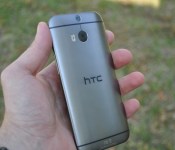
Today we have gotten our hands on the all new HTC One M8, T-Mobile variant. The phone is based upon it’s predecessor, the One M7, which was voted “Best Smartphone” by GSMA at Mobile World Congress back in February, talk about a lot of shoes to fill. However, HTC’s new flagship has jumped leaps and bounds in order to fill those shoes by creating a metal masterpiece that is both elegant and inviting.
Design:

Jumping from 70% to 90% metal, the phone just begs for you to hold it. When holding the phone, it feels like a flagship phone should, priceless. Weighing in at 160 grams it is heavier compared to other flagship phones, however this is no plastic square with a screen, it is a smooth rounded piece of art.
Onto the Display, the One is protecting its Super LCD3 1080p display with Corning Gorilla Glass 3.The screen itself hasn’t changed much as far as technology goes, however

HTC has tweaked the software a bit to display colors better. In direct sunlight or varying viewing angles, the screen looks phenomenal and HTC is also promoting their Advantage program, so in case it does fall out of your hand, they will replace the screen for free. Kudos HTC.
Hardware:
If your reading this review, I am sure you’ve seen some chart showing all kinds of specs, but what do they mean? It is a given, the new HTC One is packing one of the fastest processors available, the 2.3 Ghz Snapdragon 801 from Qualcomm along with 2GB of DDR2 RAM.
Now, we must remember that speed and memory do not completely define how fast a phone is. It kind of like putting a Ferrari motor into a Volkswagon Van, it might have some serious raw horsepower, but horsepower doesn’t get it across the finish line. This goes hand in hand with smartphones as well. HTC has worked diligently on the software side to give the user a really fast phone that never hesitates.
The phone is available with 32GB onboard memory (T-Mobile) and if that isn’t enough it also has an expandable microSD slot for cards up to 128GB. This was a big complaint to last year’s One, but I am glad HTC got the memo. So load up all your music/movies/photos and never stream again!
Battery Life:
HTC has boosted the capacity of the new HTC One battery to 2,600 mAh from 2,300 mAh in the year’s prior. However, even though this might not sound like a big jump, HTC says that we can expect a 40% increase in battery life over its predecessor. This boost in battery life is due to the Snapdragon 801 chip along with all those software optimizations, have made the device last for quite some time.

I put the battery through the ringer and I got very good results. I tested the device as I would normally use it with my occasional YouTube video,taking pictures, and syncing with my FitBit. Over the course of one day I still had about 35% battery life, which is awesome compared my previous devices, the Moto X and the Nexus 5, which would require a quick charge to make it through the day.
Charging the phone will be alot faster due to Qualcomm’s Quick Charge 2.0, however the power adapter that came with the new One does not support Quick Charge 2.0, but HTC is saying they will release a power adapter that will support it soon.
Software: The Sith Sense

Well if you have never watched Star Wars, I am sorry, otherwise you’ll know what I’m talking about. Out of the box, the new One is running with Android KitKat 4.4.2 along with HTC’s own custom interface, Sense 6.0.
Pretty much anything that can be changed, HTC has done it, gracefully though I might add. From notification, app drawer, on-screen buttons, quick settings, lock screen, hell pretty much everything has the Sith flavoring, and it is better than ever.
The greatest enhances have come to BlinkFeed and the camera app, however life is all about the little things and HTC has made lots of little tweaks to make the interface more user friendly and clean.
The initial layout of the home screens are 3 standard tiles with BlinkFeed to the far left, which is removable. With a simple pinch on the screen you can add more tiles, up to five including BlinkFeed, and customize them as you wish. HTC has really done a nice job and even though I am a huge fan of third party launchers such as Nova or Google’s Home launcher, HTC’s is really nice and should not be written off.
In quick settings, you have 24 different settings you can manage with up to 12 available in the menu. You can even edit out the ones you don’t want by tapping the pencil/rectangle thingy in the top right corner.
Motion Launch has become a big part of the Android experience which we have seen recently on the Moto X with its wrist flick camera action and the double tap on the LG G2, which wakes the phone up. Well, HTC is joining this game as well, but they have taken it to a whole new level. Below are the 5 different actions you can do, while in portrait mode and holding the phone, to wake up in specific areas:
- Swipe left to “wake the widget panel,” which means open to the home screen.
- Swipe right to wake the phone and launch BlinkFeed.
- Swipe up to simply unlock the phone and return to whatever you were doing when it went to sleep.
- Swipe down to wake the phone and turn on voice dialing.
- Double tap the display to wake the phone.
You also have the ability to get to the camera while the phone is asleep, just go into landscape mode (horizontal) and hold either the volume up or volume down button and voila, your Duo Camera is ready to snap away. You can also set either of the volume buttons to act like a shutter instead of using an onscreen button, kinda of nice and convenient.
 BlinkFeed is still alive and looking better than ever on the new HTC One. Based upon what theme you have chosen for your phone, BlinkFeed takes on the same color scheme and a much cleaner look than before. Now if you’ve never had the privilege of using BlinkFeed, you should definitely check it out.
BlinkFeed allows you to:
Personalize your own stream of online content in seconds, and stay updated in a glance. Swipe your home screen once for new Facebook posts, Twitter feeds, breaking news, sports scores, and a lot more. If you browse for it online, it’s on your HTC BlinkFeed. Only much easier to find.
Yeah, I stole the above from HTC’s website, but in a nutshell, BlinkFeed allows you to customize what you want to see without digging into all those apps. Now it has its limitations, so if your a Twitter fiend (addict) or Facebook lover you won’t see all of what is happening in your social world, however you can get a quick glimpse. HTC has over 10,000 partners you can choose from and a detailed list can be found here on their website.
BoomSound: So loud it hurts!

HTC has improved upon their already ready loud front facing speakers known as, BoomSound. HTC says they are 25% louder and clearer as well. I always enjoyed last year’s One and this year’s is just getting better. The only real downside to having BoomSound is that it does make the device larger, however it is a worthy trade off because of the crisp, loud, and clear sound you get from the speakers.
Camera Time: UltraPixels are here to stay
 Last year’s HTC One was hyped up around the idea of the UltraPixel camera, which was great for low light, however for daily use it was not impressive. Cameras have become a daily part of our lives with our smartphones and lots of people spend the money not just for a phone but a tool that connects them to the world.
This year with the new HTC One, HTC has made a valiant effort to fix some of these issues. The camera works much better outdoors, however the zooming abilities are still rough compared to other flagship phones, which is probably due to its 4-megapixel resolution.
For me, this is not a deal breaker, because if I really need to take high quality pictures, my trusty, yet expensive, SLR will do just fine. However, I am your average photo taker, but HTC has done a superb job on their new camera app which allows you to do a plethora of things such as selfies, dual capture (front and rear cameras at the same time), Pan 360 (HTC’s version of Photospheres), and Zoe camera.
T here are so many different options available for the camera, but my favorite would be the new DuoCamera. The rear cameras, yes plural as in 2, allows the main camera to capture the entire picture while the second camera captures depth information. By having the two cameras, you can defocus the background to make your main objects stand out. You can also implement many different filters to the picture in order to give it some really cool effects.
HTC is still lacking behind other smartphone makers in the camera department, but not by much! You can still produce beautiful images and have great effects on them!
The Little Things:
 The great thing about T-Mobile is Wi-Fi calling. Now, I know first hand that T-Mobile doesn’t have the greatest coverage, especially in buildings, but they make up for this with Wi-Fi calling, which has worked marvelously.
Phone clarity has been superb and I have never had any issues with your standard connectivity of Wi-Fi/Bluetooth/etc…
HTC is also offering developer and unlocked editions for $700 which is free of carrier bloatware and in the developer edition, it comes with an unlocked bootloader. So you may tinker at your hearts desire.
Overall:
HTC has had a rough few years trying to get its foot firmly planted into the smartphone market. However, HTC has taken last year’s “Smartphone of the Year” and made it even better in every way imaginable.
From design, software, and battery life I have never had such a great phone experience until now. The new One is much more than a phone it is a beautiful metal masterpiece that takes all the aspects of a phone and capitalizes on all of them.
I have truly had a great experience with the new HTC One and I believe that HTC has yet again seized the “Smartphone of the Year”.
Check out pictures and the unboxing of the new HTC One below!


The post HTC One (M8) Review: The best just got better appeared first on AndroidGuys.
MEElectronics EDM Universe In-Ear Headphones Review: the perfect companion for the EDM-Oriented
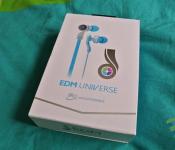
 Electronic Dance Music, or EDM, has really taken off in recent years with multiple large-scale music events every year in cities all over the world to share and celebrate this movement of music. As you can imagine, the average EDM listener is going to prefer a very specific sound when looking for personal audio equipment, something that MEElectronics is trying to provide with its EDM Universe line of products. Today, we’ll be taking a look at the MEElectronics EDM Universe In-Ear Headphones.
 Let me first off say that I am not a practiser of EDM culture, so my perspective may be a bit more conservative. However, I still think the EDM Universe earphones are fantastic looking. As well as the Peace/Blue that we’re taking a look at today, the earphones are also available in PLUR/Black, PLUR/White, Love/Pink, Unity/Gree, and Respect/Purple; EDM fans will know why those names are important.
What’s in the box?
 As usual, MEElectronics does not disappoint with the included equipment with added bonuses.
 Apart from the headphones themselves, you’ll be getting 3 additional, different sized sets of ear buds as well as a very stylish carry pouch for your earphones.
 As an additional extra, for those of you who feel inclined, there is also a rubber wristband which has the four tenets of EDM culture engraved on it: Peace, Love, Unity, and Respect.
How does it sound?
 I have been advised that the EDM Universe earphones have basically the same features as the MEElectronics M9P earphones but with slightly tweaked audio (see our review of the M9P here). That is definitely true of the EDM Universe earphones, however the tweaked audio makes them a completely different beast.
 Having its roots in EDM, you would expect the bass to quite heavy, and heavy it is. That’s not to say that the rest of the audio is neglected; the treble range appears to be well represented and still remains very sharp, though the bass does take centre stage here. Turning it up did not appear to affect them at all, with no hint of peaking and the earphones were still able to deliver excellent, clear, and bassy music. Listening to EDM is obviously where these earphones shine and while they lack the obvious depth that you might get from headphones, they still provide a great atmosphere and sound.
 As you might expect, this makes the EDM Universe earphones a very formidable EDM companion as the bass will be thumping your eardrums at very close proximity. So close that I had to take a break every so often while reviewing them, though I trust that those of you who do frequent raves will probably not have such feeble tendencies. The take home message: the EDM Universe earphones have thumping bass and are thumping loud. With that in mind, I definitely wouldn’t recommend them for anyone who doesn’t want a bass-heavy set of earphones as the bass can be a little overpowering.
What do I like about the MEElectronics EDM Universe In-Ear Headphones
 I love that MEElectronics has tried to fully embrace the EDM culture by adopting a familiar scheme for the colour choices and adding extras to help assert the ideals behind EDM. Whether or not you like EDM, the EDM Universe earphones are definitely an eye-catching accessory which looks the part.
 Normally, I’m not a huge fan of in-ear headphones for one main reason; they always seem to fall out. I’ve heard that you can ram them into your ear, but that just makes your ear canal sore. With the EDM Universe earphones however, the earphones seem to stay firmly in my ear no matter what I’m doing. It seems to be a combination of the earbud itself as well as the elongated earpiece which rests inside your ear as well, which works out well if you’re the type of listener who likes to apply yourself to overzealous dancing.
 People who have read my reviews before will know that I’m a huge sucker for included bags and pouches. Naturally then, I love that the EDM Universe earphones come with a stylish, colour-matched pouch that you can carry all your gear inside. It seems durable enough as well, so you’ll be able to toss it into your bag without any concern about your earphones getting damaged.
 As with the price of all of MEElectronics’ other products, I like that the EDM Universe earphones aren’t extortionately priced. At MSRP $49.95, it’s a very fair price for a pair of in-ear headphones with great sound and a unique appearance. It’s not quite as cheap as the M9P that they are based on, but there’s enough extra oomph and inclusions to make you feel like it’s worth your cash.
What don’t I like about the MEElectronics EDM Universe In-Ear Headphones
 As with my complaints with the M9P, some of those carry over to the EDM Universe earphones. While the overall appearance of the earphones is visually impressive, there are parts of it that just look cheap or a bit lazy.
 The lack of themed text on the cabling looks a bit unusual and the re-used in-line controls which feature on so many of MEElectronics’ headphones look more than little out of place with such a stylishly designed earphone. I won’t say that these are deal breakers as I am sure these design choices keep costs down and in the overall scheme are very minor features, however they do somewhat affect the sense of quality around the earphones.
Overall Thoughts
 The EDM Universe earphones, like many of MEElectronics’ products, are great bang-for-your-buck; you won’t be disappointed by what you get in the box and you definitely won’t be disappointed by the performance of the earphones themselves. While there are a few niggling points that I could see being improved in the overall design, the price tag of $49.95 is a pretty good deal, particularly if you’re looking for some way to really show your true EDM colours and enjoy your music too.
If you’re interested in checking out the MEElectronics EDM Universe in-ear headphones, you can visit the product page for them here, or if you would like to check out any of MEElectronics’ other products, you can visit their main website here.
Gallery of Photos


//<![CDATA[
ord = window.ord || Math.floor(Math.random()*1E16);
document.write('’);
//]]>

Amazon brings BBC’s Sherlock, Dr. Who and more to Prime Instant Video

Amazon’s Prime Instant Video streaming service is no stranger to BBC content, but today the two have inked a new deal to bring more British TV shows to the platform formerly known as LoveFilm. There are a bunch of seasons of Sherlock and Doctor Who now available to binge-watch, as well as classic comedies like The Office, Red Dwarf and Ab Fab. Far from an exclusive deal, Amazon’s basically playing catch-up to arch nemesis Netflix here, which snagged rights to more or less the same library around this time last month. Still, with only a seven-day catch-up window on BBC’s iPlayer (currently, anyway), better access to the archives on any service can only be a good thing.
Filed under: Home Entertainment, Internet, Amazon
Microsoft offers early download of Windows Phone 8.1

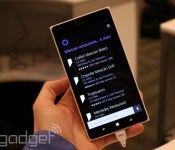
We get it. You want to download Windows Phone 8.1 as soon as possible just to see if Cortana is really as cool on a mobile device as she is in the Halo series. Or, perhaps it’s the new Action Center and swipe keyboard that strike your fancy. Whatever reason you have for wanting to play with the latest version of Windows Phone ASAP, now’s your chance. Microsoft has just announced that a developer preview of the new update is finally available for download, but as the name of the build implies, this is meant for third-party developers so they can get a good head start in prepping their apps ahead of widespread release. That said, you can still get in on the action, even if you’ve never written a line of code in your life — there’s just a few risks involved.
First of all, according to Microsoft’s site, you’ll need to register as a developer with App Studio for free. Technically, this tool allows you to create apps that you can run on your own Windows Phone (if you want to publish them to the Store, that’ll cost you $20), but it’s also a workaround that enables you to install the latest and greatest previews on your phone at your leisure. Heck, you’ll still be able to upgrade to the final build as soon as it’s available on whichever device you have — you just can’t revert back to the previous version.
There’s a few other things you must know before you start clicking buttons. Most importantly, performing the early upgrade will likely void your warranty in the process, so keep that in mind; additionally, these builds only consist of the Microsoft-sanctioned part of the update — in other words, any manufacturer or carrier customizations (and drivers) will only be available when that phone’s official release comes out. If the privilege of playing with new firmware before everyone else is too much of an opportunity for you to pass up, head here to get started.
Filed under: Cellphones, Wireless, Software, Mobile, Microsoft
Source: Microsoft

Microsoft’s ‘Age of Empires: World Domination’ to Launch on iOS This Summer [iOS Blog]
Microsoft and Japanese gaming firm KLab Inc. have revealed Age of Empires: World Domination, the first title based on the popular PC strategy franchise for iOS devices. The game features a revamped real-time battle system optimized for mobile devices, as players choose between the Celts, Vikings, Franks, or Huns to build the ultimate army for use in online multiplayer combat.
The game’s unveiling comes a year after a report by Japanese business newspaper Nikkei indicated that Microsoft would be bringing a number of its Xbox and Windows games to the iPhone in a collaborative effort with KLab. Specifically, Age of Empires was said to be the first title stemming from the partnership in the form of a free-to-play title. With the forthcoming release of Age of Empires: World Domination on iOS, it is likely that other titles from Microsoft will appear on Apple’s mobile platform in the near future.
Age of Empires: World Domination will launch on iOS this summer, as interested users can pre-register on the game’s official website for exclusive access and more information.

Age of Empires marches on iOS this summer

Even if we wanted to, we can’t (rather, shouldn’t) play Age of Empires all day. This summer it’ll become a time-sinking possibility, however, with an AoE spin-off headed to iOS. The teaser video dropped by Microsoft doesn’t reveal much outside the broad release date. Age of Empires: World Domination only gets mere seconds of gameplay teased so it’s hard to derive exactly how much depth the mobile iteration will go into. Fortunately, horses, spears and Huns, at least, have already made the transition.
Filed under: Gaming, Microsoft
Source: Joystiq
 AIVAnet