



MSI GS60 Ghost review: a gaming rig in an Ultrabook’s clothing
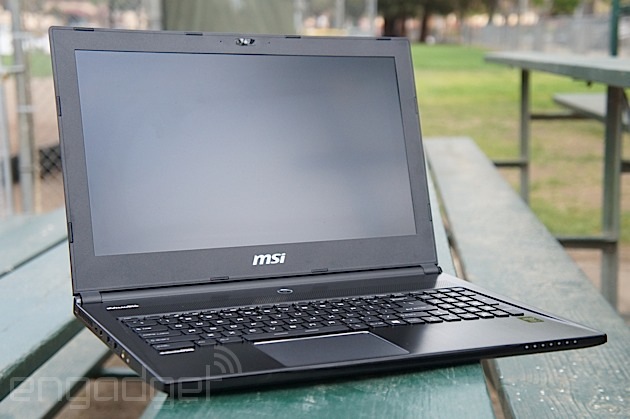
It’s the natural order of things: NVIDIA releases a new line of mobile GPUs and suddenly the market is flooded with new gaming laptops. It is spring, after all. Most notebooks in the category follow a standard form, but every now and then someone breaks the oversized, hulking mold. This year, it’s MSI. Until now, the company’s lightweight series consisted of one machine, the GS70 Stealth. It was praised for being thin, light and having a more premium feel than most gaming laptops, but its 17-inch screen still made it unwieldy. Enter the GS60 Ghost: everything you loved about the Stealth, but with a 15-inch display and — wouldn’t you know it — NVIDIA’s new GeForce GTX 800M series GPU. Let’s see how it stacks up.
Look and feel

There’s a new fad trending in the world of gaming laptops, and we like it: thin, light and simple. Three years ago, you’d have been hard-pressed to find a gaming rig that fit those adjectives, but they’re perfectly suitable for the GS60 Ghost. Save for a few manufacturer logos, a silver-accented mousepad and a small, angular shelf surrounding the keyboard, this laptop is as plain as they come. There are no gaudy color schemes, aggressive shapes or unnecessary embellishments — just a lightly brushed, black magnesium-alloy chassis.
This simple elegance doesn’t cripple the device’s connectivity options, either — Ethernet, Mini DisplayPort and HDMI sockets run down the laptop’s right edge, accompanied by an SD card reader and a USB 3.0 port. Two more USB 3.0 connections fill out the device’s left side, flanked by a pair of audio jacks and the machine’s AC adapter. Air vents circle around the back of the GS60′s slim 0.78-inch frame, quietly teasing the graphical prowess hidden within. All in all, if it weren’t for MSI’s Dragon Army branding on the lid, the GS60 Ghost could easily be mistaken for a 15-inch Ultrabook.
While the notebook’s metal frame lends it the countenance of a sturdy, well-built machine, it also makes it an easy target for scratches — which is probably why MSI ships a soft, zippered case with every unit. The protective sleeve is only lightly padded, but it’s a nice freebie nonetheless.
Keyboard and trackpad

There is one element of the Ghost’s design that put us off: the keyboard. There’s nothing wrong with its full-sized chiclet layout, and it’s certainly not missing any key functions, but the keycaps are marred by an ugly, sharply angled and slightly oversized font. Fortunately, almost everything else about the keyboard overshadows its cosmetic faults.
Most gaming laptops feature keyboards with a faint, multicolored backlight, usually controlled through a desktop application. So does the GS60, but it takes things a step further: The notebook’s SteelSeries-sourced keyboard gives users control over not just the robust LED backlight, but also the specific function of each individual key. The included SteelSeries Engine can reprogram any key (except F1-F12) to launch applications, run customized macros or simply emulate a different keyboard function. Custom profiles can be configured to automatically launch with specific games or applications too, and can be visually differentiated by custom backlight configurations. It makes for a decent typewriter too, though the keys could stand to have a little more travel.

We were a little surprised to find a buttonless, clickable trackpad — common for Ultrabooks and productivity machines, but extremely rare for gaming rigs. MSI’s implementation seemed stiff and awkward at first; it tracks fingers well enough, but only right-clicks if you press down in the lower-right-hand corner. Turn on multi-touch gestures and two-finger clicking, however, and the pad blossoms into a productivity wunderkind. Properly configured, the Ghost’s trackpad is excellent for general use. Unfortunately, it’s on a gaming laptop.
Trackpads make poor game controllers as a general rule, but clickable trackpads are particularly ill-suited to the task. Since both mouse buttons are integrated into the same clickable surface (differentiated only by an assigned area or how many fingers are being used), only one can be activated at a time. The problem? Many games require the player to move the mouse while simultaneously using both mouse buttons — aiming down the scope in a first-person shooter, for instance. Trying to depress the pad while using it to move a character is also extremely awkward. Overall, it’s a great mouse, but terrible for game input.
Display and sound

Wide viewing angles, bright colors and a non-reflective, matte screen: everything we want in a laptop display and exactly what the GS60 has to offer. It’s a relief too: Far too many gaming laptops ship with panels that lose their luster when viewed off center. MSI claims the Ghost’s 15.3-inch panel will display accurate colors to any viewer within 85 degrees of the screen, and while we didn’t exactly whip out a protractor, we’ll admit the display stayed vibrant no matter what angle we tried. All told, it’s bright, beautiful and glare-free. There isn’t much else to say.
While it’s not uncommon for notebooks to lean heavily on audio software to get the most out of their tinny speakers, the GS60′s tin cans seem to use the drivers as a crutch. Without the aid of the included Sound Blaster Cinema equalizer, the Ghost’s audio has all the fidelity of an AM radio. Properly filtered, they don’t sound bad, per se, but for speakers proudly flaunting Dynaudio branding, they’re resoundingly average. Still, they do more than a passable job when tuned to the software’s default settings: They don’t distort, crackle or buzz at high volumes, for example. There’s nothing wrong with them, really; we just expected more.
Performance and battery life
| PCMark7 | PCMark Vantage | 3DMark06 | 3DMark11 | ATTO (top disk speeds) | |
|---|---|---|---|---|---|
| MSI GS60 Ghost (2.4GHz Core i7-4700HQ, NVIDIA GTX 860M 2GB) | 5,909 | 22,602 | 22,898 |
E7,908, / P5,152 / X1,519 |
537 MB/s (reads); 495 MB/s (writes) |
| Alienware 14 (2.4GHz Core i7-4700MQ, NVIDIA GTX 765M 2GB) | 5,310 | 21,502 | 20,868 |
E6,529 / P4,211 |
507 MB/s (reads); 418 MB/s (writes) |
| Alienware 17 (2.7GHz Core i7-4800MQ, NVIDIA GeForce GTX 780M 4GB) | 5,647 | 22,114 | 27,137 |
E10,638 / P7,246 |
509 MB/s (reads); 420 MB/s (writes) |
| Digital Storm Veloce (2.7GHz Core i7-4800MQ, GeForce GTX 765M 2GB) | 6,107 | 21,379 | 20,340 |
E6,696 / P4,353 |
506 MB/s (reads); 196 MB/s (writes) |
| Razer Blade 14-inch (2.2GHz Core i7-4702HQ, GeForce GTX 765M) | 5,837 | 19,505 | 19,815 |
E6,364 / P4,161 |
546 MB/s (reads); 253 MB/s (writes) |
| MSI GT70 Dragon Edition (2013) (2.4GHz Core i7-4700MQ, GeForce GTX 780M) | 6,111 | 20,250 | N/A |
E10,519 / P7,416 |
1.19 GB/s (reads); 806 MB/s (writes) |
| Razer Edge Pro (1.9GHz Core i7-3517U, NVIDIA GT 640M LE 2GB) | 4,949 | 13,536 | 10,260 |
E2,507 / P1,576 |
409 MB/s (reads); 496 MB/s (writes) |
| Samsung Series 7 Gamer (2.30GHz Core i7-3610QM, GeForce GTX 675M) | N/A | 11,515 | 21,131 |
N/A |
N/A |
Looking forward to seeing how NVIDIA’s new GPU architecture (codenamed Maxwell) performs? You’ll have to wait a little longer. NVIDIA has a habit of outfitting its mobile chips with a mixture of new and old architectures, and its new 800M series is no exception: The GeForce GTX 860M at the GS60′s core happens to have both Maxwell and Kepler variants, differentiated by clock speed and total core count. NVIDIA says the two chips should perform on the same level — but it’s worth noting that MSI’s Ghost is outfitted with the GPU’s Kepler silicon.
Even so, last year’s GPU architecture doesn’t seem to be much of a hindrance: The GS60 Ghost consistently walked the line between ultra and very high graphic settings, with few games struggling to reach playable frame rates at maximum settings. Saints Row IV, Thief and Battlefield 4 all maintained a 30 fps average at ultra high quality, with their lowest frame counts staying in the high twenties. BioShock Infinite did even better; it held a 44 fps average on its highest graphics settings. Even The Witcher 2, a game known for taxing GPUs, toed the line: 33 frames per second at its maximum setting (with the GPU-killing ubersambling option disabled, of course). Naturally, Crysis 3 struggled to hit playable frame rates without significant concessions (we had to scale it back to medium to hit 30 fps), but struggling with Crysis is par for the course anyway, right?

Still, we can’t help but wonder if we’re missing out for the sake of last year’s architecture. NVIDIA announced the GeForce GTX 800M series with a new feature that promises to extend a laptop’s on-battery playtime by 50 to 100 percent. The Ghost gave itself up after just 52 minutes of gameplay, which is about average — far below the doubled runtime NVIDIA promises. In fact, the GS60′s high-performance runtime was only on par with the 50-minute average NVIDIA is trying to extend. The feature, called Battery Boost, uses NVIDIA’s GeForce Experience software to match game performance to a target frame rate. Indeed, the Ghost did limit its output to 35 fps when disconnected from its AC adapter, but it didn’t translate into more gameplay. It was also a fairly inconsistent experience, and would drop to a choppy 15 fps average for extended periods of time.
|
Battery life |
|
|---|---|
| MSI GS60 Ghost | 3:13 |
| Razer Blade 14-inch | 6:24 |
| MSI GT70 Dragon Edition | 4:34 |
| Razer Edge Pro | 3:40 |
| Razer Blade 2.0 | 3:29 |
| Alienware 14 | 3:07 |
| Alienware 17 | 2:55 |
| Digital Storm Veloce | 2:53 |
| MSI GT70 | 2:49 |
| MSI GT683DXR | 2:40 |
| Samsung Series 7 Gamer | 2:11 |
| 2011 Sony VAIO F Series | 2:07 |
| Qosmio X775-3DV78 | 1:26 |
The Ghost’s Ultrabook stylings don’t lend it any traditional longevity either: Engadget’s standard battery test exhausted the rig in three hours and 13 minutes. That’s about average for a modern gaming laptop, but it falls short of long-lasting outliers like Razer’s third-generation Blade. Frankly, it’s what we expected out of the Ghost, but gamers looking for a machine to pull double-duty at the office may want to look for something more longevous.
Software

Once upon a time, laptops and pre-built computers came riddled with bloatware, off-brand software packages and thinly veiled advertisements disguised as “free trials.” It’s just the way it was. This unpopular trend has been dying off in recent years, however, and we’re happy to report that the GS60 Ghost features only two offenders: the ever-present Norton security suite and XSplit Gamecaster. The former is easily (and traditionally) ignored, but the latter may be worth the attention of wannabe Twitch superstars. It’s a gameplay-broadcasting suite, complete with chat integration, webcam-overlay options and even annotation tools. That said, it’s only a demo; if you’re interested in hosting a watermark-free stream at a decent resolution, it’ll cost you $15.
Just about everything else on the Ghost’s internal storage is a complement to its hardware, including the aforementioned GeForce Experience (which also offers capture and streaming options, by the way), Sound Blaster Cinema 2 and SteelSeries Engine suites. There’s also an MSI Dragon Gaming Center app, but don’t get too excited: It’s little more than a CPU-temperature monitor with a built-in application launcher.
Configuration options
MSI’s ultra-slim gaming laptop only comes in two configurations, and not much sets them apart. Our $1,800 review model houses an Intel Core i7-4700HQ processor, NVIDIA GeForce GTX 860M graphics (with 2GB GDDR5), 16GB DDR3L RAM and a 128GB SSD drive paired with 1TB of HDD storage. Knock $100 off that price and you’ll get the exact same thing minus four gigs of RAM and 250GB of HDD space.
There’s also a third model in the works — the high-resolution Ghost Pro we saw at CeBIT — but MSI told us it won’t be available for several months. Even so, it could be worth the wait: MSI’s $2,100 model will boast GeForce GTX 870M graphics (with 3GB GDDR5) and a super-sharp, 15.6-inch 2,880 x 1,620 display.
The competition
As fond as we are of the Ghost’s slim, metallic frame, it does have at least one drawback: It’s expensive. You don’t have to look far to find a more affordable alternative with similar internals — in fact, MSI has one. The Ghost’s cousin, the GE60 Apache, matches our review laptop almost part for part, ringing in at $1,350, albeit with half as much RAM and a body that’s twice as thick (thanks in part to optical media). Meanwhile, another $50 buys the GE70, with 12GB DDR3L RAM, an optical drive and a larger 17.3-inch screen. If you’re willing to compromise, you’ve got plenty of affordable options.
If your heart’s set on thin, powerful and expensive, however, you’d be remiss to ignore the snake in the room: the 14-inch Razer Blade. This refreshed gaming portable not only matches the Ghost Pro’s GeForce GTX 870M GPU, but also outpaces that model’s 3K display with a 3,200 x 1,800 IPS multi-touch panel. It’s even a hair slimmer than MSI’s kit, flaunting its “thinnest gaming laptop” crown with a 0.70-inch frame. It only costs $100 more than the Ghost Pro, too.
Wrap-up

Like the Razer Blade, the Ghost plays to a specific niche: gamers who want the power of a full-fledged gaming PC without sacrificing portability or aesthetics. It’s a small subset of the notebook market, but MSI’s GS60 fits right in: It’s thin, powerful and a joy to use. It’s not perfect, though. Pitted against the Blade, the Ghost’s average battery life is disappointing and its Kepler-based GPU fails to make NVIDIA’s new Battery Boost feature shine. Its attractive design can also detract from its gaming roots, best exemplified by a trackpad that, while outstanding for an Ultrabook, feels out of place on a gaming machine.
While these gripes are easy to dismiss, one more shadow hangs over MSI’s GS60: the apparition of the unreleased Ghost Pro. It’s everything the current model is and more, teasing enough upgrades to conceivably push the Ghost’s performance off the fence of 30 fps gameplay. As is, the GS60 is a solid option for folks looking for a slim gaming rig, but a more powerful, identical machine is just around the corner. You want our opinion? Wait for the Pro model.
Filed under: Laptops

Flickr wants to become your new Instagram with its latest app update

Today Yahoo is rolling our Flickr “3.0,” a completely redesigned approach to its photo-sharing apps on Android and iOS. In addition to offering improved sharing through Dropbox and Google+, Flickr on mobile now features Instagram-like filters and in-depth editing tools. We especially like the new option to view each photo’s metadata, including which camera an image was shot with, aperture setting and more.
Download the new Flickr app, and you’ll see that it looks very much like Instagram, even beyond the new filters feature. You now have the ability to comment on, like and share photos, and there’s a feed view that echoes the experience of scrolling through your friends’ latest uploads on Facebook’s ultra-popular acquisition. Finally, you can also shoot and edit 30-second video clips and add filters.
Should you drop Instagram or your other photo app of choice for Flickr, though? That depends on how willing you are to create a Yahoo account — previously you could sign into the app through Facebook or Google, but the latest update eliminates those two options. In any case, you’ll find the download links below.
Via: The Next Web
Source: Flickr (iTunes), Flickr (Google Play)

Batter up: Chromecast now live streams every pitch with MLB.tv

Google’s little $35 dongle is like a fine wine: it just keeps getting better with age. Today, the Chromecast is adding support for MLB.tv, letting you push out live out-of-market games right to your TV from a smartphone or tablet. The only caveat is that you’ll need an MLB.tv Premium subscription to do so, but chances are most of you hardcore fans of America’s pasttime already have one of those. If you do, the only thing left to do is grab the MLB At Bat app from Google Play or the App Store — an update which brings Chromecast support to these apps should be rolling out as we speak. And while you’re at it, perhaps you may want to download R.B.I Baseball 14, so you can have an all-baseball day to yourself.
Filed under: Home Entertainment, Internet, HD, Google
Source: Google, Google Play, App Store

How Apple Could Make the Move to 4.7″ iPhone Displays
Amidst the flurry of iPhone 6 rumors coming from KGI Securities’ report last week, Ming-Chi Kuo presented the first possible screen resolution for Apple’s 4.7″ iPhone 6. Kuo lists it as a 1334×750 Retina display with a pixel density of 326 pixels per inch.
Historically, Apple has been very cautious with resolution changes in their iOS devices. The original iPhone was launched with a 320×480 resolution. Eventually, Apple moved to 640×960 Retina display, doubling the linear resolution in each dimension. That allowed existing apps to simply be pixel-doubled to fill the entire screen. Developers could then take their time to update their apps to fully support the higher resolution display. When Apple moved from 3.5″ to 4″ screens in the iPhone 5, they simply added vertical resolution. This allowed existing apps to run in a letterboxed format with black bars at the top and bottom of the screen.
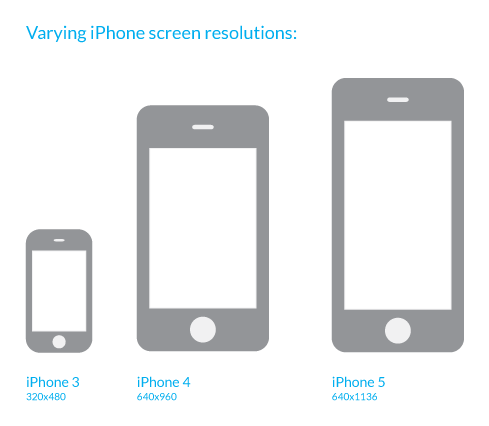
Relative iPhone display sizes by Redtech
Right before the 4″ iPhone releases, Apple began encouraging developers to use AutoLayout in designing their apps:
Auto Layout is a system that lets you lay out your app’s user interface by creating a mathematical description of the relationships between the elements. You define these relationships in terms of constraints either on individual elements, or between sets of elements. Using Auto Layout, you can create a dynamic and versatile interface that responds appropriately to changes in screen size, device orientation, and localization.
AutoLayout paves the way for apps to more easily adapt to changes in display sizes and resolution in the future.
If Apple were to adopt a 1134×750 4.7″ display as predicted by Kuo, it would preserve the same pixel density (326 ppi) as the iPhone 5s. That means that all existing user interface elements, such as icons, would be the same size but would allow for more screen space.
Our designer found that using the exact same icons and spacing them out to fill the screen, 1134×750 pixels allows Apple to fit exactly one extra row of icons onto the iPhone home screen. This mockup shows the relative size of the 4.7″ iPhone screen and how much extra room there would be using the exact same icons as on the current iPhone:
 4″ home screen (left) vs 4.7″ home screen (right)
Meanwhile, existing unoptimized apps could function in a “letterbox” style with black borders for unused screen space. TheVerge forum user Pi is exactly 3 created a mockup showing this exact scenario. This image shows how an “unoptimized” app would appear (left) compared to one that has been optimized for the 4.7″ display (right):
 Mockup by Pi is exactly 3
Given Apple’s past reluctance to blur or break existing apps, it seems that this resolution choice could provide Apple and developers a reasonable upgrade path for a larger factor iPhone. Apple has acknowledged that customers want larger iPhones and all iPhone 6 rumors are pointing to a larger iPhone device this year.
Cheero Power Plus Danboard Version Battery Pack Review: Danbo goes Mobile!
 Danbo, or Danboard, is a relatively well-known character around the world; if you don’t think you’ve ever specifically heard of Danbo, you’ll probably recognize him in one of these photos from the well known photo project called 365 Days of Danboard by Arielle Nadel (check out the whole Flickr album here). The Danboard character actually originated from a manga called Yotsuba&! who unsurprisingly plays the role of a robot made from cardboard boxes. I think Danboard is absolutely adorable, so when I saw Danboard featured on the cheero Power Plus battery packs, I had to take a look.
The three products we’re going to be looking at today include:
- cheero Power Plus 10,400mAh Danboard Version – MSRP $69.95 USD
- cheero Power Plus 6,000mAh Danboard Version – MSRP $44.99 USD
- Revoltech Danboard figurine, cheero Version – MSRP $49.99 USD
If you want to take a closer look at all the products in detail, I’ve put together a unboxing/review video to give you a better idea of how all these products look in person:
As you can see, some really great, well-made products to be seen, especially if you’re a fan of Danboard. As I mentioned in the video, I did do some more scientific testing of the battery pack charging performance which I’ve detailed below.
cheero Power Plus 10,400mAh Danboard Version
 Using Battery Monitor Widget to keep an eye on the charge rate, the 10,400mAh Power Plus managed to charge my Moto G from 20% to 50% in a pretty spritely 40 mins despite starting off quite slowly. According to the recorded results, this would result in about 45% charged in an hour, though we can see from the history tab that at its peak charge rate the Power Plus was pushing almost 53% per hour. Compared then to the uNu battery pack I reviewed a few weeks ago which could only achieve about 37.5% per hour, the cheero Power Plus has shown some pretty impressive charging performance.
cheero Power Plus 6,000mAh Danboard Version
 Likewise, like its 10,400mAh counterpart, the 6,000mAh starts off slowly, however does end up achieving quite a quick charge rate. Over the course of the brief test, the 6,000mAh Power Plus managed a very respectable 42% per hour which is likely more than enough for most people in need of emergency charging.
What I like about the cheero Power Plus battery packs
- As I mentioned at the start, I’m extremely fond of Danboard, so the styling of both the battery packs is a big win in my books, and will be in yours too if you’re a fan or looking for something a bit different.
- The charging performance from the battery packs is very impressive and is more than suited to your required uses
- Both Power Plus battery packs are quite small and very portable, especially with the addition of the pouches that each battery pack comes with.
What I don’t like about the cheero Power Plus battery packs
- While I’m sure it does require a bit more battery power, I’m a big fan of lights staying on or blinking while charging is occuring which the cheero battery packs don’t do; particularly with the Moto G where there isn’t a light to signify the device charging, it’s difficult to tell if the battery pack is charging or not.
- On the 10,400mAh Power Plus, I’m a bit disappointed that they opted to add lights and a button on the face instead of making the eyes lights like on the 6,000mAh version, but that’s probably just personal preferences
Closing Thoughts
 I really like both these cheero Power Plus battery packs; they perform the job they said they would and they look extremely unique. The fact that they’re themed and so well-made, you’ll definitely be the envy of every Danboard fan around.
If you’re interested in picking up any of the products featured in the review, we’ve provided Amazon links below. In addition to that, all the products are currently on sale on Amazon reduced by up to 43% so make sure to take a look. As an additional note, if you are hoping to purchase from outside the U.S., cheero has very kindly provided details on how to do so which we have included below as well.
Ordering on Amazon outside of the U.S.
- Search “cheero” on Amazon.com
- Click “~new from”

- Choose the seller’s condition “cheero offical seller for outside US market. As for shipping date and rates, please check “International & domestic shipping rates”.”

- Proceed to checkout as you normally would
//<![CDATA[
ord = window.ord || Math.floor(Math.random()*1E16);
document.write('’);
//]]>

Ahead of Supreme Court trial, Aereo opens lobbying and advocacy site

The United States Department of Justice says that streaming TV service Aereo is violating copyright law. Aereo, unsurprisingly, disagrees. In five days, the US Supreme Court will hear arguments from both sides. The former has already made its case to the Supreme Court in a filing; today, Aereo fights back with its own lobbying effort: a website named “Protect My Antenna” that both makes arguments for Aereo’s position and compiles various legal documents for the public to read. “We remain steadfast in our conviction that Aereo’s cloud-based antenna and DVR technology falls squarely within the law,” Aereo CEO Chet Kanojia said in an email to users announcing the site.
It’s no secret that over-the-air broadcasters are less than thrilled with Aereo’s live TV service. Customers pay annually to receive a dedicated antenna at one of Aereo’s hubs and DVR functionality, all of which exists in the cloud and streams to users. Sounds pretty okay, right? Not if you’re a broadcast TV outlet, apparently: the channels that Aereo carries show licensed content, and the companies that broadcast said content want their licensing cut.
Of course, it doesn’t help that the broadcasters in this story are the Goliath to Aereo’s David. Aereo only operates in a handful of markets — mostly cities, where using an antenna for OTA broadcasts is often unreliable — and the company is offering a unique service. It is of course growing, but remains nowhere near the size of the media giants it re-broadcasts.
The United States Department of Justice, however, argues that, regardless of Aereo’s size, it’s violating copyright law in re-broadcasting content from the likes of NBC, CBS, ABC, Fox, and other OTA signals (read our explainer right here). Whether the US Supreme Court agrees with that assessment is another question altogether — and it’s one that’s set to be answered in the not-so-distant future. The case begins on April 22nd, in just five days.
Filed under: Internet, Software, HD
Source: Protect My Antenna

My connected home turned me into a spy and an addict

Like any responsible New Yorker, I’ve entrusted a copy of my apartment keys to a close friend. This is done mostly to ensure that, should I die home alone, my body won’t be left to rot undiscovered for days. It’s also primarily done so that my mail is collected and my “children” (what you would call plants) are watered and sung to every other day when I’m travelling for work. And I travel often.
My apartment is also wired to the gills with SmartThings. These little, white, swappable sensors monitor temperature, motion, moisture, power and presence, and relay that data to me via an app — a crucial fact I’d neglected to tell my house-sitting friend many months ago. A small, yet ultimately fortunate, oversight that led me to uncover my house sitter’s true comings and goings. Or, should I say, the lack thereof.
Most people would probably expect their friends to lie about something as trivial as watering plants in your absence. It’s an easy and harmless enough fib to get away with. Plants are heartier than pets — they can survive neglect far longer. What you don’t expect is to have your fears validated; see them quantified by wireless technology. Wherever I was — L.A., Austin, Barcelona, Cologne — I’d fire up the companion SmartThings app on my phone and check the activity grid for a readout of when my door had last been opened and closed. I’d even monitor the temperature over a period of days to get a sense of how much my house sitter was blasting the A/C and, consequently, hiking up my electric bill.
I got hooked on the constant stream of connected home data flowing into the app
The truth, it turned out, was far uglier than I expected. By now, you should’ve sussed out that the apartment visits were infrequent, and that’s putting it diplomatically. But, as my SmartThings activity grid showed, when my house sitter did actually show up to tend to my plants, that visit would turn into an overnight or sometimes two-day, climate-controlled staycation chez moi. Armed with that hard evidence in hand and app, I confronted my friend, bracing for the barrage of excuses that would inevitably fly. Except, I didn’t get any. What I did get, instead, was a confession, an apology and a terse lecture about spying on someone who was “doing you a fay-vuh.”
And I deserved it.
In my defense, I didn’t do any of this to be an intentional creep. Honest. It’s just that I got hooked on the constant stream of connected-home data flowing into the app; data that was way more useful to me when it meant I could monitor someone else’s activity. Yes, SmartThings inadvertently turned me into a spy. And it almost ruined a long-standing relationship of mine. Thankfully, I have a sense of humor and, also, plant neglect is pretty low on the spectrum of friend offenses. You’d have to be a true-blue asshole to make it an issue.
My stream of SmartThings data freed me up to place my panic where it belonged: on trade show coverage.
Friend(ly) espionage isn’t the only useful measure of SmartThings’ worth I’ve found. Most of the time, the app serves as a kind of quantified-home Paxil, calming my security anxiety with real-time updates while I’m on the road. In January, for instance, when I was ferried away to that two-week marathon of consumer technology known as CES, a blizzard was descending upon New York City with the fury of a colossally giant yeti’s wet fart.

I worried that a pipe might burst and flood my apartment, or that my heat wouldn’t be on high enough to keep my plants from freezing to death. So, from time to time, I’d compulsively trigger the app and check the temperature of my Brooklyn digs to make sure it was cozy and that there was no spike in moisture levels under the sinks. All it took was just a few taps on my phone to make sure everything was okay… and, ultimately, it was. My stream of SmartThings data freed me up to place my panic where it belonged: on trade show coverage.
That kind of convenience, that flow of home-automation data is irresistible. It’s also highly addictive. So, you’ll have to forgive me for spying on my own apartment. That’s one habit I’m not willing to break.
[Image: Getty]
Filed under: Household

Nissan offers free electricity to entice EV customers

Though “fueling” an EV costs a pittance next to a gas-guzzler, hunting for that next compatible charging network can bring on cold sweats. Nissan Leaf buyers in 25 markets will soon be able to relax, though. A new “EZ-Charge” card will grant two years of free charging across four major networks: ChargePoint, Blink, AeroVironment and NRG’s eVGO. The automaker may have been motivated by its free charging trials in Texas, which led to a three-fold Leaf sales increase at one dealership. The expanded program will roll out to owners in ten markets this July, provided they bought their Leaf after April 1st. There are other restrictions too: just one hour max of free charging at a Level 2 station and a half hour on a fast charger. The latter option will give an 80 percent charge, but a level 2 station will only dole out 20 miles worth of electrons in an hour — so plan accordingly.
Filed under: Transportation
Source: Nissan

Install the Nokia X camera on your Android 4.1+ device

Whilst the Nokia X wasn’t exactly the flagship high-end spec’d out Android device we were hoping for from Nokia, the camera that is bundled with the device has some pretty nice settings, and we all know Nokia can make a pretty good camera (app).
If Google’s own camera app doesn’t quite do it for you, then the guys over at XDA Developers have managed to port the Nokia X camera software to pretty much any Android device running version 4.1 (Jelly Bean) or better.
These settings that the Nokia X camera app features include: ISO sensitivity control, the ability to display a live intensity histogram, configurable noise detection, redeye reduction, anti-banding, and more.
What’s more is you don’t even need ROOT access. Think this is something you fancy trying out? Download the file from here and install it on your Android device. Let us know what you think in the comments below.
The post Install the Nokia X camera on your Android 4.1+ device appeared first on AndroidGuys.

Looking for the longest lasting battery experience for your smartphone? Here’s the top devices

A smartphone that doesn’t last a day in the 21st century isn’t a smartphone worth having, and with devices now including more and more processor intensive features, the battle of functionality versus battery life is hotter than ever.
A great device can be let down entirely by the length of time it lasts between charges and it is important to know that you won’t be left without your device on a long day at the office or travelling.
That’s why we’ve compiled a list of the devices which have been proven to have the longest battery life between charges to enable you to make the best decision when choosing your next device. The devices are ranked according to the battery capacity they have, and ultimately the bigger battery capacity the longer it’ll hold a charge, together with user rating against how they performed when it comes to the claimed capacity.
There’s no denying that judging by the above graph that Android trumps both iOS and Windows Phone when it comes to both battery capacity in the devices and user rating for getting the expected life between charges.
Do you find yourself turning off GPS, Bluetooth, WiFi, and even dimming the screen to where it’s almost unreadable at the end of the day to conserve that last few percent of your battery? Let us know in the comments below which device you decided to get and if it lives up to the battery expectation .
The post Looking for the longest lasting battery experience for your smartphone? Here’s the top devices appeared first on AndroidGuys.
 AIVAnet