


Samsung Gear Fit review: a messy merger of fitness band and smartwatch

Fitness trackers and smartwatches come a dime a dozen, but devices that combine the best of both? Still exceedingly rare. Now, however, Samsung thinks it has the perfect solution in the Gear Fit, a fitness band with a beautiful, curved screen, as well as a heart rate monitor, pedometer and a few smartwatch features thrown in for good measure. It’s an ambitious product, no doubt, but unfortunately, this $200 fitness-tracking smartwatch hybrid didn’t quite meet my expectations. Here’s why.
Hardware and display

Beautiful. That’s the thought that ran through my mind when I handled the Samsung Gear Fit for the very first time back in February. Mostly it was the screen that got me, a 1.84-inch curved Super AMOLED display that wraps around your wrist. It helps this smartwatch/fitness band hybrid look and feel more natural, and it’s much more aesthetically pleasing than most of its rivals, too. The screen itself has vibrant colors, making it fun to stare at even when you’re not using it. It’s barely readable in sunlight, though; you’ll need to bump it up to “outdoor brightness” mode, and even then it only stays in that mode for five minutes before reverting back down to your previous setting. And since there’s no ambient light sensor, there’s no auto-brightness setting to make it easier for your display to adjust when you go outdoors.
Moving beyond the screen, the Fit is a narrow plastic module that comes with an interchangeable wristband. It’s easy enough to swap colors, though you won’t have many options at the beginning — just six for now. It’s comfortable enough that it’s not a burden to wear for long periods of time, which is something I can’t say about many rival watches. Still, it’s a sporty-looking device, if you know what I mean, which means anyone looking for something elegant should probably look elsewhere.
The Fit has one physical home button, which you can also double-press as a shortcut to certain apps (that part’s customizable — just choose the feature you use most often). On the underside of the device, you’ll find the heart rate monitor, which uses an LED to measure your pulse, along with a proprietary docking/charging port. Inside, the watch comes with Bluetooth 4.0 Low Energy, an accelerometer and gyroscope. What’s missing? GPS, which could’ve made it possible to add more fitness-tracking options (especially useful when it’s not within range of your phone).

The charging dock used here is quite small, which also makes it a huge liability. Not only is it one more accessory to take around whenever you go on a long trip, but it’s also incredibly easy to lose. There’s not much to the cradle itself: It features a micro-USB port and a couple wing-like tabs that help secure it onto the sides of your Fit. It does a good job of attaching to the watch whenever I need to plug the device in. The problem is, if one of those tabs were to break off later, it’d be virtually impossible to charge the device.
Just like Samsung’s new Galaxy S5, the Fit is IP67-certified, which means it can be immersed in up to a meter of water for up to 30 minutes. So, taking a shower and washing dishes are perfectly acceptable, and it’d probably even be OK if you jumped into the pool with it.
Software and functionality

I won’t bother mincing words here: The hardware is good, but the software isn’t. It’s not running Android or Tizen OS, like Samsung’s other Gears. Instead, it uses a specialized operating system that’s limited in functionality and doesn’t allow third-party apps to work on the device itself (this may change eventually, but probably only if the watch sells well enough to justify it).
Once the watch is set up, you’ll be greeted by a home screen. You can change this panel to one of several different preset options: You can display the pedometer, the local weather, your next calendar appointment or even a second clock for a different time zone. If you want to jazz up your clock beyond that, you can choose from 10 different themes; you can also make your own wallpaper by cropping a narrow strip out of any pic in your gallery.
Aside from the clock, the user interface is comprised of 10 menu options (11 if you count App Connect, which pops up if a Fit-compatible app like Strava is installed on your Galaxy device). If you’re fine with small text, you can fit up to three icons on the screen at the same time; if you prefer everything to be larger, however, you’ll have to make do with one. Gear Fit Manager, a Samsung phone app you need in order to manage your watch, lets you rearrange the menu as you see fit.
Finally, the menu can be split up into two sections: apps that function as fitness-tracking features, and apps that utilize the smartwatch part of the device. I’ll discuss them separately.
As a fitness band

If you have a Gear Fit-compatible phone or tablet, chances are you’ve seen the S Health app. It’s meant to be a one-stop destination for almost all of your fitness data, such as your heart rate, exercise, calorie intake and so on. It links with your Samsung Account, so you should be able to back up your data and transfer it to other Samsung-made devices down the road if you feel so inclined. As you might have guessed, almost any fitness tracking you do on the Fit can be downloaded and synced with S Health. By default, the phone and Fit are supposed to talk to each other once every three hours for data transfers, but you can have it less frequently (e.g., once or twice a day).
The idea behind the heart rate monitor is wonderful, but in practice, it isn’t as useful as I was expecting. First off, it’s not accurate enough; just like the Galaxy S5 and Gear 2, the sensor’s numbers range anywhere from a solid “in the neighborhood” to outright “outlandish.” The measurements varied wildly when I adjusted the Fit to a different position on my wrist, and the variation was even bigger when I measured my pulse on both wrists. All told, the sensor is too sensitive to sweat, movements and noise, often requiring you to make multiple attempts. Lastly, the only way to have the Fit continually measure your heart rate is to go in and tell the watch that you’re starting your workout. Even then, that option is switched off by default.

When you’re ready to begin your workout, tap on the exercise menu option. Doing this gives you a small number of workout types to choose from: walking, hiking, running and cycling. These are capable of tracking your distance, the amount of time it takes to complete the activity and the number of calories you’ve presumably burned in the process. Unfortunately, regardless of which activity you choose, there’s no way to pause once you’ve started, so your workout time won’t be accurate if you stop to take a break.
Some of the options, such as running mode, come with a built-in coaching feature. As you run, the heart rate monitor keeps an eye on your pulse and the coach will give you simple instructions like speed up or slow down. Like I said, walking is one of the workout options in the exercise menu, but the pedometer is treated as a completely separate app on the main menu. This is incredibly unintuitive; it means that if I want to go on a walk and track all of my data, I have to go into two different parts of the Fit to activate everything before I can even leave my house. (The pedometer is turned off by default.) If the pedometer had already counted your steps for the day up until that point, you’d have to reset it so you can begin your workout at zero. I want to count both daily and workout-specific steps, so it would make more sense to include a “steps counted” feature as part of the workout screen instead of treating it as a separate data point.

All of this is frustrating, but it could almost be forgivable if the pedometer were at least accurate. Not only is it imprecise, but it doesn’t sync properly with S Health. Regarding the first concern, I took a walk and counted my steps the old-fashioned way (with my brain); when I compared it with my Fit, the two figures weren’t close enough to each other to blame margin of error. I also took my GS5 and Fit along with me for a mile-long exercise — half of it walking and the other half running — and the Fit calculated 200 more steps than my phone. These are just a couple examples, of course, but I’ve noticed many more discrepancies over the past week and a half.
The syncing problem only manifested itself when I used both the Fit and Galaxy device to monitor my exercise; because the S Health app knows you might have both your phone and smartwatch on you at the same time, it only syncs the workout with the earliest start time. On paper, it’s a smart idea; both devices should measure the exact same results. Since they clearly don’t, though, this means you’ll end up with a discrepancy in your exercise unless you turn off the activity tracker on one device (or leave your phone at home when you’re going for a run). The Fit also didn’t do a good job of calculating distances traveled. I used a local track to run a mile, but the Fit told me I’d only travelled one-fifth of that distance. Again, GPS would have come in mighty handy here.

Sadly, the Fit’s woes go beyond fitness tracking — its sleep tracker is also fairly pointless. The Fit uses its built-in accelerometer to detect motion as a way of determining if you’re fully asleep, and… that’s about it. It also has a timer that tracks when you want to begin sleeping and when you wake up, but even that’s a hassle. Unlike the Basis B1 band, which automatically detects when you fall asleep, the Fit requires you to do it manually. So, if it takes you a full half-hour to conk out, the Fit will be none the wiser.
Not only is the amount of sleep data limited but also, the only way to store any of it is to download a standalone app in the Samsung Store called “S Health Sleep.” That’s right, one of the Fit’s marquee features has no place in the main S Health app. Why the company did it this way, I can’t be sure. What I do know, however, is that you currently need three different apps to properly manage the Gear Fit and all of the data you collect on it. At this point, you probably can see exactly how confusing the user experience is here. I imagine many of these problems will be solved over time, but by then it might be too late.
As a smartwatch

The fitness tracker obviously needs some work, but how does the Fit do as a smartwatch? Let’s start with a recap of what it does: like the Pebble, It’s an extension of your phone, with notifications for incoming calls, text messages and emails, and also select apps. Most of that works fine, but notifications — especially long ones — are a bit of a mess simply because of the awkward screen. If I look at it in horizontal mode, I have to view it from an awkward angle that hurts my neck (more on this in the next section). Most apps don’t even show the actual notification; they display a teaser and give you the option to look at it from your phone. In the case of Gmail, you can see the sender’s name and subject line, but nothing else. Worse, if you have more than one email, your most recent message details blend into one single notification like a run-on sentence.

There’s also a timer, media controller and stopwatch on board if you need them, but this is essentially where the functionality stops — remember that there are no third-party apps here. For a lot of people, this will be more than plenty — as I mentioned before, this isn’t meant to replace your smartphone, but I’d still like to see what else developers could do to the Fit to make it more effective when it comes to completing basic tasks.
In case you’re wondering, the Fit comes with a Do Not Disturb mode (which Samsung calls Blocking Mode), but there’s a catch: It’s combined with the sleep tracker, so that’s the only time you can use it. While I definitely like to use this mode when I’m sleeping, there are plenty of times when I’m trying to focus on other tasks and don’t want my wrist vibrating every few seconds. This seems like a huge oversight on Samsung’s part.
Performance and battery life

There’s one other problem with using the Fit as a smartwatch: The display itself may be fun to look at, but the actual contents on the screen aren’t. That’s because the panel is so narrow that I had to strain my neck every time I wanted to read the Fit display in horizontal (landscape) mode. Vertical (portrait) mode solves this problem, but introduces another issue: You can only read a few characters of text on each line, forcing you to scroll even further down the screen just to get to the end of the message.
On the plus side, scrolling isn’t terribly difficult since the screen is reasonably responsive. But unless your phone is in another room and you’re not able to get up and grab it, using two hands to scroll through a notification on your watch pretty much defeats the purpose — it’d be faster to just pick up the phone.
Meanwhile, I never had any problems pairing the Fit to my Galaxy S5, nor did I have any issues maintaining my Bluetooth connection. Also, the built-in accelerometer makes it possible to wake the display up when I raise my arm, but the performance here is hit-or-miss. On multiple occasions, I found myself grossly exaggerating my movements because simply raising my arm didn’t actually turn it on.
As for runtime, Samsung claims the Fit’s battery will last three to four days. After spending a little over a week with it, I have to agree. I only had to fully charge the unit twice during my time reviewing it, and each time it lasted for four days. Admittedly, though, it probably would have drained faster if I were a more avid runner, which means the usual caveat applies here: Your mileage may vary.
The competition

The $200 Gear Fit is unique in that it faces competition from not one, but two types of wearables: fitness trackers and smartwatches. That means you have a lot to choose from, even though the Fit is one of a few devices that attempt to bridge the gap between the two genres. But it’s not the only one. When it comes to being a jack-of-all-trades, the $400 Adidas miCoach Smart Run does a good job combining several elements, doing quadruple-duty as a media device, training coach, GPS tracker and heart rate monitor. The problem is, it’s pricey. In fact, given the feature set, the Gear Fit feels like a steal at half the cost.
Aside from the performance issues, the Fit also has limited compatibility. It can only connect to specific Samsung smartphones and tablets, so anyone using other Android or iOS devices won’t be able to do anything with it. It’s also on the expensive end of the fitness-band spectrum, going up against the $199 Basis band. Although the Fit has a few more smartwatch-type qualities, the Basis B1 does a better job tracking most fitness activities. And, as mentioned earlier, it even monitors your sleep automatically, a killer feature that puts the Fit’s capabilities to shame.
On the cheaper side, you can choose from the $150 Jawbone Up24, $100 Fitbit Flex, $100 Polar Loop and $130 Garmin Vivofit. The Garmin and Polar devices have optional heart rate monitors, and the former has a simple display for stats; all of them can connect with most smartphones to sync your data. While most fitness trackers don’t have many smartwatch qualities (if any), most smartwatches have at least a few fitness tracking features. The Pebble (which ranges from $150 to $249 depending on the model) is backed by an enthusiastic developer community, and it’s got a bunch of clever apps related to health and fitness, such as sleep trackers, swim counters and pedometers (to name a few); you’ll find Strava, RunKeeper, Runtastic Pro and other well-known apps in the Pebble store as well. Unfortunately, though, the Pebble, doesn’t have a heart rate monitor.
Wrap-up

I’ll give Samsung credit where it’s due: It’s one of the first companies to blend a fitness tracker with a smartwatch, and there is indeed a market for such a device. In terms of hardware, the company did a fantastic job crafting a curved device that feels comfortable and looks good, to boot. Samsung also included a heart rate monitor, a beautiful display and interchangeable bands — all good things.
Where Samsung failed is in the software. The user interface is confusing; the display is awkward to read; the heart rate monitor and pedometer aren’t accurate; and the sleep tracker only logs a couple important stats. Ultimately, the company tried so hard to integrate a fitness tracker with a smartwatch that it ended up half-baking both aspects. As is, it’s not worth the $200 asking price.
History, too, would suggest it’s not a good idea to buy this right now. As I mentioned in my original Galaxy Gear review, the device felt more like a proof of concept. Samsung clearly agreed, since it pushed out an improved sequel less than six months later. Now, the Gear Fit appears to be in the same position: great on paper, but poorly executed. It’s best to wait this one out, but hopefully Samsung will push forward, listens to feedback and comes out with a much better version before too long.

See the bridge of the USS Voyager with an Oculus Rift

Now that Unreal Engine 4 supports Oculus Rift, any virtual environment built with the platform can easily be pushed right over to the VR headset. Naturally, there’s a Star Trek fan using every bit of bleeding-edge technology, so it’s no surprise to see that a fan has crafted one of the first environment to take advantage of the feature. Oculus developer Thomas Kadlec has crafted the bridge of the USS Voyager for you to wander around, interact with and generally pretend that you’re dodging Borg in the Gamma quadrant. It’s available to download now, so you can relive all of those moments when you hoped that Voyager would finally become any good, but didn’t.
Filed under: Home Entertainment, Peripherals, Internet, HD
Source: Road to VR, Oculus

Run! Black&White is the perfect mix of simple and frustrating [App of the Day]

Run! Black&White is a simple and fun endless runner that you may not be able to put down.
The game is simple: tap the left side of your screen to switch between black and white, and tap the right side to jump. The character needs to be the opposite color of the platform to stand on it, otherwise they will fall through. As the game progresses, the speed picks up, making it very difficult to constantly switch colors.
The game is easy to pick up and play, and it’s free from the Play Store. What more could you want?
The post Run! Black&White is the perfect mix of simple and frustrating [App of the Day] appeared first on AndroidGuys.
RAVPower BOLT 4-Port USB Charging Station review

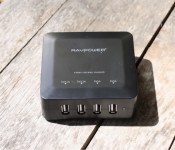
If you find yourself constantly running out of charging cables or using way too many extension cords, you may want to take a look at this charging station. With 4 ports available, you can plug your devices in without having to mess around with limited power outlets or the length of your charging cords. Let’s take a look at how it performs, and whether you should consider this for your desk.
Design
In the box, comes the charging station, a power adapter, and an instruction manual. There are no power cables included, though that shouldn’t be a problem for most people. The power adapter that’s included is a bit less than 4 feet long, so you’d need to have an outlet nearby your desk or table.
The charging brick is small and plastic, with a matted finish. Though our black model picks up fingerprints very easily, it still remains sleek and attractive. The brick has four feet at the bottom to ensure it stays in place, which is a very nice touch. There are two 2.1A and two 1A outputs, allowing devices of all sizes to charge simultaneously. It also features a bright blue LED light to the right of the ports, which brings us to our one big gripe of the product.

The LED light is way too bright – so much that you wouldn’t be able to sleep if it was sitting next to your bed. Putting a piece of tape over the LED light is a must in order to have it in the bedroom. It’s distracting, and there’s no way to turn it off. A small piece of electrical tape blends in perfectly with the black version, though, so there is a workaround.
In all, the design is great, if you don’t mind using a bit of tape.
Performance
The performance of this charger is great. It does what it’s supposed to do, and we haven’t experienced any problems with the outputs at all. The 2.1A outputs are great for charging tablets or phones very quickly, and the 1A outputs are great for charging phones or smartphones.
Should you buy?

If you’re sick of using countless power outlets and extension cords, you should buy this. Though we had some gripes with the LED light, the design is otherwise great and the performance is spot-on. If you’re interested, you can pick up this charging station from Amazon for $19.99 in white or black.
It’s lightweight, small, and does what it needs to. For $20, it’s a steal!
The post RAVPower BOLT 4-Port USB Charging Station review appeared first on AndroidGuys.

Five bucks will let you stream Joss Whedon’s latest movie early

Joss Whedon might currently be shooting the follow-up to The Avengers, but that hasn’t stopped him from making waves with another of his projects. Just moments after In Your Eyes premiered at the Tribeca Film Festival, the Firefly creator announced that the supernatural love story he penned and executive produced would be immediately available to download on video streaming website Vimeo for $5. It’s a huge coup for the website and its On Demand pay-per-view service, which finds itself in a market dominated by Google’s YouTube. As part of the agreement, it’ll get the chance to distribute the film to fans globally for a period of 72 hours, around three months before it’s due to hit theaters. Unable to attend the premiere himself, Whedon confirmed plans while taking a break from production of the Age of Ultron. “It’s exciting for us because we get to explore yet another new form of distribution,” he said, “and we get $5.”
Filed under: Home Entertainment, HD
Via: BBC News
Source: In Your Eyes (Vimeo)
HTC-made Nexus 8 reportedly coming this summer

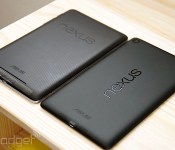
When it comes to producing affordable Nexus tablets, Google’s on a roll — and it’s looking to take advantage of that momentum. After partnering with ASUS on a 7-inch tablet each of the last two summers, the software giant is now reportedly working with HTC on an 8-inch version slated to launch in the third quarter of this year. The report comes to us from hit-and-miss DigiTimes, which tells us that Google is switching to HTC because it wants to push a new design, and ASUS is more interested in selling tablets and phones under its own brand instead.
Unless you count the Google Play edition of the LG G Pad 8.3, this will be Google’s first time offering a Nexus Android experience on an eight-inch tablet, and will be HTC’s first shot at designing a device for the series since the Nexus One. It’s also an interesting move by the Taiwanese company, which has recently expressed interest in penetrating more segments of the market in the hopes of getting its products in more hands. Of course, DigiTimes explains that Google may not be as aggressive in selling the Nexus 8 as it was with previous tablets; apparently the previous versions did well enough to encourage Android’s penetration into the tablet market, and Nexus slates simply don’t have as significant an influence as they once had.
Since I/O takes place the last week of the second quarter, it’s uncertain if Google would use that opportunity to announce the device and officially release it later, but that’s part of the magic of the show — there’s always a surprise or two.
Filed under: Tablets, Wireless, Mobile, HTC, Google
Via: PhoneArena
Source: DigiTimes
Microsoft and Nokia finally tying the knot on April 25th

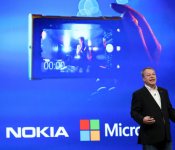
Let the wedding bells ring! Microsoft announced this morning that it finally has something we’ve been curious about since September: the actual date the company will complete its proposed acquisition of Nokia’s devices and services business. In a blog post, Microsoft’s General Counsel Brad Smith explained that all of the legal hurdles have been cleared and that the merger will officially take place this Friday, April 25th. “We look forward to introducing the next billion customers to Microsoft services via Nokia mobile phones,” Smith said.
Microsoft will manage the Nokia.com domain and the company’s social media presence for up to a year, and former Nokia CEO Stephen Elop will be in charge of Microsoft’s devices group, reporting directly to CEO Satya Nadella. Aside from this, Microsoft has been pretty tight-lipped on details about what the post-acquisition world will be like, mainly due to legal restrictions. After this Friday, however, we hope the company will open up a bit more about what we can expect going forward.
Filed under: Cellphones, Wireless, Mobile, Microsoft, Nokia
Source: Microsoft Blog

EE’s slow killing of Orange and T-Mobile shows it’s ready to bet big on 4G

Orange, T-Mobile and EE have managed to coexist together for a number of years now, despite them all being essentially the same company, and all selling similar services. While Orange and T-Mobile used to be large, established names in their own right, 4G darling EE has understandably become by far the most prominent brand of the trio. High-street stores once coloured orange or magenta have long been redressed to EE’s preference, and as of fairly recently, the online presence of the 3G-only providers has begun to be absorbed by EE. T-Mobile’s site now forwards directly to ee.co.uk, and although Orange’s homepage still exists, you can no longer purchase anything from it directly. Previously only of interest to “technofreaks,” as Vodafone’s CEO once put it, 4G is more or less mainstream. It’s only a matter of time before all major networks begin to retire old 3G plans in order to structure themselves more around 4G, and in EE’s case, this probably means putting Orange and T-Mobile out to pasture.
It took over two years for the EE as we know it to arise from the merger of Orange and T-Mobile. It was business as usual for both brands as they continued to operate separately under new umbrella company Everything Everywhere, but it was their combined, repurposed airwaves (and the blessing of Ofcom) that begat the UK’s first LTE network, months before the spectrum auction competitors needed for their own 4G services. EE was created and marketed as a completely new network selling only 4G plans, which were noticeably expensive at first. Since then, though, prices have dropped, nearly all other UK players have caught up, and most importantly 4G is no longer a buzzword. A much greater proportion of Brits are aware of 4G, and what’s possible with mobile internet that’s comparable in speed to their hardlines at home.

For other networks, launching 4G services was as simple as adding new tariffs. With EE being distinct from Orange and T-Mobile, though, the latter two brands have faded further into the background as they become less relevant to the market. EE aggressively expanding their LTE footprint, increasing spectrum allocation, signing high-profile MVNO contracts, and even having a go at own-brand hardware (as Orange used to) is the only news you’ll hear from a company that’s supposed to be representing three brands. EE absorbed Orange’s broadband business the day 4G launched, and you can bet upgrading 3G customers to 4G was, and still is seen as EE’s greatest opportunity. Much of this captive audience is yet to be converted, however. Of EE’s 27 million plus total customers across all brands, only around 2 million of them are 4G subscribers (as of January this year).
It’s not just a matter of migrating people to 4G plans, but also to a relatively new company. Naturally, Orange and T-Mobile would become less visible as the focus shifts to 4G, and not just because their customers are wanted elsewhere. Maintaining one website, one physical store format, and one brand in general is obviously much easier than doing the same with three, so it’s good business sense to make less work. All this is not to say 3G is going anywhere soon. It’ll be needed for many years to come as a fallback when 4G gets knocked out, and where it doesn’t exist. Some MVNOs, too, will no doubt exist solely to offer low-cost, 3G-only contracts. The retirement of Orange and T-Mobile could even be an opportunity for EE to build a new set of 3G tariffs by cherry-picking what’s worked best on either network.
Despite the reduced online presence of Orange and T-Mobile of late, you can still find out what they have to offer over the phone and in EE stores. They have an eBay shop, too, but this is heavily EE-branded — another example of how the identity of the 3G brands is slowly being superseded (when was the last time you saw anything but EE in your notification bar?). For now, they remain nestled under EE’s wing, but who knows how long they will survive, especially if customer numbers begin to dwindle as more move over to 4G contracts, with EE or elsewhere. There has to be a good few people out there about to finish up two-year contracts they signed for the flagships of 2012, namely the Galaxy S III and iPhone 5. How they, and others looking to renew or upgrade in the near future act will surely steer the fate of Orange and T-Mobile. Or, we should say it’ll have an affect on the timing — the machinery of their demise is arguably already in motion.
Matt Brian contributed to this report.
Filed under: Wireless
Via: The Guardian

Here’s how Microsoft tried to win the early instant messaging wars

The battle between modern chat services like LINE and WhatsApp is fierce, but it has nothing on the war between Microsoft and AOL (Engadget’s parent company) at the turn of the century. Former Microsoft developer David Auerbach has revealed that his MSN Messenger team fought hard for compatibility with AOL Instant Messenger in the summer of 1999, all in the hopes of attracting some converts. At one point, Auerbach was in a daily struggle — AOL would break MSN support by the morning, and he’d have a fix in place by the evening.
A stalemate came relatively quickly: AOL introduced a security flaw in August that Microsoft couldn’t work around, forcing the two services to remain separate. Of course, we know in hindsight that the conflict was for nought as chat shifted from PC software to mobile apps and social networks. However, the story shows that Redmond was determined to lead the instant messaging space from the word go — its acquisition of Skype was really just the culmination of efforts that began more than a decade earlier.
[Image credit: Nicki Varkevisser, Flickr]
Filed under: Internet, Microsoft
Via: I Started Something, The Verge
Source: N+1 Mag
Apple Extends Trademark Protection to Include ‘Jewelry and Watches’
Last June, Apple began registering for trademarks on the “iWatch” name in a number of countries, but since that time the company has been bolstering its trademarks on the actual company name “Apple” to also cover jewelry and watches, MacRumors has discovered.
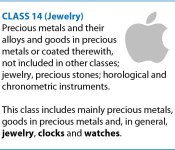
By international agreement, trademarks are broken down into 45 different classes to organize the types of goods and services being registered for protection. Watches and other jewelry are part of Class 14, which is focused on precious metals/stones and products made from those materials. While some of Apple’s trademarks on the “Apple” name have previously included some goods from Class 14, the company is now broadening and cleaning up its trademark applications in those areas. The moves come as the company is widely expected to introduce its “iWatch” smart watch as soon as later this year.

Among the recent expansions for Apple is Ecuador, where Apple filed a new trademark application in late December specifically to add protection in Class 14 for a long list of product types including jewelry and watches. Google translation of new category application for “Apple” trademark:
jewelry; watches; watches; goods in precious metals or coated therewith; cufflinks or cufflinks; keychains; timers; brooches in precious metals or coated therewith; ornaments in precious metals or coated therewith; tie pins in precious metals or coated therewith; tie clips or tie clips of precious metal or coated therewith; badges of precious metal or coated therewith; bracelets of precious metal or coated therewith; Necklaces in precious metals or coated therewith; medals in precious metals or coated therewith; short chains and ornaments in precious metals or coated therewith; buttons in precious metals or coated therewith; clip in precious metals or coated therewith; boxes of precious metal or coated therewith; decorations in precious metals or coated therewith; jewelry; sculptures and precious metals products.
Applications in other countries have followed in recent months, including a nearly identical filing in Mexico in early January that again solely focused on Class 14. Other expansions have come as part of larger filings, such as in Norway, where Apple in mid-February applied for increased protection in seven different classes including a significant list within Class 14. And just last month that effort extended to the United Kingdom, where Apple filed to broaden its protections in over a dozen classes, including Class 14 for the first time there.
While new applications to protect Apple’s use of its own name in jewelry and watches have appeared in a number of countries in recent months, the company has yet to make the move in all countries where it operates, most notably the United States where the “Apple” name is not currently covered under Class 14 at all.
 AIVAnet