



In honor of Earth Day, Google expands ‘Giving through Glass’ program

In honor of Earth Day (today, that is), Google’s announcing another wave of its Giving through Glass program for non-profit organizations. The program, originally launched late last year, equips groups including the World Wildlife Fund and Give Directly with Google’s wearable computer, with the goal of “bringing more transparency to philanthropy.” Now, Mountain View is looking to partner with another five nonprofits — submissions are open today through May 20th, and the selected organizations will win a $25,000 grant in addition to Google’s hardware. Nonprofits can head here to apply, and everyone can head past the break to check out a WWF researcher using Glass while tracking rhinos in Nepal.
Filed under: Google
Source: Google+

Barnes & Noble’s new app wants to change how you study

Back in my day, we carried backpacks loaded with six or seven textbooks… up a hill… both ways in the snow. Once we got to class, we had to take all our notes in equally large notebooks. A new app from Barnes & Noble called Yuzu is making life easier for kids these days, offering youngsters all the books without the chronic shoulder pain. The iPad app allows you to tote around all your textbooks and add notes or highlight key points in them as you read. Books are organized by class, and are synced online, so if you’re too lazy to bring your iPad with you to Anthropology you can still follow along from any web-connected computer. Yuzu can be accessed via Internet Explorer or Safari 6.1/7 (standard-issue for school-locked computers), and everything you do can be pulled up on your tablet when you’re back at the dorm. Later in the semester when you opt to go to a playoff game rather than study for finals, all your notes can be pulled together on a single page for a high-speed court-side cram session.
Barnes & Noble is one of the largest textbook retailers in the US, and currently has a digital product called NookStudy. With Yuzu, it’s being phased out, and sadly any pricey books you’ve already bought through that service are incompatible with the new app. If you’d rather save some of your money for beer (and who wouldn’t?), Yuzu-friendly versions of books will also be available for rent. Even better, professors who want to earn a little extra credit can use a tool called FacultyEnlight to create and share special course-specific workbooks and more within the app, turning it into an even better resource for students. Anxious to get started? Yuzu officially launches this summer, but teacher’s pets can get their virtual bookshelf ready for next term now by grabbing the free app from iTunes.
Filed under: Tablets, Wireless, Mobile
Via: The Digital Reader
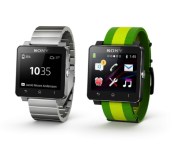
Finally, you can customize the face on your Sony Smartwatch 2

Sony has added new features to its Smartwatch 2 since its arrival last year, but there was one glaring omission. With the most recent update though, users can finally fine-tune that watch face with simple drag and drop motions. Customizable faces can sort widgets for displaying info including date, weather, calendar, battery level and more. Of course, Sony has invited third-party devs to join the party, so more options should be on the way soon. There’s also improved Gmail and Facebook functionality alongside swappable wallpapers, a calculator and notification drawer. If your devices haven’t already alerted you to the update, you can grab it via that second source link.

Filed under: Wearables, Software, Sony
Via: Android Police
Source: Sony, Google Play

1Password’s iOS and Mac apps get better sync and edit features

If you use 1Password, you might be worried about the security of your private data, what with all the talk about Heartbleed. Fortunately, the software’s developer, AgileBits, says 1Password isn’t affected by the OpenSSL exploit, but some of the sites you visit probably are. That’s why the company built a service called Watchtower, which allows you to check the vulnerability of sites you frequent. Even still, users will be happy to know that both the password manager’s Mac and iOS applications just received a whopper of an update, bringing a bevy of bug fixes, UI tweaks and notable improvements for each platform. Oh, and they’re on sale until Friday for $24.99 and $8.99 respectively.
There are quite a few enhancements to both apps, but for starters, sync is completely revamped: if you update your master password in the desktop applicaton, it will be updated on all your devices. Additionally, the new mobile app, complete with a new flat UI design, and 1Password Mini browser plugin both support login item tagging, making it much easier to find usernames and notes outside of the desktop client.
Filed under: Internet, Software
Via: 9to5Mac (iOS), 9to5Mac (Mac)
Source: AgileBits

Apple Releases OS X Security Update for Mavericks, Mountain Lion, and Lion Users [Mac Blog]
Alongside iOS 7.1.1, Apple today released Security Update 2014–002 for Mavericks, Mountain Lion, and Lion users. The update includes fixes for several operating system vulnerabilities, detailed on Apple’s support page.

Apple recommends that all users download the update, which can be acquired via the Software Update tool in the Mac App Store or through the following links:
– Security Update 2014–002 (Mavericks) (80.5 MB)
– Security Update 2014–002 (Mountain Lion) (135.9 MB)
– Security Update 2014–002 (Lion) (126.9 MB)
– Security Update 2014–002 Server (Lion) (177.2 MB)

First Generation Apple TVs Once Again Able to Connect to iTunes [Mac Blog]
 Over the weekend, Apple’s first-generation Apple TVs were unable to access iTunes, an issue that affected Apple TV owners worldwide.
It appears that Apple has resolved the problem as of Tuesday, with many first-generation Apple TV owners reporting on Apple’s Support Communities that their Apple TVs are once again able to access iTunes.
Some iOS users have speculated that the Apple TV downtime, along with the downtime for FaceTime on iOS 6, could be caused by internal communication upgrades related to the Heartbleed security issue, but Apple denied that any of its “key services” were affected by Heartbleed.
Though the first-generation Apple TV appears to be functioning once again, many iOS 6 users are continue to be unable to access FaceTime.

Logitech Adds Multi-Angle Viewing to Ultrathin Keyboard, Launches New iPad Cases [iOS Blog]
Logitech today announced a new version of its Logitech Ultrathin keyboard cover for the iPad Air, iPad mini, and iPad mini with Retina display, offering a new design that includes a flexible multi-angle slot that allows the iPad to be adjusted to different viewing angles.
The Logitech Ultrathin improves the flexibility and design of its predecessor with an even thinner and lighter keyboard cover and new flexible multi-angle slot that allows you to magnetically clip your iPad into the perfect viewing angle.
Like previous versions of the keyboard, the new Logitech Ultrathin is just a fraction of the weight of the iPad, measuring in at 6.4mm thick. It is designed from aluminum to match Apple’s iPads and the keyboard includes iOS shortcuts and keys spaced for optimal typing.
Alongside the updated version of the Ultrathin keyboard, Logitech has also announced several new protective cases for Apple’s iPads, including the Hinge, the Big Bang, and the Turnaround.
 Logitech Big Bang, Turnaround, and Hinge
The Logitech Hinge is an ultra flexible case designed to offer a wide array of viewing angles, while the Big Bang is an ultra-protective, rugged case designed to protect the iPad from drops, spills, and scratches. The Turnaround, like the Hinge, is a multi-angle stand that also allows the iPad to be rotated from portrait to landscape mode and folds up into a stylish clutch.
All of Logitech’s new products can be preordered from the Logitech website, at the following price points:
– Ultrathin for iPad Air – $99.99
– Ultrathin for iPad mini/Retina mini – $89.99
– Big Bang for iPad Air – $99.99
– Big Bang for iPad mini/Retina mini – $79.99
– Hinge for iPad Air – $59.99
– Hinge for iPad mini/Retina mini – $49.99
– Turnaround for iPad Air – $59.99
– Turnaround for iPad mini/Retina mini – $49.99
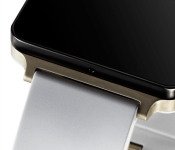
Play with the LG G Watch online

Are you the kind of user who likes to try before you buy? Perhaps then you’ll enjoy playing around with the upcoming G Watch on LG’s website. No, it’s not a real world kick-the-tires scenario but it’s a decent way to get a look at the forthcoming smartwatch.
Head over to the LG landing page for the G Watch and give that baby a spin – literally. Visitors can check out the watch in two colors (stealth black and champagne gold) and learn about some of its key features. We know now that the water and dust resistant watch will offer an always-on screen and voice recognition – things we did kinda expect.
LG via SmarterWatching
Read the rest at the source, SmarterWatching.com
The post Play with the LG G Watch online appeared first on AndroidGuys.
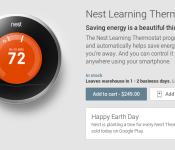
Nest now available from Google Play Store

Google today added a new device to the Google Play Store, introducing its Nest Learning Thermostat. Priced at $249.99, the device ships within 1-2 business days. To help celebrate Earth Day, Google will plant a tree for every Nest Thermostat sold today (April 22) on Google Play. To learn more about the Nest or purchase one, head to the Play Store today!
The post Nest now available from Google Play Store appeared first on AndroidGuys.

Withings Pulse O2 monitors blood oxygen levels for climbers, asthmatics

Withings released its Pulse tracker late last summer, and now the outfit has announced it’s successor: the Pulse O2. Just like that first fitness gadget, the new model keeps tabs on heart rate, sleep and activity (steps, distance, elevation and calories), but it also keeps an eye on blood oxygen levels with a lens and light mounted on the unit’s back side. While you might not find that a useful bit of info, mountain climbers and folks who suffer from breathing problems — like asthma — need the data to monitor respiratory function. The Pulse O2 automatically syncs in the background thanks to Bluetooth Low Energy and Withings has added real-time coaching to its Health Mate app for a bit of added motivation. And as you can see in the image above, there’s a new wrist strap so you can sport the Pulse O2 like a watch, if that’s your preferred method of wear. Sound too good to pass up? Well, the wearable is on sale now for £100 ($120).

Filed under: Wearables
Source: Withings (1), (2)
 AIVAnet