


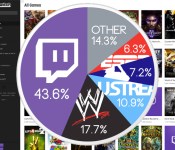
Twitch streams more live video than the WWE, MLB and ESPN combined

Video games now have more online spectators than traditional sports. Crazy, right? It’s crazy. According to Qwilt, a company that provides video caching services to content creators, Twitch is now the most popular live streaming site in the US. The outfit’s analytics group says the streaming site is more popular than UStream, the WWE, ESPN and MLB.com combined, owning a massive 43-percent share of all live streaming traffic. It’s slightly shocking from a cultural standpoint, but we can’t say we’re entirely surprised: with the Xbox One, PlayStation 4 and even mobile platforms offering average gamers the chance to put on a show, Twitch is hosting more than a million streams per month. There’s simply more content: Twitch streams gameplay 24 hours a day. ESPN has to wait for a sporting even to actually happen.
Twitch’s standing in Qwilt’s general video entertainment poll is a little less impressive, taking only 1.5% of the video streaming market when pitted against Netflix and Google’s on-demand services. Even that has a silver lining, however, as Twitch still ranks in the top 5 video entertainment services for six countries: Brazil, Peru, Taiwan, Thailand, the United Kingdom and the US. Turns out gamers like to watch other gamers game. Who would’ve thought? Hit up the source link below to see Qwilt’s live video streaming infographic, accompanied by a thinly veiled pitch for its video caching service.
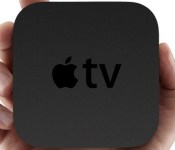
A Siri-controlled Apple TV may be on the way

Soon you might be able to simply ask your Apple TV to start playing ‘House of Cards’ rather than fumbling through a series menus. Code found in iOS 7.1′s software development kit indicates that Siri is one its way to a new device, likely Apple’s set-top box. In the operating system’s documentation, the iPhone, iPod touch and iPad are represented by “1″ and “2.” The most recent files also include a new device indicated by a “3.” For our non-developer friends following along at home, that means the digital assistant is headed to a different product. While the 3 could potentially represent something entirely new (like the fabled iWatch), Apple has previously used the number to represent its TV product in code. It’s also currently being used in several iOS-based Apple TV apps.
I’ve just found a new device family reference in Siri’s ressources in iOS 7.1… New #AppleTV or #iWatch ? pic.twitter.com/Ak1PVuBmqc
– UNiCORN (@bp_unicorn) April 19, 2014
We first heard about a Siri-enabled television several years ago in Walter Isaacson’s biography of ‘ Steve Jobs. In the book, the Apple cofounder says he’s “finally cracked” the television by creating a voice-controlled remote — a dream that as of yet hasn’t become a reality. Apple’s current TV product (which is rumored to be getting an upgrade soon) doesn’t have a built-in microphone. If Siri is coming, she’ll have to bring a new box with her, or at the very least, a new remote with voice input à la Amazon’s new Fire TV. We suspect all mysteries will be revealed in early June at Apple’s annual developer conference, WWDC. Until then, we’ll keep yelling commands at our TV and hope it gets the idea.
Filed under: Home Entertainment, Apple
Via: 9to5Mac
Source: Twitter, iOS Developer Library
HD Widgets 4 Beta testing commences with official roll-out May 1st
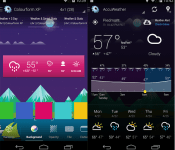
There is always something seemingly gratifying about beta testing an update or a completely new app. Cloud.tv has just released a a new HD Widgets 4 update for their beta testing community to fiddle about with and check out prior to the May 1st official public roll-out. The new HDW 4 brings in a lighter and fresher UI with a major under the hood revamp.
 The new update also brings in a side menu, hourly forecast graph and a 7-10 day forecast. Cloud.tv also has a new colourform in testing as well. The colourform app is an add on app that offers up a larger variety of color options and widget styling. Cloud.tv also makes mention of new preferences, support, guides, widgets and more that will be announced next week.
Getting involved in the beta is a s easy as joining the beta Google+ test group and following a few simple instructions. Below are the links you will need to visit to get involved and get to testing.
HD Widgets Google+ Community PC link
If you’re on mobile:
HD Widgets 4 beta:
Colourform 2 beta:
//<![CDATA[
ord = window.ord || Math.floor(Math.random()*1E16);
document.write('’);
//]]>
Sony releases Background Defocus App for Xperia Owners
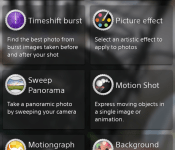
Ever since the release of the Google Camera app, everyone has been all googly eyed over the DSLR like blur effect that can be produced in images. I know you have seen a number of test shots from people with the Google Camera app, the Galaxy S5 and HTC One M8. Sony has had the same feature in their devices since the Xperia Z1, near as I can tell any ways, called Background Defocus. I know it wasn’t present in the T-Mobile Xperia Z but it might have been in international variants. Anywho, Sony has now released that camera setting add-on to the Play Store for Sony device owners.

 The Play Store listing says the Background Defocus app is compatible on Android 4.2+ devices. It will only work if you have the stock Sony camera app still. If you are rooted and stripped then it is pointless for you to get it unless you get the original camera installed first. It is interesting to note that the defocus app will only go to a 9MP resolution on the Xperia Z which contains a 13.1MP camera. Even more interesting is the Xperia Z1s only lets you push the same app to 8MP in 16:9 or 4:3 ratio.
I took a couple test shots with the Xperia Z to see how well it fared. I ran into a number of instances where it was unable to process the image correct and failed to blur the boackground. I would assume it was due to the various little suggestions made in the info box like the background object needing to be 5 meters away. I was able to snap one that didn’t fit that parameter though.
 It seemed to work out just fine. Additionally, it seems the location of the defocused images are saved in a separate folder on your device. You will still look in your DCIM folder, but there will be a new folder called XPERIA and with in that one is where you will find the BACKGROUND_DEFOCUS images.
 Feel free to go pick up the add-on Background Defocus app for your Sony device via the link below. If you find that your device is not compatible with it, and is should be, let us know.

//<![CDATA[
ord = window.ord || Math.floor(Math.random()*1E16);
document.write('’);
//]]>
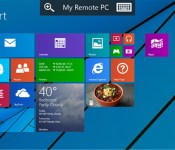
Microsoft offers a peek at Remote Desktop to Windows Phone 8.1 users

Microsoft promised that it would put out a Remote Desktop app for Windows Phone, and it’s making good on its word — provided you’re an early adopter, anyway. The company has released a Remote Desktop Preview that requires Windows Phone 8.1 (which itself is considered a preview) just to run. If all the stars align, though, you’ll get fairly advanced remote PC access that lets you perform Windows 8′s multi-touch gestures and stream “high quality” media. The folks in Redmond haven’t said when the finished app will arrive, but we wouldn’t be surprised if it launches after Windows Phone 8.1 rolls out in earnest.
Filed under: Cellphones, Software, Mobile, Microsoft
Via: ZDNet

Your connected home could one day save your life

Consider this scenario: Randall is an elderly man living alone. He’s doing pretty well — until one day he has a mild stroke. In the weeks that follow, he’s not as active as usual, getting up later and not leaving the house. Motion detectors, a mattress sensor and a smart door lock in his home detect the change in his activity patterns. Randall’s daughter gets a message prompted by her father’s activity data in the cloud, checks in on him and takes him to the doctor. Once he’s received treatment, Randall returns home, with marching orders to equip his home with additional sensors and cameras that can track his health and upload information to the cloud for his doctor to monitor.
It sounds pretty simple, right? The scenario above, proposed as part of the White House-backed SmartAmerica Challenge to jump-start innovation around connected devices, is already perfectly feasible. And for anyone with elderly friends or family, it provides a glimmer of hope for a future with fewer depressing nursing homes and live-in nurses. According to Mark Walters, President of the Z-Wave Alliance and part of the team behind this “Closed Loop Healthcare” project, it’s these types of use cases that bring the ever-nebulous term “Internet of Things” down to earth. When the gadgets in your home can help you get the care you need, everyone wins, right?
When your home can help you get the care you need, everyone wins, right?
Z-Wave, to back up a bit, is a communications protocol that powers smart devices from Philips Hue smart bulbs to home-security appliances. It’s not the only protocol smart gadgets use to interact — there’s ZigBee and Bluetooth, not to mention WiFi — but considering that the tech is currently in more than 25 million devices, Z-Wave is an important voice in the conversation about the future Internet of Things. Oh, and by the way, the cool kids aren’t calling it “IoT” these days — CPS (Cyber Physical Systems) is where it’s at for those in the know. Whatever you call it, though, the bottom line is that multiple devices are communicating to control an environment.
But back to the whole life-saving thing: The Randall example is just one of many ways connected technology could improve your life on a larger scale, if not save it. iControl, which makes the Piper camera-based home automation and security system that also happens to use the Z-Wave protocol, is working on more sophisticated monitoring solutions as well. Piper co-creater Russell Ure says such systems can be used to detect more subtle signs of decline in older people, for example.
“Having a system in the home that only your family can access will let you see signs that your parents are becoming old and listless, and track warning signs of something serious in the works,” Ure said.
And there’s no reason to think these use cases are limited to your elderly parents on the other side of the country — they could theoretically work in outpatient depression treatment, among countless other scenarios.
Still, the question remains: When will all this become a reality, especially when most people don’t have a single smart gadget in their homes?
Still, the question remains: When will all this become a reality, especially when most people don’t have a single smart gadget in their homes? A report from Juniper Research predicts that smart home appliances will pass the 10-million mark in 2017, but that number represents growth in smart fridges and washing machines, not sophisticated health-monitoring systems. The SmartAmerica Challenge, backed by the federal technology agency NIST, aims to spur funding for these broader-scale projects by demonstrating both their benefits and their feasibility. Teams behind 20 different concepts will present their work at a summit this June, and Congress could begin drumming up cash soon after.
According to Ure, the ability to monitor and manage events like an older person falling is more than a few months away. “Over the next year or two,” he says, “”there will be more technology that ties in the visual and sensor components.” That smart lock is starting to look pretty quaint, isn’t it?
Filed under: Household, Networking

‘Cosmos’ brings Neil deGrasse Tyson’s moustache to Blu-ray and DVD in June

If you’ve missed a few episodes of the Cosmos revival or maybe just want to fill the universe-sized hole in your media rack, the series hits Blu-ray and DVD this summer. Come June 10th (two days after the final episode airs), you’ll be able to watch the doc’s 13 installments plus a smattering of bonus features whenever you want. And speaking of supplements, the release will sport a five-part documentary chronicling the… documentary’s making, with the Blu-ray getting an interactive history of the universe dubbed “The Cosmic Calendar.” The price-tag on that 662-minute space-time odyssey? Sixty bucks for the Blu-ray and $50 for the DVD, but Amazon has each listed for a few ducats less.
[Image credit: Associated Press]

Filed under: Home Entertainment, HD
Source: Amazon (1), (2)
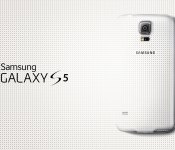
Samsung Galaxy S5 Prime “confirmed” in shipping manifest

The long-rumored premium Galaxy S5 gets one step closer to reality this week as a shipping manifest leaked online. Referencing four SM-G906K units being shipped for “R&D purpose”, it’s the same model number that has been the subject of additional leaks. While this is not outright proof positive of the so-called Galaxy S5 Prime, it’s more fuel for the fire. For what it’s worth, the manifest has since been yanked offline.
Specifications expected in the premium smartphone are reported to include:
- Android 4.4.2 KitKat
- 5.2-inch 2560 x 1440 display
- 2.5GHz quad-core Qualcomm Snapdragon 805 processor with Adreno 420 GPU
- 3GB RAM
- 32GB storage
- 16-megapixel camera
- 2-megapixel front-facing camera
If the rumors hold true, the S5 Prime should be encased in a stronger, perhaps metal body.
The post Samsung Galaxy S5 Prime “confirmed” in shipping manifest appeared first on AndroidGuys.

Snapdragon 801 powered OnePlus One officially unveiled, starts at just $299 unlocked
After months of teasing and gathering attention, OnePlus has finally made an official announcement of their first smartphone – the OnePlus One. This device is powered by a 2.5GHz Qualcomm Snapdragon 801 processor, 3GB of RAM and 16GB or 64GB of internal storage. The most impressive thing about the OnePlus One is its aggressive pricing structure. You can get yourself a 16GB version for $299 and 64GB version for $349. It also comes with stylish back cover options known as StyleSwap Covers which are being offered in wood, bamboo, denim and kevlar trims.

OnePlus One White Version
OnePlus One Specifications
- 5.5 inch LTPS IPS LCD display, 1920 x 1080 pixels & Gorilla Glass 3
- 2.5GHz quad-core Qualcomm Snapdragon 801, Adreno 330 & 3GB LP-DDR3 RAM
- 16GB or 64GB of internal storage
- 13MP Sony camera sensor (IMX214), dual-LED flash, 4K video recording, 5MP front-facing camera
- Android v4.4 KitKat based CyanogenMod 11S
- LTE, WCDMA, dual-band Wi-Fi ac/b/g/n, Wi-Fi Direct, Bluetooth v4.1, NFC, A-GPS & microUSB v3.0
- Stereo speakers, tri-microphone noise cancellation microphones
- 152.9×75.9×8.9 mm, 3100 mAh
- Bamboo, Wood, Denim & Kevlar trim for back covers

OnePlus One Battery
It is evident from the hardware and software specifications that the OnePlus One is a ‘no compromise’ smartphone which competes with all the top-end smartphones of 2014 such as Samsung Galaxy S5, Sony Xperia Z2 and HTC One M8 but is being offered at just half the price. The device will be available through an ‘invite only’ basis in Austria, Belgium, Denmark, Finland, France, Germany, Hong Kong, Italy, Netherlands, Portugal, Spain, Sweden, Taiwan, UK and the US to contain the rush. The device availability starts from mid May.
Earlier, only Nexus smartphones were known for their price to performance ratio but if the OnePlus One performs as claimed, it will beat the Nexus line-up of smartphones.
Via: Tom’s Hardware
//<![CDATA[
ord = window.ord || Math.floor(Math.random()*1E16);
document.write('’);
//]]>
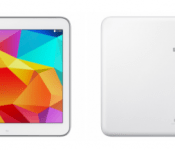
Samsung Galaxy Tab 4 will make a May 1st U.S. appearance with pre-order starting tomorrow
Samsung certainly doesn’t have plans to slow down their launch schedule of devices anytime soon. just about every month their is some new Galaxy device heading somewhere. Today the mega manufacture has announced the availability and pricing of the next Galaxy Tab. Keep true to the name scheme, it will just be the Samsung Galaxy Tab 4.
 Samsung will be making the new Tab 4 available for pre-order purchase tomorrow with official availability beginning May 1st. That is solely for the Wi-Fi models which include a 7-inch, 8-inch and 10.0-inch variety. Each of the three pack in Android 4.4 KitKat powered by a 1.2Ghz quad-core processor and 1.5GB of RAM. The screen resolution set for each one is the same at 1280 x 800. It is a little interesting that the resolution will remain the same across all three screen sizes.
There are only a few key differences that I can see in the spec out line from Samsung’s press release.
- Battery size: 8-inch (4,450mAh) 10.1-inch (6,800mAh) Samsung listed the 7-inch as (battery)
- Storage: 8 and 10 inch are 16GB and the 7-inch will be 8 or 16 GB
All of the tablets will offer a micro SD card slot. Pre-ordering for each of the Wi-Fi models starts tomorrow starting at $199.99 for the 7-inch, $269.99 for the 8-inch and $349.99 for the 10.1-inch. You will be able to snag an order through Samsung directly or other retailers like Amazon, Best Buy, Tiger Direct, Fry’s and others. We will add a few links to those tomorrow when they go live.
Following up the Wi-Fi only variants will be the LTE variants. All three sizes will be available through various carriers. Samsung lists T-Mobile to carry the Tab 4 in the 8-inch size, AT& and Sprint will be stocking the 7-inch and Verizon will sell the 8-inch and the 10.1-inch.
Source: Samsung Press Via 9to5Google
//<![CDATA[
ord = window.ord || Math.floor(Math.random()*1E16);
document.write('’);
//]]>
 AIVAnet