



Paper Icon Pack Review: scrunched up paper has never looked so Good
 You may have caught our announcement a few weeks ago of a new icon pack from our good friend Samer Zayer (check out the announcement post here). The Paper icon pack is an extremely unique take on icons, taking the texture of scrunched up, creased paper and applying it to square bordered icons and the effect is amazing. We took a more in-depth look at the icon pack in our video review:
As you can see, yet another very comprehensive icon pack from Samer. As I mentioned in the video, the pack already includes 900+ icons with cloud-stored wallpapers and very regular updates and of course, all the latest launchers are supported. The pack is also currently on sale on Google Play which will let you pick it up for just $0.99 so make sure you take advantage of that price before the sale is over (link is below).
Let us know what you think about the Paper icon pack or if you’ve tried any of Samer Zayer’s work before (P.S. be sure to follow Samer on Google+ for updates on his icon packs and his new projects).
Icons: Paper Icon Pack
Price: $0.99
//<![CDATA[
ord = window.ord || Math.floor(Math.random()*1E16);
document.write('’);
//]]>

Forked Android Based Nokia X Selling Very Well In India
Nokia’s first Android smartphone, the Nokia X which was launched last month is selling very well in India. It is already being listed as one of the best-selling and popular smartphones in all the leading online stores such as Flipkart and Snapdeal. Similar is the case with offline retail stores in the country. Priced at around INR 7,000 in India, the Nokia X runs a custom version of Android, usually referred to as ‘forked Android’ on top of entry-level hardware.
To remind you, the Nokia X is equipped with a 4 inch IPS LCD screen, 1 GHz dual-core processor, 512 MB of RAM, 3 MP camera and dual SIM card slots. Nokia X replaces all the Google services with Microsoft versions such as HERE Maps, Outlook, OneDrive and Bing Search. There is Nokia’s own Android app store but it only lists free applications and games. Other third-party app stores like 1Mobile Market, Yandex or Amazon App Store can be installed to get paid applications and games. You can also root the Nokia X and install stock Android custom ROM along with Google Play Store if you want.

Nokia X With Forked Android
//<![CDATA[
ord = window.ord || Math.floor(Math.random()*1E16);
document.write('’);
//]]>
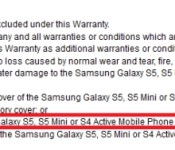
Samsung Galaxy S5 Mini along with SM-T705 & SM-T700 tablet devices leaked
The Samsung Galaxy S5 Mini was listed on Samsung New Zealand website under the warranty terms and conditions for water proof devices along with the Galaxy S5 and Galaxy S4 Active. After it was listed mistakenly, Samsung has pulled the information offline. It was thus confirmed to be water-proof with a IP67 certification. Apart from being water-proof, the Samsung Galaxy S5 Mini is rumoured to be equipped with a 4.5 inch HD screen, quad-core processor, 1.5 GB of RAM and 8 MP camera.

Samsung Galaxy S5 Mini Listed On Samsung New Zealand Website
Samsung Galaxy S5 Mini Possible Specifications
- Android 4.4 KitKat
- 4.5 inch HD touchscreen, water-proof IP67 certified
- 1.2 GHz quad-core Qualcomm Snapdragon 400 processor
- 1.5 GB of RAM, 8 GB of internal storage, microSD card slot
- 8 MP primary camera, 2 MP secondary camera
A couple of Samsung tablets bearing model numbers SM-T700 and SM-T705 have also been leaked via User Agent profiles. Both the tablets feature 8.4 inch screens with a resolution of 2560 x 1600 pixels running Android 4.4 KitKat. The SM-T705 will be a 4G LTE variant of the SM-T700. No other information about these tablets have been revealed as of now.
Source: Samsung New Zealand, Samsung Mobile UAProf | Via: GSMArena, PhoneArena
//<![CDATA[
ord = window.ord || Math.floor(Math.random()*1E16);
document.write('’);
//]]>

AcDisplay 2.1 BETA Makes Your Lockscreen Sexy – APP OF THE WEEK

AcDisplay has been featured on App of the Week before, but that was the older version. They have something new and improved now gang, and once I got the BETA 2.1 version on my phone, I fell in love
The developer has done a complete UI overhaul to AcDisplay, by not trying to emulate the Moto X Active Display as much. Sure there are still similarities to Active Display, but look at my image above and tell me that isn’t different and sexy. Instead of getting a little window at the top of your screen with your icon and message, you get the whole display showing you the icon, and the message appears in the middle of the screen with a smooth animation that is pleasing to the eyeballs. You have all the shortcut features you have in your notification bar too, which is a huge improvement from the older version. You can also use the wallpaper that is currently on your homescreen, instead of just having a black background. They haven’t added a custom wallpaper feature yet, but it wouldn’t surprise me if that is coming in a later version.
One little gripe people may have with this new version is the fact that you can’t one-finger your notification. You have to use two fingers, which I thought maybe that would have been a nuisance, but it doesn’t bother me at all.
To get AcDisplay 2.1 you have to join the community and become a beta tester. Lick the link provided below to do so, and check out the app in action in my video below. Let us know how you like it.
//<![CDATA[
ord = window.ord || Math.floor(Math.random()*1E16);
document.write('’);
//]]>

The horse riding simulator that pairs the Oculus Rift with an exercise machine

In the midst of the mind-boggling Nico Nico Chou-Kaigi, an event hosted by one of Japan’s leading video streaming sites, there was no shortage of Oculus Rift demos for attendees to drop their jaws at. Our allies at Engadget Japanese toured military carriers, controlled robot arms… generally did a load of fun things and pretended like it was work. The Hashilus horse riding simulator looked to be the most intriguing, however. It combined a horse riding exercise machine with an Oculus Rift set (oh and a fan, for immersion), to offer a relatively straightforward no-bad-guys-to-kill race, up and down a few hills. It’s a simplified experience, there’s no steering here, but players can use the tambourine-ish controller to speed up, or slow down, their steed, all while drinking in that Rift-provided 360-degree view. Bikes, schmikes.
Extra: It looks like Oculus Rift founder Palmer Luckey even got the chance to try it out earlier this month. You can see his reaction after the break — he seemed to like it.
Filed under: Peripherals, Transportation, Software
Source: Engadget Japanese
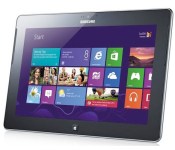
How would you change Samsung’s ATIV Tab?

I don’t normally discuss products that I’ve reviewed on How Would You Change, but I’m making an exception for Samsung’s ATIV Tab. The Korean company pondered the merits of launching the device right up to its debut, and swiftly axed any US expansion before it could get off the ground. As one of the first Windows RT devices, it came with a hobbled operating system, but the hardware was staggeringly good. Unfortunately, it’s rare that anyone actually splashed out on this unit, but I’m still asking anyone who owned one of these units to chip in. Come to the forum and share your experiences of using the ATIV Tab. What did you like, what did you hate and what would you have changed?
Filed under: Tablets, Samsung, Microsoft
Source: Engadget Product Forums

Jump around with GravyBot HD

Ever dream of being a robot that just jumped around, free-styling it through levels? Well, GravyBot HD has the answer to fill that void in your life.
Daft Monkey Games just released a new challenging arcade game that is based on realistic physics while using unique game mechanics to create a fun and addicting game.
Basically you are a robot. You start the game by choosing your color and then you must jump your way through various levels. The robot is able to jump off the floor and certain obstacles, however, you must be sure to land on your feet. If you crash out and land awkwardly, you die and must restart the level.
Sound easy? Yeah it’s not. The unique controls for the game are two buttons. One is on the right, one is on the left and they are pretty much like spin buttons. Pressing the right one spins your GravyBot forward, while pressing the left one spins it backwards.
The goal of the game is to jump your GravyBot through the entire level reaching the teleport-like looking object at the end of the level using only the front and backward spin buttons.
GravyBot HD is a free, ad-supported game on the Google Play Store. Future updates will add more levels.
The post Jump around with GravyBot HD appeared first on AndroidGuys.

Moog remakes the massive Emerson modular synthesizer 50 years later

How do you celebrate the 50th anniversary of Bob Moog’s the first voltage controlled synthesizer? By completely recreating it five decades later, of course. The folks at Moog revealed the new Emerson Moog Modular System this weekend at Moogfest. This research and construction project took three years to complete, culminated with the building of the 2014 edition of Keith Emerson’s Moog Modular System (Emerson being of Emerson, Lake & Palmer fame). Using the original schematics, hand-soldering, traditional wiring techniques and even photo-etching the aluminum front panels (a much less common process these days), engineers were able to remake the highly customized instrument from the internals to the aesthetics. Heck, Emerson even used the unit in what may be one of his last live performances Thursday night. What’s more, Moog plans to build “a handful” of these new Emerson systems and offer them for purchase. As you might expect, you’ll have to call the factory for pricing which likely means it’s a bit outside of nearly all price ranges. While you’re sorting your funds though, we were able to take a look in person, and you can scroll through those images in the gallery below.
Filed under: Misc
Source: Moog

Serious Internet Explorer flaw puts XP users especially at risk

We hope that you heeded our advice to finally ditch Windows XP in favor of a more modern operating system, because there’s a new security exploit that’ll leave stubborn XP users in the cold. In a security alert released on Saturday, Microsoft reports that there’s a serious vulnerability in Internet Explorer 6 through 11 that could allow hackers to take over your computer remotely if you happen to visit a malicious website. According to security firm FireEye, it has already found evidence of an attack that targets IE 9 through 11 that uses a well-known Flash exploitation technique to gain access to your computer’s memory. Microsoft has already said it plans to roll out an IE security update for all modern versions of Windows, but if you’re using XP, well, you’re out of luck, as support for that 12-year-old OS ended a few weeks ago.
In the meantime, Microsoft suggests enabling Enhanced Protection Mode if you’re using Internet Explorer 11 on Windows 7 for x64-based systems and all Windows 8 machines. Other workarounds include installing a free security tool called EMET (Enhanced Mitigation Experience Toolkit), adjusting security settings to High and disabling Active Scripting. To get even more tips on how to get around the vulnerability before Microsoft rolls out the update, hit the source links below. Or just, you know, use another browser, at least for the time being.
[Image credit: Getty]
Filed under: Microsoft
Via: Computer World

E.T. unearthed: The dig for legendary Atari cartridges in pictures

Yesterday marked the climax of a decades-long story that surrounded one of the most poorly received video games in history. A Microsoft-backed documentary crew took to a landfill in the desert town of Alamogordo, New Mexico in an attempt to prove that Atari had in fact buried thousands of E.T. the Extra-Terrestrial cartridges there. It appears they succeeded.
The game was an expensive failure and beckoned the demise of the once-great video game maker. It’s still unclear just how many cartridges the team discovered or what other failures treasures are buried in the trash heap, but Microsoft’s Xbox Wire says, “We can safely report that those long-buried cartridges are actually, 100 percent there.” The excavation will appear in an Xbox-exclusive documentary produced by Fuel Entertainment, tentatively titled Atari: Game Over. The film will appear later this year, but for now, here’s a closer look at the historic dig.

Reporters and spectators gather around a pile of trash in hopes of treasure. (John Thien)

A fan shows off a signed version of the game widely considered to be one of the worst in history. (John Thien for Engadget)

Breaking garbage. (John Thien for Engadget)

Film producer Jonathan Chinn and Alamogordo Mayor Susie Galea pose with the joystick that served as a sign of things to come. The crew found an Atari 2600 controller before hitting the jackpot. (AP Photo/Juan Carlos Llorca)

A new generation gets acquainted with the Delorean, because no archeological dig is complete without one. (John Thien for Engadget)

The day’s menu, woefully lacking in E.T. fingers and Reese’s pieces. (John Thien for Engadget)

The documentary’s director, Zak Penn shows off one of the first signs of a mass burial ground. (AP Photo/Juan Carlos Llorca)

Buckets of booty. (Microsoft)

And this is what we’ve been waiting for. This pile of trash is littered with E.T. packaging and cartridges along with a collection of other Atari artifacts. (Microsoft)

Success! Zak Penn, director of “Atari: Game Over,” and Andrew Reinhard, archaeologist, hold up Atari 2600 “E.T. the Extra-Terrestrial” game cartridges. (Microsoft)
Filed under: Gaming, Microsoft
Source: Xbox Wire
 AIVAnet