


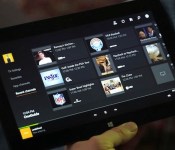
TV-focused Xbox One update tests a DVR button and OneGuide on SmartGlass

We called the Xbox One a work in progress in our initial review, and to its credit, Microsoft has been hard at work addressing various software shortcomings (party system, friend notifications, Twitch streaming and so much more) over the last few months. One aspect that’s remained mostly the same since launch — besides some tweaks and a remote control accessory — is its unique HDMI-passthrough TV experience and that’s getting some much-needed attention in a new update preview test. Microsoft may be focused on gaming under Phil Spencer, but a big part of its strategy is to win there is by controlling input 1 on your HDTV, and making the Xbox One more useful in other ways than as a Titanfall machine could help. Check after the break for a video preview of the new features plus a few more details on what they can do, and which countries are getting access to more TV listings and voice controls.

For users in the preview group, their SmartGlass second screen app on phones or tablets is ready to work as a universal remote control, with features similar to the app for Google TV. There’s also a new DVR button so owners can watch recorded shows without grabbing the old cable remote, and it can bring the full OneGuide listing of live TV and streaming options to the second screen. Finally, SmartGlass is adding a “recent channels” layout (shown above) built just for the second screen, showing you what’s on those stations now. Microsoft has already added a slew of gaming and messaging-related tweaks to SmartGlass recently, and it’s also rolling out “rent once, play anywhere” for Xbox Video across TV, PC and phone.

Until now, the Xbox One’s TV control features have been extremely focused on live TV (it already controls pause, fast forward or rewind, but it just couldn’t pull up the DVR menu) even though that’s not how we watch these days. The DVR button seems like it should be compatible with most providers but we don’t have an official list yet, and at least right now there’s no associated voice command. Also, the system still can’t see what’s recorded on your DVR or set up new recordings by itself, so there’s still going to be some adjustment if you’re switching back and forth between menus and remotes. Even when we’ve used the Xbox One’s voice controls extensively, OneGuide has been tough to dive into because of what it lacks (DVR, cable video on-demand), so we’ll need some hands-on time to see if this makes it worth using more.
Outside the US, Canada and several European countries including the UK, France and Germany will get new OneGuide and Kinect features. There Microsoft is adding live TV scheduling info to the OneGuide and Kinect voice commands to control set-top boxes and other home theater equipment (features that were already live in the US). We’ve been through the update preview process before so we’re pretty familiar with how it works, but it sounds like this one may go on a bit longer than the others. The extra time will be used to get feedback from users on how well these new features working before they roll out to everyone “later this year.” Of course, if that extra time is used to add proper surround sound passthrough or Blu-ray 3D playback, then that would be cool too Microsoft.
Filed under: Gaming, Home Entertainment, HD, Microsoft
Source: Xbox Wire, Xbox (YouTube)

Engadget giveaway: win an iPad mini Retina courtesy of ClickMeeting!

The modern workforce is a global one, but you still need to get in some face time with co-workers and associates far and wide. ClickMeeting want’s to help one lucky Engadget reader keep that personal connection and spread their message by offering an iPad mini and six months of its ClickWebinar service. This will help you make presentations to your team or dole out advice to interested clientele, and with mobile apps for iOS, Android and BlackBerry, the software lets you do it from any location. So whether it’s slurping down civet lattes at the corner cafe or direct from your kitchen table, you can get your message to the masses — and they don’t have to know you’re still wearing pajama bottoms. Simply head down to the Rafflecopter widget below for up to three chances at winning this iPad mini and ClickWebinar combo.
- Entries are handled through the Rafflecopter widget above. Comments are no longer accepted as valid methods of entry. You may enter without any obligation to social media accounts, though we may offer them as opportunities for extra entries. Your email address is required so we can get in touch with you if you win, but it will not be given to third parties.
- Contest is open to all residents of the 50 States, the District of Columbia, and Canada (excluding Quebec), 18 or older! Sorry, we don’t make this rule (we hate excluding anyone), so direct your anger at our lawyers and contest laws if you have to be mad.
- Winners will be chosen randomly. One (1) winner will receive one (1) Apple iPad mini Retina (ME279LL/A – Silver, 16GB) and six (6) months of ClickMeeting’s ClickWebinar service (which supports up to 50 attendees per meeting).
- If you are chosen, you will be notified by email. Winners must respond within three days of being contacted. If you do not respond within that period, another winner will be chosen. Make sure that the account you use to enter the contest includes your real name and a contact email or Facebook login. We do not track any of this information for marketing or third-party purposes.
- This unit is purely for promotional giveaway. ClickMeeting, Apple and Engadget / AOL are not held liable to honor warranties, exchanges or customer service.
- The full list of rules, in all its legalese glory, can be found here.
- Entries can be submitted until April 2nd at 11:59PM ET. Good luck!
Filed under: Announcements, HD, Mobile, Alt, Apple

Airtame wireless screen-mirroring dongle shipping soon for $99

Airtame, the Danish startup that received our Best of CES 2014 award for its awesome wireless video dongle, has confirmed that it will be shipping its first lot to its beta users this month. Better yet, the device has since been upgraded from a single-core Freescale chip to a dual-core version, along with dual-band WiFi and hardware acceleration on all three PC platforms: Windows, Linux and Mac. Over 15,000 Airtame dongles have been pre-ordered so far, and these will start shipping in May or June after some tweaking based on the beta feedback.
For those who aren’t familiar with Airtame, this is an HDMI dongle that you plug into a monitor or TV. With the software installed on your PC, you can wirelessly mirror or extend your desktop to one or multiple remote screens equipped with the dongle. What’s more, you can also choose to do so over your home network or over a direct WiFi connection (while somehow still maintaining your PC’s internet connection). The team claims that the performance is superior to that of existing Miracast dongles and Chromecast, featuring a low 25 to 30ms latency that’s good enough for gaming — as we found out at CES. The Chromecast, on the other hand, has a one- to two-second delay (plus it’s not really made for screen mirroring); and we’ve yet to come across a Miracast pairing that works reliably.
The Airtame dongle will eventually support smartphone and tablet video transmission, as the team received a lot of requests for a way to beam local content to the remote screen. However, app developers will need to use Airtame’s SDK to enable this feature — there will be supported apps at launch, and the dongle will also have its own browser that can be controlled from your mobile device.
In terms of retail availability, you can already pre-order the $99 Airtame dongle via the official website, or you can wait for its launch at select large, but unnamed retailers in the US, Canada, UK and Europe. Russia and some Asian countries will get the dongle later, as they require local safety certifications.
Filed under: Home Entertainment, Wireless, HD

Google to focus on portrait shots and effects with improved camera app

We know that Google has been looking to bring more advanced photo features to Android for a while, but it may soon be ready to show off what it’s been working on. Sources aware of Google’s plans have confirmed to us that the search giant is currently testing a new version of its camera app that will sport a refreshed UI, a background-blurring effect for portrait shots, and improved panorama and Photo Sphere modes. As part of its overhaul, we’re told that Google has finally fixed issues with the default camera’s photo framing, allowing users to snap images with a new 100-percent no-crop viewfinder. That means you’ll see exactly what your Android device will capture before you hit the shutter button, with no unwanted objects creeping in at the edges.
The company is also said to be making the camera app more extensible, by opening support for third-party filters. This will allow developers (and Android enthusiasts) to create and import custom effects inside the stock camera app. The camera app’s portrait skills may see some improvements too, with the addition a new lens blur mode that will take photos with a shallower depth of field, mimicking the effects you’d typically see in Nokia’s Refocus app and HTC’s new One. New high-resolution panorama and Photo Sphere modes have also been added, improving the quality of your sweeping shots.
While many are awaiting the release of Android 4.4.3, the latest version of KitKat, Google is set to make these camera improvements available to users by way of a standalone update. Our sources indicate that the app will exist separately so that non-Nexus owners running Android 4.4 and above will be able to take advantage of the improvements, without having to wait for an OTA update from their device maker or carrier.
Filed under: Cellphones, Software, Mobile, Google

5 Electronic Devices You Need to Get Your Hands On to Be With the Times
Electronic devices have changed a lot in recent years and there are a whole host of exciting new offerings that you can buy and enjoy. Taking advantage of the electronic offerings on the marketplace can allow you to enjoy entertainment and be connected in a whole new way like you have never been before. However, you need to know where to shop, what to buy and what electronic devices you should be on the lookout for you.
Stores like Best Buy provide you with a great opportunity to check out a wide variety of different cutting-edge products and find the items that will let you do the things you most want to do on electronic devices. To be as price conscious as you can be, though, you should look around for coupons and special savings on sites like GreatDeals.com before you go out to browse or shop for electronics at Best Buy. Best Buy is a great store where you can save significantly if you shop smart.

Electronics You Need to Get Your Hands On
Sometimes it is hard to keep up with all of the new electronic devices that are available since technology changes and evolves quickly. For those who are interested in shopping for themselves or to buy gifts for tech-savvy family members, here is a guide to some electronic items that you probably want to get your hands on:
- An mp3 player: Mp3 players remain as popular as ever, even after the original iPod debuted so long ago. Apple Mp3 players remain the gold-standard for most, and there are a wide variety of different ones for every user. People who want a small device can opt for a Shuffle or a Nano while people who want something more feature-rich can look for an iPod touch. While some people find an mp3 player is redundant when you have a smartphone, mp3 players are great for situations when you want to exercise or listen to music in the car and you don’t want to take your phone everywhere.
- A smartphone: Having a smartphone is very common today and you have offerings from Apple, Google, Samsung and many other major electronic resellers. Best Buy has a wide selection of different phones and you can usually save money by signing up for a data plan to get a great deal on the phone that you buy. With a smartphone, you can do so much more than talk or text. You can use GPS services, you can watch movies and read books, you can browse the Internet and you can enjoy a huge variety of different apps.
- A tablet: Tablets are the new age of computing and many people have replaced computer and laptops with tablets. Tablets are also made by different manufacturers including Apple, Asus, Nexus and Amazon. The features vary depending upon the model that you buy, but tablets can provide you with a device that allows you to watch movies, go online, send emails and do a whole host of other activities that you once needed a PC to do.
- An e-reader: E-readers are a popular electronic alternative to traditional books. There are dedicated e-readers made by different manufacturers and you can look into various Amazon Kindle products, as well as a Kobo e-reader or a Nook. E-readers will let you download books from Amazon or other online book stores and you can read PDFs and files that you email yourself. With most e-readers, you even have the option of borrowing books from the library.
- A streaming media device. Streaming movies and televisions shows is becoming increasingly common and some people are even dropping their cable television service in favor of streaming media. Netflix, Amazon Prime and Hulu+ all allow for you to stream content right onto your TV or other device, but you’ll need something to actually get that content to your TV. There are lots of streaming media devices including AppleTV and Roku that you can plug in and use to access the wealth of content that is available online.

You can buy all of these different electronic devices and many more at Best Buy, and going shopping with a coupon can help to ensure you get the very best bargains there so you will have the money to buy all of the electronic toys you have been looking for.
Jason Benet is a freelance writer with a love for technology. He likes to write on the topic because it’s always changing—which means there’s always plenty to write about!

Apple Buys iFixit, and Other 2014 April Fools’ Jokes
Today is April Fools’ Day, which means readers should be wary of what they read online as much of it will be a gross hyperbole created in the name of fun. Today also marks Apple’s 38th anniversary, with the company having been founded on this day in 1976 by Steve Jobs and Steve Wozniak.
Among the popular April Fools’ Day jokes making the rounds today are the following:
Apple Acquires iFixit
Based on the number of tips we’ve received, iFixit wins the award for the most believable Apple-related April Fools’ prank for 2014. The popular device repair company changed its entire website to announce that it is being acquired by Apple.
It’s finally here. We’re thrilled to announce that we are joining forces with Apple starting this summer. It has been an exciting adventure for all of us at iFixit, and we can’t thank our dedicated community enough. Let’s start our next chapter together.

BookBook for iMac
Twelve South, which offers a popular line of book-themed iPhone, iPad, and Mac notebook cases, has introduced its largest version yet: BookBook for iMac.

SwiftKey “Flow Hard” for Physical Keyboards
Popular alternative keyboard SwiftKey, which recently began experimenting on iOS, announced “Flow Hard”, a version of its gesture-input technology for physical desktop/laptop keyboards. The new Flow Hard is guaranteed to increase your typing speed and your overall productivity.
Nest and Virgin America Team Up on Personalized Airline Seat Climate Control
The now Google-owned Nest partnered with Virgin America to bring Total Temperature Control to airlines, allowing users to customize their own seat environment.
SelfieBot by Orbotix
Orbotix today unveiled the SelfieBot, a camera-equipped drone that hovers around you, capturing the best selfie moments you would normally miss. Always ready to snap a picture, the SelfieBot can be controlled by your smartphone or operate independently.
Google Chrome for iOS Adds Emoji Translation
Google has added support for emoji translation to its popular Chrome browser for iOS and Android. Instead of boring and bland text, users can capture the sentiment of each page through efficient and emotive illustrations.
Today we’re announcing Google Translate support for Emoji, built directly into Chrome for Android and iOS. You can now read all your favorite web content using efficient and emotive illustrations, instead of cumbersome text. Our translation algorithm interprets not just the definition of the words on a webpage, but also their context, tone and if appropriate, facial expression. It then distills text into articulate, meaningful symbols so you can get more out of every screen.
MacRumors has not participated in April Fools’ Day prank news stories on its regular news pages in past years, and has no plans to break from that tradition this year. All news stories posted on our front page, iOS Blog, and Mac Blog today are real.
     |
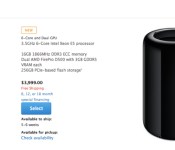
Apple’s Mac Pro Shipping Estimates in U.S. Move to 5-6 Weeks [Mac Blog]
Apple updated the shipping estimates for its new Mac Pro desktop, with the US store now providing a shipping target of 5 to 6 weeks for new orders with either stock or custom configurations. International stores still report April as an estimated ship date, but these dates are likely to change now that the month has officially started.

This is one of several recent changes Apple has made to Mac Pro shipping estimates, with the company showing both March and April shipping targets earlier this year. The change from a monthly window of approximately seven to eight weeks to a weekly window of five to six weeks suggests the company is starting to move toward a balance of supply and demand after the initial buying rush at launch.
We may hear more about the Mac Pro and its supply constraints later this month when Apple announces its earnings for the second fiscal quarter (first calendar quarter) of 2014. Apple will hold its quarterly earnings conference call on April 23 at 5:00 PM Eastern / 2:00 PM Pacific. MacRumors will provide coverage of both the earnings report and conference call at that time.
| |

Samsung announces their new Galaxy Tab 4 lineup

Samsung, as expected, have just revealed their lineup of three new Galaxy Tab 4 products which include a 7-inch, 8-inch, and 10.1-inch size screen, all with new designs and new internals from the previous generation.
The Galaxy Tab 4 range sees a move towards slimmer bezels and squarer corners, together with a slimmer, thinner, and lighter design than the Galaxy Tab 3.
All three Galaxy Tab 4 tablets have the same 1280 x 800 WXGA resolution with a 16:10 aspect radio.
The Galaxy Tab 4 10.1 is powered by a 1.2GHz quad-core processor, 1.5GB of RAM, 16GB of internal storage, with a microSD card slot, 3-Megapixel rear-facing camera, a 1.3-Megapixel front-facing camera, and Bluetooth 4.0
With almost exactly the same specs, the Galaxy Tab 4 8.0, the main difference over the 10.1-inch model is the dimensions, with the 8-inch model measuring 124.0 x 210.0 x 7.95 mm and weighing 320 grams, compared to the 243.4 x 176.4 x 7.95 mm and 487 grams of the 10.1-inch model.
The Galaxy Tab 4 7.0 has the same internals as the bigger tablets, but will feature an 8GB option alongside the 16GB model.
Samsung has said the three new Galaxy Tab 4 devices will go on sale later this year in black and white, with pricing still yet to be announced.
The post Samsung announces their new Galaxy Tab 4 lineup appeared first on AndroidGuys.
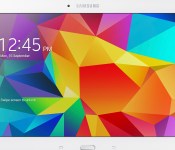
Samsung Galaxy Tab4 Gallery

No April Fooling around, Samsung’s latest series of tablets has officially been announced. Slated to debut later this quarter, the new Galaxy Tab4 line will come in 7-inch, 8-inch, and 10.1-inch versions. Here’s a look at the threesome from a variety of angles.


The post Samsung Galaxy Tab4 Gallery appeared first on AndroidGuys.
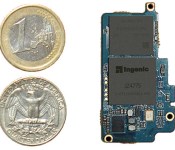
This quarter-sized chip platform could power future Android Wear devices

While Intel was backtracking on its “Edison” chip size claims, another Android Wear partner has claimed that its system-on-chip is the size of the proverbial SD card. Imagination Technologies (MIPS) has just revealed the Newton platform based on its MIPS architecture, built by chip-making partner Ingenic. It uses Ingenic’s power-sipping, Android-compatible 1GHz JZ4775 CPU (similar to that in the GEAK watch), to help it give smartwatches and other wearables 30 hours or more of battery life. A laundry list of other features is also baked in, like support for up to 3GB RAM, 720p video, WiFi, Bluetooth 4.0, NFC, MEMS sensors, health care sensors and USB support. Device makers can pick and choose those options thanks to the modular design, which also allows for rapid prototyping. In theory, that will help Android Wear hardware makers turn their designs into products more quickly — and fulfill Google’s ambitious product launch timetable.
Filed under: Wearables
Source: MIPS
 AIVAnet