



Google Text-to-Speech update to version 3.0.11 brings more language and voices Support
 Contrary to what people think Google actually does during April Fool’s Day, like making Google Maps into a Pokemon-laden procrastination place, Google does actually do some work and today has released a Google Text-to-Speech update to continue its improvements to the dictation app.
Fortunately, this update to version 3.0.11 isn’t a joke and adds some crucial language support, including Portuguese (Brazil) and Spanish (United States), as well adding high-quality voices for English (United Kingdom) and English (US) should you feel inclined. The full list of updates as per the Play Store page includes:
- Portuguese (Brazil) and Spanish (United States) now supported
- English (United Kingdom) male voice available for download
- High quality voices available for download for English (United Kingdom) and English (US)
- Updated user interface for voice data management
The update should be rolling to you now, but if you can’t wait that long, you can download the apk file at the link below:
Google Text-to-Speech update version 3.0.11
Application: Google Text-to-Speech
Price: Free
//<![CDATA[
ord = window.ord || Math.floor(Math.random()*1E16);
document.write('’);
//]]>
X-Mini ME Speaker Review

Having already posted about the X-Mini speaker range and its incredible potential given its size, you can imagine that when the guys over at Xmi Pte Ltd sent me a review unit to take for a spin I was very excited.
The X-Mini ME unit I reviewed was the speaker without Bluetooth so relied on a wired connection to receive sound from the source. Out of the box you’re provided a cable in order to connect to the audio source and that also doubles as a charging lead. The X-Mini ME felt very solid throughout the time I reviewed it, and I would be confident that it would survive being roughly handled or even dropped without falling to pieces.
First thing’s first, the size is absolutely tiny. I knew it would be small having covered the press release, but when I unboxed it I was simply surprised at just how small this thing is. The specs are as follows to give an appreciation of the form factor, and also what they’ve managed to cram into it:
Dimensions: 44mm x 38mm
Net Weight: 44g
Speaker: Magnetically Shielded 31mm (3.6Ω)
Loudspeaker Output: 1.5W
Frequency Response: 200Hz-20kHz
Signal-to-Noise: ≥80dB
Distortion: ≤0.3%
Playback Time: Up to 6 hours
Battery Capacity: 230mAh
Battery Charging Voltage: 5V (USB)
Battery Charge Time: Minimum of 1.5 hours
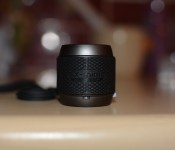
For reference, I took a picture of the X-Mini ME speaker next to my lens cap to give a bit of perspective around the size of the device.

Now whilst size is obviously important, and the X-Mini ME speaker scores maximum points for portability, what matters is the sound quality. What’s the point of being able to carry a speaker everywhere that doesn’t perform when required?

Having used the X-Mini ME speaker extensively in a variety of situations at work, in the car, and in the garden etc. it never failed to disappoint with the sound it delivered. The clarity is fantastic, and you’ll be forgiven if you thought the sound was being produced by a larger speaker; the size of the X-Mini ME definitely does not compromise quality.
Unfortunately that leads me onto the only bad point about the X-Mini ME, and it’s not exactly even a bad point when you remember just how small the speaker is. I often found the bass of the sound to be lacking and on the lower end of the scale as to what I’d consider acceptable with bass reproduction. I often found myself changing the song to a less bass-intensive track in order to avoid the sub-par bass emission that the X-Mini ME produced.

With that said, the X-Mini ME is still a tiny speaker, and it’s easy to fall into the mind-set of criticsing the device for producing a less than ideal bass line, but you have to remember and consider the form-factor. It’s not designed to rattle windows and walls, the X-Mini ME is designed to be placed inconspicuously in your backpack or placed in your pocket, forgotten about, and called upon when required to deliver sound to a wider audience when headphones just don’t cut it, and for that the X-Mini ME is absolutely brilliant.
The X-Mini ME speaker is available at the X-Mini Store.
The post X-Mini ME Speaker Review appeared first on AndroidGuys.

BlackBerry updates BBM with stickers and group photo sharing

Admit it: Sometimes what you need to say is best expressed through the image of a WWE character. Now you can send that wrestler, or a picture of Shaun the Sheep (if you’re feeling a little less hostile) to friends via BBM. Following rumors we heard a few weeks ago, today BlackBerry launched stickers for the messaging app, similar to what all some other messaging apps have been doing for a while now. The company is opening a new BBM Shop where you can pick up a variety of sticker packs (with 20-25 icons each) now for $1.99 or less a pop, with more expected to come on a regular basis. If the addition of stickers isn’t quite enough for you, today’s update also brings the ability to share photos with friends in multi-person chats, so you can make sure the whole crew gets that #groupie at the same time.
Filed under: Wireless, Mobile, Blackberry
Source: BlackBerry

iWork upgrade lets you share read-only documents

Apple isn’t letting the launch of Office for iPad go completely unanswered. It’s pushing out a slew of iWork updates that might not keep Microsoft awake at night, but should fill in a few conspicuous feature gaps. You can now share read-only documents, for one thing — you no longer have to worry that others will mess with a Pages report. You can also open iWork documents from iCloud webmail, and there’s a host of cross-app improvements that include a new editor tab and the option of modifying imported charts. All the upgrades are available on iCloud, iOS and the Mac, so you can check out the many, many tweaks for yourself.
Filed under: Cellphones, Tablets, Internet, Software, Apple
Via: 9to5 Mac
Source: iWork for iCloud, App Store
Divoom Voombox; A Water Resistant BT Speaker for the Rough and Tough
Spring is on the way, well, it should be. With warmer weather comes the dusting off of the outdoor gear, prepping for hikes, pulling out the tents, airing up the tires on the trailer, basically preparing to come out of our locked in hibernation. What are the great outdoors without some tunes? Sure, the peace and quiet of nature is pretty wonderful, but sometimes you just need some music to relax with after a long day on the trail. Divoom has a portable Bluetooth speaker that will easily help make your outdoor adventures a party. Meet the Divoom Voombox.
 What’s in the box
- Divoom Voombox – Outdoor Bluetooth Speaker
- USB Charging Cable
- Audio Cable
- Wrist strap
- User manual
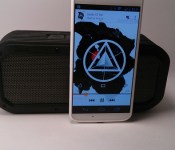
The Voombox measures in at 7.28 x 2.36 x 3.07 inches ( 185 x 60 x 78 mm ) and weighs in at 1.54 pounds ( 700 grams ). In the speaker department it offers up 5 drivers housed inside, a tweeter, 2 mid/woofers and 2 passives totaling 15 watts of output power with a frequency range of 100 – 20000Hz. The Voombox also has a substantial built-in battery, 3200 mAh, that offers up to 12 hours playback. It doesn’t double as an external battery pack though, the battery is solely for the speaker system to use. You have the option of connecting your audio source via an AUX port or through Bluetooth. The Voombox is Bluetooth 4.0 compatible with A2DP Stereo profile support.
The Voombox’s outer shell is a stiff rubber material that offers up a little grip along with disbursing the sound and vibrations evenly when placed on a flat surface.
On the right hand side you find a ‘VOOMBOX’ rubber port cover. Underneath it is where you find the Micro USB charge port and AUX cable port to direct connect an outside audio source to the speaker.

 On the left hand side you find the wrist strap cut out.
On the top you are given 4 buttons for remote operation. You have your power button, volume up and down and a play/pause /pairing button.
 The Voombox also has a mic built-in to allow you to use it as speakerphone if you do so desire.
How does the Voombox perform
Audio performance is always a tough one to adequately explain. The dual 7.5 watt speakers have plenty of umph in them. Depending on your music style, device and any outside EQ settings can quickly change the overall sound. Straight stock off of Google Music without any audio adjustments provides a loud output at full volumes. The bass is present, but not overpowering. It is a bit more driven in the mids, highs and vocals area.
The 3200 mAh battery is rated for 12 hours of music play back and 15 hours of talk time. We have been using the Voombox on a shelf in the shower for he last 2.5 weeks with it getting daily use ranging from 20 minutes to 40 minutes and still have not had to charge it up since the initial full charge. I am sure it is getting close to finally powering off.
All the buttons on the top work as they should. Long pressing on the volume up changes the track forward while long pressing on the volume down goes back a track. The play button is also the pause button. It is also important to note that the volume controls on the Voombox are independent from your phone or tablet.
What I like about the Divoom Voombox – Outdoor
 The look of the speaker is pretty cool. The front and rear grills are mixed with the screwed on cover and grooved rubber shell give it a tough look. It has enough weight to it to feel solid and not like you might break it if dropped. It is clear that it was designed to head out on long trail rides and camping trips. The sound is loud and powerful, it easily fills an open space with music that is clear. I like the fact that the speakers volume is independent from my phone. I can leave my Bluetooth volume all the way up and adjust the speaker without having to turn the Bluetooth volume back up on my device later for use on a different device. While their website and the packaging fails to offer a water resistant rating, but like I said, it has been sitting on the shelf in the shower for weeks and has been splashed numerous times without issues. I would assume it isn’t one that should be fully submerged.
What I don’t like about the Divoom Voombox-Outdoor
There isn’t much not to like. I would have expected a bit more punch from the bass drivers than it has. It isn’t that they distort under normal usage, it is more so that the bass is an underlying sound, but you can feel it if you hold the speaker.
Overall final thoughts
The speaker has a lot of good things going for it. It does have plenty of sound to carry it across fairly large spaces. The water resistant side, the rugged built quality of the Voombox and the price point all line up very well. With multiple color options to help fit your gear and your own unique style, the $99.99 is pretty fair, and almost a bargain for what it is. You can grab any of the colors, red, blue, black or green via Amazon through the link below.


//<![CDATA[
ord = window.ord || Math.floor(Math.random()*1E16);
document.write('’);
//]]>

Google Play Lists Nexus 10 as ‘Coming Soon’

The Nexus 10 has been a bit of a question mark as of late, and we all are wondering when the new version will be upon us. Right around the time the Nexus 5 was released, the Nexus 10 was listed as “out of stock”, and then we waited for an announcement of the next generation Nexus 10, as well as who is making it. There have been many rumors since that time, but now we get the words “coming soon” showing up in the Nexus 10 listing on Google Play.
This is nothing to get too excited about, given that Google doesn’t like to talk about their products until they are about to release, and it could very well change. We still have no word on what OEM will produce the new tablet, so your guess is as good as ours on that. Let us know who you think will make the new Nexus 10.
Source: Google Play
//<![CDATA[
ord = window.ord || Math.floor(Math.random()*1E16);
document.write('’);
//]]>

Stock Android Camera app Could Soon Find its Way to the Play Store
Sources are claiming that Google is in the process of bringing the stock Android camera app, the one found on Nexus devices, to the Play Store. Adding it to the list of standalone apps that Google has already pulled out like Gmail. The Engadget source claims that testing is already underway and that it will eventually make its way out of the Android OS stock software found on Nexus devices and become available for any device running Android 4.4+.
 The move isn’t terribly surprising really. Over the last year or so we have seen more and more manufacturers take their apps out of devices and make them available as standalone apps. Samsung, Sony, Motorola and others are in that list. The Play Store offers up the control to ensure the app can only be installed to a supporting device and it also allows them to update the app independently versus having to release an entire OS update. With carriers needing to test out full on OS updates, Play Store app versions speed up the process at which they can release fixes, patches and new features to one aspect of a device.
Along with the news that the app will become stand alone soon, there is also talks of new modes like one that will help mimic a shallow depth of field to create blurry backgrounds without the need to do so through alternative apps like snapseed. The Xperia Z2 and HTC One (M8) have this ability already.
If that isn’t cool enough, they are reportedly going to be opening up the camera software to third-party developers. I imagine this would be for add-on apps that can be downloaded to create different effects and such.
I for one am pretty excited to see what Google has done to make the stock camera app even better. With third-party developer access, we should see a flood of great add-ons that can help unleash the create beast hidden inside.
Source: Engadget
Img: Gizmag
//<![CDATA[
ord = window.ord || Math.floor(Math.random()*1E16);
document.write('’);
//]]>

HTC One M8 Mini set for May debut, report says

The HTC One M8 Mini is slated for a May debut, or so says an anonymous UK retailer. Alleged to feature a 4.5-inch display, the details may also include a rear UltraPixel camera. Why no Duo-Camera setup? Price, of course. With that said, the screen could be 720p instead of 1080p, too.
We might assume the device runs the same Android 4.4 KitKat and HTC Sense 6 UI found in the upcoming flagship. Given the launch is rumored for May we could soon be sharing a press release from HTC.
The post HTC One M8 Mini set for May debut, report says appeared first on AndroidGuys.

Boost Mobile now offering International Minute Packs

Boost Mobile customers who wish to make international calls might be interested in checking out the carrier’s new International Minute Packs. Priced anywhere between $10 and $20 the bundles include up to 1,000 minutes of calls to various countries. There are 22 of these “grab ‘n go” bundles with most of them offering around 80-150 minutes of calls. The rub is that you’ve got one month to use them; they do not roll over. If you make international calls on a more consistent basis then you’ll want to read up on the International Connect or International Connect Plus plans.

The post Boost Mobile now offering International Minute Packs appeared first on AndroidGuys.

April Fools 2014 Roundup

As another April fools day comes to an end, we take a look at the best pranks pulled around the web today for 2014.
HTC and Samsung introduce new wearable gloves

Both companies took today as the perfect opportunity to introduce their new products, and intentionally or not actually pulled the same joke as each other. Showing off their new Samsung Fingers product, you’re able to make a call with a thumb and a little finger gesture – you know, the type you do when you ask someone to call you? Also placing your hand flat in front of your face in a “Talk to the hand” gesture lets someone leave you a message.
HTC’s offering is meant to go hand-in-hand (no pun intended) with the new HTC One M8 and lets you ‘like’ things in the real world on Facebook. The HTC Gluuv allows you to thumbs up certain things in the real world that will then upload to Facebook.
Opera intros ‘Cats by Opera’ project

Deciding that cats should have as equal access to the internet as what humans enjoying Opera introduced the first web browser tail-or made for cats.
When we go to work, my cat were just left at home with iPads sitting on the coffee table. It just made sense to give them something better to do other than snooze or cough-up hairballs. Now they can interact with the web, which is 92.3% cats anyways.
The little said about this the better.
Introducing #SelfieBot by Sphero

The worst thing about taking a selfie is the fact it requires one hand to hold the camera, so Sphero took the opportunity of April Fools 2014 to announce the SelfieBot to get the perfect selfie. The autonomous flying robot that shoots selfies – yes you did read that correctly – leaves your handsfree to capture that perfect social network shot from every possible angle in high definition.
SwiftKey Flow Hard
Using the same easy-to-use gesture based flow gesture input as we’re all used to with SwiftKey, the company have released their new technology called Flow Hard which brings the same gesture input to the physical keyboard. Now, you can simple slide your finger from key to key to type out words on a full physical laptop or computer keyboard.
Flow Hard is built upon the same AI prediction engine that powers our global best-selling SwiftKey Keyboard app. We’ve spent years looking at how to apply the same powerful technology to the ergonomic challenges of a full-size hard keyboard. Finally, we think we’ve nailed it.
Of course, none of these are real, no matter how awesome or ridiculous some of them may be, but let us know if you got caught out with any April Fools today, or the best stories you’ve seen today.
The post April Fools 2014 Roundup appeared first on AndroidGuys.
 AIVAnet