


Join the Engadget HD Podcast live on Ustream at 8:45PM ET

It’s Tuesday, which is time for the Engadget HD Podcast and we hope you’ll join us for the live recording at 8:45PM. We start this week’s show with news from Verizon about its new Quantum TV DVR. The Xbox One finally has some new TV features coming its way too, and Vudu comes to Chromecast. Content news from Amazon rounds out the coverage, along with some other streaming news, of course. If you’ll be joining us, take a peek at the topics after the break and then get ready to participate in the live chat.
Verizon FiOS Media Server arrives as Quantum TV DVR that records up to 12 channels at once
TV-focused Xbox One update tests a DVR button and OneGuide on SmartGlass
Vudu’s 1080p movies and TV shows are now streaming on Chromecast
Amazon likely to announce media streamer at April 2nd event
Amazon Prime signs ’24′ away from Netflix just before the new season airs on Fox
Amazon’s Alpha House wins re-election, six new series set to debut
Dish teams up with Disney and ABC to offer app access to content
Watch Sony explain Project Morpheus and its VR plans for PlayStation
Gadget Rewind 2005: Slingbox
Must See HDTV for the week of March 31st: HIMYM finale, Game of Thrones, Final Four
Filed under: Home Entertainment, HD

Daily Roundup: April Fools’ roundup, a tour of ThinkGeek’s headquarters, and more!

You might say the day is never really done in consumer technology news. Your workday, however, hopefully draws to a close at some point. This is the Daily Roundup on Engadget, a quick peek back at the top headlines for the past 24 hours — all handpicked by the editors here at the site. Click on through the break, and enjoy.

This is not a prank: ThinkGeek and the business of April Fools’
April Fools’ Day beckons celebration from techies and corporations alike, but no one does it better than ThinkGeek. Our own Joseph Volpe was lucky enough to spend the day with ThinkGeek’s team of expert nerds as they prepared this year’s round of product spoofs. And don’t worry, we took lots of pictures.

Google to focus on portrait shots and effects with improved camera app
Sources familiar with Google confirmed to us that the search giant’s revamping its camera app. The new version will include a panorama mode, several new effects and provide a bug fix for the default camera’s photo framing issue.

2014 April Fools’ roundup
Every year, all sorts of companies try to take their April Fools’ gags to the next level — and 2014 is no exception. By now you’ve probably familiar with Google’s emoji translator and the selfie-taking drone, but click on through for our entire roundup!

TV-focused Xbox One update tests a DVR button and OneGuide on SmartGlass
The Xbox One TV experience is finally getting a little TLC. A new update preview is in testing that outfits the SmartGlass app with a new “recent channels” layout and DVR button, removing the need for your old cable remote.
You also might like:
Filed under: Misc
Blade Electronics’ PulsePak Kickstarter project is the ‘World’s Smallest Smartphone Battery Charger’
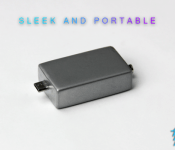
 There are literally thousands of portable battery packs to choose from these days, however, one of my biggest peeves with these generally large and cumbersome battery packs is that unless you carry a bag with you, you will need to actively remember to bring them with you and find somewhere to store it when you leave the house. That’s something that Blade Electronics is trying to address with its PulsePak Kickstarter project, the self-professed “World’s Smallest Smartphone Battery Charger” which easily fits on a keychain.
The PulsePak is intended to be a 1.5×0.9 x0.5 inch box with a micro-USB connector (with a lightning cable connector to follow, maybe) and will hold a battery charge of 300mAh. That might not seem like much compared to some of the monster battery packs out there, but for something that fits on your keychain, you will get between 1-1.5 hours of talk time depending on your device’s capacity. Check out the Kickstarter pitch video below:
The pledges which include the PulsePak start at $15 (not including shipping) for early birds and surprisingly only go up $25 which includes a PulsePak with a limited edition gold anodized finish. Blade Electronics is hoping to reach its target of $25,000, and while they only have $688 in pledges right now, it’s still early days. So if you’re interested in getting on board, be sure to hit the links below and check out their full Kickstarter page.
Source: Kickstarter
//<![CDATA[
ord = window.ord || Math.floor(Math.random()*1E16);
document.write('’);
//]]>

Dish teams up with Disney and ABC to offer app access to content

Starting today, Dish subscribers can tune into their favorite ABC, ABC Family, Disney Channel and ESPN shows on their computers, phones and tablets. Thanks to its recently renewed deal with the Walt Disney Company, customers can now access shows through each channel’s respective app or website by signing in using their DISH account information. Some apps are also available on the Apple TV and Roku, and ESPN content can be accessed on the Xbox 360 and Xbox One. Dish rolled back some of its DVR tech (Hopper’s ad skipping on Disney-owned ABC is disabled for three days) to wrangle an agreement that raises the possibility of ESPN on an internet-only streaming service — here’s hoping that was worth it.
Image credit: Flickr/ Dave L
Filed under: Cellphones, Home Entertainment, Tablets, Wireless, HD, Mobile
Lenovo’s latest budget Android tablets focus on high-quality audio

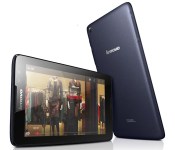
If Samsung’s new Galaxy Tabs aren’t your cup of tea, Lenovo may have the budget tablets you’re looking for. It just unveiled four entry-level Android slates that expand on the sound quality focus we saw in last year’s models. The Tab A7-30, A7-50, A8 and A10 all have Dolby audio that should improve your small-screen movie experience. They also have “responsive” (if unnamed) quad-core processors, too. You’re mostly choosing devices based on screen sizes. The A7-30 has a basic 7-inch display and optional cellular support, while the A7-50 jumps to HD and throws in a 2-megapixel front camera; move to the A8 and you’ll get an 8-inch panel, while the A10 includes (you guessed it) a 10-inch display. Lenovo plans to ship the new Tab A-series worldwide in the second quarter of the year, with UK prices ranging from a frugal £100 ($166) for an A7-30 to a still quite affordable £170 ($283) for an A10. There’s no mention of a US launch for the new A-series so far, but we’ve reached out for more details. We’ll let you know if these starter tablets reach American shores.
Leef Access: The Quarter Sized Portable MicroSD Card Reader for Android Devices
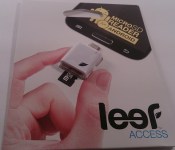
Lately I have been on a storage kick. From the 32GB Leef Pro, to the 128GB Toshiba Thumb Drive, to the 64GB SanDisk Connect Wireless Thumb Drive, to the more recently acquired 128GB SanDisk MicroSD card. I might have an addiction to having more storage options and ways to access it than really needed. However, the whole purpose is more so for you guys then me. With so many various storage solution out there, I want to check out as many viable solutions as possible to help you guys make a decision on what you might be looking for in your Android life. The latest addition to the storage solution battle comes from Leef with the Leef Access micro SD reader for Android.
 Whats in the package
- 1 Leef Access micro SD card reader device
Nothing more and nothing less. The Leef Access measures in at 1.18 x 1.18 x 0.35 inches ( 30 x 30 x 9 mm). It is pretty close to the same size as a quarter. (IMG below: Quarter underneath the Leef Access)
 This ultra small little device offers you a few little niceties. On the rear, opposite side of the micro USB plug, you will find two slots. The top slot is the active card reader slot while the slot below it offers you a place to store and carry an additional micro SD card.
 On the front to the right, or left depending on how you look at it, is a small LED that lights up to show that the device is active and working. On the opposite side as the LED there is small set of holes for attaching a wrist strap or keychain.
 The Leef Access is also waterproof and dust proof. Most micro SD cards are also waterproof, dust proof and even shock proof. That doesn’t mean you should toss it into the sink and then immediately plug it into your phone though.
How does it Perform
The performance is based on your device, or device, being about to use it. You need OTG support on your device in order to recognize the card reader. Most newer phones and tablets don’t have any issues. Without issue I slipped a Leef Pro 32 GB card into the Access and plugged it into my Sony Xperia Z. The phone easily read the Access and the card. You treat the extra addition just like built-in storage or like a micro SD card in your device. Open your file explorer app and you can view, transfer or delete files at will.

 What I like about the Leef Access
I really like the small compact size of the device. Even though it is tiny, it offers the lanyard/keychain holes to attach it easily to something that I won’t loose. Leef could have easily left the card reader alone with the one active card slot, but adding in the additional slot for easily carrying more storage was a nice touch.

 What I don’t like about the Leef Access
While the Access is waterproof and dust proof, it isn’t bend proof. While I am pretty careful with things I carry around, accidents can happen. I am not all that keen that there isn’t a cap or cover to help further protect the Access’s micro USB tip from possibly being bent. On the same note, lint is the evil spawn of dust bunnies. In the off chance that pocket lint comes into play in your life, there is the real possibility that it could get stuck inside the card slot or the usb plug.
I am sure those are insane and rather ridiculous things to consider, but it is something that occurred to me that might be important to you.
Over All thoughts
The Leef Access is a standalone device purchase. It doesn’t come with a micro SD card, so you will need to provide your own. This actually helps keep the cost down dramatically. With SanDisk and Samsung always having Micro SD card sales on Amazon you probably already have two or three micro SD cards sitting around anyways. It never hurts to have ways to transport those cards and to access their content without having to unmount the one in your phone and swapping them all the time. That being said, you will be pretty happy to find out that the Leef Access is only $9.99. So even if you have fears of lint and a bent usb plug, they are inexpensive enough to have a couple around. Plus it comes with a 5-year limited warranty.
Don’t go jumping up and down and hitting buy buy buy just yet though. The Leef Access has become a rather sought after little guy. Leef’s site is sold out at the moment, but they will be stocked back up on April 14th. You can pre-order one now though as long as you are willing to wait a bit for it to ship. While you are there, you can also pick up a Leef Pro MicroSD card for 20% off to accompany the Access.
Bounce on over to 2leef.com and take a look and pre-order a Leef Access today.
//<![CDATA[
ord = window.ord || Math.floor(Math.random()*1E16);
document.write('’);
//]]>

Humble Bundle PC and Android 9 goes live with 6 great, cross-platform Games
 It would be quite hard for Humble Bundle to perform and pull off a real April Fool’s Day prank, so instead they’ve opted to offer the Humble Bundle PC and Android 9 pack which offers 6 great games that will be available on multiple platforms including Windows, Mac, Linux and, of course, Android. The games include Broken Sword 2: The Smoking Mirror, Bridge Constructor, Type:Rider (check out our review here) and Ravensword: Shadowlands; If you don’t know what some of these games look like, check out the trailer they’ve put together:
If you’ve never heard of Humble Bundle before, it’s essentially a great way to get games for a great price while also supporting the various charitable services that Humble Bundle supports. As always, paying below the average purchase price will net you only the first four games, but to unlock the last two games Kingdom Rush and Knights of Pen and Paper +1 Edition, you will have to contribute above the average price, though that is only a measly $3.68 USD right now.
If you’re interested in picking up this Humble Bundle, hit the link below and remember to give generously; note that it will only be live for two weeks, so get in quick:
Humble Bundle PC and Android 9
Source: Humble Bundle
//<![CDATA[
ord = window.ord || Math.floor(Math.random()*1E16);
document.write('’);
//]]>

Apple Releases Safari 7.0.3 for Mavericks With Push Notification Improvements, Security Fixes [Mac Blog]
 Apple today updated update Safari for Mavericks users to version 7.0.3, adding improvements to compatibility, stability, and security. The update includes a new option for turning off push notification prompts for websites, improves credit card autofill, adds support for webpages with generic top-level domains, and fixes several security issues.
– Fixes an issue that could cause the search and address field to load a webpage or send a search term before the return key is pressed
– Improves credit card autofill with websites
– Fixes an issue that could block receipt of push notifications from websites
– Adds a preference to turn off push notification prompts from websites
– Adds support for webpages with generic top-level domains
– Strengthens Safari sandboxing
– Fixes security issues, including several identified in recent security competitions
The update is a free download for Mavericks users and is available through the software update tool in the Mac App Store.
     |

iWork for iCloud Updated With Retina Support and Design Improvements, iOS and Mac Updates to Follow
Following the launch of Microsoft’s Office apps for iOS, Apple is updating its iWork apps for iCloud, Mac, and iOS, adding some major improvements to compete with Microsoft’s Excel, Keynote, and Word.
As noted by 9to5Mac, Pages, Numbers, and Keynote for iCloud have gained updated designs for their document, spreadsheet, and presentation editors along with support for Retina displays. All three apps have also been updated with the ability to share view-only documents and to open documents directly from iCloud Mail.
Individually, Pages has also been updated with new templates, the ability to edit charts in imported documents, and improved text wrap. Numbers now has improved pop-up menu support, and Keynote also allows charts to be edited in imported documents.
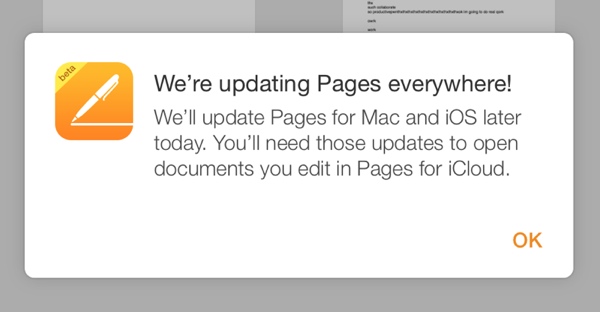
A pop-up within the iWork for iCloud apps indicates that Apple also has plans to update Pages, Numbers, and Keynote for both iOS and Mac, with the updates being required to open documents edited in iCloud.
Apple last updated its iWork suite of apps across all platforms in January, adding several new features to improve the software and return functionality that was removed when the new iWork apps were introduced back in September. Apple pledged to improve the apps back in November after facing significant user criticism from power users.
| |

OWC Debuts First Intel Xeon Processor Upgrades for 2013 Mac Pro
 Back in January, OWC confirmed that the 2013 Mac Pro’s processor was socketed and removable, theoretically allowing for future upgrades, which are now available by the company. As of today, OWC is allowing users to send in their Mac Pros for both processor and memory upgrades.
Processor upgrades, which start at $1,498 with the trade-in of the base Apple-supplied quad-core processor, include 8-core, 10-core, and 12-core models that are compliant with Apple’s technical specifications and power requirements. OWC says that the upgrades are tested, qualified, and guaranteed to meet or exceed the processors available from Apple.
According to the company, the processors are up 46 percent faster than base factory processors available from Apple, and up to 31 percent more affordable.
OWC Turnkey Server Class Processor Upgrade options for Mac Pro 2013 models:
– Intel Xeon E5–2650 v2 8-Core 2.6GHz with 20MB Cache, 25% faster, $1498
– Intel Xeon E5–2667 v2 8-Core 3.3GHz with 25MB Cache, 41% faster, $2448
– Intel Xeon E5–2690 v2 10-Core 3.0GHz with 25MB Cache, 45% faster, $2396
– Intel Xeon E5–2697 v2 12-Core 2.7GHz with 30MB Cache, 46% faster, $2978
The company is also offering turnkey installations of its memory upgrades, which as previously announced, are available in 32, 64, 96, and 128 GB kits starting at $449.
OWC’s Turnkey Upgrade Program, which is available for processor, memory, and storage upgrades, offers professional installation and testing by Apple Certified technicians, also including shipping both ways and rebates for existing hardware. More information on the program can be found on the Other World Computing upgrade website.
| |
 AIVAnet