



WiFi Performance to Improve As FCC Opens Unlicensed Frequencies
 In February, the Wall Street Journal reported on the formation of a new lobbying group called WifiForward that advocated the opening up of unlicensed frequencies to alleviate Wi-Fi congestion and improve performance. The group consisted of industry partners including Google, Best Buy, Microsoft, and many others.
On Monday, the FCC announced that it was freeing up more airwaves for Wi-Fi usage. The WiFiForward group wrote in response to the ruling:
Today, the FCC voted unanimously to unleash more unlicensed spectrum will support all the things we already use and further drive investment and experimentation—a 50% increase in spectrum available for Wi-Fi, to be exact. Consumer devices are already equipped to operate in the band, so they can easily be adapted to quickly take advantage of new 5 GHz channels. And a new Wi-Fi standard, 802.11ac, has just been approved for the 5 GHz band. 802.11ac’s wide channels will allow for a better consumer experience.
The group indicates that consumer devices will be “easily” adapted to take advantage of the new 5GHz channels, and that 802.11ac will be able to take advantage of the new bandwidth.
802.11ac or “Gigabit” Wi-Fi offers speeds up to three times as fast as existing 802.11n wireless networks. 802.11ac has been introduced into Apple’s Mac line starting in 2013, and is expected to be included in the iPhone 6 later this year.
     |

Microsoft plans to bring Windows to robots and ‘a whole new class of small devices’

Microsoft’s Build 2014 kicks off tomorrow, but it’s not just Windows Phones, tablets, Office or even the return of Clippy. Redmond has plans to bring its operating system, well, everywhere else. A Windows on Devices site has apparated into existence, mentioning robots, talking bears, the Internet of Things and Intel’s Galileo acting as developmental hardware. It looks like Microsoft’s planning a charm offensive on the maker community, with the site linking out to a Big-styled — presumably Microsoft-powered — floor keyboard as well as Maker Faire. The first SDK will appear soon, (by the end of Spring 2014) with additional releases through out the year. Microsoft says it’ll have a life-sized piano to show-off its Windows on Devices conceit and naturally, it reckons its cloud services will serve as the perfect online accompaniment.
Filed under: Misc, Robots, Wearables, Wireless, Internet, Microsoft, Intel
Via: Twitter (@h0x0d), (@stroughtonsmith)
Source: Windows on Devices

Don’t remember what you rated Flappy Bird? Google Play never forgets

If you were browsing through the Google Play store to check out this month’s free music, you might’ve noticed an addition to the sidebar. Nestled between the device and wishlist tabs is a section devoted to showcasing anything you’ve starred or given a +1, called, wait for it, “My Play activity.” Don’t fret if personal media and app ratings aren’t appearing on your page though, as Android Police notes that the link isn’t showing up for everyone just yet. As of this writing, only a handful of Engadget editors can view theirs, for instance. Once the desktop feature finishes rolling out, you should be able to view anyone’s rating-history at-will — much like you can on Android. If anything, it’s another venue for (privately) ridiculing your boss’ taste in music.
Via: Android Police
Source: Google Play

Xbox One SmartGlass beta apps bring TV controls to Android, Windows and Windows Phone

Microsoft only just revealed it would test new TV remote features on the Xbox One and its associated SmartGlass apps, and Windows Phone Central points out that right now anyone can give them a try. All you need is one of the game systems and a device running Android, Windows 8 or Windows Phone 8. We tried out the apps and they install right alongside the standard Xbox One Smartglass apps, although there are some known issues and rough edges. The smiley face button serves as a way to report any issues, but overall things worked smoothly, and we were able to navigate recordings on a standard Comcast DVR or surf through the OneGuide without a problem. Download the apps now and try them via Google Play, the Windows Store or Windows Phone Store — we haven’t spotted a beta version for iOS yet.

Filed under: Gaming, Home Entertainment, HD, Mobile, Microsoft
Via: WPCentral, Android Central
Source: Google Play, Windows Phone Store, Windows Store
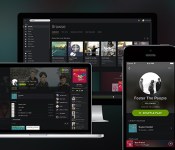
Spotify’s new design is cleaner, darker and puts the focus on content

If you’re using Spotify on the web, desktop or iOS you should notice a pretty massive change starting today. (The new look should be coming to Android “near future.”) The company is launching its most dramatic overhaul since its launch in 2008. Most noticeably, it’s flat and dark. Like Swedish death metal dark. The gray and white elements it experimented with over the last couple of years have been banished and it has returned to its roots with a UI that is primarily black and slightly lighter black. Sure, there are still green highlights and the new rounded (dare we say finger-friendly) icons are a lighter shade of gray, but the overall effect is one where the most important element — the content — jumps off the background.
Of course, if Spotify simply painted everything black that wouldn’t be big news. The redesign touches on almost every element of the experience. The edges are softer, there’s a heavy use of blurring on background images (especially in the mobile app) and there’s a new typeface, Proxima Nova, that’s clean and heavily rounded. Despite the starkness of the UI elements, these touches make the app feel warm and inviting. The new look also borrows flourishes from social networks. Artist and user pages now feature a round profile image against a large cover photo and content is now presented as image-heavy cards when browsing. Those round profile photos also give you a quick visual cue to let you know a card is for a person or artist, rather than a song or album. In general you’ll notice a lot more images throughout the interface, and big ones at that.
The overall look is not that unlike a dark cousin of Google+, at least in the browser. The desktop client uses many visual elements as the redesigned web player, but still retains some of the more traditional media manager elements. The mobile app employs a heavy does of transparency and slides around individual UI elements to keep them out of the way and maximize screen real estate. It also makes the shift to a tabbed interface that more inline with modern design trends.
The changes are not purely cosmetic either. The company has finally fully implemented search as you type across all platforms, and it’s blazingly fast. This will also be the first time that many users will get to enjoy collections — a feature that has been rolling out painfully slowly. Rather than being forced to save albums as playlists, users will simply be able to add them to their library for quick and easy access.
For more about Spotify’s effort to breathe new life into its streaming music service, read our additional coverage here.
Filed under: Home Entertainment, Internet, Software, HD, Mobile
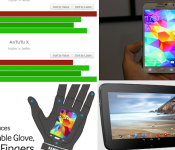
HTC One M8 False Benchmarks! Galaxy S5 has the Best Display! – ManDroid Quickie

Welcome my Android friends. Time to give you some of that precious Android news in a hurry. At least I hope it is in a hurry. Last week, I started doing this type of video just to relieve some of the burden of my double life as a workforce, 8-5 worker, and balancing the YouTube life. Trying to keep these videos quick, and today I achieve that…somewhat. HTC decided to play the false benchmark score game, which breaks my heart a little. The Galaxy S5 apparently has the best display, which I congratulate them for. Enjoy the show!
News Topics
HTC flase benchmarks
HTC and Samsung play same April Fool’s Day joke
Galaxy S5 has the best display according to DisplayMate
Nexus 10 coming soon
//<![CDATA[
ord = window.ord || Math.floor(Math.random()*1E16);
document.write('’);
//]]>

Amazon delivery lockers now also accept returns

You’re not the only one who’s ever bought silly things from Amazon while drunk. Good thing Amazon has several return methods, the newest of which lets you send back that banana slicer through the company’s strategically placed delivery lockers. According to The Wall Street Journal, the e-commerce giant will now let you return duds that way, so long as you get a drop-off code from its Online Returns Center first. You’ll need that code to open a cabinet on the locker, where you can stick in a box (up to12x12x12 inches in size) that holds and conceals your embarrassing purchase.
The WSJ says this move could save Amazon some serious cash, as up to a third of online purchases are usually returned and shipping’s one of the company’s biggest expenses. After all, carriers can retrieve items and deliver new orders at the same time whenever they visit a location. Unfortunately for customers, Amazon charges the same amount for locker returns as it does for UPS drop offs. We imagine it’s still a welcome development for folks who live or work near one of those lockers, though — whatever makes it more convenient to send back that Borat mankini, right?
Via: Wall Street Journal
Source: Amazon
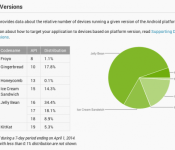
KitKat Sees a Nice Jump in New Platform Version Pie Chart

Another month has past, so another platform chart has been released to see who is running what on their devices. We always hope to see the newest versions of Android take most of the pie, and it looks like Android 4.4 KitKat has seen a nice percentage raise to 5.3%. Last month the percentage was roughly 2.5%, so they are doing their best to get that KitKat out there to us. Jelly Bean is still the victor in this pie, by taking 61.4% of devices out there, which is about a 0.6% decrease from last month. A very lovely number indeed, which is what Android is striving to achieve, by making their newest versions easier to get on all the many devices out there. Cut down that fragmentation.
Still makes me laugh that there are still people rocking Froyo out there, but at least that Gingerbread and ICS number has gone down. Let us know what you think about these new numbers.
Source: Phandroid
//<![CDATA[
ord = window.ord || Math.floor(Math.random()*1E16);
document.write('’);
//]]>

Google Maps users, rejoice: ‘search nearby’ is back

The incredibly useful “search nearby” tool was one of the casualties of the Google Maps redesign, but today Mountain View re-introduced the feature. For those who didn’t constantly use it to find new Indian restaurants a few blocks from their apartment (ahem), “search nearby” lets you pull up businesses and other points of interest based on an address, neighborhood or other location. It’s already re-added on the desktop; simply type in a place and the “search nearby” bar will turn up.
To be fair, it’s not like you couldn’t search for tacos near the Empire State Building with the new Google Maps that began rolling out last month — you could get the same functionality by doing a follow-up search after typing in an address — but “search nearby” is much more user-friendly. Unlike the latter method, it also lets you control the zoom level to get results within a particular distance of your location. And, no, we’re pretty sure this isn’t an April Fools’ joke.
Via: SlashGear
Source: @GoogleMaps
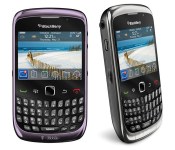
T-Mobile will no longer carry BlackBerry devices

By the looks of it, BlackBerry chief John Chen wasn’t appeased by T-Mobile’s attempt to make peace — in fact, things have only escalated: T-Mobile will no longer carry any BlackBerry device. In a press release today, the company formerly known as RIM announced that it has chosen not to renew T-Mobile’s license to sell its products when it expires on April 25th, 2014. If you’re wondering what exactly happened between the two companies, it all started when T-Mobile offered customers discounts on other phones if they trade in a BlackBerry. Obviously, that didn’t sit well with Chen, so the magenta network launched a similar promo for existing BB owners, giving them $200 to $250 if they’re upgrading to another BlackBerry device. Those who decided to do so need not worry, though: the two promise not to let this nasty divorce get in the way of supporting their current customers.
Filed under: Mobile, Blackberry, T-Mobile
Source: BlackBerry
 AIVAnet