


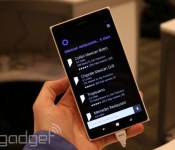
Having a chat with Cortana, Windows Phone’s new personal assistant

Anyone who’s played Halo, the iconic first-person shooter based 500 years in the future, knows where Microsoft came up with the name of Cortana, its new voice recognition program on Windows Phone 8.1. Master Chief might be the star of the video game series, but Cortana is the heroic digital sidekick that saves his behind in almost every level. Granted, the Windows Phone version may not help you explore an alien planet or teach you how to defeat the bad guys, but it’s still capable of some great stuff.
Just press the search button on the bottom of every Windows Phone device (as long as it uses 8.1, of course) and Cortana pops up, ready to listen and obey your commands. What kinds of things can she do? You can tell her to call someone, send a text, set reminders, take notes and hook you up with all sorts of information that you might need throughout the course of any given day. And since it’s powered by Bing, the engine working behind the scenes has a solid amount of oomph.
At present time, there’s one major catch to the feature, which is currently in beta status: while Cortana is quite functional, the only way to activate the service is to physically press a button on the screen. We’re told that always-listening capabilities (as seen on devices like the Moto X) are in the works and hopefully can be incorporated at some point down the road, but for right now that remains a significant limitation to the service.
We hope to get more personal time with Cortana in the coming weeks as new Windows Phone 8.1 devices come out, but we at least got a few minutes to play around with the service. It’ll start out in beta mode, which means that Microsoft still has some work to do before it’s a completely solid and reliable feature. In its early stages, interacting with Cortana was still an enjoyable experience, although there were a few instances in which we had to repeat (or rephrase) our request in order for the system to recognize what we were asking. For instance, Cortana interpreted “find me a…” as “find Mia,” and attempted to find a contact in the People Hub under that name. Still, we were also in a crowded room with a lot of voices nearby, so we have a feeling that it performs more reliably in quieter environments.
Regardless, we’re pretty happy with what Cortana is capable of. When you first try to set up the service, you’ll be prompted to answer a few questions about yourself, so Cortana can become better acquainted with your preferences. You can assign nicknames to yourself and other contacts, and it uses its own “virtual notebook” to remember what you’ve done in the past. The service can parse email and detect that you have a flight booked — and then it will ask you if you want her to track that flight. Indeed, Microsoft is taking a more personal (as in, personal assistant) approach to Google Now.
Additionally, Cortana will learn your voice and your preferences as time goes by, so in theory the service should get even more accurate and reliable the more you use it. And since developers have access to Microsoft’s speech API, third-party apps can be a part of the fun; because of this, you’ll be able to pull up your contacts’ Facebook pages, send out tweets, add shows to your Hulu Plus queue and do plenty more. Finally, Windows Phone 8.1 now features geofencing, which means you can tell Cortana to remind you to pick up groceries when you pass by the store of your choice.
Even though it’s not completely perfect yet, Cortana’s off to a pretty good start. There’s a lot of room for improvement, of course, but we’re excited by what Microsoft has been brewing up for the past two years. And who knows — perhaps in a few years the actual Cortana herself will pop up as a hologram to the delight of video game fans everywhere, but we might be getting ahead of ourselves.
Filed under: Cellphones, Wireless, Mobile, Microsoft

An afternoon with the Fire TV

We came away relatively impressed with the Fire TV during our brief hands-on. But we all know that units set up specifically for press demonstrations are hardly the best indicator of how a device will function in the real world. So we immediately went back our lair and began putting the newest kid on the streaming block through its paces. Once away from the carefully controlled demonstration area, it became clear that the Fire TV is more of a mixed bag — and still tied to its Android / Google TV roots — than Amazon would like you to believe.
When you first plug in your Fire TV you’re treated to a rather lengthy instructional video hosted by a sketchy (as in crudely drawn, not as in disreputable) man. Most of the functions are pretty straight forward, but it’s a nice touch, especially for the less tech savvy out there. The Fire TV is definitely a streaming set-top box you could give to your grandmother. It certainly helps that the whole UI is intelligently designed and extremely intuitive. Our only major complaint from an interface standpoint is that it can be a little busy at times. All the large images and tile-like collections of apps and movies that populate the Home tab are pretty, but a little distracting. Still, it’s responsive and we didn’t encounter a single stutter over the course of an afternoon spent installing several apps, a game or two and streaming plenty of movies, TV shows, YouTube clips and music.
One feature that we felt let down a little by was ASAP. While it was flawless during the demonstrations both on and off stage at Amazon’s New York event, things weren’t quite as smooth back in the dark recesses of Engadget HQ. The first title we fired up simply failed to play at all, while the Blair Witch Project took a full 36 seconds to start. On the other hand, The Avengers only displayed a loading screen for roughly one second and after that we were able to bounce around the movie seamlessly. And when we backed out to the menu and picked Skyfall from the suggested titles it started up instantly, just like it did during the demo. It seems that maybe we needed to let the Fire TV warm up first.

We are extremely happy to report that multitasking is not only possible, the hardware appears more than capable of handling it. We were able to fire up our favorite Pandora station then drop out to the main menu, install Sev Zero and play through the entire first level without dropping a frame or causing the audio to skip. Obviously playing a song in the background isn’t particularly taxing, but it’s likely to be the only time you make use of the Fire TV’s multitasking ability.
Nothing highlights both the strengths and weaknesses of Amazon’s set-top quite like the app selection. Plenty of major services are represented — though a few of their apps are just ported Google TV products. While that certainly made it easy for companies to get on board with the new platform, the results often leave something to be desired. The YouTube app even preserves the indicators for keyboard shortcuts, despite the fact that you can’t currently use a keyboard with the Fire TV.
Even search left us with some mixed feelings. The voice search functions almost flawlessly — it’s fast, accurate and always just a button press away. But sometimes voice search can be tripped up by foreign or gibberish words. (Just try getting it to recognize Suspiria.) Or, perhaps you’re one of the millions of people out there with a speech disorder or impediment. Then you’ll have to rely on text search, and while Amazon was eager to poke fun at Roku’s on screen keyboard and compared it to entering your high score on an NES, the Fire TV solution is even more onerous. First, you’ll have to move up to the search tab on the left side, then over to the right to search interface, then up again to access the text search (it defaults to voice). Then you’re presented with a carousel of letters that you must scroll through from A-Z, punching in each one manually.
In general it seems like the good outweighs the bad on the Fire TV, but — likely for the sake of expediency — it’s clear there were a few questionable decisions made. We’ll withhold judgement though until our full review.
Filed under: Home Entertainment, HD, Amazon
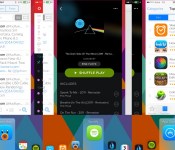
Jailbreak Tweak Auxo 2 Brings Unified Control Center, Gesture-Based Multitasking to iOS [iOS Blog]
Auxo 2, the follow up to 2012’s popular jailbreak tweak Auxo, is now available in the Cydia Store. The product of developers @Sentry_NC and QusicS, the new tweak includes a number of features including a unified view for the Control Center and app switcher, a Quick Switcher for moving between apps using gestures, a hot corners feature that allows access to apps by touching the corners of an iOS device, and more.

Unlike the stock iOS 7 experience, Auxo 2 allows users to access the app switcher, multitasking controls, and Control Center toggles entirely with the use of gestures, all while combining all three elements into one interface and offering a variety of settings for customization.
Auxo 2’s flagship feature is the Quick Switcher, which allows users to switch between apps by swiping from the bottom left of a device and releasing a finger on an open app. By default, the Quick Switcher is limited to six apps, but users may enable an unlimited amount of apps in the settings. The Quick Switcher features a fluid animation in line with the rest of iOS 7, and features dynamic full screen previews for each app.

Meanwhile, Auxo 2′s Multi-Center feature combines iOS 7′s toggles, App Switcher, and media controls into one interface. In order to achieve the sheer number of controls located within Multi-Center, Auxo 2 locates a few elements in different places, with the AirPlay/AirDrop buttons and control toggles at the top, which is followed by media controls at the bottom. Multi-Center animates in and out of an open app, and contains various customization settings.
Auxo 2 also offers a Hot Corners feature, which allows users to return to the home screen by swiping up from the bottom right corner of the screen or access the app switcher from swiping up from the bottom left of the display. This enables users to access both UI elements with only gestures as opposed to using the home button.

Among other features, Auxo 2 allows the user to scrub through iTunes Radio tracks with its media controls, something that is not possible with the stock Music app. Other toggles for turning off elements, accessing the last open app, inverting the Hot Corners feature, and disabling the tweak in selected apps are available as well.
Auxo 2 is out now on the Cydia Store for $3.99, and is available at a discounted price of $1.99 for users who bought the original Auxo tweak. iDownloadBlog also has a detailed review of Auxo 2 covering all of its major features and customization options, and can be seen in the video below.

     |

‘Hearthstone: Heroes of Warcraft’ for iPad Now Available in New Zealand, Australia, and Canada [iOS Blog]
Blizzard Entertainment’s digital card trading game Hearthstone: Heroes of Warcraft for iPad soft-launched today in Australia, Canada, and New Zealand, after launching for Mac in March.
The free-to-play collectible card game is set in the Warcraft universe, allowing players to compete with Magic the Gathering-style decks in one-on-one fights via Battle.net or against the computer. The iPad version of the game will connect to Battle.net accounts, syncing with the PC/Mac version.
JUMP RIGHT IN: Fun introductory missions bring you into the world of Hearthstone’s intuitive gameplay.
BUILD YOUR DECK: With hundreds of additional cards to win and craft – your collection grows with you.
HONE YOUR SKILLS: Play in practice matches against computer-controlled heroes of the Warcraft universe. Thrall, Uther, Gul’dan – they’re all here!
COLLECTION TRAVELS WITH YOU: Your card collection is linked to your Battle.net account – enabling you to switch your play between tablet and desktop with ease.
AND FIGHT FOR GLORY: When you’re ready, step into the Arena and duel other players for the chance to win awesome prizes!
While the game is currently only available to players in New Zealand, Canada, and Australia, as a soft-launch for testing purposes, the game should launch worldwide soon. Blizzard is also planning to release an iPhone app later this year.
| |

HTC’s collaboration with Fitbit isn’t the end of activity trackers… yet

When HTC developed the new HTC One (M8) it knew it had a dilemma. If it played it safe, and did a general all-round specification bump, it risked underwhelming the public. Conversely, by over-cooking things, and innovating for innovation’s sake, it could saddle the phone with software gimmicks and unnecessary hardware additions. It ultimately attempted to land on that thin strip of middle ground. We’ve already covered the return of the Ultrapixel, that new duo camera, and the latest version of Sense in our review. Potentially, though, it’s the low-profile “Smart Sensor hub” that might prove to be the dark horse — not just for HTC, but for Android, and smartphones as a whole. The new Smart Sensors are what enable the LG-like tap-to-unlock feature, and all those other fancy wake gestures (covered in the review) while the phone is in standby. The cool part being that HTC has given developers access to these sensors for their own projects. Fitbit was the first app to make deliberate use of it, but who will it benefit in the long run?
If you’re unfamiliar with how a Fitbit device (or its any of the alternatives) works, sensors (usually an accelerometer, sometimes an altimeter too) in the wristband send data to a mobile or desktop app wirelessly, or by connecting the band directly to a PC. Most smartphones have had accelerometers in them for a number of years now, so we’re left to assume that it’s a practicality (read:battery) issue that’s prevented handsets from performing a similar function natively so far. The new HTC One, however, has swanky new sensors in it that let it track motion without engaging the main processor, thus making it much less power-hungry. Apple did something similar with its M7 co-processor, which also takes the juice-sapping silicon out of the equation, allowing for low battery-drain constant motion recording. Incidentally, Fitbit has a similar app for iOS that performs basic motion tracking without any additional hardware.

So, why didn’t HTC just make its own fitness app a-la Samsung’s S Health and be done with it? Well, possibly for a number of reasons. Not least, that HTC is aware that it’s in the phone making game, not the fitness game. Secondly, a proprietary platform for these types of features can come across as gimmicky, inferior — or worse, a thinly veiled attempt at locking users into an ecosystem. By working with Fitbit, HTC benefits from the expertise of one of the biggest players in the game, and its existing user base. Likewise, new HTC customers can enjoy the fitness tracking functionality, knowing that they’re not locked into HTC phones forever more, and can take their data with them should they ever decide to do so. The net result is that HTC gets a neat new feature on its latest flagship, as well as a showcase app for its Smart Sensor hub API — which is open to developers to use for a whole host of applications. What about Fitbit’s end of the deal? Isn’t it just cannibalizing its own business with these apps that don’t require its hardware? Potentially, for a small number of fence-sitting customers — but it’s likely banking on the brand exposure it gets in return being worth it.
The reality is, however, that in its current form (on both Android and iOS), the native Fitbit app only really serves as an introduction to the concept of fitness tracking. Much like the free-to-download version of many software programs, you’re left with the feeling you’re quite not getting the whole experience. To start with, via the HTC One version of the Fitbit app, you can either choose the phone to be your tracker, or a Fitbit band. Not both. If you don’t have a band, this means you can only track activity while you have the phone with you — so, gym sessions or activity in the great outdoors will require lugging the handset along, and forget about swimming obviously.

The second issue is that it doesn’t appear to be as accurate (yet) as when using the traditional app with Fitbit hardware. In our early testing it looked promising, but it has since become apparent there’s quite a difference between the two. We put the new HTC One side by side against Fitbit’s own Flex device and by the end of the day the step counts differed by a smidge over 2,000 (we logged over 9,000 according to the Flex and another independent tracker, but just over 7,000 on the phone). On a second occasion there was nearly a 5,000 step shortfall when tracking using the phone.
You can of course still choose to use the HTC One with your own Fitbit device as before, if you already own one/want to buy one, but that just returns you to the status quo. We’d initially thought that you might be able to use the phone as a tracker along side your wristband, for those times you forgot it, or for increased accuracy, maybe even hooking into additional etc. — but currently that’s not the case. Even when Nike launched an app that uses just the iPhone 5s handset to track your movement (and earn its “Nike Fuel” score without a FuelBand), it felt more like the idea was more about engaging users in its app/platform, with the ultimate goal of converting users to (Fuelband) buyers.
It might be that the new sensors in the HTC One, and/or the API hooks as implemented by Fitbit aren’t able to compete with purpose built software and hardware yet. This wouldn’t be surprising; we only have to think back to early camera phones to remember how poor they were in comparison to existing point-and-shoots they now virtually replace. Or possibly, Fitbit and Nike are just “holding something back” so as not to write themselves out of the game completely. This begs the question: who profits from this latest arrangement (Nike is still Apple only, and has pretty much confirmed that’s not about to change soon)?
Right now, HTC and Fitbit are clearly hoping to exchange fluids with their respective customers, but in the long term, Fitbit needs to sell hardware, especially after having to recall its Force tracker from the market. It doesn’t need to start getting people used to the idea they might only need the free app (something we suspect Nike is weary of in its deal, too). HTC, on the other hand, profits from a nifty feature and brand association (in a similar way that had hoped for with Beats), but one that currently doesn’t deliver.

As technology develops, and becomes more ubiquitous, all-day activity tracking across multiple platforms (Android/iOS smartwatch etc.) will likely become a standard smartphone feature. We’re still at the beginning of this process on both Android and iOS though. Likewise, Intel’s recent acquisition suggests we could see motion tracking spread to a whole host of different devices and platforms. When this happens, it’s vital that the data created on the phone is open to third-party apps just like location, orientation and so on are today, so that the stage is set for it to be utilized more freely and effectively. This leaves the likes of Fitbit et al with the same decision faced by camera-makers. Out-innovate the phones, and see how long they can stay ahead, or think long and hard about becoming a software-only proposition.
In the case of the latter, phone makers could then just bundle a generic wristband in the box (to cover the periods when a phone isn’t appropriate — like swimming), along with the headphones etc., or sell it separately as an accessory, like it appears Samsung might be considering. This would at least provide another option for brands like Fitbit to remain in the game, as an OEM. For now, however, all the current phone-only options aren’t quite there yet, wristband-makers still have a market for their hardware, and other Android handset manufacturers have time to catch up.
Filed under: Cellphones, Wearables

Turkey’s Constitutional Court: Twitter ban violates freedom of speech

Since Turkey blocked access to Twitter in late March — in response to posts about the prime minister’s alleged corruption — there’s been plenty of legal back-and-forth, with the ban even being lifted temporarily as judges weighed complaints against the government. Today’s news might mean Twitter is back for good: The Constitutional Court ruled that blocking the social-media platform was unconstitutional on the grounds that it violates the right to free speech. Most importantly, the ruling requires Turkey to immediately restore access to Twitter.
According to the Hurriyet Daily News, this ruling may be used as a precedent for similar cases in the future, possibly preventing authorities from imposing widespread bans like this again. It’s unclear whether this ruling will also affect the country’s ban on YouTube, which is currently in effect. In response to the ruling, Twitter’s @Policy account tweeted: “We welcome this Constitutional Court ruling, and hope to have Twitter access restored in Turkey soon.”
Filed under: Internet
Via: Hurriyet Daily News
Source: @Policy

Fire TV ‘isn’t trying’ to be a game console, but is Amazon’s first real investment in gaming

What is Fire TV? Well, it’s Amazon’s set-top box. Er, at least it has that functionality. But Fire TV does more than just stream media, thankfully; we’ve got plenty of devices that do that stuff. The $99 tiny black box that Amazon unveiled this morning in New York City streams media (video and music through a variety of services) and it also plays games. Despite that being half the device’s functionality, Amazon VP Pete Larsen reassured us that Fire TV “isn’t trying to be a game console.”
So, what is it trying to be then?
Good question — even Larsen doesn’t know. We asked him what product category Fire TV is aimed at. “We didn’t really think about that,” he told us. “We looked at what customers were doing with the current streaming media devices out. We tried to mine the customer reviews to find what was working and not working. And then we say to ourselves, ‘How do we solve those problems?’ Which we did, with performance, voice search and open ecosystem.”
Amazon’s “create-a-market” approach isn’t new to the company. The Kindle is but one example of Amazon creating a market by creating a product. In the case of the Fire TV, a $99 box that straddles the worlds of set-top box and game console, it’s less clear that a market is ripe for creation. Larsen disagrees. “This isn’t trying to be a console, but we do think there’s a great opportunity there in between a console and a smartphone for fun, quality games,” he told us. Time will certainly tell, but Amazon’s far from the first to broach that angle (OUYA, anyone?).
Regardless of the hardware involved, there’s no doubt that Amazon’s making a massive gaming push with Fire TV. Even if the device ultimately doesn’t succeed, Amazon’s mass-hiring veteran game devs like Kim Swift, Clint Hocking and Ian Vogel (and buying studios, like Double Helix) to build internal talent. There are swathes of internal teams working on dozens of games for Fire TV, all created in-house at Amazon Game Studios. The man heading up games for Amazon, Mike Frazzini, told us that’s exactly the idea.

“We’re taking this very seriously; we’re committed; and we’re making big investments,” he said. Frazzini spoke to the history of Amazon’s game investment, calling Game Studios “a few years” old, though it’s only within the last year that his staff really ramped up development. Indeed, the few developers on-hand at this morning’s event echoed that sentiment — Minecraft studio Mojang said it got the Fire TV build of Minecraft: Pocket Edition running in just the past few weeks (with some help from Amazon). The same goes for the folks at Telltale Games, who only first started working with the Fire TV in January (they’re jumping in headfirst on support, with The Walking Dead Season One available at launch and other Telltale Games titles arriving later this year).
At very least, even if the half-media player/half-sorta-kinda game console idea that is Fire TV doesn’t work out in the long term, Amazon’s making a seriously major investment in the world of video games. And that — regardless of the rest of today’s news — is a seriously interesting piece of news.
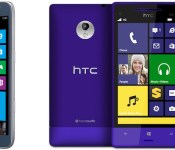
Sprint will roll out Windows Phone 8.1 upgrades this summer

Windows Phone fans on Sprint don’t have to worry about when they’ll get the 8.1 update on their devices. The carrier tells Engadget that both the HTC 8XT and Samsung’s ATIV S Neo are getting 8.1 sometime this summer; more details should come closer to the rollout. That’s later than when we’ll see the OS preloaded on brand new devices, but it’s good news for those who are still happy with both Microsoft’s mobile platform and Big Yellow’s network.
Filed under: Cellphones, Mobile, Samsung, Microsoft, HTC, Sprint

Hulu hires Warner TV exec to lead original content, adds a slew of exclusive streaming deals

Are you caught up on all of Amazon’s and Microsoft’s news today? Good, because Hulu has a few announcements as well. First up, the streaming TV service has appointed a new head of content, Craig Erwich, who, given his pedigree, will likely help bolster the company’s push into original content. Erwich comes from Warner Brothers’ TV division where he oversaw business operations, development and production, and prior to that, he spent a dozen years at FOX Broadcasting. As Hulu tells it, Erwich has been “instrumental” in creating shows like House, Pretty Little Liars and 24. Speaking of TV shows, the video outfit has also announced that it’s locked up exclusive streaming agreements for a handful of new programs.
As of today, Hulu Plus is the only service that will have Brooklyn Nine-Nine, Top Chef, Top Chef Masters and The Mindy Project. In terms of shows that you would probably rather that no-one knew you watched, The Real Housewives, Flipping Out, Keeping Up With the Kardashians, and The Millionaire Matchmaker are en route too. Hulu hasn’t provided a firm date just yet, but says the new shows will be available in the coming weeks.
Filed under: Home Entertainment, HD

Google Keep receiving major update today

Sometimes Google creates a great application, puts it in the Play Store, and forgets about it. Unfortunately, Google Keep has been the victim of that for quite a long time. Well, good news! Keep is receiving a pretty big update beginning today.
The update for Keep will be to version 2.2, and will bring a bunch of new features. The most noticeable change is that the status bar will now feature the same bright yellow that we’re all used to. Also, if you’re in a note set to a different color, it will change to that color.
What’s more, is Keep is getting search functionality for images, and a Trash option in the menu, allowing you to keep documents for a bit longer than usual.
Pick up the update from Google Play!
The post Google Keep receiving major update today appeared first on AndroidGuys.
 AIVAnet