


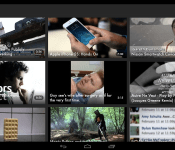
ShowYou video discovey app adds Chromecast support

Remixnation have today added Chromecast support to their iOS and Android app ShowYou, allowing you to push interest-curated online videos to the big screen.
ShowYou helps find the most interesting online videos based on your interests and what your friends share on social media.
The picked videos then get arranged into a lineup programmed around your interests, and now these can be streamed directly to the Google Chromecast.
What can ShowYou do?
☆ Follow and browse videos from channels like the Daily Show, Break, Reddit, Funny or Die, Pitchfork, Vanity Fair and many more
☆ Browse videos from your Twitter timeline and your Facebook feed
☆ Search index of over 90 million videos selected by our users
☆ Create your own channel by simply sharing videos
☆ Watch and react to videos shared by your friends.
☆ Share videos with your friends on Showyou, Facebook, Twitter or by email.
ShowYou is available for free on the Google Play Store.
The post ShowYou video discovey app adds Chromecast support appeared first on ChromeWatching.
Read the rest at the source, ChromeWatching.com
The post ShowYou video discovey app adds Chromecast support appeared first on AndroidGuys.

CyanogenMod 11.0 M5 Release hits servers, ready for download

CyanogenMod 11.0 M5 has begun hitting the community distribution channel ready for download bringing a whole bunch of features.
M5 releases aren’t nightlies, or even stable releases pursue, more like semi-stable releases of CM11 for select devices, offeirng the perfect blend for those users who like to be on the cutting edge of technology but haven’t got the time to flash a new build of CM each night.
Here’s whats new in CM11 M5:
Trebuchet – Fix last icon from hotseat disappearing
Trebuchet – Fix custom home transition effect
Volume Panel – Increase opacity of transparency (previous level led to visibility concerns)
WhisperPush – Relocate to Privacy menu
WhisperPush – fix NPE on viewing identity if unregistered
Translations – Initial imports from CrowdIn (followup blog post next week)
MultiSim – Additional support patches (25+)
Privacy Guard – Additional AppOps permissions
Additional Right-to-left (RTL) layout mirroring support
Settings – Add ‘screen color’ support
Quickboot support (device specific)
Stylus – Fix eraser being disabled by palm rejection
NavBar – Allow toggle in runtime (needs kernel support)
Add ethernet icon support to status bar
Dialer – Open Source forward/backward/incoming look-up
It seems the Galaxy S3 and Galaxy S4 were left out in this release in order to continue work on a build that works for all variants of the device. Hit up this link to get downloading now.
The post CyanogenMod 11.0 M5 Release hits servers, ready for download appeared first on AndroidGuys.
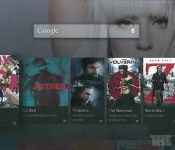
Android TV interface and details leaked

It seems Google is not stopping at the Chromecast when it comes to taking over your living room since a whole load of screenshots have surfaced on the internet showing software called Android TV running on new hardware.
Unlike Chromecast, Android TV seems to go directly after the newly announced Amazon FireTV and Apple TV by providing an entertainment platform used to house media as a standalone device, rather than just a streaming dongle.
According to the sources, Google is already approaching developers to bring their Apps to the platform, and it seems the likes of Netflix, Hulu, and Vevo are already involved, as well as Google’s own services including Hangouts, Play Movies, and Youtube.
Whilst it may seem confusing that Google would be releasing such a product, it makes perfect sense in order to bring the company’s services off the mobile device and onto the big screen, removing the dependancy for a mobile device to access the content.
No doubt Google will be detailing more about Android TV at Google I/O in a few months time, but in the mean time drop us a comment below and let us know if you’d be interested in such a device.
The post Android TV interface and details leaked appeared first on AndroidGuys.
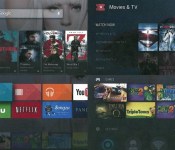
Apparent Android TV UI Screenshots Surface

Remember Google TV? Yeah I barely remember myself, but I do remember how excited I was when Honeycomb made it to my Logitech set top box. Well it looks like Google doesn’t want to give up on bringing Android to you and your loved ones in the living, because Android TV is on its way it seems. Supposed screenshots have surfaced on the net, showing us what Android will look like on our TVs.
The TV platform will of course supply streams to all the major video stream providers, and it will also be game friendly. The UI groups everything in cards, not really the card look in the Google Now interface, but it still looks pretty lovely. Google also is wanting developers to get on developing apps for the new TV world, and I am sure they will come up with some awesome apps. Let us know what you think about Android TV.
Source: Android Police
//<![CDATA[
ord = window.ord || Math.floor(Math.random()*1E16);
document.write('’);
//]]>

Google reportedly looking to simplify home entertainment with Android TV

Google has been edging away from the original Google TV concept for a while, but it now looks like the company is ready to make a sharper break from its past. The Verge claims to have documents revealing a new Android TV release with a more conventional (if very slick) living room interface. Rather than stress apps or the web, the new OS would rely on a familiar, simplified card layout centered around accessing content quickly. It would put more emphasis on home screen suggestions, and it would be easy to resume media you were playing on your phone or tablet. There are also mentions of gamepad support, suggesting that games may play a more important role this time around. We don’t know just when the new Android TV software would reach screens and set-top boxes — the folks in Mountain View aren’t commenting. If the leak is accurate, though, we’ll at least know that the search giant isn’t fazed by Google TV’s past challenges.
Filed under: Home Entertainment, HD, Google
Source: The Verge

Google Preparing ‘Android TV’ Set-Top Box with Native Apps, Simple Interface, Voice Search
Google is gearing up to release a new Android TV set-top media box that utilizes a simple card interface with native apps and games, voice search, and a proactive recommendation system, according to new documents obtained by The Verge.
The documents note that while Android powers the box’s experience, the interface will be represented by a simple “cards” interface that represent a variety of mediums, including movies, shows, apps, and games. Users will be able to scroll through the interface with a four-way directional pad that contains Enter, Home, and Back buttons, with the set-top box reportedly featuring “optional” game controllers.

“Access to content should be simple and magical,” reads one Google document, which adds that it should never take more than three clicks or gestures to go from the homescreen to enjoying a new piece of content. Even search appears to be secondary to intuitively understanding what you want and delivering it as soon as possible, though search will be still be one of Android TV’s primary tools. In addition to universal search, pressing the Search button on the controller will let you search from within individual apps as well.
Moreover, Android TV is said to contain support for voice input, notifications, and search, with the set-top box also being able to recommend content based on a user’s interests and resume content viewed elsewhere the moment Android TV is turned on. Google is reportedly asking select developers to create games and apps for its new set-top box with optimized interfaces for the TV, as apps for Vevo, Netflix, Hulu, Pandora are expected to ship with the device. The company will also work in its own apps including Play Movies, YouTube, and Hangouts.

“Android TV is Android, optimized for the living room consumption experience on a TV screen,” writes the company, but the focus is on simplicity for now. Google is stripping away unneeded features like telephony, cameras, touchscreen support and near-field communication to keep developers focused, and handing them ready-made interfaces where they can hopefully just plug in shows, games, photos, music, and films.
Google is also expected to keep its popular Chromecast HDMI streaming accessory with the release of Google TV, with The Verge noting that developers will be required to build two different interfaces for the two different devices.
It is not known specifically when the device will launch, but it is clear that Google’s Android TV will enter a growing market of set-top boxes – just this past week, Amazon launched its own Fire TV media streaming box with voice search, game support and more that competes with others devices such as Apple TV and Roku.
The move comes as Apple is said to be preparing a new version of the Apple TV that will integrate with Comcast’s network to enable a streaming TV service for users. Apple is expected to unveil its new Apple TV sometime in the near feature, although some rumors have suggested a launch as early as April.
     |

Wilson introduces what could be the basketball of the future

Ahead of the NCAA men’s Final Four, which takes place today and you can watch via March Madness Live 2014 or on TV, sporting goods maker Wilson has revealed its new, smart basketball. Due to launch this winter (around the holiday season, we’re told), Wilson’s attempting to revolutionize the game of hoops by placing performance-tracking sensors inside of a basketball. The technology, developed by Wilson in partnership with Finnish artificial intelligence firm SportIQ, will allow ballplayers to pair the ball with an app and use it to easily track performance data. This means you can see how well you’re shooting; which spots on the court you’re most efficient from; and the amount of time it takes you to let a shot go.
As it stands, Wilson says its newly minted intelligent ball is a consumer-focused initiative, but that it is “certainly extendable” to future basketball competitions. Wilson’s VP of Digital, Tom Gruger, told Engadget that development for the ball started more than two years ago, and the goal from the beginning was to “provide actionable data to players so their training could be more focused on ‘actual’ rather than ‘perceived’ performance.” Gruger also said the company is working to bring a similar type of tech to products from other sports: “Wilson is pursuing solutions in all of its primary sport categories. We’re excited by the roadmap ahead and feel that we can change the way that sport is approached.”
Filed under: Misc, Peripherals, HD
Source: Wilson

Here’s what you missed at Microsoft’s 2014 Build conference

We came, we saw, we barked orders into a phone. Though Microsoft’s annual developer conference is technically called “Build Windows,” we actually spent far more time at this year’s event playing with handsets — almost no PCs, come to think of it. Indeed, the star of the show was a husky-voiced lady (fembot?) named Cortana, Microsoft’s new Siri-like personal assistant. Of course, Cortana wouldn’t exist outside of the next version of Windows Phone (that’d be v. 8.1.), which we also got a glimpse of this week. In case you missed our three-hour liveblog — or were too busy following our Amazon Fire TV coverage — we’ve got a neat recap below. We promise we’ve left out all the boring bits about developer tools. Mostly, anyway.
Windows 8.1 Update

OK, we lied: there actually was some Windows news this week. And yes, we did play with at least one full-fledged PC. Microsoft announced a fairly modest update for Windows 8.1, and almost all of the improvements are aimed at winning over mouse-and-keyboard users. For instance, you can now pin Metro-style Windows Store apps to the desktop, with the Windows Store shortcut pinned by default. Speaking of the desktop, PC makers now have the option of booting to the desktop by default, though you’re really only likely to see that on traditional PCs, maybe not hybrid devices.
Other changes: when you right-click on something on the Start Screen, you’ll see your options pop up right there, where your cursor is, not at the bottom of the page. Wrapping up, there are dedicated power and search buttons on the Start Screen; you can pull up the desktop Taskbar even when using Windows Store apps; and Metro-style programs now have a Title Bar up top allowing you to close out by hitting an “X” in the upper-right corner. Really, lots of things that should have been baked into Windows 8 to begin with.
Return of the Start Menu

Oh, and speaking of things that should have always been part of Windows 8, Microsoft casually dropped some major news toward the end of its epic keynote: the company is planning to bring back the Start Menu you all know and miss. This time, though, it won’t just include a list of desktop programs, but there’ll be a second pane over on the right showing Live Tiles with Windows Store apps. Smart move, we say: not only would it make Windows 8 feel more familiar to new users, but it would drive home the point that whether it’s a desktop app or a Windows Store download, it’s all the same OS.
Cortana

Who needs Siri when you can have an assistant named after the life-saving sidekick in Halo? Though Microsoft’s new voice recognition program isn’t perfect, it’s at least rich in features, and does basically everything you’d expect of a modern voice-controlled personal assistant for your phone. That means, you can use Cortana to help you compose emails and texts, set reminders, take notes and search the web (with lots of help from Bing, of course). Also, much like Google Now, Cortana gets smarter over time as she learns more about your various likes, interests and late-night taco addictions (not that there’s anything wrong with that). Using a Notebook feature, you can input a lot of this information yourself, including Quiet Hours when you’d rather not be interrupted by phone calls (even then, select people, like your family, can still get through).
In our brief hands-on, we found that Cortana only responded when we phrased our queries in a certain way. (Pro tip: start with verbs. As in, “Remind me to ask Brian for a status update.”) Also, you have to press a button on-screen anytime you want Cortana to start listening. Still, Cortana’s only in beta and indeed, Microsoft tells us it’s working on an always-listening mode similar to what you’ll find on the Moto X. Better language recognition is also in the works, according to company reps, which means you might get away with saying “Can you find me a Thai restaurant in Palo Alto?” Lastly, Microsoft promises the final version of Cortana will have even more “personality” — whatever that means.
Windows Phone 8.1

But there’s more to Windows Phone 8.1 than just Cortana. The OS update, which will hit existing devices in the coming months, brings a number of new features, including a drop-down Action Center for notifications that looks suspiciously like the one in Android. Windows Phone users also get a customizable lock screen and a Windows Store that makes it easier to find featured apps — two improvements we first saw on Windows 8.1 for the desktop. Additionally, Windows Phone 8.1 ushers in a Wi-Fi Sense feature that automatically accepts the terms of service for networks, and securely shares your router’s password with contacts in Facebook, Outlook.com and Skype. Thus, you can give them guest access to your internet, but not your full network. Finally, there’s a new weekly view in the calendar, and you can use “Shape Writing” to draw letters on the keyboard, à la Swype.
New Lumia phones

What would a Windows Phone update be without some new hardware to go with it? Once Microsoft finished its three-hour opening-day keynote, Nokia held a party of its own, where we had a chance to play with the newly announced Lumia 930, 630 and 635. Though the 930 is clearly the flagship, it’s also incredibly familiar. In fact, it’s basically the Lumia Icon we reviewed two months ago, just with support for global LTE (the Icon is exclusive to Verizon in the US). But, for those of you outside the States who have been ignoring the Icon for just that reason, here’s a quick refresher: the phone has a 5-inch, 1080p screen, a 20-megapixel PureView camera and a quad-core Snapdragon 800 processor. The main difference, aside from those foreign LTE bands? The color options. Yes indeed, while the US model comes in just black and white, the 930 will be also available in orange and neon green.
Moving on down the line, the 630 and 635 are more or less identical to each other — at least on the outside. Both have a 4.5-inch screen with a 854 x 480 display, 5-megpaixel camera, Snapdragon 400 processor and a modest 512MB of RAM. The main difference is that the 630 is 3G-only with a choice of a single-or dual-SIM setup. The 635, meanwhile, runs on LTE and uses just one SIM. The Lumia 630 will cost $159 / $169 off-contract, depending on whether you get the single- or dual-SIM version. The 635, meanwhile, will cost $189.
Windows Everywhere

Get ready to see even more Windows apps on even more devices. As part of its opening-day keynote, Microsoft told a crowd of developers that it will now be possible to write a Windows app for one platform — say, Windows Phone — and then port it over to the tablet or desktop, all with minimal work on the back end. From there, developers will have the option of offering their apps in such a way that consumers only have to pay for it once, though they’d still be able to download it multiple times across different kinds of devices (tablets, PCs, et cetera). In theory, devs will also be able to write universal Windows apps for the Xbox too, though Microsoft will still curate the selection, as well as decide which apps require an Xbox Live Gold subscription.
Additionally — and this is big news — Microsoft announced that Windows would be free for phones, tablets smaller than nine inches, and miscellaneous gadgets that fall into the “Internet of Things” category. That gives manufacturers a bigger incentive to build Windows devices, which can only mean more options for you, the consumer. Finally, Microsoft also said it intends to bring Windows to robots and a “new class of small devices,” which we can only assume means wearables.
A look at Office for Windows tablets

It was just last week that Microsoft came out with Office for iPad, and now we’re seeing a glimpse of what Word, Excel and PowerPoint would look like on Microsoft’s own Windows OS. After teasing a touch-friendly “Metro” version of Office last year, the company is now ready to give us a slightly deeper look. The company used its day-one keynote to show us a few screenshots of the app-in-progress, which sports the familiar Ribbon UI and makes good use of gestures like pinch-to-zoom, and finger-highlighting. No word yet on how feature-rich it will be, but we can only hope it will be just as functional as the new iPad suite.

How to install the Amazon App Store on your Android

Is the Google Play Store not giving you what you want? Perhaps you may want to try the Amazon Appstore.
Although seasoned Android users may already know about this process, here is a walkthrough for those new to the platform. For those who don’t already know, you can download apps from sources other than the Google Play Store. Probably the next most popular way to do this is from the Amazon Appstore (the same app store that the Kindle Fire tablets use).
Amazon offers a free paid application everyday, something that Google Play only does on a rare occasion. That may be reason enough to install it, but it also offers some great recommendations as well as exclusive apps.
Since the Amazon Appstore isn’t available in Google Play, you need to do a few extra steps in order to get it installed. Here’s a step-by-step guide on how to install it on your Android.
1. Enable “Unknown sources” on your device
Before we begin, there’s a setting that needs to be changed on your device. First, navigate to the Security tab in your Settings menu. If you’re on an older Android device, you may need to navigate to the Apps menu under Settings. Once in the Security menu, scroll down until you see “Unknown sources”. Make sure the box is checked.

This feature is on your Android device to ensure that your phone stays safe. When this box is checked, it allows applications to be installed on your device that aren’t in the Play Store.
2. Download the Appstore
In the browser on your phone, head over to the Appstore download page. Once there, click the big orange “Download the Amazon Appstore” button. You should see a message reading, “This type of file can harm your device. Do you want to keep AmazonApps-release.apk anyway?” Click “OK”, and the file should begin to download.

3. Install the Appstore to your device
In your notification shade, you should see the AmazonApps file. Click on that notification, and you will see this screen:

Read through the permissions if you’d like, and click Install. After it’s done installing, you’re all done! Sign in with your Amazon username and password, and you can begin downloading anything you’d like.
Oh, and remember to go back into Settings and uncheck that Unknown Sources box.
Still having trouble? Head to the comments and we will do our best to help you out! If there is anything you would like to suggest to AndroidGuys or to any other readers, feel free to use the comment section below!
The post How to install the Amazon App Store on your Android appeared first on AndroidGuys.

You can now search Yelp on mobile using emojis

Are your Twitter friends jumping down your throat for flooding them with emojis? Well, you might want to let off some emoji-filled steam on Yelp instead, because the business directory app now lets users search for establishments with the popular ideograms. Yes, it’s just what it sounds like — on mobile, the app parses any emoji you put in the search box (even if it’s that smiling turd icon, as you can see after the break) and returns relevant results.
It’s fun, but unless you’ve memorized the symbols on your phone or tablet, it’s not any more convenient or faster than typing in words. So, if you’re scratching your head wondering why Yelp’s developers would even bother adding the feature, the answer is, well, they don’t exactly have a reason. A spokesperson told us that the app’s engineers came up with the crazy idea during a recent company hackathon, and guess what? Yelp’s higher-ups ended up loving it so much, they officially added it to the app.
Lol so proud of @yelp mobile team. First to provide emoji local search. pic.twitter.com/FUlsPdvYDH
– Jeremy Stoppelman (@jeremys) April 2, 2014
Via: The Next Web
 AIVAnet