
[VIDEO] UI Performance test between the Nexus 5 and Samsung Galaxy S5 shows stock Android still wins Out
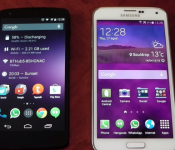
 The Samsung Galaxy S5 is one the first Android devices on the market right now with the new Qualcomm Snapdragon 801 processor, boasted updated efficiencies over its predecessor, the Snapdragon 800. So which is faster? It’s obvious that the 801 is faster on paper, however there is not yet a device with the 801 that natively comes with stock Android. So to see if there are any potential differences in speed, YouTuber Chris Nacca has performed a UI Performance test between the Nexus 5 and Samsung Galaxy S5, the Nexus 5 with its SD800 and Galaxy S5 with its SD801, the results of which you can see in the following video:
As you can see, despite the SD801 having a slight performance advantage, the bloating effect that the TouchWiz has on the UI performance of the Galaxy S5 is quite significant. While there may have been improvements to TouchWiz this time around, it still pales in comparison to the Nexus 5 with its older, ‘inferior’ SD800. As Chris mentions, however, that’s not to say that the Nexus 5 is definitely the device to get; the Galaxy S5 is still a blisteringly fast device and is probably worth the pretty penny, but in a speed test of the supercars of Android royalty, the Galaxy S5 is the slower of the two devices.
What do you think of the UI Performance test between the Nexus 5 and Samsung Galaxy S5? Are you surprised by the results, and have the results changed your mind at all about either of the phones? Let us know what your thoughts are in the comments.
Source: YouTube via Phones Review
//<![CDATA[
ord = window.ord || Math.floor(Math.random()*1E16);
document.write('’);
//]]>

How lasers are used in the manufacturing process of medical devices
Today laser technology plays a key role in the manufacturing of medical devices. These devices often need to be small and non-intrusive, making advanced laser technology the best choice for cutting, drilling and marking them. Here we will take a further look into how lasers are used in the manufacturing process of medical devices and the benefits of this technology.

Lasers are used to mark medical devices like pace makers.
Image source: http://farm7.staticflickr.com/6152/6239779379_1bd9d4e3e6.jpg
Marking medical devices
Laser technology is used to create unique device identifications on medical devices. These unique IDs make it easier to identify equipment and can be incredibly beneficial when products need to be recalled in order to improve patient safety. The industry and vendor specific ID markings are usually made up of long alpha-numeric strings, which may include the place and data of manufacture, aswell as things like the serial and part numbers for a particular device. Seeing as medical devices are more often than not small (with many being smaller than the average pencil) it takes precise and unparalleled laser technology in order to create the necessary markings.
Advanced laser technology is able to produce markings without damaging the chemical makeup of a medic device which protects it from germ intrusion and corrosion. Laser marked surfaces have a resistant finish which will remain in a good condition, no matter how many times they have been cleaned and sterilised over the years.
Lasers can be used to mark everything from sensitive medical devices like catheters and insulin pumps, to products made of silicone and polyamides, which people struggled to mark in the past.
Cutting medical devices
Diode lasers suitable for industrial applications are commonly used in the production of medical devices. The fact they offer such a precise energy output, helps to improve the reliability and quality of the medical devices. Today laser system developments can be configured by users, allowing them to select the pulse shape of the laser. This makes the laser more flexible and user-friendly, allowing for optimal precision.
Laser technology is used to cut medical stents. These are small, lattice-shaped tubes that are made from metal and are inserted into the arteries to restore blood flow. In order for medical stents to work properly their edges must be smooth and they must be completely sealed as to avoid infections from occurring. The fact that the tubes have such tiny diameters (usually between 1mm and 10mm in wall thickness) means that precision is required during the cutting process. Fibre lasers are the recommended choice for this process. Their pulse frequency and duration helps to significantly improve user control.
Welding medical devices
Nd: YAG pulsed diode lasers are often used to weld intricate and heat sensitive parts of medical devices such as pacemakers and electrical devices containing batteries. Seeing as these devices are implanted in the body, they need to be hermetically sealed. To do this a high peak-energy pulsed laser is used to create the seal without damaging the device.
Drilling medical devices
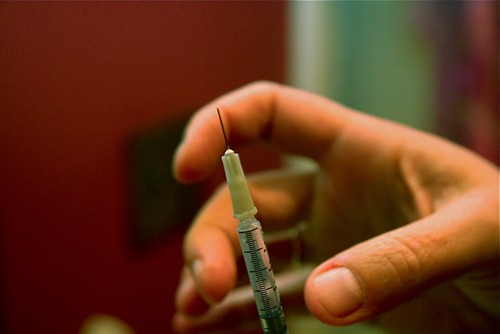
Pulsed Nd: YAG lasers can also be used to drill tiny and precise holes in medical devices. This includes the holes in those long and thin hypodermic needles you see at the hospital, as well as other drug delivery devices.
Ever wondered how they create the hole in hypodermic needles? The answer is using pulsed Nd: YAG laser technology.

Image source: http://farm4.staticflickr.com/3242/3021193208_5b5ab5fc85.jpg
Conclusion
From reading this article, you will see just how important the role of laser technology is in the medical device manufacturing process. If you are looking to invest in laser technology then visit the range of Industrial lasers solutions from JK Lasers.
Not only is it used to cut and weld the devices, but it is also used to mark them without causing damage. Laser technology provides supreme accuracy and versatility, enabling medical device manufacturing companies to make continuous cost-savings, whilst producing products of the very highest standards.
Image credits:Universitetssykehuset Nord-Norge (UNN)&stevendepolo

This onesie turns you into a walking WiFi hotspot

Forget carrying a separate hotspot router to have a local network wherever you go — what if you were the hotspot? Fashion designer Borre Akkersdijk has come very, very close to making that vision a reality with his experimental BB.Suit. The goofy-looking cotton onesie is knitted using a special 3D technique that leaves space for WiFi, Bluetooth, GPS and NFC connections, turning the owner into an access point. Akkersdijk showed off the potential of the suit at South by Southwest, where it became a roving jukebox: attendees could both track it on Google Maps and upload songs through it to create a special playlist.
There are only two prototypes of the BB.Suit, and Akkersdijk knows that it has room to evolve; he’d like to work with technology companies to create a smart clothing platform. To him, smartwatches and other current head- and wrist-worn wearables are too ungainly. It may be a while before connected apparel is more stylish than this puffy design, though. They’ll need slim, flexible electronics that can survive a washing machine. Until then, intelligent garments will likely remain too fragile and bulky for the fashionistas among us.
Filed under: Wearables, Networking
Via: Vice

[RUMOUR] Could the Samsung Galaxy Note 4 be using the Youm wraparound Display?
 Last week, we heard from Yoon Han-kil, Samsung’s Senior Vice President of Product Strategy, that Samsung would be looking to give the next Galaxy Note device a “new form factor”. The device, which would most likely be called the Samsung Galaxy Note 4, plans to breath new life into the Galaxy Note line of devices in an attempt to recapitalize on the market that the phablet devices helped create. According to ZDNet in Korea, this revitalization may include a Samsung design patent that we saw late last year.
 The patent in question is one named “Youm” and features a wraparound screen that does away with the conventional side bezels. What this allows is the extra screen space, which is tilted away from the main screen, to be used for addition user inputs including lock/unlock gestures or quick menu options. It’s a concept that Samsung has shown off prototypes for before, but has been suspiciously quiet about since then. While it’s definitely a tantalizing idea to consider that this design could feature on the Note 4, there’s no real concrete evidence to say that Samsung will utilize Youm.
What do you think about the Samsung Galaxy Note 4 using the Youm wraparound screen? Let us know what your thoughts are in the comments below.
//<![CDATA[
ord = window.ord || Math.floor(Math.random()*1E16);
document.write('’);
//]]>

Americans are optimistic about technology, except drones… and robots… and…

If you asked the average American what they think about the coming crop of technologies, you’d probably get some generic optimism. According to a recent Pew Research survey found that 59 percent of Americans expected that technology would make our lives better, only 30 percent worried that we’d be worse off because of scientific progress. More than eight in 10 even expect us to be growing replacement organs in labs within the next 50 years. But when dig into specific technologies, opinions start to turn a little more sour.
When considering the potential impact of something like drones, robots or genetic engineering Americans are quite wary. For instance, 63 percent think that we will be worse off if commercial or personal drones are given clearance to fly through US airspace. The worries over machines doesn’t end there either. 65 percent of Americans are concerned about the possibility of lifelike robots caring for our sick and elderly. And when it comes to altering our DNA to improve our intelligence or resistance to disease Americans are firmly opposed — with 66 percent saying it would be a change for the worse.
The numbers offer an interesting view into the American mind, which seems to hold contradicting opinions about science and technology. People appear to believe that their lives are better thanks to scientific progress and they believe that the overall impact of technology in the future will be positive. Yet when specific technologies are in question that would dramatically change how we live our lives or even what it means to be human (electronic implants), Americans become significantly more pessimistic.
Filed under: Misc, Robots, Science
Source: Pew Research

‘Multitasking’ Brings its Own Unique Way to Multitask – APP OF THE WEEK

Multitasking is an essential part of the Android ecosystem. It has been there since the very beginning, and finally other operating systems have adopted the much needed feature. Now when it comes to the stock experience of multitasking in Android, some are okay with how it works. It’s simple, fluid, and pleasing to the eye, but some people want a little bit more. There are a slew of multitasking apps out there, and I have even featured some of those apps on the App of the Week segment, but this new one, simply called “Multitasking”, brings a unique spin to the useful feature.
Multitasking is kind of like a sidebar app drawer, because well, you swipe to the right, and out comes a sidebar with app selections. Where it differs from the rest is that these apps are part of Multitasking, instead of having your entire app draw fitting into a sidebar. When you click on one of these apps, the app pops up in a nice little window in the center of your screen, giving you quick access to whatever you need, and you can access them when you are in another app. Thats isn’t it either; you can also open multiple apps at one time, and place the windows anywhere on the screen by simply holding and dragging. Love those overlays.
My only gripe about the app is that the free version will pop up ads at very random times. And I am not talking about little ads on the top and the bottom of the screen, I am talking about the whole screen gets taken over by the ad. I guess that is one way to get people to buy the pro version. Other than that though, I dig this app. It’s a unique multitasking experience, and I would suggest trying it out. Check out my video run-through below to se it in action, and let us know if you downloaded it, and what you think of it.
//<![CDATA[
ord = window.ord || Math.floor(Math.random()*1E16);
document.write('’);
//]]>

Samsung opens its own Innovation Museum, we take an early tour

Before arriving at the Samsung Innovation Museum, I had an idea of what to expect: the Korean company shoehorning itself into every technological milestone, whether it deserved to or not. Fortunately, the five-storey complex in Suwon’s Digital City (that’s a nerve center of Samsung Electronics) starts with the advent of electricity and goes from there and any notion that this is a Samsung… thing is when the company starts building electronics itself — oh and a big helping of those see-thru touchscreen displays boxes… yeah, they were a hint. The museum opens to the public today, but we took an (admittedly on-the-rails) tour with other foreign media last week. Is it worth a trip to Korea? Maybe not, but if you’re a tech obsessive already visiting Seoul, it could be worth the trip out to Samsung’s Digital City. Be warned: it was mildly educational.

Samsung Electronic’s CEO said it will give the public a chance “to see where we’ve come from” — and that’s exactly what the first floor’s dedicated. The museum is undeniably stylish (and it helps that it’s brand new), but what I liked the most was the realia; the for-real artifacts from history. Not just a StarTAC and the first slimline TV, but an Edison filament lightbulb, the first ever TV. The Samsung Innovation Museum (SIM: see what they did there?) gets a credibility boost from these merely being here.
This isn’t just a Samsung showcase, and I’m sure the company has knowingly skewed the content to pull in school trips
The whole museum has similar style lines to Samsung’s pop-up stores and even event booths at the likes of CES and MWC: all curved corners and cutaways. Standalone stations that guide visitors through the floors have a trigger inside, from a power switch, to morse code tapper to a radio dial, and these initiate a quick video, projected onto the walls. It’s all very institutional-styled, but I was surprised at how much detail some of the displays went into. This isn’t just a Samsung showcase, and I’m sure the company has knowingly skewed the content to pull in school trips, but there’s a lot more to absorb here than at the company’s showcase store in the middle of Seoul.

Moving up to the next floor, the tour takes a heavier Samsung bent. This level is meant to represent the present, and well, recent past, covering the advent of TV sets, phones, smartphones, the internet — the things that made Samsung Electronics the multinational giant it is today. It also attempts to outline the lifestyle and sociological changes that have accompanied the expansion of electronics. The early stages and stations focused on the inventors, the museum tries to elaborate on the role played by corporations in expanding and realizing these ideas — without the production scale of big business, the narrative says that large-scale roll-out of technologies (and more importantly, products) would have been impossible. Thanks corporations!
The floor is all very B2B — it’s called exactly that. It felt a lot like a haunted trade show booth… all the gadgets and none of the crowd crush.
The final floor is an out-and-out Samsung promotion, although there are some interesting things (military-styled Galaxy S4 anyone?), alongside the chance to test out its latest releases — at this point there’s several tables of Gear 2s and Gear Fits to mess with. There’s also setups for contactless payments, point-of-sale displays. The floor is all very B2B — it’s called exactly that. It felt a lot like a haunted trade show booth… all the gadgets and none of the crowd crush.
Further down, there’s also a curved UHD theater, but for the moment, it’s another cheery showcase of Samsung Electronics and another little presentation trick that we won’t spoil for anyone that makes the trip to SIM. The content here’s a bit insipid, but hopefully the company might host some awesome 4K content in the near-future, maybe when there’s more 4K content out there.
It wouldn’t be a museum without a gift shop, either, and several product ranges here including charitable donations. Unfortunately, there’s some Chelsea Football Club merchandize too, but I won’t hold it against them.

Samsung’s museum is another effort to improve its image, not that it was necessarily a bad one to begin with — and it really wants to be called innovative. I think I’d have preferred it titled the Innovation Museum, but then, why wouldn’t you put your company’s name in there, right? The phone segment, in particular, while dodging recent innovation issues, touches on many firsts. The first phone with a TFT-LCD display? A Samsung. The first MP3-playing phone? That’ll be another Samsung.
There’s an unmistakeable Samsung tinge to everything, but I imagined this was going to be far more obvious and cloying.The exhibit, while skipping over a lot of Apple and (native rival) LG products, makes room for the likes of the StarTAC and the before-its-time Simon Personal Computer — grown-up moves that better help to illustrate the blazing fast progress of technology and electronics. But as a museum, perhaps nothing demonstrates the industry’s pace better than the semiconductor section (an arm of Samsung that forms the backbone of the company and its profits), with a side-by-side look at the first, huge, transistor and its contemporary ancestor — a fraction of the size and several times more capable.
Based in Suwon, Samsung’s Innovation Museum is open from 10 am to 6 pm, Monday to Saturday. Visitors on weekdays have to make an appointment in advance at samsunginnovationmuseum.com, but weekend visits can be done without reservation.
Filed under: Cellphones, Internet, Alt, Samsung

How a toy designer dreamed up the geek-friendly AeroPress coffee maker

The AeroPress is a deceptively simple device — it’s basically a coffee syringe. The quick brewing coffee maker sits somewhere between an espresso machine and a French press. You pour hot water over your grounds then force the water through them with a plunger. What makes the AeroPress unique is how quickly it can spit out a high quality cup of Joe. The entire process takes roughly one to two minutes and at the end you’ve got a heavily concentrated, smooth mug of coffee. But unlike other modern methods for making a hot caffeinated beverage, the AeroPress was dreamed up by an engineer who spent a good chunk of his career making toys and electronics.
After designing flying discs for Parker Brothers, Alan Adler turned his attention to coffee following a conversation with a friend’s wife. The two were discussing how hard it was to brew a single cup of decent coffee using a drip machine. That was in 2004. By the following year Adler had his prototype — a pair of plastic cylinders that fit together to create an air-tight seal. By forcing the hot water through the grounds at a high pressure, Adler was able to reduce the steep time to as little as 10 seconds (though many will wait up to 30 seconds before pressing the plunger).
The whole setup might seem overly simplistic, but it has inspired an entire subculture dedicated to devising the best ways to brew using an AeroPress. There’s even a World Championship where competitors battle it out to see who can make the best mug of Joe using the device. Fast Company has an interview with the inventor and you can see Tested’s method for brewing with the AeroPress below.
Image via the Department of Coffee and Social Affairs.
Filed under: Household
Source: Fast Company

[GUIDE] The Top 3 Ways to Save on Google Play
 Being a cheapskate does not come easy; it takes hard work and dedication to save every possible dollar. For me being a gamer, every dollar that I can save is one I can use to spend on another game. Anyone can say they want to save money but it takes drive and more often lack of funds to try and save money. There are a couple of things to know before going out and trying to save so consider this my guide on being a cheapskate and saving money on Google Play.

Image courtesy of artist Mike DeSantis
The first is the mental part. Everyone loves to play games when they first come out, however having that exclusive moment cost money. Not all games need to be played the day of release; advertising is a psychological art where the advertiser gets in your head to make you want the advertised product immediately. To that I say resist the tempantion and just wait. The early bird indeed gets the worm, however the second mouse gets the cheese.

Image courtesy of VangViet.com
The second process is more physical. It involves a lot of homework; once you have it set in you mind you want to save, it’s time to work. Most games go on sale is for special reason. Some offer sales for different holidays or change of seasons, while others are for celebration of an anniversary. One prime example of this was a couple of years back when Google had a celebration sale for reaching 10 billion downloads and had lots of apps on sale for 10 cents; I picked up Minecraft PE the day it went on sale I saved 98% off the cost of the game. Which brings me to my next case: if a game is on sale that you are on the fence, buy it because it won’t be on sale for a very long time. Case in point: Minecraft PE has yet to go on sale again since that last sale.

Image courtesy of Wikipedia
Lastly is having the tools to make app sales easier to find. One is following your favorite Android site, for example this one that you are on now. Another is an app called AppSales. I won’t get into that too much though you can read the article we have done on AppSales previously. Another piece of advice: if you are a family guy like me, and you have more than one Android device in your house, make a family account. This way, any apps, music, books, etc. can be shared instantly between your devices. My final piece of advice is to sign up for questionnaires that offer gift cards as rewards. For example, I am with one that offers Game Stop gift cards after which I go to the store and buy a Play Store gift card with the card I earned. And of course, there is also Google Opinion Rewards which you can read more about here.
If there is anything you feel I missed please feel free to add it in the comments; information is a resource that should be shared among peers.
//<![CDATA[
ord = window.ord || Math.floor(Math.random()*1E16);
document.write('’);
//]]>
 AIVAnet